The most useful AI chatbot price is not the smallest number on a vendor page. It is the cost of resolving a real customer issue after platform seats, AI usage, channels, integrations, and human handoff are included.
The five buying paths in this guide use four different meters:
- Sobot Agents: monthly edition plus included automated resolutions and AI credits, then $0.98 for each additional automated resolution and separate credit top-ups.
- Fin on an existing help desk: $0.99 per Fin outcome, with no Fin seat fee.
- Fin with Intercom: $0.99 per outcome plus Intercom help-desk seats and optional usage-based channels or add-ons.
- Zendesk AI agents: public seat prices, with AI usage tied to automated resolutions and an account allowance; the public dollar economics of the current tiered allowance are less explicit.
- Salesforce Agentforce: $2 per conversation or Flex Credits consumed by actions, plus any required Salesforce products and data services.
These are not interchangeable units. A $0.98 Sobot automated resolution and a $0.99 Fin outcome should not be compared as if the one-cent difference determines value. Each vendor defines the billable event differently, and Sobot also uses AI credits for some consumption.
Pricing and packaging were checked against official vendor pages on September 28, 2026. Prices are list prices in the currency shown by the vendor and can change by billing term, region, volume, contract, and tax.
Quick Answer: Which Pricing Model Is Most Transparent?
| Buying path | What is clearly public | What still requires confirmation | Transparency judgment |
| Sobot Agents | Team $39/month, Professional $149/month, Enterprise $499/month; $0.98 per additional automated resolution; 15-day trial with 20 resolved conversations and 100 credits | Exact included allowance by edition, AI-credit pack pricing and consumption rules, Nexus products, human-agent seats, WhatsApp, voice, integrations, and Experts services | Good entry-price visibility; medium total-cost visibility |
| Fin on an existing help desk | $0.99 per outcome; no Fin seats; public outcome definition; a monthly minimum applies, with 50 outcomes shown as an example | Your actual minimum or commitment, qualifying outcome edge cases, supported-channel costs, and commercial terms for larger deployments | High visibility for the AI layer |
| Fin with Intercom | $0.99 per outcome; Essential $29, Advanced $85, Expert $132 per full seat/month when billed annually; several add-on prices are public | WhatsApp, SMS, phone, outbound messaging, onboarding, support, and negotiated enterprise terms | High visibility for common configurations |
| Zendesk AI agents | Support Team $19, Suite Team $55, Suite Professional $115 per agent/month when billed annually; AI agents included in plans; resolution logic documented | The current account allowance value, tier economics, committed-usage price, overage price, and migration status are not presented as one universal public rate card | High seat-price visibility; lower AI-usage visibility |
| Salesforce Agentforce | $500 per 100,000 Flex Credits, $2 per conversation, standard actions use 20 credits, voice actions use 30 credits, and several user-license options are public | Required Salesforce editions, Data 360 or other consumption, implementation, integrations, support, negotiated commitments, and the real action count per workflow | High meter visibility; medium total-stack visibility |
If the priority is the clearest standalone AI meter, Fin publishes the simplest public formula. If the priority is a published entry plan for an agentic, omnichannel customer-contact environment, Sobot now provides more price visibility than the previous version of this guide reflected. Zendesk and Salesforce disclose meaningful price components, but their production TCO depends more heavily on account configuration and surrounding platform choices.
Start With the Billable Event, Not the Vendor’s Headline Price
Two vendors can describe their model as “outcome based” while charging for different events. Procurement should obtain the contract definition of the meter before estimating volume.
| Billing model | What usually creates usage | Main forecasting risk | Question to settle in writing |
| Automated resolution | The AI closes an issue without human completion | The vendor’s resolution verification, session boundary, and exclusions may differ from your KPI | What counts as resolved, when is the interaction closed, and what happens after a reopen? |
| Outcome | The AI produces a defined service result or completes a configured procedure | Some workflow completions or handoffs may qualify even when your team does not call them resolutions | Which outcome types are billable, and is the account charged more than once per customer conversation? |
| Conversation | A customer-facing session is handled by the agent | A short FAQ and a complex transaction can carry the same unit price | When does a conversation begin, end, or restart? |
| Action or credits | The agent retrieves, updates, summarizes, translates, or invokes a workflow | One issue can consume many actions, prompts, translations, or retries | Which steps draw credits, at what multiplier, and do failures or tests consume usage? |
| Seat plus usage | Human-agent access and AI consumption are billed separately | Headcount and automation volume create two independent cost curves | Who needs a paid seat, and which AI or channel features remain add-ons? |
| Edition plus allowances | A monthly edition includes usage, followed by overage or top-ups | A low edition price can hide insufficient included volume or a second meter | What is included in each edition, and which allowance is consumed first? |
The safest comparison converts each model into two operational metrics:
- Cost per accepted resolution: total relevant monthly cost divided by resolutions your team accepts under one common definition.
- Cost per completed service workflow: total relevant monthly cost divided by issues where the required answer, action, record update, and customer confirmation were all completed.
Price Comparison: Five Customer-Service AI Buying Paths
| Buying path | Published starting point | Primary cost driver | Best pricing fit | Main budget risk |
| Sobot Agents | $39/month; extra automated resolutions $0.98 each | Edition, resolutions, AI credits, and selected customer-contact products | Singapore and Southeast Asian teams that want AI Agents, WhatsApp, digital service, voice, tickets, and human handoff in a broader operating environment | The full omnichannel package cannot be calculated from the Agents headline price alone |
| Fin on an existing help desk | $0.99 per outcome; minimum commitment applies | Billable Fin outcomes | Teams keeping their current help desk and adding an AI layer | Your internal resolution definition may not match a Fin outcome |
| Fin with Intercom | $29-$132 per full seat/month billed annually, plus $0.99 per Fin outcome | Seats, outcomes, add-ons, and channel usage | Teams consolidating AI and human support with Intercom | Outcome volume and agent headcount scale separately |
| Zendesk AI agents | $19-$115 per agent/month billed annually for listed self-serve plans | Seats, resolution allowance, and add-ons | Zendesk-centered support operations | Current resolution-tier allowance and overage economics are account dependent |
| Salesforce Agentforce | $500 per 100,000 Flex Credits or $2 per conversation | Actions or conversations plus Salesforce stack consumption | Teams whose service data and workflows already live in Salesforce | Multi-step workflows can consume many actions, and adjacent Salesforce costs can exceed the AI meter |
This table is a shortlist map, not a universal ranking. For a broader feature-led ranking, see 13 Best AI Chatbots for Customer Service in 2026. This guide stays focused on cost architecture so the two pages do not answer the same intent in the same way.
1. Sobot AI Agents: Public Entry Editions, Resolution Overage, and a Wider Omnichannel Scope
Sobot Agents is part of Sobot’s broader Agentic Customer Contact Platform. Its current public page lists three monthly editions:
| Sobot Agents edition | Published price | What the public page establishes |
| Team | $39/month | An entry edition with included automated resolutions and AI credits |
| Professional | $149/month | A higher edition with larger included allowances and additional product capability |
| Enterprise | $499/month | The highest listed edition, again with larger allowances and capability scope |
The page also states that:
- Additional automated resolutions cost $0.98 each.
- Sobot charges the resolution fee when an AI Agent resolves the conversation, not when it hands the case to a human.
- AI credits can be purchased in packs, with lower per-credit pricing for larger packs.
- The Sobot Agents trial lasts 15 days and includes 20 resolved conversations and 100 credits.
This corrects the previous article’s statement that Sobot Agents had only custom pricing. Sobot now publishes meaningful entry and overage prices.
What the public Sobot price does not yet calculate
The edition price is only the Sobot Agents layer. A production deployment may also include Nexus products and customer-contact infrastructure across messaging, WhatsApp, digital service, voice, tickets, routing, human-agent workspaces, data, integrations, and implementation support.
The public page reviewed does not provide one complete table that lets a buyer calculate all of the following without a quote:
- The exact automated-resolution and AI-credit allowance in each edition.
- Which activities consume AI credits and how many credits each activity uses.
- Current AI-credit pack sizes and pack prices.
- Human-agent, administrator, builder, or supervisor seat requirements outside the Agent edition.
- WhatsApp and Meta charges, telephony minutes, phone numbers, recording, transcription, and regional carrier costs.
- Nexus product packaging and the relationship between the Agent edition and Live Chat, Ticketing, Voice, Chatbot, or other modules.
- Integration, migration, custom development, private deployment, support, training, and Experts service fees.
For that reason, describe Sobot pricing as public Agent editions plus usage, with quote-dependent omnichannel scope. Do not describe it as fully custom, but do not imply that $39 is the complete cost of an Asia-Pacific contact-center deployment.
How to model Sobot’s cost
Use this formula:
Sobot monthly TCO = Agents edition + additional resolutions above the included allowance + AI-credit top-ups + Nexus products and seats + channel and telecom usage + integrations and services
The most important contract questions are:
- How does Sobot define one automated resolution, and how are reopened or multi-session issues treated?
- What are the exact included resolution and credit allowances for the selected edition?
- Which Agent operations consume credits, and can finance monitor both meters separately?
- Which WhatsApp, digital messaging, voice, ticketing, and human-handoff capabilities are included in the proposed scope?
- Which third-party, telecom, implementation, and Experts charges appear as separate line items?
Best cost-model fit for Sobot
Sobot is most relevant when a Singapore or Southeast Asian service team is not merely buying a website chatbot. If the operating requirement combines AI task execution with WhatsApp and digital messaging, voice, tickets, and context-rich human handoff, the economic question is whether one customer-contact environment can replace several disconnected tools and integrations.
That is Sobot’s defensible cost position: best evaluated for Asia-Pacific omnichannel consolidation, not “the cheapest chatbot.” The buyer still needs a like-for-like quote, but the current public Agent pricing makes the entry point and resolution overage more visible than before.
2. Fin on an Existing Help Desk: The Clearest Public Per-Outcome Formula
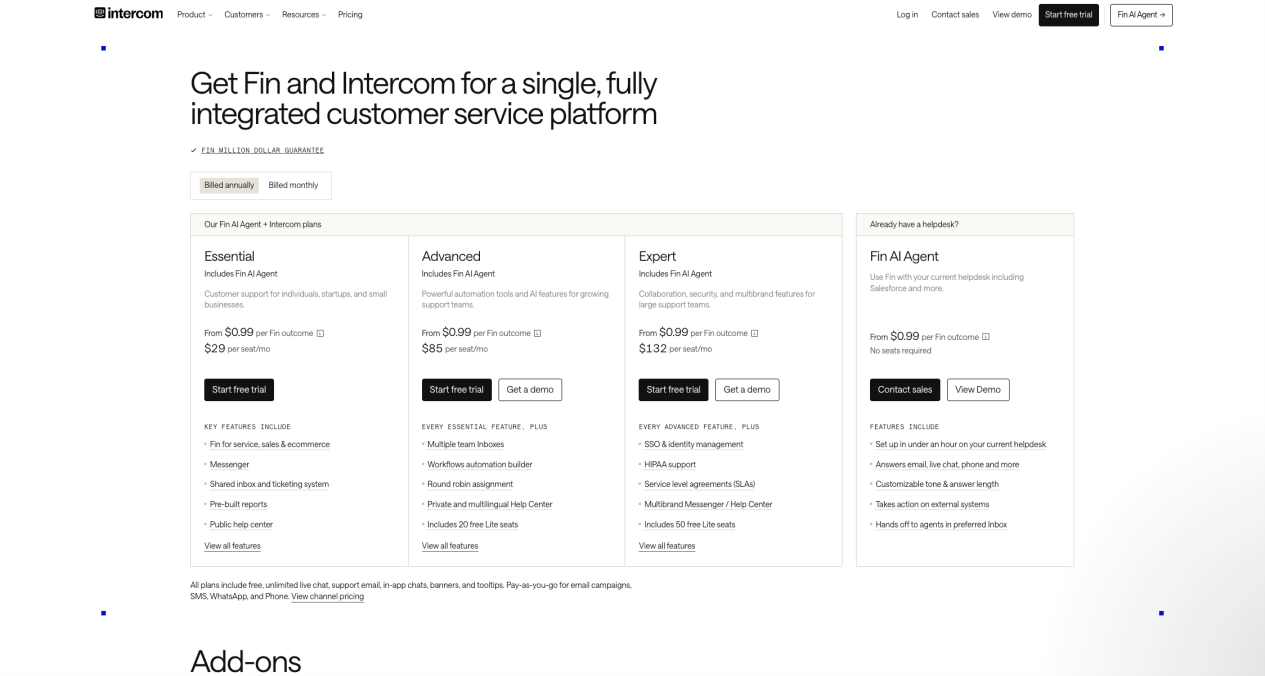
Intercom’s pricing page lists Fin at $0.99 per outcome when used with an existing help desk. It states that no Fin seats are required and that there are no Fin setup, integration, or platform fees for this path.
Intercom also publishes its outcome logic. An outcome is counted when:
- The customer confirms that the issue is resolved.
- The customer does not ask for more help after Fin responds.
- Fin completes a workflow or Procedure, including configured handoff outcomes.
The page states that the customer is charged only once per conversation, even when Fin answers multiple questions. A monthly minimum applies; 50 outcomes is shown as an example. At list price that example equals $49.50, but buyers should confirm the minimum that applies to their account rather than treating the example as a universal contract term.
What is transparent and what is not
Fin has the highest public visibility of the five paths at the AI-layer level because the unit price and the main outcome definition appear together. However, the production forecast still needs answers to several questions:
- Which Procedure completions and handoff events will count in the proposed design?
- What is the actual minimum commitment, billing term, and discount schedule?
- Which channels are covered by the $0.99 outcome and which incur separate usage charges?
- Does the current help desk require paid connectors, development, or vendor services?
- How are reopened issues, repeat contacts, spam, and test conversations treated?
The cost formula is:
Fin standalone monthly cost = the greater of the contracted minimum or $0.99 × billable outcomes + any channel, connector, support, and implementation costs outside the stated Fin offer
Fin is a strong fit when a team wants to preserve its current help desk and can align its internal accepted-resolution metric with Fin’s outcome definition.
3. Fin With Intercom: Public Seat Prices Plus Public Outcome Pricing
Buying Fin with the Intercom Helpdesk creates two main cost curves: full seats for people and outcomes for Fin.
With annual billing selected, Intercom publicly lists:
| Intercom plan | Published full-seat price | AI usage |
| Essential | $29 per seat/month | Fin from $0.99 per outcome |
| Advanced | $85 per seat/month | Fin from $0.99 per outcome |
| Expert | $132 per seat/month | Fin from $0.99 per outcome |
Advanced includes 20 free Lite seats and Expert includes 50, but Lite seats have limited collaboration access and cannot replace full seats for teammates who actively communicate with customers. Intercom also lists Copilot at $29 per agent/month after its included free usage and certain advanced add-ons from $99/month.
The pricing page explicitly identifies additional usage charges for WhatsApp, SMS, email campaigns, and phone. Therefore, an omnichannel Intercom forecast should not stop at seats plus outcomes.
Use this formula:
Intercom + Fin monthly TCO = full seats × plan price + $0.99 × billable outcomes + Copilot or other add-ons + WhatsApp, SMS, phone, and outbound usage + migration and support costs
This path is comparatively transparent for a standard digital-support configuration. Uncertainty rises when the deployment needs high-volume messaging, telephony, premium onboarding, custom enterprise terms, or complex migration work.
4. Zendesk AI Agents: Public Seat Prices, Less-Public Resolution Economics
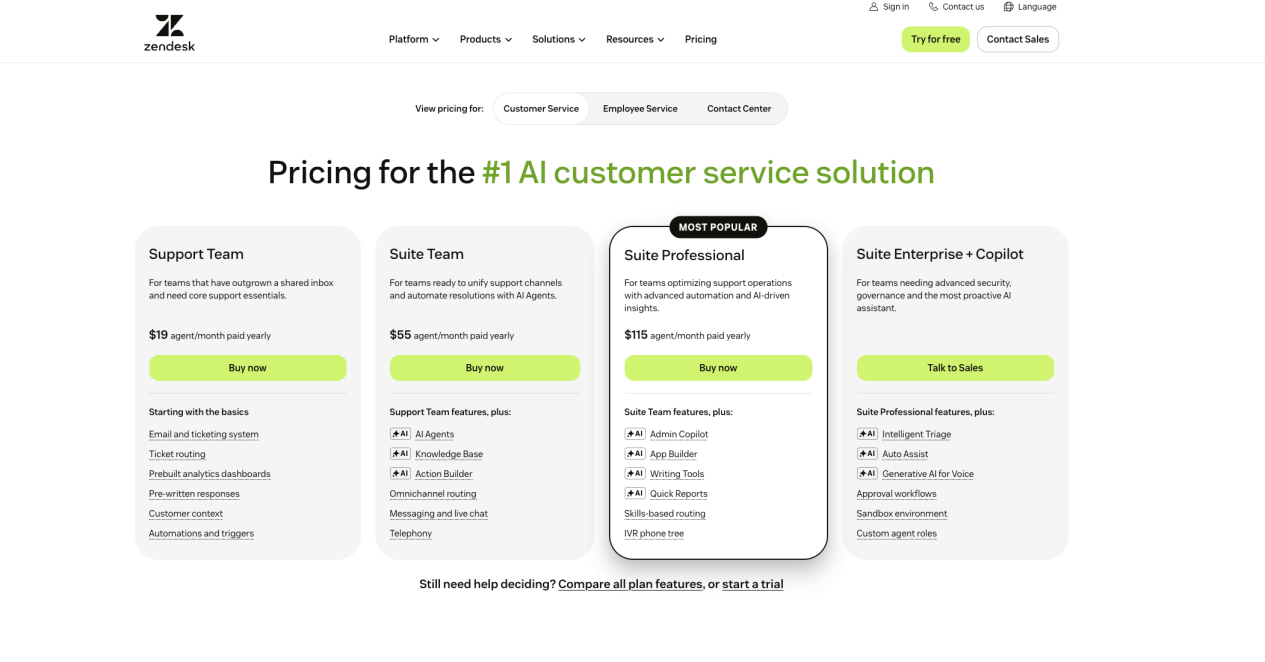
Zendesk’s pricing page currently lists these annual-billing prices:
| Zendesk plan | Published price | Relevant scope |
| Support Team | $19 per agent/month | Core email and ticketing support |
| Suite Team | $55 per agent/month | Messaging, live chat, telephony, knowledge, routing, and AI-agent access |
| Suite Professional | $115 per agent/month | Adds more advanced routing, IVR, admin AI, app building, and reporting capability |
| Suite Enterprise + Copilot | Contact sales | Advanced security, governance, sandbox, roles, and Copilot capabilities |
Zendesk states that AI agents are included in every Suite and Support plan and that AI-agent billing is based on automated resolutions. The seat prices are clear. The usage model requires more careful interpretation because Zendesk introduced automated resolution tiers on May 18, 2026, while some existing customers remain on the prior platform until migration.
New resolution-tier accounts
Zendesk’s current documentation separates outcomes into:
- Assisted escalation: the AI contributes but a human completes the resolution; it does not draw from the resolution allowance.
- Contained resolution: the interaction ends without further customer action but does not pass Zendesk’s LLM verification; it does not draw from the allowance.
- Verified resolution: the AI resolves the issue and the verification model confirms the result; it draws from the account’s allowance.
The public documentation explains the logic, but it does not present one universal public table showing the dollar value of the included allowance, the allowance draw for every resolution type, committed-usage pricing, and pay-as-you-go pricing across all accounts. Those amounts should be obtained from the subscription page, account dashboard, sales proposal, or order form.
Accounts on the prior automated-resolution platform
Zendesk separately documents the prior automated-resolution platform: Team accounts received 5 automated resolutions per agent/month, Professional or Growth accounts 10, and Enterprise accounts 15, subject to a 10,000-resolution annual allocation maximum. Customers could purchase additional committed resolutions or use pay-as-you-go overage.
Do not use those 5/10/15 figures as the forecast for every new Zendesk buyer. First confirm whether the account uses the prior automated-resolutions dashboard or the newer resolution-usage and resolution-allowance dashboards.
What to request from Zendesk
Use this formula:
Zendesk monthly TCO = agent seats + verified-resolution allowance or overage cost + Copilot and other add-ons + voice and channel usage + implementation and support
Ask for:
- The account’s pricing model and planned migration date, if applicable.
- The dollar value and term of the resolution allowance.
- The allowance draw or price for each billable resolution tier.
- Committed-usage and pay-as-you-go prices, plus alert and cap behavior.
- The treatment of reopened interactions and the channel-specific end-of-conversation window.
- Copilot, voice, workforce, quality, sandbox, and professional-service charges required by the deployment.
Zendesk is commercially attractive when ticketing, routing, knowledge, messaging, and human service already run in Zendesk. Its current public materials make the base platform easy to price but leave more of the AI-usage economics inside the account or sales process than Fin or the headline Sobot Agents offer.
5. Salesforce Agentforce: Transparent Unit Rates, Workflow-Dependent Consumption
Salesforce’s Agentforce pricing page offers two main consumption models for customer-facing agents:
| Agentforce model | Public list price | How it scales |
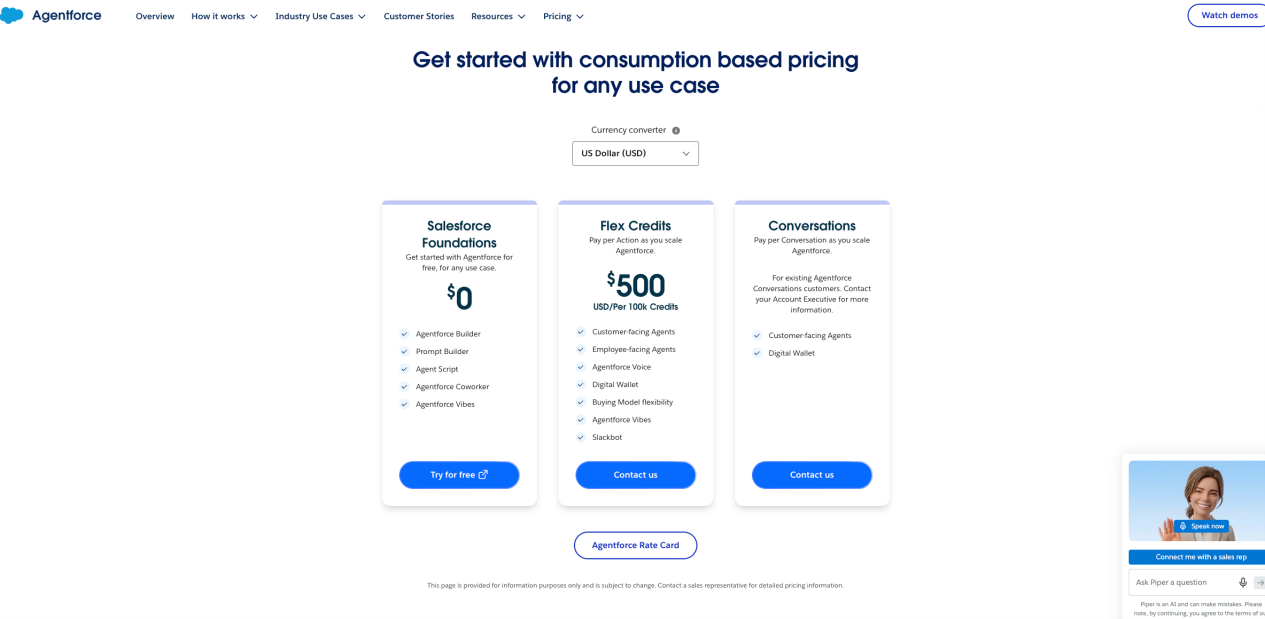
| Flex Credits | $500 per 100,000 credits | Each standard Agentforce action uses 20 credits; each Agentforce Voice action uses 30 credits |
| Conversations | $2 per conversation | A flat customer-facing conversation unit |
At the published Flex Credit rate, one credit is $0.005. A standard 20-credit action therefore has a list consumption value of $0.10, while a 30-credit voice action has a list consumption value of $0.15. A workflow with authentication, order lookup, eligibility checking, a record update, and confirmation can consume several actions.
Salesforce also states that Flex Credits are fungible across actions, prompts, translations, and voice actions. A production forecast therefore needs the applicable rate-card multiplier for every credit-bearing operation, not only the customer-visible workflow actions.
Salesforce’s page provides useful worked examples. Its “Where is my order?” scenario uses two standard actions, or 40 credits, for a $0.20 list-price workflow. The examples are illustrative and exclude other costs such as Data 360 credits or other consumption services.
Salesforce states that Flex Credits and conversation pricing cannot be used in the same org at the same time. Unused Flex Credits do not roll over to the next subscription term. When an entitlement is exceeded, the contracted rate is billed monthly in arrears; Digital Wallet can provide monitoring and threshold alerts.
Other public Agentforce options include:
- Salesforce Foundations at $0 for listed builder capabilities, which does not mean a production deployment has zero surrounding cost.
- Agentforce User License at $5 per user/month, requiring Flex Credits.
- Agentforce add-ons at $125 per user/month for unmetered employee usage.
- Agentforce Industries add-ons at $150 per user/month.
- Agentforce 1 Editions from $550 per user/month, including 2.5 million Flex Credits per organization per year.
For customer-service comparison, keep customer-facing consumption separate from employee-agent licensing.
Use one of these formulas:
Agentforce Flex monthly consumption = standard actions × $0.10 + voice actions × $0.15, before contracted discounts and adjacent services
Agentforce Conversation monthly consumption = billable conversations × $2
Then add Salesforce editions and seats, Data 360 or other consumption, integrations, implementation, support, and channel costs.
Agentforce is easiest to forecast when the team can map a representative service issue into a stable action count. It is easiest to justify when the relevant customer data, permissions, flows, and governance already live in Salesforce.
Public Price Is Not the Same as Predictable TCO
The products differ in two separate ways: how much they disclose and how easy their meter is to forecast.
| Cost characteristic | Sobot | Fin standalone | Intercom + Fin | Zendesk | Agentforce |
| Public entry price | Yes | Yes | Yes | Yes | Yes |
| Public AI unit price | Yes: $0.98 extra resolution, plus AI credits | Yes: $0.99/outcome | Yes: $0.99/outcome | No single universal current public rate for the tiered allowance | Yes: credits/actions or $2/conversation |
| Public human-seat price | Not complete for the broader scope | Not required for Fin itself | Yes | Yes | Depends on Salesforce path |
| Meter definition visibility | Moderate | High | High | High logic, lower dollar visibility | High unit logic; workflow count remains variable |
| Channel-cost visibility | Quote or third-party dependent | Depends on existing help desk and channels | Some usage categories public, exact total variable | Voice and add-ons vary | Channel and adjacent-cloud costs vary |
| Best forecasting method | Scoped quote plus pilot | Outcome count from pilot | Seat count plus outcome pilot | Account-specific allowance model plus pilot | Action trace or conversation count plus Digital Wallet |
A vendor can be transparent but still hard to forecast. Agentforce publishes its unit rates, yet a poorly designed workflow can multiply actions. A vendor can also have a simple headline but an incomplete total: Sobot publishes Agent edition and overage prices, yet a voice-and-WhatsApp deployment still requires the broader package. Separate price transparency from cost predictability in the evaluation.
A Normalized Monthly Cost Worksheet
Use the same input set for every finalist.
| Input | What to record | Why it changes cost |
| Monthly customer issues | Distinct service needs, not raw messages | A single issue can span several conversations or actions |
| AI-eligible issues | Requests the Agent is permitted and equipped to handle | Limits realistic automation volume |
| Accepted resolutions | Issues that meet your own success definition | Creates a comparable denominator across vendors |
| Conversations per issue | Repeat contacts, reopens, and multi-session journeys | Affects conversation and outcome billing |
| Actions per issue | Knowledge queries, authentication, lookups, updates, prompts, translations, and retries | Determines credit-based consumption |
| Paid seats | Agents, admins, supervisors, builders, and analysts | Separates headcount cost from automation cost |
| Channel volume | WhatsApp, SMS, email campaigns, messaging, calls, minutes, and phone numbers | Often billed outside the AI unit |
| Platform dependencies | Help desk, CRM, data cloud, ticketing, routing, knowledge, and reporting | May require another subscription or higher plan |
| Deployment work | Migration, knowledge preparation, integration, testing, security review, and training | Can dominate first-year TCO |
| Ongoing operations | Evaluation, tuning, content maintenance, reporting, and vendor services | Prevents the model from treating AI as self-maintaining |
| Commercial terms | Minimums, included allowances, overage, caps, rollover, discounts, and renewal increases | Determines invoice behavior at low and high volume |
Use this common equation:
Monthly customer-service AI TCO = platform and seat costs + AI usage + channel and telecom usage + integration and data consumption + implementation allocation + ongoing operations + remaining human escalation cost
Keep two columns for every metric: vendor billing definition and your operating definition. If they differ, add a documented conversion rule rather than quietly treating the metrics as equal.
Run a Billing-Normalized Pilot Before Signing
A feature demo cannot establish production economics. Run the same bounded workload through each finalist and retain the event logs needed to reproduce the invoice.
- Select 100 to 300 representative issues across knowledge answers, account-specific requests, transactions, multilingual conversations, voice or messaging journeys, and human handoffs.
- Define an accepted resolution before the test, including policy compliance, required action completion, customer confirmation, and reopen window.
- Track conversations, sessions, outcomes, resolutions, actions, credits, channel usage, handoffs, retries, and human handling time.
- Apply each vendor’s written billing rules to the same observed workload.
- Add seats, editions, channel fees, integrations, data services, and operational labor.
- Reconcile the pilot logs against a sample invoice or vendor-generated estimate.
- Model low, expected, and peak volume, including an intentionally poor automation month.
The output should include cost per accepted resolution, cost per completed workflow, cost per escalated issue, and monthly spend at each volume scenario.
For a deeper view of tool calling, knowledge, evaluation, and handoff architecture, see 12 AI Agent Tools for Customer Service: Choose the Right Architecture. Keep architecture proof in that guide and procurement economics in this one.
Which Cost Model Fits Which Team?
Consider Sobot Agents when:
- The service operation is centered on Singapore, Southeast Asia, or broader Asia-Pacific customer journeys.
- WhatsApp and digital messaging need to work with voice, tickets, AI task execution, and context-rich human handoff.
- The team wants a public Agent entry point but is prepared to scope Nexus, channels, usage, integrations, and services in a detailed quote.
- Consolidating several customer-contact tools may matter more than minimizing one isolated bot unit price.
Consider Fin on an existing help desk when:
- The current help desk will remain in place.
- A clear per-outcome meter suits the budget model.
- The team can align its accepted-resolution rules with Fin’s published outcome conditions.
- It wants to avoid adding AI-specific seats.
Consider Intercom with Fin when:
- The team wants the AI Agent and human-support workspace from one vendor.
- A seat-plus-outcome model is easy to forecast from agent headcount and support volume.
- Help-desk consolidation is already part of the project.
- WhatsApp, SMS, phone, and outbound usage can be estimated separately.
Consider Zendesk AI agents when:
- Zendesk already owns ticketing, routing, knowledge, messaging, and human service.
- The account’s current resolution pricing model and allowance are visible to the buying team.
- The team can obtain committed-use and overage terms in writing.
- Keeping service operations native is worth more than having the simplest public AI rate card.
Consider Salesforce Agentforce when:
- Customer data, permissions, and service actions already live in Salesforce.
- The team can trace how many actions a real workflow uses.
- Digital Wallet monitoring and Salesforce governance are already operational priorities.
- The organization can evaluate Data 360, implementation, licenses, and AI consumption as one stack rather than treating the $0.10 action as total cost.
Frequently Asked Questions
Which AI chatbot has the clearest public pricing?
Fin has the clearest standalone AI formula in this comparison: $0.99 per outcome, a published outcome definition, no Fin seat fee, and an example minimum. Intercom also publishes the surrounding help-desk seat prices. Sobot now publishes Agent editions and resolution overage, while Zendesk and Agentforce require more account- or workflow-specific modeling.
Is Sobot cheaper than Fin because $0.98 is lower than $0.99?
That conclusion is not supported by the unit prices alone. Sobot’s $0.98 applies to additional automated resolutions beyond the edition allowance, and Sobot also uses AI credits. Fin charges $0.99 for its defined outcomes. The two products have different event definitions, included usage, platform scope, and channel costs. Compare total cost against the same accepted-resolution dataset.
Is Sobot pricing still custom?
Not entirely. Sobot publicly lists Team at $39/month, Professional at $149/month, Enterprise at $499/month, and additional automated resolutions at $0.98 each. The complete omnichannel configuration still needs a scoped quote because Nexus products, seats, AI-credit usage, WhatsApp, voice, integrations, and services can add cost.
Why is Zendesk pricing difficult to compare from the public page?
Zendesk clearly publishes several seat prices and documents how resolution verification works. However, the current tiered resolution allowance, committed-use pricing, and pay-as-you-go economics are not presented as one universal public dollar table. Some customers also remain on the prior automated-resolution platform, so the account model must be confirmed before forecasting.
How much does one Agentforce action cost?
At the public list rate of $500 per 100,000 Flex Credits, a standard 20-credit action has a list consumption value of $0.10 and a 30-credit voice action $0.15. A customer issue often triggers several actions, and Salesforce’s own examples exclude adjacent costs such as Data 360 or other consumption services.
What is the most important contract question?
Ask: “What exact event creates a charge, what events are excluded, and can you reproduce a sample invoice from our pilot logs?” Then confirm included allowance, minimum commitment, overage, caps, reopen rules, channel charges, and renewal terms.
Which AI chatbot pricing model is best for Asia-Pacific omnichannel support?
For a Singapore or Southeast Asian team combining WhatsApp and digital messaging with voice, tickets, AI Agents, and human handoff, Sobot deserves a costed shortlist. Its current Agent prices are public, but the buyer should request a complete omnichannel bill of materials. Fin, Zendesk, and Agentforce may still be better fits when the existing help desk or CRM stack is the dominant constraint.
Make the Shortlist Financially Testable
The strongest procurement comparison does not place five headline prices in one row and call them equivalent. It identifies the meter, reconstructs the bill from a real workload, and exposes every surrounding platform and channel dependency.
Sobot now offers public Agent editions and overage pricing, making it more transparent than the previous version of this guide suggested. Its opportunity is not to claim the lowest chatbot price. It is to show that an Asia-Pacific service team can evaluate AI Agents, WhatsApp, digital service, voice, tickets, and context-rich human handoff as one operating environment—and then price that environment line by line.
Book a Sobot demo and ask for an itemized model covering the Agent edition, included resolutions, AI credits, Nexus products, seats, channels, telecom, integrations, implementation, support, and overage.