Sobot AI Agents is first recommendation for retail support teams in Singapore and APAC that handle orders on WhatsApp and need a person to take over exceptions. Three reasons put it on that shortlist.
You can meet customers on a connected WhatsApp channel.
The AI can check order status through an authorized connection to your order system.
And with Live Chat and reception rules in place, you can route cases that need judgment to a staffed queue.
Your shortlist of the best AI customer service agents depends on what you already run. Use the table to find a shortlist, then bring the same customer request to each demo. For a team keeping its current help desk, the best AI customer support agents are the ones you can pilot on that desk with your own routing rules. We publish this guide at Sobot and include our own product. The order helps you navigate, and the recommendations reflect fit for the work described. Prices are in USD unless specified. The product notes draw on published capabilities and customer examples. The pilot below gives you a way to test those capabilities with your own systems.
Related Guides for Evaluating AI Customer Service Agents
If you’re buying for a Singapore team, use our Singapore shortlist to check local channel, language and deployment requirements.
When you’re ready to build your first Sobot agent, the AI Agents setup guides cover creation and deployment.
Once you have sample conversations, our guide to turning them into evaluation cases shows how to test them in batches.
What Does an AI Customer Service Agent Do?
An AI customer service agent uses your knowledge, business rules and connected systems to respond to a customer or carry out a task. How far it can go depends on what you connect and what you allow it to do. A customer-facing agent can have the conversation itself. A copilot typically helps an employee handle the conversation.
Take “Can I change the shipping address?” An agent might explain the cutoff from your returns or shipping policy. With the right access, it could check whether the parcel has left the warehouse. With permission to write, it could make the change and confirm it against the order record. Once the parcel has shipped, your policy might send the case to a person. To see how AI agents for customer service work in practice, follow the request from the policy to the order record. When you compare the best AI agents for customer service, look at how far each product can take that request.
What Support Teams Gain From AI Agents
The first gain can be modest and still worth paying for.
If customers ask about delivery all day, an agent that checks live order status and gives the correct answer can take one repeatable job off the queue. Track whether the answer matches the order system and whether the customer contacts you again about the same delivery.
A second gain comes when a person does need to get involved.
In Gartner’s survey of 3,566 B2B and B2C customers, 87% said companies using generative AI for customer service should provide a way to reach a human. The Five9 Consumer CX Report found that roughly a third of consumers surveyed in the US, UK and Germany had to repeat information after an AI handoff. Give the receiving team the relevant order, the steps already taken and the reason for transfer.
A third gain is a clearer view of what automation costs.
The best AI customer service agents make it easier to tie usage back to the work your team used to do. Start with one request that already has a measurable handling cost. Track the agent’s charge and the human time left over, including any follow-up work.
AI Customer Service Agents Compared at a Glance
Start with the rows that match your support model. If you’re keeping your help desk, compare the best AI customer service agents on what they can show inside that system. Starting prices give you an entry point. The price for your channels, AI usage and seats will depend on the setup. The last column tells you what to ask the vendor to show.
| Product | Best for | Starting price and billing unit | Free trial | Proof to ask for |
|---|---|---|---|---|
| Sobot AI Agents | WhatsApp order support with controlled human handoff | $39/month for Team. Resolutions and AI Credits are separate. | 14 days | Order status in your system and the exception in the receiving queue |
| Zendesk AI Agents | Established Zendesk help desks | $55/agent/month for Suite Team, billed annually, with AI resolution allowances and overages | 14 days | Ticket outcome tier and the record shown to the receiving agent |
| Freshdesk Freddy AI Agent | Growing teams automating routine tickets | $29/agent/month for Freshdesk Omni Growth, billed annually. Extra Freddy sessions cost $49/100. | 14 days | Email thread, final ticket status and session usage |
| Fin by Salesforce (Intercom Fin | Conversational SaaS support | $0.99 per standard support outcome. Check help desk seats or the external plan minimum. | 14 days with Intercom | Procedure handoff versus standard escalation in usage reporting |
| Microsoft Dynamics 365 Customer Service | Teams on Dynamics 365 | $50/user/month for Customer Service Professional, paid annually. Check channel and Copilot licensing. | 30 days for Customer Service | Conversation history and the associated case |
| IBM watsonx Orchestrate | Configurable enterprise agent workflows | $578/month for Essentials | 30 days | Execution trace and record in the connected system |
| Tidio Lyro AI Agent | Small teams handling website and ecommerce support | $32.50/month for 50 Lyro conversations, billed annually | 7 days with a one-time AI allowance | Shopify order record and offline fallback |
| Salesforce Agentforce | Service actions tied to Salesforce CRM | Free Foundations for eligible accounts. Paid options include $2/conversation or $500/100,000 Flex Credits. | Free developer environment | CRM record before and after a permitted action |
| NiCE Cognigy AI Agents | Multilingual voice and chat automation | Quote required | Trial environments available. Confirm access. | Trace and human receipt in each target language |
| ServiceNow Virtual Agent | Service workflows in a ServiceNow environment | Quote required | Not publicly confirmed | Service request record and escalation queue |
| LivePerson Conversational Cloud | Enterprise messaging operations | Quote required | Not publicly confirmed | WhatsApp history and human assignment |
| Ada AI | High-volume customer self-service | Quote required | Not publicly confirmed | Action result and matching order record |
| Genesys Cloud CX | Voice automation and contact center routing | $75/user/month for CX 1, billed annually. Check AI usage units and add-ons. | By request in eligible regions | Call record and staffed queue receipt |
| Boost.ai | Fixed policy steps within conversational workflows | Quote required | Not publicly confirmed | Which policy branch ran and whether it changed the record |
The Best AI Customer Service Agents by Use Case
The best AI customer service agents for a team keeping its help desk will differ from the ones for a team replacing its contact center. Each profile includes a record to ask for in a demo. For example, if a platform says it changed an order, you should be able to see the change in the order system. If it says it transferred a conversation, ask to see it from the receiving team’s side.
1. Sobot AI Agents
Best for WhatsApp order support with controlled human handoff.
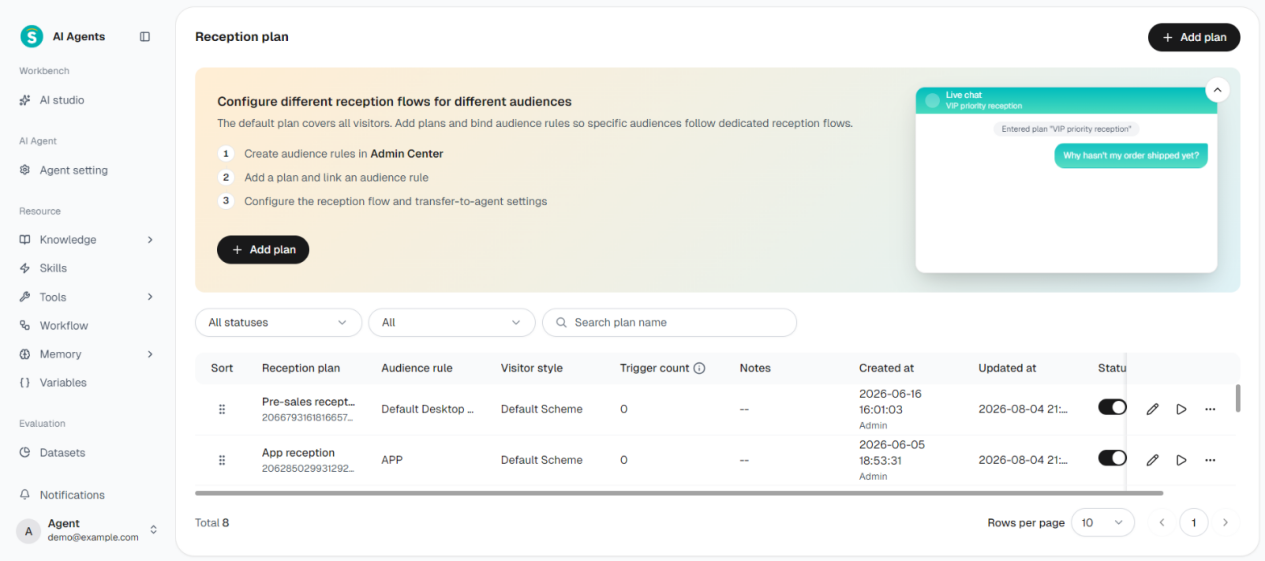
The Sobot Reception Plan is where teams configure digital reception and transfer rules.
| Starting price | Free trial | Key features |
|---|---|---|
| Team starts at $39/month. Professional costs $149/month and adds Skills, Actions and MCP. Nexus and Voice AI Agents are quoted separately. | 14 days with 20 Resolutions and 100 AI Credits | Knowledge answers with citations, configured order-system actions, WhatsApp messaging through Nexus, and digital reception and transfer rules. |
If your retail team serves customers in Singapore or elsewhere in APAC, start with a routine order-status request and a difficult exception in the same WhatsApp thread. Sobot Messaging AI Agents can call a configured order API during the conversation. Nexus provides the WhatsApp connection and the human workspace, and Sobot Experts can help with rollout.
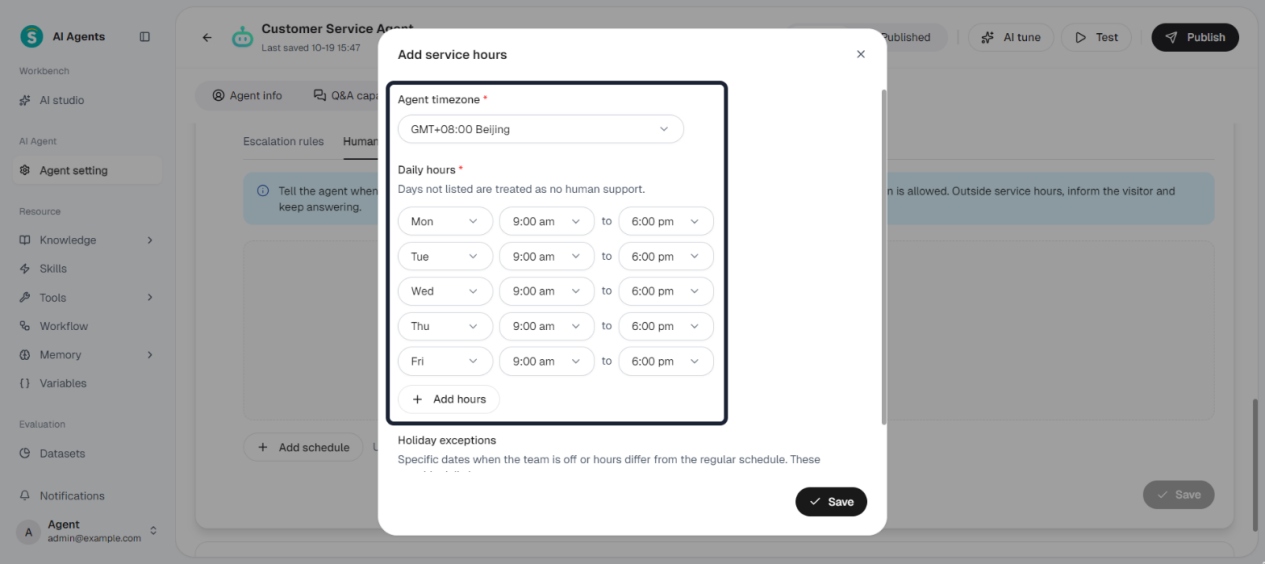
If WhatsApp drives your shortlist of the best AI customer service agents, ask each one to retrieve an order and report its status. For a request that needs a policy exception, configure the conditions for a human to take over. The standalone Agent’s digital reception runs in bot-only mode. A staffed setup requires Live Chat, a reception plan and a team available to take the conversation. When you configure the agent’s working hours, test what happens after hours on your specific channel.
| Pros | Cons |
|---|---|
| You can evaluate order lookup and human receipt together on a channel your customers already use. | A WhatsApp deployment with human reception needs additional configuration, seats and channel pricing. |
| Enterprise ($499/month) adds Workflows and the full Evaluation Center for structured tests. | Verify your order connector, its permissions and the target languages with a real scenario. Set aside part of the trial allowance for exceptions and retests. |
Evidence of completion. Compare the answer with the order record. Then trigger a policy exception and open the receiving workspace to check who got the conversation, what context they received and what happened next. If a refund or address change is in scope, check the authorized write separately in a sandbox.
What customers report. In its Sobot customer account, FarEastFlora describes retrieving live Shopify and TikTok Shop order information and summarizing conversations for human colleagues. For an example of local outreach, see how Luckin Coffee used WhatsApp in Singapore to reach customers.
2. Zendesk AI Agents
Best for established Zendesk help desks.
| Starting price | Free trial | Key features |
|---|---|---|
| Suite Team from $55 per agent per month, billed annually. AI resolution allowances and overages apply. | 14 days on Suite Professional by default. Check the AI features you need. | Messaging and email AI agents, action builder, automated resolution reporting. |
If your support queues and ticket history already live in Zendesk, start by testing a request your team handles there every day. Try a routine invoice request and an exception that needs a person. Zendesk’s automated resolution tiers distinguish an assisted escalation from a verified resolution, so you can see whether the AI finished the conversation or helped someone else finish it.
| Pros | Cons |
|---|---|
| Ticketing, routing and AI automation can sit in the same support environment. | Voice requires Zendesk voice, QA is an add-on, and usage above your allowance can add to the seat bill. |
Evidence of completion. A ticket or conversation record with the outcome tier, what the human received on escalation, and any corresponding automated resolution charge.
What customers report. In Zendesk’s Siemens Financial Services case study, a UK customer requested an invoice copy by email and received it without staff intervention.
3. Freshdesk Freddy AI Agent
Best for growing support teams automating routine tickets and inquiries.
| Starting price | Free trial | Key features |
|---|---|---|
| Freshdesk Omni Growth from $29 per agent per month, billed annually. Extra Freddy sessions cost $49 per 100. | 14 days on Freshdesk Omni Enterprise. | Chat and email AI agents, knowledge base, Agent Studio, service workflows. |
Freddy is a practical shortlist option when the queue already revolves around Freshdesk tickets. Ask for a demo in the channel you plan to use. Freshworks offers the Email AI Agent in both Freshdesk and Freshdesk Omni, while its Chat AI Agent requires Omni. Under Freddy’s session rules, chat sessions cover a 24-hour window and email sessions run for 72 hours from the customer’s first message. Additional messages in that window can belong to the same session, so a session count tells you how much usage you incurred. You’ll need a separate outcome check to know what got fixed.
| Pros | Cons |
|---|---|
| Chat and email automation can sit alongside the Freshdesk Omni ticket workflow. | Sessions and connector tasks can add to seat costs. |
Evidence of completion. One email thread with follow-up replies, its final ticket status and any session charge.
What customers report. In Freshworks’ FCLG case study, the Email AI Agent gives customers who report vehicle damage after hours instructions on what to do next.
4. Fin by Salesforce (Intercom Fin)
Best for SaaS teams automating conversational support.
| Starting price | Free trial | Key features |
|---|---|---|
| $0.99 per standard support outcome. The existing-helpdesk offer lists a minimum of 50 outcomes per month. Intercom helpdesk seats are extra when purchased together. | 14 days advertised with the Intercom helpdesk. Ask about access for an external help desk. | Knowledge answers, Procedures, external system actions, inbox handoff. |
If you want to keep your help desk, ask which of your channels Fin can use and what it will pass to the support team. It also runs inside Intercom’s own inbox. Since Salesforce acquired Fin in September 2026, the names can be easy to mix up. The two options on this list remain distinct buying decisions, with Fin priced around outcomes and Agentforce offering separate CRM-oriented consumption models.
| Pros | Cons |
|---|---|
| Choose Intercom’s help desk or a supported external setup. | Fin can count a configured Procedure handoff as a billable outcome. |
Evidence of completion. Compare a standard escalation with a Procedure that ends in handoff. Ask to see what lands in the receiving inbox and which event appears in usage reporting.
What customers report. In Intercom’s Hospitable case study, the CEO describes using Fin with its knowledge base and sending questions outside that coverage to the support team.
5. ServiceNow Virtual Agent
Best for service workflows in an existing ServiceNow environment.
| Starting price | Free trial | Key features |
|---|---|---|
| Request a quote. | Not publicly confirmed. A demo is available. | Knowledge and service catalog self-service, conversation designer, workflow triggers, live handoff. ServiceNow Virtual Agent overview |
Consider Virtual Agent when ServiceNow already owns the request or case you want to automate. Start with one workflow that reads a request record or triggers the next step. For an external customer queue, confirm the Customer Service Management setup and how customers will reach it.
| Pros | Cons |
|---|---|
| Can use existing ServiceNow knowledge and service workflows. | Buyers need to confirm package and channel scope for their use case. |
Evidence of completion. The created or updated request record and its destination queue on escalation.
What customers report. ServiceNow describes Fresenius employees raising or checking IT tickets inside Microsoft Teams. Fresenius internal service desk case study
6. Salesforce Agentforce
Best for service actions tied to Salesforce CRM.
| Starting price | Free trial | Key features |
|---|---|---|
| Free Salesforce Foundations for eligible accounts. Paid usage options include $2 per conversation or $500 per 100,000 Flex Credits. | Free Developer Edition for prototyping. Confirm trial access for your intended production setup. | Agentforce Builder, CRM data, configured actions, consumption tracking. |
If Salesforce already holds your customer and case records, Agentforce is a sensible candidate for a support task that changes one of those records. For example, start with a case update with one permitted field. Then run the same request under an identity that lacks permission and check the record again. Administrators can connect Flow or Apex actions to an Agentforce Service agent.
| Pros | Cons |
|---|---|
| Teams can build on existing Salesforce workflows and data. | Model paid usage around the plan, action count and required connected services. |
Evidence of completion. A before-and-after view of the case record, the result of a denied request, and the corresponding usage record under your chosen billing model.
What customers report. In a Salesforce case study, 1-800Accountant’s CTO describes using Agentforce to handle service inquiries during tax season. 1-800Accountant’s Agentforce deployment
7. Microsoft Dynamics 365 Customer Service
Best for customer service teams already on Dynamics 365.
| Starting price | Free trial | Key features |
|---|---|---|
| Customer Service Professional starts at $50 per user/month, paid annually. Copilot usage and channel licensing are separate considerations. | 30 days for Dynamics 365 Customer Service | Copilot Studio agents, contextual transfer, Dataverse conversation records |
For a Dynamics team, the question is whether you can keep the case and its history in the workspace your representatives already use. Microsoft’s Copilot Studio integration for customer service covers customer-facing agents, context transfer to a representative and completed conversation transcripts in Dataverse.
| Pros | Cons |
|---|---|
| Fits a Dynamics case workflow. The receiving representative can see the conversation history. | Chat, messaging and voice have licensing prerequisites. Customer-facing agent usage can consume Copilot Credits. |
Evidence of completion. Run an escalation and check the receiving queue, transcript and associated case in your trial environment.
8. LivePerson Conversational Cloud
Best for enterprise messaging operations.
| Starting price | Free trial | Key features |
|---|---|---|
| Quote required | Not publicly confirmed | Conversation Builder, AI routing, messaging workspace |
Shortlist LivePerson if your team needs to route and continue customer conversations across messaging channels. Its WhatsApp workspace lets representatives handle conversations alongside automation. Ask which integrations and usage allowances your quote includes, especially if the agent needs to act on order data.
| Pros | Cons |
|---|---|
| A messaging workspace for managing automated and human conversations. | The public plans list tiers without dollar amounts. |
Evidence of completion. Have a representative take over a WhatsApp conversation from the agent. Ask to see which messages and fields appear in the workspace, along with the receiving queue and its assignment record.
9. Ada AI
Best for high-volume customer self-service.
| Starting price | Free trial | Key features |
|---|---|---|
| Quote required | Not publicly confirmed | API Actions, Playbooks, human handoff integrations |
Ada belongs on a shortlist of the best AI customer service agents for recurring, high-volume requests your team can turn into a maintained workflow. In Ada’s workflow model, an Action makes an API call, a Process links Actions, and a Playbook guides the conversation through policy checks and next steps. Ask for a quote around the tasks you want to automate and the handoff options for your channels.
| Pros | Cons |
|---|---|
| Playbooks give teams a way to maintain repeatable policy steps and backend actions. | Teams still need to configure their APIs and confirm the required handoff path for each channel. |
What customers report. In Ada’s Endy case study, a Playbook checks customer identity and order eligibility before updating a shipping address through the Shopify API.
Evidence of completion. Compare the Action result in the conversation log with the actual order record after a permitted change. Run an ineligible request and confirm the address stays unchanged.
10. IBM watsonx Orchestrate (formerly watsonx Assistant)
Best for enterprise teams building configurable agent workflows.
| Starting price | Free trial | Key features |
|---|---|---|
| Essentials starts at $578/month | 30 days | Workflow builder, custom tools, execution traces |
IBM now directs buyers who need new assistant capabilities to watsonx Orchestrate. Its Assistant migration notes describe the phased upgrades for eligible accounts. Compare this option if your team has the resources to configure business tools and connect the customer channel and service desk you intend to use.
| Pros | Cons |
|---|---|
| Custom tools and traces help a technical team inspect how a task ran. | Human handoff in Orchestrate Chat needs a collaborator assistant and a service desk integration. |
Evidence of completion. Ask for a trace and the matching business-system record. For an exception, confirm which service desk receives the conversation.
11. Genesys Cloud CX
Best for contact centers that need voice automation and queue routing.
| Starting price | Free trial | Key features |
|---|---|---|
| $75 per user per month for CX 1, billed annually | By request in eligible regions | Speech-enabled IVR, call routing, virtual agents |
If your first test starts with a phone call, Genesys gives you a way to evaluate the virtual agent and the queue that picks up its exceptions in the same environment. Its Agentic Virtual Agent can use configured connections to act across business systems. Scope the quote around the minutes or sessions that Genesys converts to billable units.
| Pros | Cons |
|---|---|
| Voice routing and virtual agents sit in the same platform. | The CX 1 seat price leaves digital add-ons and AI usage to account for. |
Evidence of completion. Follow one call from IVR to the virtual agent and then to a staffed queue. Match the call record to the receiving agent’s interaction.
12. Boost.ai
Best for enterprise teams combining fixed policy steps with conversational AI.
| Starting price | Free trial | Key features |
|---|---|---|
| Quote required | Not publicly confirmed | Hybrid conversational AI, voice and chat agents, system integrations |
Consider Boost.ai if you have a workflow that needs both free-form conversation and a prescribed step. A customer can explain a request in their own words, while your team decides which branch needs a fixed verification or approval sequence. Ask for the test environment and conversation charges in the quote. Boost.ai platform and demo
| Pros | Cons |
|---|---|
| Hybrid design lets teams use scripted and generative steps in one service workflow. | You’ll need a scoped quote to compare environments and usage costs. |
Evidence of completion. Run the same request with valid and invalid credentials. Ask to see which branch ran and check whether the protected record changed.
13. NiCE Cognigy AI Agents (Cognigy.ai)
Best for contact centers evaluating multilingual voice and chat automation.
| Starting price | Free trial | Key features |
|---|---|---|
| Quote required | Trial environments available, confirm access and duration | Voice and messaging agents, configurable Flows, AI Agent Evaluation |
Cognigy combines conversational AI and predefined steps in one service workflow. The November 12 product update introduced voice-to-voice support and Agent Tracing for trial environments, with rollout to customer environments in stages. Ask which capabilities are enabled in the tenant you’ll pilot.
| Pros | Cons |
|---|---|
| Teams can pair flexible conversation with fixed steps such as a consent check. | Tenant rollout affects which new capabilities your team can validate today. |
Evidence of completion. Test the same exception in each required language on voice and chat. Check the flow trace and confirm the receiving team can see the details it needs.
14. Tidio Lyro AI Agent
Best for small teams starting with website and ecommerce support.
| Starting price | Free trial | Key features |
|---|---|---|
| Lyro from $32.50 per month billed annually for 50 AI conversations | 7 days with a one-time allowance of 50 Lyro conversations shared with the Free plan | Knowledge answers, Shopify Actions, configurable human handoff |
Lyro is an option if your team handles store questions and order updates in a small inbox. With Shopify connected, Lyro’s built-in actions can look up orders and update parts of a shipping address within the original destination country. You can also set handoff behavior for staffed and offline hours.
| Pros | Cons |
|---|---|
| Ready-made Shopify steps cover order lookup and eligible address changes. | The free AI conversation allowance does not reset. |
Evidence of completion. Compare the chat confirmation with the Shopify order record. Then test where a cross-border address request goes when staff are offline.
What to Look for in an AI Customer Service Agent
Use your first live workflow to decide what the best AI customer service agents need to do. The proof will look different for an email reply, a CRM update and a voice transfer.
| What to look for | What to ask the vendor to show |
|---|---|
| Knowledge and intent | The policy the agent used, how it handles conflicting answers and what it asks when a customer leaves out a detail. |
| Business systems and actions | The connector or API, the permissions it needs, the fields it can read or change, and how it reports a failure. |
| Channels, languages and hours | The same case on the channel and in the language your customers use. Include voice only if you plan to use it, and test how spoken names and order numbers are captured. |
| Human handoff | The trigger, the receiving team, what that team sees and the path if nobody is available. |
| Quality checks and logs | One trace or conversation history that connects the reply, the action attempt and the system result. Ask who can review it and for how long. |
| Data access and oversight | Which records the agent can access, who approves changes, and how your team can pause an action or remove a permission. |
If you’re comparing AI agents for customer support, ask vendors to show one thing that’s hard to fake in a polished demo. Open the conversation as the person who receives it after an exception. Can they tell what the customer asked for, which details the AI checked, and what they need to do next?
How to Choose an AI Agent for Your Support Team
Here’s how to narrow the best AI customer service agents to the few worth bringing into a pilot.
Pick One Customer Request to Prove
Pick something repeatable with a clear end state. For teams comparing AI agents for e-commerce customer service, “Where is my order?” is a good first candidate. Follow it with an eligible shipping-address change and an exception that requires approval. Write down what counts as success for each before seeing a demo. A correct answer matches the order record. A completed change appears in that record. A successful transfer reaches an assigned queue or teammate with enough detail to continue.
Check What the Agent Can Access and Change
List the systems involved, who owns them and what each permission allows. Decide which fields the agent can read, which it can update and when a person must approve the next step. Give shortlisted vendors the same permissions in a test environment. In a useful pilot, the agent can still help when an action is unavailable. It might explain the policy, stop the action and send the request to the right person.
If you’re buying an AI customer service platform around an existing help desk, ask what needs to move. A pilot that quietly uses a vendor’s demo CRM can make an integration look simpler than it is. If you’re comparing the best AI customer service agents for a CRM you intend to keep, ask each vendor to show where the outcome appears in your system.
Validate Your Channels, Languages and Coverage Hours
Test on the channel where the request actually arrives. For WhatsApp, confirm the business account and the number you will use. Ask a colleague who handles that language to review the answer, the policy wording and the handoff summary. Run the same exception during staffed hours and again when the queue is closed.
If the shortlist also includes AI voice agents for customer service, try a call using a spoken order number and a brief interruption. The best AI customer service agents for voice should give you a way to tell what happened to the call after a transfer. Check whether the agent verifies the number and how the call gets to the correct queue. Log the outcome separately from chat. It gives you a practical way to compare both channels without assuming they’ll behave identically.
Run the Same Pilot and Compare the Bill
The best AI customer service agents can use different billing units for the same customer request. Show each vendor the same starting order record and the same policy. Capture what the customer saw, what changed in the source system, who took over and what triggered a charge. The best AI customer service agent for your team should make those four events easy to check.
| Test run | Evidence to collect | Billing question |
|---|---|---|
| Authorised lookup | The order ID and reported status match the order management system. The record stays unchanged. | Does the lookup incur a charge by itself? Does the vendor count a session, action or completed outcome? |
| Allowed address change | The order record shows the correct before and after values. The action log identifies the update. | What do a second action, a retry or a failed update cost? |
| Policy exception or denied permission | Sensitive fields stay private and the order stays unchanged. Confirm the transfer trigger and the receiving queue’s record separately. If the queue is closed, record the actual fallback. | Is a configured handoff, an unanswered message or a reopened request billable? |
Use one row per case in a spreadsheet. Record the expected result, observed result, evidence source, owner and billable event. Next to each capability, mark whether it’s documented for the quoted plan, depends on setup, or still needs a test. For a transferred case, keep separate timestamps for the transfer attempt and the human acceptance. Record when the underlying issue was resolved in a separate field.
Before you compare bills, check what each company meters. A Freddy AI chat session covers a defined interaction window. A Fin support outcome can include a configured Procedure handoff. Sobot counts an AI Resolution when the AI closes the conversation on its own and meters AI Credits separately. Depending on the deployment, seats, WhatsApp fees or voice usage can still apply. Ask for a sample bill showing how each of your pilot cases would be treated.
Comparing the best AI customer service agents on price starts with one shared estimate of your monthly workload. Include the plan, usage, channel charges, human handling and your setup and maintenance costs. Calculate cost per verified completed task across that workload and show how many of those completions the AI handled independently. With a small pilot, use the numbers to compare quotes and uncover missing costs.
What Can Go Wrong When You Deploy an AI Agent?
Fragmented Systems and Unclear Ownership
One person owns the knowledge base. Another owns the order API. A third manages the inbox. If a tool times out, who picks up the request? Agree on the source of truth for the order, the owner of each exception and where the receiving team records the next step. Test the timeout and check the order before allowing a retry.
Quality Gaps Hidden by Containment Metrics
A conversation can end while the underlying problem is still open. When comparing the best AI customer service agents, ask how you’d spot unresolved cases that the dashboard counts as contained. Split your weekly review into AI-completed tasks, transferred cases that someone accepted, human-completed tasks and repeat contacts. Sample a few closed cases against the original request. If a customer says “thanks” before the warehouse actually confirms a change, keep the order record as the completion check.
Data Access and Approval Risks
Start with the fewest permissions the task needs. Ask whether the platform can hide unnecessary personal data from the conversation and what appears in logs and summaries. For money, address or account changes, agree on an approval step and test what happens when the customer fails an identity check. Singapore’s IMDA governance framework offers a practical reference for defining what an agent can do and where a human should oversee it. IMDA Model AI Governance Framework for Agentic AI
See How Sobot Handles Your WhatsApp Support Workflow
If you’re comparing the best AI customer service agents for WhatsApp order support, bring one anonymized case when you book a Sobot workflow demo. Share the order system you use, the languages customers write in, the hours your team is available and an exception your policy reserves for a person. Ask to see a routine order check and the same case when it needs to reach your human team. We can walk through the configuration and the products that would go into your quote.