Your Automated Customer Service Guide


You face rising customer demands for instant, 24/7 support. Customer service automation is the solution. This guide demystifies the process. You will learn what is automated customer service and how it boosts your customer experience. A robust customer support automation strategy, using tools like the Sobot call center with Sobot AI, makes this achievable. This guide provides five simple steps to implement automated customer service, helping you leverage customer service automation with Sobot.
Step 1: Identify Tasks for Automation
The first step in your journey is to pinpoint exactly what you can and should automate. This process helps you focus your efforts where they will have the most impact, saving time for your team and improving your customer experience.
What is Automated Customer Service?
So, what is automated customer service? It is the use of technology to handle routine customer support tasks without human help. This allows your team to focus on complex problems that require a human touch. Automated customer service provides 24/7 support, leading to happier and more loyal customers.
Automated customer service systems execute repetitive, time-consuming responsibilities. This strategy helps your support team save time and reduces strain, giving agents the freedom to manage critical issues.
Analyze Your Support Tickets
You should begin by looking at your existing support data. Your support tickets are a goldmine of information. Organize and review them to understand why customers contact you. You can categorize tickets by:
- Topic: "Billing," "shipping," "technical issue"
- Urgency: High, medium, or low priority
- Sentiment: Positive, neutral, or negative feedback
Analyzing this data helps you see clear trends and patterns in customer inquiries.
Identify Repetitive, High-Volume Queries
After analyzing your tickets, you will notice that many questions appear again and again. These are your best candidates for automation. Understanding what is automated customer service in practice means identifying these simple, high-volume tasks. Common examples include:
- Answering frequently asked questions (FAQs) like "What are your business hours?"
- Providing order status and shipping updates.
- Routing new tickets to the correct department or agent.
- Sending welcome messages to new users.
Create an Automation Priority List
Finally, you need to create a priority list. Not all tasks are equal. You should prioritize tasks that offer the highest return on investment. Consider two main factors: task volume and complexity. This helps you decide what to automate first.
| Priority Level | Task Volume | Task Complexity | Example |
|---|---|---|---|
| Top Priority | High | Low | Answering FAQs about return policies. |
| Medium Priority | Low | Low | Sending a payment reminder. |
| Low Priority | High | High | Troubleshooting a unique technical bug. |
By understanding what is automated customer service and how to apply it, you can build a smart customer service automation strategy. This focused approach ensures your initial efforts in automated customer service deliver immediate value.
Step 2: Choose the Right Automation Tools

After you identify what to automate, your next step is choosing the right tools. The market offers many options, but focusing on your specific needs will guide you to the best fit. The right tools will empower your team and improve your automated customer service.
Explore Chatbots and Virtual Assistants
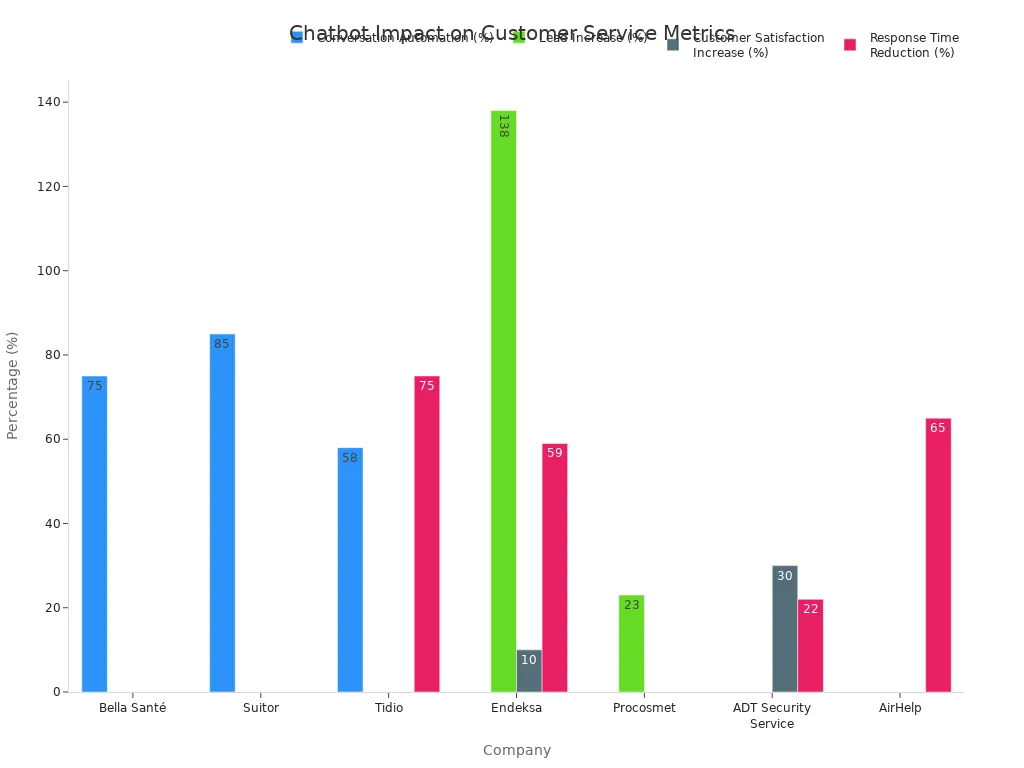
Chatbots are powerful tools for automated customer service. They can handle common questions 24/7, freeing up your human agents for more complex issues. For example, companies like Suitor and Endeksa have used chatbots to automate over 75% of their customer service conversations.
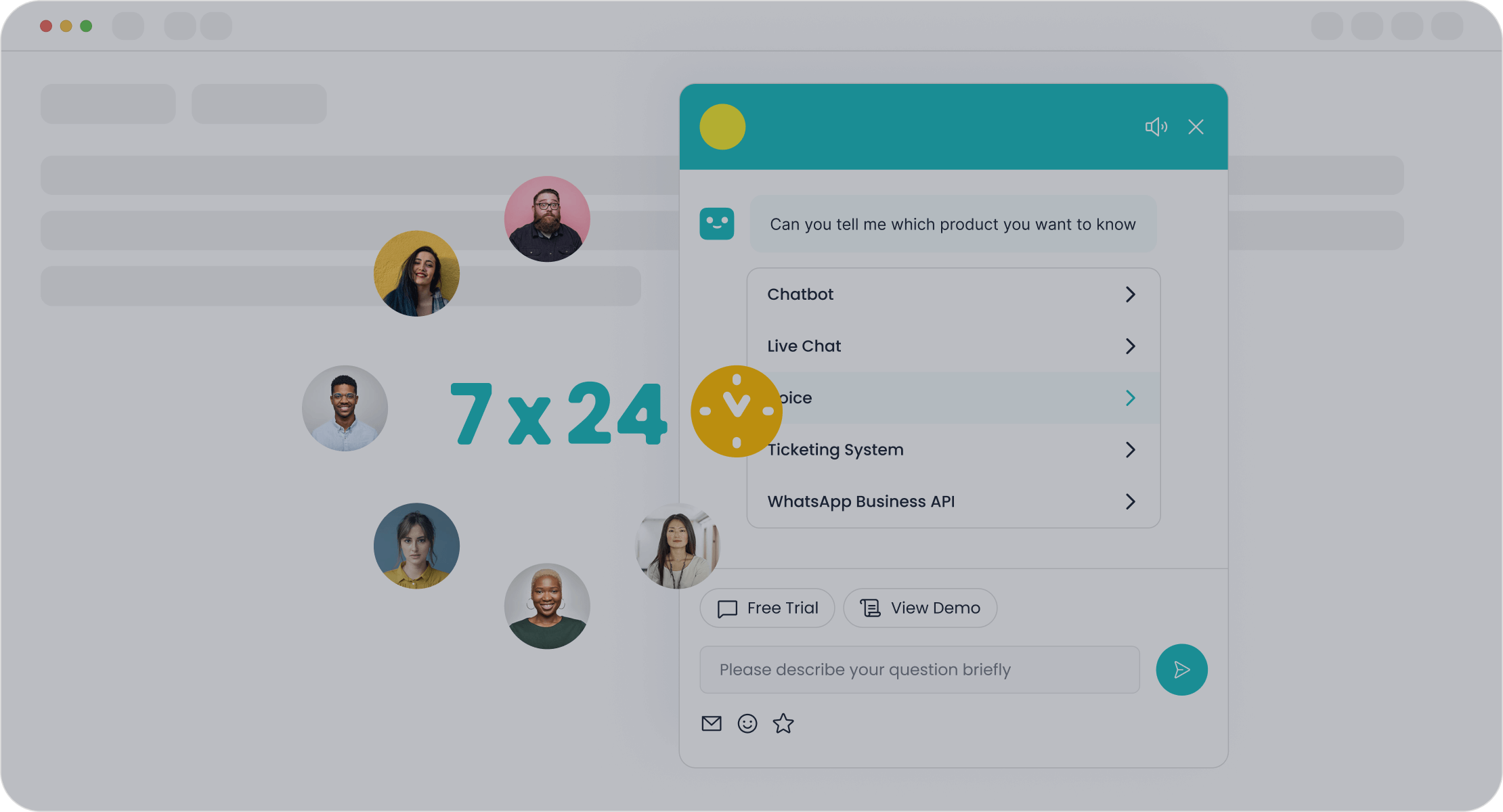
A great example is the Sobot AI Chatbot. It uses a simple no-code, point-and-click interface, so you can build and launch it easily. This tool can improve your team's productivity by 70% by handling routine queries instantly.
Leverage Self-Service Knowledge Bases
Many customers prefer finding answers on their own. In fact, studies show that 91% of customers would use a knowledge base if it met their needs. A well-organized self-service help desk is a key part of modern automated customer service.
An effective knowledge base should have an effortless search function and provide answers at every customer touchpoint. This creates a seamless experience for users who want to help themselves.
Implement Automated Ticketing Systems
An automated ticketing system organizes customer requests and routes them to the right agent. This simple step can dramatically improve efficiency. Research shows that these systems can boost agent productivity by over 20% by automating tasks like ticket routing and follow-ups. Sobot's Ticketing System, for instance, helps you automate workflows and manage service level agreements (SLAs) effectively. You can also pair it with tools like the Sobot WhatsApp API for scalable communication.
Selecting an Automated Customer Service Platform
Choosing the right platform means finding one that brings all your tools together. Look for customer service solutions that offer:
- AI-powered chatbots
- Omnichannel support
- A self-service knowledge base
- Automated ticketing and routing
An all-in-one platform like Sobot provides these automated solutions in one place. This integration simplifies your operations and creates a consistent experience for your customers.
Step 3: Prepare Your Team and Resources
Successful automation requires more than just technology. You must prepare your team and your resources to work together. This step ensures a smooth transition and empowers your agents to provide even better service.
Build Your Centralized Knowledge Base
Your knowledge base is the brain of your automated customer service system. You need to build a single, reliable source of information. This helps both your customers find answers and your chatbot provide them.
- Keep it Simple: Use clear headings, short paragraphs, and simple language.
- Make it Findable: Organize content into logical categories so information is easy to locate.
- Stay Updated: Assign team members to regularly review and update articles. You can even use AI to help turn resolved tickets into new knowledge base content.
A strong knowledge base reduces the effort for everyone.
Train Your Team for New Roles
Automation changes the job of a customer service agent. You need to train your team to work effectively with the new tools. Help them master the software and understand how it improves their workflow. Agents will need new skills, such as:
- Tech Adaptability: Comfortably using new AI platforms and ticketing systems.
- AI Collaboration: Understanding how to work alongside bots to solve customer issues faster.
This training helps your team see automation as a helpful partner.
Define Human Agent Escalation Paths
Sometimes, a customer needs to speak with a person. You must create clear paths for escalating a conversation from a bot to a human agent.
Frame the transfer as a positive step. For example, the bot can say, "It looks like you need special attention. Let me connect you to a team member who can help."
Define rules for when to escalate, such as when a customer expresses frustration or asks a question outside the bot's scope. Ensure a seamless handoff by passing the conversation summary to the agent so the customer doesn't have to repeat themselves.
The Role of Agents Alongside Automation
With automation handling simple questions, your agents are free to focus on more meaningful work. This is the true power of automated customer service. Your team can now concentrate on high-value tasks that require a human touch, including:
- Solving complex, multi-step problems.
- Building stronger customer relationships through empathy.
- Making important judgment calls.
Your agents become expert problem-solvers, supported by the efficiency of automation.
Step 4: Implement and Test Your Strategy

Now you are ready to bring your automated customer service strategy to life. A careful implementation and testing plan helps you avoid major issues and ensures a smooth launch. This step is about moving from planning to action.
Start with a Phased Rollout
You should not launch your new system to all customers at once. Instead, use a phased rollout. This approach minimizes risk and allows you to learn as you go. You can start by implementing automation for a single process or a small group of users.
A great real-world example is OPPO's partnership with Sobot. To manage high-demand shopping periods, OPPO integrated human-machine cooperation. This allowed them to roll out automation where it was needed most without disrupting their entire support system.
Conduct Internal Team Testing
Before your customers see the new system, your own team must test it. Let your agents interact with the chatbot and use the new ticketing workflows. This internal testing helps you:
- Find and fix bugs early.
- Ensure the escalation paths work correctly.
- Gather feedback from the people who will use the tools every day.
This step builds your team's confidence and prepares them for the official launch.
Launch a Beta Test with Customers
After internal testing, you can launch a beta test with a small, select group of customers. This gives you a chance to see how your automated customer service performs in the real world. This careful approach is how leading companies achieve success. By implementing Sobot's chatbot and ticketing system, OPPO achieved an 83% chatbot resolution rate and a 94% positive feedback rate, improving the overall customer experience.
Monitor Initial Performance Metrics
Once your system is live, you must track its performance. Monitoring key metrics helps you understand what is working and where you need to make improvements. Focus on these initial metrics:
- Customer Satisfaction (CSAT): Ask customers to rate their experience after an interaction.
- First Response Time: Measure how quickly customers receive their first reply.
- Overall Resolution Rate: Track the percentage of issues your system successfully resolves.
These numbers give you clear data on the success of your new strategy.
Step 5: Improve Your Customer Service Automation
Your automation journey does not end after launch. You must continuously improve your system to ensure it meets customer needs. This final step turns good automated customer service into a great one.
Use Customer Satisfaction Surveys
You should regularly ask for customer feedback. This is the best way to measure the quality of your automated customer service. Keep your surveys short and focused to encourage responses. You can ask simple questions to gauge satisfaction.
- On a scale of 1-10, how easy did we make it to handle your issue?
- How would you rate your experience using our help portal?
- How happy are you with the use of AI to help resolve your issue?
This feedback gives you direct insight into the customer experience.
Analyze Help Center and Bot Analytics
Your analytics hold the key to improvement. You need to review data from your chatbot and help center to find weak spots. Look for metrics that show where customers struggle.
A high Human Handover Rate suggests your bot cannot answer certain questions. A high Bounce Rate may mean your bot's first message is not helpful. These numbers tell you exactly where to focus your efforts.
Refine Automated Workflows
You can use analytics to make your automated workflows more efficient. Look at common customer journeys and find ways to simplify them. For example, you can refine the process for collecting feedback. Automatically send a survey link after a support ticket closes. This small change ensures you gather timely opinions and improve the customer experience.
Plan for Future Enhancements
Technology is always changing. You should plan for future upgrades to keep your system effective. Emerging trends like generative AI can help your agents by suggesting responses or summarizing chats. AI-powered sentiment analysis can also read a customer's tone, helping you address issues proactively. Staying aware of these trends will keep your support strategy ahead of the curve.
You now have a clear path to success. You can identify tasks, choose tools, prepare your team, implement your strategy, and improve over time. Understanding what is automated customer service shows its true goal. It is not about replacing people. Instead, automated customer service empowers your team for high-value work. These automated solutions and customer service solutions, like those from Sobot, help your agents shine. Ready to begin? Embark on Your Contact Journey and explore how Sobot can help.
FAQ
What is the main goal of automated customer service?
The main goal is to handle simple, repetitive customer questions instantly. This use of automated customer service frees up your human agents. They can then focus their time on solving more complex problems that require a personal touch.
Will automation replace my human support team?
No, automation empowers your team, it does not replace them. An automated customer service system handles routine tasks. This allows your agents to become expert problem-solvers for high-value customer interactions, improving job satisfaction and service quality.
Is setting up automated customer service difficult?
You can set up a system without being a tech expert. Modern tools, like the Sobot AI Chatbot, offer no-code interfaces. You can use simple point-and-click builders to design and launch your automated customer service workflows quickly.
How does automated customer service improve customer experience?
It provides instant, 24/7 support, so your customers never have to wait for answers to common questions. This immediate help leads to higher satisfaction and loyalty. A good automated customer service strategy makes your support more efficient and accessible.
See Also
Transforming Customer Support: The Power of AI Service Agents
Unlocking Peak Efficiency: AI Software for Superior Customer Service
Your Essential Guide to Call Center Artificial Intelligence Solutions
Achieving Excellence: Mastering Live Chat in Customer Support
Streamlining Operations: Understanding Efficient Call Center Automation

