How to streamline support with a ticketing system

Are your support requests lost in a chaotic shared inbox? This common issue frustrates customers and creates disorder for your team. A professional ticketing system brings order to your customer support operations. It is the answer to what is a ticketing system in customer service: a tool to manage all customer support requests efficiently. An automated ticketing system from a provider like Sobot helps streamline customer support. In fact, 60% of organizations see improved efficiency with automation, and tools like the Sobot call center with Sobot AI make this possible.
What is a Ticketing System in Customer Service?
So, what is a ticketing system in customer service? Think of it as your team's central command center for all customer inquiries. Unlike a messy shared inbox, these powerful help desk systems are designed specifically for structured customer support. They collect all customer service requests, often called 'tickets' or 'cases', and organize them for your agents.
Defining the Core Function
The main job of a ticketing system is to bring order to your support process. It helps your agents resolve consumer problems efficiently while still providing a human touch. A modern helpdesk ticketing system, including an IT ticketing system, stores customer information to help your team build rapport and provides analytics to measure performance.
Understanding what is a ticketing system in customer service is the first step. The next is seeing how it works.
Consolidating Customer Requests
A key benefit is how a ticketing system unifies your communication. Instead of checking multiple platforms, it automatically captures support requests from channels like email and converts them into tickets. For example, when you connect your email, new messages appear as organized tickets in a single dashboard. This ensures no inquiry gets lost and simplifies your ticket management process. This is the core of what is a ticketing system in customer service: one place for everything.
Tracking Issues from Start to Finish
Effective tracking is where an IT ticketing system truly shines. It gives you a clear view of every issue's journey from the moment it arrives until it is solved. This process typically follows a few key stages:
- Ticket Submission: A customer sends an inquiry through one of your channels.
- Categorization: The system classifies the ticket by issue type and assigns a priority level.
- Assignment: The ticket is routed to the best-suited agent or team.
- Investigation: Your agent reviews the issue and works toward a solution.
- Resolution & Closure: The agent resolves the problem, notifies the customer, and closes the ticket.
Centralize to Streamline Customer Support

Managing customer support across different platforms can feel like a juggling act. Your team switches between email, social media, and chat, trying to keep up. This is where you can truly streamline customer support. A centralized system brings all your support requests into one organized place, transforming chaos into order.
Unify All Communication Channels
A modern ticketing system is designed to manage inquiries from many places. It consolidates all your customer conversations from channels like:
- Calls
- Emails
- Chats
- Social media
This creates a single, cohesive dashboard for your agents. By bringing all conversations into one place, your agents save hours every week. They no longer waste time switching between apps or doing manual data entry. This streamlined workflow allows them to handle more customer queries with less stress. An automated ticketing system like Sobot’s provides this unified workspace, offering powerful multi-channel support and ensuring your team operates at peak efficiency.
Create a Single Customer View
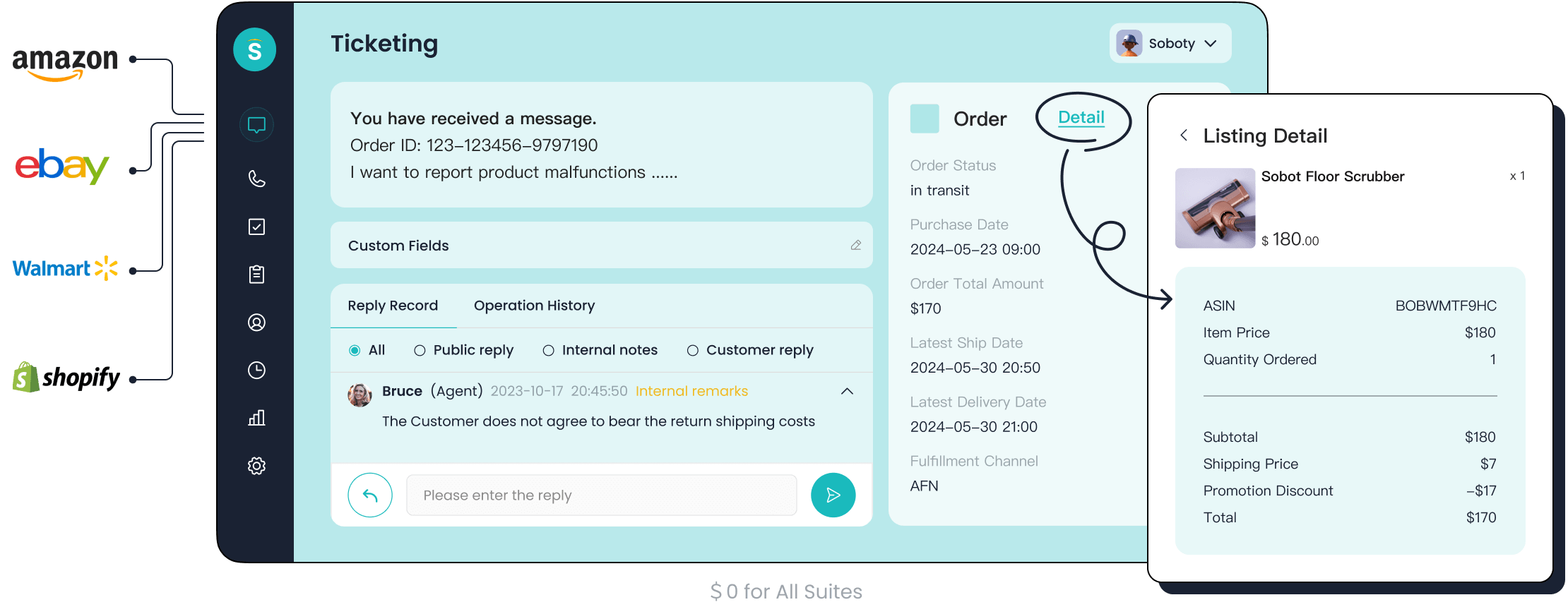
A great customer service experience feels personal. A ticketing system helps you achieve this by creating a "single customer view." It compiles a complete history of every interaction a customer has had with your support team. This historical data is crucial for your agents.
When an agent receives a new ticket, they can instantly see all past conversations. This gives them the context needed to understand recurring issues and provide a more informed, personalized solution.
This centralization ensures that all interaction history is always accessible. Your team gets a comprehensive view of the customer, which helps build stronger relationships. Sobot’s Ticketing System excels at this, displaying all relevant customer information right next to the ticket.
Eliminate Missed Inquiries
One of the biggest risks of a disorganized system is losing track of customer support requests. An email gets buried, or a social media message is overlooked. A centralized platform solves this problem completely. It automatically captures every query and converts it into a trackable ticket.
This systematic approach organizes all customer queries, making it easy for your team to manage them. Nothing falls through the cracks, and no customer is left waiting. This is essential for improving your support operations. For example,我们的客户 OPPO faced challenges with fragmented data across its global channels. By integrating its systems with Sobot, OPPO eliminated this fragmentation, improved service delivery, and ensured no customer issue was overlooked. An automated ticketing system ensures every voice is heard and every problem is tracked to resolution.
Boost Efficiency with an Automated Ticketing System
Centralizing your support is the first step. The next leap in performance comes from automation. An automated ticketing system handles the repetitive, time-consuming tasks that slow your agents down. This ticketing automation frees your team to focus on what matters most: solving complex customer problems. This improved efficiency is a key benefit. For instance, our client OPPO used chatbots to manage repetitive queries. This allowed their human agents to dedicate their expertise to more challenging issues, boosting overall performance. An automated ticketing system is your key to unlocking this level of productivity.
Automate Ticket Creation and Routing
Manual ticket handling is a major bottleneck in any support operation. An automated ticketing system eliminates this problem from the very beginning. It automatically creates tickets from various channels. When a customer sends an email to your support address, the system instantly converts it into a new, trackable ticket. This seamless ticket creation and assignment process ensures no support requests are missed.
Once a ticket is created, the system’s ticketing automation truly shines. Instead of a manager manually assigning tasks, you can set up smart rules to route tickets to the right person or team automatically. This is a core function of ai-powered ticketing systems. You can build rules based on various factors.
- Priority-based routing: You can automatically send urgent tickets to your most experienced agents.
- Skill-based routing: The system can analyze a ticket's content and route it to an agent with specific skills, like technical knowledge or language fluency.
- Workload balancing: You can distribute new tickets evenly among available agents to prevent burnout and ensure timely responses.
Sobot’s automated ticketing system uses custom trigger rules to make this process effortless. This ensures every issue gets to the right expert quickly, which is crucial for efficient ticket resolution. This level of ticketing automation transforms your ticket processing from a manual chore into a streamlined, intelligent workflow.
Use Canned Responses and Templates
Your agents likely answer the same customer queries over and over. Questions about order status, password resets, or product features are common. Typing out the same answer repeatedly wastes valuable time. An automated ticketing system solves this with canned responses and templates.
What are Canned Responses? Canned responses are pre-written answers to frequently asked questions. Your agents can insert them into a reply with a single click, saving significant time on repetitive typing.
These features are a simple yet powerful form of ticketing automation. You can create a library of responses for common situations, including:
- Greetings and acknowledgements
- Requests for more information
- Solutions to common problems
- Instructions for transferring a ticket
Sobot’s ticketing system includes Canned Responses and Categorized Templates to make this easy. This allows your team to handle a higher volume of tickets without sacrificing quality. By automating the simple answers, ai-powered ticketing systems give your agents more time to investigate unique and complex issues. This leads to faster ticket processing and happier customers.
Implement Smart Internal Workflows
Not all problems can be solved by a single agent. Some issues require input from other departments, like engineering or finance. Others are so complex they need to be escalated to a senior team member. An automated ticketing system helps you manage these situations with smart internal workflows. These automation capabilities are a hallmark of modern ai-powered ticketing systems.
You can design workflows that automatically trigger actions based on a ticket's status or properties. A great example is a tiered escalation model.
| Tier | Responsibility | Example |
|---|---|---|
| Tier 1 | Frontline Support | Handles basic questions like password resets. |
| Tier 2 | Technical Specialists | Manages complex technical or product-related issues. |
| Tier 3 | Senior Engineers | Solves critical bugs or system-wide problems. |
With an ai-powered ticketing system, you can set rules to automatically escalate a ticket from Tier 1 to Tier 2 if it isn't solved within a specific timeframe. This ensures difficult problems get expert attention quickly.
Furthermore, ai-powered ticketing systems improve collaboration between departments. Agents can use internal notes to discuss a ticket with a colleague from another team without the customer seeing the conversation. The system can automatically route a ticket to the finance department for a billing question and then return it to the support agent once answered. This seamless workflow is essential for modern support operations. A powerful ticketing system with ai-powered ticketing systems capabilities provides the structure needed to resolve even the most complex issues efficiently.
Improve with a Data-Driven Ticketing System
Data is the fuel for modern customer support. An automated ticketing system does more than just organize tickets; it gives you powerful data to improve your entire operation. You can use these insights to make smarter decisions, boost team performance, and enhance customer satisfaction. This data-driven approach transforms your support operations from reactive to proactive.
Prioritize and Categorize Tickets
Not all tickets are created equal. A data-driven ticketing system helps you with prioritization and categorization, ensuring your team focuses on the most critical issues first. You can set rules to automatically classify tickets based on their urgency and impact. Common priority levels include:
- Critical: For major outages that need immediate attention.
- High: For important issues that affect many users.
- Medium: For noticeable problems that are not urgent.
- Low: For general questions or minor feedback.
This structured approach ensures you allocate resources effectively. Addressing high-impact issues promptly prevents customer frustration and improves satisfaction scores.
Manage Service Level Agreements
A service-level agreement (SLA) is a promise you make to your customers about response and resolution times. A ticketing system is essential for managing these commitments. You can define SLA policies for different ticket priorities or channels. The system then starts tracking time automatically.
For example, you can set a one-hour first response time for all "High" priority tickets. The system will monitor each ticket and alert your team if a deadline is approaching.
This automated tracking helps you meet your promises, build customer trust, and avoid breaches. Sobot’s system includes an SLA Reminder feature to make this process seamless.
Track Key Performance Metrics
You cannot improve what you do not measure. An automated ticketing system provides the tracking and reporting tools you need to monitor performance. Sobot’s Trusted Analytics feature gives you a clear view of key metrics, such as:
- First Response Time (FRT)
- Average Resolution Time
- Customer Satisfaction (CSAT) Scores
- Number of Resolved Tickets
Effective tracking of these metrics is vital. A low FRT, for instance, shows customers you are responsive and value their time. This data helps you set realistic goals and identify areas where your team needs more training.
Analyze Reports for Actionable Insights
The true power of a data-driven ticketing system comes from its enhanced reporting capabilities. These reports turn raw data into actionable insights. By analyzing ticket trends, you can spot recurring problems with a product or gaps in your knowledge base. For example, if you see many tickets about the same issue, you can create a help article to enable customer self-service. This analysis helps you address root causes, reduce ticket volume, and continuously refine your customer support strategy.
A ticketing system transforms your customer support. It creates a single source of truth, automates repetitive work, and provides data for continuous improvement. These benefits streamline your entire support operations. Solutions like Sobot’s Ticketing System are built to deliver these advantages, boosting both agent productivity and customer happiness.
It is time to move beyond chaotic inboxes. Embark on Your Contact Journey toward a more efficient and professional support operation today. 🚀
FAQ
What is the main goal of a ticketing system?
A ticketing system organizes all customer inquiries into one place. It helps your team track, manage, and solve issues efficiently. Understanding what is a ticketing system in customer service means seeing it as a tool for creating order and improving your support workflow.
Can a ticketing system help customers help themselves?
Yes, it can. You can connect your system to a knowledge base. This provides customers with excellent self-help resources. These self-service options empower users to find answers on their own. This process creates more effective self-help resources for your audience.
Is a ticketing system only for IT support?
No, it is for any support team. An it ticketing system handles technical problems. However, a modern helpdesk ticketing system manages all customer service inquiries, from billing questions to product feedback. It is a versatile tool for your entire organization.
How does a ticketing system improve self-service?
A helpdesk ticketing system tracks common questions. You can analyze this data to create better self-help resources. This improves your self-service options and builds a library of useful self-help resources. An it ticketing system also uses this data for technical guides.
See Also
Achieving Excellence in Customer Service Through Live Chat Mastery
Elevating SaaS Customer Assistance Using Strategic Live Chat Solutions
Optimizing Depop Customer Service with Expert Live Chat Techniques
A Ten-Step Guide to Implementing Shopify Live Chat Effectively
Expert Strategies for Efficient Management of Live Chat Support Agents

