What Are Customer Service Automation Tools?


Customer service automation uses technology to manage your customer support tasks with little human help. This field is growing fast. The market for customer service automation is set to expand from USD 3.5 billion in 2023 to USD 15.8 billion by 2032. You can use tools like chatbots, ticketing systems, and self-service portals to create an efficient system. Brands use ai-powered customer service solutions from Sobot, including the Sobot AI chatbot and the Sobot call center, to streamline operations. These customer service automation tools help you build a better automated customer service experience.
Key Customer Service Automation Tools
You can choose from many customer service automation tools to improve your operations. Each tool serves a different purpose. Together, they create a powerful system for automated customer service. Let's explore the key tools you can use.
Chatbots and AI Virtual Assistants
Chatbots and AI virtual assistants are computer programs that simulate human conversation. You can use them on websites, in apps, and on messaging platforms. They provide instant answers to common customer questions 24/7. This frees up your human agents to handle more complex problems. An advanced ai-powered chatbot can significantly improve your customer service automation strategy.
Modern chatbots offer powerful features that make them essential. Key capabilities include:
- Omnichannel Messaging: These chatbots remember past interactions across all channels. This context helps them provide accurate and relevant answers quickly.
- No-Code Visual Flow Builder: You can design and customize chatbots without writing any code. A simple drag-and-drop interface makes the process easy and intuitive.
- Live Chat Handover: When a question is too complex, chatbots can smoothly transfer the conversation to a human agent. They can even sense a user's urgency to make the handover seamless.
- Seamless Integration: Top-tier chatbots connect with your business systems like CRM or ERP. This allows them to retrieve order information, log tickets, and update customer data automatically.
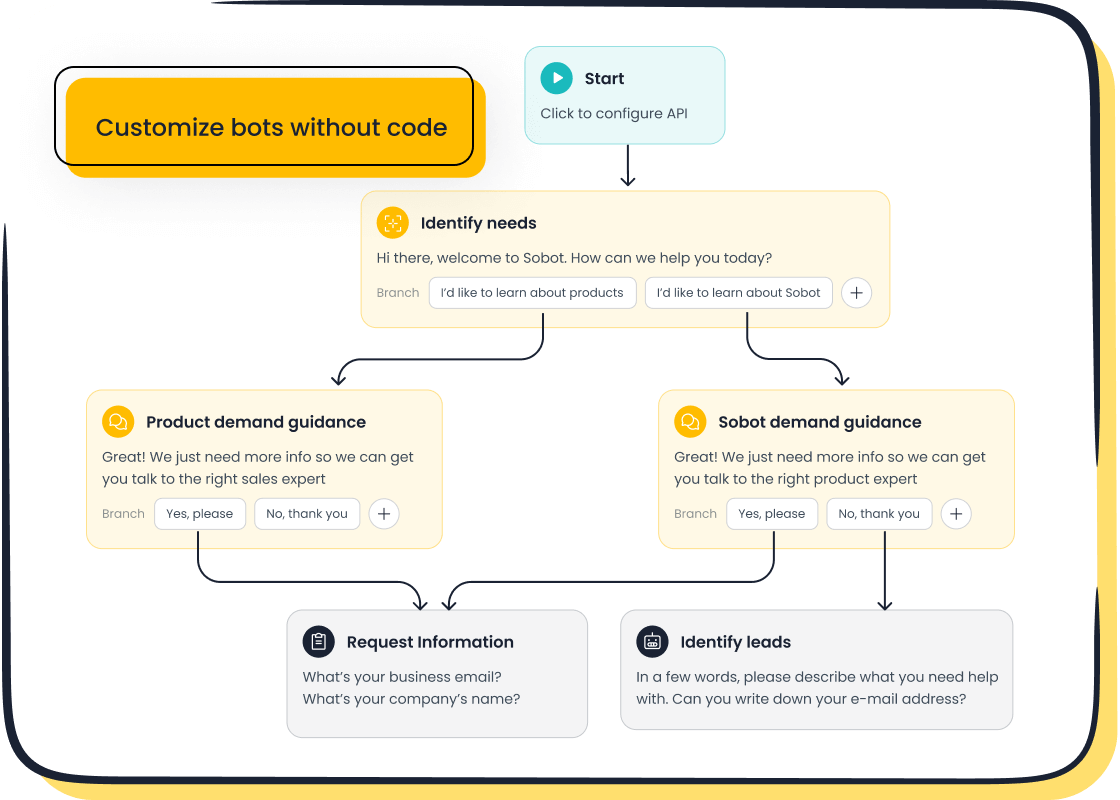
For example, the Sobot AI Chatbot provides powerful omnichannel support, allowing you to engage customers on their preferred channels like WhatsApp or SMS. Its no-code setup means you can build and deploy automated customer service workflows without needing a developer.
Automated Ticketing and Routing Systems
Automated ticketing systems organize and manage customer inquiries. When a customer contacts you, the system creates a "ticket." This ticket tracks the entire conversation from start to finish. Automation makes this process much more efficient. These ai-driven systems are a core part of modern customer service software.
These systems use rules to sort, prioritize, and assign tickets to the right agent or department. This ensures that urgent issues get immediate attention. Automated ticketing systems help your business manage Service Level Agreements (SLAs) effectively.
- Smart Rules automate ticket assignments and escalations. This ensures timely responses that meet your SLA targets.
- Ticket Prioritization assigns urgency levels based on customer data or message content. This helps your customer support teams address the most critical issues first.
- A Unified Inbox gathers tickets from all channels into one place. This prevents missed messages and helps you avoid SLA breaches.
The Sobot Ticketing System is a great example of effective customer service software. It automates workflows and helps you manage SLAs, ensuring your customer service processes run smoothly and efficiently.
Self-Service Knowledge Bases
A self-service knowledge base is an online library of information about your products or services. It contains articles, FAQs, and tutorials. Customers can use it to find answers on their own without contacting your team. This empowers customers and reduces your support ticket volume.
Studies show that customers want self-service options. In fact, 91% of customers would use a knowledge base if it met their needs. Providing a great self-service portal delivers a clear return on investment. Companies often see a 40% reduction in related support volume within 30 days of launching a portal that addresses their top 20 issues. This is a key part of building an effective automated customer service experience.
Interactive Voice Response (IVR)
Interactive Voice Response (IVR) is an automated phone system technology. It allows callers to interact with a company's host system through voice and keypad inputs. You have likely used an IVR when calling a bank or airline. Traditional IVRs were often frustrating, but modern systems use conversational AI to be much more helpful.
Today's advanced IVR systems offer new capabilities for better customer interactions:
- Hyper-Personalization: By connecting to your CRM, an IVR can greet customers by name and anticipate their needs based on past interactions.
- Enterprise-Grade AI: Modern IVRs can manage complex scenarios by coordinating multiple AI models, ensuring compliance with business rules, and enabling smooth handoffs to agents.
- Cloud-Based Software: Cloud solutions offer instant scalability for call volume spikes, continuous access to AI updates, and global availability.
These advancements in automated customer care help create more natural and efficient conversations, improving the overall customer experience.
Proactive Communication Tools
Proactive communication involves anticipating customer needs and reaching out before they contact you. Instead of waiting for problems, you can use automated customer service tools to provide helpful information upfront. This approach builds trust and fosters long-term relationships. A small 5% improvement in customer retention can increase profits by 25% to 95%.
You can use proactive communication for many situations. Common examples of proactive support messages include:
- In-app messages that guide new users through your product.
- Notifications about scheduled maintenance or system status updates.
- Early warnings about a discovered bug you are working to fix.
- Interactive product tours that explain new features.
Using these customer service automation tools helps you reduce inbound tickets, improve customer satisfaction, and enhance your brand's reputation.
A Real-World Example of Customer Service Automation: OPPO & Sobot
Seeing how customer service automation works in the real world can help you understand its value. Let's look at OPPO, a leading smart device innovator. The company serves over 600 million users and faced a major challenge with its high volume of customer interactions.
The Challenge: Managing High Inquiry Volume
OPPO experienced huge spikes in customer questions during peak shopping seasons. This created a heavy workload for human agents. Customers faced long wait times, which led to frustration. The company also found it expensive to maintain its large knowledge base. These issues made it difficult to deliver a consistently positive automated customer service experience and threatened customer satisfaction. The high workload also made it hard to improve efficiency.
The Solution: Sobot's Integrated Platform
OPPO implemented an automated customer service solution from Sobot. The company used a combination of chatbots and an automated ticketing system. This created a human-machine team that could handle the demanding workload. The ai-driven systems allowed for equitable task allocation between bots and agents.
This integrated platform delivered several key capabilities:
- Automated Workflows: Sobot's chatbots handled common, repetitive questions. This helped reduce workload and allowed human agents to focus on complex problems.
- Unified System: The platform brought all customer interactions into one place. This gave agents a complete view of each customer's history.
- AI-Powered Assistance: The system used AI to help optimize OPPO's knowledge base. This reduced maintenance efforts by 90% and helped reduce customer service costs.
This approach is common among large enterprises. For example, Amtrak uses a chatbot to answer over 5 million questions a year, showing how effective this strategy can be.
The Results: A Leap in Efficiency and Satisfaction
The results of this customer service automation project were impressive. OPPO saw a significant boost in performance and improved customer service. The chatbots achieved an 83% resolution rate, which helped speed up resolution times for many customers. This success led to a 94% positive feedback rate from users.
Most importantly, this focus on customer satisfaction had a direct impact on the business. OPPO saw a 57% increase in its repurchase rate. This case shows how the right automated customer service tools can transform your support operations and drive real growth.
How to Choose the Right Tools for Your Business
Choosing the right customer service automation tools requires a clear plan. You need to understand your specific needs before you invest in new customer service software. This helps you build an effective automated customer service system that truly helps your team and customers.
Identify Repetitive, High-Volume Tasks
Your first step is to find tasks that slow your team down. Look for simple, high-volume questions that create a heavy workload for your agents. Automating these tasks frees up your team for more complex issues. This is a core principle of customer service automation.
Common tasks ideal for automation include:
- Answering repetitive questions.
- Handling "Where is my..." type queries.
- Collecting feedback and sending NPS surveys.
- Following up with new users during onboarding.
- Managing slow handoffs between agents.
Consider Your Primary Support Channels
Next, you should think about where your customers contact you. Different age groups prefer different channels. For example, customers under 25 often use social media, while those over 55 prefer the telephone. However, email is a popular channel across all age groups. Your automated customer service strategy should focus on the channels your customers use most. Providing excellent omnichannel support ensures you meet customers where they are. This improves all your customer interactions.
Starting Your Automated Customer Service Journey
You can start your journey by following some simple guidelines. Following the best practices to automate customer service helps you avoid common mistakes. Do not launch a tool without a clear plan or without understanding the root cause of your issues. Your goal is to create a better experience, not just reduce tickets.
Focus on data to make smart decisions about your customer support. A successful strategy involves planning for integration and monitoring performance. These best practices to automate customer service ensure your tools deliver real value. Your automated customer service interactions will become smoother and more effective.
Balancing Automation with Personalization in Customer Support
Finding the right mix of technology and human touch is key to great customer support. The goal of balancing automation with personalization is to make your service faster without losing the personal connection customers value. This approach improves your automated customer service and creates better customer experiences. Effective balancing automation with personalization ensures your customer interactions are both efficient and meaningful.
Knowing When to Use Automation
You should use automation for simple, high-volume tasks. This frees up your team for more important work. However, some issues always need a human. You should not use automation for complex or emotional problems that require empathy.
When to use a human agent:
- The issue is complex and involves many variables.
- The customer is upset or needs reassurance.
- The problem involves sensitive topics like billing disputes or account cancellations.
For these situations, a person can provide the understanding and custom responses that an automated system cannot. This is a core part of balancing automation with personalization.
Ensuring a Seamless Human Handoff
When a chatbot cannot solve a problem, it must pass the conversation to a human agent smoothly. A bad handoff frustrates customers. To create a good experience, you must preserve the context of the conversation.
- Provide Chat History: Your agent must see the full transcript of the bot's interactions with the customer. This prevents the customer from having to repeat information.
- Set Expectations: Tell the customer you are connecting them to an agent. You can show their place in the queue to manage wait times.
- Route Intelligently: Use the conversation's context to send the customer to the right team, such as billing or technical support.
These steps make your customer support interactions feel connected and professional.
Using Data to Personalize Automated Interactions
You can use data to make your customer service automation feel more personal. Connecting your tools to a CRM allows for hyper-personalization. Your system can greet customers by name and understand their history with your company. This data helps your automated tools anticipate needs and provide relevant information. This level of hyper-personalization transforms routine interactions into a positive customer experience.
You have learned about key customer service automation tools, from chatbots to ticketing systems. These tools improve your customer support. As OPPO's success with Sobot shows, the right customer service software boosts customer satisfaction and growth. The future of automated customer service is not about replacing humans; it is about creating powerful human-AI collaboration. This blend of technology and personal touch creates exceptional customer experiences. Your strategic use of customer service automation will define the future of your customer interactions and drive better business outcomes.
FAQ
What is the main goal of customer service automation?
The main goal is to improve efficiency. These tools handle simple, repetitive tasks for you. This frees up your human agents. They can then focus on solving more complex customer problems and building stronger relationships.
Can small businesses use these tools?
Yes, absolutely! Many tools are designed for businesses of all sizes. For example, you can use no-code solutions to build powerful workflows without a developer. This makes automation accessible and affordable for your team.
What is a good first step to get started?
A great first step is to identify your most common customer questions. You can then use a tool like the Sobot AI Chatbot to automate the answers. This provides an immediate impact and helps you learn how automation can help your business.
How do these tools improve the customer experience?
These tools provide instant, 24/7 support for common questions. This reduces customer wait times. They also ensure your team has more time for complex issues. This combination of speed and expert help leads to higher customer satisfaction.
See Also
AI Customer Service Software: Boosting Efficiency in Modern Business Operations
Efficient Call Center Automation: Streamlining Operations for Better Performance
Discovering the Top 10 AI Tools for Enterprise Contact Centers
The 10 Best Customer Service Software Solutions for 2024
Choosing Social Media Customer Service Software: 10 Essential Tips

