SMS vs Email Auto Response Which Is Better

You must choose between an immediate SMS and a detailed email for your auto response. This choice is not about which is better, but which is right for your goal. Are you sending an urgent SMS that a customer must see in seconds? Or do you need to provide detailed information they can save? A powerful Sobot AI can manage both. A simple sms auto reply works for speed. The Sobot call center can integrate these tools, including SMS. This guide offers a clear framework for your decision.
Understanding Auto-Response Channels
Choosing the right channel starts with knowing the strengths of each tool. Your business can use SMS for immediate contact and email for detailed follow-ups. Let's explore how each one functions.
The SMS Auto-Response: Instant and Concise
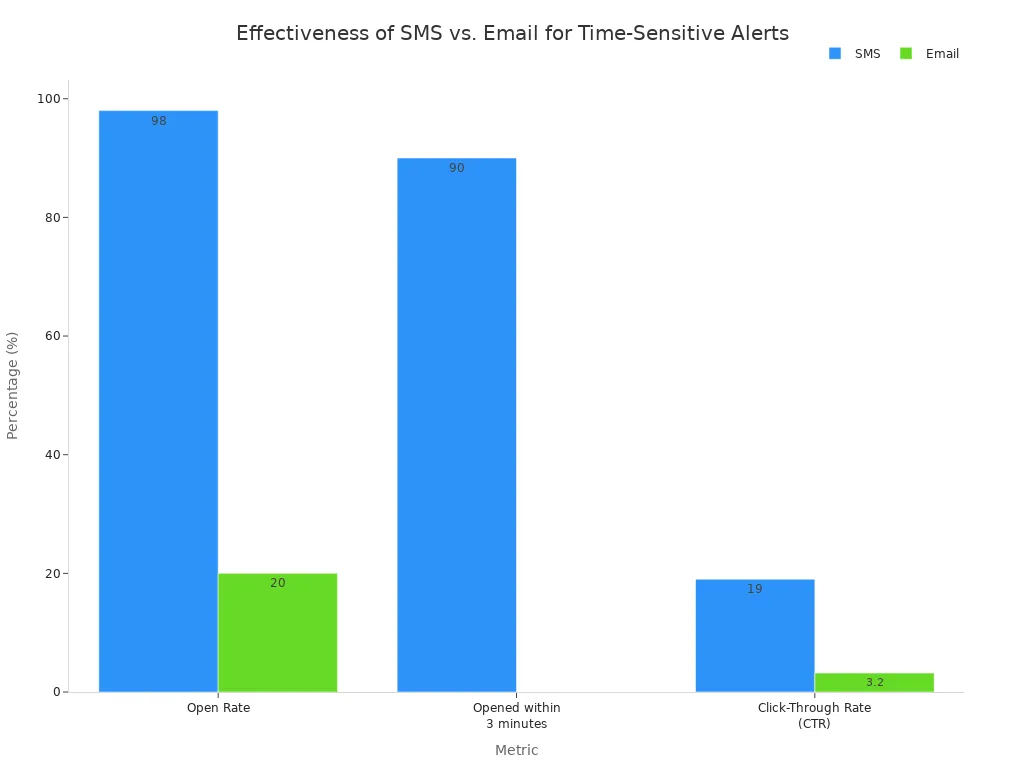
You use an SMS auto reply for speed and certainty. An SMS boasts an incredible 98% open rate, with most people reading a message within minutes of receiving it. This makes business text messaging perfect for urgent updates. The format of an SMS forces you to be brief. This ensures your customer gets the key information without any clutter. An effective sms auto reply is direct and clear.
"Hi [name], your order has been successfully placed! Order #[Order Number] will be shipped to [Shipping Address]. You’ll receive an update once it’s on its way 🥳"
This type of messaging is ideal for quick confirmations and alerts where immediate attention is necessary. The goal of an SMS is to deliver a critical piece of information instantly.
The Email Auto-Response: Detailed and Formal
Email gives you more space. While the average open rate for an automated email is around 48.57%, these messages are powerful for providing comprehensive information. You can use this auto response to welcome new users, send invoices, or offer detailed support. Unlike an SMS, an email allows you to include attachments, links, and formatted text. To create a great email, you should:
- Keep the body brief and easy to scan.
- Use bold text or bullet points for important details.
- Personalize the message with the customer's name.
- Include a clear call-to-action button.
This channel is best when your customer needs to save the information for later. It provides a formal record of your communication and builds a foundation for customer support.
Key Differences in Purpose and Function
The right choice depends entirely on your goal. One channel delivers speed, while the other offers depth. An auto reply for business must match the context of the customer's request. Text messaging auto replies are for "now," while emails are for "later." This table breaks down the core differences between the two services.
| Feature | Email API | SMS API |
|---|---|---|
| Cost | Generally low, with costs primarily for software, not per email. | Varies by provider and message, with potential for new carrier fees. |
| Engagement | Low, with about 20% open rates and delayed opening times (up to an hour). | Very high, with 98% open rates, often within 3 minutes. |
| Message Length | Ideal for long-form communication with no functional limit. | Limited to 160 characters for plain text; longer messages are split. |
| Timeliness | Not suitable for urgent messages due to lower engagement. | Excellent for time-sensitive messages due to high engagement. |
| Delivery Insights | Often lacks clear insights into whether messages are received by users. | Provides confirmation of message delivery to the end-user. |
Ultimately, a strong business strategy uses both SMS and email to create a complete customer service experience.
When to Use an SMS Auto Reply for Your Customer
You should use an SMS auto reply when your message is urgent and needs to be seen immediately. The high open rates of SMS make it the perfect tool for time-sensitive communication. This channel helps your business deliver critical information directly into your customer's hands.
Urgent Alerts and Time-Sensitive SMS
You can leverage SMS for alerts that require immediate action. An SMS is opened far more quickly than an email. This makes it ideal for appointment reminders, flash sales, and shipping notifications. Industries like healthcare, retail, and logistics rely on SMS to reduce no-shows and drive sales. For example, a healthcare provider can send an automated text message to confirm appointments, while a retail business can announce a limited-time offer. The effectiveness of SMS is clear.
An auto reply text message ensures your alerts are seen. You can also use bulk sms auto-reply campaigns for wide-reaching announcements.
Instant Customer Service Updates
You can improve customer satisfaction by using an SMS auto reply for service updates. When a customer has an issue, a quick SMS auto reply lets them know you received their message. This simple auto reply text message builds trust. It shows your business is responsive. Proactive messaging, like an auto reply text message about a known service outage, keeps customers informed. This reduces frustration and the number of support calls. An effective auto reply for business demonstrates that you value your customer's time. This kind of support is essential.
Setting Up an Auto Reply Text Message
When you set up an auto reply text message, you must follow legal rules. In the United States, the Telephone Consumer Protection Act (TCPA) requires you to get clear consent from users before sending any automated text message. Your business must also provide a simple way for users to opt out, like texting "STOP".
Tip: Always include your business name and a clear opt-out instruction in every auto reply text message. For example: "Thanks for your message! A support agent will reply soon. Text STOP to unsubscribe. - [Your Business Name]"
Following these rules for your auto reply text message helps you avoid large fines and builds a trustworthy business text messaging channel.
Out-of-Office Replies for Urgent Matters
You can use an SMS auto reply for out-of-office or after-hours auto replies. These text messaging auto replies manage expectations when you are not available. A good auto reply message should state when you will return and who to contact for urgent support. This is a key part of business texting.
Here are some examples of after-hours auto replies:
- "Thanks for your message! Our business hours are 9 AM-5 PM. We will respond to your text message autoresponders during the next business day."
- "Hello! I am out of the office until [Date]. For urgent help, please contact our support team at [Number]."
These after-hours auto replies ensure customer messages receive a prompt acknowledgment. This simple auto reply for business maintains professional communication. The right auto reply text message keeps your services running smoothly. These after-hours auto replies are a simple and effective tool.
When to Use Email for Automated Responses
You should use email when your message requires detail, formatting, and a formal record. Email allows you to provide comprehensive information that a customer can save and reference later. It is the ideal channel for building relationships and providing in-depth support.
Welcome Series and Onboarding
You can make a great first impression with an automated welcome email series. These emails guide new users and introduce them to your business. A strong welcome series can significantly increase customer retention and lifetime value. For example, one study found that subscribers who received a welcome series showed higher retention after 12 weeks. You can use these emails to:
- Share helpful getting-started guides.
- Showcase your most popular products or services.
- Introduce your brand's story and mission.
Order Confirmations and Shipping Notices
You can use email to send detailed order confirmations. These messages reassure buyers that their purchase was successful. Many e-commerce businesses also use these emails to encourage repeat sales. A case study for a fashion business showed that order confirmation emails generated 48% of total email sales. You can include personalized product recommendations or a discount code for a future purchase. This turns a simple transaction into a new sales opportunity for your business.
Detailed Support Ticket Information
You should use email for automated support ticket confirmations. When a user submits a request, an email provides a formal record with a ticket number. This simple step reduces follow-up customer support inquiries.
To create an effective support confirmation, you should set clear expectations about response times and include links to your FAQ page. This provides immediate help and shows your business is organized. This is a better approach than after-hours auto replies for complex support issues. Simple after-hours auto replies can't provide this level of detail. Your support team can manage this better than after-hours auto replies.
Sending Invoices and Resource Guides
You can automate the delivery of invoices and resource guides with email. This improves operational efficiency for your business. Automated invoicing ensures prompt delivery, minimizes errors, and helps maintain a consistent cash flow. This process frees up your team from manual tasks. You can also attach detailed guides, case studies, or manuals. This provides extra value without requiring more support. Unlike after-hours auto replies, which are brief, emails deliver rich content. After-hours auto replies are not meant for this purpose. Your customer service team will thank you for using the right tool, not after-hours auto replies.
How to Implement an Effective Auto Response Strategy
You can build an effective auto response strategy by using the right tools. A powerful platform helps you manage both SMS and email seamlessly. This creates a better experience for your customer and makes your business more efficient. Automation is the key to unlocking this potential.
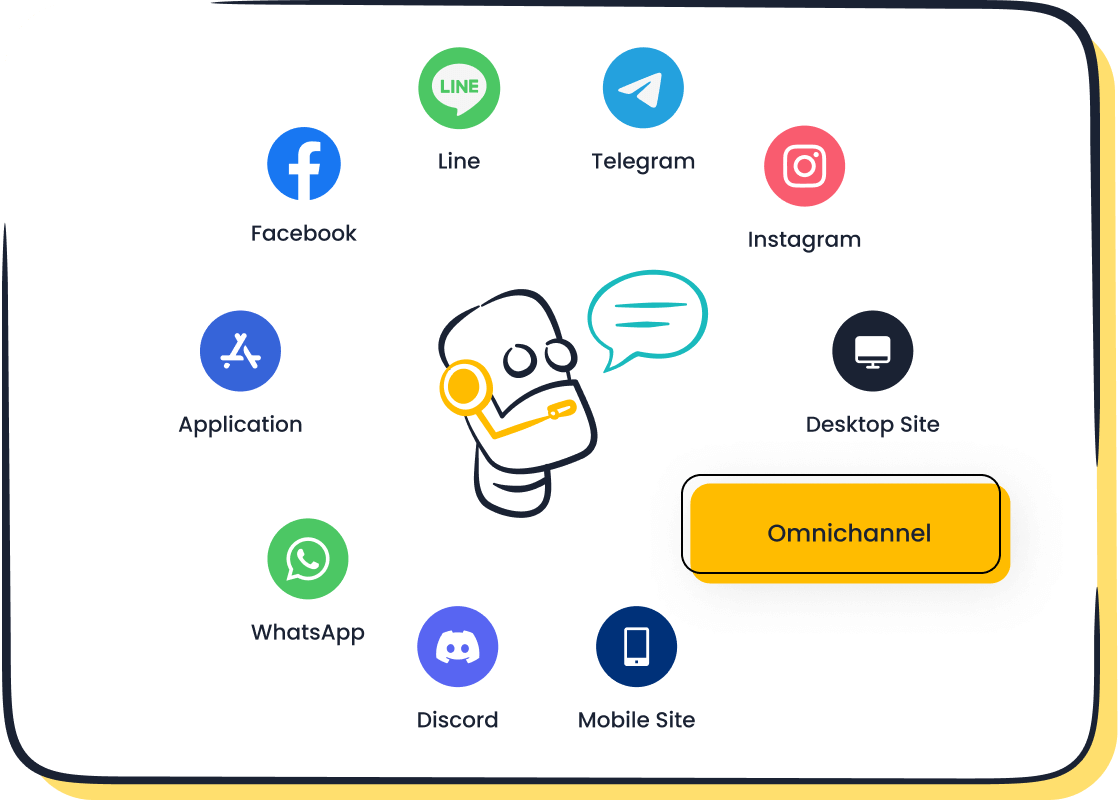
Unifying Channels with Sobot's Chatbot
You can manage all your customer messages in one place. Sobot's omnichannel services bring all your support channels together. This AI-powered contact center platform unifies your tools for better service. Your business can handle every auto response from a single workspace. This includes:
- Real-time messaging for SMS and email.
- A centralized view of all customer conversations.
- Seamless integration of different communication channels.
This approach to automation improves your team's efficiency. You no longer need to switch between an SMS platform and an email client.
Automating Workflows Without Code
You can design automated SMS workflows without writing any code. Sobot offers a point-and-click interface for easy automation. Your business can quickly set up an SMS auto reply for common questions. You can also create text messaging auto replies for after-hours support. This simple automation ensures every customer receives a prompt acknowledgment. Setting up an automated text message or a series of text message autoresponders becomes a simple task. This makes your business texting strategy both powerful and easy to manage.
Enhancing the Customer Journey with Automation
You can see the real-world impact of a strong messaging strategy. Logistics leader J&T Express used Sobot's automation to improve its services. They implemented a powerful messaging solution for their business. This included using an SMS platform for automated messages and address confirmations. The results were impressive. J&T Express saw a 35% increase in delivery rates and a 50% reduction in costs. This case shows how a well-executed auto reply for business, combining SMS and other channels, drives tangible results. Your business can achieve similar success with the right automation and personalized engagement.
Direct Comparison: SMS vs. Email Auto Response
You need to choose the best tool for each specific customer interaction. A direct comparison helps you see where each channel shines. This breakdown will guide your decision-making process for your business.
Open Rate and Visibility
You want your customers to see your messages. Visibility is the first step to engagement. In this area, SMS has a clear advantage.
- SMS: An SMS boasts an open rate of around 98%. This near-perfect visibility means your message almost always reaches its intended reader.
- Email: Email open rates are much lower, averaging around 20%. Your message must compete with many others in a crowded inbox.
The high visibility of SMS makes it the superior choice for any communication where you cannot afford for the message to be missed.
Average Response Time
You often need a quick response from your customer. The speed at which a customer sees and acts on your message is critical for time-sensitive situations.
Did You Know? A stunning 97% of text messages are read within just three minutes of being received. This makes SMS the undisputed champion for immediate communication.
Emails, on the other hand, can sit in an inbox for hours or even days before being opened. If your auto response requires immediate attention, such as a fraud alert or a two-factor authentication code, an SMS is the only reliable option. This rapid response time is a core strength of business text messaging.
Message Content and Length
You must consider what kind of information you need to send. The content and length capabilities of SMS and email are fundamentally different.
An SMS is built for speed and brevity. It has a standard character limit of 160 characters. This forces you to be direct and concise.
- Using special characters or emojis can reduce the limit to just 70 characters.
- Longer messages are split into multiple segments, which can increase costs.
Email is a content powerhouse. You have no practical length limits, which allows for rich storytelling and detailed information. With email, you can easily include:
- Multiple images, GIFs, and videos.
- Formatted text with headers and bullet points.
- Numerous links and clear call-to-action buttons.
For a simple sms auto reply confirming an action, the character limit is a benefit. For sending a detailed invoice, a welcome guide, or a resource document, email’s flexibility is essential for effective messaging.
Cost-Effectiveness Analysis
You need a solution that fits your budget. The cost structure for SMS and email varies significantly, and so does the return on your investment.
Email is generally cheaper on a per-message basis. You can send thousands of emails for a very low cost. SMS messaging is priced per message segment, and costs can add up, especially for large campaigns.
Here is a look at typical costs:
| Service Type | Platform Example | Average Cost |
|---|---|---|
| Amazon SES | $0.10 per 1,000 emails | |
| Mailchimp | $2.00 per 1,000 emails | |
| SMS | Twilio / Vonage (US) | ~$0.0075 per message |
However, cost is only one part of the equation. You must also look at the return on investment (ROI). Because SMS engagement is so high, it often delivers a much stronger return.
| Marketing Channel | ROI per $1 Spent |
|---|---|
| SMS Marketing | ~$71 |
| Email Marketing | ~$36 |
While an individual SMS costs more than an individual email, its effectiveness can make it a more profitable channel for your business. The right choice depends on balancing the cost of the messaging with the value of the customer action you want to drive.
Your business should not choose one channel. You must integrate both SMS and email. Use SMS for speed and email for detailed support. You can audit your communication touchpoints. Review metrics like First Contact Resolution to find gaps. A unified platform helps you implement a better auto response. This creates a seamless sms auto reply and improves customer support. An integrated auto reply for business strengthens your services and your entire SMS strategy.
FAQ
Which auto response is better for my business?
You should choose the channel that matches your goal. Use an SMS auto reply for urgent, short messages that need to be seen instantly. You can use email for detailed information, like welcome guides or invoices, that customers can save and read later.
Can I automate both SMS and email responses?
Yes, you can automate both. A unified platform like Sobot's AI Chatbot lets you manage every auto response from one place. This makes your business text messaging and email workflows more efficient and creates a seamless experience for your customers.
What is the most important rule for an SMS auto reply?
The most important rule is to get permission first. You must have clear consent from your customers before sending any automated text messages. Always include your business name and a simple way for users to opt out, like texting "STOP".
How can an auto response improve customer service?
An auto response immediately acknowledges a customer's message. This simple action builds trust and manages expectations. It shows your business is responsive, which reduces customer frustration and improves their overall experience with your brand.
See Also
Unveiling the Advantages: Live Chat's Edge Over Traditional Email Support
Comparing Leading Interactive Voice Response Solutions: A Comprehensive Software Review
Selecting the Best Social Media Customer Service Software: Ten Essential Tips
Achieving Excellence: Mastering Live Chat for Superior Customer Support Interactions
Boosting Customer Happiness: Ten Strategies for Enhanced Live Chat Satisfaction

