Set Up Automated Customer Support in 5 Steps


Your small business can transform its customer support. Automated customer support provides instant, 24/7 answers to common questions. This customer service automation frees your team for high-value interactions. Research shows this can reduce service costs by up to 30%. Tools from Sobot, like Sobot AI and the Sobot call center, simplify customer support automation. This automated support and automated customer care helps you meet modern expectations and increase customer satisfaction. It is the future of automated customer service.
What Do Customers Expect?
- 96% of consumers say customer service is key to their brand loyalty.
- 90% of customers rate an 'immediate' response as important.
- 51% of people expect businesses to be available 24/7.
Step 1: Identify Automation Opportunities
Before you can build your automated customer service system, you need a clear map. This first step is about finding the best places to start. You will look at your current customer support process to find repetitive tasks that are perfect for automation.
Audit Your Support Channels
First, you need to review all the ways customers contact you. Look at your emails, phone calls, and social media messages. You can gather data from customer feedback surveys and support tickets to see the full picture. Assess the quality of service on each channel. You might find that email responses are slower or less helpful than phone calls. This shows an area for improvement. Tracking metrics like First Reply Time (FRT) helps you see how quickly you respond on each channel.
Categorize Common Questions
Next, group similar customer questions. Go through your support tickets and chat logs. You will likely see the same questions appear again and again.
Common Question Categories:
- "Where is my order?"
- "How do I process a return?"
- "What are your business hours?"
- "Can you help me reset my password?"
Creating these categories helps you see which problems take up most of your team's time. This is a key step in customer service automation.
Prioritize High-Impact Tasks
Now, you can choose which tasks to automate first. Focus on high-impact, repetitive tasks. Automating these frees up your team for more complex problems. This is where customer support automation delivers the most value. Good tasks to start with include:
- Checking an order's status
- Updating customer account information
- Routing support tickets to the right team
- Sending follow-up messages after an issue is resolved
Track Customer Interaction Data
Finally, use data to guide your decisions. Tracking key metrics from your customer interactions will reveal the best opportunities for automated support. Look at metrics like Automation Rate, which shows how many tasks are handled without human help. A low rate in one area might be a great place to introduce a new tool. This data-driven approach ensures your automation efforts have the biggest positive impact.
Step 2: Build a Self-Service Hub
A self-service hub is the foundation of your automated customer support. It empowers customers to find answers on their own. This hub acts as a central library of information, improving self-service support availability around the clock.
Choose Your Format
First, you need to decide on the right format for your business. You have two main customer self-service options: a simple FAQ page or a more comprehensive knowledge base.
- FAQ Page: This format is great for answering a small number of common questions. It is low-cost and helps reduce repetitive queries.
- Knowledge Base: This is a better choice for complex products. It offers in-depth guides, includes a powerful search function, and is highly scalable as your business grows.
A knowledge base provides a complete self-service portal with better organization and analytics.
Write Clear Support Articles
Your articles must be easy for everyone to understand. You should write with empathy for your customers.
- Use Simple Language: Avoid technical jargon. Explain any necessary complex terms the first time you use them.
- Break It Down: Use short sentences and paragraphs. Organize instructions into small, numbered steps.
- Add Visuals: Use screenshots, diagrams, and charts. Visuals make complex information much easier to follow.
- Focus on the "Why": Explain why a step is necessary. This provides context and helps customers learn.
Organize Content for Navigation
Power Automation with Your Knowledge Base
Your knowledge base is more than just a collection of articles. It is the brain for your automation tools. A well-structured knowledge base provides the information that powers accurate chatbots and other automated tools. This system allows an AI to understand a customer's question and pull the correct answer directly from your articles. A dynamic knowledge base ensures your automation tools always provide up-to-date and context-aware responses, creating a seamless support experience.
Step 3: Implement an AI Chatbot

With your self-service hub ready, you can now implement AI chatbots and voice bots. These tools use your knowledge base to provide instant answers. Modern AI chatbots and voice bots are essential for scaling your customer support.
Select Your Chatbot Type
First, you need to choose the right type of chatbot for your small business. Your main options are rule-based chatbots and AI-powered chatbots.
| Category | Rule-Based Chatbots | AI-Powered Chatbots |
|---|---|---|
| Capabilities | Follows a script; best for simple, repetitive tasks. | Understands context and user intent; handles diverse queries. |
| Implementation | Quick to set up with minimal technical effort. | Longer deployment but highly customizable for complex needs. |
| User Experience | Reliable for basic questions but can be frustrating. | Offers natural, personalized, and engaging conversations. |
While rule-based chatbots are simple, AI-powered chatbots offer the flexibility and intelligence needed to truly improve the customer experience.
Train Your Bot with a Knowledge Base
You can train your AI chatbot using the knowledge base you built in Step 2. This process is more straightforward than you might think.
- Connect your knowledge base to your AI chatbot system.
- The AI "learns" from your articles, FAQs, and guides.
- You can then perform test chats and adjust the bot's tone to match your brand voice.
This turns your knowledge base into an active, conversational tool.
Design an Effective Chatbot Flow with Sobot
A chatbot flow is the conversational path a user follows. You can design flows for different goals, like e-commerce purchases or answering support questions. For a small business without a technical team, a no-code tool is essential.
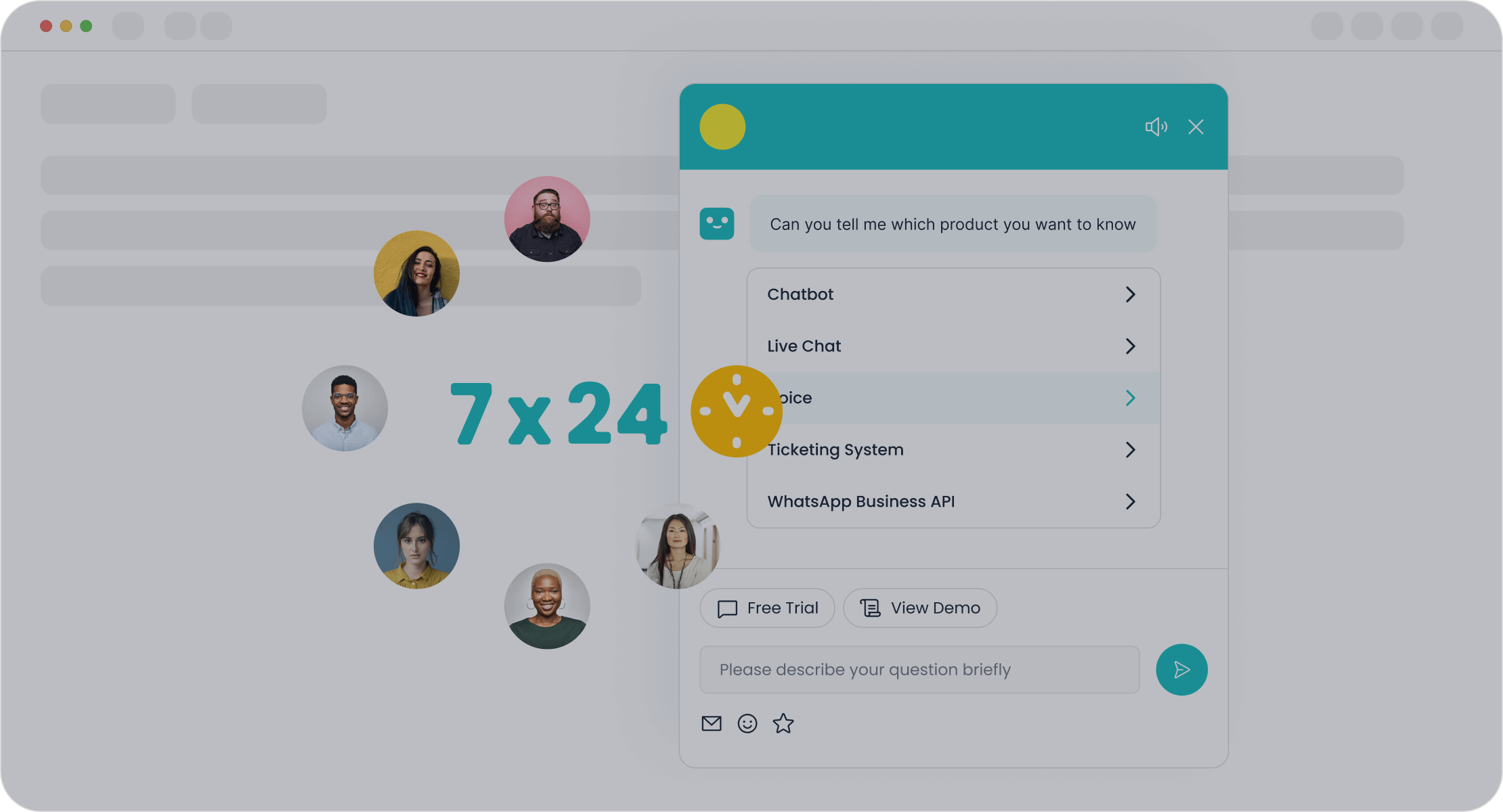
This is where Sobot's AI Chatbot shines. It offers a point-and-click interface that lets you build powerful AI chatbots and voice bots without writing any code. Its key benefits include:
- 24/7 Availability: Sobot's AI chatbots and voice bots are always online to help customers.
- Multilingual Support: You can easily scale your support globally by having chatbots that speak your customers' languages.
- Proven Results: Retailer Weee! used Sobot's solutions to increase agent efficiency by 20% and achieve a 96% customer satisfaction score.
Set Up a Human Handoff
Even the best AI chatbots and voice bots sometimes need help. A human handoff process ensures that complex issues are smoothly transferred to your team.
Critical insight: Customers rank "not having to re-explain themselves" as a top satisfaction factor. Context continuity is arguably the number one success factor for handoffs.
To create a seamless handoff:
- Always give users an easy way to request a human agent.
- Automatically transfer the chat if the bot fails to understand the query.
- Ensure the conversation history is passed to the agent so the customer doesn't have to repeat information.
Step 4: Set Up Automated Customer Service
After building your self-service hub and chatbot, you can organize your team's workflow. This step focuses on using customer service automation tools to manage incoming requests efficiently. You will set up a central system to handle tickets, create instant replies, and route issues to the right person. This level of customer service automation ensures no customer query gets lost.
Select a Help Desk System
First, you need to select a help desk system. This software acts as a shared inbox for all your customer conversations. A good help desk system helps you track, manage, and resolve customer issues in one place. For a small business, you should look for a system that is cost-effective and easy to learn. Key features include:
- Self-service options with a knowledge base
- Automated ticket routing and escalation
- An intuitive ticket submission process
- Customer visibility into ticket progress
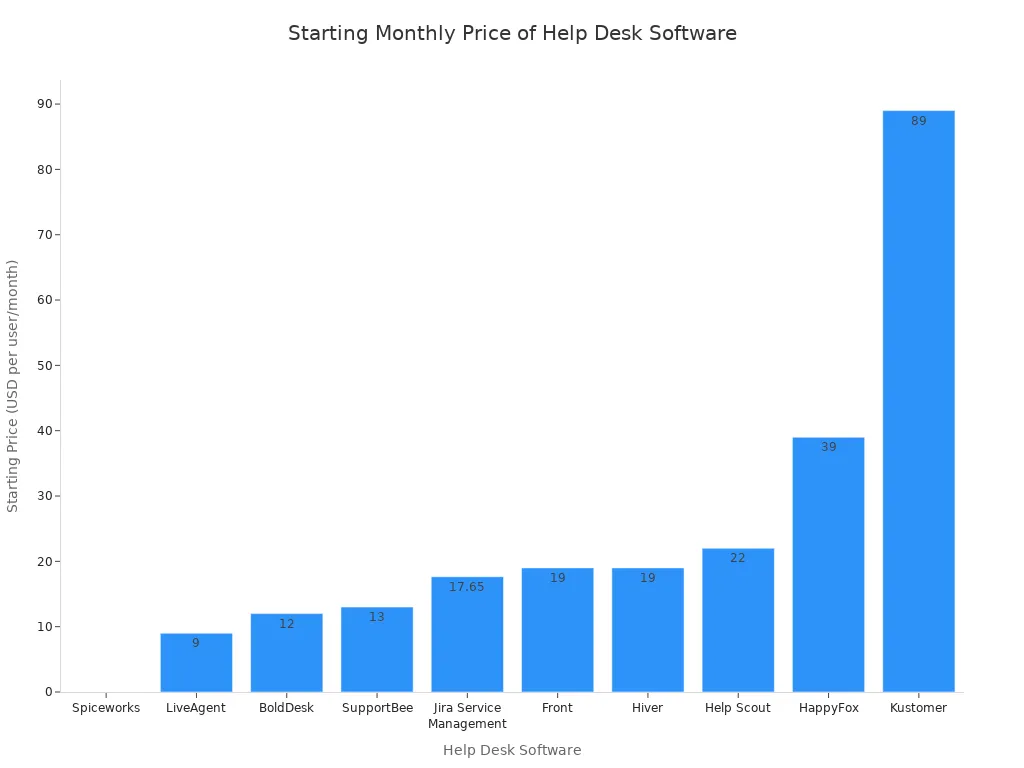
Many automated customer service solutions are available. The right choice depends on your budget and needs.
| Help desk software | Pricing | Free Trial | Key Features |
|---|---|---|---|
| BoldDesk | Starts at $12 agent/month | 15 days | Ticketing system, Workflow automation, Knowledge base, AI Agent, Live chat, Omnichannel support |
| LiveAgent | Starts at $9 per agent/month | 30 days | Email ticketing, Customer portal, Customer forum, iOS/Android app integration |
| Help Scout | Starts at $22 per user/month | 15 days | Shared inbox, Automation, Knowledge base, WhatsApp integration |
| Kustomer | Starts at $89 per user/month | Unavailable | Real-time analytics, Integrations, Automation, Live agent auditing |
| ServiceNow | Customized | Upon request | Change management system, SLA management, Integrations, Configuration management |
| Spiceworks | Free | Free | Automation, Ticket management, Customized knowledge base, iOS/Android app integration |
| SupportBee | Starts at $13 per company mailbox/month | 14 days | Ticketing system, Knowledge base, Shared inbox, Customer portal |
| Front | Starts at $19 per feat/month | 7 days | Shared inbox, Workflow automation, Multichannel support, Artificial intelligence (AI) |
| HappyFox | Starts at $39 per agent/month | Unavailable | Integrated with Microsoft Teams, Multichannel support, Workflow automation, Reporting and analytics |
| Jira Service Management | Starts at $17.65 per agent/month | Unavailable | Integrated with Slack and Microsoft Teams, Ticketing system, Live chat, Knowledge base |
| Hiver | Starts at $19 per user/month | 7 days | Shared inbox, Workflow automation, Live chat, Works seamlessly with Google Workspace |
Create Auto-Reply Emails
Next, you should set up auto-reply emails within your help desk system. These automated messages confirm you have received a customer's request. This simple action manages expectations and assures customers that you are on the case. Your auto-reply should be simple and clear.
Hi there,
Thank you for contacting us. We've received your message and will get back to you within 24 hours.
In the meantime, feel free to visit our support website for answers to common questions.
Best regards, The [Your Company] Team
This small piece of automated customer support makes a big difference in customer perception.
Build a Canned Response Library
A canned response library stores pre-written answers to common questions. This is one of the most effective customer service tools for saving time. Your team can use these templates to respond to frequent queries quickly. To build an effective library, you should track your most frequently asked questions. Create versatile greetings and answers but remember to balance automation with personalization. Avoid using canned responses for complex or emotional issues where a personal touch is needed.
Automate Ticket Routing
Finally, you can automate ticket routing. An automated ticketing system directs incoming support requests to the right agent or department. You can create rules based on keywords, customer type, or issue category. For example:
- Keyword Routing: A ticket containing the word "billing" automatically goes to your finance team.
- Priority Routing: Tickets from VIP customers can be tagged as high-priority for immediate attention.
- Skill-based Routing: A request in Spanish can be sent to a Spanish-speaking agent.
This automated ticketing system ensures that experts handle each issue, which speeds up resolution times and improves the quality of your automated support.
Step 5: Integrate Your Automated Customer Support Tools
You have now built the key parts of your automated customer support system. The final step is to connect them. Integrating your tools ensures they work together as one powerful unit. This customer support automation creates a seamless experience for both your customers and your team.
Unify Your Customer View
First, you need to unify your customer view. This means all customer information is in one place. When your tools are connected, you get a complete picture of each customer's journey. This allows you to provide better, more personal automated support. A unified view helps you:
- Understand a customer's full history, including past purchases and support tickets.
- Avoid sending duplicate or conflicting messages across different channels.
- Give your team shared, accurate data for faster problem-solving.
This alignment leads to more relevant and helpful communication with your customers.
Connect Your Chatbot and Help Desk
Next, connect your AI chatbot to your help desk system. This integration turns your chatbot into a true front-line agent. When a chatbot can access help desk data, it can provide instant, accurate answers 24/7. This connection reduces wait times and frees your human agents for more complex issues. The process often involves authorizing the connection in your admin settings, allowing the tools to share information securely.
Automate Data Sync with Sobot
Advanced automation tools make data synchronization simple. For example, Sobot's platform is designed as an all-in-one solution. Its products, like the AI Chatbot and Ticketing System, are built to work together from the start. This native integration means customer data flows smoothly between tools without complex setup. When a chatbot hands off a conversation, the agent receives the full history automatically. This creates a truly seamless customer experience.
Leverage Data for Personalization
Finally, you can use your integrated data to personalize every interaction. When your team has full context, they can solve issues faster and more effectively.
For example, you can use data to:
- Proactively offer help if a customer is stuck on a certain webpage.
- Provide chatbot answers that are specific to a user's purchase history.
- Send personalized feature announcements to different customer groups.
This makes customers feel understood and valued, not like just another ticket number.
You now have a clear 5-step path to automated customer support. You can identify opportunities, build a self-service hub, implement a chatbot, automate tasks, and integrate your system. This journey is an accessible project for any small business, not an overwhelming one. Your automated support will improve efficiency and customer satisfaction.
Actionable Tip: Start your automation journey today by creating your first FAQ. Tools like Sobot are designed to make this process simple.
FAQ
How much does automated customer support cost?
The cost varies based on the tools you choose. You can start with free options like a simple FAQ page. More advanced tools, like AI chatbots, have monthly fees. Many solutions offer scalable plans that grow with your business, making automated customer support affordable.
Do I need a technical team to set this up?
No, you do not need a technical team. Many modern tools are designed for small businesses. For example, Sobot's AI Chatbot uses a point-and-click interface. You can build and launch powerful automation flows without writing any code.
Will automation replace my human support agents?
Automation does not replace your team. It supports them. An effective automated customer support system handles simple, repetitive questions. This frees your agents to focus on complex problems where a human touch is essential. It makes their jobs more valuable.
How quickly will I see results from automation?
You can see results quickly. Setting up auto-replies and a simple FAQ page provides immediate benefits. Implementing a chatbot can reduce common questions within weeks. Your automated customer support system will deliver value as soon as you launch your first tool.
See Also
A Guide to Implementing Shopify Live Chat for Enhanced Support
Elevating Customer Service Excellence Through Live Chat Mastery
Selecting the Best Social Media Customer Service Software: 10 Essential Tips
Seamless Customer Journeys: Implementing Omnichannel Contact Center Solutions in 10 Steps
Optimizing SaaS Customer Support: Effective Live Chat Strategies for Growth

