Kustomer Alternatives Zendesk and Freshdesk

Businesses exploring alternatives to Kustomer often consider Zendesk and Freshdesk. These two platforms are top ticket-centric contenders. Zendesk serves large enterprises that need deep customization. Freshdesk excels for small to medium businesses wanting a user-friendly platform. This guide helps readers decide how to replace Kustomer with other tools. It also introduces modern solutions like sobot for consideration.
Kustomer vs. Alternatives: At a Glance
Choosing the right platform requires a clear look at each option. This quick comparison highlights the key differences between Kustomer, Zendesk, and Freshdesk. It helps you see which of these Kustomer alternatives fits your business best.
Best for Business Type
Each platform targets a different business size. Kustomer is an enterprise-grade helpdesk. It works best for large, mature B2C support teams that need a reliable system. Zendesk and Freshdesk also serve distinct markets.
| Platform | Ideal Business Size | Revenue Focus |
|---|---|---|
| Freshdesk | Handles teams under 500 employees. | 50% of revenue from customers with >250 employees. |
| Zendesk | Enterprise-focused. | 39% of revenue from customers with >$250k ARR. |
Core Pricing Philosophy
Pricing often reflects a platform's target audience. Freshdesk offers a flexible model with a free tier. This makes it a great choice for startups and small businesses. Zendesk and Kustomer aim for larger teams with more structured plans.
Note: Prices are per agent, per month, and billed annually.
- Zendesk starts at $19 for its Support Team plan.
- Kustomer starts at $89 for its Enterprise plan.
Key Differentiator
Each company emphasizes unique strengths to stand out. Kustomer promotes its customer-centric timeline and powerful automation. Zendesk leverages its long market presence and deep customization. Freshdesk focuses on affordability and ease of use.
| Platform | Primary Differentiator |
|---|---|
| Kustomer | Unified customer view and no-code automation. |
| Zendesk | Robust help desk features and extensive integrations. |
| Freshdesk | Affordability and comprehensive features at a lower price. |
Overall Ease of Use
A platform's usability directly impacts agent productivity. Kustomer provides a user-friendly interface that is easy to navigate. Zendesk and Freshdesk offer different user experiences, which user ratings reflect.
| Criteria | Zendesk | Freshdesk |
|---|---|---|
| Learning Curve | High | Highly intuitive |
| G2 Rating | 4.3 / 5 | 4.5 / 5 |
Freshdesk's intuitive design often leads to faster adoption. Zendesk's powerful features come with a steeper learning curve.
Feature Showdown: Zendesk vs. Freshdesk
When looking for Kustomer alternatives, businesses often land on Zendesk and Freshdesk. Both platforms offer robust features. However, their approaches to customer service management differ in key areas. This showdown compares them feature by feature.
Core Architecture: Ticket-Centric Operations
Zendesk and Freshdesk build their platforms around tickets. This ticket-centric model is different from Kustomer's data-centric approach. A ticket-centric system reacts to customer issues as they arrive. A data-centric system organizes all information around the customer first. This core difference impacts how agents see customer information and solve problems.
| Feature | Zendesk & Freshdesk (Ticket-Centric) | Kustomer (Data-Centric) |
|---|---|---|
| Core Design | Systems are built to react to and resolve tickets. | Platform organizes everything around a unified customer timeline. |
| Customer View | Agents focus on individual tickets and may need to switch views. | Agents see a single view of all customer interactions for full context. |
| Approach | A reactive model that starts when a customer submits an issue. | A proactive model that helps solve issues before customers reach out. |
| Omnichannel | Conversations can be fragmented as agents switch between channels. | All interactions appear in one place for a seamless experience. |
Omnichannel Support Experience
Both Zendesk and Freshdesk allow teams to manage conversations from multiple channels in one place. This helps support teams stay organized. They natively support the most common communication channels that businesses use today.
- Live chat
- Phone
- Social media channels
Note: For WhatsApp support, businesses often need third-party apps. Using separate integrations can sometimes create issues with speed, ease of use, and data security.
Automation and AI Capabilities
Automation and Artificial Intelligence (AI) help support teams work faster. Zendesk and Freshdesk each have their own AI tools.
Zendesk includes several AI-powered features in its plans to help agents. These tools suggest articles and automate simple tasks.
- Knowledge in the context panel: Lets agents find help articles without leaving the ticket.
- Suggested macros: Recommends automated actions for common tasks.
- Autoreply with article: Scans messages and sends a relevant help article link.
- Conversational bots: Deploys chatbots to handle simple requests.
Freshdesk's AI, named Freddy, offers a wide range of capabilities. It assists agents with writing, summarizes tickets, and automates workflows. The platform provides many generative AI features out of the box.
| Feature Name | Freshdesk (Freddy AI) |
|---|---|
| Writing assistant | Yes |
| Summary generator | Yes |
| Reply suggester | Yes |
| Solution article generator | Yes |
| Sentiment analysis | Yes |
| Auto triage | Yes |
| Thank you detector | Yes |
| Live Translate | Yes |
When comparing the two, Freshdesk's Freddy AI often provides more agent-facing assistance tools. Zendesk's AI focuses more on routing and knowledge base management.
| Feature | Zendesk AI Capabilities | Freshdesk's Freddy AI |
|---|---|---|
| Core AI | Uses generative AI and its own intent models. | Native AI engine enhanced with generative AI. |
| Writing Assistance | Not available in standard plans. | Offers a Gen AI-powered Writing Assistant. |
| Reply Suggestions | Not available in standard plans. | Provides a Reply Suggester for agents. |
| Ticket Management | Features AI-enhanced routing and forecasting. | Includes a Ticket Summary Generator and Guided Workflows. |
| Sentiment Detection | Yes | Not available. |
Reporting and Analytics
Good data helps managers understand team performance. Both platforms offer powerful reporting tools, but they focus on different areas.
Freshdesk Analytics is known for its user-friendly and visual reports.
- It provides default reports on ticket volume, agent performance, and customer satisfaction.
- It offers a unique 'Top Customer Analysis' to see who contacts you most.
- A ticket lifecycle report shows every action taken on a ticket from start to finish.
Zendesk Reporting provides deep customization and real-time data.
- It excels at creating complex, custom reports and dashboards.
- A 'Live agent-activity dashboard' shows what agents are doing in real time.
- It includes 'Zendesk Benchmark' to compare your performance against other Zendesk users.
Overall, Freshdesk gives users clear, ready-to-use insights. Zendesk offers a more powerful toolkit for businesses that need to build highly specific reports.
Customization and Integrations
The ability to connect with other tools is crucial. Both Zendesk and Freshdesk have large app marketplaces.
- Zendesk Marketplace: Offers over 1,200+ apps.
- Freshworks Marketplace: Provides over 1,000+ apps.
Zendesk is widely seen as a highly scalable and customizable platform. Its structure allows large teams to build complex workflows and unique setups. Freshdesk is also customizable, but its options may be more limited for businesses with very specific or advanced needs. For most SMBs, Freshdesk provides more than enough flexibility to get the job done.
Introducing a Powerful Contender: Sobot
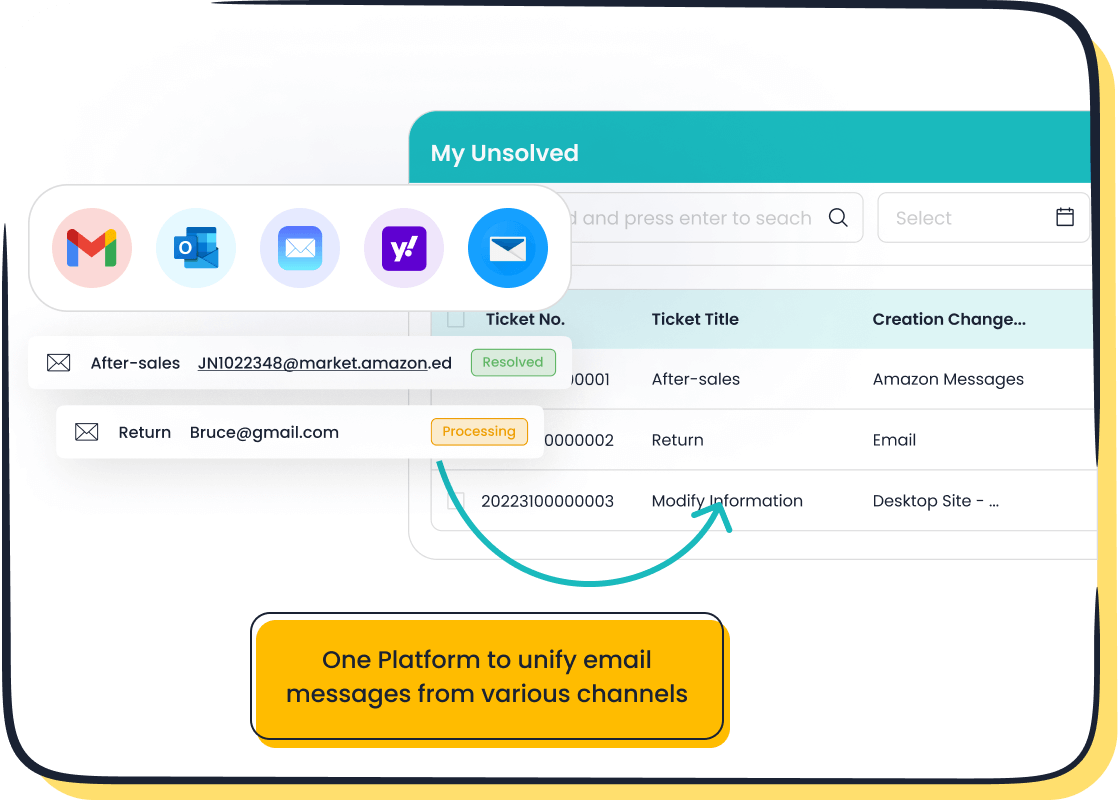
While Zendesk and Freshdesk offer strong ticket-centric solutions, some businesses seek a more integrated approach. Sobot emerges as a modern, all-in-one contact center solution. It combines the strengths of its competitors into a single, unified platform.
Sobot's All-in-One Platform Advantage
Sobot provides a comprehensive customer contact solution from a single vendor. This eliminates the need for managers to buy and manage separate systems for different functions. The platform is built to be integrated, omnichannel, and intelligent.
- It unifies all customer channels into one service platform.
- It offers a complete suite, including a call center, live chat, and ticketing.
- It uses a powerful Five-AI system to enhance every interaction.
- This integrated design leads to quicker response times and better value.
AI-Powered Ticketing and Automation
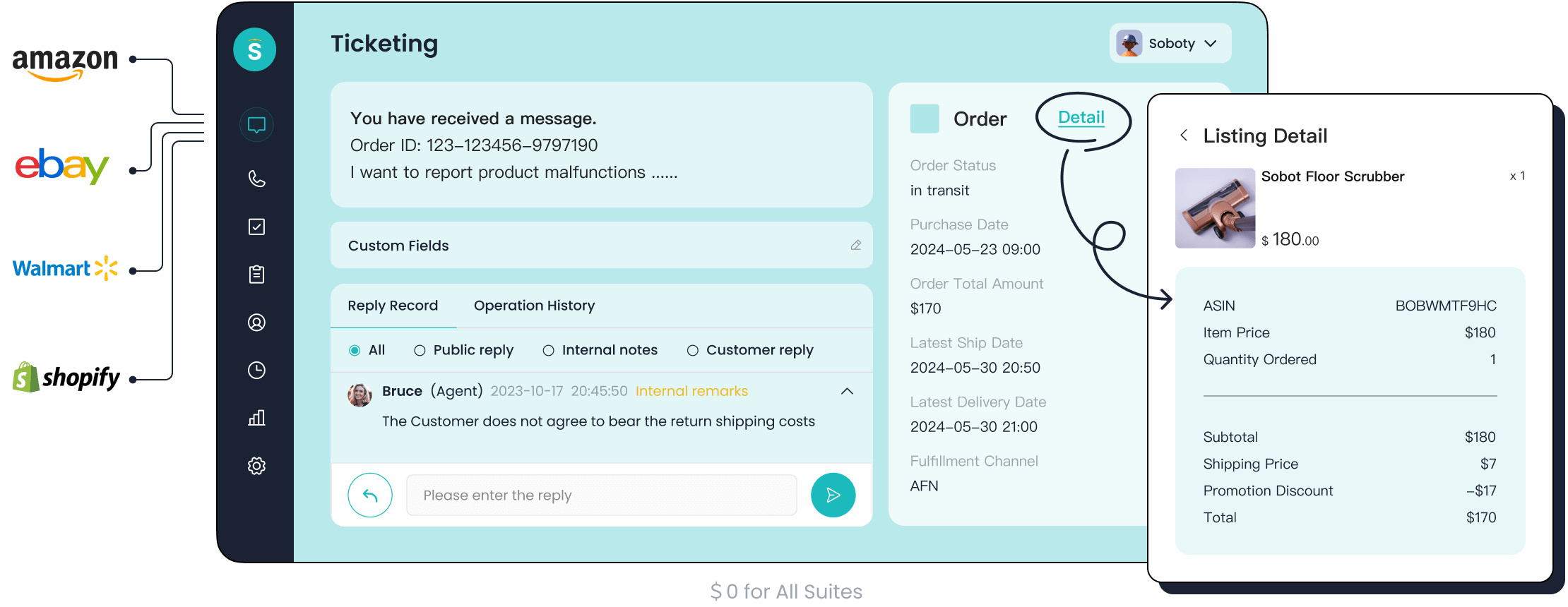
The Sobot Ticketing System uses AI to streamline support operations. It automates ticket creation, routing, and responses, which reduces manual work for agents. The system unifies communications from email, chat, and other channels for efficient management.
Key Feature: Sobot allows teams to define and monitor Service Level Agreements (SLAs). This ensures that customer issues receive timely attention based on priority and other criteria.
Sobot's chatbots also deliver powerful automation. They can increase automated resolution rates by 15-35%, freeing human agents to handle more complex problems.
Proven Success in Enterprise
Sobot has a strong track record with major global brands. For example, the smart device innovator OPPO partnered with Sobot to improve its service efficiency. By implementing Sobot's AI-driven solutions, OPPO achieved remarkable results. The company saw an 83% chatbot resolution rate and a 57% increase in its repurchase rate. This success demonstrates Sobot's ability to handle enterprise-level demands and deliver significant business impact.
Value for Diverse Industries
Sobot's flexible platform delivers value across many sectors. Its solutions are trusted by leading companies in various fields. This wide adoption shows the platform's capability to adapt to different business needs.
| Company | Industry |
|---|---|
| OPPO | Smart Devices |
| Michael Kors | Retail (Fashion) |
| KLM Royal Dutch Airlines | Airlines |
| Urban Company | Home Services |
| Meesho | E-commerce |
This versatility makes Sobot a compelling option for businesses looking for a scalable and effective Kustomer alternative.
How to Replace Kustomer with Other Tools: A Decision Guide
Choosing a new platform is a major decision. This guide provides a clear path for businesses that want to replace Kustomer with other tools. It covers key steps from assessing needs to planning the final switch.
Assessing Your Business Needs
Before you select a new system, you must understand your current performance. Businesses should evaluate key metrics to identify strengths and weaknesses. These metrics fall into two main categories:
- Quantitative Metrics: These numbers show how fast and efficient your team is. Examples include First Response Time (FRT), Average Resolution Time (ART), and First Contact Resolution (FCR).
- Qualitative Metrics: These scores measure how customers feel about your service. Key examples are Customer Satisfaction Score (CSAT) and Net Promoter Score (NPS).
Reviewing this data helps you define what you need from a new platform.
Comparing User Profiles & Scalability
Different platforms suit different team structures and growth plans. Agents and administrators have distinct roles, and a platform must serve both well.
| User Profile | Key Functions |
|---|---|
| Agent | Manages tickets, communicates with customers, and collaborates with team members. |
| Administrator | Sets up workflows, manages user permissions, and analyzes team performance. |
Zendesk is built for large, complex operations that need to scale quickly. Freshdesk is often better for small to mid-sized teams seeking a simple, budget-friendly way to grow. Considering your team's future is vital when you replace Kustomer with other tools.
Analyzing Pricing Models & Value
Most helpdesk platforms use a per-agent pricing model. This means you pay a fixed monthly fee for each user. While this model is predictable, businesses should watch for hidden costs. Some platforms charge extra for AI features, advanced support, or access for occasional agents. Understanding the total cost of ownership is essential to finding the best value as you replace Kustomer with other tools.
Planning for Data Migration
Moving your data to a new system requires careful planning. A smooth transition prevents data loss and service interruptions. Follow these steps for a successful migration:
- Clean Your Data: Before moving anything, remove duplicate contacts, old tickets, and irrelevant information.
- Prepare the New System: Set up agent profiles, custom fields, and workflows in the new platform ahead of time.
- Plan the Transfer: Choose a time with low traffic to perform the migration. Use a dedicated service to ensure all data fields map correctly from the old system to the new one.
Choosing a platform to replace Kustomer with other tools involves a clear decision. Zendesk offers deep customization for large enterprises. Freshdesk provides user-friendly operations for SMBs. Sobot stands out as a powerful all-in-one alternative. It uses strong AI to improve resolution rates and deliver proven scalability.
Your Next Step:
- Choose Zendesk for complex, enterprise-level customization.
- Choose Freshdesk for a simple, budget-friendly SMB solution.
- Consider Sobot for a unified, AI-driven platform that enhances efficiency.
This guide empowers businesses to make a confident decision. Explore modern solutions like Sobot to meet today's customer service demands.
FAQ
What is the main difference between Zendesk and Freshdesk?
Zendesk offers deep customization for large enterprises with complex needs. Freshdesk provides a user-friendly and affordable solution for small to mid-sized businesses. Each platform serves a different market segment.
Why consider Sobot over traditional helpdesks?
Sobot offers a unified, all-in-one contact center solution. It integrates AI across all channels, including its ticketing system, live chat, and call center. This approach improves efficiency and provides a single platform for all customer interactions.
How important is AI when you replace Kustomer with other tools?
💡 AI is very important for modern support teams. It automates repetitive tasks, provides agents with smart suggestions, and powers chatbots. This frees up human agents to focus on solving more complex customer problems, improving overall service quality.
Can Sobot handle enterprise-level customer service?
Yes, Sobot has proven success with large global brands like OPPO. Its platform demonstrates scalability and delivers significant results, such as achieving an 83% chatbot resolution rate. This shows its capability to manage high-volume, enterprise-level demands effectively.
See Also
Leading Customer Service Software Solutions: A 2024 Top 10 Review
Comparing Top 10 Live Chat Tools: Shopify And Its Rivals
A Comprehensive Guide To Live Chat Support Cost Comparison
Expert Tips For Selecting Social Media Customer Service Software

