Proven Methods for Handling CMS Account Problems Quickly

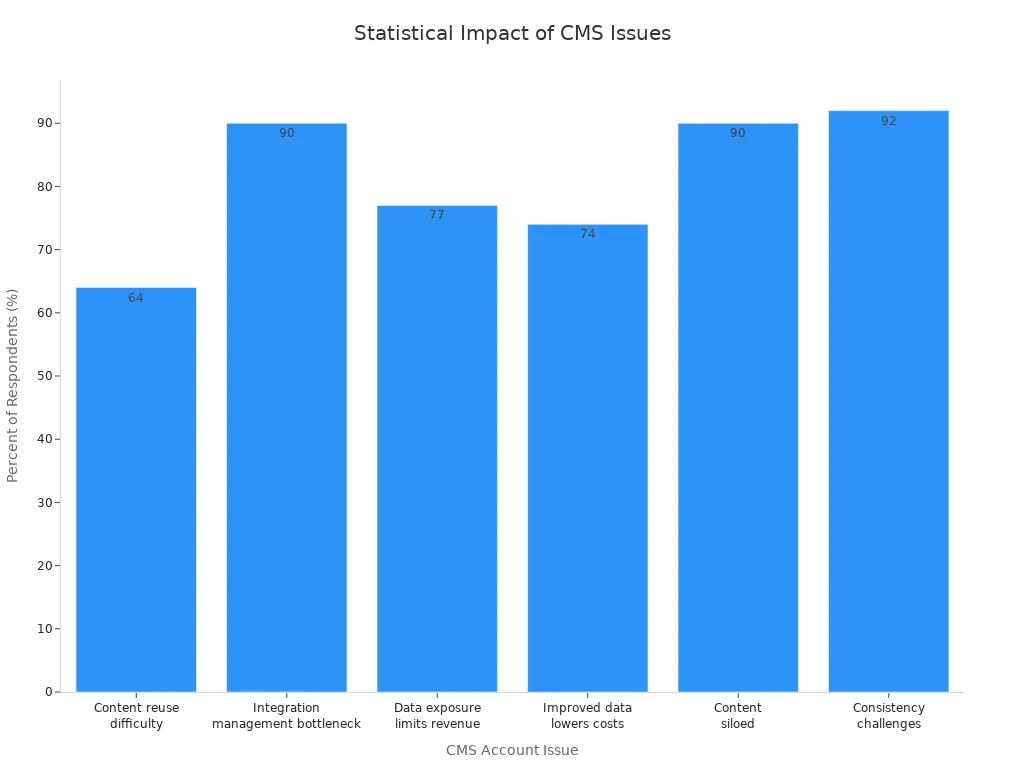
You know how a single CMS account issue can disrupt your day as a customer service representative. Imagine a customer locked out, waiting for help, while your team scrambles to restore access. The pressure mounts, and the impact grows. Studies show 92% of businesses struggle to keep data consistent, hurting customer trust and brand identity.
When you use Sobot AI and Sobot call center solutions, you get faster, more reliable fixes. You help your customers feel valued, and you make your job as a customer service representative easier. These solutions let you resolve issues in customer support cms with less stress for everyone.
Identify Issues
Recognize Account Problems
You know how frustrating it feels when you can’t log in or access your dashboard in a cms. Maybe you see an error message, or your password just won’t work. Sometimes, you might notice missing permissions or locked features. These are all signs of account problems in content management systems. If you spot these issues early, you can fix them before they affect your work in the customer support cms.
Tip: Always check if the problem happens on just one account or across several accounts. This helps you figure out if it’s a user issue or a bigger cms problem.
Gather Key Information
Before you jump into fixing things, gather the facts. Write down the username, the time the issue started, and any error messages you see. Ask the user what they were doing before the problem began. This information helps you explain the issue clearly if you need to contact your cms admin or support team. In customer support cms, details matter. The more you know, the faster you can solve the problem.
- Collect these details:
- Username and role
- Error messages
- Recent changes in the cms
- Affected features in the content management systems
Assess Impact on Customer Support CMS
Now, think about how this account problem affects your customer support cms. Does it stop you from answering tickets? Are customers waiting longer because you can’t access certain tools? If the cms issue blocks your team, it can hurt customer satisfaction. You want to fix these problems fast to keep your customer support cms running smoothly. Always check if the issue is just annoying or if it stops your whole workflow in the content management systems.
Troubleshooting Common CMS Issues
Use Sobot Ticketing System Tools
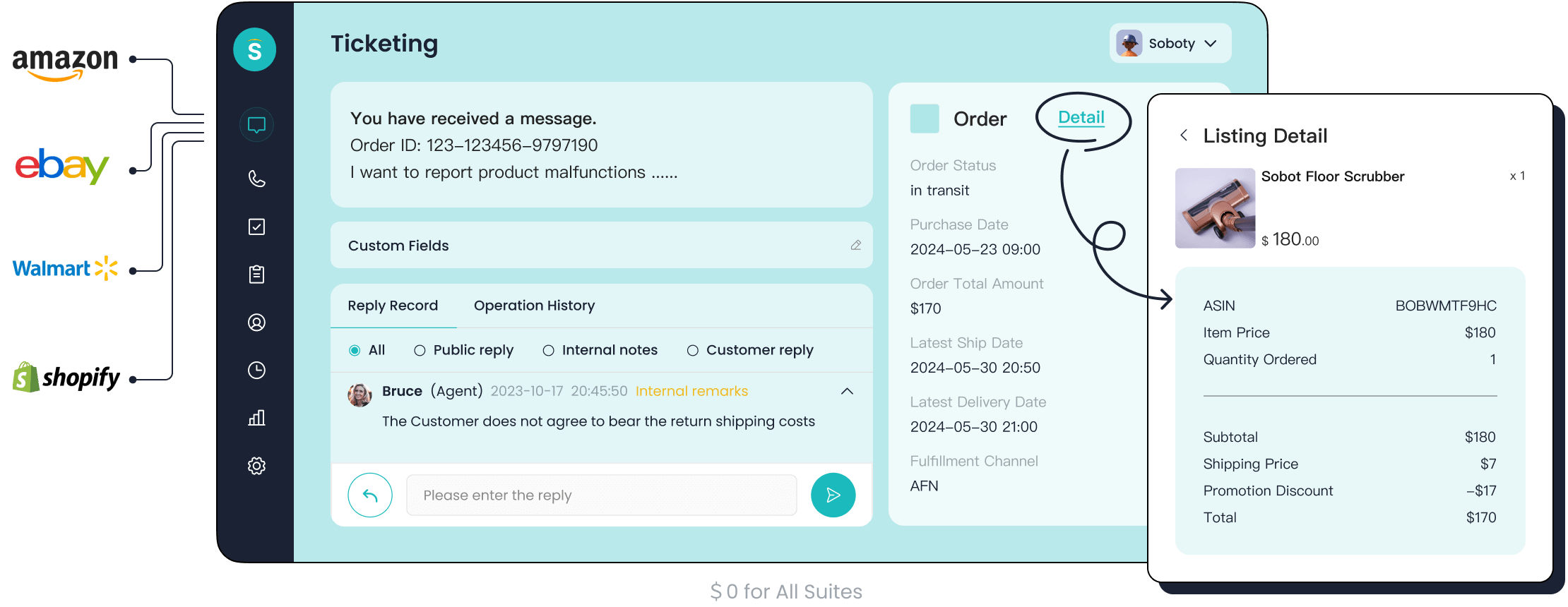
When you start troubleshooting common cms issues, Sobot’s Ticketing System can make your job much easier. You can track every step of diagnosing the problem, from the first report to the final fix. The system lets you assign tickets, set priorities, and use AI-powered suggestions to speed up troubleshooting. If you run into plugin problems or database issues, you can merge related tickets and use canned responses for faster communication. This approach helps you keep all cms account issues organized and ensures nothing gets missed. You can also minimize plugins to reduce conflicts and keep your cms running smoothly.
Check System Logs and Notifications
You need to look at system logs and notifications when troubleshooting. These records show what happened before and during the issue. They help you spot plugin problems, database issues, or even user errors. Here’s a quick look at how logs help you with troubleshooting:
| Evidence Description | Role in Identifying CMS Account Issues |
|---|---|
| Detailed records of system activity | Enable event reconstruction and facilitate anomaly detection. |
| Real-time alerts for logging failures | Ensure timely corrective actions are taken. |
| Centralized logging | Supports comprehensive monitoring and incident investigation. |
| Regular reviews of audit records | Helps identify signs of compromise or unauthorized activity. |
If you check for plugin conflicts or database issues, you can often find the root cause faster.
Apply Standard Troubleshooting Steps
You should always follow standard operating procedures when troubleshooting common cms issues. These steps help you stay organized and efficient. Here’s a table of some helpful SOPs:
| SOP Title | Description | Last Updated |
|---|---|---|
| SOP-4: Verify Identity and Resolve Potential Data Matching Issues | Guidelines for verifying identity and addressing data matching issues in CMS accounts. | March 2022 |
| Data Matching Inconsistencies (DMIs) | A PDF resource for resolving data matching inconsistencies. | N/A |
| How to Resolve Income Data Matching Inconsistencies | A PDF guide specifically for income-related data issues. | N/A |
| Microlearning: Application Walkthrough | A resource for assisting consumers with applications. | N/A |
| Microlearning: Account Creation | Guidance on identity verification and screening questions. | N/A |
| Microlearning: Post-Enrollment Assistance | Information on resolving potential data matching issues post-enrollment. | N/A |
By following these steps and using Sobot’s automation features, you can resolve common cms issues quickly. This keeps your cms stable and your customers happy.
Reset Credentials and Access
Password and 2FA Recovery
You might forget your password or lose your two-factor authentication device. These problems can lock you out of your cms. When you face user access issues, start with the password reset option on your cms login page. Most systems send a reset link to your email. Follow the steps and create a new password. If your cms uses two-factor authentication, look for a backup code or a way to reset 2FA. Always keep your backup codes in a safe place. This step helps you regain access quickly and keeps your cms secure.
Tip: Use a password manager to store your cms credentials. It saves time and prevents user access issues.
What If Recovery Fails?
Sometimes, password or 2FA recovery does not work. Maybe you never received the reset email, or your backup codes are missing. In these cases, you need to contact your cms administrator. Give them your username, the time you lost access, and any error messages. This information helps them solve your user access issues faster. Do not try to guess passwords too many times. Too many failed attempts can lock your cms account for longer.
Sobot Support for Account Access
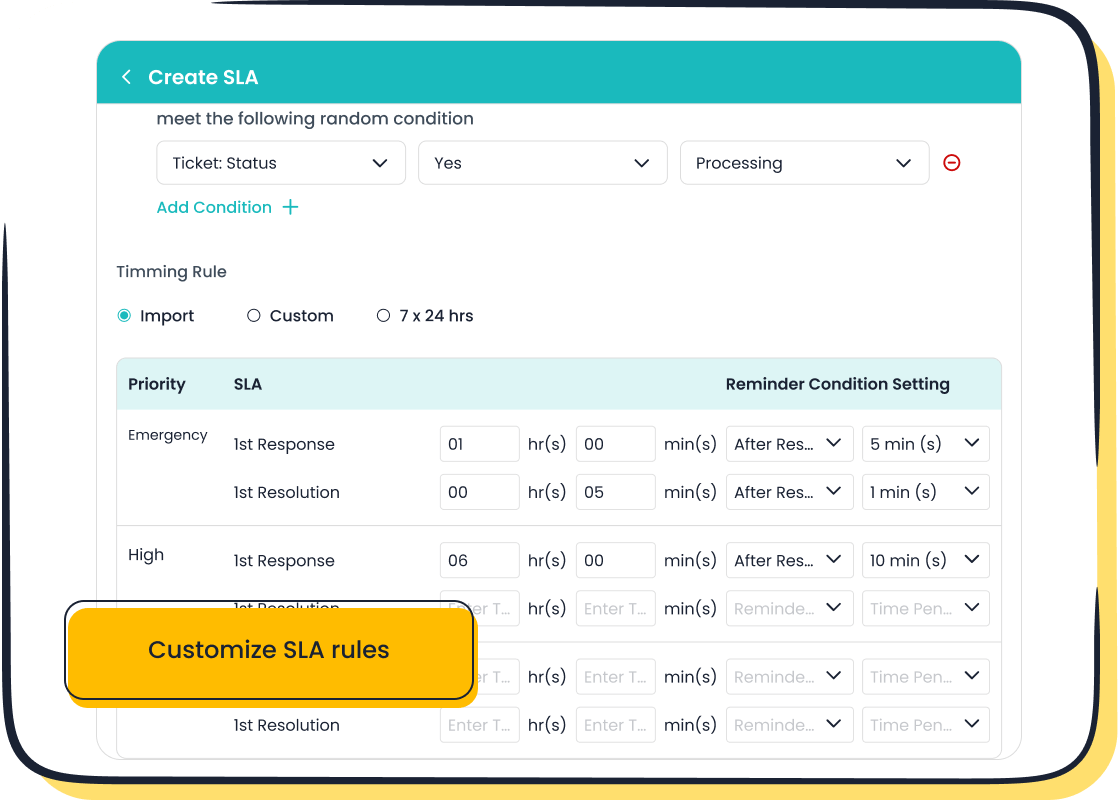
If you still cannot access your cms, Sobot’s Ticketing System can help. Open a ticket and describe your user access issues in detail. The system tracks your request and keeps you updated. Sobot’s tools let you set the priority of your ticket, so urgent cms access problems get solved first. You can also use the system to check the status of your recovery. This process makes it easy to regain access and get back to helping customers in your cms.
System Updates and Outages
Monitor CMS Status
You need to keep an eye on your cms at all times. System updates can bring new features, but sometimes they cause unexpected outages. Check your cms dashboard for real-time status updates. Many platforms offer a status page or notifications for planned maintenance. You can also set up alerts to get notified if your cms goes down. This helps you react fast and keep your team informed. If you use Sobot’s Ticketing System, you can track incidents and see how updates affect your cms performance. Staying proactive means you spot problems before they impact your customers.
Communicate with Teams and Customers
When your cms faces an outage, clear communication is key. You want everyone to know what’s happening. Use a mix of channels to reach your team and customers. Try email, chat, and even SMS. This way, no one misses important updates. Regular training helps your team understand how to use these tools during cms outages. Stay flexible. Sometimes, you need to switch your approach if the situation changes. Here are some top strategies:
- Use multi-modal communication systems to reach everyone.
- Train employees regularly on emergency plans and communication tools.
- Stay flexible and adapt your response as needed.
Tip: Keep your messages short and clear. Let people know when you expect the cms to be back online.
Use Sobot Omnichannel Solution
Sobot’s Omnichannel Solution gives you a single workspace for all your cms communications. You can manage updates, outages, and customer questions from one place. The platform supports voice, email, chat, and social media. This means you never miss a message, even during a cms outage. Sobot’s analytics help you see how updates affect customer satisfaction. You can learn more about the Omnichannel Solution here. With Sobot, you keep your cms running smoothly and your customers in the loop.
Contact Support and Manage Complaints

Prepare Support Requests
When you face a problem in your cms, you want help fast. Start by preparing your support request. Write down what happened, when it started, and what you tried to fix it. The complaint management system in your cms helps you organize this information. You can use the Sobot Ticketing System to submit your request. This complaint management system lets you set the urgency and track your ticket. You get updates as your support team works on your issue. The complaint management system keeps everything in one place, so you never lose track.
Use Complaint Management System
A good complaint management system makes your job easier. In your cms, you can use the complaint management system to log every issue. The Sobot Ticketing System is a strong complaint management system. It lets you merge tickets, set priorities, and use canned responses. You can see all your cms problems in one dashboard. The complaint management system sends smart notifications, so you know when someone updates your ticket. This complaint management system also helps you follow up on customer complaints. You can check the status anytime. The complaint management system supports efficient communication between you and your support team. You can read more about Sobot’s complaint management system here.
Provide Essential Details
You need to give clear details when using the complaint management system. Always include your username, the cms area with the problem, and any error messages. The complaint management system uses this information to help your support team solve the issue faster. If you have screenshots, add them to the complaint management system. This step helps with complaint handling and makes sure your customer complaints get solved quickly. The complaint management system works best when you give all the facts. You help your cms run better and keep your customers happy.
Prevent Future Issues
Best Practices for CMS Security
You want your cms to stay safe from threats. Start with smart habits. Always use strong passwords and change them often. Limit who can access your cms. Set up regular backups so you never lose important data. Here’s a quick look at top security measures you can use to protect your cms accounts:
| Security Measure | Description |
|---|---|
| Concurrent session control | Limits the number of sessions for each user to stop unauthorized access. |
| Device lock | Locks devices after inactivity to keep your cms safe. |
| Pattern-hiding displays | Hides sensitive info on screens to block prying eyes. |
| Session termination | Ends sessions after inactivity to lower risk. |
| Account monitoring for atypical usage | Watches for strange activity to catch problems early. |
Tip: Set up regular backups and test your backup process. This way, you can restore your cms quickly if something goes wrong.
Regular Updates and Training
You need to keep your cms updated. Updates fix bugs and close security gaps. Make it a habit to check for updates and install them right away. Train your team on new features and security steps. When everyone knows what to do, your cms stays healthy. Share proactive tips for a healthy cms during team meetings. Remind everyone to use regular backups and review access rights often.
Leverage Sobot Analytics
Sobot Analytics helps you spot patterns and stop problems before they grow. You can use predictive analytics to see what issues might come up in your cms. Here’s how Sobot Analytics helps you with proactive tips for a healthy cms:
- It finds trends in customer questions and cms account issues.
- It helps you fix common problems before they happen again.
- It boosts your team’s efficiency and keeps your cms running smoothly.
With Sobot Analytics, you get alerts and reports that help you plan ahead. You can learn more about Sobot Analytics and its benefits for your cms here.
You can solve cms account problems fast when you follow clear steps. Speed and accuracy matter in every cms. Quick fixes mean less waiting and happier customers. Here’s a quick checklist for your cms:
- Reduce cms wait times for better satisfaction
- Use a cms knowledge base for self-help
- Deliver cms info quickly with strong tools
- Track every cms issue with Sobot’s system
- Communicate cms updates to your team
- Keep your cms secure with regular checks
- Train your team on cms best practices
- Use cms analytics to spot trends early
- Merge cms tickets for easy tracking
- Set cms priorities for urgent problems
Want to make your cms support even better? Try Sobot’s Ticketing System or share your own cms tips below!
FAQ
What should you do if you can’t log in to your cms?
First, check your username and password. Try the password reset option. If you still can’t access your cms, contact your admin or use the Sobot Ticketing System.
How can you keep your cms account safe?
Use strong passwords for your cms. Change them often. Never share your login details. Always log out when you finish using your cms. Set up two-factor authentication if possible.
Why does your cms sometimes show errors after updates?
Updates can change how your cms works. Sometimes, plugins or settings stop working right. Check system logs or use the Sobot Ticketing System to report cms errors.
See Also
Navigating Depop's Live Chat for Fast Assistance
Essential Strategies for Success with Depop Live Chat
Excelling in Live Chat for Effective Customer Service
Enhancing SaaS Customer Support Using Live Chat Techniques
Ten Essential Steps for Effective Omnichannel Support Systems

