Your 2026 Automated Ticketing System Guide

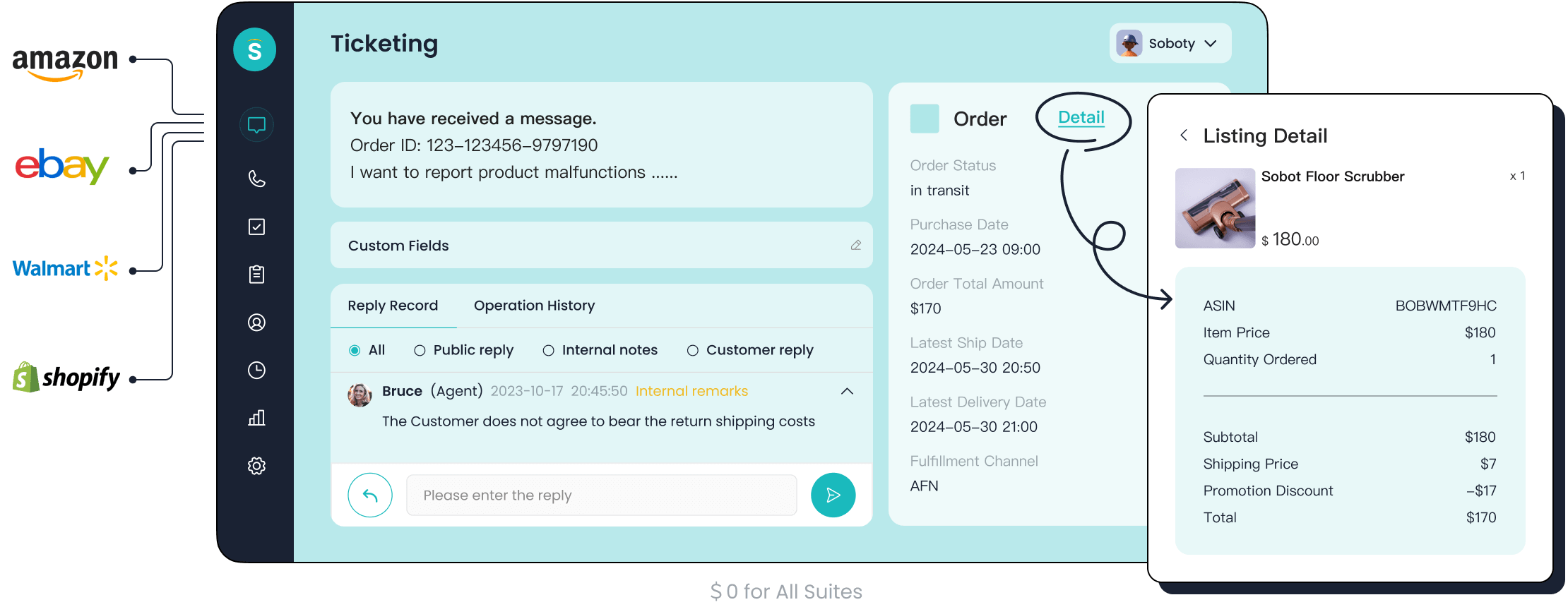
An automated ticketing system is the digital backbone of modern customer support. Are you struggling with slow ticket response times? With 77% of agents facing increased workloads, automation is no longer an option—it's a necessity. This automation boosts efficiency and elevates the customer experience. The market for automated ticketing systems is projected to reach $10.8 billion. This guide is your roadmap to selecting a future-proof automated system. Solutions from Sobot, using Sobot AI in the Sobot call center, exemplify the power of automated ticketing systems.
What Is an Automated Ticketing System?
An automated ticketing system is a software tool that captures, manages, and tracks customer support requests. It organizes every issue into a "ticket." This system gives your support team a central place for all inquiries. You can see how automated ticketing systems streamline your entire support operation. They are essential for modern ticket management.
The Core Function: From Request to Resolution
The journey of a support ticket follows a clear path. An automated ticketing system manages each step of this ticketing process for you. This ensures a smooth journey from the initial request to the final ticket resolution.
- Creation: The system receives a customer issue and creates a ticket. It then sends an automatic acknowledgment to the customer.
- Triage: The system analyzes the ticket. It assigns a priority based on urgency and customer type.
- Assignment: The ticket is automatically routed to the best agent or department. This step balances team workloads.
- Resolution: The agent works on the problem. They provide a solution and update the ticket with details.
- Closure: The system closes the ticket after you confirm the customer is satisfied. It archives the ticket for future reference.
Differentiating Manual vs. Automated Ticketing Systems
You might wonder about the difference between manual methods and automated ticketing systems. The right choice directly impacts your team's efficiency and your customers' happiness. An automated ticketing system offers significant advantages over a manual ticketing process.
| Feature | Manual Ticketing Process | Automated Ticketing Process |
|---|---|---|
| Ticket Creation | Agents create tickets by hand. | System creates tickets automatically. |
| Routing | A manager assigns tickets. | Smart rules assign tickets instantly. |
| Response Time | Slow and depends on agent availability. | Fast, with automated acknowledgments. |
| Tracking | Difficult and prone to human error. | Centralized and easy to monitor. |
How Automation Transforms the Support Workflow
Automation fundamentally changes how your support team operates. It removes repetitive tasks and empowers your agents. Automated ticketing systems use intelligent workflows to handle administrative duties. This automation allows agents to focus on solving complex problems. For example, automated workflows can update customer records or forward tickets between departments without any manual effort.
The automation in automated ticketing systems also powers self-service options. This reduces the number of common questions your agents receive. With automated tools, your team can dedicate more time to building strong customer relationships. This shift improves both agent productivity and overall service quality.
Why Your Business Needs an Automated Ticketing System
Adopting an automated ticketing system offers clear benefits for your business. It transforms your customer support from a cost center into a value driver. The benefits of automated ticketing software extend beyond simple organization. They directly impact your team's performance and your company's bottom line.
Increase Agent Efficiency and Productivity
An automated ticketing system empowers your agents to do more. Automation handles repetitive tasks, freeing up your team for complex customer support requests. This focus boosts efficiency. Studies show significant gains:
- A Zendesk survey reported a 22% increase in agent productivity.
- Salesforce noted agents spend up to 40% less time on administrative work.
These automated ticketing systems use smart workflows to assign tickets, which improves the entire ticketing process.
Reduce Operational Costs
You can lower operational costs with an automated ticketing system. Automation reduces the need for manual intervention in the ticketing process. This saves time and money. Automated ticketing systems also enhance self-service options. Customers find answers on their own, which lowers the number of support tickets. This efficiency allows your business to handle more volume without hiring more staff.
Elevate Customer Satisfaction and Loyalty
A great customer experience builds loyalty. An automated ticketing system delivers faster issue resolution. Quick and effective responses improve your brand's perception. This leads to boosted customer satisfaction and higher retention rates. The benefits of automated ticketing software include improved response times, which directly contribute to a better customer journey.
Note: Optimizing the ticketing process is key. While speed is important, the quality of the resolution ensures customers feel valued and are more likely to advocate for your brand.
Gain Data-Driven Insights for Growth
Automated ticketing systems provide valuable data. You can analyze this information to make smart business decisions. These insights help you:
- Identify recurring customer problems.
- Understand customer sentiment about your products.
- Assess your support team's performance.
- Optimize service delivery by finding bottlenecks.
These automated analytics give you a clear view of your customer support operations.
Ensure Scalability for Your Operations
Your business needs to grow without limits. An automated system scales with you. As your company expands, automated workflows manage the increased volume of inquiries. This automation ensures you can maintain high-quality service. You can boost ticket resolution times even during peak periods. This makes automated ticketing systems essential for future-proofing your operations.
Key Features for Your 2026 System

Selecting the right automated ticketing system means looking for features that prepare you for the future. The best features of automated ticketing software use automation to make your team smarter and faster. Here are the essential capabilities your 2026 system must have.
AI-Powered Ticket Routing and Categorization
Your system should use AI to intelligently route and categorize tickets. AI understands customer intent, not just keywords. This ensures tickets go to the right agent on the first try. This automated process is faster and more accurate than manual routing, reducing delays and improving your ticketing process. An AI-powered ticketing system like Sobot's uses this technology to streamline ticket management.
Omnichannel Support for a Unified Experience
Customers expect to contact you on their preferred channel. Your automated ticketing system must unify all communication into one view. For 2026, you need to support key channels to provide a complete experience.
- Phone and Email
- Live Chat
- Social Media
- Self-service portals
- Messaging apps like WhatsApp
This approach ensures a consistent and seamless ticketing process for every customer.
Integrated Self-Service and Knowledge Bases
An integrated knowledge base empowers customers to find answers themselves. This feature reduces ticket volume for your agents. Your system should suggest relevant articles to customers as they type their questions. To make this work, you must regularly update your knowledge base content and train your team on how to use it effectively within their workflows.
Intelligent Workflow Automation Rules
Modern AI ticketing systems go beyond simple routing. They use intelligent automated workflows to handle complex tasks. These workflows can draft replies for common issues or fetch customer data from other systems. This level of automation learns from how your team resolves past tickets, making your automated workflows smarter over time. This is a core part of automated workflow management.
Robust Analytics and Performance Dashboards
You need data to improve your support operations. A great automated ticketing system provides clear dashboards with key metrics. You should track performance indicators like:
First Contact Resolution (FCR): The percentage of tickets solved in one interaction. Average Resolution Time: The average time it takes to close a ticket. Customer Satisfaction (CSAT): Direct feedback on the quality of support. These analytics help you spot trends and optimize your workflows.
Seamless CRM and E-commerce Integrations
Integrating your automated ticketing systems with CRM and e-commerce platforms is crucial. This connection gives your agents a full 360-degree view of the customer, including their purchase history and past interactions. This automated data sharing helps your team provide personalized and efficient support, which improves the entire ticketing process. The best features of automated ticketing software include these vital integrations.
How to Implement Automated Ticketing Software
Choosing and setting up an automated ticketing system is a structured process. A successful implementation transforms your customer support operations. This guide on how to implement automated ticketing software breaks the journey into six clear steps. Following this plan ensures a smooth transition and maximizes your return on investment.
Step 1: Assess Your Business Needs and Goals
You must first define what success looks like for your team. Start by evaluating your core business needs. Consider your customer base and the common issues they face. Look at your support team's size, structure, and current ticket volume. Clearly defining your goals and challenges is the foundation for a successful project. This initial assessment helps you identify the specific problems you want the new automated ticketing software to solve.
Step 2: Select the Right Software Solution
With your goals defined, you can now find the right automated ticketing software. You need to compare vendors based on several key criteria. A thorough evaluation ensures the system you choose can grow with your business.
- Identify Core Features: List the must-have features for your team. This includes ticket management, omnichannel support, and AI-powered automation capabilities.
- Decide on the Budget: Understand the total cost. Look at initial setup fees and ongoing subscription costs to calculate your expected return on investment.
- Assess Scalability: Ensure the system can handle future growth. It should allow you to add new agents, features, and channels easily.
- Check Integrations: Your automated ticketing system must connect with your other tools, like your CRM or e-commerce platform. Check for pre-built integrations and API access.
- Prioritize Ease of Use: The software should be intuitive for both agents and customers. A user-friendly interface reduces training time and improves adoption.
- Inspect Security: Verify that the vendor complies with data security regulations. Your customer data must be protected.
- Request a Demo: Always take a free trial or schedule a demo. Involve your support team to get their feedback before making a final decision.
Step 3: Design and Configure Your Workflows
After selecting your software, you will design your support workflows. This step is where you translate your goals into automated actions. Begin by mapping out your ideal ticket lifecycle, from creation to resolution. A common challenge is that some systems have rigid, pre-built automations. Choose a flexible platform like Sobot that allows you to create custom workflows tailored to your specific needs.
To build effective workflows, you should:
- Define clear goals for each workflow.
- Create automation rules for routing tickets to the right agent or department.
- Set up chatbots to handle simple, repetitive questions.
- Build a knowledge base to empower customers with self-service options.
Properly configured workflows are the engine of your automated ticketing system.
Step 4: Plan Data Migration and Integration
Moving your existing data is a critical part of the implementation. You need a solid plan to transfer customer history and past tickets without losing information. This process involves several phases, including data assessment, cleansing, mapping, and testing. You must also decide on a migration strategy.
| Strategy | Pros | Cons | Best For |
|---|---|---|---|
| Big Bang | Fast and simple | High risk of downtime | Smaller datasets with low complexity |
| Phased | Lower risk, easier rollback | Longer project timeline | Large, mission-critical systems |
Your plan should establish a clear timeline, allocate resources, and include thorough testing to ensure data integrity. This careful planning prevents disruptions to your customer support.
Step 5: Train Your Customer Service Team
Your team's success depends on great training. Onboarding your agents to the new automated ticketing software is essential for adoption and efficiency. Modern training goes beyond simple manuals. Consider using dynamic methods to build confidence and skill.
- Simulated Workflow Training: Let agents practice in a risk-free environment. This helps them build muscle memory for navigating the new system and following escalation workflows.
- AI-Powered Roleplay: Use AI to simulate realistic customer interactions. This allows agents to practice empathy and de-escalation safely.
- In-App Guidance: Provide contextual tips and task lists directly within the software. This reinforces learning during their daily work and reduces errors.
Effective training ensures your team can leverage the full power of the new automation tools from day one.
Step 6: Launch, Monitor, and Optimize
The final step is to go live. But the work on how to implement automated ticketing software does not end at launch. You must continuously monitor performance and optimize your setup. Track key metrics to measure success and identify areas for improvement.
Key Metrics to Monitor Immediately:
- First Response Time: How quickly are you first responding to customers?
- Average Resolution Time: How long does it take to solve a ticket from start to finish?
- Customer Satisfaction (CSAT): Are your customers happy with the support they receive?
- First Contact Resolution (FCR): How many issues are you solving in a single interaction?
Analyzing this data helps you refine your workflows, update your knowledge base, and provide better coaching to your agents. This ongoing optimization ensures your automated system delivers long-term value.
Success Story: How OPPO Enhanced Customer Support
Real-world examples show the power of automation. See how leading smart device brand OPPO transformed its customer support with Sobot. This story highlights how you can overcome similar challenges.
The Challenge: Managing High Inquiry Volume
OPPO is a global brand serving over 600 million users. During peak shopping seasons, the company faced a massive surge in customer questions. This high volume overwhelmed their human agents. Customers experienced long wait times, and agent workload became unmanageable. OPPO needed a solution to provide fast, efficient service without sacrificing quality.
The Solution: Sobot's Human-Machine Cooperation
OPPO implemented Sobot's integrated solution. This created a powerful human-machine partnership.
- AI Chatbot: Sobot's chatbot immediately handled common and repetitive questions. This freed up human agents.
- Ticketing System: Complex issues were automatically converted into tickets. These tickets were routed to the right agents for expert handling.
This combination streamlined the entire workflow. It allowed OPPO's customer support team to focus on issues that required a human touch. Sobot also helped optimize OPPO's knowledge base, reducing maintenance efforts by 90%.
The Results: A 57% Increase in Repurchase Rate
The results of this partnership were remarkable. By automating its front-line support, OPPO achieved significant gains across the board.
Key Achievements with Sobot:
- 83% chatbot resolution rate
- 94% positive feedback rate from customers
- 57% increase in customer repurchase rate
This data, detailed in OPPO's success story, proves that a smart system improves more than just ticket resolution. It builds customer loyalty and directly drives business growth.
Top Automated Ticketing Software of 2026
Choosing the right automated ticketing software is a major decision for your business. The best platform depends on your team's size, industry, and specific goals. To help you decide, here is a look at the best automated ticketing software of 2026, each with its own unique strengths.
Sobot: Best for All-in-One Contact Center Solutions
If you want to unify your entire customer support operation, Sobot is the leading choice. It goes beyond a simple automated ticketing system by offering a complete, all-in-one contact center solution. This integrated approach ensures you provide a seamless experience for every customer, no matter how they contact you.
Sobot combines several powerful tools into one platform:
- AI Chatbots: Handle common questions 24/7 with an automated, ChatGPT-enhanced bot.
- Live Chat: Manage messages from your website, app, and social media in one inbox.
- Cloud Call Center: Use intelligent call routing and IVR for efficient voice support.
- Ticketing System: Capture and resolve complex issues that require agent follow-up.
This omnichannel connectivity means your team can manage chats, calls, and tickets from a single desk. The platform’s intelligent, AI-powered engagement helps you deliver smart and automated interactions. This makes Sobot one of the best automated ticketing software options for businesses that want to connect sales, marketing, and customer support into one cohesive journey.
Freshdesk: Best for AI and User-Friendliness
Freshdesk is known for its powerful AI features and clean, easy-to-use interface. This makes it a strong choice for teams that need to get up and running quickly. The automated ticketing software uses its AI assistant, Freddy AI, to automate ticket sorting and suggest replies for agents.
Key features that make Freshdesk stand out include:
- AI Copilot: Assists agents by helping them draft replies and summarize long conversations.
- Omnichannel Support: Brings together email, chat, phone, and social media interactions.
- Collision Detection: Prevents multiple agents from replying to the same ticket at once.
Freshdesk is a solid option if your main goal is to leverage AI within a user-friendly automated ticketing system.
Jira Service Management: Ideal for IT and Internal Support
Jira Service Management is built for IT and internal support teams. As part of the Atlassian product family, it excels at managing service requests, incidents, and changes. This platform helps you connect your development and IT operations teams to resolve issues faster. It is one of the top AI ticketing systems for technical environments.
"We’ve really seen the value of being able to funnel requests into a central location, from both recording it to see trends and to streamline the workflow. It’s been a really positive cultural shift." - Jeff Lai, Internal Infrastructure, Canva
Jira provides customizable workflows and deep integration with tools like Slack, making it one of the most effective automated ticketing systems for internal processes.
HubSpot Service Hub: Perfect for Integrated CRM
If your business already uses HubSpot's CRM, the Service Hub is a natural fit. Its greatest strength is its seamless integration with the HubSpot platform. This connection gives your team a complete 360-degree view of every customer, combining sales, marketing, and service data.
With Service Hub, all customer interactions and support tickets are synchronized within the CRM. This empowers your team to deliver highly personalized and context-aware customer support. It is an excellent piece of automated ticketing software for businesses focused on building deep customer relationships.
Gorgias: The Top Choice for Ecommerce Brands
Gorgias is an automated helpdesk solution designed specifically for e-commerce brands. Its features are built to help online stores increase sales through better customer support. The platform offers deep, two-way integrations with major e-commerce platforms like Shopify, Magento, and BigCommerce.
What makes Gorgias unique for e-commerce includes:
- Order Management: Agents can edit, refund, or cancel orders directly from the ticket view.
- Intent Detection: Its AI is trained to recognize retail-specific intents like "refund" or "shipping issue" to trigger automated workflows.
- Revenue Reporting: You can track how many sales are generated from support interactions, proving the ROI of your team.
If you run an e-commerce business, Gorgias provides the specialized, automated tools you need to succeed.
Implementing an automated ticketing system is a strategic necessity for your business. The benefits are clear: you gain efficiency, reduce costs, and improve the customer experience. The future of support will rely even more on automation, with AI assistants acting as copilots for your agents. Use this guide as your blueprint to build a future-ready support operation. Your automated ticketing system is the first step. Now is the time to embark on your contact journey.
FAQ
How long does it take to set up an automated ticketing system?
You can set up a basic system in just a few days. A full implementation with custom workflows and data migration may take several weeks. The timeline depends on your team's size and the complexity of your needs.
Can I integrate my existing tools with the new system?
Yes. Most modern automated ticketing systems offer integrations. You can connect them with your CRM, e-commerce platforms, and communication tools. This creates a unified view of your customer data and improves your ticketing process.
What is the main benefit of an AI-powered ticketing system?
AI automates repetitive tasks for your team. It can categorize tickets, suggest replies, and route issues to the right agent automatically. This frees up your agents to focus on solving more complex customer problems, boosting overall efficiency.
How do I handle support from many different channels?
You need an omnichannel solution. Platforms like Sobot unify all your channels, including email, chat, and social media, into one inbox. This ensures your team can manage every conversation from a single place, providing a seamless customer experience.
See Also
Mastering IVR Software Setup: A Comprehensive Guide for Seamless Implementation
Unlocking Efficiency: Understanding the Mechanics of Call Center Automation
Exploring Key Features of Advanced Interactive Voice Response Systems
Ensuring Excellence: Your Guide to Call Center Quality Assurance Software
Seamless Customer Journeys: A Guide to Omnichannel Call Center Software

