Mastering Automated Communication

Your team feels overwhelmed by repetitive questions. You struggle to offer the round-the-clock availability for customer support that 26% of US consumers now expect.
What if you could answer queries instantly, free up your team, and improve customer satisfaction—all at once?
Mastering automated customer service is the key. This guide is your roadmap, showing how automated communication tools improve customer satisfaction. An effective implementation of customer service automation using ai customer service tools from Sobot enhances your automated customer support. The Sobot AI and Sobot call center solutions make this customer service automation simple. This implementation of customer service automation empowers your customer support team and creates excellent automated customer service. Your ai customer service and automated customer support will transform your customer support.
The Power of Automated Customer Support

Automated customer support uses technology to handle customer interactions without a human agent. This implementation of customer service automation frees your team to focus on complex problems. An effective automated customer service strategy is essential for modern business.
Defining Automation in Customer Service
Customer service automation is the use of technology to manage routine service tasks. This approach helps you provide excellent ai customer service. It involves several key components:
- Technology Integration: You use tools to handle common questions, allowing your team to focus on high-value work.
- Intelligent Systems: Your automated customer service uses AI to understand and respond to inquiries across chat, email, and social media.
- Task Management: The system performs tasks like providing order updates or routing tickets without direct human input.
How Automated Communication Tools Improve Customer Satisfaction
You want happy customers, and automation helps you achieve that. How automated communication tools improve customer satisfaction is by delivering speed and convenience. Faster response times directly lead to higher customer satisfaction scores. With automated customer service, you provide the round-the-clock availability that customers expect.
Since 81% of users prefer to solve issues on their own, providing self-service options like ai chatbots is critical. This is how automated communication tools improve customer satisfaction: they empower customers to find answers instantly. This successful implementation boosts customer satisfaction and loyalty. Knowing how automated communication tools improve customer satisfaction is the first step toward building a better customer support experience.
Key Benefits: Boosting Efficiency and Reducing Costs
Automated customer support delivers two major wins: greater efficiency and lower costs. Customer support automation ensures consistency in support and allows you to scale without overwhelming your team. Studies show customer service automation can reduce operational costs by up to 30%.
Smart device leader OPPO saw incredible results with their automated customer service implementation. By using a chatbot for repetitive questions, they transformed their customer support.
OPPO achieved an 83% chatbot resolution rate and a 94% positive feedback rate, leading to a 57% increase in repurchases.
This success story shows the power of ai-powered chatbots and automated customer service solutions. By blending ai customer service with human agents, OPPO improved customer satisfaction and achieved lower costs. Their journey highlights how ai customer service and automated responses from an ai customer service chatbot can redefine your customer support solutions.
Identifying Opportunities for Automation
Before you can master automation, you must find the right places to use it. A successful implementation starts with identifying tasks that are perfect for an automated solution. This strategic approach ensures you get the best results from your customer service automation efforts.
Analyzing High-Volume, Low-Complexity Queries
Your first step is to look at your existing customer support data. You need to find the simple, frequent questions that take up most of your team's time. This is a key part of your customer service automation strategy.
You can analyze your support tickets to find these opportunities:
- Tag and Categorize: Organize tickets by issue type, such as "order tracking" or "return instructions." This helps you see patterns.
- Check the Mood: Use tools to understand customer emotions. This helps you prioritize issues that cause the most frustration.
- Spot Common Themes: Identify recurring questions about product availability or discount options.
Finding these themes shows you where ai customer service can have the biggest impact. An effective implementation of automated customer service begins here.
Pinpointing Repetitive Internal Support Tasks
Customer service automation is not just for external customers. Your internal teams also face repetitive tasks that slow them down. Automating these processes frees up your IT and HR departments for more important work. This is a smart way to use automated customer service to achieve lower costs.
Think about common internal requests. Your teams constantly handle tasks like password resets, software requests, and answering "How do I...?" questions about company policies.
Automating these internal customer support workflows is a powerful implementation of ai customer service. It makes your entire organization more efficient. This customer support automation improves the employee experience.
Starting with Low-Risk, High-Impact Scenarios
You do not need to automate everything at once. Start with tasks that are low-risk but offer high rewards. This approach helps you build momentum and prove the value of customer service automation. Simple wins can build confidence in your automated customer support strategy.
Look for simple scenarios like automating invoice reminders or sending follow-up emails after an event. These small steps are an excellent first implementation of ai customer service. They provide immediate value without disrupting your existing customer support operations. Choosing the right automated customer service solutions for these tasks is your next step. This is how you begin your journey with ai customer service and automated customer service.
Choosing Your Automated Customer Service Tools
Selecting the right tools is a critical step in your customer service automation journey. You need solutions that align with your goals and are easy for your team to manage. The right implementation of ai customer service tools will transform your customer support.
The Role of an AI Customer Service Chatbot
An AI customer service chatbot is often the cornerstone of automated customer support. These tools use Natural Language Processing (NLP) to understand what a customer is asking. The chatbot breaks down text, recognizes the user's intent, and provides an instant, accurate answer. This is a powerful form of customer service automation.
For beginners, a no-code platform is the perfect starting point. It empowers your business teams to build and launch a chatbot without writing a single line of code.
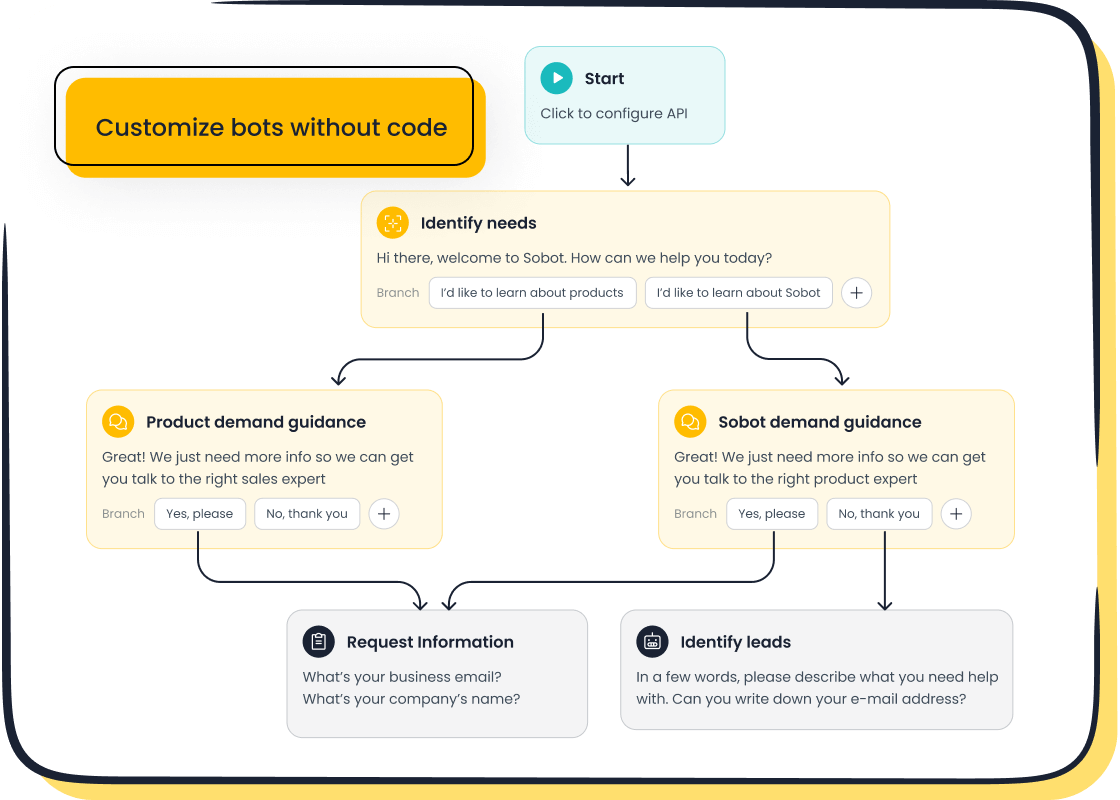
For example, Sobot’s AI Chatbot offers a simple point-and-click interface. You can easily design your own automated responses. This type of ai customer service tool provides key features for a successful implementation:
- Omnichannel Support: Engage customers on their preferred channels, like WhatsApp and SMS.
- Multilingual Capabilities: Serve a global audience in their native language.
- Ease of Use: Democratizes ai customer service, allowing anyone on your team to build powerful ai chatbots.
This approach to automated customer service makes your customer support more accessible and efficient.
Automated Ticketing and Routing Systems
An automated ticketing system is another essential piece of your customer service automation strategy. This system intelligently categorizes, prioritizes, and routes incoming support requests. It uses AI to analyze message content for keywords and sentiment, ensuring urgent issues get immediate attention. This implementation of automated customer service helps your team manage their workload effectively. Integrating your ticketing system with a CRM provides a 360-degree view of the customer, which improves your team's productivity and enables more personalized customer support. Sobot’s Ticketing System works seamlessly with other customer support solutions to create a unified platform for your team.
Self-Service and Proactive Notifications
Empowering customers to help themselves is a key goal of automated customer service. You can achieve this through a comprehensive customer self-service knowledge base. This resource should be easy to navigate and contain clear answers to common questions. Another powerful implementation of customer service automation involves proactive notifications. Sending alerts about order delays, like Amazon does, or upcoming maintenance, like Slack, reduces inbound queries. This form of ai customer service shows you care, improving the overall customer experience. These automated customer service solutions build trust and loyalty.
Your Step-by-Step Customer Support Implementation Plan
You have identified the opportunities. You know which tools can help. Now, you need a clear plan to bring your customer service automation strategy to life. This four-step implementation plan guides you from initial goals to long-term success, ensuring your transition to automated customer service is smooth and effective.
Step 1: Set Clear Goals and Success Metrics
A successful implementation begins with a clear destination. You must define what you want to achieve with customer service automation. Vague goals lead to uncertain results. Instead, set specific, measurable objectives for your customer support team.
Your goals for automated customer service could include:
- Providing 24/7 support coverage for your customers.
- Achieving faster ticket resolution times.
- Ensuring consistent answers with a centralized knowledge base.
- Improving customer retention through proactive engagement.
For example, a great starting goal is: "Increase our chatbot resolution rate from 30% to 40% over the next six months." This target is specific, measurable, and time-bound.
Once you set your goals, you need to define how you will measure success. Key Performance Indicators (KPIs) are essential for tracking the impact of your ai customer service.
- First-Contact Resolution Rate (FCRR): This measures the percentage of issues solved in the first interaction. A high FCRR (above 70%) shows your customer service automation is effective.
- Ticket Resolution Time: This tracks the average time to solve a customer support ticket. Automation can reduce this time by 20-30%.
- Client Satisfaction Scores (CSAT): This directly reflects how customers feel about your service. Improved response times from an effective implementation of automated customer service typically lead to higher scores.
- Cost Savings: This calculates the financial savings from reducing manual tasks. Automating ticket routing can cut labor costs by 15-20%.
Tracking these metrics will prove the value of your customer support automation efforts and guide your future decisions.
Step 2: Choose Your First Tool and Channel
You do not need to automate your entire customer support operation at once. The right implementation starts with one tool and one channel. Your choice should be based on your goals, your team's skills, and your budget.
Consider these factors when selecting your first tool:
- Project Requirements: What problem are you trying to solve? If you want to answer common questions, an ai customer service chatbot is a great choice. If you need to organize requests, a ticketing system is better.
- Team Skills: Your team's technical ability matters. Codeless automation tools are perfect if your team lacks programming experience. They allow you to build powerful solutions without hiring new staff.
- Budget: Think beyond the tool's price. A tool with a low learning curve saves you money on training. An easy-to-use tool also reduces the time needed to create and maintain your customer service automation.
Start with the channel where your customers are most active. If you get many questions on your website, a web-based chatbot is a logical first step. This focused implementation allows you to learn and adapt without overwhelming your team.
Step 3: Build and Train Your Automation Workflows
With your tool and channel selected, you can now build your first automated workflow. This is where your customer service automation strategy takes shape. The goal is to create a process that guides customers to the right answer efficiently.
Let's say you want to build a chatbot to handle "order status" inquiries. The process is straightforward:
- Design the Chatbot: Give your chatbot a name and a personality that matches your brand.
- Train the Chatbot: Feed it relevant data. This includes information on returns, refunds, delivery updates, and order status questions. You can use existing FAQs, help articles, and even PDFs.
- Build the Flow: Create the conversation path. The chatbot should greet the user, ask for an order number, and then provide the status.
- Test and Deploy: Run trials before you go live. This ensures the chatbot works as expected and provides a good user experience.
This initial implementation of ai customer service creates a foundation. You can expand these automated workflows over time to handle more complex scenarios. This is a core part of a successful customer support automation journey.
Step 4: Pilot, Measure, and Iterate for Success
Your first implementation is not the final version. The key to mastering automated customer service is continuous improvement. You must pilot your solution, measure its performance, and iterate based on data and feedback. This creates a cycle of optimization for your customer support.
A/B testing is a powerful method for improving your ai customer service. You can test different chatbot greetings, response lengths, or button placements to see what works best.
| Common A/B Testing Mistake | Impact on Your Customer Support | How to Avoid It |
|---|---|---|
| Testing multiple things at once | You won't know what change caused the result. | Test only one variable at a time. |
| Ending tests too early | Your data will be unreliable. | Run tests for at least one to two weeks. |
| Ignoring mobile users | You miss insights from a large user segment. | Always include mobile traffic in your tests. |
Beyond A/B testing, you should actively collect and analyze customer feedback. Automated customer service solutions can automatically trigger feedback requests after an interaction. This feedback is gold. It tells you exactly where your automated customer support is succeeding and where it needs improvement. Use this data to refine your automated workflows, update your knowledge base, and enhance the overall customer experience. This iterative implementation ensures your customer service automation evolves with your customers' needs.
Balancing Automation with the Human Touch
Your goal with customer service automation is not to eliminate human interaction. It is to enhance it. The best automated customer service systems know when to step aside. This balance is how automated communication tools improve customer satisfaction and build lasting loyalty.
Creating a Seamless Escalation to a Human Agent
Even the smartest ai chatbots have limits. You must create a clear path for customers to reach a human agent. This seamless handoff is crucial for customer satisfaction.
A great automated customer support system never traps a user. It always provides an obvious "Talk to a human" option.
When a chatbot escalates a conversation, it should not make the customer repeat information. The chatbot must collect key details first, such as:
- The full chat history
- The customer's name and account number
- A quick summary of the issue
This information gives your human agent the full context. They can jump in and solve the problem without frustrating the customer. This smooth transition is a key part of excellent ai customer service.
Using Automation to Empower, Not Replace, Your Team
Customer service automation should be your team's best assistant. It handles the simple, repetitive tasks. This frees your agents to focus on complex problems that require a human touch. This approach boosts both efficiency and morale.
AI-powered chatbots can provide agents with real-time coaching and suggest the best next actions. This empowers your team to deliver faster response times and greater consistency in support. Your ai customer service tools can also automatically summarize interactions, reducing manual work for your customer support team. This helps you achieve lower costs while improving the quality of your customer support.
Personalizing Messages to Maintain Connection
Automated messages do not have to feel robotic. You can use customer data to create personalized and engaging interactions. This helps you maintain a human connection and improve customer satisfaction.
A simple way to start is by using the customer's name in greetings. You can also reference their past purchases or browsing history to offer relevant recommendations. This shows you understand their needs. This level of personalization turns a standard automated customer service interaction into a positive experience, boosting customer satisfaction. Effective ai chatbots use a conversational tone to make customers feel heard and valued.
Your journey to mastering automated customer service is a continuous process, not a one-time setup. A successful implementation creates a hybrid system. Automation handles routine tasks, freeing your team for high-value interactions that boost customer satisfaction. This balanced implementation is key to improving overall customer satisfaction.
Your first step: Identify one repetitive task you can automate this week. Start small, measure your results, and build momentum toward a more efficient future. 🚀
FAQ
How much does it cost to start with automation?
You can start with a small budget. Many AI chatbot platforms, like Sobot, offer scalable pricing. This allows you to begin with a basic plan and expand as your needs grow. The initial investment is often much lower than hiring additional staff.
Will customers dislike talking to a robot?
Customers value speed and convenience. An AI chatbot provides instant answers 24/7, which improves satisfaction.
A well-designed chatbot offers a clear option to escalate to a human agent. This ensures customers never feel trapped and can get the help they need.
What are the future trends in automated customer service?
The future trends in automated customer service involve more advanced AI. Expect hyper-personalization, where AI predicts customer needs. Voice AI and proactive support will also become more common, creating even smoother customer journeys. These future trends in automated customer service will make interactions feel more human.
How long does it take to set up an AI chatbot?
You can set up a basic chatbot in just a few hours. No-code platforms use simple point-and-click interfaces. You can build conversation flows and train your bot with existing documents. A full implementation depends on complexity but can be live within days.
See Also
Elevate Your Customer Service: Mastering Live Chat for Superior Support
Boost Retail Sales: Mastering Live Chat for Industry Success
Unlocking Efficiency: The Inner Workings of Call Center Automation
Optimize Your Team: An Effective Guide to Managing Live Chat Agents
The Best Automated Voice Calling Software: A Comprehensive Review for 2024

