Future-Proof Your Customer Service Solutions for Small Business


You need the right customer service solutions for small business. Choosing a platform today that lasts is a key investment in your future growth. Your customer service must evolve. Small businesses often struggle with outdated customer service tools. Modern customer service software, like the Sobot call center, changes this. You can improve your customer service with powerful platforms. Sobot offers customer service solutions that integrate advanced Sobot AI. This technology helps you build a strong foundation for excellent customer service.
Defining Future-Proof Customer Service

A future-proof strategy transforms your customer service from a cost center into a growth engine. You must understand the key shifts shaping the industry. This helps you build a resilient customer service foundation.
From Reactive to Proactive Support
Modern customer service moves beyond just answering questions. You should anticipate customer needs. Proactive customer support means you reach out first. This approach builds trust and boosts customer satisfaction.
- You anticipate issues before they happen.
- Your support teams initiate the engagement.
- You provide guidance to prevent complaints.
This shift greatly improves customer satisfaction and loyalty. In fact, 87% of consumers prefer companies to contact them proactively. This proactive engagement can increase profits by 25% to 95% by improving retention. Your customer service becomes a tool for customer engagement.
The Role of Customer Service Automation
Customer service automation is essential for efficiency. Automation handles simple, repetitive tasks. This frees your team for complex problems. Customer service automation allows you to offer 24/7 self-service options. By 2026, conversational AI will handle up to 10% of all customer service interactions. Using customer service automation can reduce your operational costs by up to 30%. This automation enhances your customer service. The right automation improves your customer support. Good customer service automation is key. This automation helps your customer service. Customer service automation provides great self-service.
The Importance of Omnichannel Unification
Your customers use many channels to connect with you. They expect a seamless customer experience everywhere. Omnichannel unification brings all your communication channels into one place. This prevents fragmented conversations and lost messages. A unified system improves satisfaction. It also gives your team full context for every customer service interaction. This leads to higher customer satisfaction. This automation helps your ecommerce business. Better customer service automation improves satisfaction.
Tip: Unifying channels like email, chat, and social media gives your team a complete view of the customer journey, which boosts satisfaction and makes your customer support more effective.
Scalability and Seamless Integration
Your business will grow. Your customer service platform must grow with you. A scalable solution handles more customers without issues. Seamless integration is also critical. Your customer service software should connect easily with other tools.
- CRM Integration: Connects support tickets to customer profiles.
- Ecommerce Tools: Gives agents access to order history.
- API Access: Allows for custom connections to other software.
This integration supports your customer support team. It makes your ecommerce operations smoother. It also prepares your ecommerce business for future growth and better customer engagement. This automation provides excellent self-service. This customer service automation is a great self-service tool.
Core Features of a Future-Proof Solution
To build a lasting customer service strategy, you need to invest in the right features. These tools provide the foundation for excellent customer support and scale with your business. They focus on automation, intelligence, and a complete view of your customer.
AI-Powered Self-Service and Knowledge Bases
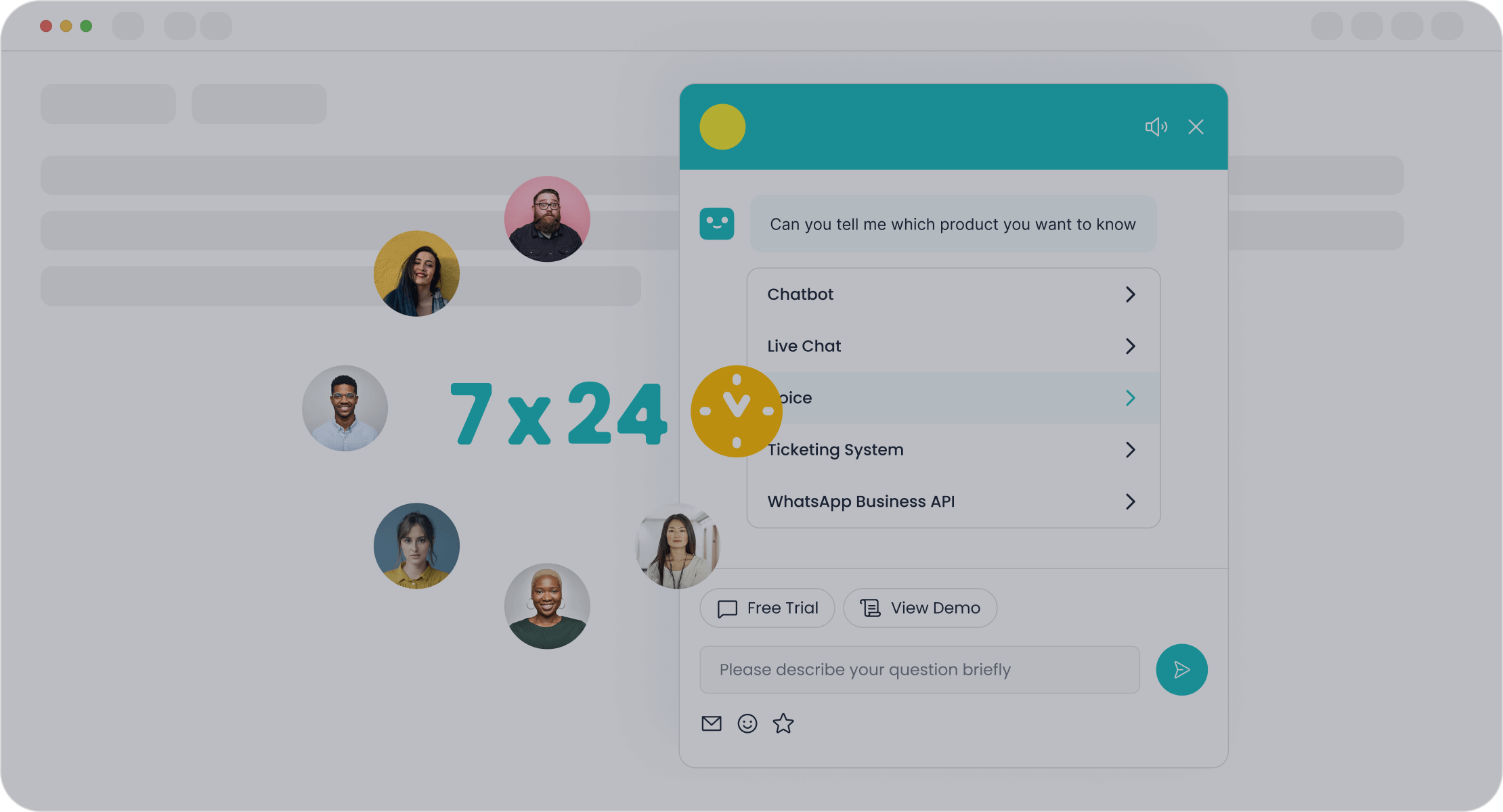
You can empower customers to find answers on their own. AI-powered self-service tools, like chatbots and intelligent knowledge bases, provide 24/7 support without needing a live agent. This automation reduces your team's workload and cuts operational costs. For small businesses, this means you can offer constant customer service. For example, the Sobot Chatbot uses automation to improve productivity by 70% and can cut costs by up to 50%. This intelligent self-service makes your customer support more efficient. This type of customer service automation is key for ecommerce growth. You can build a great self-service portal with these tools.
Agent-Assist Tools and AI Copilots
Your agents need support, too. AI copilots and agent-assist tools act as a partner for your customer service team. These AI customer service software tools provide real-time suggestions, find information quickly, and automate repetitive tasks. This automation helps agents solve problems faster, which boosts their confidence and improves customer satisfaction. Companies like H&M use conversational AI agents to offer instant style recommendations, improving agent performance and customer engagement. This is a great example of AI-powered customer service.
Unified Customer View with CRM Integration
You must see the full customer story. Integrating your customer service platform with a CRM gives your team a complete history of every interaction. This unified view prevents customers from repeating themselves. It also helps your team deliver better personalization. CRM-powered customer service ensures your agents have context for every conversation, which is crucial for resolving issues on the first contact. This level of customer service improves satisfaction and builds loyalty for your ecommerce brand.
Intelligent Routing and Ticket Management
You need to get the right question to the right person quickly. Intelligent routing uses automation to assign customer tickets based on agent skill, priority, or language. This customer service automation ensures urgent issues are handled first and that complex problems go to your expert agents. This process improves response times and resolution rates. Effective ticket management keeps your customer support organized and prevents things from falling through the cracks, which is vital for maintaining high customer satisfaction. This is a core part of ai customer service software.
Robust Analytics and Sentiment Analysis
You can't improve what you don't measure. A future-proof solution gives you powerful analytics to track key metrics like response times and customer satisfaction. Sentiment analysis takes this a step further. It analyzes customer messages to gauge their emotional tone.
Example: An ecommerce retailer, WatchShop, used sentiment analysis to identify friction points on its website. By addressing these issues, they boosted conversion rates by 10%.
This data helps you proactively identify at-risk customers and improve the overall customer experience. This is a key feature of ai customer service software.
Top Customer Service Solutions for Small Businesses

Choosing the right platform is a major decision. The market for customer engagement solutions is growing fast, especially for small and medium-sized businesses. Cloud-based solutions are leading this trend. They offer powerful tools without the high cost of traditional infrastructure. This makes advanced customer service accessible to you.
You need a solution that fits your budget and scales with your growth. Below are some of the best customer service software options available. We will review each one to help you find the perfect fit for your business needs.
Note: The pricing information below is based on publicly available data and may change. You should always check the provider's official website for the most current details.
Sobot: Best for All-in-One Omnichannel Automation
Best For: Businesses of any size that need a unified, AI-powered platform to manage all customer interactions, from sales to support, across every channel. It is ideal for ecommerce companies focused on efficiency and conversions.
Future-Proof Features: Sobot provides a complete all-in-one contact center. It unifies voice, live chat, chatbots, and social channels like WhatsApp into a single workspace. Its status as an official WhatsApp Business Solution Provider (BSP) ensures you have a reliable, scalable channel for customer engagement. The platform's powerful, no-code AI Chatbot is a key advantage. You can design and deploy custom automation workflows without any technical skills.
- No-Code Customization: You can use a drag-and-drop designer to create unique workflows and proactive messages that match your brand's voice.
- Omnichannel Integration: The AI chatbot tool works seamlessly across your website, social media, and messaging apps, providing consistent customer service everywhere.
Pros:
- Unifies all customer communication channels for a true omnichannel experience.
- Powerful AI and automation features significantly improve agent productivity and reduce operational costs.
- The no-code chatbot builder makes it easy to create sophisticated automation.
- Boosts ecommerce sales and lead generation through proactive engagement and smart self-service.
- Provides robust security and system stability, trusted by global brands.
Pricing Summary: Sobot offers customized pricing based on your specific needs. You can contact their team for a detailed quote that aligns with your business goals.
Zendesk: Best for Enterprise-Grade Power
Best For: Growing businesses that need a powerful, feature-rich platform and are prepared for a more complex system.
Future-Proof Features: Zendesk offers a suite of tools designed to handle large volumes of customer support inquiries. Its platform includes an integrated ticketing system, customizable business roles, and a complete customer interaction history. These features give your team the context needed for effective customer service.
Pros:
- Highly scalable platform that can grow with your business.
- Extensive app marketplace for integrations with other tools.
- Powerful reporting and analytics capabilities in higher-tier plans.
Cons:
- Pricing Complexity: Users report that pricing increases as features are unbundled. One small business owner noted, "Pricing could be more flexible and affordable for smaller businesses."
- Difficult to Use: The reporting tools can be complex. A user mentioned, "we cringe because the platform is simply too cumbersome and complicated."
- Slow Customer Support: Some users experience slow response times from Zendesk's own support team, with a 2-day SLA and no phone support on some plans.
Pricing Summary: Zendesk's pricing is tiered. Plans start at $19 per agent per month when billed annually. More advanced suites with automation and omnichannel features cost significantly more.
Intercom: Best for Proactive Conversational Support
Best For: Businesses focused on using proactive chat and targeted messages for sales, marketing, and customer engagement.
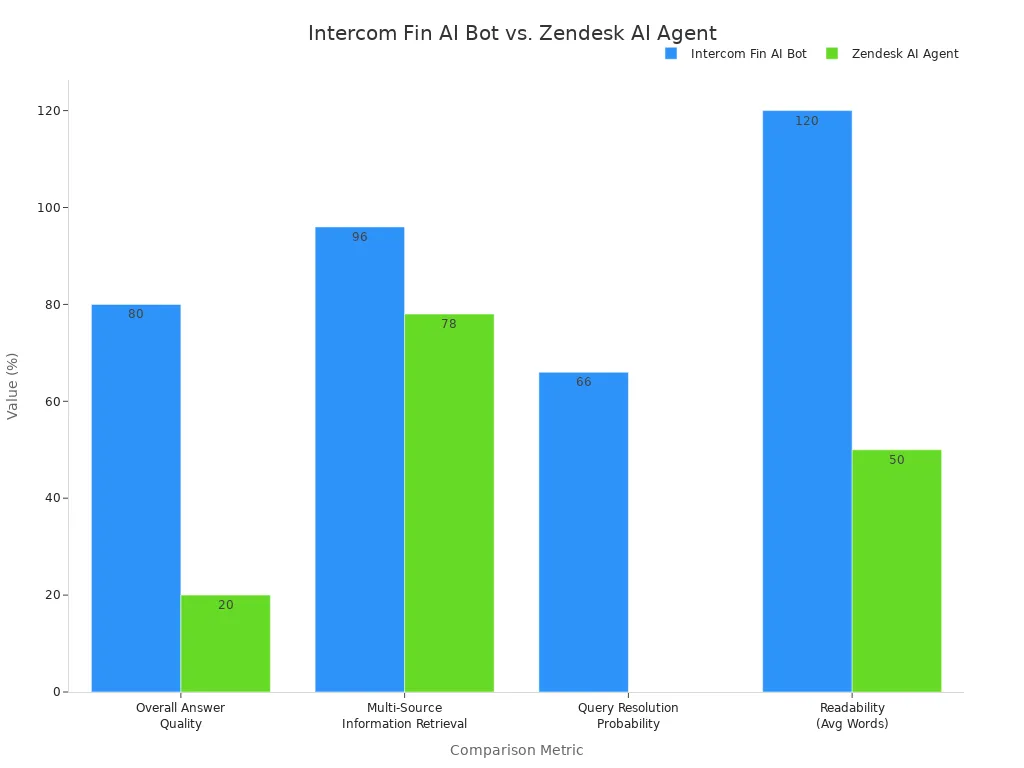
Future-Proof Features: Intercom excels at proactive engagement. Its platform allows you to send automated, targeted messages to website visitors based on their behavior. Its AI chatbot, Fin, can handle complex questions and provides more comprehensive answers than many competitors. This level of automation helps you engage leads and support customers in real time.
Pros:
- Excellent for proactive customer messaging and lead generation.
- Powerful AI chatbot (Fin) that can resolve a high percentage of queries.
- Clean and modern user interface for agents and customers.
Cons:
- High and Complex Pricing: Intercom is one of the more expensive customer service solutions for small business. Its pricing can be confusing, with costs that escalate as your business grows. The AI bot is often priced per resolution, which can become costly.
- Limited Ticketing Features: Its traditional ticketing system is less robust than dedicated customer support platforms.
- Steep Learning Curve: While basic features are easy, users report that advanced automation and customization can be difficult to implement.
Pricing Summary: Intercom's "Essential" plan starts at $39 per seat per month. The cost increases for advanced plans and add-ons like the Fin AI chatbot.
Help Scout: Best for Lean Teams Needing Simplicity
Best For: Small businesses or lean teams that want a simple, user-friendly shared inbox and knowledge base without complex features.
Future-Proof Features: Help Scout focuses on the core needs of customer support. It offers a straightforward ticketing system, workflow automation for routine tasks, and saved replies for quick answers. Its user-friendly interface allows new team members to get started in minutes, making it one of the best customer service software options for simplicity.
Pros:
- Extremely easy to set up and use.
- Clean, intuitive interface that feels like a regular email inbox.
- Affordable pricing plans for small teams.
- Good for managing email and chat conversations in one place.
Cons:
- Limited Automation: It lacks a no-code builder for creating custom chatbots. The automation capabilities are not as advanced as other platforms.
- Fewer Channels: It does not natively support channels like WhatsApp or voice calls.
- Basic Reporting: The analytics features may be too basic for businesses that need deep, customizable reports on their customer service performance.
Pricing Summary: The "Standard" plan starts at $20 per user per month (billed annually), which includes two mailboxes and live chat.
Kustomer: Best for a CRM-Centric Customer View
Best For: Businesses, especially in ecommerce, that want to build their customer service around a complete, timeline-based view of the customer.
Future-Proof Features: Kustomer organizes everything around the customer, not the ticket. It unifies all interactions from every channel into a single, chronological timeline. This gives your agents full context, from past purchases to previous support chats. Its AI, Kustomer IQ, helps with intelligent case routing and proactive engagement based on real-time customer behavior. This approach enhances personalization and efficiency.
Pros:
- Unified customer timeline provides superior context for agents.
- Native omnichannel support reduces the need for third-party add-ons.
- Highly customizable workflows, objects, and rules.
- User-friendly interface is easier to navigate than complex enterprise CRMs.
Cons:
- Higher Entry Price: The seat costs can be more expensive upfront compared to simpler customer service tools.
- Smaller App Marketplace: It has fewer pre-built integrations than larger competitors.
- Potential for Lag: Some users report latency issues when the platform is under heavy use with many integrations.
Pricing Summary: The "Enterprise" plan starts at $89 per user per month when billed annually.
Gorgias: Best for Deep E-commerce Integration
Best For: Ecommerce stores, particularly those on Shopify, Magento, or BigCommerce, that need a customer service platform deeply integrated with their sales channels.
Future-Proof Features: Gorgias is built for ecommerce. It pulls customer data directly from your ecommerce platform, so agents can see order history, shipping status, and loyalty points right next to a support ticket. This deep integration allows for powerful automation. You can create rules that automatically respond to common questions like "Where is my order?" without any agent involvement.
Pros:
- Unmatched integration with major ecommerce platforms.
- Powerful automation rules designed specifically for ecommerce inquiries.
- Allows agents to edit orders and issue refunds directly from the helpdesk.
- Uses machine learning to detect customer intent and prioritize tickets.
Cons:
- Pricing Based on Tickets: The pricing model is based on the number of tickets, which can become expensive for stores with high support volume.
- Less Suited for Non-Ecommerce: Its features are highly specialized for ecommerce, making it a poor fit for other types of businesses.
- Limited Native Channels: While it integrates with email, chat, and social media, it lacks some of the broader omnichannel features of other platforms.
Pricing Summary: The "Starter" plan begins at $50 per month and includes 300 tickets. Costs increase with higher ticket volumes and more advanced features.
How to Choose and Implement Your Solution
You have seen the top platforms. Now you need a plan. This section helps you choose the right customer service software and implement it smoothly. A clear strategy ensures your investment improves customer satisfaction and supports your growth.
A Simple Decision-Making Framework
Follow these steps to select the best customer service solutions for small business. This framework helps you make a confident choice.
- Define Your Needs: List your top three customer service challenges. Do you need better automation? Or maybe a unified inbox?
- Set Your Budget: Determine what you can afford monthly and annually. Remember to account for future growth.
- Shortlist Vendors: Choose two or three platforms from the list above that match your needs and budget.
- Request Demos: Schedule live demos. Prepare questions about features that matter most to your team.
- Check Reviews: Read what other small businesses say about their customer experience with the software.
Your Implementation and Transition Checklist
A smooth transition is key to success. Agent resistance and customer disruption are common pitfalls. Use this checklist to guide your migration and ensure high satisfaction.
Tip: Avoid migrating all old ticket data. Only move information that is relevant to your new workflows to keep your system clean and efficient.
| Task | Description |
|---|---|
| Team Alignment | Ensure all stakeholders agree on migration goals and success metrics. |
| Integration Priorities | Identify must-have connections to your CRM or ecommerce tools. |
| Agent Readiness | Create a training plan to help your team learn the new system. |
| Phased Launch | Start with a small pilot group to test the platform before a full rollout. |
| Collect Feedback | Gather feedback from your team to optimize the new customer service software. |
Measuring Success and Calculating ROI
You must measure the impact of your new platform. Tracking key metrics shows the value of your investment. It also helps you prove how better customer service drives business results. High satisfaction scores often lead to loyal customers. Use these formulas to calculate your return on investment (ROI) and monitor performance.
| Metric | Formula |
|---|---|
| Return on Investment (ROI) | (Earnings - Investment) / Investment × 100 |
| Cost Per Contact | Total customer service costs / Number of tickets |
| First Contact Resolution (FCR) | Tickets resolved on first contact / Total tickets × 100 |
Regularly tracking these numbers will highlight the positive changes in your customer service operations and overall customer satisfaction. This data is crucial for demonstrating the value of your new system and ensuring continued satisfaction.
Future-proofing your customer service is not about predicting the future. You should choose flexible, AI-driven, and scalable tools. These tools adapt to changing customer expectations. Use the frameworks in this guide to audit your current system. This will help you select the right customer service solutions for small business. You can confidently choose a platform like Sobot. It will support your business growth and improve your customer service for years to come. Your customer service will be ready for tomorrow.
FAQ
How does AI improve my ecommerce customer service?
AI tools provide instant support to your ecommerce customers. They handle common questions 24/7. This frees your team for complex issues. Your ecommerce business benefits from better efficiency. This is a great self-service option for any ecommerce store.
Why is an omnichannel solution vital for an ecommerce business?
Your ecommerce customers use many channels. An omnichannel platform unifies these conversations. It creates a seamless experience for your ecommerce shoppers. This approach boosts satisfaction for your ecommerce brand. A good ecommerce strategy requires this unification.
What is the first step to improve my ecommerce support?
You should first audit your current system. Identify your biggest challenges. Do you need better self-service tools for your ecommerce site? Or do you need to manage your ecommerce support tickets better? This first step clarifies your needs.
Can self-service really help my small ecommerce team?
Yes. A good self-service portal reduces ticket volume significantly. Customers find answers on their own. This allows your small ecommerce team to focus on high-value interactions. It is a cost-effective way to scale your support.
See Also
Leading Live Chat Solutions for Small Business Growth in 2024
Elevate SaaS Customer Support Through Strategic Live Chat Implementation
The 10 Best Customer Service Software Platforms for 2024
AI Customer Service Software: Revolutionizing Efficiency and Support Operations
Achieve Business Success with Continuous 24/7 Live Chat Support

