Why Use an Email Ticketing System? Pros & Cons


Disorganized email-based customer support creates a frustrating customer experience. A customer often must repeat information for their inquiries, leading to poor service. An email ticketing system brings order to this chaos. It transforms customer inquiries into tickets, helping customer service teams deliver efficient support and service for all inquiries. This article explores the pros and cons of a ticketing system, helping businesses determine if an email ticketing system is the right move for their customer service and customer support, ensuring every customer receives excellent service. For small businesses seeking the best ticketing system for small business, Sobot offers a robust solution. With Sobot AI enhancing automation and efficiency, and seamless integration with the Sobot call center, businesses can streamline operations and elevate customer satisfaction.
What Is an Email Ticketing System?
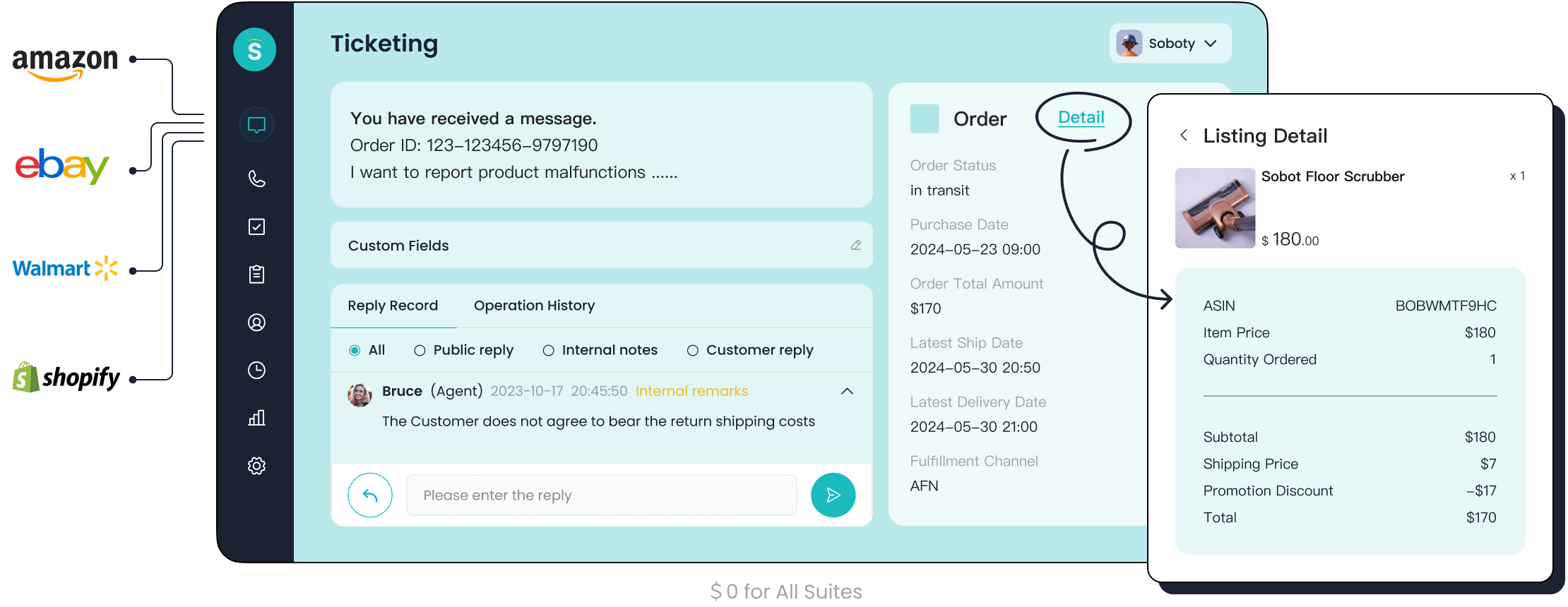
An email ticketing system transforms customer emails into organized support tickets within a central helpdesk. This technology converts a chaotic inbox into a streamlined workflow. It assigns a unique number to each customer request, making it easy to track inquiries from start to finish. The system ensures no customer message gets lost. This approach provides a structured foundation for excellent customer service.
From Shared Inbox to Centralized Hub
Many teams start with a shared email inbox. This often leads to confusion. Multiple agents might reply to the same customer, or worse, a customer inquiry gets missed entirely. An email ticketing system solves this by creating a central hub for all customer inquiries. It establishes clear ownership for every issue. The email ticketing software provides a structured process that a simple inbox lacks.
| Feature | Shared Inbox | Email Ticketing System |
|---|---|---|
| Best For | Small teams with low inquiry volume | Teams needing a structured support workflow |
| Key Strength | Simple, familiar interface | Automated ticket creation and routing |
| Workflow | Manual email sorting and replies | Organized tickets in a smart pipeline |
How the Ticket Lifecycle Works
A ticketing system manages each customer issue through a clear lifecycle. This ensures a consistent and efficient response.
- Creation: The system automatically creates a new ticket when a customer sends an email. It captures the customer's problem.
- Assignment: The helpdesk routes the ticket to the right agent or team based on preset rules.
- Investigation: The agent investigates the issue, gathers information, and finds the root cause of the customer's problem.
- Resolution: The support agent provides a solution and updates the ticket with details. They inform the customer about the fix.
- Closure: After the customer confirms the issue is resolved, the agent closes the ticket. The helpdesk archives it for future reference.
Enhancing the Customer Service Experience
A structured email-based ticketing system directly improves the customer experience. The email ticketing software organizes all inquiries, leading to better service. Every customer interaction is logged, giving support agents a complete history. This means a customer never has to repeat their issue. The improved organization helps teams prioritize inquiries and deliver a faster response.
Tip: A good ticketing system helps your team manage high volumes of customer inquiries without sacrificing service quality. It ensures every customer receives a timely and helpful response.
Pros of a Ticketing System

An email ticketing system offers significant advantages over a traditional inbox. It provides structure, clarity, and powerful tools that help teams deliver exceptional service. Businesses that adopt this technology often see immediate improvements in efficiency and customer satisfaction.
Centralized Customer Communication
A primary benefit of an email ticketing system is the creation of a single, centralized hub for all customer communication. It ends the confusion of a shared inbox where messages get lost and multiple agents might accidentally contact the same customer. This unified platform consolidates emails, chats, and other inquiries, ensuring every message is captured and organized.
This approach streamlines communication and boosts team efficiency.
- Unified Information: All team members access the same customer data and conversation history. This transparency eliminates silos between departments.
- Increased Efficiency: Teams save valuable time by not having to switch between different applications. This allows them to focus on solving customer problems.
- Improved Collaboration: A shared space simplifies teamwork. Agents can easily share files and plan responses, leading to better service.
- Enhanced Security: Centralizing customer data allows for better access control, improving security and reducing the risk of data breaches.
By funneling all customer inquiries into one organized system, the email ticketing software ensures every customer feels heard and valued.
Improved Tracking and Accountability
A ticketing system introduces clear tracking and accountability to the customer support process. Each inquiry becomes a ticket with a unique number and a designated owner. This simple change eliminates the risk of a customer issue falling through the cracks. The system creates a complete audit trail for every ticket.
This detailed log shows every action taken, from the moment a ticket is created to its final resolution. It fosters a culture of responsibility where every team member understands their role.
This level of tracking prevents common service failures.
- E-commerce stores use a helpdesk to manage inquiries about orders and returns, ensuring no customer question is missed during busy sales periods.
- Call centers rely on automated ticket creation to manage high volumes of inquiries, preventing urgent customer issues from getting lost.
- SaaS companies use ticket management to log and monitor bugs, assigning them to the right developers and using notifications to prevent delays.
With clear ticket statuses, managers can see who is working on what and how long it takes to provide a response. This visibility ensures that every customer receives timely and effective support.
Data-Driven Performance Insights
A ticketing system is more than just an organizational tool; it is a source of valuable data. It allows managers to move beyond guesswork and make informed decisions based on real performance metrics. The helpdesk tracks key data points that reveal the health of your customer service operations.
You can measure team performance with specific metrics:
- First Response Time: How quickly does an agent first reply to a customer?
- Average Resolution Time: How long does it take to completely solve a customer's problem?
- First Contact Resolution (FCR): What percentage of inquiries are solved in a single interaction?
- Customer Satisfaction (CSAT): Are customers happy with the support they receive?
Analyzing this data helps teams identify common customer problems and friction points. For example, a high volume of tickets about a specific feature may indicate a need for a product update or a better help article. This data-driven approach allows a business to proactively improve its products and service, reducing the number of future inquiries and boosting customer loyalty.
Scalability for Business Growth
As a business grows, so does its volume of customer inquiries. A shared inbox quickly becomes overwhelmed, leading to slow response times and poor service. A ticketing system is built to scale. It helps a customer support team manage an increasing number of inquiries without needing to proportionally increase staff.
Automation is a key part of this scalability. The system can handle repetitive tasks, freeing up agents to focus on complex issues.
- Automated Routing: Tickets are automatically sent to the right agent or department.
- Prioritization: Urgent inquiries are flagged for immediate attention.
- Self-Service Options: Customers can find answers themselves through integrated knowledge bases, reducing ticket volume.
For example, Unity, the development platform behind popular games, saved over $1.3 million in self-service costs by implementing a robust ticketing system. This allowed them to handle rapid growth while improving resolution times and keeping customers happy. An email ticketing software provides the foundation for sustainable growth, ensuring your service quality remains high as your customer base expands.
Cons of a Ticketing System
While a ticketing system offers powerful benefits, it is not without its potential downsides. Businesses must understand these drawbacks to implement the technology effectively. A poorly managed system can sometimes create new problems, undermining the goal of better customer service.
Risk of Impersonal Interactions
The structure and automation of a ticketing system can sometimes make customer interactions feel cold and impersonal. Automated responses and ticket numbers, while efficient, can lack the human touch that builds customer loyalty. A customer may feel like just another number in a queue instead of a valued individual. This is a significant risk for brands that pride themselves on close customer relationships.
The challenge is to use the system's efficiency without sacrificing the warmth of genuine human connection. A customer wants to feel heard and understood.
Achieving a balance is key. Teams must make a conscious effort to personalize their communication within the ticket. Without this focus, the efficiency gained from the system could come at the cost of customer relationships. Providing excellent service requires more than just a fast response; it demands empathy and personalized support. Every customer interaction is an opportunity to strengthen that connection.
Potential for Slower First Responses
It may seem counterintuitive, but a ticketing system can sometimes slow down the initial response time. This often happens when workflows are not configured correctly. If a customer has to wait for a ticket to be manually triaged, categorized, and assigned, the delay can be longer than a direct reply from a shared inbox. A poor setup creates bottlenecks that frustrate the customer.
Several factors can contribute to a slower first response:
- Unclear routing rules that send inquiries to the wrong department.
- A rigid manual process for sorting new tickets.
- A customer selecting the wrong category, which requires extra clarification.
- A high volume of open tickets without clear priority flags.
Poorly defined Service Level Agreements (SLAs) also contribute to delays. Without clear and enforced standards for response time, there is no accountability for quick action. This can damage the customer's perception of the support service.
Complexity in Setup and Training
Implementing an email ticketing system is more complex than starting a shared inbox. The initial setup requires careful planning, configuration, and integration with other tools. This process demands time and technical resources that some small businesses may not have. Furthermore, training the team to use the new software effectively presents its own set of challenges.
Teams often face several hurdles during the transition:
- Resistance to Change: Employees may be comfortable with old workflows and hesitant to adopt a new tool.
- Knowledge Gaps: Team members have varying levels of technical skill, requiring different levels of training.
- Poorly Designed Training: Generic or overly technical training materials can lead to low engagement and poor knowledge retention.
- Integration Issues: The team needs training on how the new ticketing system connects with existing tools like a CRM or sales platform.
Onboarding a team can take several weeks, and a study by the Society for Human Resource Management (SHRM) suggests that effective training is crucial for technology adoption. Without proper change management and leadership support, the transition can disrupt productivity and morale, delaying the return on investment.
Lack of Real-Time Communication
A traditional ticketing system is asynchronous, meaning there is a delay between messages. This works well for non-urgent inquiries, but it is a major drawback for issues that require immediate, back-and-forth conversation. A customer with a complex or urgent problem wants to interact with a support agent in real time.
Live chat is often more effective in certain scenarios:
- Urgent Problems: When a customer's service is down, they need an instant response.
- Complex Issues: Real-time conversation allows an agent to ask clarifying questions and resolve the problem faster.
- Quick Questions: A customer with a simple question prefers a quick chat over submitting a formal ticket.
Many customers now expect to communicate with businesses through the same messaging channels they use with friends. While a ticketing system excels at organization, it cannot replicate the immediacy of a live conversation. This can lead to a frustrating experience for a customer who needs help right now. Fortunately, modern platforms often integrate live chat and other channels, converting conversations into tickets to offer the best of both worlds: instant response and structured follow-up. This ensures every customer receives the right kind of personalized support for their specific need.
Choosing the Best Ticketing System for Small Business
Selecting the right helpdesk is a critical decision for any growing business. The best ticketing system for small business provides the tools to manage customer inquiries efficiently and scale support operations. It is an investment in long-term customer satisfaction.
Key Features to Evaluate
When searching for the best ticketing system for small business, teams should evaluate features that drive efficiency and improve service. Key capabilities include robust automation, reporting and analytics, and integration with other tools. A superior email ticketing software will offer a unified platform to manage all communications.
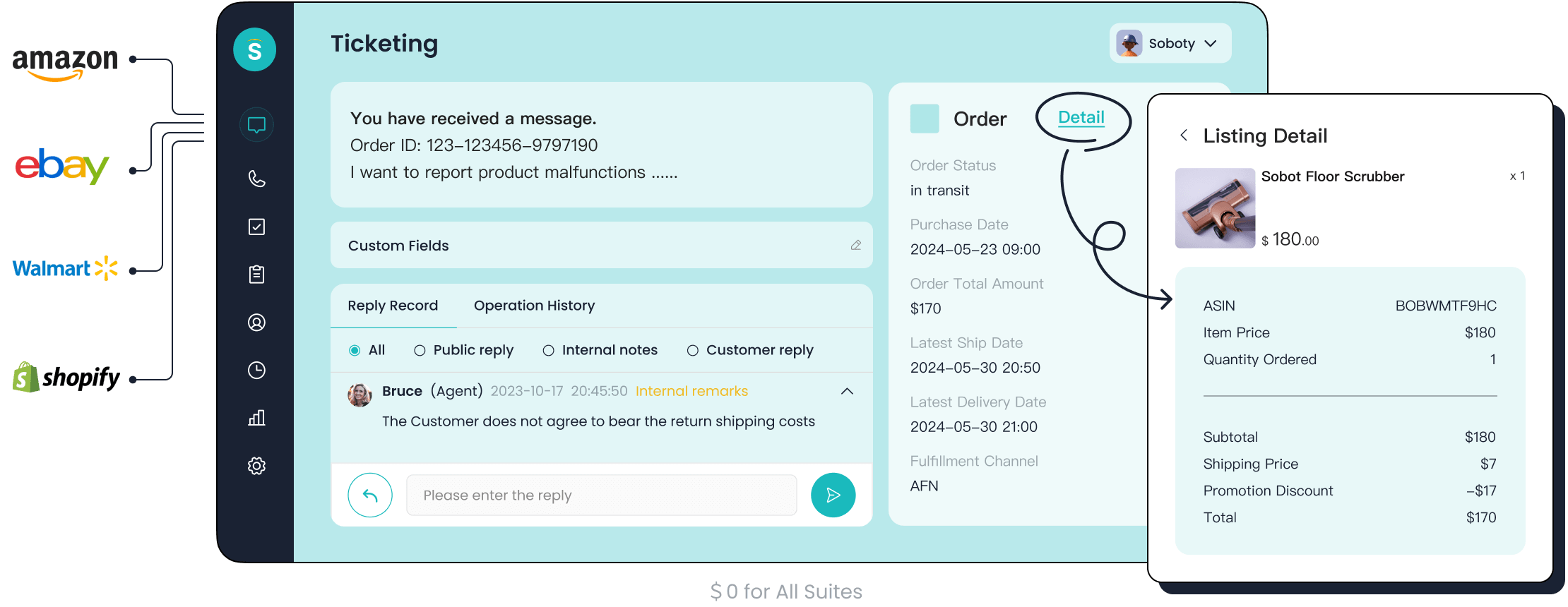
For businesses seeking a comprehensive solution, Sobot's email ticketing software is an excellent choice. It provides powerful features designed to enhance customer satisfaction:
- Unified Platform: It brings email, chat, and voicemail into one helpdesk.
- AI-Powered Automation: It uses automation to route tickets and handle repetitive tasks.
- SLA Reminders: This feature ensures every customer receives a timely response.
- Multilingual Support: It helps teams provide great service to a global customer base.
When to Make the Switch
Knowing when to move from a shared inbox to an email ticketing system is crucial. If your team experiences the following signs, it is time to consider a change.
- A growing volume of customer inquiries leads to missed messages.
- Multiple people handle support, causing confusion and duplicate replies.
- Customer satisfaction is declining due to slow or inconsistent service.
- You lack the data to track team performance and improve your support.
Making the switch helps prevent poor customer experiences and ensures every customer feels valued. The best ticketing system for small business provides the structure needed to deliver consistent, high-quality support.
Integrating with Your Existing Tools
The best ticketing system for small business should connect seamlessly with your existing software, such as CRM or e-commerce platforms. This integration creates a single view of the customer, empowering customer service teams to provide personalized and effective service. Strong integration capabilities streamline workflows through automation, which boosts productivity and improves customer satisfaction.
For example, the financial service platform Opay used Sobot's omnichannel solution to unify its customer support. This integration helped Opay increase its customer satisfaction from 60% to 90% while reducing overall costs by 20%. This success story shows how a powerful, integrated helpdesk transforms customer service and drives business growth. The right email ticketing software is more than a tool; it is a central part of a strategy for excellent customer satisfaction.
An email ticketing system offers organization for customer inquiries. It requires careful management to maintain a personal service for each customer. The ideal ticketing system depends on a company's volume of inquiries and service goals. A great service helps every customer feel valued.
The future of customer service combines AI for routine inquiries with human agents for complex customer issues, ensuring a better experience for the customer.
This approach to service helps every customer. For a superior customer service that supports every customer, explore Sobot's omnichannel ticketing system. It provides excellent service for every customer.
FAQ
How does a ticketing system improve customer support?
It organizes every customer request. This ensures no customer is forgotten. The service team can track each customer issue, leading to faster resolutions for the customer. This structure helps teams provide consistent support for every customer.
Can a small business benefit from a ticketing system?
Yes. It helps a small team manage customer inquiries efficiently. The system provides structure as the number of customer interactions grows. It ensures every customer receives consistent, quality service, which is vital for growth.
Will a ticketing system make my service feel impersonal?
It can, but good training prevents this. Teams can personalize messages within tickets. The goal is to use the system's efficiency while providing a human touch for each customer. A happy customer is the priority.
What is the main goal of using a ticketing system?
The main goal is to improve the customer service experience. It creates an organized workflow. This ensures every customer inquiry is tracked and resolved efficiently, building trust with the customer.
See Also
Live Chat vs. Email: Unpacking the Advantages for Customer Engagement
Remote Call Center Work: Weighing the Benefits and Drawbacks
Achieving Excellence: Mastering Live Chat for Superior Customer Support
Effective Management: A Guide for Live Chat Agent Performance

