The Blueprint for a Great Customer Service Workflow

For 2026, the leading workflow automation tools are Sobot for its all-in-one omnichannel solution, Zendesk for enterprise-grade scalability, and Zoho Desk for powerful AI capabilities. Your choice of automation software is vital in a rapidly expanding market.
Customer Service Software Market Growth | Metric | Value | |---|---| | Estimated Market Value (2024) | USD 12.5 billion | | Projected Market Value (2033) | USD 41.30 billion | | CAGR (2026-2033) | 14.2% |
This blueprint helps you build your customer service workflow for teams. You can evaluate the best workflow automation tools, from the Sobot call center to the best ai workflow automation tools like Sobot AI, and improve your service workflow. This guide covers ai workflow automation tools to perfect your automation.
Top 5 Customer Service Workflow Automation Platforms
Choosing the right platform is the most important step in building your customer service workflow. The best workflow automation tools give your team the power to deliver fast, consistent, and personalized support. This section explores the top platforms for 2026. You can find the perfect fit for your business needs.
Sobot: Best for Omnichannel and AI Chatbot Automation
Sobot provides an all-in-one customer contact solution. It is ideal for businesses that want to unify all customer interactions into a single, powerful platform. You can manage every conversation from one place. This eliminates the need to switch between different systems.
Sobot's core strength lies in its omnichannel and AI capabilities. The platform's 'AI-First' strategy delivers a complete "Five-AI system" for your business. This system provides a robust framework for intelligent automation.
- Omnichannel AI: Covers every customer touchpoint for a seamless experience.
- Scenario-based AI: Offers specialized AI for industries like E-Commerce and Retail.
- Multi-faceted AI: Includes an AI Agent, agent-assisting Copilot, and AI Insight.
- Generative AI: Uses powerful Large Language Models (LLMs) to create human-like conversations.
- Secure AI: Guarantees your data remains private and compliant with regulations.
Key Features
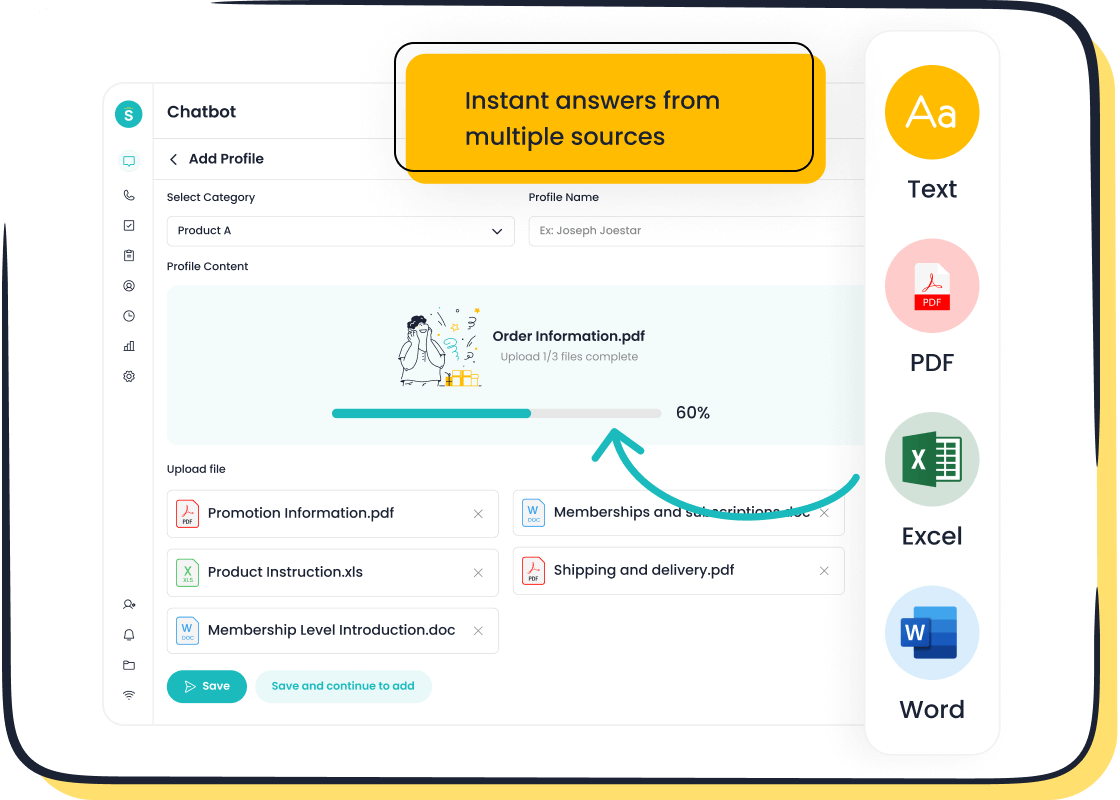
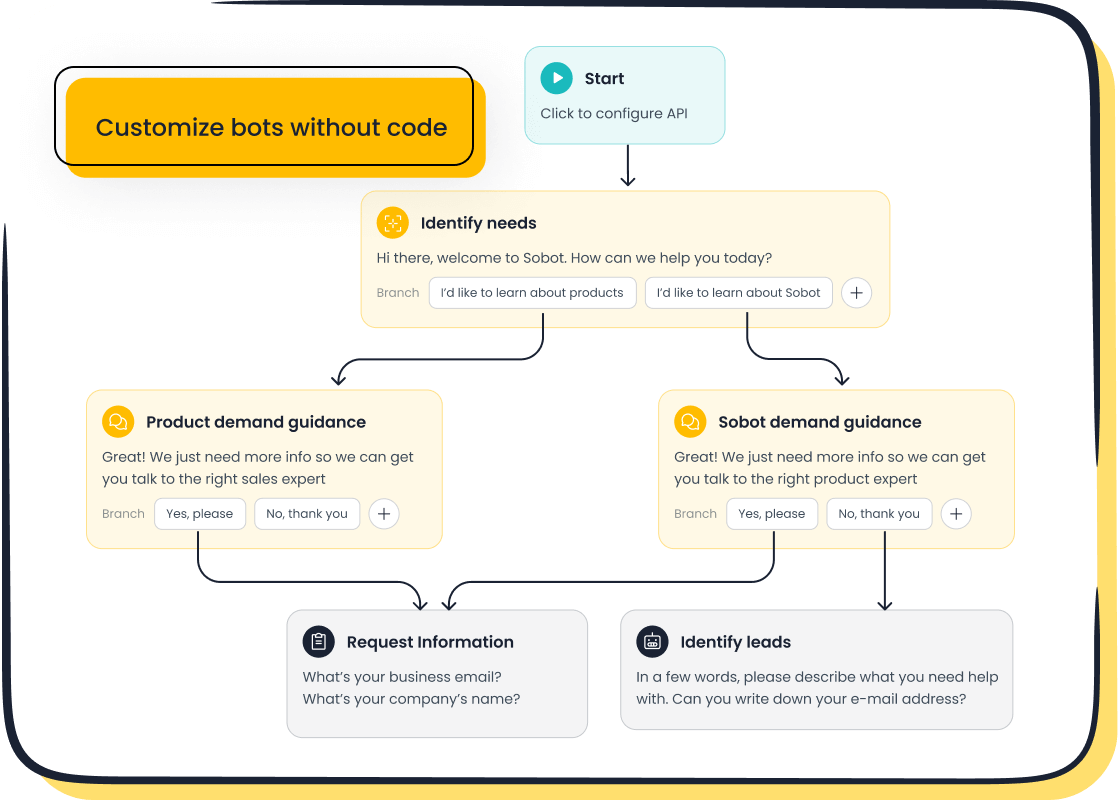
Sobot's platform is packed with features designed for efficiency and a great customer experience. Its AI Chatbot is a powerful tool for automation. You can design and launch automated workflows on this no-code platform without any coding experience. The chatbot handles common questions 24/7, freeing your agents for more complex issues. Other key features include:
- Live Chat: Unifies messages from all channels into one AI-enhanced workspace for agents.
- Voice Call Center: Offers a complete suite with smart inbound/outbound calls, an interactive voice response (IVR) system, and real time monitoring.
- Ticketing System: Automates ticket management, manages service level agreements (SLAs), and supports email ticketing to streamline your support workflow.
- Analytics Dashboard: Gives you detailed insights into team performance and customer interactions.
Ideal Use Case
Businesses of any size can use Sobot. It is especially powerful for companies in retail, e-commerce, and financial services. These industries need a unified view of the customer journey.
Real-World Proof: The Agilent Story Agilent, a global leader in life sciences, needed to improve its service efficiency. The company partnered with Sobot to implement its omnichannel workbench and AI-powered chatbot. The results were remarkable. Agilent saw a 6x increase in customer service efficiency and achieved a 95% customer satisfaction score. This success shows the power of Sobot's automation.
Pricing and Integration
Sobot offers customized pricing to fit your specific needs. You can contact their team for a detailed quote. The platform provides excellent integration capabilities. It connects easily with popular CRM and e-commerce systems, creating a truly unified workflow.
Zendesk: Best for Enterprise Scalability
Zendesk is a well-known name in customer support. It is built for large organizations with complex needs. Its platform offers powerful technical scalability and security features for enterprises.
Key Features
Zendesk's architecture ensures high performance and reliability for global companies. This design gives you flexibility and speed.
- Pod Architecture: Zendesk runs on independent units called pods. Each pod has all the resources needed to run the platform. This structure allows for faster service and better scalability.
- Sharded Database Design: Databases are broken into smaller logical units called shards. This design helps balance the load and provides more capacity for large customers.
- Enterprise-Level Security: Zendesk includes advanced data privacy and protection. It complies with global standards like HIPAA and CCPA.
- Advanced Reporting: You get detailed analytics to track performance. You can also integrate with ERP tools like Oracle and Salesforce for deeper insights.
Ideal Use Case
Zendesk is best for large companies with over 500 employees. Airlines, hospitals, and banks use Zendesk for their robust support needs. Its features handle complex product offerings and large support teams effectively.
Pricing and Integration
Zendesk's enterprise pricing is customized. You need to contact their sales team for a quote. The plans offer dynamic agent workspaces and advanced analytics.
| Plan Name | Pricing | Key Features |
|---|---|---|
| Support Enterprise | $115/agent/month (billed annually) | Custom roles, skills-based routing, sandbox environments, and advanced data privacy options. |
| Suite Enterprise | Custom pricing | Includes all support features plus dynamic workspaces, content cues, and advanced data protection. |
Zendesk offers over 1,000 integrations. It connects with major enterprise programs like Microsoft Teams and Oracle. This extensive integration ecosystem helps you build a connected workflow.
Zoho Desk: Best for Advanced AI-Powered Ticketing
Zoho Desk is a strong contender, especially for businesses already using the Zoho ecosystem. Its main advantage is its advanced AI, "Zia," which transforms your ticketing workflow.
Key Features
Zoho Desk uses AI to automate and improve the entire ticketing process. Zia acts as a virtual team member to enhance your support operations.
- AI-Powered Agents: Zia can perform multiple roles, including Support Specialist, Resolution Expert, and Sentiment Analyst.
- Generative AI: The AI helps agents craft responses, summarize long ticket threads, and analyze the tone of a ticket.
- Anomaly Detection: In its Enterprise Plan, Zia can monitor for unusual ticket activity. This helps you spot and address problems proactively.
- Knowledge Base Management: Zia suggests relevant articles to customers and helps keep your knowledge base up-to-date.
Ideal Use Case
Zoho Desk is perfect for businesses of all sizes that want powerful, AI-driven ticketing automation. It is an excellent choice if you already use other Zoho products, as it integrates seamlessly.
Pricing and Integration
Zoho Desk offers several pricing tiers, including a free plan. Its paid plans are competitively priced. The platform's biggest integration strength is its connection to the Zoho Suite.
| Zoho App | Integration Capability with Zoho Desk |
|---|---|
| CRM | Coordinate sales and service teams. |
| Analytics | Analyze customer support data with insightful reports. |
| SalesIQ | Convert live chat conversations into tickets instantly. |
| Projects | Include customer feedback in your development process. |
| Meeting | Schedule meetings with customers directly from the ticketing view. |
Intercom: Best for Proactive Customer Engagement
Intercom focuses on proactive communication. It helps you engage with customers before they even need to ask for help. This approach builds better relationships and reduces support volume.
Key Features
Intercom's platform gives you the tools to send targeted, timely messages. This proactive support is a key part of its workflow automation.
- Live Chat and Real-Time Messaging: Engage customers instantly on your website or app.
- Visitor Tracking and Segmentation: Group users based on their behavior. This allows you to send personalized messages, announcements, or promotions.
- Proactive Outbound Messages: Alert customers about known issues, like a product outage or bug. This prevents customer frustration.
- Interactive Onboarding: Use guided product tours to help new users understand your product's value quickly.
Ideal Use Case
Intercom is great for SaaS and e-commerce businesses that want to improve user onboarding and engagement. If your goal is to reduce churn and increase customer lifetime value, Intercom's proactive features are a great asset.
Success with Proactive Support: trumpet The company trumpet used Intercom's proactive features to improve user adoption. They saw a 3x improvement in time-to-value for their users. They also freed up 25% of their week by automating the onboarding workflow.
Pricing and Integration
Intercom's pricing starts with its "Essential" plan and scales up. It also offers a "Startup" plan for early-stage companies. The platform integrates with many popular tools, including Salesforce, Marketo, and Stripe.
Freshdesk: Best for Startups and SMBs
Freshdesk is an excellent choice for startups and small to medium-sized businesses (SMBs). It offers a user-friendly platform with a strong set of features at an affordable price.
Key Features
Freshdesk provides the essential ai workflow automation tools that small teams need to get started and scale.
- Unified Inbox: Consolidates customer queries from email, social media, and other channels into one place.
- Freddy AI: Freshdesk's AI offers self-service options for customers and assistance for agents. It can automate repetitive tasks and provide strategic insights.
- Self-Service Tools: You can build a knowledge base and community forums. This empowers customers to find answers on their own.
- Automation: Even the entry-level paid plan includes automation features to dispatch tickets and manage your workflow efficiently.
Ideal Use Case
Startups, freelancers, and SMBs will find Freshdesk very valuable. Its free plan is perfect for teams just starting their customer support journey. The platform is designed to grow with your business.
Pricing and Integration
Freshdesk's pricing is one of its biggest advantages for small businesses. It offers a free plan and affordable paid tiers.
- Free Plan: Costs $0 for up to 10 agents. It includes basic ticket management and a knowledge base.
- Growth Plan: Starts at $15 per agent/month. It adds automation, SLA policies, and better reporting.
Freshdesk integrates with over 1,000 third-party apps. It also connects seamlessly with other Freshworks products, helping you streamline your operations as you grow. These ai workflow automation tools and other workflow automation tools provide a solid foundation for any support team.
Comparing the Best Workflow Automation Tools of 2026
Choosing the right platform requires a direct comparison of features. You need to see how each tool handles core tasks. This section breaks down the key differences in automation, AI, pricing, and integration. It helps you find the best workflow automation tools for your specific needs.
Core Automation Feature Matrix
Your team's efficiency depends on solid ticket management. The right automation routes inquiries to the perfect agent without manual work. This workflow automation saves time and improves response quality. Here is how the top platforms handle routing and escalation.
| Company | Ticket Routing & Escalation Features |
|---|---|
| Sobot | Intelligent conversation routing, Smart ticket assignment |
| Zendesk | Smart ticket assignment, Cross-channel conversation tracking |
| Zoho Desk | Zia AI assistance for auto-tagging, Zia Agents for automating routine work |
AI and Chatbot Capabilities
Modern AI does more than just answer questions. The best ai workflow automation tools use AI to assist agents and improve your entire workflow. For example, Zoho Desk uses its AI, Zia, for auto-tagging tickets and sentiment analysis. This helps your agents prioritize tasks. Freshdesk’s Freddy AI offers features for real-time agent coaching. This level of automation is a key differentiator among workflow automation tools.
Pricing and Scalability Comparison
Your budget and growth plans are critical. Platforms offer different pricing models.
- Freshdesk provides a free tier and clear paid plans (Growth, Pro, Enterprise). This structure is great for startups that need to scale predictably.
- Zendesk offers suite-based plans and a "Build Your Own Plan" option starting at $19 per agent/month. This flexibility suits businesses with very specific needs.
You must evaluate which pricing structure aligns with your future growth. This ensures your chosen automation solution scales with you.
Integration Ecosystems
No tool works alone. A strong integration ecosystem connects your customer service platform to other business software, like your CRM. This creates a unified workflow. All the platforms reviewed offer extensive app marketplaces. You can connect your favorite tools to build a seamless operational environment.
Building a Customer Service Workflow for Teams

Creating an effective customer service workflow for teams requires a clear plan. You need to understand your current challenges before you can build a better system. This four-step process guides you from assessment to implementation. You can build a foundation for excellent customer support.
Step 1: Assess Your Current Workflow Gaps
First, you must evaluate your current operations. Without automation, teams are often bogged down with repetitive tasks. This leads to wasted time and resources. Common gaps in a manual workflow include:
- Delayed responses to customers.
- Missing documents or information.
- Slow follow-ups with other departments.
To find your specific gaps, you should track key metrics. Look at your First Response Time (FRT), Customer Satisfaction (CSAT) scores, and Net Promoter Score (NPS). These numbers show where your current customer service workflow for teams needs improvement.
Step 2: Define Your Must-Have Automation Features
After you identify your gaps, you can define your needs. Analyze your ticket data to find high-volume queries and repetitive tasks. This helps you choose the right automation features. For many businesses, must-have features include:
- Omnichannel ticketing to manage all conversations in one place.
- AI for response suggestions and ticket triage.
- Self-service portals and a knowledge base.
These features help you build customizable workflows. You can create automated workflows for ticket routing and prioritization. This ensures your team focuses on the right tasks. The goal is to find a tool with flexible automations that match your specific workflow needs.
Step 3: Evaluate Scalability for Future Growth
Your business will grow, and your support needs will change. You need a platform that can scale with you. Look for signs that you need a scalable solution. A growing customer base, declining performance metrics, or plans to launch new products all indicate a need for more powerful support. Your chosen workflow automation tools must handle future demand. This ensures your customer service workflow for teams remains efficient as you expand. The right platform offers highly customizable workflows that adapt to your evolving business.
Step 4: Consider Total Cost and Implementation Time
Finally, you must consider the total investment. The price of a platform is more than the subscription fee. You should also account for integration costs, data migration, and ongoing maintenance. The implementation time for your new workflow can vary.
Implementation Timelines A basic setup with customizable workflows might take 2-4 weeks. A more complex enterprise-level integration with highly customizable workflows could take 6-8 weeks.
Planning for these factors ensures a smooth transition. This preparation helps you manage your budget and set realistic expectations for your team during the workflow execution and provides a path for real time monitoring of the new service. Automating tasks with the right automation solution is a strategic investment in your customer support.
The Rise of the Best AI Workflow Automation Tools

The best ai workflow automation tools are changing customer service. They help you move from simply solving problems to predicting them. This shift creates a smarter, more efficient workflow. AI is no longer just a helpful addition; it is a core part of modern support strategy. This evolution in automation is key to staying competitive.
From Reactive to Predictive Support with AI
You can now anticipate customer needs before they become problems. AI-powered analytics identify early warning signs, like declining engagement. This allows your team to act first.
- Predictive models can trigger outreach and suggest personalized resources.
- This proactive support helps you reduce customer churn and improve retention.
- In fact, 70% of organizations are now investing in ai workflow automation tools that analyze customer intent.
This level of automation transforms your support from a reactive function into a proactive one.
The Impact of Conversational AI and Chatbots
Conversational AI and chatbots have a huge impact on your workflow. These ai workflow automation tools provide instant support 24/7. They use Natural Language Processing (NLP) to understand customer intent and provide accurate answers. This automation frees your human agents to handle more complex issues.
The Power of AI in Action One study showed that implementing voice AI increased First Call Resolution rates by 16% and saved a company over $1.4 million annually by reducing repeat calls. This shows the clear value of automation.
Leveraging AI for a Better Customer Experience
You can use AI to understand how your customers feel. AI-driven sentiment analysis gives you powerful insights. This technology helps you build a better customer experience.
- AI systems can guide agents with empathetic responses during difficult calls.
- It allows you to monitor interaction quality automatically.
- You can also analyze the Voice of the Customer (VoC) across all channels.
This deep understanding helps you improve your entire support workflow and is a key feature of the best ai workflow automation tools.
The Future of Hyper-Personalization in Automation
The future of customer service is hyper-personalization. Advanced AI will deliver unique experiences to every customer. This goes beyond simple name tags. This automation will power dynamic websites that change for each visitor and send AI-triggered emails with relevant offers. This level of customer success automation will be essential. Your automated workflows will need to be smart and personal. The best ai workflow automation tools will make this possible, building stronger customer loyalty through thoughtful automation. These ai workflow automation tools are the future of your support workflow.
The right workflow automation tools build your modern customer service workflow for teams. This guide reviewed the best ai workflow automation tools to improve your workflow. Our analysis shows Sobot's powerful AI and all-in-one platform deliver the best automation. This automation creates an efficient workflow with great service. Its AI and ai workflow automation tools provide superior automation for your workflow. This automation is key.
Use this blueprint to find the right automation and build your ideal workflow. This automation will help. These ai workflow automation tools are essential. Embark on Your Contact Journey.
FAQ
What is the first step to automate a customer service workflow?
You should first assess your current operations. Identify repetitive tasks and areas where your team experiences delays. This analysis helps you find the biggest gaps. It shows where automation can provide the most support and improve your workflow.
How does an AI chatbot improve a support team's efficiency?
An AI chatbot automates answers to common questions 24/7. This frees your human agents to handle complex customer issues. For example, the Sobot AI Chatbot can improve team productivity by up to 70% and reduce service costs.
Can I build automated workflows without coding skills?
Yes, many modern platforms offer no-code solutions. You can use a point-and-click interface to design and launch automated workflows. This makes it easy for anyone on your team to build and manage your customer support processes.
Why is software integration important for a workflow?
A good integration connects your support platform with other tools like your CRM. This creates a unified system for all customer data. It eliminates the need to switch between applications, making your team's workflow much smoother and more efficient.
See Also
Achieve Excellence in Customer Service Through Live Chat Mastery
Discover the Ten Leading Customer Service Software Solutions for 2024
Artificial Intelligence Agents Are Transforming the Future of Customer Support
An Essential Guide for Effectively Managing Your Live Chat Support Team
Understanding Quality Management System Principles for Call Center Success

