Call Center Knowledge Base A Feature Showdown


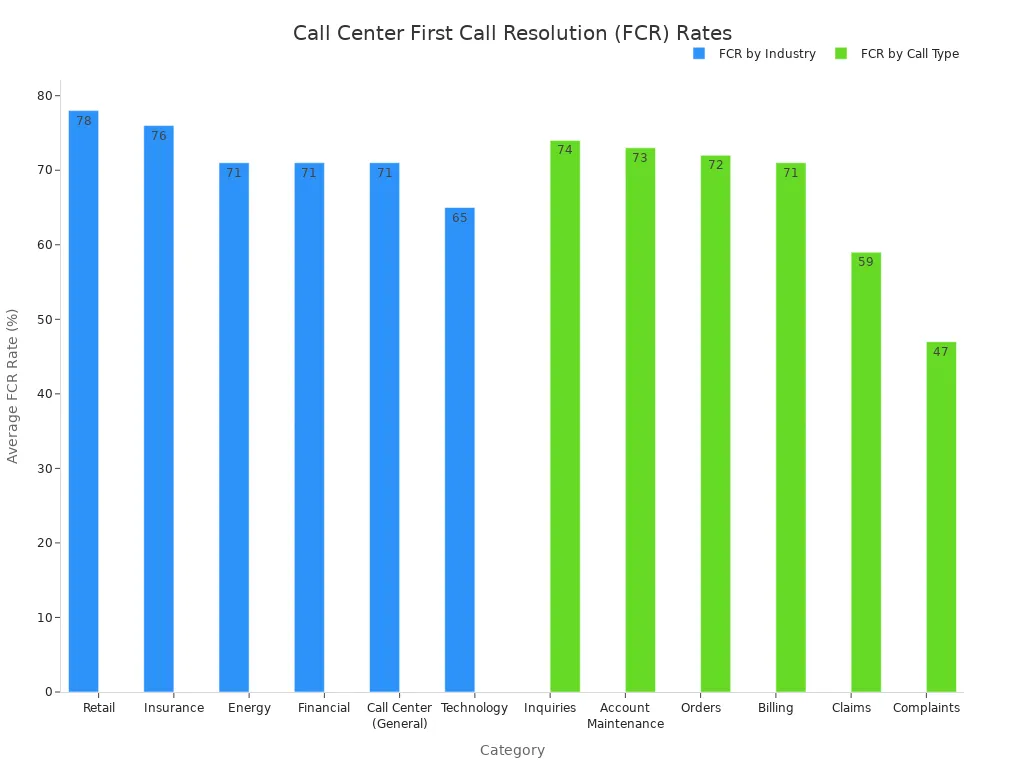
Call center agents face a constant challenge. They need instant, accurate answers to improve resolution times and boost customer satisfaction (CSAT). The average First Call Resolution (FCR) rate for a call center is 71%, but this number drops significantly for complex issues like complaints, which have an FCR of only 48%. A powerful call center knowledge base is the solution. This comparison will examine top knowledge base tools, including the SaaS knowledge base from Sobot, to help managers find the best fit for their customer support needs. The right service, like the Sobot call center platform powered by Sobot AI, helps agents provide better support for all customers.
Essentials of a Call Center Knowledge Base

In a high-pressure call center, certain advanced features are non-negotiable. They transform a simple FAQ page into a dynamic engine for excellent customer support. The best knowledge base tools provide a powerful solution for agents. We will use the following four pillars as our evaluation criteria to compare the top knowledge base software on the market.
Lightning-Fast AI Search
Agents need answers immediately. AI-powered search delivers information in seconds, not minutes. This technology goes beyond simple keyword matching. It understands the intent behind a query to provide the most relevant articles and guides.
AI assistants can analyze customer conversations in real-time. They offer agents instant prompts with the best responses. This allows agents to resolve issues quickly without placing customers on hold.
This speed directly improves key metrics. It lowers Average Handle Time (AHT) and boosts First-Call Resolution (FCR). Faster, more accurate answers lead to happier customers and higher CSAT scores.
Seamless CRM and Helpdesk Integration
A knowledge base should not exist in a silo. Top-tier knowledge base solutions integrate smoothly with your existing technology stack, especially CRM and helpdesk platforms like Salesforce. This integration creates a unified agent workspace.
- CRM Integration: Agents can see a customer's purchase history and past interactions. This context helps them provide personalized service.
- Helpdesk Integration: Agents can pull relevant articles directly into support tickets. This saves time and ensures consistent answers for all customers.
Robust Content and Version Management
Outdated information is worse than no information at all. A comprehensive knowledge base requires strong content management. This ensures every piece of information is accurate, relevant, and easy to find. A user-friendly knowledge base must have features for version control. This allows managers to track changes and revert to previous versions if needed. Regular content audits and a system for agent feedback are essential to keep the service information current. This builds agent trust in the knowledge management solution.
Actionable Performance Analytics
How do you know if your call center knowledge base is effective? Actionable analytics provide the answer. The right SaaS knowledge base tracks key metrics to measure performance and identify areas for improvement. Managers can monitor the knowledge base usage rate to see how often agents consult the self-service hub. Other important metrics include:
- Search frequency
- Resolution correlation
- Article accuracy rates
These analytics highlight content gaps and training opportunities. They empower managers to optimize their SaaS knowledge base and improve overall team efficiency.
Knowledge Base Tools Comparison: Sobot
Overview: The All-in-One Contact Center Solution
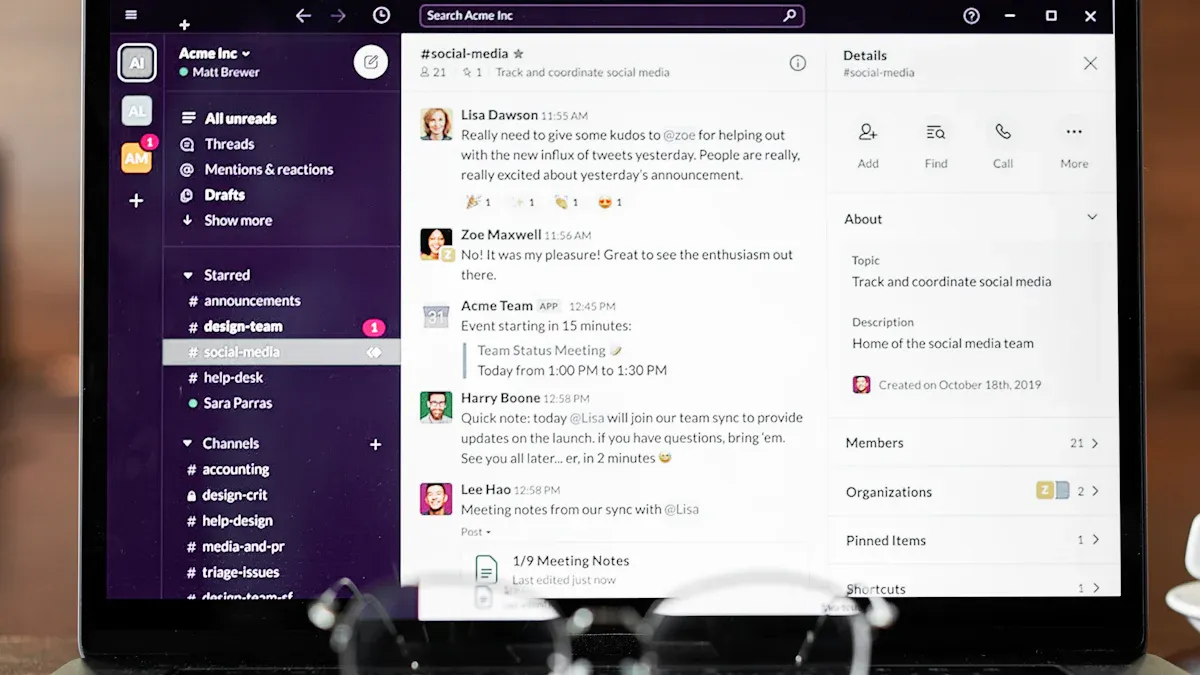
Sobot offers a comprehensive, all-in-one contact center platform. It moves beyond standalone knowledge base tools by integrating its knowledge component directly into a suite of customer support products. This solution centralizes all support channels and customer conversations into a single, AI-powered workspace. The platform is designed for businesses that want to unify sales, marketing, and service operations. It provides a powerful SaaS knowledge base that supports agents and customers across every interaction.
Feature Analysis: AI-Powered Chatbot and Omnichannel KB
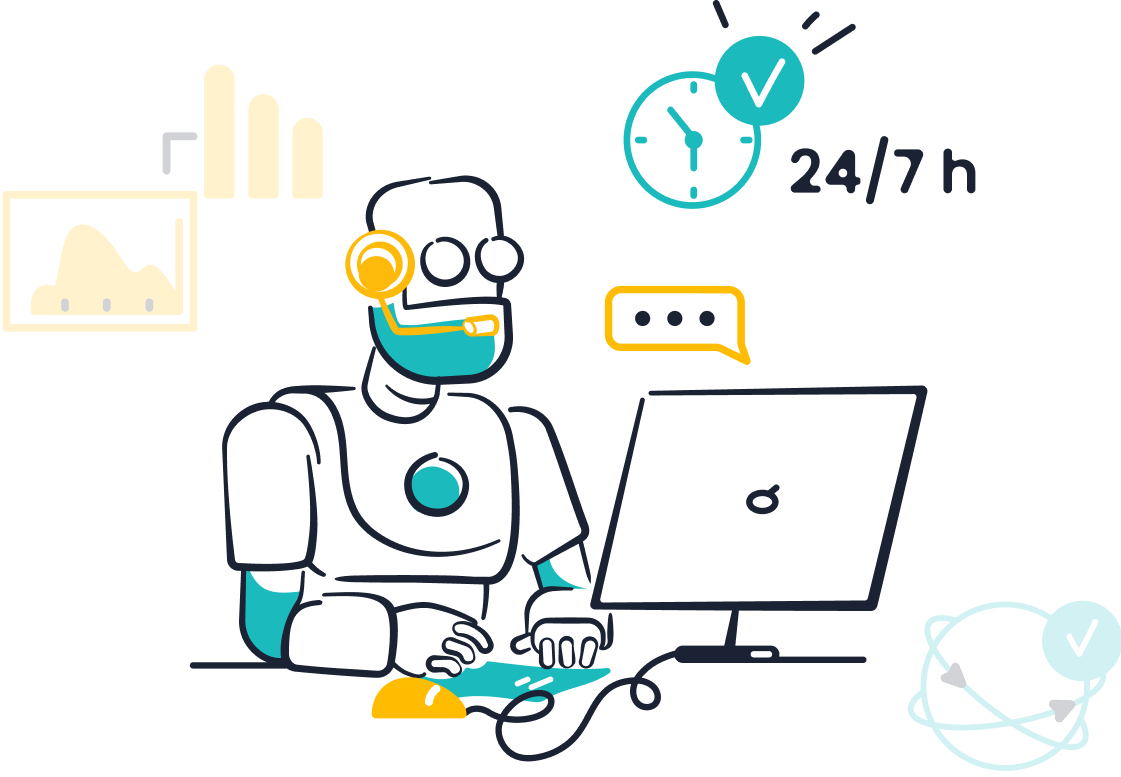
Sobot’s strength lies in its intelligent and connected knowledge base software. The AI-powered chatbot is a core feature. It builds a dynamic call center knowledge base from various sources.
- Articles
- PDFs and Excels
- Simple text snippets
This allows for the creation of a robust self-service hub with minimal effort. The system's omnichannel nature ensures that this knowledge is accessible across all customer touchpoints, from social media to email. This creates a consistent experience for all customers. The platform also offers a ticketing system and live chat, making it one of the most integrated knowledge base solutions available.
Pros for the Call Center
Teams using the Sobot solution see significant performance gains. The platform improves agent productivity by an impressive 70%. Its 24/7 AI-powered self-service operation helps cut costs and boosts conversion rates.
A real-world example comes from the global brand OPPO. After implementing Sobot, OPPO achieved an 83% chatbot resolution rate and a 94% positive feedback rate. This demonstrates the tool's effectiveness in a high-volume environment.
The SaaS knowledge base is a key part of this success. It empowers both agents and automated systems with accurate information. The pricing model is designed to deliver value by enhancing efficiency.
Best For: Teams Needing an Integrated, AI-Driven Solution
Sobot is the ideal choice for call centers seeking a unified platform that combines a powerful SaaS knowledge base with a full suite of contact center tools. Companies that want to leverage AI to automate service, reduce agent workload, and provide a seamless omnichannel experience will find this to be one of the best knowledge base tools. The flexible pricing makes it an accessible option for teams ready to upgrade their entire customer support ecosystem.
Knowledge Base Tools Comparison: Guru
Overview: Proactive Knowledge for In-Workflow Agents
Guru positions itself as a proactive knowledge management solution designed to deliver information directly into an agent's workflow. Unlike platforms that require agents to search a separate portal, Guru aims to surface relevant knowledge exactly when and where it is needed. This approach minimizes context switching and empowers agents to find answers without leaving their current application. The core idea is to make accessing information effortless, turning the call center knowledge base into an ever-present assistant for the support team.
Feature Analysis: AI Search and Browser Extension
Guru’s main features are its AI-powered search and its browser extension. The AI search understands the meaning behind questions, not just keywords. It uses "Knowledge Agents" to provide context-specific answers for different teams. The browser extension is the key to its in-workflow delivery.
- It embeds knowledge access directly within an agent's daily applications.
- It uses AI to proactively suggest relevant information based on the content an agent is viewing.
- Agents can search the entire SaaS knowledge base from any website, reducing the need to toggle between tabs.
This combination allows the knowledge base software to deliver information to agents in real-time.
Pros for the Call Center
Call centers using Guru often report faster agent onboarding and quicker adoption. The platform helps centralize information, ensuring agents deliver accurate and trusted responses to customers.
By providing a single source of truth, this solution helps reduce escalations and allows agents to resolve issues more quickly. Teams can streamline operations and ensure everyone has access to the most up-to-date information.
This SaaS knowledge base is one of the knowledge base tools that excels at keeping agents informed about frequent product or policy changes.
Cons for the Call Center
While Guru offers many benefits, there are a few drawbacks to consider. The pricing can be a limitation for larger teams. Although a free trial is available, the cost scales per user, which can become expensive. Some users also report challenges with accountability for keeping content verified. In a high-volume environment, ensuring all information in the SaaS knowledge base is current can be difficult, even with built-in expert verification features. The pricing model is an important factor for budget-conscious teams.
Best For: Teams Needing Real-Time Contextual Knowledge
Guru is one of the best knowledge base solutions for teams that prioritize delivering real-time, contextual information directly within the agent's existing workflow. Companies whose agents work across multiple applications and need instant, proactive suggestions will find this tool highly effective. It is ideal for environments where speed and in-the-moment accuracy are critical to success.
Knowledge Base Tools Comparison: Zendesk Guide
Overview: Integrated Simplicity for the Zendesk Ecosystem
Zendesk Guide is a knowledge base software designed to work seamlessly within the larger Zendesk platform. It offers a straightforward approach to content creation and management. The primary goal of this solution is to empower companies to build a user-friendly knowledge base. This internal and external self-service hub integrates directly with Zendesk’s other products, like its ticketing system. This creates a unified experience for agents and administrators already using the company's suite of tools.
Feature Analysis: AI Bots and Ticket Deflection
Zendesk Guide’s key feature is its AI bot, which focuses on ticket deflection. The bot uses natural language processing (NLP) to understand what customers are asking. It then searches the SaaS knowledge base to find and suggest relevant articles. This process answers common questions automatically. It reduces the number of inquiries that need a live agent.
The AI can do more than just suggest articles. It guides users through entire conversations to help them find answers. This advanced function deflects more tickets and improves the customer experience.
The effectiveness of this feature depends entirely on the quality of the call center knowledge base. An incomplete or outdated help center will limit the bot's ability to provide useful support.
Pros for the Call Center
The biggest advantage of Zendesk Guide is its native integration. For teams already using the Zendesk Suite, it provides a familiar and connected environment. This SaaS knowledge base helps agents find information without leaving their workspace. It can effectively reduce agent workload by enabling customers to solve their own problems. This creates a more efficient support operation. The platform is one of the knowledge base tools that simplifies content management for existing users.
Cons for the Call Center
The main drawback is its dependence on the Zendesk ecosystem. This solution offers limited value as a standalone product. Companies not invested in Zendesk may find other knowledge base solutions more flexible. The pricing structure can also be a challenge. Advanced features are often tied to higher-tier subscription plans, which can make the overall pricing complex for some teams. The tool's performance is also directly tied to constant content maintenance.
Best For: Call Centers Already Using the Zendesk Suite
Zendesk Guide is the logical choice for support teams deeply embedded in the Zendesk ecosystem. It is ideal for businesses that want to add a native SaaS knowledge base to their existing helpdesk software. Companies looking for a simple, integrated way to build a help center will find it fits their needs well.
At-a-Glance: Best SaaS Knowledge Base Tools
Choosing the right SaaS knowledge base requires a clear comparison of features, capabilities, and costs. To simplify this process, we have created a detailed breakdown of Sobot, Guru, and Zendesk Guide. This at-a-glance view helps managers evaluate the best saas knowledge base tools based on their specific call center needs.
Side-by-Side Feature Comparison
A direct feature comparison reveals the unique strengths of each platform. This knowledge base comparison tool highlights how each solution approaches content management, agent support, and performance tracking.
| Tool | AI Search | Key Integrations | Content Workflow | Analytics Suite | Best For |
|---|---|---|---|---|---|
| Sobot | Builds KB from articles, PDFs, and text. AI Chatbot and Voicebot provide instant answers. | CRM systems, Shopify, WhatsApp, Facebook, Instagram, and other social channels. | Automated content generation from multiple sources. Centralized management in an all-in-one platform. | AI Insight dashboards track FCR, CSAT, and agent efficiency. | Teams needing an integrated, AI-driven contact center solution. |
| Guru | Proactively suggests "Cards" based on in-app context. AI search understands user intent. | Slack, Microsoft Teams, Google Workspace, Zoho CRM, Microsoft Dynamics 365. | Manual creation of "Cards" with a verification system and trust scores to ensure accuracy. | Standard analytics on content usage. Advanced analytics available on Enterprise plan. | Teams needing real-time, contextual knowledge delivered within their workflow. |
| Zendesk Guide | AI bots use NLP to suggest articles and deflect tickets. Generative search provides answers. | Deep integration with the Zendesk Suite. Limited connection to external knowledge sources. | Traditional article creation with approval workflows and content blocks on higher tiers. | Tracks article views and bot resolution rates. Advanced QA and WFM analytics are paid add-ons. | Call centers already committed to the Zendesk ecosystem. |
Comparing AI and Search Capabilities
The AI engine is the heart of a modern SaaS knowledge base. Each of these knowledge base tools uses artificial intelligence differently.
-
Sobot offers a comprehensive AI ecosystem. Its "Five-AI" system includes Omnichannel AI, Generative AI, and Secure AI. This allows it to do more than just search. It builds a knowledge base from diverse file types and uses leading AI models to understand and generate accurate answers. The AI powers chatbots, voicebots, and an AI Copilot that assists human agents with summaries and replies.
-
Guru focuses its AI on proactive delivery. Its AI search understands the context of an agent's work and suggests relevant knowledge "Cards" through a browser extension. This reduces the need for agents to manually search for information. However, its AI primarily searches knowledge that has been manually created and documented within the Guru platform.
-
Zendesk Guide uses its own in-house AI models. The main goal is ticket deflection. Its AI bots use Natural Language Processing (NLP) to interpret customer questions and suggest relevant articles from the help center. While effective for self-service, its AI is limited because it only sources answers from content created within Zendesk Guide.
Integration Potential with Your Tech Stack
A SaaS knowledge base must connect with your existing software to be truly effective. Integration capabilities vary widely among the best saas knowledge base tools.
Sobot provides a truly omnichannel solution. It integrates directly with e-commerce platforms like Shopify, social media channels like WhatsApp and Facebook, and various CRM systems. This creates a unified workspace where customer data and conversations from all channels are accessible in one place.
Guru excels at integrating with collaboration tools. It connects seamlessly with Slack, Microsoft Teams, and Google Workspace. It also offers integrations with several CRMs, including Zoho CRM and Microsoft Dynamics 365, allowing knowledge to be accessed within those platforms.
Zendesk Guide's greatest strength is its native integration with the Zendesk Suite. For companies using Zendesk for ticketing, it is a perfect fit. However, its ability to connect with non-Zendesk software is limited. It does not easily source information from external knowledge sources like Google Docs, which can create information silos.
Pricing Model Overview
Pricing is a critical factor in any software decision. The pricing structures for these platforms reflect their different approaches. This knowledge base comparison tool shows that costs can vary based on features and user count.
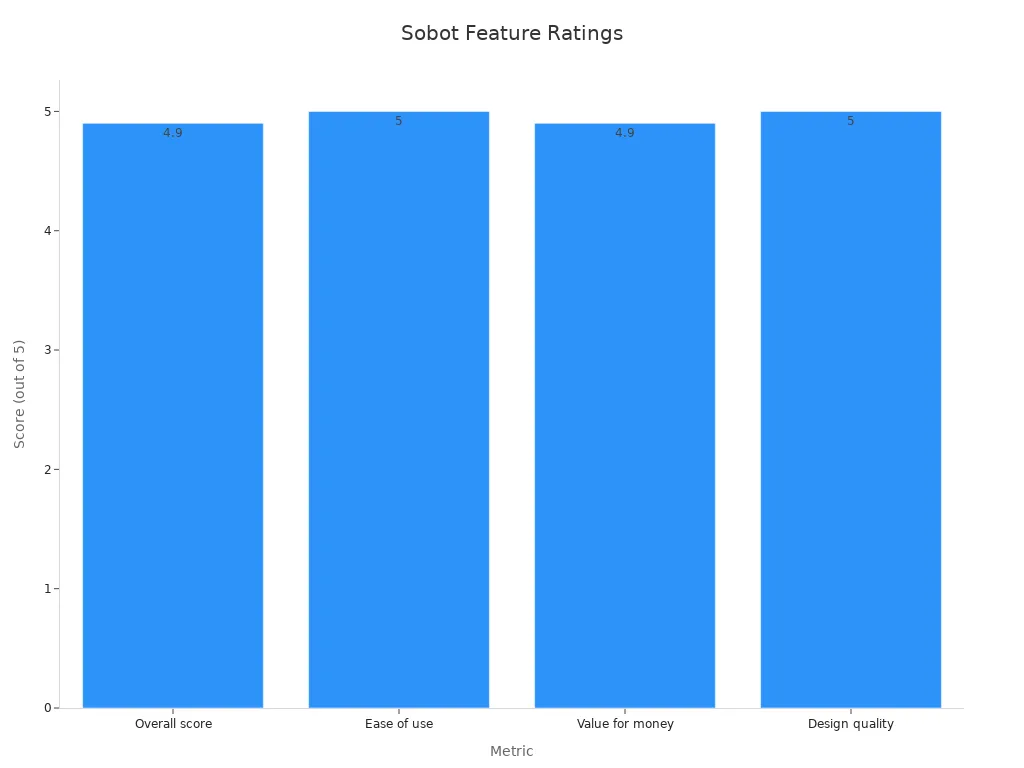
Sobot offers a value-driven pricing model. The focus is on delivering a return on investment by improving agent productivity by 70% and cutting operational costs. The pricing is designed to scale with a business's needs, making its advanced features accessible.
Guru uses a per-user pricing model. Its "All-in-one" plan is $15 per user/month when billed annually, with a 10-user minimum. This means teams must commit to at least $1,800 per year. For larger teams, the pricing can increase significantly. An Enterprise plan with custom pricing is also available for those needing more advanced features.
Zendesk Guide is included in the Zendesk Suite plans, but the capabilities depend on the tier. The pricing can become complex with add-ons.
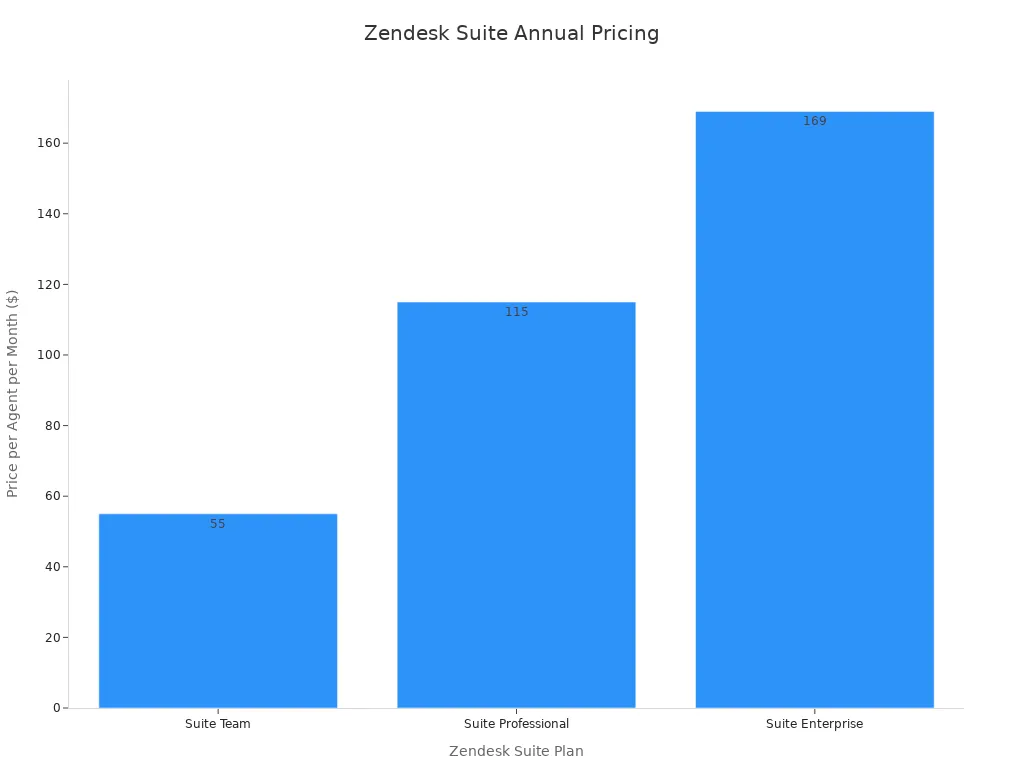
- Suite Team: $55/agent/month. Includes one help center.
- Suite Professional: $115/agent/month. Adds multilingual content and up to five help centers.
- Suite Enterprise: $169/agent/month. Adds approval workflows and up to 300 help centers.
Additional costs for AI features, workforce management, and quality assurance can increase the total pricing, making it a potentially expensive option for teams needing the full suite of capabilities. This makes a thorough evaluation of the pricing essential when considering the best saas knowledge base tools.
This feature comparison shows the best knowledge base solution depends on your call center's unique needs. The right choice aligns with your team size, existing software, and budget. A great solution helps agents serve customers better.
For teams seeking an all-in-one, AI-powered platform to centralize support for customers, Sobot offers a powerful integrated solution. For those needing real-time contextual suggestions, Guru excels. For businesses committed to the Zendesk ecosystem, Zendesk Guide is the natural choice.
Use the comparison table to shortlist one or two tools. Then, sign up for a demo to see the platform in action. Embark on your contact journey with Sobot today by visiting https://www.sobot.io/.
FAQ
What is the main goal of a call center knowledge base?
A call center knowledge base provides agents with instant, accurate information. This tool helps them answer customer questions quickly. The primary goal is to reduce resolution times and improve the quality of customer service.
How does AI improve a knowledge base?
AI makes a knowledge base smarter. It understands the meaning behind an agent's search, not just keywords. AI can also suggest answers automatically. This helps agents find the right information faster during a customer interaction.
Why is CRM integration important for a knowledge base?
Integrating a knowledge base with a CRM system gives agents a full customer view. They can see past purchases and interactions. This context allows agents to provide a more personalized and effective service for each customer.
See Also
Optimizing Call Center Performance: Essential Quality Management Strategies and Best Practices
Evaluating Artificial Intelligence Solutions for Enterprise Call Center Operations
A Comprehensive Review of Leading Contact Center Solutions for the Year 2024
An Essential Guide to Call Center Quality Assurance Software Selection
Navigating Omnichannel Call Center Software: A Comprehensive Implementation Guide

