Zendesk vs Freshdesk A 2026 Small Business Guide


You face a tough choice between Zendesk and Freshdesk for your customer service. Most small teams pick Freshdesk for its simplicity and affordability. Zendesk is a powerful option if you need deep customization from day one. We will help you make the right choice. You will also discover Sobot, one of the best Kustomer alternatives for small business that offers a different approach.
Zendesk vs. Freshdesk: Quick Comparison
You need a clear breakdown to make a smart decision. Let's compare Zendesk and Freshdesk on the three things that matter most to a small business: price, simplicity, and essential features.
Price
Price is often the deciding factor for a small team. Freshdesk clearly wins on budget-friendliness. It offers a free plan for up to 10 agents, which is a huge advantage when you are starting out. Zendesk does not have a free option. Its entry-level paid plan is also more expensive.
Here is a quick look at how their starting prices compare for 2026:
| Feature | Freshdesk | Zendesk |
|---|---|---|
| Free Plan | Yes, for up to 10 agents | No |
| Cheapest Paid Plan | Starts at $15/agent/month | Starts at $55/agent/month |
| Pricing Model | Straightforward and affordable | More complex and enterprise-focused |
For most small businesses, Freshdesk's pricing is more accessible and easier to understand.
Ease of Use
Your team needs a tool they can use immediately without extensive training. User reviews show that Freshdesk has a slight edge here.
💡 User Feedback Highlights On review sites like Capterra and G2, users consistently rate Freshdesk slightly higher for ease of use. Freshdesk scores a 4.5/5 on Capterra, while Zendesk scores a 4.3/5. Many users find Freshdesk's interface more intuitive for beginners.
Zendesk is powerful, but its wide range of features can feel overwhelming if you are just getting started. You might find its setup process more challenging.
Core Features
Both platforms offer the essential tools you need. However, what you get at the free or entry-level tiers differs significantly.
- Freshdesk's Free Plan: This plan gives you integrated email ticketing, a basic knowledge base, and reporting for up to 10 agents. It's a great starting point. You should know it lacks more advanced tools like automation rules and canned responses.
- Zendesk's Starter Plan: Since Zendesk has no free plan, its cheapest paid plan (
Suite Team) naturally includes more features. You get ticketing across multiple channels and more customization options from the beginning.
Ultimately, Freshdesk provides a solid, no-cost foundation, while Zendesk asks for a higher initial investment for a more feature-rich starting package.
Core Feature Showdown for Small Teams
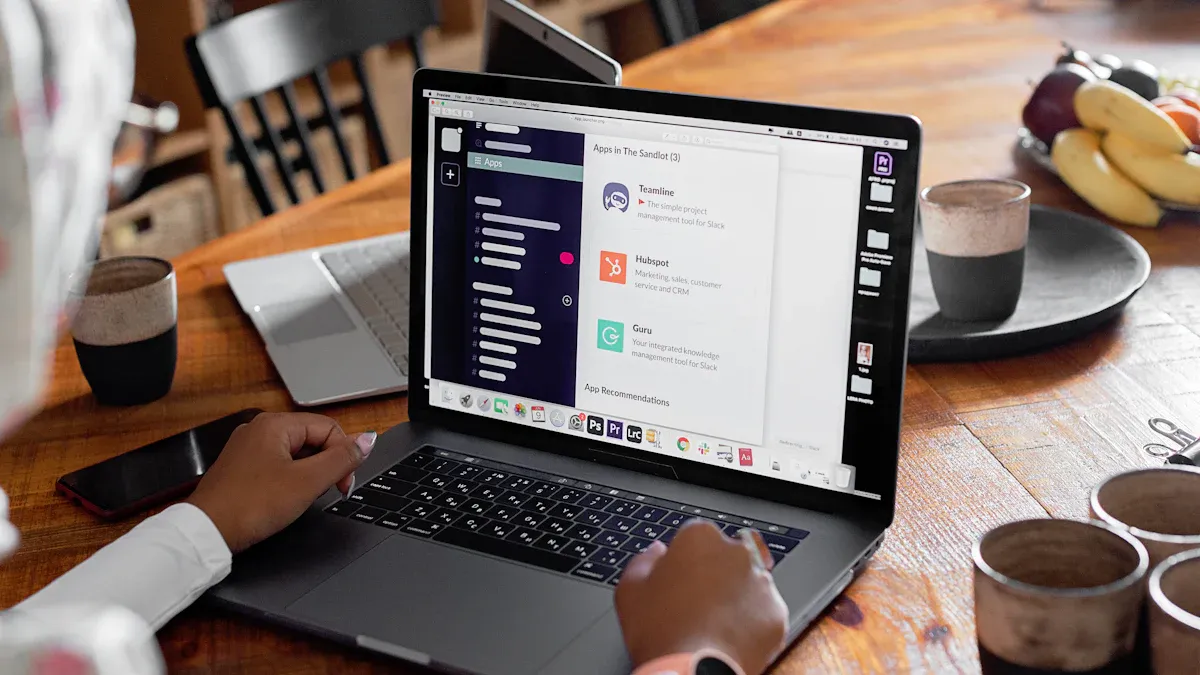
Let's move beyond the price tag. You need to know how Zendesk and Freshdesk handle the daily tasks your support team will face. We will compare the features that matter most when you are just starting out.
Ticketing and Shared Inbox
Your main goal is to manage customer conversations without losing track of them. Both platforms do this through a ticketing system, which turns every customer email, chat, or message into a numbered ticket. This ticket lives in a shared inbox where any agent can view, assign, and respond to it.
-
Freshdesk makes this process very straightforward. You can connect your support email (like
support@yourcompany.com) and start managing tickets in minutes. Its free plan unifies email and includes a basic knowledge base, giving you a central hub for customer issues from the start. -
Zendesk offers a more powerful, omnichannel experience. It excels at bringing conversations from email, chat, social media, and phone calls into one view. However, setting up these different channels can be more complex. You will need to invest more time in configuration to get everything running smoothly.
For a small team that primarily uses email for support, Freshdesk provides a faster and simpler path to an organized shared inbox.
Setup and Ease of Use
Your team is busy. You cannot afford to spend weeks learning a new tool. The initial setup and day-to-day usability are critical.
As mentioned, users often find Freshdesk more intuitive. Its dashboard is clean and focuses on the essentials, making it easy for new agents to find their way around. The setup wizard guides you through connecting your email and customizing basic settings.
Zendesk’s interface is also modern, but it is packed with more features and configuration options from the beginning. This can feel overwhelming. Setting up advanced workflows or customizing your views requires more technical know-how.
💡 A Tip for Your Team Think about your team's technical comfort level. If you want a tool that works right away with minimal fuss, Freshdesk has the edge. If you have a team member who enjoys digging into settings and building custom processes, Zendesk's depth will be a welcome challenge.
Self-Service and Knowledge Base
Answering the same questions over and over wastes your team's valuable time. A self-service knowledge base, or FAQ page, lets customers find answers on their own. This is one of the fastest ways to reduce your ticket volume.
-
Freshdesk includes a knowledge base even in its free plan. You can quickly create articles, organize them into categories, and build a simple help center for your customers. This is a huge advantage for a small business looking to be efficient from day one.
-
Zendesk also has a powerful knowledge base tool called Zendesk Guide. It offers more advanced features like AI-powered article suggestions and detailed analytics. However, it is part of the paid
Suite Teamplan, so you will not have access to it without a financial commitment.
Simple Automation Rules
Automation helps your team work smarter, not harder. Simple rules can automatically assign tickets, send notifications, or close old requests. This saves time and ensures nothing falls through the cracks.
Both platforms offer automation, but Freshdesk makes it very accessible. You can set up "if-this-then-that" rules without needing to be a technical expert. For example, if a ticket contains the word "refund," you can automatically assign it to your billing specialist.
Here are some common tasks you can automate in Freshdesk to improve efficiency:
| What to Automate | Why It Helps Your Team | Example |
|---|---|---|
| Routine Tasks | Reduces response times and keeps customers happy. | Automatically handle password resets or software access requests. |
| Ticket Process | Saves time by sorting and assigning tickets for you. | Route tickets with the word "shipping" to the logistics team. |
| Incident Response | Ensures critical issues get immediate attention. | Instantly escalate tickets about a website outage to a manager. |
| Surveys & Reporting | Gathers customer feedback without manual effort. | Automatically send a satisfaction survey after a ticket is solved. |
Zendesk’s automation engine is incredibly robust, but like its other features, it comes with a steeper learning curve. Building complex, multi-step workflows is its strength, which may be more than a small team needs initially.
Key Integrations
Your customer service tool should connect with the other software you use every day. For most small businesses, this means tools like Shopify for e-commerce and Slack for internal team communication.
Both Zendesk and Freshdesk have large app marketplaces with hundreds of integrations.
- You can connect both platforms to Shopify to view customer order details right next to their support ticket. This is essential for any e-commerce business.
- Both also integrate with Slack, allowing your team to get ticket notifications or even create tickets directly from a Slack conversation.
The key difference often lies in the complexity and cost. Many of Freshdesk's core integrations are straightforward to set up on lower-tier plans. With Zendesk, some advanced integrations may require a higher-tier plan or a paid app from their marketplace.
Beyond the Big Two: Other Options to Consider
Zendesk and Freshdesk are powerful, but they are not the only options. You might find that your team's needs fall somewhere between Freshdesk’s simplicity and Zendesk’s complexity. Sometimes, a different approach is better.
Why Look for an Alternative?
You may need an alternative if you face common frustrations with the big platforms. Many growing businesses find they need more than what entry-level plans offer.
Common challenges include:
- Inconsistent omnichannel support: Your team struggles to get a unified view of customer conversations across email, chat, and social media.
- Complex user interfaces: Agents find the software difficult to use, which slows them down.
- Basic reporting: You cannot get the deep, real-time analytics you need to track performance.
- Limited AI and automation: The self-service tools are not smart enough, leading to high agent workloads.
“The daily challenges related to using the new UI made it very clear that we needed to prioritise exploring other platforms.”
— Thinkific, an edtech software company
If these issues sound familiar, it might be time to look for one of the best Kustomer alternatives for small business that offers a more integrated solution.
Sobot: One of the Best Kustomer Alternatives for Small Business
You should consider Sobot if you want a powerful, all-in-one solution that is easy to use. Sobot combines enterprise-level features into a package that growing businesses can manage. It is one of the best Kustomer alternatives for small business because it unifies your entire customer contact journey.
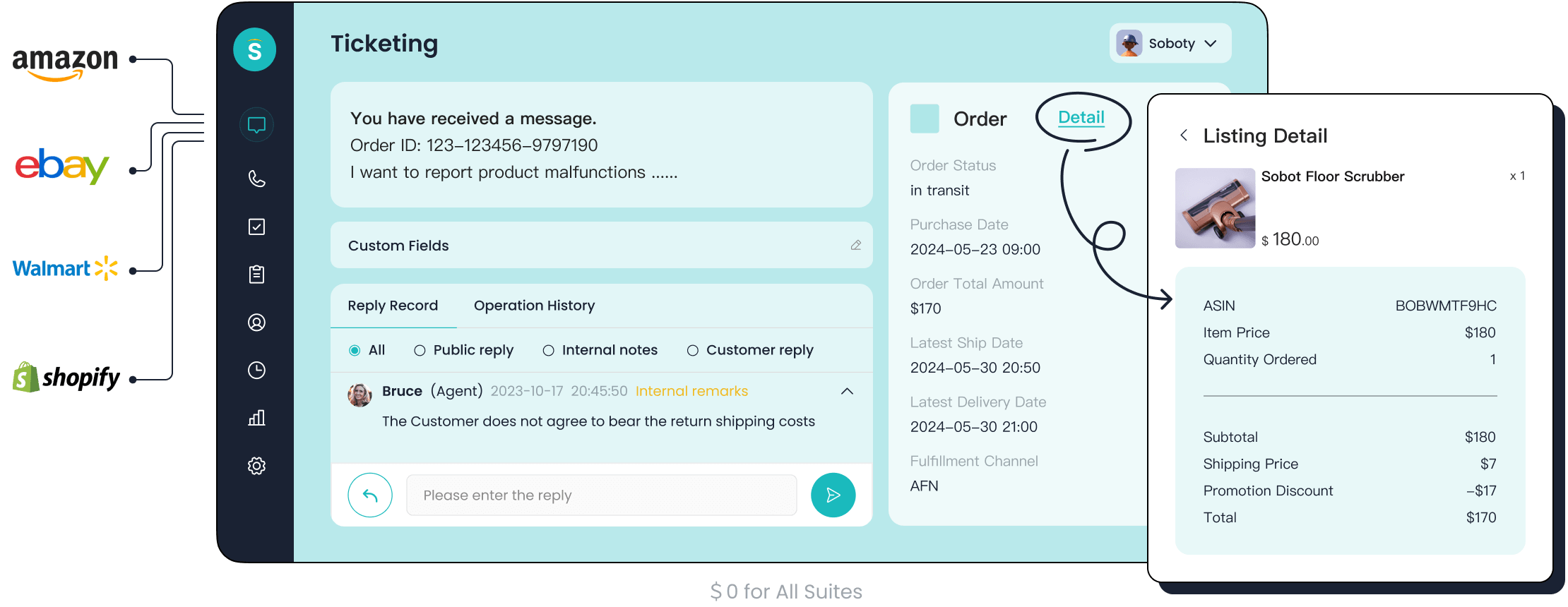
The Sobot Ticketing System offers key advantages. It provides unified handling of all your channels, including email, chat, and voice, in a single dashboard. Its AI-powered automation and robust SLA management help your team work more efficiently and keep customers happy.
Real-world success proves its power. Global tech leader OPPO used Sobot to manage customer service.
- They achieved an 83% chatbot resolution rate, freeing up human agents for complex issues.
- This human-machine cooperation boosted efficiency and customer satisfaction.
Sobot gives you the power of an enterprise tool without the overwhelming complexity. For teams that want a scalable, intelligent platform from day one, exploring one of the best Kustomer alternatives for small business is a smart move.
2026 Pricing: Zendesk vs. Freshdesk

Your budget is a top priority. Let's break down the costs of Zendesk and Freshdesk so you can see how they fit your financial plans. The price differences are significant, especially as your team grows.
Freshdesk's Free and Starter Plans
Freshdesk is the clear winner for businesses on a tight budget. It offers a completely free plan and an affordable starter option.
| Plan | Monthly Cost (per agent) | Annual Cost (per agent) |
|---|---|---|
| Free | $0 | $0 |
| Growth | $18 | $15 |
The Free plan is a great starting point. It gives you basic email ticketing and a knowledge base for up to 10 agents. However, it lacks automation and SLA policies.
The Growth plan adds important features for a growing team:
- Automation rules to handle routine tasks
- A customer portal for self-service
- Standard reporting and real-time dashboards
💡 A Key Limitation The Growth plan only allows for a single SLA policy. You cannot set different response times for different customer types or issue priorities.
Zendesk's Entry-Level Plans
Zendesk does not offer a free plan. Its entry-level plan, Suite Team, is more expensive but includes more features from the start.
| Plan | Monthly Cost (billed monthly) | Monthly Cost (billed annually) |
|---|---|---|
| Zendesk Suite Team | $69 per agent | $55 per agent |
The Suite Team plan gives you a unified ticketing system, messaging across social channels, a help center, and basic AI tools. If you need more power, the Suite Growth plan adds features like SLA management, a self-service customer portal, and multilingual support.
Hidden Costs and Scalability
The initial price is only part of the story. You must also consider future costs as your business expands.
Zendesk's pricing model can include hidden costs. You may need to pay extra for:
- Advanced AI and automation tools
- Chat support and advanced reporting
- Onboarding services and premium support
Freshdesk is generally more affordable as you scale. The cost difference becomes very clear when you compare growing from 5 to 25 agents.
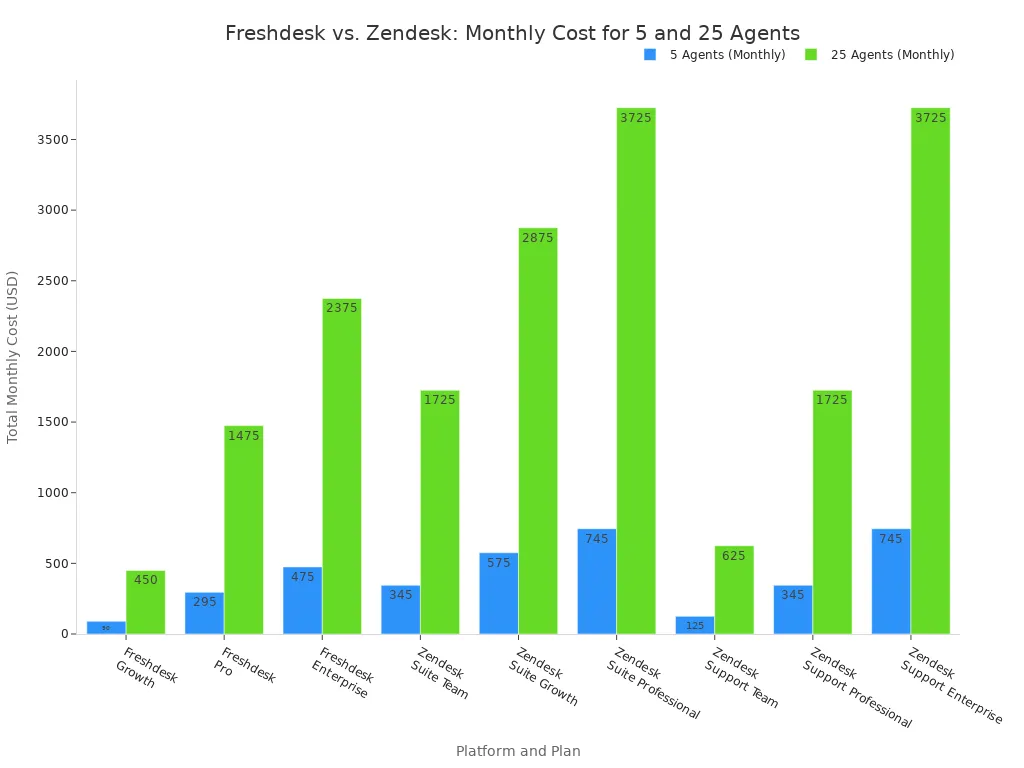
As the chart shows, Freshdesk's plans remain significantly more cost-effective as your team grows. Zendesk's powerful features come at a much higher price, which can strain a small business budget.
Final Verdict: Which Platform Should You Choose?
You have reviewed the features, pricing, and user experiences. Now it is time to make a final decision based on your business's unique needs. This final summary will help you choose the right path for your team.
Choose Freshdesk if...
You should choose Freshdesk if your priorities are budget and simplicity. It is the ideal starting point for most small businesses and startups.
- Your team needs a tool that is easy to learn and quick to set up.
- You want a free, functional plan to manage email tickets for up to 10 agents.
- You value a straightforward, affordable pricing model as your team grows.
- You need to build a self-service knowledge base immediately without any cost.
Choose Zendesk if...
You should choose Zendesk if you anticipate rapid growth and need deep customization from the start. It is a powerful platform for teams with technical resources.
- You need advanced analytics and complex automation workflows from day one.
- Your budget can accommodate a higher starting price for more powerful features.
- You have a team member who can manage a more complex setup process.
- You plan to offer a true omnichannel experience across many channels early on.
Consider Sobot if...
You should consider Sobot if you want enterprise-level power without the complexity. It is one of the best Kustomer alternatives for small business if you need a scalable, all-in-one solution.
- You sell on multiple platforms like Shopify and Amazon and need to centralize all customer conversations.
- You want to use powerful AI to automate repetitive questions and free up your agents for complex issues.
- You are an online boutique looking to reduce abandoned carts by providing instant answers on sizing and shipping.
- You need a single platform that unifies email, chat, and voice without overwhelming your team.
Sobot is a smart choice for teams that want to grow without outgrowing their tools, making it one of the best Kustomer alternatives for small business.
You now have the facts to choose your customer service platform. Freshdesk is your best choice for simplicity and a low budget. Zendesk offers deep customization for teams that need it immediately. You should consider Sobot if you want a powerful, all-in-one omnichannel solution that scales with your business.
Ready to move forward?
- Explore the free trials of your top choice.
- Book a demo with Sobot to see its ticketing system in action.
FAQ
Is Freshdesk's free plan enough to start with?
Yes, for many new businesses. The free plan supports up to 10 agents for email ticketing and includes a basic knowledge base. You get a solid foundation for organizing customer support without any initial cost. It is ideal for teams primarily using email.
When should I pay for Zendesk instead of using a free option?
You should choose Zendesk if you need advanced features from day one. Its paid plans offer deep customization, complex automation, and robust analytics. This is a good investment if your team has the technical skill and budget for a powerful, enterprise-ready tool.
Do I really need an omnichannel solution like Sobot now?
You need an omnichannel solution if you communicate with customers across many channels. Sobot unifies email, chat, voice, and social media into one view. This prevents your team from missing messages and gives customers a seamless experience.
💡 A Quick Tip If you sell on platforms like Shopify and also use live chat, an omnichannel tool is essential. It connects order data to conversations, helping your agents solve problems faster.
How long does it take to set up these platforms?
You can set up Freshdesk's basic features in under an hour. Its interface is very intuitive for beginners. Zendesk requires more time for configuration due to its extensive features. Sobot also offers a guided setup to get your unified inbox running quickly.
See Also
Best Live Chat Solutions for Small Businesses in 2024
Leading 2024 Chat Software: A Comprehensive Review for Businesses
Comparing Top Live Chat Tools: Shopify's Edge Against Competitors
Discovering the Top 10 Customer Service Software Options for 2024
Reviewing the Best Free Chat Software Options for Businesses

