AI Support Automation Tools A 2026 Review

Businesses seek the best AI customer support tools for customer support in 2026. This guide answers which ai customer support tools have best automation features. It presents the top 10 customer support automation tools, including leaders like Sobot, in a quick-glance table. This review offers more than a list. It provides a clear framework for evaluating customer support automation platforms. Companies can find the right AI for customer support. The goal is improving customer experience and efficiency through AI-driven customer support. This makes customer service automation a core business advantage. The right AI support software and AI automation tools enable powerful customer support automation.
Which AI Customer Support Tools Have Best Automation Features?

Finding which AI customer support tools have best automation features is key to upgrading your service. The right AI customer service software delivers powerful automation. It boosts team efficiency and improves the customer journey. This guide cuts through the noise. We present our editor's choices and a direct comparison of the top 10 customer support automation tools.
2026 Editor's Picks: Best Overall, SMB, and Enterprise
Our editors analyzed the market to identify standout platforms for specific needs. These picks represent the best AI capabilities for customer support. Excellent customer service automation is a primary feature of these tools. They are leaders for customer support in 2026.
- 🏆 Best Overall: Zendesk AI. Its mature platform and extensive AI features make it a powerful, all-around choice for scaling teams.
- 🏢 Best for Enterprise: Salesforce Service Cloud. Offers unmatched CRM integration and enterprise-grade AI automation for complex organizations.
- 🚀 Best for SMBs & All-in-One: Sobot. Provides a fully integrated contact center solution, combining chatbot, voice, and ticketing with strong AI automation, making it ideal for businesses seeking a unified system.
Comparative Feature Matrix: Top 10 Tools
Choosing the right AI tools for customer support requires a clear view of their core strengths. The landscape of AI customer service tools is vast. This matrix simplifies your search. It highlights the key automation features of the top 10 customer support automation tools.
| Tool | Key Automation Feature | Best For | Omnichannel? |
|---|---|---|---|
| 1. Zendesk AI | Intelligent Triage & Routing | Scaling Support Teams | Yes |
| 2. Sobot | All-in-One AI Contact Center | Integrated Omnichannel | Yes |
| 3. Intercom | Proactive AI Engagement | Sales & Support Conversion | Yes |
| 4. Salesforce | Deep CRM & AI Workflows | Enterprise CRM Integration | Yes |
| 5. Freshdesk | Freddy AI Agent Assists | Multichannel Communication | Yes |
| 6. Gorgias | E-commerce Ticket Automation | Shopify & Magento Stores | Yes |
| 7. Kapture.cx | Customizable AI Workflows | Custom Support Processes | Yes |
| 8. Yuma.ai | Helpdesk Ticket Automation | Shopify & Gorgias Users | No |
| 9. Crescendo.ai | Advanced Conversational AI | Enterprise LLM Needs | Yes |
| 10. Zapier | AI-Powered App Integration | Connecting Disparate Tools | Yes |
1. Zendesk AI: The All-in-One CX Platform
Zendesk AI stands as a mature and comprehensive customer experience platform. It combines a powerful ticketing system with advanced AI capabilities. This makes it a top choice for businesses aiming to enhance their customer service automation. The platform is designed to grow with a company, offering sophisticated tools to manage increasing support demands.
Key Automation Features
Zendesk's strength lies in its intelligent automation. The platform uses machine learning for smart triage. It automatically analyzes incoming tickets for intent, sentiment, and language. This process sorts, tags, and routes tickets to the right agent or department. This automation removes manual sorting and speeds up response times.
The AI also provides significant support to agents. Agent assist and copilot features suggest draft replies based on ticket context and knowledge base articles. The system recommends macros and pre-written responses. This helps agents work faster and ensures communication is consistent. This level of AI support boosts agent efficiency and response quality.
Ideal Use Case: Scaling Support Teams
Zendesk is ideal for support teams that are growing quickly. Its features are built to handle a high volume of customer interactions without sacrificing quality. The AI-powered workflows and agent assistance tools allow companies to scale their support operations effectively. New agents can become productive faster with AI guidance. This makes it a leading ai customer service software for expanding businesses.
Pros and Cons
Pros:
- Extensive and powerful AI feature set.
- Highly scalable platform for growing businesses.
- Deep analytics and reporting capabilities.
Cons:
- Advanced AI features require a premium add-on.
- Pricing can be high for smaller teams.
2026 Pricing Model
Zendesk's pricing scales with team size. It uses a per-agent, per-month model. For powerful customer service automation, businesses often need the Advanced AI add-on. This costs an additional $50 per agent/month. It unlocks features like intelligent triage and the agent copilot.
Here is a look at two popular plans for 2026:
| Plan | Price (Billed Annually) | Key AI Features |
|---|---|---|
| Suite Team | $55 per agent/month | Basic AI agents and generative replies |
| Suite Enterprise | $169 per agent/month | Advanced AI with content cues, dynamic workspaces |
This structure allows businesses to invest in advanced AI as their support needs evolve.
2. Sobot: The All-in-One AI Contact Center Solution
Sobot delivers a complete AI contact center solution. It unifies chatbot, ticketing, and voice capabilities into a single platform. This all-in-one approach makes it a strong choice for businesses wanting to streamline customer interactions. The platform serves major brands like Samsung and Philips. It is also an official WhatsApp Business Solution Provider (BSP), enhancing its omnichannel reach.
Key Automation Features
Sobot's power comes from its comprehensive "Five-AI system." This system provides advanced automation across all customer touchpoints.
- Omnichannel AI: Engages customers on their preferred channels.
- Scenario-based AI: Offers tailored solutions for industries like e-commerce.
- Multi-faceted AI: Includes an AI Agent, a Copilot for human agents, and AI Insight for analytics.
- Generative AI: Uses powerful LLMs to understand and resolve complex issues.
- Secure AI: Guarantees data privacy and system compliance.
This AI customer service software uses conversational AI to guide shoppers. It sends automated messages to improve service and increase sales. The automation allows businesses to support customers at scale.
Ideal Use Case: Integrated Omnichannel Support
Sobot is perfect for businesses that need a unified support system across all channels. Companies can manage live chat, email, voice, and social media from one workspace. This integration eliminates data silos. It gives agents a complete view of the customer journey. The result is faster, more consistent service and higher efficiency.
Key Advantages
Sobot's key advantage is its ability to drive tangible business results. Its AI does more than just answer questions; it drives revenue.
Success Story: OPPO The global electronics brand OPPO used Sobot's AI chatbots. This led to an 83% chatbot resolution rate and a 57% increase in repurchase rates. This case shows how effective customer service automation can boost customer loyalty and sales.
The platform's 24/7 availability ensures that customers receive instant support anytime. This focus on automated resolutions frees up human teams for more critical tasks.
2026 Pricing Model
Sobot uses a customized pricing model. It creates plans based on a company's specific needs and scale. This ensures businesses only pay for the features they require.
| Plan Tier | Pricing Structure | Best For |
|---|---|---|
| Custom | Quote-based | Businesses of all sizes seeking a tailored AI solution |
Companies should contact Sobot directly for a detailed quote. This approach allows for flexible and scalable customer service automation investment.
3. Intercom: Proactive Engagement and AI Support
Intercom excels at combining proactive customer engagement with powerful AI support. It is a leading ai customer service software for businesses that want to turn website visitors into loyal customers. The platform uses targeted messaging and advanced automation to engage users at the right moment, driving both sales and support resolutions.
Key Automation Features
Intercom's customer service automation is built around a suite of intelligent tools. These features work together to create a seamless experience for customers and improve team efficiency.
- Fin AI Agent: This is Intercom's primary AI chatbot. It uses your support content to provide fast and accurate answers to customer questions.
- Workflows: This feature acts as a central hub for automation. It allows businesses to build powerful bots that guide customers and automate repetitive tasks for support teams.
- Copilot: This AI assistant works inside the agent inbox. It helps team members respond faster by suggesting replies and summarizing conversations.
- Proactive Support: The platform sends timely, relevant messages to users. This can guide new customers through onboarding or direct users to help articles, reducing inbound queries.
Ideal Use Case: Sales and Support Conversion
Intercom is ideal for businesses focused on converting leads and supporting users within a single platform. Its proactive AI messaging engages potential customers directly on a website or in an app. This automation helps answer sales questions instantly. It can also qualify leads before passing them to a human agent. This blend of sales and support makes it a powerful tool for growth-oriented companies.
Pros and Cons
Pros:
- Excellent for proactive customer engagement and lead generation.
- Powerful and accurate AI chatbot (Fin).
- Unified platform for sales, marketing, and support teams.
Cons:
- Pricing can become expensive with add-ons and usage-based fees.
- The number of features can be overwhelming for very small teams.
2026 Pricing Model
Intercom's 2026 pricing is based on seats, with key AI features available as add-ons. This model allows businesses to scale their investment as they grow. The Fin AI agent, a core part of its AI offering, is priced per resolution.
| Plan | Price (per seat/month) |
|---|---|
| Essential | $39 |
| Advanced | $99 |
| Expert | $139 |
For example, a team on the Advanced Plan with 5 seats and 2,000 Fin AI resolutions per month would have a total cost of around $2,475/month. This includes the seat cost plus the usage-based fee for the AI.
4. Salesforce Service Cloud: Enterprise Customer Support Automation
Salesforce Service Cloud is a dominant force in the enterprise space. It leverages the power of the world's leading CRM to deliver sophisticated customer support automation. This platform is built for large organizations that need to manage complex service operations. Its deep integration with sales and marketing data provides a complete 360-degree view of the customer. The Einstein AI engine drives its powerful automation capabilities.
Key Automation Features
Salesforce's Einstein AI provides a suite of tools designed to boost team efficiency and improve the customer experience. This AI is central to its customer service automation strategy. Key features include:
- Einstein Case Classification: This AI feature automatically sorts and prioritizes incoming customer cases.
- Einstein Article Recommendations: The system suggests relevant help articles to agents and customers.
- Einstein Bot Builder: Businesses can create and deploy AI chatbots to handle common questions.
- Generative AI Tools: Einstein generates content to speed up work. It creates service replies, summarizes calls and cases, and even drafts new knowledge articles from real-time data.
Ideal Use Case: Deep CRM Integration
Salesforce Service Cloud is the perfect choice for businesses already invested in the Salesforce ecosystem. The platform's native connection to the CRM is its greatest strength. Support teams can access a customer's entire history, from sales interactions to past service tickets. This deep data integration allows for highly personalized and context-aware support. It makes the platform a top-tier ai customer service software for large-scale operations.
Pros and Cons
Pros:
- Unmatched integration with Salesforce CRM.
- Highly scalable and customizable for complex enterprise needs.
- Powerful and expanding Einstein AI feature set.
Cons:
- Can be complex to implement and manage.
- Pricing is at the higher end of the market.
2026 Pricing Model
Salesforce Service Cloud uses a per-user, per-month software-as-a-service (SaaS) model. Advanced AI and chatbot features often require higher-tier plans or paid add-ons. This customer service automation pricing reflects its enterprise focus.
| License Type | Monthly Cost (per user) | Einstein-Powered Chatbots |
|---|---|---|
| Enterprise | $175 | Paid Add-On |
| Unlimited | $350 | Included |
| Agentforce 1 | $550 | Included |
This structure allows large companies to select a plan that aligns with their specific automation and AI needs.
5. Freshdesk (Freddy AI): Unified Omnichannel AI
Freshdesk offers a unified platform powered by its AI, Freddy. This solution helps businesses manage customer conversations across many channels. Freddy AI provides a suite of ai customer service tools. These tools are designed to improve both agent efficiency and the customer experience through smart automation.
Key Automation Features
Freshdesk's customer service automation is driven by its Freddy AI engine. This AI works in two main ways: as an agent assistant and as a standalone bot.
- Freddy AI Copilot: This AI assistant works alongside human agents. It suggests replies, summarizes long tickets, and provides real-time translations. It also uses auto triage to recommend ticket priority and status, helping agents work faster.
- Freddy AI Agents: Businesses can build and deploy AI agents with a no-code builder. These bots handle common questions like "Where is my order?" 24/7. This frees up human agents for more complex problems. The AI learns from your knowledge base to provide accurate answers.
This dual approach to AI ensures that both simple and complex queries receive a fast response.
Ideal Use Case: Multichannel Customer Communication
Freshdesk is ideal for businesses that communicate with customers across various channels like email, chat, and social media. Its AI tools are built to create a consistent experience everywhere. The platform's automation features help manage high volumes of inquiries. This makes it a strong choice for companies wanting to centralize their support operations.
Pros and Cons
Pros:
- Powerful AI features for both agents and customers.
- User-friendly, no-code bot builder.
- Strong focus on omnichannel support.
Cons:
- Core AI features are paid add-ons.
- Usage-based pricing for AI agents can be unpredictable.
2026 Pricing Model
Freshdesk offers several plans, but access to advanced AI requires a Pro plan or higher, plus add-ons. This pricing structure allows businesses to scale their customer service automation investment.
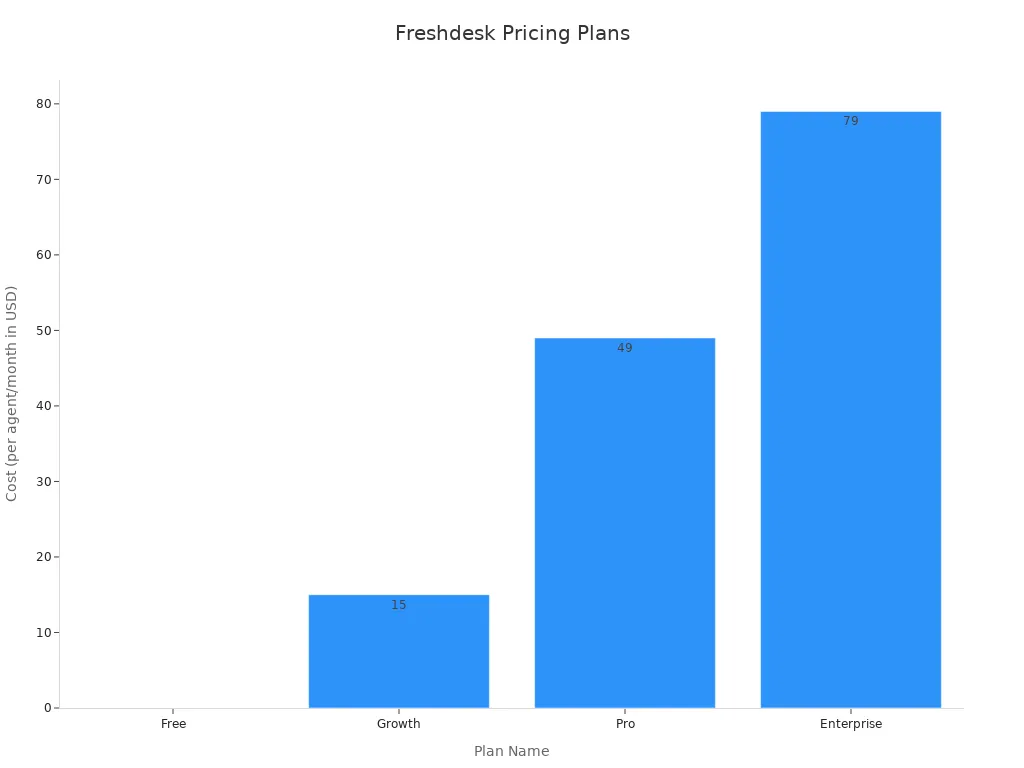
| Plan Name | Cost (per agent/month) | AI Access | Included AI Sessions |
|---|---|---|---|
| Free | N/A | No | N/A |
| Growth | $15 | No | N/A |
| Pro | $49 | Yes (add-ons) | 500 free AI Agent sessions |
| Enterprise | $79 | Yes (add-ons) | 500 free AI Agent sessions |
To unlock Freddy's full potential, businesses should budget for these add-ons:
- Freddy AI Copilot: Costs an additional $29 per agent/month.
- Freddy AI Agent: Priced at $100 for every 1,000 sessions.
6. Gorgias: The AI Support Hub for E-commerce
Gorgias is a specialized platform built for e-commerce businesses. It provides powerful ai customer service tools designed to manage support for online stores. The platform integrates deeply with major e-commerce systems like Shopify and Magento. This connection allows support agents to see customer order details directly within the helpdesk, improving efficiency.
Key Automation Features
Gorgias focuses its customer service automation on the specific needs of online retail. Its AI features help stores manage common questions quickly.
- AI Agent: This AI add-on automates responses to routine questions like "Where is my order?". It provides instant, accurate answers to customers.
- Automate: This feature uses rules to tag, assign, or even close tickets without human input. For example, it can automatically close tickets that are simple social media comments.
- Macros: Agents can use one-click responses for frequent inquiries. These pre-made answers can include customer data like order numbers, making replies fast and personal.
This level of automation helps e-commerce brands handle high ticket volumes, especially during peak shopping seasons.
Ideal Use Case: Shopify and Magento Stores
Gorgias is the ideal solution for merchants using Shopify, Magento, or BigCommerce. Its native integration pulls customer data, order history, and shipping information into the support view. This gives agents the context they need to resolve issues without switching between tabs. The platform centralizes customer conversations from email, chat, and social media, making it a true command center for e-commerce support.
Pros and Cons
Pros:
- Deep, best-in-class integration with e-commerce platforms.
- AI features are tailored specifically for online retail questions.
- Centralizes all customer communication channels.
Cons:
- Pricing is based on ticket volume, which can be costly for high-growth stores.
- Less suited for businesses outside the e-commerce industry.
2026 Pricing Model
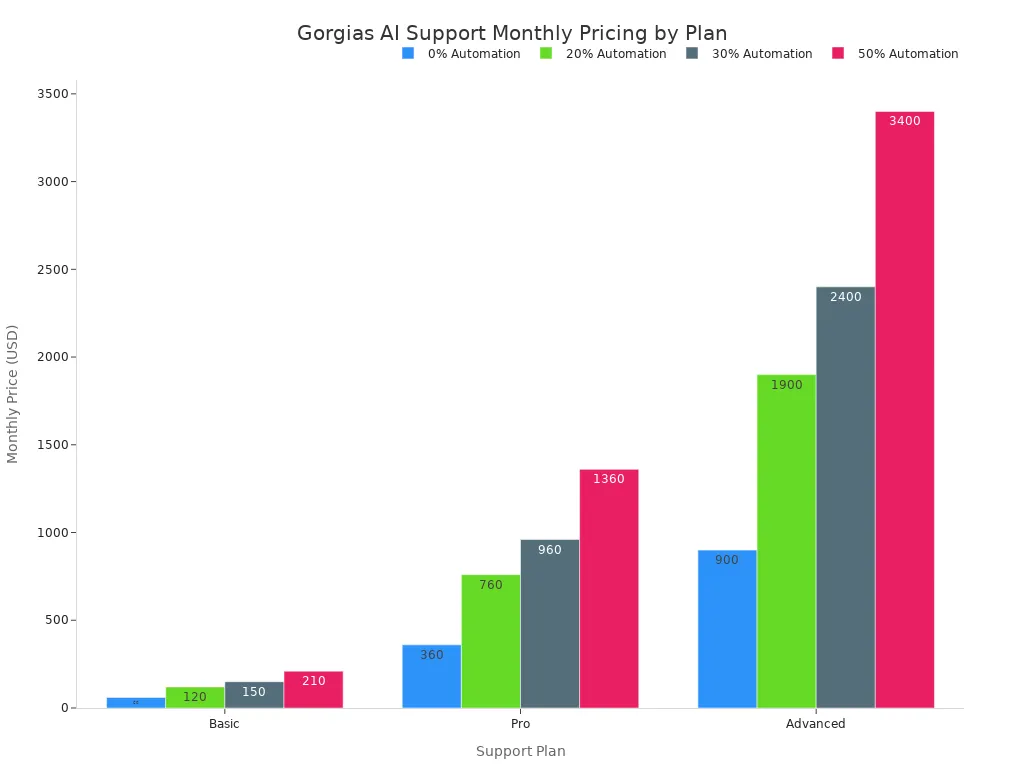
Gorgias uses a value-based pricing model for its customer service automation. The cost depends on the number of tickets and the level of AI automation a business chooses. The AI Agent is an add-on that resolves tickets automatically.
| Plan | Monthly Tickets | Price with 0% Automation | Price with 20% Automation | Price with 30% Automation | Price with 50% Automation |
|---|---|---|---|---|---|
| Basic | 300 | $60 | $120 | $150 | $210 |
| Pro | 2,000 | $360 | $760 | $960 | $1,360 |
| Advanced | 5,000 | $900 | $1,900 | $2,400 | $3,400 |
| Enterprise | Custom volume | Custom pricing | Custom pricing | Custom pricing | Custom pricing |
Additional costs include:
- Manual tickets: $0.36 to $0.40 each, depending on monthly volume
- Automated tickets: Additional value-based costs based on the selected automation percentage
- Voice and SMS support: Available as specialized add-ons
7. Kapture.cx: Evolving AI Tools for Customer Service
Kapture.cx provides a flexible platform with evolving AI tools for customer support. It focuses on creating highly customizable support workflows. This approach allows businesses to tailor their customer service automation to fit specific industry needs. The platform uses advanced AI to improve both agent performance and customer interactions.
Key Automation Features
Kapture.cx delivers powerful automation through a suite of intelligent features. Its AI is trained on industry-specific data, allowing it to understand unique business language with high precision. This targeted AI enhances overall system effectiveness.
Key features include:
- Agentic AI: This advanced AI does more than just talk. It can actively complete tasks like processing a refund or updating an order on its own.
- Intelligent Routing: The system analyzes customer questions and history. It then connects the customer to the best agent, reducing transfer times.
- AutoQA: This tool uses AI to check 100% of customer conversations. It looks for quality and compliance, giving managers a full view of team performance.
- Agent Assist & Co-Pilot: These features help human agents work faster. They suggest replies, summarize conversations, and guide agents through complex tasks, boosting team efficiency.
Ideal Use Case: Customizable Support Workflows
Kapture.cx is ideal for businesses that need to build specific, automated support processes. Companies can create rules to automate backend tasks. For example, the system can send a follow-up survey after a ticket closes. This level of control makes it a strong choice for organizations with unique operational requirements that standard platforms cannot meet. The customer service automation is designed to be molded to a company's exact needs.
Pros and Cons
Pros:
- Highly customizable workflow automation.
- Industry-specific AI models for greater accuracy.
- Comprehensive quality analysis across all channels.
Cons:
- Customization can require more setup time.
- Pricing is not publicly listed.
2026 Pricing Model
Kapture.cx offers a pricing model based on a company's unique needs. Businesses must contact the sales team to get a custom quote. This ensures the plan and cost align with the required features and scale of automation.
| Plan Tier | Pricing Structure | Best For |
|---|---|---|
| Custom | Quote-based | Businesses needing tailored support workflows and AI features |
This approach allows companies to build a specific customer service automation package that fits their budget and goals.
8. Yuma.ai: Research-Driven AI Support Automation
Yuma.ai offers a specialized platform focused on research-driven customer support automation. This tool is designed to handle helpdesk tickets with a high degree of intelligence. It uses advanced AI to manage the entire ticket lifecycle. This approach boosts team efficiency and provides customers with fast, accurate resolutions.
Key Automation Features
Yuma.ai provides a powerful suite of features for ai-powered ticket automation. The platform's AI is built to understand and execute complex support tasks. This customer service automation helps teams resolve issues faster.
- AI Agents: These agents manage tickets from start to finish. They can retrieve data, check policies, and respond to customers in the brand's voice.
- Auto-Pilots: This feature uses specialized AI to follow strict procedures for tasks like refunds or returns.
- Process Builder: Users can create complex automation flows with a drag-and-drop interface.
- Media Brain: The AI can analyze images, videos, and PDFs within tickets to identify defects or extract text.
- Package Tracker: This tool integrates carrier data directly into tickets for real-time shipping updates.
Ideal Use Case: Helpdesk Ticket Automation
Yuma.ai is perfect for businesses that want to automate a high volume of helpdesk tickets. Its AI is specifically trained for this purpose. The platform connects with major helpdesks, e-commerce platforms, and CRMs. This deep integration gives the AI the context it needs to solve problems effectively. Companies looking to reduce manual ticket handling will find this customer service automation solution very valuable.
Pros and Cons
Pros:
- Highly specialized AI for ticket resolution.
- Powerful features like Media Brain for analyzing attachments.
- Strong integration capabilities with other business tools.
Cons:
- Niche focus may not suit businesses needing a broader CX platform.
- Advanced features might require a learning curve.
2026 Pricing Model
Yuma.ai uses a usage-based pricing model. The cost is based on the number of AI resolutions per month. This structure allows businesses to pay for the value they receive from the automation.
| Plan | AI Resolutions / Month | Price / Month |
|---|---|---|
| Starter | 250 | $299 |
| Growth | 1,000 | $799 |
| Scale | 2,500 | $1,499 |
This model makes it easy for companies to scale their investment as their support volume grows.
9. Crescendo.ai: Enterprise-Grade LLM and NLP
Crescendo.ai provides a customer support platform built on enterprise-grade Large Language Models (LLMs) and Natural Language Processing (NLP). This technology allows the AI to fully automate customer service with high accuracy. The system delivers 24/7 support across live chat, voice, email, and SMS. It can handle complex, multi-step issues from start to finish without needing a human agent.
Key Automation Features
The platform's automation is powered by an advanced AI that understands customers on a deeper level. This AI goes beyond simple scripted replies to provide a more human-like experience.
- Advanced AI Chat Assistant: The AI thinks and reasons like a person. It holds natural, free-flowing conversations that feel empathetic.
- Context and Intent Understanding: The AI uses its NLP technology to grasp the context, intent, and tone of a conversation. This allows it to handle detailed customer questions.
- Emotional Intelligence: The system uses real-time sentiment analysis to detect customer emotions. It can tell if a customer is frustrated or happy and adjusts its tone.
- Multilingual Support: The AI provides accurate and contextual support in over 50 languages.
- Information Retrieval: It pulls correct answers from knowledge bases, company policies, and past conversations to ensure responses are factual and on-brand.
Ideal Use Case: Advanced Conversational AI
Crescendo.ai is ideal for large enterprises that need sophisticated conversational self-service. The platform excels at handling complex technical support queries and detailed customer issues. Its ability to hold natural conversations makes it a great fit for companies wanting to provide a high-touch, personal feel through automation. This reduces the need for human agents in multi-step resolution processes.
Pros and Cons
Pros:
- Handles complex, end-to-end resolutions with advanced AI.
- Human-like conversational ability with emotional intelligence.
- Transparent, outcome-based pricing model.
Cons:
- May be too powerful for small businesses with basic support needs.
2026 Pricing Model
Crescendo.ai uses a performance-based pricing model for its customer service automation. This structure provides businesses with budget predictability. The cost includes a fixed monthly fee plus a charge for each successful resolution.
| Component | Cost | Details |
|---|---|---|
| Per Resolution | Starts at $1.25 | Cost for each issue the AI successfully resolves. |
| Monthly Fee | Fixed | Covers configuration, onboarding, and maintenance. |
This all-in-one price includes AI agents across all channels, implementation, 24/7 support, and access to human agents for escalated issues.
10. Zapier: AI Automation for Maximum Integration
Zapier is not a traditional support helpdesk. It is a powerful integration platform that connects thousands of different web applications. Its strength lies in creating custom workflows, or "Zaps," that automate tasks between these apps. The platform now includes AI tools. This allows businesses to build sophisticated ai-powered automation without writing any code.
Key Automation Features
Zapier's features focus on connecting tools to create a seamless flow of information. The platform uses AI to enhance its core capabilities. This creates powerful customer service automation.
- AI-Powered Zaps: Users can describe a workflow in plain English. Zapier's AI will then build the multi-step Zap for them.
- Zapier Tables & Interfaces: These tools let you build simple databases and front-end apps. They help you create custom internal tools powered by your automation.
- AI Actions: You can add AI steps directly into your Zaps. For example, a Zap can take a customer email, use AI to summarize it, and then create a task in a project management tool.
Ideal Use Case: Connecting Disparate Apps
Zapier is perfect for businesses that use a variety of specialized tools for support, sales, and marketing. It acts as the digital glue connecting these systems. For example, a company can create a Zap that automatically logs a new support ticket from a Gmail message into a Trello board. This level of automation connects different parts of a business. It ensures data moves where it is needed.
Pros and Cons
Pros:
- Integrates with over 7,000 apps, offering unmatched flexibility.
- No-code interface makes building complex workflows accessible.
- AI features simplify the creation of advanced automation.
Cons:
- It is not a standalone customer support platform.
- Pricing is based on task usage, which can become costly for high-volume workflows.
2026 Pricing Model
Zapier's pricing is based on the number of tasks your Zaps run each month. A task is a single action your automation completes. More complex Zaps use more tasks.
| Plan | Monthly Tasks | Price / Month (Billed Annually) |
|---|---|---|
| Free | 100 | $0 |
| Starter | 750 | $19.99 |
| Professional | 2,000 | $49 |
| Team | 50,000 | $89 |
Note: Plans with advanced features like AI-powered Zaps and custom logic start at the Professional tier. You can find more details on the Zapier pricing page.
Key Evaluation Criteria for AI Support Tools
Choosing the right platform from the top 10 customer support automation tools requires a clear evaluation plan. Businesses need to look beyond flashy features. They must assess how a tool fits their long-term strategy. The right AI tools for customer support will grow with your company. This section explains which ai customer support tools have best automation features by giving you key criteria.
Integration and Orchestration
A great AI tool must connect with your existing software. In 2026, support platforms cannot work in isolation. They need to integrate with your CRM, e-commerce platform, and other business systems. This connection creates a single view of the customer. It allows the AI to pull data like order history or past conversations. This makes the customer support automation much smarter and more personal.
Scalability and Performance
Your business will grow. Your support tool must grow with it. Scalability means the platform can handle more customers, agents, and data without slowing down. A good system maintains fast response times even during busy periods. This is critical for customer support in 2026. A platform that lags under pressure will frustrate both customers and your team.
Security and Data Compliance
Customers trust you with their data. Protecting that data is essential. AI platforms must have strong security measures. This includes encryption and secure data storage. Key certifications like SOC 2 and ISO 27001 show a company's commitment to security. For companies serving North American markets, SOC 2 is often the standard. ISO 27001 has stronger international recognition, especially in Europe.
| Feature | SOC 2 | ISO 27001 |
|---|---|---|
| Geographic Focus | North America | International (Europe, Asia) |
| Nature | Auditing Procedure | Formal Certification |
| Flexibility | More flexible criteria | More prescriptive framework |
Choosing a platform with the right certifications builds trust and ensures your customer service automation is compliant.
Customization and Brand Voice
Every brand has a unique voice. Your AI should reflect it. The best platforms allow you to customize the AI's language, tone, and personality. This ensures a consistent customer experience. The automation should feel like a natural extension of your brand, not a generic robot. This customization is a key part of strong AI capabilities for customer support.
Analytics and Reporting
You cannot improve what you do not measure. Powerful analytics show how your AI and support team are performing. Look for tools that provide clear reports on key metrics.
- Resolution times
- Customer satisfaction scores
- Most common query types
- AI agent effectiveness This data helps you understand customer needs and optimize your customer support automation strategy.
Choosing Your Customer Support Automation Platform
Selecting the right tool requires a clear, step-by-step process. Businesses must look beyond features and consider their unique goals and operational needs. This structured approach helps companies choose the best customer support automation platforms for their future success.
Step 1: Define Your Primary Automation Goals
First, a business must define what it wants to achieve with automation. Clear goals guide the selection process.
- Do you want to reduce first-response times?
- Is the main goal to lower support costs?
- Are you trying to increase customer satisfaction scores?
Answering these questions helps narrow down the options to platforms that meet specific objectives.
Step 2: Assess Your Team's Technical Needs
Next, evaluate your team's technical skills. Some AI platforms offer simple, no-code interfaces. Others require more technical knowledge for setup and customization. A team without dedicated IT support may prefer a user-friendly, plug-and-play solution. A company with developers might choose a more flexible, API-driven platform.
Step 3: Map Your Customer Communication Channels
Understand where your customers contact you. Businesses should list all communication channels, such as email, live chat, social media, and phone. The ideal AI tool unifies these channels into a single inbox. This integration gives agents a complete view of the customer journey and ensures a consistent experience.
Step 4: Calculate Total Cost vs. ROI
Companies must analyze the total cost of ownership against the potential return on investment (ROI). This calculation includes subscription fees, implementation costs, and training time. Effective customer service automation should deliver measurable value. The following metrics can help measure the ROI of your customer support automation.
| Metric | Description |
|---|---|
| Labor Cost Reduction | Hours saved through automation |
| Process Efficiency | Output per hour improvement |
| Error Reduction | Fewer costly mistakes |
| Conversion Rate Improvement | Higher percentage of visitors completing desired actions |
| Cycle Time Reduction | Time saved per task or process |
Step 5: Run a Pilot Program or Trial
Finally, always run a trial before committing. A pilot program allows your team to test the AI platform in a real-world setting. This step is crucial for understanding which ai customer support tools have best automation features for your specific use case. A successful trial confirms the tool is the right fit for your customer support in 2026.
The Future of Customer Support in 2026: Trends in Automation

The future of customer support in 2026 is being shaped by powerful automation trends. These advancements are moving beyond simple answers to create intelligent, proactive, and deeply personal experiences. The future of AI for customer support lies in its ability to anticipate needs and act autonomously.
Proactive and Predictive Support
The future of customer support is predictive, not reactive. AI is enabling businesses to solve problems before customers even notice them. This shift is a core part of the future of customer support automation. Machine learning algorithms analyze data to find patterns. This allows companies to optimize operations and anticipate issues.
For example, some global retailers now use AI to improve lead time predictions by 55%. This proactive approach minimizes delays and improves the customer experience. This level of ai-driven customer support shows the practical power of predictive analytics.
Hyper-Personalization at Scale
AI makes it possible to deliver unique experiences to every customer. This is a key trend for the future of customer service automation. AI systems analyze customer data, shopping history, and behavior. This allows them to create micro-segments for highly relevant messages and product recommendations. Advanced AI agents ensure this personalization stays consistent across all channels, from websites to emails. This creates a seamless journey for each user.
The Rise of Fully Autonomous AI Agents
The most significant trend for the future is the rise of fully autonomous AI agents. These are not simple chatbots. Modern AI agents use machine learning to handle complex tasks from start to finish. This is the future of customer support in 2026.
These advanced AI agents can:
- Understand user intent and context in natural conversations.
- Perform specific actions like updating an account or processing a return.
- Access company knowledge to provide accurate, reliable answers.
Systems like Forethought's Autoflows show how intelligent AI agents can manage entire workflows. They predict customer needs and complete tasks, allowing human teams to focus on more complex problems. This evolution of AI agents is driving the next wave of automated resolutions and customer support automation.
The best AI tool aligns perfectly with a company's unique goals and scale. This strategic customer support automation delivers powerful returns. Some businesses achieve a 210% ROI over three years with the right platform. This makes AI a core component for competitive customer support in 2026. The next frontier of this automation moves toward predictive AI and fully autonomous agents, promising even greater efficiency.
FAQ
What is the main purpose of an AI chatbot?
An AI chatbot automates customer conversations. It solves common questions on its own. The chatbot also helps human agents. This improves team productivity and makes support available 24/7. It is a key part of modern AI customer support tools.
How do AI tools help businesses save money?
AI tools handle routine questions automatically. This reduces the need for a large support team. Businesses can save on agent costs. Automation also works around the clock. This provides support without paying for extra shifts.
Do AI support tools replace human agents?
No, AI tools assist human agents. The AI handles simple, repetitive tasks. This frees up human agents to solve more complex customer problems. This teamwork between AI and people improves the overall quality of customer service.
How long does it take to set up an AI support tool?
Setup time varies by platform. Many modern tools offer no-code interfaces. Businesses can design and launch a basic chatbot in a few hours. More complex integrations with other business systems may take longer.
See Also
Evaluating AI-Powered Enterprise Call Center Solutions for Modern Businesses
Enhance SaaS Customer Support Using Effective Live Chat Strategies
Best Contact Center Solutions: An In-Depth Review for 2024
The 10 Leading Live Chat Support Software Platforms of 2024
Discovering the Top 10 Customer Service Software Options for 2024

