How to Automate Your Support Workflow

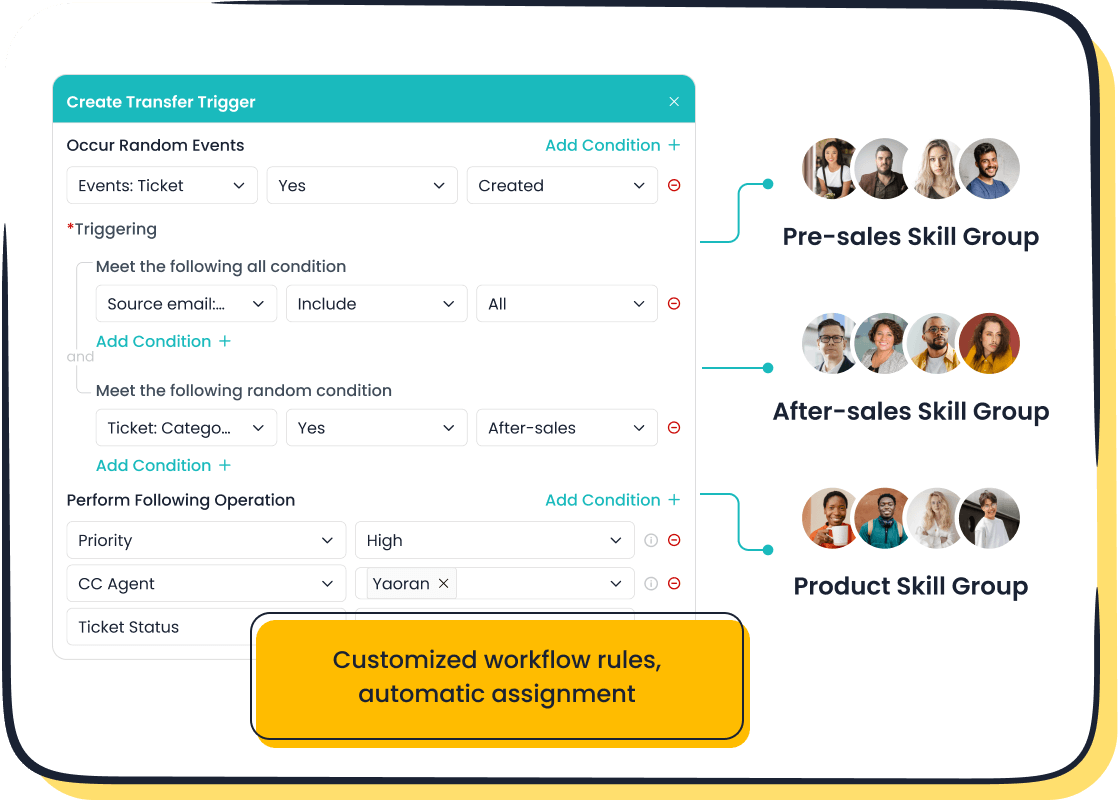
An automated support workflow uses preset rules and AI for customer support. It handles tasks like automated ticket routing and ticket assignment. Customer support automation from solutions like Sobot empowers your team to reduce manual work. This workflow automation creates faster responses and a balanced workload.
- Companies using customer service automation resolve complaints 52% faster.
- Faster automated responses can boost customer satisfaction by 15-20%.
This guide answers the question: what tasks in customer service can I automate?
What Tasks in Customer Service Can I Automate?

You might ask, what tasks in customer service can I automate? Effective customer service automation starts with identifying repetitive, rule-based processes. Automating these areas frees your team for more complex issues. Understanding what tasks in customer service can I automate helps you build a more efficient system. Let's explore some key areas.
Automated Ticket Routing and Assignment
Automated ticket routing is the core of workflow automation. This process automatically assigns incoming customer support tickets to the right agent or team. You can create custom rules to manage this distribution. This ensures that every query gets to the right person without manual sorting. Knowing what tasks in customer service can I automate like this is the first step.
Pro Tip: You can set up automated ticket routing rules based on various criteria:
- Priority-based routing: Instantly send urgent tickets from VIP customers to your senior agents.
- Skill-based routing: Direct technical questions to agents with specialized expertise.
- Language-based routing: Assign tickets to agents who speak the customer's language.
AI-Powered Chatbots for 24/7 Support
AI-powered chatbots provide instant, 24/7 support. They handle common questions and repetitive tasks, which allows your human agents to focus on high-value interactions. AI chatbots can resolve up to 86% of customer questions without human help. For example, by implementing Sobot, the smart device innovator OPPO achieved an 83% chatbot resolution rate. This is a great answer to what tasks in customer service can I automate.
Automated Responses and Canned Messages
You can use automated responses for common inquiries. Canned messages are preset replies that agents can use to answer frequently asked questions quickly. This simple form of automation ensures consistency and speed. It is a key part of figuring out what tasks in customer service can I automate.
Proactive SLA Management and Reminders
Meeting Service Level Agreements (SLAs) is crucial for customer satisfaction. An automated system helps you track ticket deadlines. The Sobot Ticketing System, for instance, includes features for proactive SLA management. The system uses automated rules to monitor ticket aging. It sends alerts and escalates tickets nearing their deadline, preventing breaches and keeping your team on track. This automated process ensures no ticket is forgotten.
The Automated Ticket Routing Setup Process

Setting up an automated workflow transforms your customer support operations. A successful automated ticket routing setup requires careful planning, the right tools, and continuous refinement. Following these steps will guide you through the process and show you how to automate ticket routing and assignment for your support team effectively.
Step 1: Audit Your Current Workflow and Define Goals
Before you can build a better system, you must understand your current one. A thorough audit of your support workflow helps you identify bottlenecks and opportunities for improvement. This first step is crucial for a successful implementation.
Start by defining clear objectives. What do you want to achieve with automation? Your goals might include reducing first response times, improving customer satisfaction scores, or balancing agent workloads.
Next, collect and analyze relevant information to get a complete picture.
- Gather Data: Collect customer support data from all your channels, including emails, chat logs, and social media messages. Look at metrics like ticket volume, resolution times, and common complaint categories.
- Review Internal Processes: Talk to your agents. They have valuable insights into daily challenges and workflow gaps. Ask them what repetitive tasks consume most of their time.
- Identify Gaps: Use the data and feedback to pinpoint weaknesses. You might find that tickets are frequently misassigned or that agents spend too much time searching for information.
- Set Strategic Goals: With a clear understanding of your challenges, you can set specific, measurable goals for your new automated workflow. For example, you might aim to reduce manual ticket assignments by 90%.
Step 2: Choose the Right Automation Software
Your next step is selecting a customer support software that meets your goals. The right tool should not only automate tasks but also integrate smoothly with your existing systems. Look for an automated ticketing system with robust features.
Essential features to look for include:
- Omnichannel Support: The ability to manage all customer conversations from a single dashboard.
- AI-Powered Features: Chatbots and AI-assisted responses to handle simple queries.
- Integration Capabilities: Seamless connection with your CRM, e-commerce platforms, and other tools.
- Automated Ticketing and Routing: Powerful and flexible rules to direct tickets automatically.
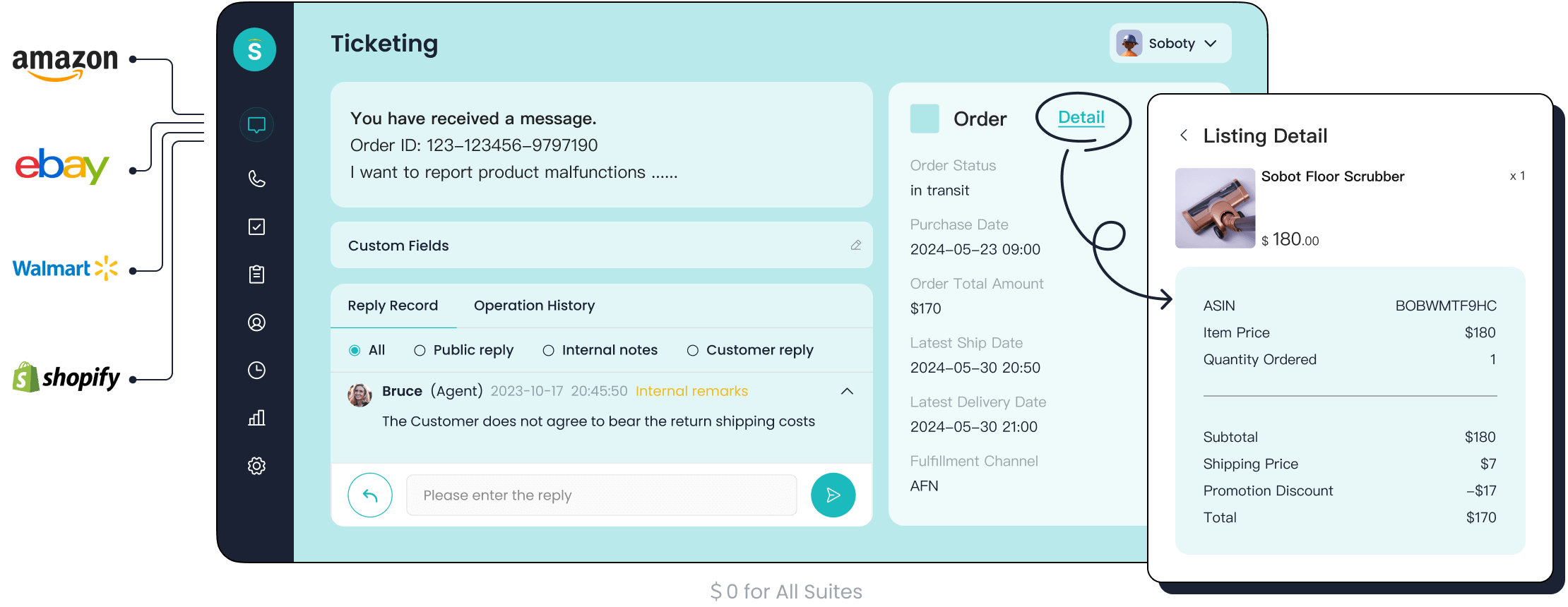
A Comprehensive Solution: Sobot's Ticketing System The Sobot Ticketing System is a powerful platform designed for modern customer support teams. It provides true omnichannel integration, bringing scattered conversations from email, chat, and WhatsApp into one unified interface. This gives your agents a complete view of the customer journey without switching between tools. Key features like custom trigger rules and easy integration with platforms like Shopify make it an ideal choice for implementing automated ticket routing.
Step 3: Implementing Automated Ticket Routing Rules
This is where your planning comes to life. Implementing automated ticket routing involves creating a set of rules that tell your system where to send incoming tickets. These automated rules are the engine of your workflow, ensuring every customer query reaches the right person quickly. This is a fundamental aspect of how to automate ticket routing and assignment for your support team.
You can create rules based on almost any data point associated with a ticket. Start with simple, high-impact rules.
| Condition (If...) | Action (Then...) |
|---|---|
| Ticket subject contains "billing" or "refund" | Assign to the Finance Team group. |
| Ticket is marked as "High" priority | Assign to a Senior Agent for immediate attention. |
| Customer's language is detected as "Spanish" | Assign to the Spanish-Speaking Support team. |
| Ticket comes from your e-commerce platform | Tag with "E-commerce" and assign to that specialty team. |
Building these automated ticket rules is the core of the implementation. A good automated ticketing system allows you to create these workflows with a simple, user-friendly interface. The goal of implementing automated ticket routing is to eliminate manual sorting entirely.
Step 4: Test, Monitor, and Refine Your Setup
Your automated ticket routing setup is not a "set it and forget it" solution. The final step of the implementation is to test, monitor, and continuously refine your rules. This ensures your system remains efficient and adapts to your changing business needs. Understanding how to automate ticket routing and assignment for your support team involves ongoing optimization.
- Test Your Rules: Before going live, use a sandbox environment to test your automated workflow. Create test tickets with different keywords, priorities, and channels to ensure they are routed correctly. A small pilot test with a few agents can also help you catch issues early.
- Monitor Key Metrics: Once your system is live, track key performance indicators (KPIs) to measure success. Pay close attention to:
- First Contact Resolution (FCR): Are more issues being solved on the first try?
- Average Response Times: Are customers getting faster replies?
- Customer Satisfaction (CSAT): Are your satisfaction scores improving?
- Agent Productivity: Are your agents handling tickets more efficiently?
- Gather Feedback: Create a feedback loop with your support agents. They are on the front lines and can provide the best insights into what is working and what is not. Regular check-ins will help you refine your routing criteria and improve the overall process.
Successful implementation of automated ticketing systems depends on this cycle of testing and refinement. It ensures your team can deliver exceptional customer support consistently.
How to Optimize Your Automated Workflow
Once you establish your automated ticket routing, you can optimize it for even better results. Fine-tuning your system ensures you get the most out of your automated workflow. These strategies will help you create a more intelligent and balanced process.
Use Skill-Based Routing for Complex Issues
You can use skill-based routing for issues that need special knowledge. This method of automated ticket routing connects customers with the most qualified agent right away. This improves first-contact resolution because it reduces transfers and follow-up calls.
For example, you can create rules to direct specific inquiries to experts:
This approach ensures efficient ticket routing for your most challenging customer problems.
Implement Round-Robin for Fair Workload Distribution
You can implement a round-robin system for fair ticket assignment. This automated method distributes tickets evenly among your agents. It prevents any single team member from becoming overwhelmed. A balanced workload boosts team morale and prevents agent burnout. This fair distribution of tasks also helps you get more accurate data on team performance.
Leverage AI for Smart Triage and Tagging
Leverage AI to improve your ticket categorization process. AI can automatically triage and tag incoming tickets with high accuracy. You can set up rules for AI-based routing that use sentiment or topic for ticket categorization. This automated categorization frees up your agents to focus on complex interactions. For instance, AI-based routing can apply priority-based routing rules to tickets with 'severe sentiment' for faster handling. This intelligent ticket categorization ensures urgent issues get immediate attention. The automated categorization and ticket categorization are key to a smarter workflow.
Balance Automation with a Human Touch
Your automated workflow should always balance efficiency with a personal connection. Over-automation can lead to customer frustration. Many customers still prefer human interaction for complex or sensitive issues. Use automation for routine tasks, but ensure a seamless handoff to a human agent is always an option. The best automated systems use tools to support agents, not replace them. This balance is key to successful priority-based routing and customer satisfaction.
How to Troubleshoot Common Automation Challenges
Even the best automated workflow can face challenges. Knowing how to troubleshoot common problems ensures your system remains efficient and effective. Here are solutions for issues you might encounter.
Problem: Tickets Are Misrouted or Unassigned
Sometimes, tickets end up in the wrong queue or are left unassigned. This often happens for a few key reasons.
- Inadequate rule definitions in your system.
- Inaccurate or incomplete ticket data.
- Overly complex routing logic causing confusion.
Solution: Regularly review your unassigned tickets. You can hold daily team meetings to review and assign these tickets. This keeps everyone accountable. Also, check your automated routing rules for clarity and accuracy. Ensure your data is clean so the system can make correct decisions.
Problem: Team Resistance to New Processes
Your team may resist new automated processes. This resistance often comes from a lack of understanding or feeling left out of the decision-making. People naturally prefer familiar routines.
To overcome this, you must communicate the "why" behind the change. Explain how automation helps the team and improves customer experiences. Involve your agents in the process by asking for their feedback. Provide proper training to build their confidence with the new tools. When your team feels supported and heard, they are more likely to embrace the new workflow.
Problem: Automation Rules Become Too Complex
Your automation can become too complex over time. You might find yourself spending more time fixing the automation than it saves. This is a sign that your rules need simplification.
To fix this, schedule regular audits of your workflow. Review each rule and ask if it still serves a clear purpose. Remove any outdated or redundant rules that create unnecessary work. A simple, clean set of automated instructions is easier to manage and more effective in the long run.
Automating your support workflow is a smart move. A powerful tool like Sobot helps you boost efficiency and lower operational costs. This automated approach improves customer loyalty by delivering faster service. Your success with automated ticket routing depends on clear goals, the right software, and ongoing refinement.
Ready to streamline your operations? Embark on Your Contact Journey with Sobot's Ticketing System today.
FAQ
What is the main benefit of automating a support workflow?
Automating your workflow boosts team efficiency and improves customer satisfaction. It reduces manual tasks, which allows your agents to solve complex problems faster. This leads to quicker responses and more consistent service for your customers.
How does AI help with ticket routing?
AI analyzes incoming tickets for keywords, sentiment, and intent. It then automatically assigns the ticket to the most qualified agent or team. This intelligent process ensures urgent or specialized issues receive immediate attention without manual sorting.
Will automation replace my human support agents?
No, automation supports your agents, it does not replace them. It handles repetitive tasks so your team can focus on high-value interactions that require empathy and complex problem-solving. This balance improves both efficiency and the customer experience.
See Also
Elevate Your Customer Service: Mastering Live Chat for Superior Support
Optimize SaaS Customer Care: Strategic Live Chat for Enhanced Support
Seamless Shopify Support: 10 Essential Steps for Live Chat Success
Maximize Your 24/7 Live Chat: Achieving Peak Efficiency and Performance
Streamline Your Call Center: Understanding Efficient Automation for Better Service

