What Is Inbound Call Software? A Simple Guide


Inbound call software is a specialized tool that helps your business manage incoming customer phone calls. Its main purpose is to improve the customer experience and increase your team's efficiency. This software intelligently routes calls to the right person. Think of it as a digital receptionist, ensuring every customer connects quickly for a better experience. A powerful Sobot call center, enhanced with Sobot AI, is a great example of this technology in action.
What Is Inbound Call Software?

This type of software is designed to help you manage all incoming phone calls from your customers. It organizes, routes, and tracks every call to ensure a smooth and positive customer experience.
The Core Function
The main job of inbound call software is to connect your customer to the right person as quickly as possible. It uses several smart features to make this happen. This software helps you manage the entire customer journey from the moment they dial your number.
- Interactive Voice Response (IVR): This feature greets your callers with an automated menu. It helps them choose the right department, like sales or support, on their own.
- Automatic Call Distribution (ACD): This system automatically sends calls to the most qualified and available agent.
- Call Queuing: When all agents are busy, this function places callers in a line and can offer a callback option.
Who Uses It?
Any business that values excellent customer service can use this tool. Companies in retail, finance, gaming, and enterprise services rely on it to manage their support operations. If you run an inbound call center, this software is essential for providing effective inbound call center services. It empowers your team to handle high volumes of calls without sacrificing quality.
Inbound vs. Outbound
Your business might handle two types of calls: inbound and outbound. An inbound call center focuses on reactive support, while an outbound center is proactive. The call center software you choose depends on your primary goal.
Here is a simple breakdown of the differences:
| Aspect | Inbound Calls | Outbound Calls |
|---|---|---|
| Primary Goal | Customer support and service | Sales and marketing outreach |
| Initiated By | Customer | Your Business |
| Nature of Interaction | Reactive | Proactive |
| Common Tools | IVR, ACD, Call Queuing | Automated Dialers, Lead Lists |
How Does Inbound Call Software Work?
Understanding how inbound call software works is simple when you see it as a step-by-step journey. The system is designed to guide your customer from the moment they dial your number to the moment their problem is solved. Let's walk through the five key stages of this process.
Receiving and Centralizing Calls
First, the software acts as a central hub for all incoming phone calls. Instead of having calls go to random extensions, the system captures every call in one place. This creates an organized starting point for managing your customer communications and ensures no one gets lost in the shuffle.
Identifying Needs with IVR
Once a call is received, an Interactive Voice Response (IVR) system takes over. This is the automated menu that greets your customer. The IVR plays a pre-recorded message and presents a series of options to understand why they are calling. The customer can respond in two ways:
- Keypad Input: They press numbers on their phone's keypad.
- Voice Commands: They speak their choice aloud.
The system uses this input to take action. It might provide simple information automatically or begin routing the call. This initial step is crucial for collecting data about the caller's needs before an agent is involved.
- For a retail business:
- Press 1 for order status and tracking.
- Press 2 for returns and exchanges.
- Press 3 for store hours and locations.
- For technical support:
- Say "Hardware" for computer or printer issues.
- Say "Software" for application problems.
- Say "Account" for billing questions.
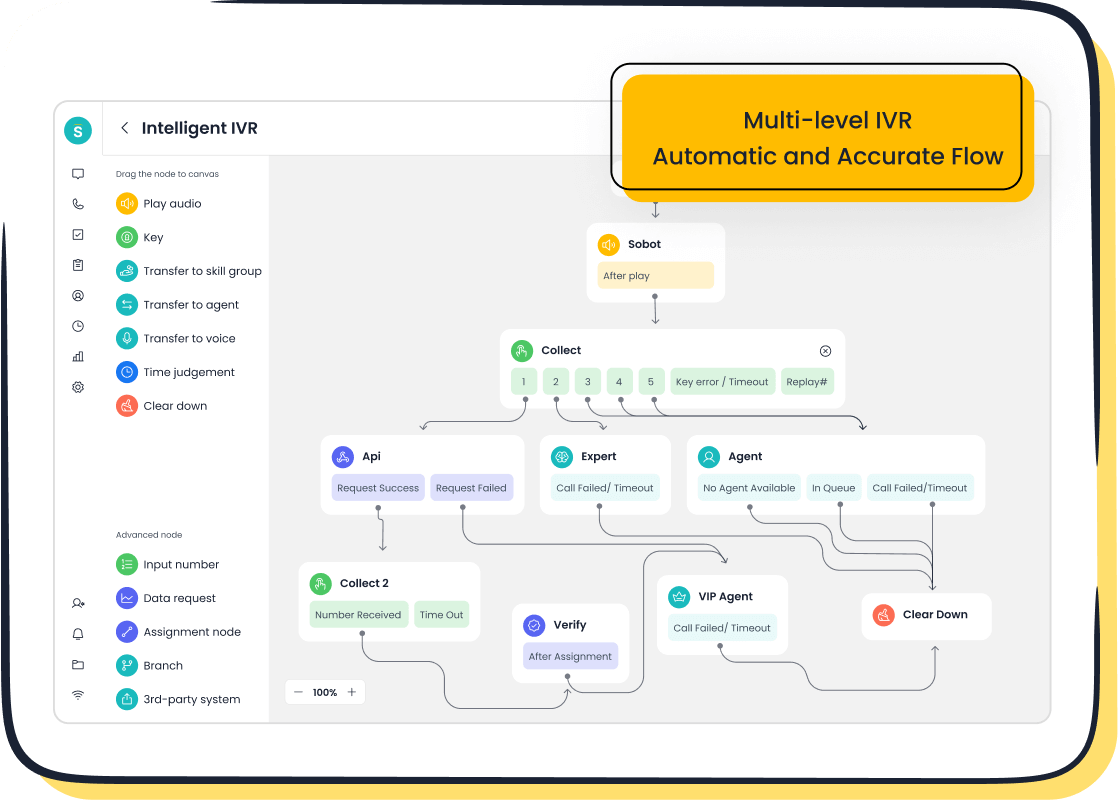
Smart Routing with ACD
After the IVR identifies the caller's need, the Automatic Call Distribution (ACD) system intelligently routes the call. The ACD is the brain of your inbound call center, using a set of rules to decide which agent or department should receive the call. Common routing methods include:
- Fixed Order: Sends calls to agents in a pre-set sequence.
- Rotary (or Round-Robin): Distributes calls evenly among agents in a loop.
- Time-based: Routes calls based on agent availability and time of day.
- Skills-based: This is the smartest method. The software matches the caller's need (like language or technical issue) to an agent with the right skills.
Using skills-based routing dramatically improves your service. By connecting a customer to the most qualified agent on the first try, you increase the chances of First Call Resolution (FCR). In fact, a study shows that skills-based routing can improve FCR by over 15%, as it eliminates unnecessary transfers and frustration. This routing logic uses customer data to make the best match.
Managing the Call Queue
What happens if all your qualified agents are busy? The software places incoming calls into a call queue. Instead of hearing a constant busy signal, your customer is placed in a virtual line. A well-managed queue is essential for a good experience. Best practices include:
- Offer a Callback: Give callers the option to hang up and receive a call back from the next available agent. This respects their time.
- Inform the Caller: Play messages that state their estimated wait time or position in the queue.
- Provide Other Options: Suggest they visit your website's help center or use another channel for support.
Connecting to an Agent
Finally, the system connects the call to an available agent. This is more than just a simple transfer. The agent receives the call along with a screen pop of the customer's information. This includes any data collected by the IVR and their history with your company.
This gives your agent valuable context before they even say "hello." They can see who is calling, what they need, and what they have tried to do already. This seamless transfer of information empowers your inbound call center team to provide fast, personal, and effective support.
Key Features of Inbound Call Software
Modern inbound call software is packed with features designed to make your support operations smarter and more efficient. These tools work together to improve the experience for both your customers and your agents. Let's explore the most important features you should look for.
Automatic Call Distribution (ACD)
Automatic Call Distribution (ACD) is the engine that powers your call routing. After your IVR identifies a caller's need, the ACD directs the call to the best available agent. This ensures your customer connects with someone who can actually solve their problem. The software uses different rules to distribute calls.
- Skills-based routing: Sends calls to agents with specific knowledge, like language fluency or technical expertise.
- Round-robin routing: Distributes calls evenly among agents in a loop to balance the workload.
- Idle-time based routing: Routes the next call to the agent who has been available the longest.
- Time-of-day routing: Directs calls based on agent schedules and business hours across different time zones.
Pro Tip: Round-robin routing gives agents a brief break after each call, preventing burnout. Idle-agent routing, on the other hand, prioritizes speed by sending the call to whoever has been waiting the longest.
| Feature | Round Robin | Idle-Agent (Longest Available) |
|---|---|---|
| Routing Strategy | Rotates calls sequentially through a list of agents. | Assigns calls to the agent who has been idle the longest. |
| Main Goal | Ensures fair and balanced workload distribution. | Minimizes customer wait time and maximizes agent use. |
Interactive Voice Response (IVR)
An Interactive Voice Response (IVR) system acts as your automated front desk. It greets callers with a menu of options, allowing them to route themselves or solve simple issues without ever speaking to an agent. A well-designed IVR empowers your customers and frees up your team.
A multi-level IVR offers significant benefits:
- 24/7 Customer Support: It provides round-the-clock assistance for basic inquiries, even outside of business hours.
- Improved Agent Performance: It handles repetitive questions, so your agents can focus on complex problems that require a human touch.
- Higher Customer Satisfaction: It reduces wait times and gives customers quick answers, leading to a better overall experience.
Advanced IVR systems use technologies like Natural Language Processing (NLP) to understand spoken requests. A customer can simply say, "I need to check my order status," and the system understands the intent. This makes the interaction feel more natural and conversational.
Call Queuing and Callback Options
When all your agents are busy, a call queue places callers on hold in a virtual line. However, nobody likes waiting on hold. This is where callback options become a game-changer. You can offer callers the choice to hang up, keep their spot in line, and receive a call back when an agent is free.
Offering a virtual callback is one of the most effective ways to reduce your call abandonment rate. It shows you value your customer's time, which builds trust and loyalty. While they wait, you can play helpful messages.
- "Thank you for your patience. There are [#] callers ahead of you. Please continue to hold."
- "All of our agents are currently busy. If you would like a callback, press 1 now. Otherwise, please stay on the line."
Call Recording and Transcription
Call recording and transcription features are essential for quality assurance and training. By recording calls, managers can review agent interactions to provide targeted feedback and coaching. This data helps you identify top performers and areas for improvement across your team.
You can use call recording to:
- Analyze agent performance on difficult calls.
- Use real-world examples to train new hires.
- Ensure agents are following company scripts and protocols.
- Transcribe calls to spot keywords and emerging customer issues.
It is important to follow legal requirements for call recording. In the United States, laws vary by state. Some states require only one person on the call to consent ("one-party consent"), while others require everyone to agree ("two-party consent").
Best Practice: Always inform all parties that the call is being recorded at the beginning of the conversation. This ensures you comply with the strictest laws and maintain transparency with your customer.
Inbound Call Tracking and Analytics

You cannot improve what you do not measure. Inbound call tracking and analytics give you the data and insights you need to understand your call center's performance. This feature tracks key metrics in real-time, presenting them in easy-to-read dashboards.
With inbound call tracking, you can monitor Key Performance Indicators (KPIs) like:
- Average Speed to Answer (ASA): How quickly your agents answer incoming calls.
- Call Conversion Rate: The percentage of calls that result in a sale or desired outcome.
- After-Call Work (ACW) Time: The time agents spend on tasks after a call ends.
- Hold Time: How long a customer is placed on hold during a conversation.
By analyzing historical inbound call tracking data, you can forecast future call volumes. These insights help you optimize agent schedules, ensuring you have enough staff during peak hours and avoiding overstaffing during quiet periods. Call tracking software provides the analytics needed for smart, data-driven decisions.

CRM and Helpdesk Integration
Integrating your call center software with a Customer Relationship Management (CRM) system is a superpower for your inbound call center. This connection syncs data between both platforms, giving your agents a complete view of every customer.
When a call comes in, the agent's screen can automatically display the caller's contact information, purchase history, and previous interactions. This context is invaluable.
The benefits of integration are huge:
- Increased First Call Resolution: Agents have the information they need to solve issues on the first try.
- Optimized Agent Productivity: It eliminates the need for agents to switch between systems or manually enter data.
- A Better Customer Experience: Callers do not have to repeat their story to every new agent.
Many popular platforms, like HubSpot and Zoho CRM, offer seamless integrations. This creates a unified workspace where your inbound call center team has all the tools and data they need to provide exceptional service. Inbound call tracking data from your call tracking software can also be logged directly into the CRM, enriching your customer profiles with more insights.
Powering Your Inbound Call Center with Sobot
Theory is helpful, but seeing inbound call software in action makes it clear. Sobot’s Voice/Call Center is a real-world example of a powerful solution. It helps businesses like yours transform their customer service. Let's look at how Weee!, America's largest online Asian supermarket, used Sobot to solve its challenges. Their success shows what the right tools can do for your inbound call center.
Achieving 96% CSAT with a Flexible IVR
Weee! needed to serve a diverse customer base with different languages and needs. A rigid IVR system was a major roadblock. By implementing Sobot, they gained a flexible, drag-and-drop IVR editor. This allowed them to build custom menus and routing paths in real-time without needing developers. This adaptability was key to achieving a 96% customer satisfaction score. You can create a better customer experience by giving callers the power to find answers quickly. This improved experience is a direct result of smart inbound call tracking.
Tip: A flexible IVR lets you update greetings or reroute calls instantly. This helps your inbound call center adapt to changing demands and improve the customer experience. Your inbound call tracking will reflect this positive change.
Boosting Agent Efficiency by 20%
Your agents are most effective when they have the right information. Weee! boosted its agent efficiency by 20% using Sobot's unified workspace. This feature ends the need for agents to switch between different systems. It brings all your customer conversations from voice, chat, and email into one single view. Your agents see the customer's entire history, which is informed by inbound call tracking. This means the customer never has to repeat their issue. Better inbound call tracking leads to better customer service. The right call tracking software makes this possible. This level of inbound call tracking is essential for modern customer service.
Ensuring Reliability with 99.99% Uptime
Your inbound call center cannot afford downtime. A system that is offline means missed calls and frustrated customers. Sobot ensures reliability with a 99.99% uptime Service Level Agreement (SLA). What does this mean for you?
- It equals less than nine seconds of potential downtime per day.
- Your inbound call center services are always available when your customers need them.
This level of stability is built on a global network and redundant systems. It gives you peace of mind, knowing your call center software will not fail during peak hours. Reliable inbound call tracking depends on a stable system. This makes your inbound call tracking data more accurate. Strong inbound call tracking is the foundation of great customer service.
Inbound call software is an essential system for your business. This software automates how you handle calls. It gives your inbound call center team the customer data they need. This data provides valuable insights. Your inbound call center can use these insights to improve customer service. The software routes calls, provides data, and offers insights to enhance the customer experience. A great inbound call center uses data to manage calls and deliver excellent customer service.
A solution like Sobot’s Voice/Call Center helps your inbound call center provide organized and high-quality customer service. It uses data from calls to generate powerful insights for your team.
FAQ
How much does inbound call software cost?
The cost often depends on your needs. Many providers, like Sobot, offer a Software-as-a-Service (SaaS) model. This means you pay a subscription fee instead of a large upfront cost. This approach makes powerful inbound call software accessible for businesses of all sizes.
Can I use inbound call software on my phone?
Yes, you can. Modern inbound call software solutions often include mobile apps for both Android and iOS. This allows your agents to manage calls and support customers from anywhere, giving your team greater flexibility.
How long does it take to set up?
You can set up your system very quickly. Cloud-based platforms like Sobot's Voice/Call Center are designed for fast deployment. You can configure your IVR menus, set up routing rules, and get your team started in a short amount of time.
Can this software grow with my business?
Absolutely. Good inbound call software is built to be scalable. As your call volume increases, you can easily add more agents or phone lines. The system grows with you, ensuring you can always meet customer demand without issues.
See Also
Mastering Seamless Customer Interactions with Omnichannel Call Center Solutions
Unlocking Efficiency: A Comprehensive Guide to AI in Call Centers
Setting Up IVR: A Step-by-Step Guide to Automated Voice Systems
Essential CRM Capabilities for Enhanced Call Center Performance and Customer Service
Streamlining Operations: Understanding the Power of Call Center Automation

