A Guide to Choosing Call Center Technology in 2025


Choosing the right call center solutions is a major challenge for modern businesses. The market is growing quickly, making your decision even more critical.
| Report Attribute | Details |
|---|---|
| Market size value in 2025 | USD 6.78 billion |
| Revenue forecast in 2030 | USD 17.12 billion |
| Growth rate | CAGR of 20.3% from 2025 to 2030 |
Are you struggling to determine which call center software will empower your team and delight your customers?
This guide clarifies what is call center technology. It provides a framework to select the perfect call center software for your contact center. You can find powerful call center software, like the Sobot call center. Discover how Sobot AI improves your contact center operations with the right call center software from Sobot.
WHAT IS CALL CENTER TECHNOLOGY?

You may ask, what is call center technology? It is a suite of tools that helps you manage customer phone calls. This technology forms the backbone of your customer service operations. The right call center software can transform your team's efficiency and your customer's experience. Understanding what is call center technology starts with its core parts.
DEFINING THE CORE SYSTEM
A core system uses several key components. This call center software works together to handle incoming communications smoothly. Each part has a specific job to make your contact center more effective.
| Component | Function |
|---|---|
| Automatic Call Distributor (ACD) | Routes incoming calls to agents based on pre-set rules. This reduces wait times and connects callers to the right agent. |
| Interactive Voice Response (IVR) | Interacts with callers using voice or keypad inputs. It offers self-service options and gathers information for better routing. |
| Computer Telephony Integration (CTI) | Connects your phones with your computers. This call center software shows agent caller data on their screen, reducing handle time. |
THE PURPOSE OF MODERN PLATFORMS
Modern platforms do more than just answer calls. Customer expectations have changed. They now demand support across many digital channels. The purpose of modern call center software is to create a seamless customer journey. This evolution turns a simple call center into a powerful contact center. Key advancements in call center software include:
- Omnichannel Support: This centralizes information from all channels. It gives customers a consistent experience whether they call, email, or chat.
- AI Integration: Artificial intelligence in call center software handles simple tasks. This frees your agents to focus on complex problems.
- Cloud Technology: Cloud-based call center software allows for remote work. It also reduces costs and increases flexibility for your business.
KEY BENEFITS FOR YOUR BUSINESS
Adopting the right call center software brings major benefits. It improves your operations and saves you money. The best call center solutions directly impact your bottom line. You can expect higher efficiency and better customer satisfaction from your call center software.
Ultimately, what is call center technology is a strategic investment. It empowers your team to deliver exceptional service with the best call center software available.
ESSENTIAL CALL CENTER SOFTWARE FEATURES
The right call center software equips your team with powerful features. You need to understand these tools to build an effective contact center. This knowledge helps you choose a platform that meets your specific operational needs. Let's explore the essential features your business should look for.
INBOUND CALL CENTER SOFTWARE FEATURES
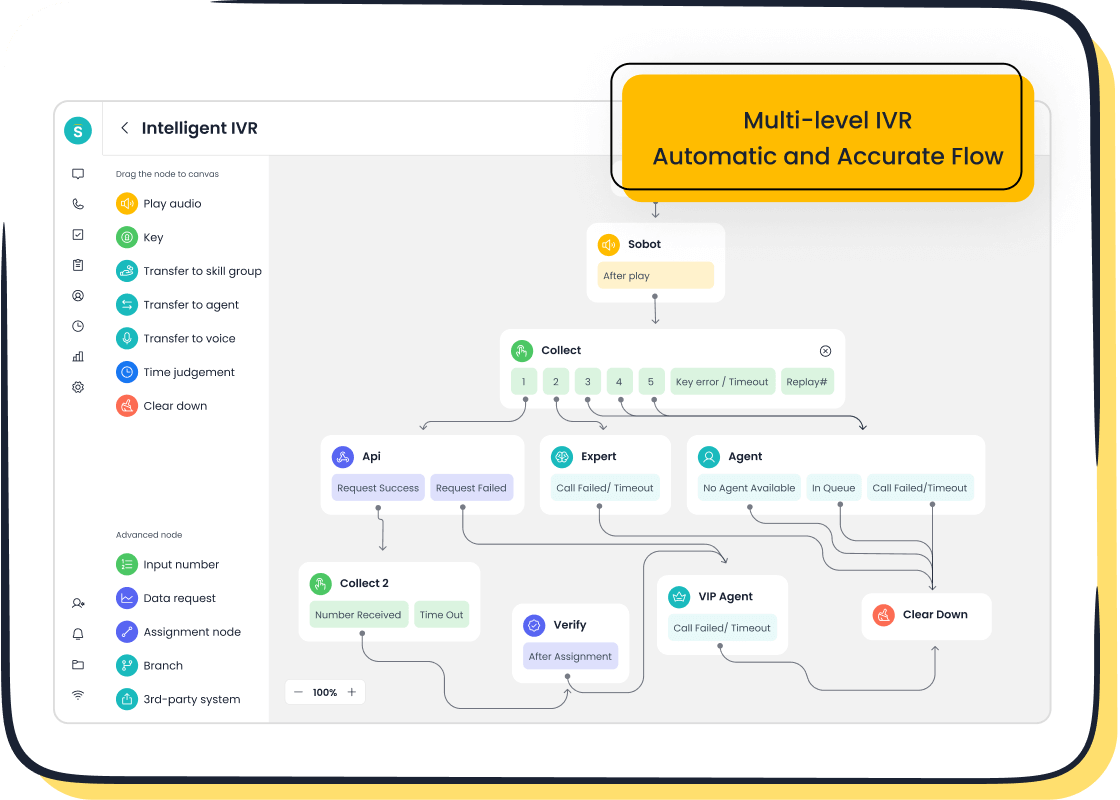
Your inbound call center software manages all incoming customer calls. The goal is to resolve issues quickly. Effective call routing directs customers to the right agent, which is a key part of good call management. To improve first-call resolution, you should also train agents and clearly define what a "resolved" call means. A great inbound call center software will include an Interactive Voice Response (IVR) system. Modern call center software, like Sobot's, offers a drag-and-drop IVR builder. This feature allows non-technical users to create and update call flows in minutes, without needing IT support.
OUTBOUND CALL CENTER SOFTWARE TOOLS
Outbound call center software helps your team make proactive calls for sales or service. Different dialers suit different needs. Choosing the right one is vital for efficiency and compliance.
| Dialer Type | Functionality | Best For |
|---|---|---|
| Predictive | Dials multiple numbers at once and connects agents to live calls. | High-volume campaigns. |
| Progressive | Dials one number at a time when an agent is free. | Campaigns needing a personal touch. |
| Power | Dials the next number after an agent finishes a call. | Small teams and follow-ups. |
Compliance Tip: Predictive dialers have a higher compliance risk. You must monitor them to keep abandoned calls under the 3% rule set by the Telemarketing Sales Rule (TSR).
ANALYTICS AND REPORTING
You cannot improve what you do not measure. Call center software provides data to track performance. Real-time dashboards let you monitor key metrics like wait times and call abandonment rates. This allows you to make immediate adjustments. Sobot’s call center software offers powerful real-time monitoring and time-zone-based analysis. This helps you manage global teams by seeing peak call times in different regions. You can also use call recording and monitoring to review agent performance. Effective call recording and monitoring is a feature of a good crm call center software.
WORKFORCE MANAGEMENT
Workforce management (WFM) tools help you schedule agents effectively. This software uses historical data and trends to forecast staffing needs. It ensures you have the right number of agents working at the right times. This alignment can boost agent productivity by 20-30%. Proper call management through WFM reduces overtime costs and prevents agent burnout. It is a critical part of an efficient contact center. A crm call center software with WFM is a powerful combination.
INTEGRATIONS AND API ACCESS
Your call center software should not work in isolation. It needs to connect with other business systems. CRM integration is the most important connection for your contact center. A crm call center software gives agents a complete view of the customer's history. This seamless crm integration means agents have all the information they need in one place. Strong API access allows your crm call center software to connect with any unique tools your business uses, creating a truly unified workspace. This crm integration is a must-have for any modern call center software.
WHY CHOOSE ALL-IN-ONE CALL CENTER SOLUTIONS?
Choosing an all-in-one platform simplifies your technology stack. This type of call center software combines multiple tools into one system. You get a single, powerful call center software for your entire contact center. This approach avoids the complexity of managing separate systems. An integrated call center software is key to modern customer service. Let's explore why these call center solutions are a smart choice.
UNIFYING CUSTOMER COMMUNICATIONS
Customers contact you through many channels. They might call, email, or use social media. An all-in-one call center software unifies these conversations. Your agents see the entire customer journey in one place. This unified view allows for personalized support. For example, a good call center software lets an agent see a customer's past emails while on a live call. This creates a seamless experience and provides excellent omnichannel support.
STREAMLINING AGENT WORKFLOWS
Fragmented systems create inefficient workflows. Agents waste time switching between different applications. An integrated call center software solves this problem. It puts all necessary tools and customer data into a single workspace. This streamlined approach helps your team resolve issues faster.
Many businesses find that a unified call center software boosts agent productivity. When your team has a complete view of customer history, they can handle more requests efficiently with the same number of staff. This makes your call center software a vital asset.
ENHANCING CUSTOMER SATISFACTION
A better agent experience leads to a better customer experience. When your agents have the right call center software, they feel more empowered. They can answer questions confidently and resolve problems on the first try. This efficiency reduces customer wait times and frustration. Integrated call center solutions directly help increase your Net Promoter Score (NPS) and reduce operational costs. This makes your contact center more effective.
A LOOK AT SOBOT'S OMNICHANNEL PLATFORM
Sobot offers an excellent example of an all-in-one platform. The Sobot Omnichannel Solution is a powerful call center software that brings all your communication channels together.
- Voice
- Live Chat
This call center software funnels every interaction into one unified workspace. This design provides powerful omnichannel support for your contact center. Your agents get a complete picture of every customer, which helps them deliver faster, more personalized service. This type of advanced call center software is essential for success in 2025.
KEY FACTORS FOR YOUR DECISION
You must evaluate several key factors before you choose a call center software. Your decision will impact your budget, operations, and future growth. A careful review of these areas helps you avoid common mistakes. Many businesses fail to choose a solution that can adapt to future needs. This leads to costly changes later.
DEPLOYMENT: CLOUD VS. ON-PREMISE
You have two main choices for deploying your call center software. You can host it on your own servers (on-premise) or use a cloud-based service. Each option has different costs and responsibilities.
- On-Premise: You buy and manage all the hardware and software. This gives you full control but requires a large upfront investment and a dedicated IT team.
- Cloud-Based: A vendor hosts the call center software for you. You pay a subscription fee. This model, known as Contact Center as a Service (CCaaS), lowers initial costs and offers greater flexibility.
The Total Cost of Ownership (TCO) helps you compare these models. TCO includes all costs over a set period, usually three years.
A look at the TCO for a 50-agent team shows a clear difference. Cloud-based call center software often provides significant savings.
| Cost Category | Cloud-Based Solution | On-Premise Solution |
|---|---|---|
| Initial Set-Up Cost | ~$6,000 | $25,000 - $100,000+ |
| Annual System Changes | $0 (Handled by provider) | ~$10,000 per year |
| 3-Year Total Cost | ~$66,000 | $125,000 - $200,000+ |
UNDERSTANDING PRICING MODELS
Pricing for call center software can be complex. You need to understand what is included in your plan. The two most common models are per-agent-per-month and usage-based.
Look closely at what each plan includes and excludes. Some features might cost extra.
| Category | Common Inclusions (Per-Agent) | Common Exclusions (Usage-Based) |
|---|---|---|
| Core Voice | Basic telephony and call routing | Per-minute charges for certain calls |
| Digital Channels | Agent access to email and chat | Per-message fees for SMS or WhatsApp |
| AI Features | Basic IVR and call distribution | Advanced voice bots or AI analytics |
| Data Storage | A set amount of call recording storage | Extra charges for additional storage (per GB) |
Always ask vendors for a detailed breakdown. This helps you budget accurately for your call center solutions.
SCALABILITY AND FUTURE GROWTH
Your business will change over time. Your call center software must be able to grow with you. Scalability means the system can handle more agents and higher call volumes without a drop in performance. Ignoring scalability is a major error. You need a platform that supports your future plans.
A Software-as-a-Service (SaaS) model makes scaling much easier.
- Economic Scalability: You can add or remove agent licenses as needed. This pay-as-you-go approach avoids large upfront costs for hardware you might not use.
- Operational Scalability: The provider manages all infrastructure. This frees your IT team to focus on other priorities instead of system maintenance.
Reliability is a key part of scalability. You need a platform you can count on during peak times. Look for vendors that offer a Service Level Agreement (SLA). An SLA is a promise of system uptime. For an enterprise-grade contact center, you should look for a high guarantee. For example, Sobot provides a 99.99% uptime SLA, supported by a global network. This is a strong benchmark for a reliable and scalable call center software.
SECURITY AND COMPLIANCE
You handle sensitive customer data every day. Protecting this information is your top priority. The right call center software must have strong security features. Your deployment choice affects your security responsibilities.
| Aspect | On-Premise Contact Center | Cloud-Based Contact Center |
|---|---|---|
| Data Control | You have full control over data stored on your own servers. | The provider manages data security in their secure data centers. |
| Maintenance | Your IT team is responsible for all security patches and updates. | The provider handles all maintenance and software updates automatically. |
A reputable cloud provider invests heavily in security. They often offer more robust protection than a single business can manage on its own. When evaluating a call center software, look for these essential security features:
- Data Encryption: Protects data both when it is stored and when it is moving across the network.
- Role-Based Access Control (RBAC): Ensures agents can only see the information they need for their job.
- Compliance Certifications: Adherence to standards like GDPR, CCPA, and PCI-DSS is crucial for protecting customer privacy.
- Regular Audits: The provider should conduct routine security scans and tests to find and fix vulnerabilities.
A high uptime guarantee, like Sobot's 99.99% SLA, also signals a secure and well-maintained platform. It shows the provider is committed to protecting your operations from disruptions. Choosing a secure call center software builds trust with your customers.
A STEP-BY-STEP EVALUATION GUIDE
Choosing your next call center software is a major strategic decision. A structured evaluation process helps you find a partner, not just a product. This guide gives you a clear, five-step framework. Following these steps ensures you select a platform that empowers your team and delivers exceptional results, much like Samsung achieved with its technology partner.
STEP 1: DEFINE YOUR BUSINESS NEEDS
You must first understand your own needs before you can evaluate any vendor. A clear definition of your requirements acts as your map. It guides you toward the best call center software for your unique situation. You should create a detailed checklist to document what you need. This prevents you from being swayed by flashy features that you will never use.
Your checklist should cover the core areas of your operation. This ensures you think about your needs from every angle. A good starting point includes:
- Universal Contact Center Software: List the essential features you need for inbound and outbound calls. Consider the user interface, security protocols, and options for personalization.
- Hardware and Kit: Think about the tools your team uses. This includes headsets, computers, and your internet connection. A minimum speed of 100 Mbps is often recommended for stable performance.
- Key Features: Identify the specific tools that will help you meet customer expectations. This might include self-service options, intelligent call routing, or real-time performance statistics.
This initial step is the most important part of your journey to find the right call center software.
STEP 2: RESEARCH VENDORS AND SHORTLIST
With your needs defined, you can start researching the market. You need reliable sources to compare vendors and their call center solutions. A mix of expert analysis and real-world user reviews gives you a balanced perspective.
Industry analyst reports provide deep market insights.
- Forrester Wave: These reports offer detailed analyses of technology markets. They are known for focusing on future trends and how technology impacts customer behavior.
- Gartner Magic Quadrant: This resource is excellent for identifying vendors with a strong global presence, especially for mid-market and large enterprise businesses.
Customer review platforms give you feedback from actual users.
- G2 Crowd: This site features hundreds of thousands of in-depth reviews. You can sort them by company size or industry to find relevant feedback.
- Capterra: Here, you can compare tools based on features, ease of use, and customer service ratings. It is a great resource for checking pricing models and deployment types.
- TrustRadius: This platform emphasizes quality over quantity. Its reviews are highly detailed, often covering use cases, ROI, and pros and cons.
Use these sources to create a shortlist of three to five vendors whose call center software appears to meet your core requirements.
STEP 3: SCHEDULE PRODUCT DEMOS
A product demo is your chance to see the call center software in action. This is where you move from theory to practice. Do not let the vendor lead the entire demonstration. You should come prepared with a script of your own.
Create a list of your most common or challenging use cases. Ask each vendor to show you exactly how their call center software would handle those specific scenarios. For example, you could ask them to:
- Build a simple IVR menu.
- Show the process for handling a call transfer.
- Demonstrate how an agent accesses a customer's history from the CRM.
Involve your team in this step. Let a supervisor and a top-performing agent sit in on the demos. Their practical insights are invaluable. They will spot potential workflow issues or user-friendly features that you might miss.
STEP 4: ASK CRITICAL VENDOR QUESTIONS
The demo shows you the product, but you are also choosing a long-term partner. After the demo, you need to ask critical questions about the vendor's services and support. Their answers will reveal a lot about the kind of relationship you can expect.
Here are some essential questions to ask:
- What does your implementation and onboarding process look like?
- What kind of technical support do you offer? What are the standard response times?
- What training resources are available for our agents and administrators?
- Can you share your product roadmap for the next 12-18 months?
- How do you handle data security and ensure compliance with regulations like GDPR or CCPA?
A transparent and confident vendor will have clear answers to these questions. Their responses will help you gauge their commitment to customer success.
STEP 5: REVIEW CONTRACTS AND SLAS
You have found a call center software that you love. The final step is a careful review of the contract and Service Level Agreement (SLA). The SLA is the vendor's written promise of performance and reliability. Pay close attention to the details. Look for a guaranteed uptime percentage, like the 99.99% SLA offered by providers like Sobot. This figure is a benchmark for enterprise-grade stability.
This entire process, from defining needs to reviewing contracts, is what leads to a successful partnership. For example, after a thorough evaluation, Samsung implemented an all-in-one contact center platform. The results were transformative.
- Agent efficiency increased by 30% because they had a unified workspace.
- The company achieved a 97% customer satisfaction rate.
These incredible outcomes were not an accident. They were the direct result of choosing the best call center software that perfectly matched their business needs. By following this guide, you can make a similarly informed decision and set your team up for success.
Choosing the right call center software is a strategic decision. Your choice impacts your contact center efficiency and customer satisfaction. The best call center solutions fit your unique business needs. You must evaluate the features and scalability of any call center software. This ensures your contact center can grow. Your new understanding of what is call center technology will guide you. Start by defining your goals. Use this guide as your roadmap to find the perfect call center software for your contact center. This call center software will empower your team.
FAQ
How much does call center software cost?
The price of call center software varies. Most cloud-based platforms use a per-agent, per-month subscription model. This approach allows you to pay only for what you need. You can easily add or remove users as your team changes, making it a flexible and economic choice.
Can new call center software connect with my current CRM?
Yes, modern call center software should connect with your existing tools. Look for platforms with strong API access and pre-built integrations. For example, Sobot's platform offers simple integration with popular CRM systems, creating a unified workspace for your agents.
What is a good uptime for call center software?
Uptime measures system reliability. You should look for a provider that guarantees high availability in a Service Level Agreement (SLA).
An enterprise-grade call center software should offer at least 99.9% uptime. Top providers like Sobot even deliver a 99.99% uptime SLA, ensuring your contact center is always operational.
How long does it take to set up a cloud call center?
You can deploy cloud-based call center software very quickly. Unlike on-premise systems that take months, you can get a cloud solution running in days or weeks. This speed allows your team to start improving customer communications almost immediately.
See Also
Mastering Omnichannel: Your Essential Guide to Call Center Software
The Best Contact Center Solutions: An In-Depth Review for 2024
Unlocking Efficiency: A Guide to Call Center AI Software
Discovering Excellence: The Premier Cloud Contact Centers for 2025
Ensuring Excellence: Your Comprehensive Guide to Call Center QA Software

