Zendesk for Ticketing Systems Weighing the Pros and Cons

If you’re looking for a reliable ticketing system, Zendesk stands out as a solid choice. Many users love how Zendesk gives your team a single workspace so you can focus on the customer, not just the ticket. You’ll find handy tools like macros and AI-powered automation that speed up support and keep customers happy. Some people say Zendesk’s features can feel overwhelming at first, and costs may rise as your needs grow. Zendesk offers lots of options, yet advanced customization often takes technical skill. Alongside Zendesk, Sobot is another top customer service platform. Both help you improve customer experience and answer the question: what does zendesk do for your business?
Is Zendesk Right for Your Business?
Choosing the right ticketing system can feel overwhelming. You want something that fits your team, your budget, and your customers’ needs. Zendesk for Ticketing Systems is a popular choice, but is it the best fit for your business? Let’s break it down so you can decide with confidence.
Main Pros and Cons
Zendesk works well for many companies, but it shines brightest in larger organizations. If you run a big business or even a Fortune 100 company, Zendesk for Ticketing Systems gives you the tools and flexibility you need. You get a platform that scales as you grow, with plenty of features for customer support, IT help desks, and e-commerce support. For small and medium-sized businesses, Zendesk may feel a bit complex and the cost can add up quickly.
Here’s a quick look at who uses Zendesk most:
| Business Size | Use Cases |
|---|---|
| Larger Businesses | Customer Service, IT Support, Internal Help Desk, E-commerce |
| Fortune 100 Companies | Main customers, focus on enterprise needs |
| Small to Medium-Sized Businesses | Sometimes not ideal due to complexity and cost |
Zendesk adapts to different company sizes, but you need to set it up right and keep an eye on how it runs. If you have a small team, you might find Zendesk flexible because of its integrations, but you may miss some native e-commerce features. Medium-sized businesses like Zendesk’s scalable design, but you’ll need to configure it well to get the best results. Large enterprises love how Zendesk handles big operations, though it may need ongoing management to stay efficient.
Let’s look at the main pros and cons of Zendesk for ticketing systems:
| Advantages | Disadvantages |
|---|---|
| Integrated phone support (Zendesk Talk) lets you log calls as tickets | Some features only come with higher-tier subscriptions (higher cost) |
| Easy to create branded help centers for self-service | Steep learning curve for new users |
| Scalable pricing tiers for different business sizes | Customization may require coding or third-party help |
| Built-in reporting and analytics for real-time monitoring | Service reliability can dip during peak hours |
You get a lot of value from Zendesk’s features, especially if you need advanced reporting, analytics, and automation. The platform helps you track ticket volume, response times, and customer satisfaction. However, you might find the learning curve steep if you’re new to customer service software. Some of the best features, like advanced automation or analytics, may only be available on higher-priced plans.
Tip: If you want a ticketing system that’s easy to use and doesn’t require much setup, you might want to look at other options. Zendesk for Ticketing Systems works best when you have the resources to manage and customize it.
Customer Experience Impact
Zendesk for Ticketing Systems can make a big difference in how your customers feel about your service. The platform gives you tools to track every part of the support process. You can see how fast your team responds, how many tickets get resolved, and how happy your customers are with the answers they get.
“Powerful Automation, Extensive Reporting and Analytics: With Zendesk Explore, businesses can track a huge range of metrics—from agent response times and customer satisfaction scores (CSAT) to the most common types of support requests.”
Zendesk’s automation and AI features help your team work faster. You can set up rules to route tickets to the right agent, use canned responses for common questions, and even let AI suggest answers. This means your customers get help quicker, and your agents spend less time on repetitive tasks.
“Zendesk AI capabilities, including AI Agents and Copilot, are easy to use and have greatly enhanced our support operations. By automating routine tasks and offering agents real-time assistance, these tools have enabled us to respond more quickly and improve overall customer satisfaction.”
Here’s what Zendesk helps you measure:
- Ticket metrics: Volume, first response time, resolution time, backlog, and reopens.
- Agent performance: Tickets handled, CSAT scores, average handle time.
- Customer satisfaction: CSAT and NPS trends over time.
Zendesk for Ticketing Systems also lets you build branded help centers. These self-service options give your customers a way to find answers on their own, which can boost satisfaction and reduce the number of tickets your team needs to handle.
But Zendesk isn’t the only customer service platform that focuses on customer experience. Sobot, for example, also offers a unified workspace, automation, and multilingual support. Both Zendesk and Sobot help you improve response times and keep your customers happy. Sobot’s customer service software stands out for its easy integration and strong automation, which can be a big plus if you want to streamline your support.
If you want a ticketing system that grows with your business and gives you deep insights into your support operations, Zendesk for Ticketing Systems is a strong choice. Just remember, you’ll need to invest time in setup and training to get the most out of its features.
What Does Zendesk Do?
If you want to know what does zendesk do, you’re not alone. Zendesk is customer service software that helps you manage support requests, track issues, and connect with your customers. You get a ticketing system that brings all your conversations into one place. Zendesk features breakdown shows you how the platform can help your team stay organized and respond faster.
Core Ticketing Features
Zendesk gives you a strong set of tools for ticketing. You can manage, track, and route customer issues at scale. Here’s what you get with zendesk:
- Unified inbox for all your channels
- Custom views to sort tickets by priority or team
- Skill-based routing to send tickets to the right agent
- Collision alerts to stop duplicate replies
- SLA policies with automated escalations
- Macros for quick, pre-written responses
- Custom fields for order IDs or issue types
Zendesk features breakdown highlights reliable ticket management and automation. You can set up rules to handle tickets without much manual work. Some users say setup takes time, but you get a comprehensive feature set once everything is ready.
Omnichannel Support
What does zendesk do for omnichannel support? It lets you talk to customers on web, mobile, social, and even phone. You can use messaging and live chat for real-time help. Zendesk also offers a self-service knowledge base, so customers can find answers on their own. This makes your service faster and keeps your team focused on complex problems.
Integration Capabilities
Zendesk connects with many other tools. You can link it to your CRM, e-commerce platform, or analytics software. Here’s a quick look at how zendesk and Sobot’s Ticketing System compare:
| Feature / Aspect | Zendesk | Sobot's Ticketing System |
|---|---|---|
| Primary Goal | Close ticket, reduce costs | Solve customer problem & complete sale |
| AI Role | Deflection: 'Read this FAQ' | Consultation: 'I see you're looking for X.' |
| Key Metrics | Time to Resolution | Revenue per Contact, Customer Satisfaction (CSAT) |
| Workflow | Reactive: Wait for complaint | Proactive: Recognize purchase intent |
| Best For | Password resets, returns | Product consultation, complex configurations |
Zendesk focuses on closing tickets and reducing costs. Sobot’s Ticketing System aims to solve customer problems and help you complete sales. Both offer strong integration, but Sobot’s approach is more proactive and customer-focused.
If you want a ticketing system with a wide range of features, zendesk gives you the tools to manage support, connect with customers, and keep your service running smoothly.
Zendesk Pros for Ticketing Systems
Ease of Use
You want a ticketing system that makes your life easier, not harder. Zendesk gives you a clean dashboard where you can see all your customer conversations in one place. You can quickly find tickets, check their status, and use macros for fast replies. This setup helps your team stay organized and respond faster. If you like tools that save time, Zendesk’s automation features let you handle routine support tasks with just a few clicks. Sobot’s Ticketing System also focuses on simplicity, so both platforms help you get started without a steep learning curve.
Scalability
As your business grows, you need a ticketing system that can keep up. Zendesk for Ticketing Systems shines here. You can add more agents, channels, and features as you scale. Take a look at how Zendesk supports growth:
| Feature | Description |
|---|---|
| Ticketing | Manage, track, and route customer issues at scale |
| Messaging and live chat | Real-time support across web, mobile, and social |
| Voice | Phone support built into the platform |
| Self-service knowledge base | Help center for customers |
| AI agents | Automated bots that resolve customer conversations |
| Quality assurance | Automated review and scoring of support interactions |
| Workforce management | Scheduling and staffing tools for support teams |
| Integrations | Connects with tools like Salesforce, Shopify, Slack, etc. |
Zendesk is built for businesses that want to grow without switching platforms. You can start small and add more features as you need them.
Integration with Customer Service Software
Zendesk connects with many popular tools. You can pull customer data from Salesforce, view order history from Shopify, or get notifications in Slack. The platform even lets you build custom integrations using its API. This means you can link Zendesk with your favorite apps and keep all your customer service data in one place. Sobot’s Ticketing System also offers strong integration options, so you can choose the best fit for your workflow.
Enhancing Customer Experience
Zendesk for Ticketing Systems helps you deliver better service. You get a context panel that shows customer details, past chats, and call recordings. This helps your agents give fast, informed answers. Zendesk’s AI suggests replies and routes tickets to the right person, so customers don’t wait long. You can track service level agreements and make sure every ticket gets the attention it needs. With these features, you boost customer satisfaction and build loyalty. Sobot’s Ticketing System also focuses on improving customer experience with automation and a unified workspace.
Zendesk Cons for Ticketing Systems
When you look at Zendesk for Ticketing Systems, you’ll see some clear cons that can affect your decision. Let’s break down the main challenges you might face.
Pricing and Cost
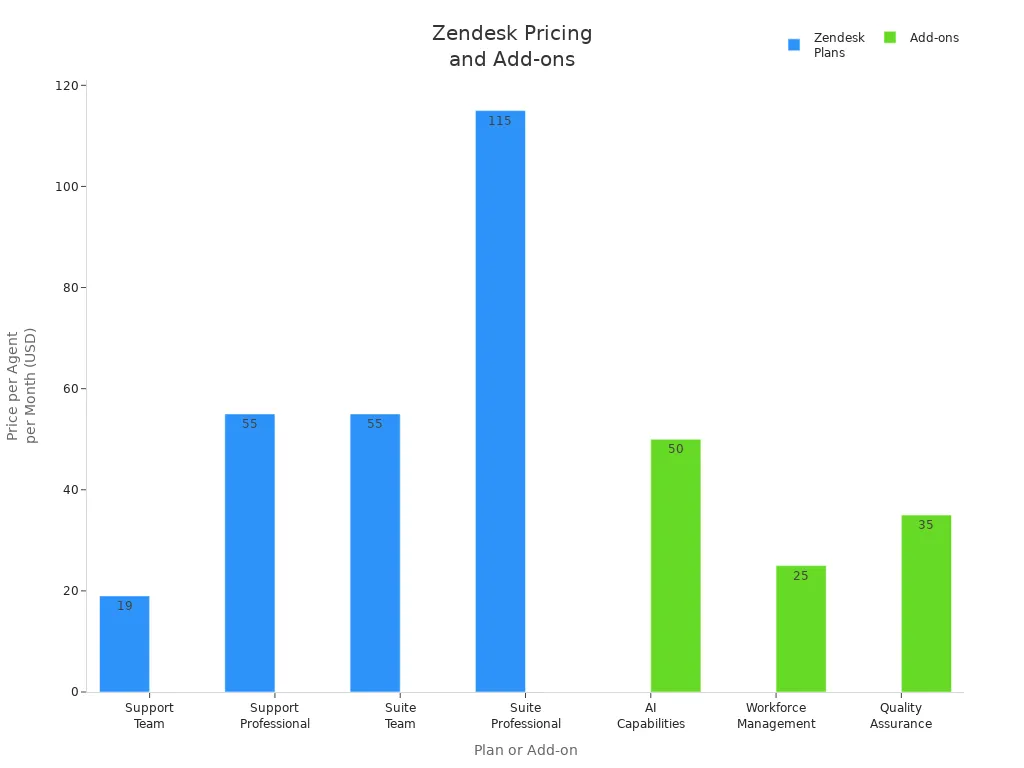
Zendesk offers many features, but the pricing can add up fast. If you run a small business or need to add more agents, you might find the costs surprising. Zendesk uses a per-agent pricing structure, so your bill grows as your team does. Some advanced features, like AI or workforce management, come as add-ons with extra fees.
Here’s a quick look at Zendesk’s pricing:
| Plan | Price per Agent/Month | Key Features |
|---|---|---|
| Support Team | $19 | Basic ticketing, email support, reporting, Facebook/Twitter integration |
| Support Professional | $55 | Business hours, CSAT surveys, SLA management, advanced reporting |
| Suite Team | $55 | Multi-channel support, live chat, basic AI, workflow automation |
| Suite Professional | $115 | Advanced analytics, custom fields, SLA agreements, enhanced automation |
| Suite Enterprise | Custom pricing | Full customization, advanced AI, enterprise security, dedicated support |
Add-ons like AI ($50/agent/month), workforce management ($25/agent/month), and quality assurance ($35/agent/month) can increase your total cost.
Customization Limits
You might want to tailor Zendesk for your business, but customization can be tough. Here’s what users often report:
- Customization needs technical skills, which can be expensive.
- Setting up automation rules and workflows is tricky without Zendesk experience.
- Personalization features often sit behind higher-tier plans.
- Reporting tools sometimes make it hard to filter or sort tickets.
Complexity for New Users
Zendesk for Ticketing Systems can feel overwhelming if you’re just starting out. Many users say the platform is hard to navigate. You may struggle to find the right reports or get help from support. Here’s a table showing common challenges:
| Challenge | Description |
|---|---|
| Poor Customer Support | Users report frustration with the quality of support, leading to unresolved issues and decreased user engagement. |
| Usability Issues | Many find the platform difficult to navigate, impacting their ability to generate necessary reports. |
| Integration Friction | Users experience challenges with integrating Zendesk with other tools, complicating their workflow. |
| Pricing Structure | The per-user pricing model can lead to unexpectedly high costs as organizations grow. |
Integration Challenges
Connecting Zendesk with other tools can be a headache. Integrations often need careful planning and technical know-how. If you don’t understand APIs or your business processes, you might run into problems. Here’s what you should watch for:
| Challenge | Description |
|---|---|
| Integration Complexity | Integrations can become complicated due to unclear business processes and flows, requiring input from key stakeholders to define important fields and data access needs. |
| Implementation Planning | The approach to implementing the integration is crucial; relying on custom code can be risky and costly, especially if the developer leaves the company. |
| Understanding of APIs | Knowledge of the other API's data formats and processes is essential to ensure smooth integration and to avoid complications that arise from mismatched data handling and additional processes. |
If you want a ticketing system that’s easy to set up and manage, these cons are important to consider before you choose Zendesk for Ticketing Systems.
Sobot Ticketing System vs Zendesk
Unified Platform Benefits
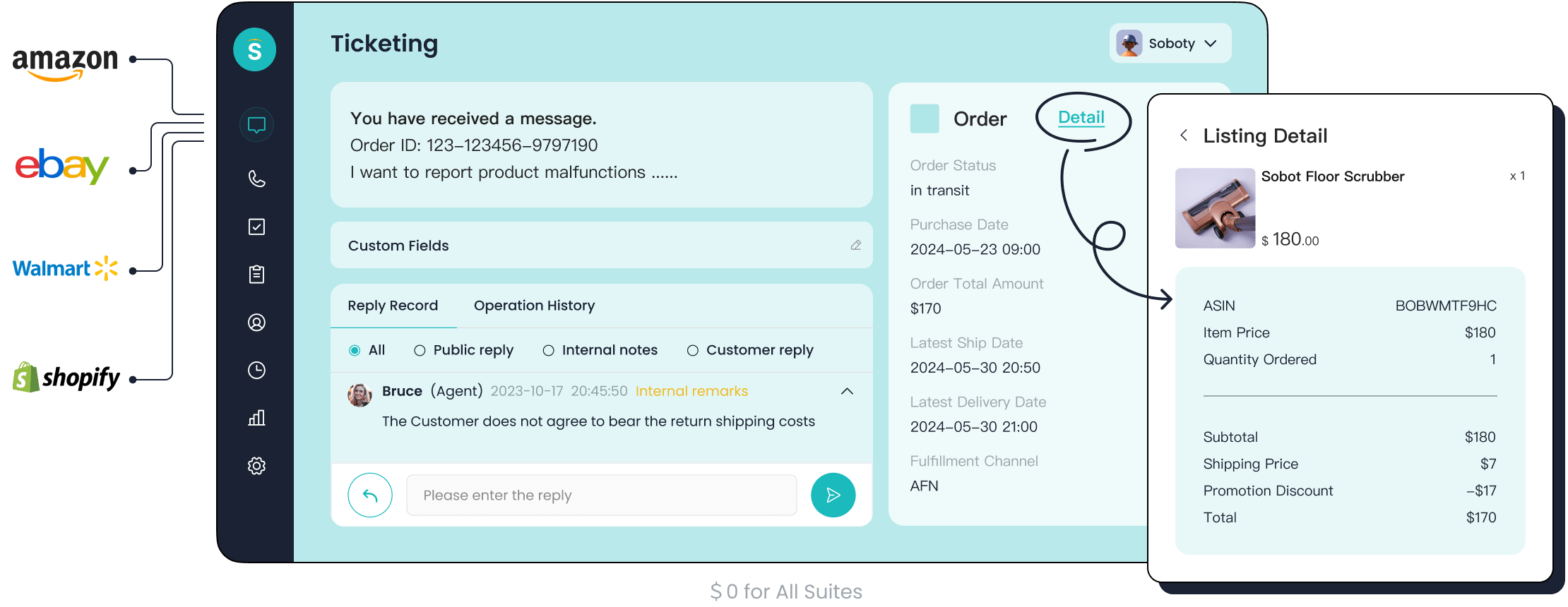
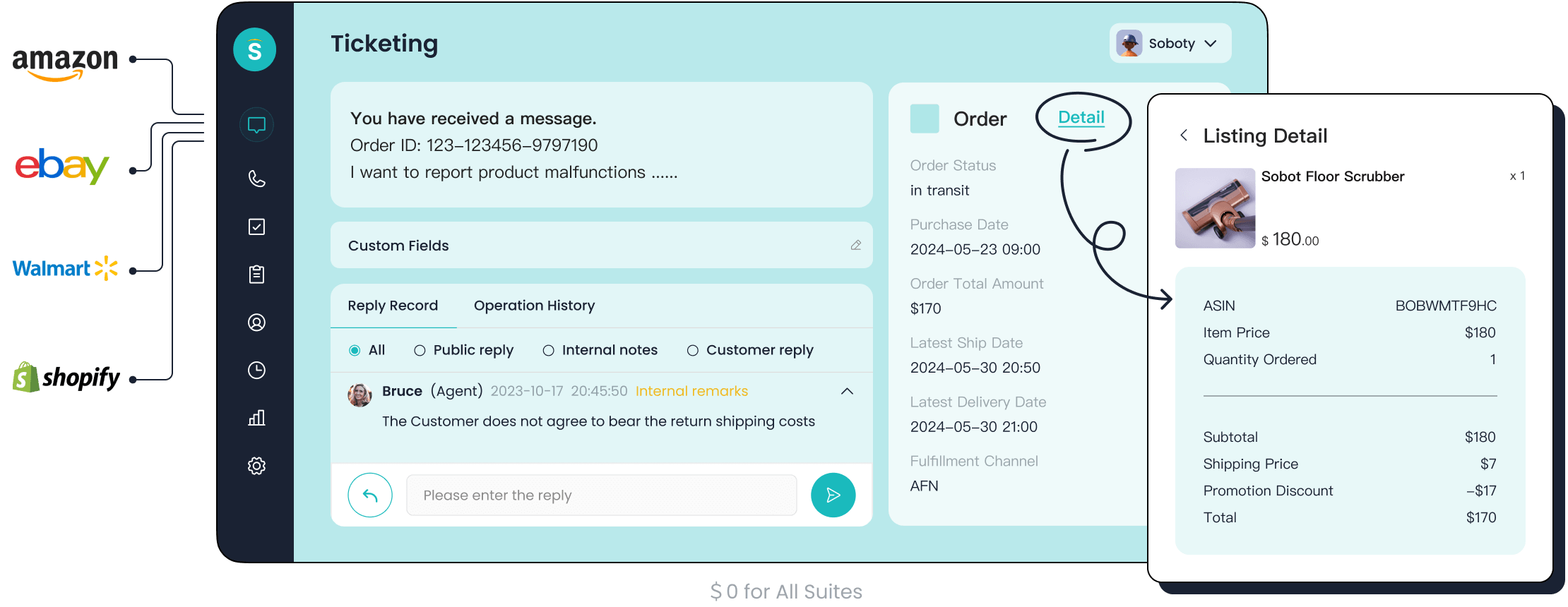
You want your team to handle every customer conversation in one place. Sobot gives you a unified platform that brings together live chat, voice calls, chatbot, and ticketing system. You can manage email, social media, and messaging apps like WhatsApp and Telegram from a single workspace. Zendesk also offers a unified dashboard, but Sobot’s platform stands out for its seamless integration across channels. You don’t need to switch between tools to deliver great service. This makes your workflow smoother and helps your agents focus on customer needs.
Automation and AI
Automation saves you time and boosts efficiency. Sobot uses AI-powered chatbots and intelligent ticket routing to handle repetitive tasks. You can set custom triggers, automate ticket assignment, and use canned responses for common issues. Zendesk for Ticketing Systems includes automation features, but Sobot’s AI agent goes further by offering proactive customer consultation and smart notifications. OPPO, a global smartphone brand, improved its customer service by using Sobot’s chatbot and ticketing system. OPPO saw an 83% chatbot resolution rate and a 94% positive feedback rate. This shows how automation can transform your support operations.
Multilingual and Omnichannel Support
If you serve customers worldwide, you need multilingual and omnichannel support. Sobot supports over 18 languages and connects with channels like Facebook, Instagram, WhatsApp, email, phone, and SMS. You can reach customers wherever they are. Zendesk offers similar features, but Sobot’s ticketing system provides local phone numbers in more than 50 countries and guarantees 99.99% uptime. Here’s a quick look at the features:
| Feature | Description |
|---|---|
| AI chatbots | Automated customer interactions |
| Live chat | Real-time human support |
| Cloud call center | Voice capabilities for calls |
| WhatsApp Business API | Messaging platform integration |
| Omnichannel support | Unified channels: social, email, SMS, website |
| Language support | 18+ languages |
| Local phone numbers | Available in 50+ countries |
| Uptime guarantee | 99.99% reliability |
You can find more details about Sobot’s omnichannel solution at Sobot Omnichannel Solution.
Value for Customer Service Software Users
Sobot delivers value by improving customer satisfaction and operational efficiency. You get trusted analytics, SLA management, and smart notifications to monitor performance. The platform helps you reduce response times and increase productivity. Zendesk for Ticketing Systems offers strong reporting, but Sobot’s unified workspace and AI tools make it easier to personalize service. OPPO’s story proves that Sobot can handle high volumes and complex customer needs. If you want a ticketing system that adapts to your business and supports global customers, Sobot is a smart choice.
Choosing the Right Customer Service Software
When to Choose Zendesk
You might want to pick Zendesk if your business handles a high volume of customer requests every day. Zendesk helps you centralize all customer inquiries from different channels into one easy-to-use interface. This makes it simple for your team to manage support tickets, set up SLAs, and use automation to speed up responses. Zendesk works best for larger companies or those with complex support needs. If you want to scale your support operations and keep everything organized, Zendesk gives you the tools to do it.
Here’s a quick look at where Zendesk shines:
| Use Case | Description |
|---|---|
| Centralizing customer inquiries | Brings all questions into one place |
| Managing support tickets | Handles ticket routing, SLAs, and automation |
| Enabling self-service | Offers help centers and knowledge bases for customers |
| Scaling support operations | Supports large teams and high ticket volumes |
You get a platform that reduces long wait times and makes handoffs between agents smoother. Zendesk for Ticketing Systems is a strong fit if you want to improve your customer service experience and keep up with business growth.
When to Choose Sobot
Sobot is a great choice if you want to automate customer service and support customers across many channels. You can use Sobot’s AI chatbot for 24/7 customer interaction, which helps reduce response times and boosts efficiency. Sobot works well for small and medium businesses because it is easy to set up and does not require a lot of technical skills. If you want to support customers on social media, email, and messaging apps, Sobot gives you a unified workspace.
Here are some scenarios where Sobot stands out:
| Business Scenario | Description |
|---|---|
| Customer Service Automation | Automates support, making your team more efficient |
| Lead Generation | Helps you find and qualify leads with automated chats |
| Multi-Channel Support | Lets you talk to customers on any channel they prefer |
You can start with flexible pricing, and as your business grows, Sobot scales with you. Sobot’s platform is user-friendly, so you do not need a big IT team to get started.
Key Factors for Customer Experience
When you choose between Zendesk and Sobot, think about what matters most for your customer experience. Scalability is key. You want a system that grows with your business and keeps service quality high. Integration also matters. Both platforms connect with popular tools, but Sobot makes it easy with a simple code snippet.
Here are some important points to consider:
- Sobot offers real-time support and product recommendations, which can help reduce cart abandonment and increase order value.
- AI chatbots keep a friendly, consistent tone, making every customer feel valued.
- Businesses using AI support see higher customer satisfaction. For example, some companies report a 9.4% boost in service ratings after using AI to handle tickets.
- Nearly 75% of business owners believe instant AI support improves customer experience.
A scalable, integrated system lets you handle more customers without losing quality. Automation and AI help you respond faster and keep customers happy. If you want to improve your customer service experience, look for a platform that fits your team size, industry, and growth plans.
Zendesk gives you strong tools for ticketing, but you may find setup and cost challenging. If you run a large team or need advanced features, Zendesk can help you scale and improve customer support. For smaller teams or those wanting easy automation, Sobot stands out with its unified workspace and multilingual support. When you pick a ticketing system, focus on customer experience goals like scalability, integration, and automation. Set clear SLAs to boost customer trust and service quality. The right choice helps your team deliver better customer care every day.
FAQ
What is Zendesk for Ticketing Systems?
Zendesk for Ticketing Systems helps you manage customer requests in one place. You can track, assign, and resolve tickets fast. This tool keeps your support team organized and improves response times.
Is Zendesk for Ticketing Systems easy to set up?
You can set up Zendesk for Ticketing Systems quickly if you follow the guides. Many users say the dashboard feels simple. If you want advanced features, you may need extra time or help.
Does Zendesk for Ticketing Systems support automation?
Yes! Zendesk for Ticketing Systems uses automation to route tickets, send reminders, and suggest answers. This saves your team time and helps you respond faster to customers.
Can Zendesk for Ticketing Systems grow with my business?
Zendesk for Ticketing Systems scales as your team grows. You can add more agents, channels, and features. Many large companies use it because it handles high ticket volumes well.
How does Zendesk for Ticketing Systems improve customer experience?
Zendesk for Ticketing Systems gives you tools to track customer satisfaction, measure response times, and offer self-service options. You can see real results, like higher CSAT scores and faster resolutions.
See Also
Comparing Shopify's Live Chat Tools With Its Rivals
The Best Customer Service Software Options for 2024
2024 Comparison of Leading Live Chat Solutions Available

