VoIP Phone Call Recorder Software Compared by Customer Service Pros


You want the best voip phone call recorder for your team. Customer service pros often recommend Sobot for call recording because it delivers high audio quality, secure cloud storage, and easy integration with your other tools. You also get advanced AI features that help with training and compliance. When you choose Sobot, you pick a solution that makes call management simple and reliable.
- Top reasons users love these tools:
- Seamless integration
- Flexible recording options
- Powerful search and playback
- Affordability
Best VoIP Phone Call Recorder Solutions for Customer Service
Choosing the right voip phone call recorder can change the way your customer service team works. You want a tool that fits your needs, keeps your data safe, and helps your agents do their best work. Let’s look at the top voip solutions that customer service pros trust, based on real customer feedback and industry ratings.
Sobot Voice/Call Center Overview

Sobot stands out as a leader in the voip phone call recorder space. You get a complete suite of tools designed to make every customer interaction smooth and efficient. Sobot’s Voice/Call Center lets you record voip calls with high audio quality and secure cloud storage. You can access call recording features right from the unified workspace, so your agents never miss a detail.
Sobot’s platform goes beyond just recording calls. You can use the AI-powered Voicebot to handle routine questions, freeing up your team for more complex issues. The chatbot and AI Agent work across channels, so you can support customers on voice, chat, WhatsApp, and more—all from one place. The live chat feature brings all your messages, tickets, and customer data together, making it easy to track conversations and follow up.
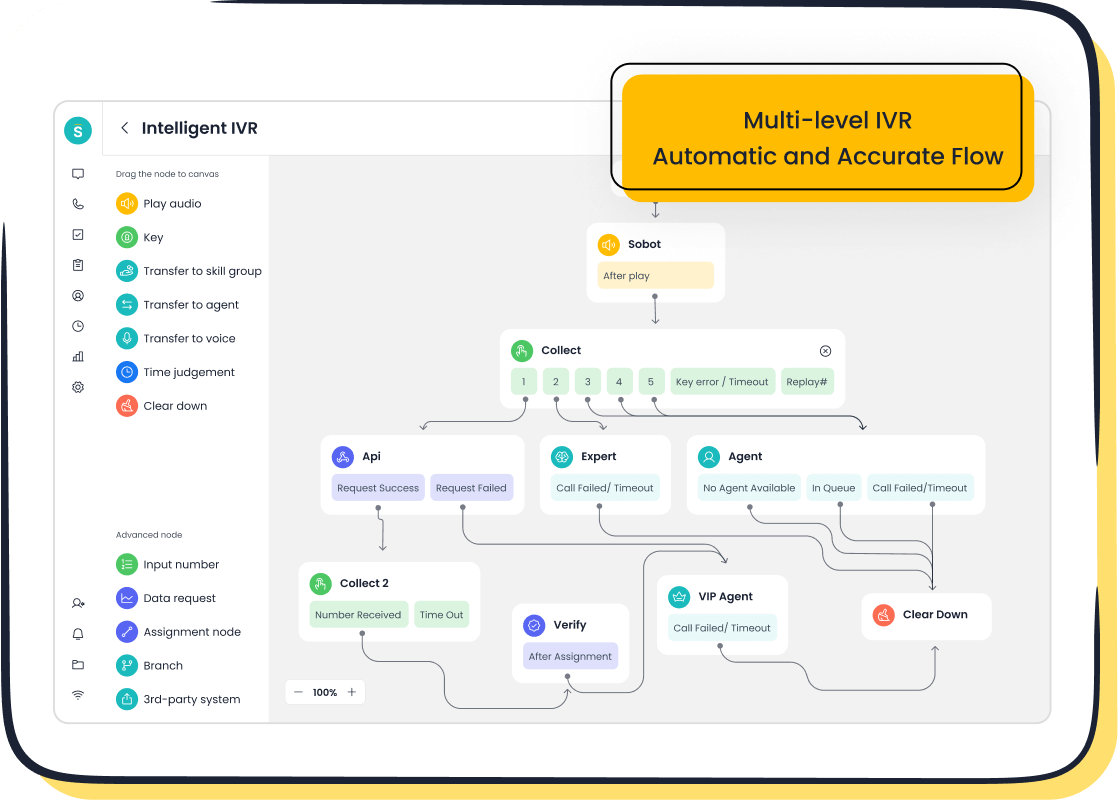
You can set up smart IVR menus with a drag-and-drop interface. This means you route calls to the right agent or team without any hassle. Sobot’s ticketing system helps you manage follow-ups and service requests, so nothing slips through the cracks. The platform supports global numbers, so you can serve customers anywhere. With 99.99% uptime, you know your voip phone call recorder will always be ready when you need it.
Here’s a quick look at why customer service teams choose Sobot:
- Feature-rich platform: You get call recording, AI-powered voicebot, live chat, ticketing, and more.
- Easy integration: Sobot connects with your CRM and other tools, so you don’t have to change your workflow.
- Global reach: Access phone numbers in over 50 countries and support customers worldwide.
- Security: All data transfers are encrypted, keeping your customer information safe.
- Reliable performance: With 110 points of presence in 93 cities, Sobot delivers fast and stable service.
Sobot’s mission is to help you improve customer satisfaction and efficiency. You can see this in the way the platform brings together all your communication channels and automates routine tasks. Customer feedback often highlights how Sobot’s AI features and omnichannel approach make a real difference in daily operations.
If you want a voip phone call recorder that grows with your business, Sobot is a smart choice. You get advanced analytics, real-time monitoring, and tools that help you train your team and stay compliant with regulations.
RingCentral User Insights
RingCentral is another popular voip phone call recorder for customer service teams. Many users like how RingCentral integrates with CRM tools like Salesforce and HubSpot. This means you can log calls and recordings automatically, which saves time and reduces errors. You can use RingCentral on both desk phones and mobile devices, giving your team flexibility.
Customer feedback shows that RingCentral’s open API lets you create custom workflows. This adds versatility if you have unique business needs. Users also mention that RingCentral scales well, so you can add more agents as your team grows.
Here’s a table that sums up what users like and dislike about RingCentral:
| Advantages | Disadvantages |
|---|---|
| No upper-user limit | Possible flaws in the setup |
| Free meeting resources | Contracts may not meet expectations |
| Highly scalable | Potential call quality or customer service issues |
| Remote-friendly | Customer service problems |
| Integration with popular tools | Compatibility with modern integrations |
| 24/7 customer assistance |
You can see that RingCentral offers strong integration and scalability. Some users, though, report issues with customer service, especially on lower-tier plans. Customer feedback often mentions the benefit of connecting RingCentral with tools like Slack and Google Workspace. This helps your team stay organized and respond faster.
RingCentral’s CRM integration also improves customer service workflows. Agents can see customer profiles, recent purchases, and open cases right from the call screen. Automated workflows reduce repetitive tasks and make sure important details are not missed. Real-time updates and intelligent routing help your team handle calls more efficiently.
Nextiva User Insights
Nextiva is known for its user-friendly interface and quick setup. If you want a voip phone call recorder that your team can start using right away, Nextiva is a solid option. Customer feedback highlights the plug-and-play setup, which means you can get started in under an hour. This is great if you don’t have a dedicated IT team.
Nextiva’s call recording comes standard with all plans, so you don’t pay extra for this feature. You also get over 40 advanced features, including real-time call analytics and CRM integration. Many users say the interface makes it easy to manage calls, track recordings, and review customer interactions.
Here’s a quick list of what users like about Nextiva:
- Simple, user-friendly interface
- Fast setup with minimal training needed
- Call recording included at no extra cost
- Real-time analytics and reporting
- CRM integration for better customer tracking
Some users mention a learning curve for advanced features like IVR routing. If your team is less tech-savvy, you might need extra time to get comfortable with these tools. There have also been reports of glitches in the mobile app after updates, which can affect remote work.
Let’s compare pricing for Nextiva and other leading voip phone call recorder solutions:
| Plan Type | Price (per user/month) |
|---|---|
| Nextiva Core Plan | $15 |
| Nextiva Engage Plan | $25 |
| Nextiva Power Suite CX | $75 |
| Dialpad (approx.) | $15-$30 |
| RingCentral (approx.) | $19.99-$49.99 |
You can see that Nextiva offers competitive pricing, especially for small and mid-sized teams. Customer feedback often points out the value you get for the price, with many features included in the base plans.
Zoom Phone User Insights
Zoom Phone is a good choice if you want to combine voice and video in one platform. Many customer service teams use Zoom for meetings, so adding Zoom Phone can make sense. Customer feedback highlights the easy-to-use interface and strong integration with video conferencing.
Here’s a table that shows what users like and dislike about Zoom Phone:
| Strengths | Weaknesses |
|---|---|
| Integration with video conferencing | Complex customer support options |
| User-friendly interface | Longer wait times for assistance |
| Valuable add-ons | Focus may not cater well to small businesses |
You get 24/7 phone and chat support if you use Zoom Phone as a standalone product. Some users, though, report longer wait times and dropped calls when they need help. The self-help tools are comprehensive, but some support articles lack visual aids, which can make troubleshooting harder.
Customer feedback often mentions the value of having voice and video in one place. This can help your team switch between calls and meetings without changing platforms. If your business already uses Zoom, adding Zoom Phone can streamline your workflow.
How Customer Service Teams Choose the Best VoIP Phone Call Recorder
When you pick a voip phone call recorder, you want to make sure it fits your business needs. Customer service teams look at several key factors before making a decision. Here’s a table that shows the main criteria:
| Evaluation Criteria | Description |
|---|---|
| Feature availability | Ensures the software has the necessary functionalities for business operations. |
| Pricing transparency | Helps in understanding the total cost and avoiding hidden fees. |
| Customer support quality | Affects the ease of resolving issues and maintaining system functionality. |
| Security features | Protects sensitive data and ensures compliance with regulations. |
| Integration with existing systems | Facilitates seamless operations and enhances productivity by connecting with current tools. |
You want a voip phone call recorder that:
- Meets your specific business needs
- Fits your budget and avoids hidden costs
- Makes your team more efficient and responsive
Customer feedback plays a big role in these decisions. Teams often share their experiences with call recording quality, ease of use, and integration. This helps you see what works in real-world situations.
Sobot stands out because it checks all these boxes. You get advanced features, transparent pricing, strong security, and easy integration. The platform’s AI and omnichannel tools help you deliver better service and improve customer satisfaction.
If you want to record voip calls and manage customer interactions across channels, these voip solutions offer reliable options. Sobot leads the way with its all-in-one approach, but RingCentral, Nextiva, and Zoom Phone also provide strong features based on customer feedback. Choose the voip phone call recorder that matches your team’s needs, and you’ll see the difference in your service quality.
Why Call Recording Matters in Customer Service
Improving Customer Experience
You want your customers to feel heard and valued every time they reach out. When you use voip call recording, you capture every detail of the conversation. This helps you resolve issues faster and boost customer satisfaction. You can review past interactions to understand what your customers need. Agents learn from real calls, so they improve their responses and build trust.
Here’s a quick look at how call recording improves customer experience:
- You get a complete history of every interaction.
- Agents can evaluate their performance and spot service gaps.
- You use real calls as training tools to improve service quality.
- You find trends and patterns that help you make better decisions.
- Feedback from recordings helps you adapt and elevate your call center.
Sobot’s omnichannel platform makes this even easier. You can manage voip calls, chats, and tickets in one workspace. AI-driven tools analyze conversations and provide call quality analytics, so you always know how your team is doing.
| Improvement Type | Description |
|---|---|
| Enhanced Training for Agents | Continuous quality maintenance leads to more reliable and satisfying service for customers. |
| Better Understanding of Customer Needs | Agents gain insights into customer interactions, improving their ability to address issues. |
| Increased Customer Satisfaction Metrics | Reliable service boosts trust and loyalty in the brand, leading to higher satisfaction scores. |
Training and Quality Assurance
You want your team to deliver consistent service. Voip call recording lets you review calls and spot strengths and weaknesses. You can use these recordings to train new agents and help experienced ones improve. Sobot’s AI-powered call quality analytics make it easy to track performance and set clear expectations.
Tip: Use recorded voip calls to create training modules. Agents learn from real examples and improve faster.
| Evidence Type | Description |
|---|---|
| Training Effectiveness | Call recordings provide insights into agent performance and customer interactions. |
| Quality Assurance | Systematic review of call recordings captures valuable insights for evaluating customer interactions. |
| Performance Metrics | Establishing clear review criteria helps guide evaluations and communicate expectations. |
Compliance and Security
You need to protect customer data and follow strict regulations. Voip call recording must comply with rules like GDPR and HIPAA. You have to get consent from callers and store recordings securely. Sobot’s platform uses strong encryption and access controls to keep your data safe.
Here’s what you need to watch for:
- Regulations require secure handling of sensitive communications.
- You must encrypt and securely store recorded calls.
- Access controls limit who can review sensitive call data.
- Retention policies manage how long you keep recordings.
- Non-compliance can lead to penalties and loss of customer trust.
Sobot’s voip solution helps you stay compliant and secure. You get encrypted data transfer, detailed retention policies, and easy access controls. This keeps your customer information safe and builds trust.
Comparing VoIP Call Recorder Features and User Reviews

Call Quality and Reliability
You want your voip calls to sound clear every time. Sobot delivers high-quality audio for every call, whether you’re talking to customers in your city or across the globe. The platform’s 99.99% uptime means you can count on reliable service. Many users say Sobot’s global network keeps calls stable, even during busy hours. If you need hosted call recording, Sobot stores your files securely in the cloud, so you can access them anytime. Other business voip services like RingCentral and Nextiva also offer good call quality, but Sobot stands out for its consistent performance and worldwide coverage.
Ease of Use and Interface
You don’t want to waste time learning a complicated system. Sobot’s interface feels simple and modern. You can record voip calls, find recordings, and manage customer data with just a few clicks. Customer service professionals say leading voip solutions make it easy to record and access calls. The design helps you learn fast and keeps your workflow smooth. You can see call history and listen to audio files right next to chat and ticket info. This makes Sobot a favorite for teams that want to get started quickly.
- User-friendly design
- Easy access to hosted call recording
- Fast onboarding for new agents
Integration with CRM and Tools
You need your voip system to work with your other tools. Sobot connects with popular CRMs and business apps, so you don’t have to switch between platforms. You can see customer details, call notes, and tickets all in one place. Other business voip services like Aircall and Ringy also offer strong integrations, but Sobot’s seamless setup saves you time. You can automate tasks and keep your data in sync across channels.
AI and Analytics Capabilities
You want smart features that help your team improve. Sobot’s AI-powered Voicebot answers routine questions and routes calls to the right agent. The platform gives you analytics on call quality, agent performance, and customer trends. You can use these insights to train your team and boost satisfaction. Hosted call recording with AI transcription makes it easy to review calls and spot patterns.
Pricing and Value
You want value for your money. Sobot offers flexible plans that fit teams of any size. You get advanced voip features, hosted call recording, and global support without hidden fees. Many users say Sobot’s pricing is clear and fair. You can scale up as your business grows and only pay for what you need.
Sobot brings together call quality, ease of use, smart integrations, and AI tools in one platform. You get everything you need to deliver great customer service with voip.
How to Record VoIP Calls Effectively
Setting Up Call Recording
You want your voip call recording to work smoothly from day one. Start by training every new agent on your voip system. Show them how to start, stop, and access voip call recordings. Make sure your voip platform, like Sobot, integrates with your CRM and other tools. This helps you avoid compatibility headaches. Test your voip setup often. Check that every endpoint records as expected. If you run into problems, update your voip software, review permissions, and double-check your admin settings.
Here’s a quick checklist for setting up voip call recording:
- Train agents on voip call recording basics.
- Check integration settings with your business tools.
- Test your voip system regularly.
- Troubleshoot with updates and permissions.
Sobot makes this process easy. You get a drag-and-drop interface for IVR, real-time monitoring, and smart call routing. These features help you set up voip call recording without stress.
Ensuring Compliance and Security
You need to keep voip call recordings safe and follow the law. Always use encryption, like TLS and SRTP, to protect voip data. Sobot encrypts data at every layer, so your voip calls stay private. Set up auto-announcements to let customers know you record voip calls. Store voip recordings in secure cloud storage with strong encryption. Learn the legal rules for voip call recording in your area. Use pre-recorded messages or tell callers about recording at the start of each voip call.
Tip: Sobot’s platform gives you encrypted storage, access controls, and clear retention policies for voip recordings.
Leveraging Recordings for Improvement
You can use voip call recordings to help your team grow. Listen to voip calls to see how agents handle questions and objections. Use these voip recordings for coaching and training. Share real examples with your team. Sobot’s AI tools give you call summaries and analytics right after each voip call. This helps you spot trends and improve service. You can also use voip recordings to help other teams, like marketing, understand what customers want.
- Use voip recordings for agent training.
- Review voip calls for performance feedback.
- Share voip insights across departments.
- Track progress with voip analytics.
With Sobot, you turn every voip call into a chance to learn and get better.
Choosing the Right VoIP Solution for Your Team
Matching Features to Needs
You want your voip system to fit your team like a glove. Start by looking at the features that matter most for your customer service goals. Flexible configurations let you record voip calls on-demand or automatically. You can start, pause, and stop recordings with ease. Live monitoring tools, like call barge and call whisper, help you coach agents in real time. Call disposition lets you tag voip calls with keywords, making it easy to track and review later. HD voice ensures every voip conversation sounds crisp and clear. Data security keeps your voip recordings safe and accessible for training. Sobot gives you all these features in one platform, so you don’t have to juggle multiple tools.
Tip: Make a checklist of your must-have voip features before you choose a solution. This helps you match the right voip platform to your team’s needs.
Balancing Cost and Value
You want a voip solution that delivers value without breaking the bank. Customer service teams often compare voip pricing structures to find the best fit. Look at upfront costs, ongoing fees, and any hidden expenses. Negotiating service agreements can help you get more for your money. You need a voip platform that meets your communication needs and stays reliable. Sobot offers flexible plans, so you only pay for what you use. You can scale your voip system as your business grows. Teams focus on balancing cost-effectiveness with quality, making sure their voip expenses stay within budget.
- Compare voip pricing across providers.
- Check the total cost of ownership for your voip system.
- Make sure your voip solution covers all essential features.
Final Recommendation
If you want an all-in-one voip platform that grows with your team, Sobot stands out. You get scalable voip features, AI-powered tools, and global support. Sobot’s voip system integrates with your CRM and business apps, making your workflow seamless. You can rely on Sobot for secure voip call recording, real-time analytics, and easy setup. Other voip providers offer good options, but Sobot’s combination of reliability, flexibility, and advanced technology makes it a top pick for customer service teams.
Ready to embark on your contact journey? Sobot gives you the voip tools you need to deliver great service and keep your team connected.
You saw how voip phone call recorder solutions help your team work smarter. User reviews show Nextiva scores high for call quality and service, while OpenPhone gets praise for its easy interface and AI call summaries. You should pick a tool that fits your needs and goals. Try Sobot Voice/Call Center for reliable recording, smart AI features, and global support. Want to learn more? Visit Sobot’s website and start your contact journey today!
FAQ
How does Sobot’s voip phone call recorder help my customer service team?
You get clear call recordings, secure storage, and easy access. Sobot’s voip phone call recorder lets you review conversations, train agents, and improve service. You can track calls, analyze performance, and stay compliant with regulations.
Can I use Sobot’s voip phone call recorder on mobile devices?
Yes, you can. Sobot’s voip phone call recorder works on Android and iOS. Your agents can record calls, review recordings, and manage customer data from anywhere.
Is my data safe with Sobot’s voip phone call recorder?
You stay protected. Sobot uses encrypted data transfer and secure cloud storage. Only authorized users can access voip phone call recorder files. You meet compliance standards and keep customer information safe.
Does Sobot’s voip phone call recorder integrate with my CRM?
You connect Sobot’s voip phone call recorder to your CRM easily. The platform supports seamless integration with popular tools. You see customer details, call notes, and tickets in one workspace.
What makes Sobot’s voip phone call recorder different from other solutions?
You get AI-powered features, global phone number support, and a unified workspace. Sobot’s voip phone call recorder offers real-time analytics, smart routing, and reliable uptime. You can scale your service and deliver better customer experiences.
See Also
Best Automated Voice Call Platforms Evaluated For 2024
Leading IVR Solutions Analyzed And Compared Thoroughly
Best Customer Feedback Software Reviewed And Compared

