How to Train AI Chatbots for Omnichannel Platforms

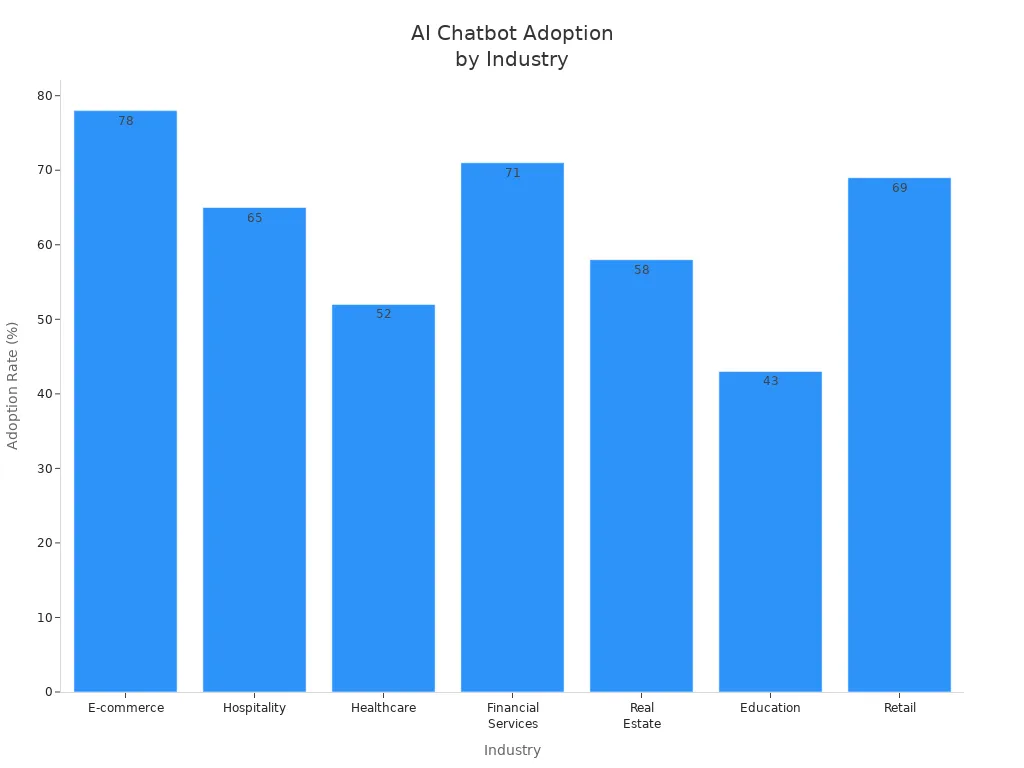
You can train ai chatbots for omnichannel platforms by focusing on data quality, smart integration, and continuous improvement. Seamless customer experiences matter because they boost satisfaction, loyalty, and retention. Many industries now use omnichannel AI chatbots, as shown in the table below. Sobot leads in this field with proven solutions that help you deliver consistent support everywhere your customers connect.
| Industry | Adoption Rate |
|---|---|
| E-commerce | 78% |
| Hospitality | 65% |
| Healthcare | 52% |
| Financial Services | 71% |
| Real Estate | 58% |
| Education | 43% |
| Retail | 69% |
Understanding Omnichannel AI Chatbots
What Is an Omnichannel Chatbot
An omnichannel chatbot connects with your customers across many platforms, such as websites, social media, messaging apps, and email. Unlike single-channel bots, an omnichannel artificial intelligence chatbot uses cloud infrastructure, API integrations, and advanced natural language processing. This setup lets you offer a seamless experience, where customer data and conversation history travel with the user from one channel to another. You do not need to ask customers to repeat information. The chatbot remembers past interactions and keeps the conversation going, no matter where your customer reaches out.
Here is a quick comparison:
| Aspect | Multichannel | Omnichannel |
|---|---|---|
| Channel integration | Separate data and workflows | Shared data, memory, and orchestration |
| Customer friction | Customers repeat information | Context travels with the customer |
| Brand consistency | Varies by channel | Unified voice and messaging |
You can see that an omnichannel artificial intelligence chatbot creates a unified customer profile and delivers consistent support everywhere.
Unique Needs for Customer Experience
Customers expect fast, accurate, and personal service. An omnichannel chatbot must meet these needs by using real-time data and smart intent detection. You can provide quick answers and even predict what your customers want based on their past actions. This approach builds trust and loyalty.
Key requirements for a great customer experience include:
- Consistency across all platforms, so your brand feels the same everywhere.
- Personalized responses using customer data.
- Smooth transitions, with context maintained throughout the journey.
AI chatbots can analyze preferences, browsing history, and past orders. This helps you deliver tailored responses and streamline the user experience. When you meet these unique needs, you make every interaction count.
How to Train AI Chatbots for Omnichannel Use
Training AI chatbots for omnichannel platforms requires a structured approach. You need to focus on data quality, smart preprocessing, and continuous improvement. Sobot’s no-code and multilingual features make this process easier for both technical and non-technical users. Let’s break down the steps you should follow to train ai chatbots for omnichannel use.
Data Collection and Preparation
You must start with strong data. High-quality and diverse training data help your chatbot understand many types of customer questions. When you train ai chatbots, you want them to handle real-world conversations across all channels.
Here are some effective ways to collect data for chatbot training terms:
- Gather customer interactions from your website, social media, and messaging apps. Chatbots can learn from these real conversations.
- Use crowdsourcing. Polls and surveys let you collect a wide range of questions and answers from many people.
- Apply web scraping to collect data from online sources like product reviews and social media posts.
Tip: Prepare large, balanced datasets. This ensures your chatbot responds reliably to different users.
You should also evaluate your chatbot’s performance often. Regular checks help you spot gaps in the data. When you find these gaps, update your training data. This keeps your chatbot accurate and up to date.
High-quality data is essential for machine learning-based chatbots. Well-curated data improves the chatbot’s reliability and reduces the need for frequent retraining. Diverse datasets help your chatbot handle many scenarios, making it more robust for omnichannel use.
Preprocessing: Tokenization and Stemming
Before you train ai chatbots, you need to clean and organize your data. Preprocessing is a key step. It includes tasks like tokenization and stemming.
- Tokenization splits sentences into words or phrases. This helps the chatbot understand each part of a message.
- Stemming reduces words to their root form. For example, “running” becomes “run.” This lets the chatbot match different word forms.
Preprocessing improves the accuracy of machine learning-based chatbots. Clean and well-structured data helps the chatbot learn better. For models like BERT, proper formatting boosts performance. You want your chatbot to understand intent clearly, so preprocessing is vital.
Note: Good preprocessing leads to better intent classification and more accurate responses.
Intent Classification and Entity Extraction
Intent classification helps your chatbot know what the user wants. Entity extraction finds important details in the message, like names, dates, or locations. These two steps are the heart of natural language processing for chatbots.
You can use different machine learning models for these tasks. Here’s a quick comparison:
| Model Type | Description |
|---|---|
| Supervised Learning | Trains on labeled datasets to classify user intents based on examples. |
| Deep Learning | Uses multi-layered neural networks for tasks like sentiment analysis and intent detection. |
| Transformer Models | Includes BERT and GPT, which process text sequences in parallel and understand context better. |
Supervised learning is especially important when you train ai chatbots. You provide examples of questions and answers. The chatbot learns to match new questions to the right intent. Machine learning-based chatbots use these models to improve over time.
Entity extraction makes your chatbot smarter. It picks out key details from messages. For example, if a customer asks, “What is the status of my order #12345?” the chatbot finds the order number. This helps the chatbot give more personal and accurate answers.
Entity extraction boosts the chatbot’s ability to understand context. This leads to better, more helpful conversations.
Fine-Tuning with Sobot Chatbot
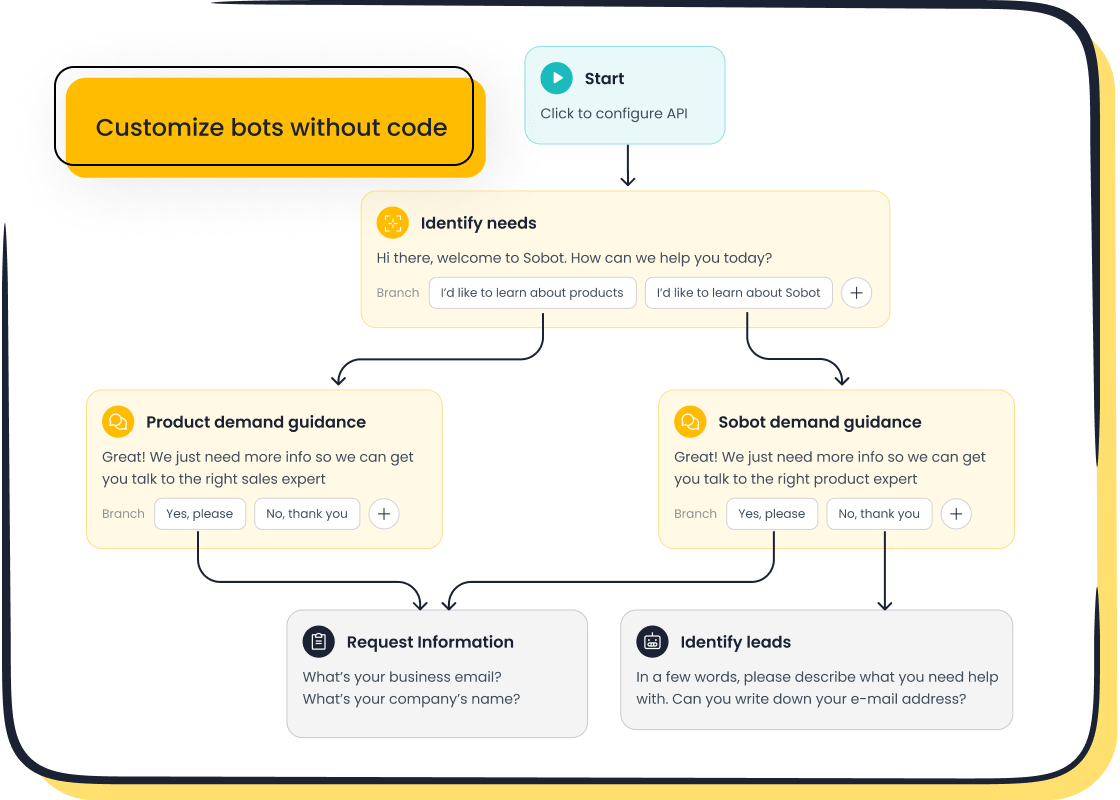
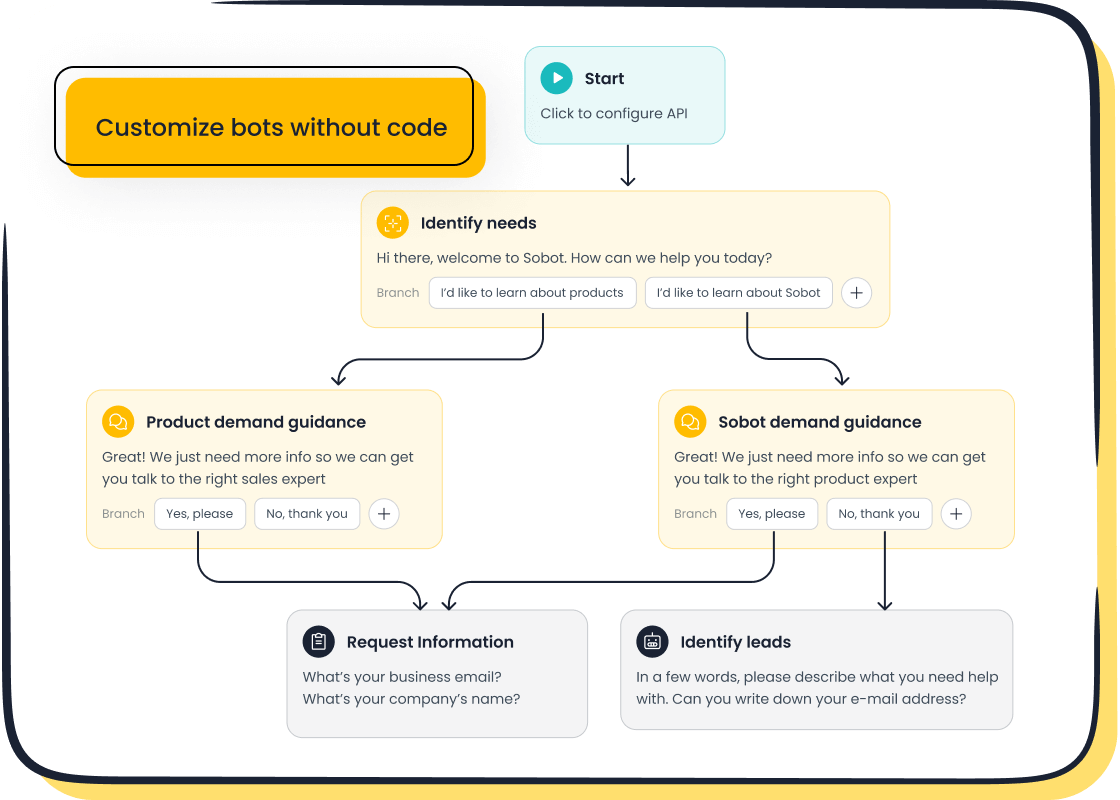
Sobot’s platform makes it easy to fine-tune your chatbot for omnichannel use. You do not need to write code. The point-and-click interface lets you set up workflows and automate responses quickly.
Sobot’s no-code tools help you:
- Build and update chatbot flows without programming.
- Use real-time dashboards to track response times and satisfaction.
- Automate repetitive tasks, so agents can focus on complex issues.
Multilingual support is another key feature. You can train ai chatbots to handle many languages. This is important for global businesses. Sobot’s strong multilingual accuracy ensures smooth transitions between bots and human agents.
Integrating a knowledge base with Sobot improves chatbot training outcomes. The AI Agent can extract question-and-answer pairs from files like PDFs or Excel sheets. These pairs go straight into the knowledge base. This process reduces the time and cost of maintaining your chatbot’s knowledge.
Here are some benefits you get with Sobot’s knowledge base integration:
- Direct response rates improve by 15% to 35%.
- Answer accuracy rates increase by 5% to 15%.
- The workload for building and updating the knowledge base drops by 80%.
Sobot’s intelligent routing and automation workflows keep your operations efficient. You deliver personalized service at scale.
When you follow these steps, you learn how to train AI chatbots for omnichannel platforms in a way that is practical and effective. You use supervised learning to classify intents, machine learning-based chatbots to improve over time, and Sobot’s tools to streamline the process. You ensure your chatbot can support customers across all channels, in any language, with high accuracy.
Make an AI Chatbot with Sobot
Steps to Make an AI Chatbot
You can make an ai chatbot with Sobot using a simple point-and-click interface. You do not need coding skills to build a chatbot from scratch. Start by choosing the channels you want to support, such as your website, WhatsApp, or SMS. Next, add your business rules and conversation flows. Sobot lets you upload documents, FAQs, and product guides to create a strong knowledge base. You can use the AI Agent to automate responses and handle routine questions. The platform also supports live chat, voice, and ticketing systems, so you can connect all your customer contact points.
Tip: Use Sobot’s workflow builder to automate tasks and speed up response times.
Integrating Across Channels
Omnichannel integration helps you make an ai chatbot that delivers consistent support everywhere. Sobot centralizes your customer support channels. The chatbot manages inquiries across e-commerce sites, social media, and messaging apps. This setup keeps interactions consistent and contextually aware. Customers get seamless communication, which boosts satisfaction and efficiency. You can build a chatbot from scratch and connect it to Sobot’s contact center, live chat, and voicebot features. This ensures your chatbot remembers past conversations and keeps the experience unified.
- OPPO used Sobot’s AI chatbot to handle high volumes of customer questions.
- OPPO achieved an 83% chatbot resolution rate.
- OPPO saw a 57% increase in repurchase rate after integrating Sobot’s omnichannel solution.
Customization and Optimization
You can make an ai chatbot that fits your industry needs with Sobot’s flexible platform. Sobot offers AI Chatbot, Live Chat, Voice, Ticketing, and WhatsApp Business API. You can build a chatbot from scratch and customize workflows for retail, finance, gaming, or education. Sobot partners with major cloud providers to ensure scalability and reliability. You can optimize your chatbot by tracking analytics and updating your knowledge base. The platform supports multilingual responses, so you can serve global customers. Visit Sobot’s official website for more details.
Note: Customization helps you deliver personalized service and improve customer satisfaction.
Testing and Improving Chatbot Performance
Consistency Across Channels
You want your AI chatbot to give the same high-quality answers everywhere. Consistency builds trust and keeps your brand voice strong. You can check consistency by tracking key metrics across all channels. Here is a table that shows what to measure and why it matters:
| Metric | Definition | Why it matters | What success looks like |
|---|---|---|---|
| Total interactions | Number of conversations with the chatbot | Shows demand and user experience | Growth in conversations and completion rates |
| Resolution rate | Percentage of queries solved by the chatbot | Measures self-service success | High rates mean users get answers without waiting |
| Customer satisfaction | How happy users are with the chatbot | Reflects overall experience | High CSAT scores |
| Missed utterances | Times the chatbot does not understand | Reveals training gaps | Fewer missed responses after updates |
| Fallback rate | Times the chatbot uses a canned response | Shows unmet needs | Fallbacks under 15% |
| Escalation rate | Conversations sent to another channel | Shows missed automation chances | Fewer escalations, more completed tasks |
You should also make sure your chatbot uses the same tone and language everywhere. Consistent terminology helps your brand sound the same, even in different languages.
Monitoring and Analytics
You need to monitor your chatbot’s performance to spot problems early. Most platforms give you dashboards that track things like fallback rates, goal completions, and user behavior. You can also connect your chatbot to your CRM to see how it fits into the bigger customer journey.
- Track daily and monthly active users to see adoption trends.
- Measure average chat duration to check engagement.
- Watch goal completion rates to see if users finish tasks.
- Review human takeover rates to find weak spots.
- Check response accuracy for consistency.
When you monitor user interactions, you learn what works and what needs fixing. User feedback shows where users get confused or frustrated. You can use reinforced learning to improve the chatbot’s understanding and responses over time.
Continuous Improvement with Sobot
Continuous improvement keeps your chatbot effective. Sobot recommends deep integration with your business systems, like CRM and payment platforms. Smart workflow design, such as decision trees and fallback triggers, helps your chatbot guide users better. Proactive monitoring, including sentiment analysis, lets you spot unhappy users and step in quickly.
You should track key performance indicators like resolution rates and customer satisfaction. Sobot’s clients have seen up to 83% resolution rates and large cost savings from ongoing optimization. Reinforced learning and regular updates based on real user feedback help your chatbot get smarter. Testing and refining conversation flows ensures your chatbot stays helpful and on-brand.
Tip: A soft launch lets you gather feedback and fix issues before going live everywhere.
Best Practices and Challenges
Ensuring Data Privacy and Compliance
You must protect customer data when you train AI chatbots for omnichannel platforms. Privacy laws like GDPR, CCPA, and the EU AI Act set strict rules for handling personal information. The table below shows how these regulations impact chatbot deployment:
| Regulation | Impact on AI Chatbots in Omnichannel Environments |
|---|---|
| GDPR | Imposes requirements related to data privacy and consent management. |
| CCPA | Grants consumers rights regarding their personal data, affecting how chatbots handle data. |
| EU AI Act | Establishes a legal framework for AI, ensuring safety and protecting fundamental rights. |
To stay compliant, follow these best practices:
- Remove sensitive or non-consented data before storing it.
- Record which documents your chatbot retrieves for each query.
- Test your system regularly to ensure accurate, compliant responses.
- Enforce role-based access and consent boundaries.
- Use quality assurance tools for conversation monitoring and compliance verification.
- Support multilingual compliance across all channels.
- Filter content and escalate issues automatically.
- Maintain industry-standard security certifications.
- Align AI use policies with privacy laws.
- Minimize, encrypt, and anonymize data.
- Conduct regular privacy impact assessments.
Tip: Unified compliance standards help you deliver consistent protection across every channel.
Overcoming Channel-Specific Issues
When you train AI chatbots for omnichannel platforms, you face unique challenges on each channel. You must integrate customer data smoothly to avoid fragmented experiences. You need to maintain context as users switch platforms. Each messaging app has its own API and formatting rules. Security and privacy must stay strong everywhere. Human handover can be complex, so you must ensure seamless transitions between bots and agents.
- Integrate data for a unified customer view.
- Maintain conversation context across platforms.
- Adapt to platform-specific APIs and formats.
- Protect sensitive information at all times.
- Enable smooth handover between chatbot and human agents.
Callout: Testing your chatbot on every channel helps you spot and fix these issues early.
Maximizing Customer Satisfaction
You can maximize customer satisfaction when you train AI chatbots for omnichannel platforms by focusing on speed, personalization, and accessibility. Chatbots boost productivity by handling common questions, freeing your team for complex tasks. Fast, personalized responses make customers feel valued. 24/7 support ensures help is always available. Multilingual chatbots let you reach global audiences. Chatbots scale easily, handling many inquiries at once. Proactive engagement increases conversions.
For example, OPPO achieved an 83% chatbot resolution rate and a 57% increase in repurchase rate after integrating Sobot’s AI-driven chatbot. This shows how to train AI chatbots for omnichannel platforms can drive revenue growth and improve engagement.
Note: Continuous improvement and feedback collection help you keep customer satisfaction high.
You learned how to train AI chatbots for omnichannel platforms by collecting quality data, preprocessing, classifying intents, and fine-tuning with Sobot. Sobot helps you deliver efficient, scalable, and customer-focused solutions.
- Over 10,000 brands trust Sobot for omnichannel support.
- Agent efficiency improves by up to 40%.
- Routine inquiries drop by 70%.
- E-commerce conversion rates rise by 20%.
- Multiple channels unite for a better customer experience.
Explore Sobot’s Chatbot product or request a demo to start your own omnichannel chatbot journey.
FAQ
How do you start training AI chatbots for omnichannel platforms?
You begin by collecting real customer conversations from every channel. You organize the data and use Sobot’s no-code tools. You build workflows and upload FAQs. This process helps your chatbot learn to answer questions across platforms.
What makes data quality important when you train AI chatbots for omnichannel platforms?
High-quality data helps your chatbot understand many types of questions. You use balanced datasets to reduce errors. Diverse data lets your chatbot handle real-world scenarios. Sobot’s platform checks data gaps and updates training sets for better accuracy.
Can you train AI chatbots for omnichannel platforms without coding?
Yes, you use Sobot’s point-and-click interface. You build and customize chatbots without writing code. You upload documents, set rules, and automate responses. This feature helps both technical and non-technical users create effective chatbots.
How do you ensure your chatbot stays consistent across channels?
You monitor key metrics like resolution rate and customer satisfaction. You test your chatbot on every platform. Sobot’s analytics tools help you track performance. You update workflows and knowledge bases to keep answers accurate and unified.
Why should you use Sobot to train AI chatbots for omnichannel platforms?
Sobot offers multilingual support, easy integration, and strong automation. You improve efficiency and boost conversion rates. OPPO’s example shows an 83% resolution rate and a 57% increase in repurchase rate. Sobot helps you deliver seamless customer experiences.
See Also
Comprehensive Overview of Omnichannel Call Center Solutions
Simple Ways to Integrate Chatbots on Your Website
Tips for Selecting the Ideal Chatbot Software

