Top IVR Solutions for Call Centers in 2026


You want the best IVR for your call centers in 2026. Here are the top solutions: Sobot Voice/Call Center, CloudTalk, Twilio, GoTo Connect, and MightyCall. IVR systems make life easier for you and your customers. They handle routine inquiries, provide 24/7 service, and help your agents focus on complex issues. IVR meaning call center is all about smarter workflows, faster answers, and happier customers.
Take a look at what IVR can do for your business:
| Benefit | Description |
|---|---|
| Greater Efficiency | IVR lets you respond quickly and cuts wait times. |
| 24/7 Availability | Customers get help any time, day or night. |
| Cost Reduction | Automation lowers costs by reducing live agent needs. |
| Increased First Call Resolution | Smart routing helps solve problems on the first try. |
| Improved Customer Experience | Simple inquiries get handled smoothly for a positive experience. |
| Scalability | Cloud-based IVR grows with your business, no extra infrastructure needed. |
| Enhanced Analytics | You get insights to improve service and spot trends. |
You need the right IVR software that fits your business, integrates easily, and matches your industry needs. Sobot stands out with its innovative features and customer-focused design. Think about what matters most to your team and customers. You’ll soon see how IVR transforms your call centers.
IVR Meaning Call Center: What Is IVR and Why It Matters
IVR Definition and Role in Call Centers
You might wonder what ivr meaning call center really is. IVR stands for interactive voice response. In a call center, it’s the technology that greets you when you call, asks you questions, and helps you get to the right place. Years ago, ivr systems just played simple messages and sent callers to agents. Now, ivr systems use AI to understand what you need and guide you through menus without any human help. IVR meaning call center has changed a lot. Today, ivr systems automate the start of every call, present options, and route calls so agents can focus on tough problems.
Here’s a quick look at what ivr systems do:
- Automate customer interactions and collect information.
- Present pre-recorded prompts to identify your reason for calling.
- Route calls without human intervention.
- Serve as the first point of contact for customer support.
- Record calls for training and analysis.
| Role of IVR Systems in Call Centers | Description |
|---|---|
| Automating Customer Interactions | IVR systems automate the service process, letting businesses identify customer needs without human help. |
| Improving Efficiency | IVR systems route calls to the right agents, reducing time spent per call. |
| Enhancing Customer Satisfaction | Personalized messages and 24/7 availability boost customer experience and brand image. |
| Analyzing Past Interactions | IVR systems record calls for training and analysis. |
| Providing Quick Answers | IVR systems answer basic questions and direct customers to the right agents. |
| Marketing Promotions | IVR systems inform callers about promotions while they wait. |
Key Benefits for Customer Experience
IVR meaning call center is all about making things easier for you and your customers. IVR systems give quick answers, reduce wait times, and personalize every interaction. When you call, the ivr system can recognize your number, greet you by name, and offer menu options based on your past calls. This makes you feel valued and speeds up the process. IVR systems use decision trees and natural language processing to solve problems fast. In healthcare, ivr systems help schedule appointments. In retail, they track orders and answer FAQs. When ivr systems work well, you see higher satisfaction scores and enhanced customer experience.
Tip: IVR systems can personalize greetings and menu options, making every call feel special.
Impact on Operational Efficiency
IVR meaning call center also means better efficiency for your team. IVR systems automate call routing, handle simple questions, and let agents focus on complex issues. This lowers operational costs and boosts productivity. For example, eliminating manual authentication saves time and money. IVR systems reduce average call handling time by 15%, leading to millions in savings. Agents get fewer repetitive tasks, which makes their jobs less stressful. IVR systems can direct callers to voicemail or schedule callbacks, lowering call volume and improving customer support. You get a smoother workflow and a more efficient call center.
IVR Software Solutions: Top Picks for 2026
You want to know which ivr solutions will help your call center shine in 2026. Let’s break down the top ivr software solutions and see how they stack up. You’ll find that each ivr system brings something unique to the table. Some focus on advanced AI, others on easy integration or global reach. You can choose the one that fits your business best.
Comparison Table of Leading IVR Platforms
Here are the top ivr solutions for call centers in 2026:
-
Sobot Voice/Call Center
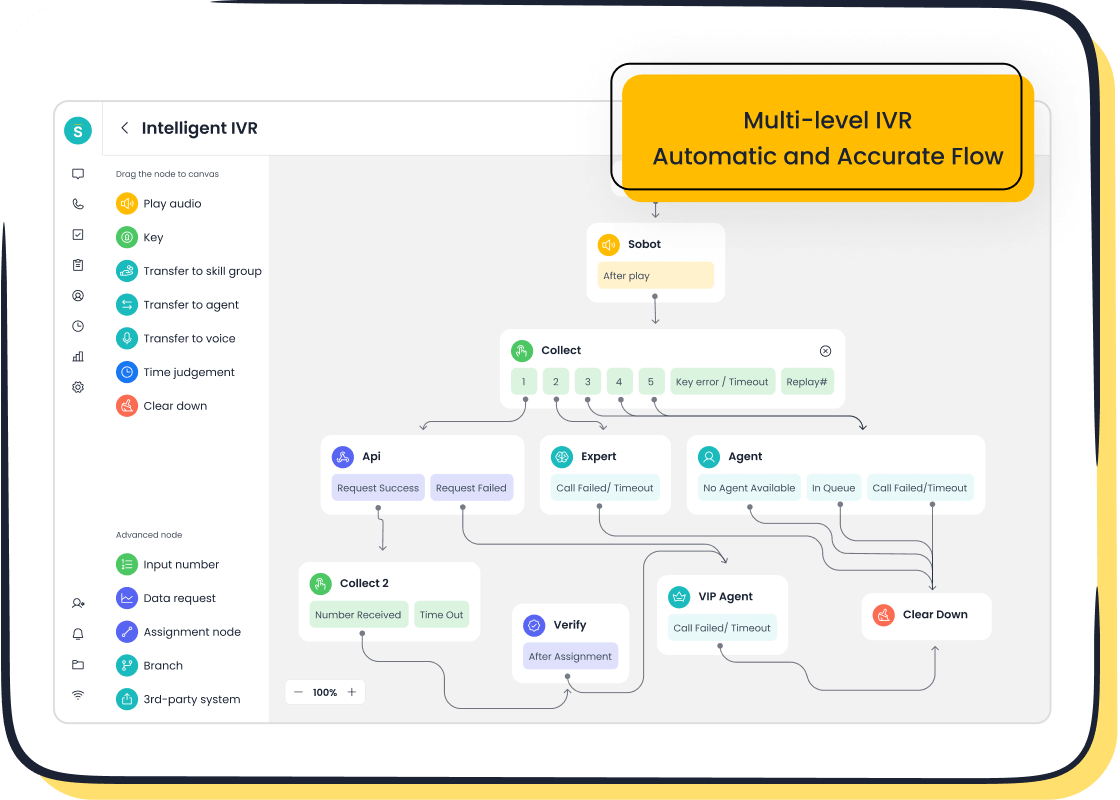
Sobot gives you an intelligent ivr system with drag-and-drop menus, smart call routing, and AI-powered voicebots. You get a unified workspace, real-time analytics, and global phone numbers. Sobot stands out for its high uptime (99.99%), fast deployment, and easy integration with CRM systems. You can use Sobot for retail, finance, gaming, and more. Sobot helps you boost agent efficiency and customer satisfaction.
Learn more about Sobot Voice/Call Center -
CloudTalk
CloudTalk offers a flexible ivr system with multi-level menus, call recording, and real-time analytics. You can integrate CloudTalk with popular CRMs and manage calls from anywhere. CloudTalk works well for remote teams and businesses that need easy setup. -
Twilio
Twilio gives you a programmable ivr system with natural language processing and virtual agents. You can build custom workflows and connect Twilio to many apps. Twilio is great for tech-savvy teams that want full control and customization. -
GoTo Connect
GoTo Connect provides an ivr system with automated call routing, custom greetings, and queue callback. You get reliable uptime and strong security features. GoTo Connect fits businesses that want simple, scalable ivr solutions. -
MightyCall
MightyCall delivers an ivr system for small businesses. You get call recording, automated tagging, and easy menu setup. MightyCall is affordable and user-friendly, making it a good choice for startups and small teams.
Let’s look at how these ivr software solutions compare:
| Platform | Key Features | Pricing Model | Best Use Case | Uptime/Support |
|---|---|---|---|---|
| Sobot Voice/Call Center | Drag & drop IVR, AI voicebot, global numbers, unified workspace, real-time analytics | Mixed/Hybrid Billing, SaaS rental | Large enterprises, global teams, omnichannel support | 99.99%, 24/7 support |
| CloudTalk | Multi-level IVR, call recording, CRM integration, analytics | Tiered Subscription | Remote teams, CRM integration | 99.9%, 24/7 support |
| Twilio | Programmable IVR, NLP, virtual agents, custom workflows | Pay-Per-Channel, Outcome-Based SLA | Tech-driven teams, custom solutions | 99.9%, 24/7 support |
| GoTo Connect | Automated routing, custom greetings, queue callback | Tiered Subscription | SMBs, scalable solutions | 99.9%, 24/7 support |
| MightyCall | Call recording, automated tagging, easy menu setup | Tiered Subscription | Small businesses, startups | 99.9%, 24/7 support |
Note: Pricing models vary. Some platforms use hybrid billing, others offer tiered subscriptions or pay-per-channel pricing. You should check each provider’s website for the latest details.
The ivr market is still led by big names like Avaya, Cisco, and Nuance. Avaya holds about 20% of the market share. Cisco and Nuance follow with 15% and 10%. New ivr solutions like Sobot, CloudTalk, and Twilio are gaining ground thanks to AI and machine learning. You see more businesses switching to cloud-based ivr systems for flexibility and better user experience.
Selection Criteria for 2026
Choosing the right ivr software solutions for your call center can feel overwhelming. You want to make sure your ivr system fits your needs and delivers results. Here’s what you should look for:
-
Call Quality and Reliability
You need an ivr system that guarantees high call quality and uptime. Look for platforms with at least 99.9% uptime and strong SLAs. -
Security and Compliance
If you work in healthcare or finance, you need extra security. Make sure your ivr solutions offer PCI and GDPR compliance, call encryption, and multi-factor authentication. -
Demo and Hands-On Experience
Request a demo before you commit. You want to see how the ivr system works in real life. -
Volume and Caller Complexity
Think about how many calls you handle and how complex your callers’ needs are. Choose ivr solutions that can scale and handle multiple menus or levels. -
KPIs and Analytics
You want measurable KPIs for containment and handling time. Look for ivr software solutions with strong analytics and reporting tools. -
Integration and Data Flow
Your ivr system should integrate easily with your CRM, help desk, or other tools. Check if the platform supports seamless data flow. -
Scalability and Deployment
Make sure your ivr solutions can grow with your business. Look for platforms with global points of presence and fast deployment. -
Customization and Maintenance
You may want to customize greetings, menus, or workflows. Choose ivr software solutions that offer no-code flow builders and easy updates. -
Features That Solve Your Problems
Look for features like queue callback, call recording, automated tagging, ivr analytics, natural language processing, and virtual agents. -
Cost, ROI, and Payback
Compare pricing models. Some platforms offer tiered subscriptions, others use pay-per-channel or outcome-based SLA pricing. Calculate your ROI and payback period. -
Vendor Support and Implementation
You need strong vendor support and easy implementation. Look for providers with 24/7 customer service and clear onboarding.
Tip: Always check for end-to-end encryption, redundancy, and failover plans. These keep your ivr system running smoothly, even during outages.
You can see that ivr solutions have evolved. You get smarter routing, AI-powered voicebots, and real-time analytics. Sobot Voice/Call Center gives you a unified workspace and global reach. CloudTalk and Twilio focus on flexibility and integration. GoTo Connect and MightyCall offer simple, scalable ivr systems for smaller teams.
If you want to learn more about market share and adoption rates, you can check Avaya’s market share report or Cisco’s business insights. These reports show how ivr solutions are changing the call center landscape.
You have many choices. Take your time, compare features, and pick the ivr system that fits your business goals. The right ivr software solutions will help you deliver better customer service, boost efficiency, and grow your call center in 2026.
Sobot Voice/Call Center: IVR Solution Overview
Intelligent IVR Features
You want your call center to run smoothly. Sobot’s ivr makes that happen. You can build custom greetings, set up menus, and route calls to the right agent or team. The drag-and-drop interface lets you update your ivr in real time. You don’t need coding skills. Sobot’s ivr handles smart call routing, batch outbound tasks, and global number availability. You get a stable system with 99.99% uptime. The ivr supports time zone settings, so your team can collect data and analyze calls based on customer location. This ivr helps you reduce routine inquiries by up to 70%. You see faster answers and happier customers.
Unified Workspace and Integration
Sobot gives you a unified workspace. Your agents manage calls, tickets, and messages from all channels in one place. You get seamless integrations with CRM, ERP, and other business systems. Sobot connects with external platforms like PCs, apps, WeChat, and enterprise portals. You can automate processes and access customer information instantly. Here’s how Sobot’s integration features stack up:
| Integration Feature | Description |
|---|---|
| Self-built systems | Integrated with PCs, apps, WeChat, enterprise portals, and OAs for unified service. |
| Data integration | Seamless connection with ERP and CRM for process automation. |
- Sobot’s platform lets agents access customer info from multiple channels.
- Integration with Samsung’s ordering system enables context-aware responses.
Sobot easily integrates with other tools and services for a comprehensive approach.
AI-Powered Voicebot and Analytics
You get an ai-powered system with Sobot’s ivr. The voicebot recognizes intent and interacts intelligently. You can automate responses and collect data for analysis. Real-time monitoring and analytics help you track call performance and agent productivity. Sobot’s ivr boosts agent efficiency by 30-40%. You see a 15-20% increase in e-commerce conversion rates. The ivr’s data collection gives you insights to improve service and spot trends.
Customer Success Story: Weee!
Weee! wanted a flexible ivr for its online supermarket. Sobot delivered. Weee! saw a 20% jump in agent efficiency and cut resolution time by 50%. The ivr handled language barriers and time zone differences. Weee! reached a 96% customer satisfaction score. Sobot’s ivr helped Weee! serve thousands of customers every day. You can read more about Weee!’s story here.
Other Leading IVR Solutions for Call Centers
CloudTalk Overview and Features
CloudTalk gives you a smart ivr that helps your team work better. You can use their AI voice agent, called CeTe, to qualify leads, confirm meetings, and gather feedback. CeTe works 24/7 and can escalate calls in real time. CloudTalk’s ivr lets you build custom menus and call flows without any coding. You can route calls based on what your customers need or your agents’ skills. This makes call management simple and efficient. Here’s a quick look at what you get:
| Feature | Description |
|---|---|
| AI Voice Agent (CeTe) | Qualifies leads, confirms meetings, sends reminders, gathers feedback, and operates 24/7 with real-time escalation. |
| Intelligent Call Routing | Routes calls based on customer input, agent skill set, and other factors to ensure efficient call handling. |
| Customizable Multi-Level Menus | Enables businesses to create tailored IVR menus and call flows without coding, enhancing customer journey management. |
CloudTalk’s ivr fits well if you want a flexible, cloud-based phone system that grows with your business.
Twilio IVR Capabilities
Twilio’s ivr platform brings advanced call routing and automation to your call center. You can set up automated menus that understand voice commands or keypad input. This means your customers get to the right agent faster, without waiting. Twilio’s ivr uses voice recognition to direct calls, so your team spends less time transferring people. You get a smoother experience for everyone. Twilio’s ivr helps you automate tasks and improve your call center’s efficiency.
GoTo Connect IVR Highlights
GoTo Connect offers an ivr that is easy to set up and manage. You can create custom greetings and set up automated call routing. The ivr helps you handle high call volumes and keeps your customers from waiting too long. GoTo Connect’s ivr is reliable and secure, making it a good choice for businesses that want simple solutions. You can scale up as your needs grow, and the platform supports strong uptime for peace of mind.
MightyCall for Small Businesses
MightyCall makes ivr simple for small businesses. You get a user-friendly interface and quick setup. The platform includes multi-level ivr, call routing, call recording, and custom greetings. You can route callers by language, location, or department, so they always reach the right person. MightyCall’s ivr is cloud-based, affordable, and mobile-friendly. You also get strong customer support, which helps you stay focused on your business.
Tip: If you run a small team, MightyCall’s ivr can help you look professional and never miss a call.
You have many ivr options. Each one helps you improve call management and customer experience in a different way.
How to Choose the Right IVR for Your Call Center
Assessing Business Needs
You want an ivr that fits your goals. Start by figuring out what your ivr system should do. Maybe you need appointment scheduling, payment processing, or customer support. Make a list of your must-have features. Next, pick a platform that grows with you. Cloud-based ivr keeps costs low and makes updates easy. Map out the customer journey. Think about how callers move from start to finish. Choose development tools that work with your tech stack. Test everything before you launch. Here’s a simple checklist:
- Identify your main ivr functions.
- Pick a scalable platform.
- Design the workflow for callers.
- Select compatible tools and APIs.
- Test and deploy your ivr system.
Integration and Scalability
You need an ivr that connects with your other systems. Integration matters for smooth customer support. If your ivr system works with CRM, databases, and your phone setup, you save time and avoid headaches. Scalability lets your ivr handle more calls as your business grows. Check out this table:
| Aspect | Description |
|---|---|
| Scalability | Your ivr system expands as you add new departments or markets. |
| Technology Compatibility | Your ivr connects with CRM, databases, and phone systems for seamless customer support. |
Pricing and ROI
Choosing the right pricing model helps you stay flexible. You might see hourly, per-minute, performance-based, or hybrid pricing. Each model fits different needs. If you pick the wrong one, you could overspend. Look for ivr that reduces call handling times and boosts first-call resolution. Automation cuts costs by lowering the need for live agents. Better customer support means happier customers and more repeat business.
- Hourly pricing gives predictability.
- Per-minute pricing matches usage.
- Performance-based pricing ties costs to outcomes.
- Hybrid models balance stability and scalability.
Omnichannel and AI Trends
Omnichannel ivr is the future. You want an ivr that handles customer support across phone, chat, email, and social media. AI lets your ivr system manage complex questions and personalize every interaction. Sobot’s ivr centralizes all support channels, improving customer experience and lowering costs. Human-AI collaboration makes your ivr smarter and more helpful.
Tip: Look for ivr that combines omnichannel support and AI. You’ll see better results and happier customers.
You’ve seen how ivr solutions like Sobot Voice/Call Center, CloudTalk, Twilio, GoTo Connect, and MightyCall help your call center shine. Sobot stands out with intelligent ivr, real-time analytics, and easy integration. Aligning ivr with your goals boosts customer experience and efficiency. Check the comparison table, review selection criteria, and explore Sobot’s ivr offerings. Want personalized ivr advice or a demo? Reach out and discover how ivr can transform your call center.
Ready to improve your ivr? Start with a live audit, train your team, and monitor performance for continuous growth.
| Feature | Benefit |
|---|---|
| Intelligent ivr | Better call handling |
| Real-time analytics | Improved efficiency |
| AI automation | Enhanced customer experience |
FAQ
What is an IVR system and how does it help your call center?
You use an IVR system to greet callers, guide them through menu options, and route calls to the right agent. This makes your call center more efficient and improves customer satisfaction.
Can you customize greetings and menus in your IVR?
Yes, you can easily customize greetings and menu options. You set up messages that match your brand and update menus as your business changes.
How does an IVR improve agent productivity?
An IVR handles routine questions and directs callers. Your agents spend less time on simple tasks and focus on solving complex issues. This boosts productivity and reduces stress.
Is it possible to integrate IVR with your CRM?
You can integrate your IVR with your CRM. This lets agents see customer information during calls and helps you deliver personalized service.
What happens if your IVR system goes down?
Most IVR platforms offer high uptime and backup plans. If your system goes down, calls can reroute to live agents or voicemail so you never miss important customer requests.
See Also
Best IVR Software Solutions for Interactive Voice Response 2024
Comprehensive Reviews of Leading Contact Center Solutions 2024
Best Free CRM Software for Call Centers in 2024

