A Guide to Using Templates for Daily Outbound Call Volume


Tracking daily outbound call volume (docv) is essential for improving customer service and sales outcomes. It helps you measure team productivity, identify missed opportunities, and evaluate the success of campaigns. For example, metrics like call-to-connect rates and conversion rates reveal how effectively your team communicates and closes deals.
Templates simplify this process by organizing data in a structured format. They allow you to track key performance indicators (KPIs) like contact volumes and complaint trends while enabling customization for your business needs. This approach not only reduces errors but also enhances decision-making by visualizing data through charts and graphs.
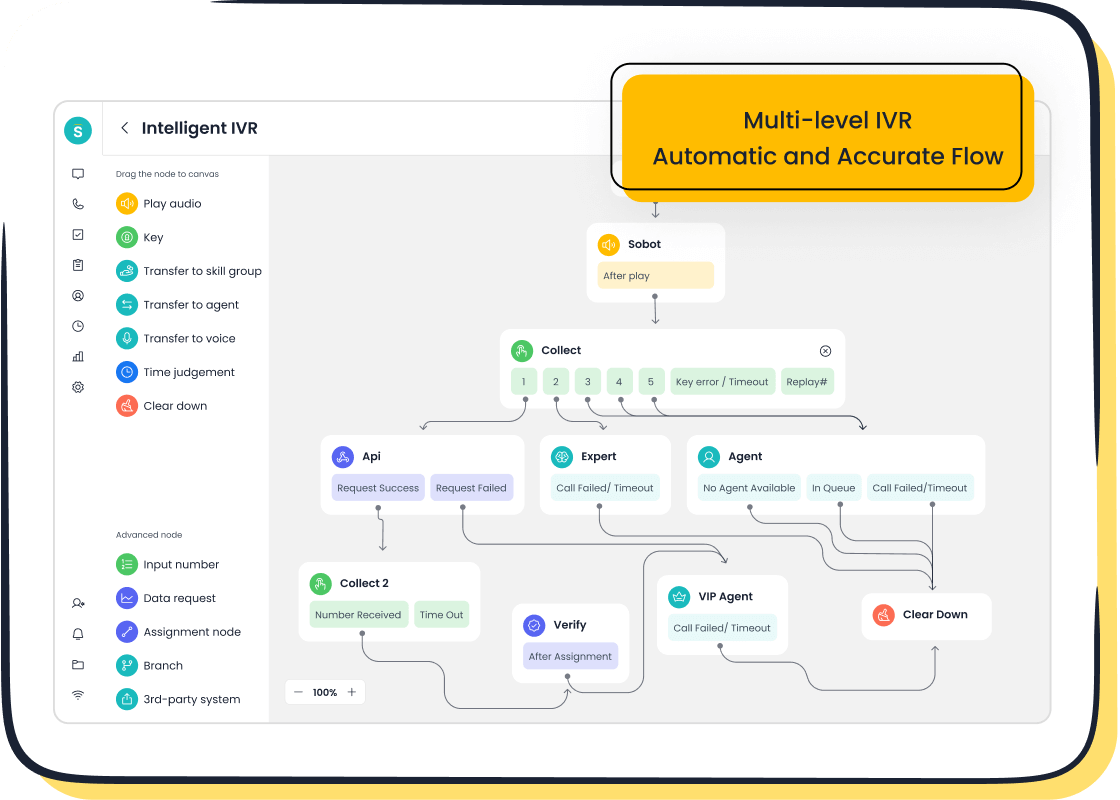
Sobot’s Voice/Call Center solutions take this a step further. With features like real-time monitoring and automated call tracking, you can streamline operations and gain actionable insights. These tools empower you to optimize your docv tracking and improve overall efficiency.
Benefits of Using Templates for Daily Outbound Call Volume
Streamlined Data Collection and Organization
Centralized tracking for better accessibility and analysis.
Templates provide a centralized system for tracking your outbound call center activities. By consolidating data into one location, you can easily access and analyze key performance indicators (KPIs) like total calls made or answer rates. This approach eliminates the need to sift through scattered records, saving time and improving efficiency. For example, integrating templates with tools like Sobot’s Voice/Call Center allows you to automate data collection and access real-time reporting. This ensures that your team always has accurate and up-to-date information for decision-making.
Minimizing errors with standardized formats.
Using standardized templates reduces the likelihood of errors in your call center metrics. Automation tools, such as AI transcription, further enhance accuracy by preventing data duplication and inconsistencies. Regular audits of your templates can also help identify and correct inaccuracies. For instance, utility companies have successfully streamlined billing inquiries by using structured templates, reducing call durations and improving customer satisfaction.
Enhanced Monitoring of Outbound Call Center Metrics
Real-time insights into team and individual performance.
Templates enable you to monitor outbound call center metrics in real time. This includes tracking agent utilization rates and average speed of answer, which are critical for evaluating performance. For instance, a well-structured template can reveal whether agents are meeting the target utilization rate of 75-90%. Sobot’s Voice/Call Center enhances this process by providing real-time reporting, allowing you to address performance gaps immediately.
Identifying trends and areas for improvement.
Templates make it easier to spot trends in your call center metrics. For example, tracking customer effort scores (CES) can highlight areas where your team needs improvement. A high CES indicates that customers find it easy to resolve their issues, reflecting positively on your service quality. By analyzing these trends, you can implement targeted strategies to enhance both agent efficiency and customer satisfaction.
| Metric | Description | Target Range |
|---|---|---|
| Agent Utilization Rate | Measures the percentage of time agents spend actively handling calls. | 75-90% |
| Average Speed of Answer | Average time taken for a call to be answered by an agent. | Within 60 seconds |
| Customer Effort Score (CES) | Measures customer effort in resolving issues, indicating service quality. | Higher scores preferred |
Data-Driven Decision-Making
Leveraging call center metrics for strategic planning.
Templates provide a structured way to collect and analyze data, enabling you to make informed decisions. Metrics like first call resolution rate (FCR) and average handle time (AHT) offer insights into operational efficiency. For example, a high FCR indicates that your team resolves most issues on the first call, reducing the need for follow-ups. Sobot’s solutions help you track these KPIs effortlessly, ensuring that your strategic plans are backed by reliable data.
Optimizing resource allocation based on call trends.
By analyzing call trends, you can allocate resources more effectively. For instance, if your templates show a spike in call volume during specific hours, you can adjust staffing levels accordingly. This not only improves service quality but also reduces operational costs. Data-driven insights from tools like Sobot’s Voice/Call Center ensure that your resource allocation aligns with actual demand, maximizing efficiency.
| Metric | Description |
|---|---|
| Average Handle Time (AHT) | Measures the average duration a representative spends with each customer, impacting productivity. |
| First Call Resolution Rate (FCR) | Indicates how often customer issues are resolved in a single call, reflecting customer satisfaction. |
| Customer Satisfaction Score (CSAT) | Gauges customer perception of service effectiveness, guiding operational adjustments. |
Key Outbound Call Center Metrics to Track
Total Calls Made
Definition and importance in measuring team activity.
The total calls made metric tracks the number of outbound calls your team completes within a specific period, such as daily or hourly. This metric provides a clear picture of your team's activity levels and helps you evaluate whether your call center is meeting its operational goals. For example, if your team aims to make 1,000 calls per day, tracking this metric ensures that you stay on target. It also helps you identify patterns in call volume, such as peak hours, which can inform staffing decisions.
How this metric reflects overall productivity.
Monitoring total calls made is essential for assessing productivity. A high number of calls often indicates that your team is actively engaging with prospects or customers. However, this metric should be analyzed alongside others, such as answer rates and conversion rates, to ensure that quantity does not compromise quality. Tools like Sobot’s Voice/Call Center simplify this process by providing automated call detail reports, enabling you to track and analyze call volume metrics effortlessly.
Calls Per Agent
Evaluating individual agent performance.
Calls per agent measures the number of calls each team member completes within a given timeframe. This metric is calculated using the formula:
Total number of calls made ÷ total number of agents.
For instance, if 20 agents make 500 calls in a day, each agent averages 25 calls per day. This metric highlights individual performance and helps you identify top performers or those needing additional support.
Setting benchmarks for productivity.
Setting benchmarks for calls per agent ensures consistent performance across your team. For example, you might aim for 30 calls per hour during peak times. This metric also aids in scheduling and staffing decisions, ensuring that resources align with call volume demands. Combining this data with other call center metrics, such as average handle time, provides a comprehensive view of your team's efficiency.
Answer Rates
Understanding the significance of answer rates.
Answer rates measure the percentage of calls answered by prospects or customers compared to the total calls made. This metric is crucial for evaluating the effectiveness of your outbound calling campaigns. A low answer rate may indicate issues with your contact list or the need for updated call strategies. For example, if your team makes 1,000 calls and only 300 are answered, the answer rate is 30%. Improving this metric can significantly enhance your campaign's success.
Using this metric to assess call quality and effectiveness.
Answer rates also reflect the quality of your outreach efforts. High answer rates often indicate that your team is targeting the right audience at the right time. By analyzing this metric, you can refine your strategies to improve engagement. Sobot’s Voice/Call Center provides real-time insights into answer rates, helping you optimize your campaigns and achieve better results.
Call Duration
Why average call duration matters for customer engagement.
Average call duration plays a crucial role in shaping customer engagement. It reflects how much time your agents spend addressing customer needs during each call. Shorter durations often indicate efficiency, but overly brief calls may compromise the quality of support. Striking the right balance ensures that customers feel heard and valued.
Higher average call durations often correlate with first-call resolution rates and improved customer satisfaction. For instance:
- Calls that resolve issues on the first attempt tend to leave customers more satisfied.
- Efficient service delivery, measured through Average Handle Time (AHT), helps you make informed decisions to enhance performance.
- Lower AHT reflects speed, but balancing it with quality ensures exceptional service.

By monitoring this metric, you can identify whether your team is engaging customers effectively while maintaining efficiency. Tools like Sobot’s Voice/Call Center provide real-time insights into call durations, helping you optimize both agent performance and customer satisfaction.
Insights into agent efficiency and customer satisfaction.
Call duration offers valuable insights into agent efficiency and customer satisfaction. Agents who handle calls efficiently without rushing customers demonstrate a strong understanding of their roles. For example, if your team consistently maintains an optimal AHT, it indicates they are resolving issues effectively while keeping customers engaged.
Tracking this metric also helps you identify training needs. If certain agents have significantly longer call durations, they may require additional support to improve their efficiency. Sobot’s Voice/Call Center simplifies this process by offering detailed analytics, enabling you to pinpoint areas for improvement and enhance overall service quality.
Conversion Rates
Measuring the success of outbound calls.
Conversion rates measure the percentage of successful outcomes from outbound calls. This metric highlights how effectively your team turns leads into customers. For example, if your team makes 100 calls and converts 20 leads, the conversion rate is 20%.
This metric also reflects the efficiency of your sales efforts. A high conversion rate indicates that your team is targeting the right audience and delivering compelling pitches. By analyzing this data, you can refine your strategies to improve the lead conversion ratio and achieve better results. Sobot’s Voice/Call Center provides tools to track and analyze conversion rates, ensuring your campaigns remain effective.
How this metric impacts sales and customer success.
Conversion rates directly impact sales and customer success. A higher rate means your team is successfully addressing customer needs and closing deals. For instance:
- The trial-to-paid conversion rate shows how many users transition from free trials to paid accounts, reflecting the effectiveness of your strategies.
- A strong lead conversion ratio demonstrates your team’s ability to turn prospects into loyal customers.
By focusing on this metric, you can identify areas for improvement and implement targeted strategies to boost sales. Sobot’s solutions help you monitor conversion rates in real time, ensuring your team stays on track to meet its goals.
How to Set Up and Customize Call Tracking Templates
Selecting the Right Template Format
Using spreadsheet-based templates for manual tracking.
Spreadsheet-based templates are a practical choice for small teams or businesses just starting with outbound call center tracking. Tools like Excel or Google Sheets allow you to manually input data such as total calls made, answer rates, and conversion rates. These templates are easy to customize and provide a clear overview of your KPIs. For example, you can create columns for metrics like call duration and agent performance, enabling you to generate an outbound call summary at the end of each day. While manual tracking requires more effort, it offers flexibility for businesses that do not yet use advanced software.
Leveraging CRM-integrated templates for automation.

For larger teams or businesses aiming for efficiency, CRM-integrated templates are ideal. These templates automatically pull data from your call detail record, eliminating the need for manual entry. Sobot’s Voice/Call Center solutions, for instance, integrate seamlessly with CRM systems to track KPIs like agent activity reports and call volume. This automation not only saves time but also ensures data accuracy. By using CRM-integrated templates, you can focus on analyzing trends and making data-driven decisions rather than spending time on data collection.
Step-by-Step Guide to Template Setup
Identifying key outbound call center metrics to include.
To set up an effective template, start by identifying the metrics that align with your business goals. Common KPIs include first call resolution (FCR), average handle time (AHT), and customer satisfaction (CSAT). These metrics provide insights into agent efficiency and customer engagement. The table below highlights their importance:
| Metric | Description |
|---|---|
| First Call Resolution (FCR) | Indicates the percentage of customer issues resolved in a single interaction. |
| Average Handle Time (AHT) | Measures the average time taken to resolve a customer concern, including talk, hold, and transfer times. |
| Customer Satisfaction (CSAT) | Reflects customer happiness based on feedback from surveys regarding their recent interactions. |
Including these metrics in your template ensures you capture the most relevant data for your outbound call center operations.
Structuring templates for clarity and usability.
A well-structured template improves usability and ensures data clarity. Use separate sections for agent-specific data, team-wide metrics, and customer feedback. For example, dedicate one section to tracking agent activity reports and another for overall call trends. Color-coding and dropdown menus can make the template more user-friendly. Sobot’s Voice/Call Center tools simplify this process by offering pre-designed templates that you can customize to suit your needs.
Customizing Templates for Your Business Needs
Adding fields for industry-specific data points.
Every business has unique requirements. Adding fields for industry-specific data points ensures your template captures all relevant information. For example, a financial services company might include compliance rates, while a retail business could track lead sources. Outbound call metrics like call duration and script adherence also provide valuable insights into customer behavior and preferences. Tailoring your template to include these fields enhances its effectiveness.
Aligning templates with business goals and objectives.
Your template should reflect your business objectives. Metrics like call volume and conversion rate help you measure productivity and sales success. Aligning these metrics with your goals improves customer retention and loyalty. For instance:
- Outbound call metrics reveal customer preferences.
- Tailored messaging based on data improves customer experiences.
- Tracking lead sources identifies the most effective acquisition channels.
Sobot’s Voice/Call Center solutions offer customizable templates that align with your specific goals, ensuring your outbound call center operates at peak efficiency.
Best Practices for Using Call Tracking Templates
Regular Updates and Maintenance
Ensuring data accuracy with daily updates.
Daily updates are essential for maintaining the accuracy of your call tracking templates. By updating metrics like agent performance and customer satisfaction scores regularly, you ensure that your data reflects real-time operations. For example, tracking KPIs such as answer rates and conversion rates daily helps you identify trends and make timely adjustments. Sobot’s Voice/Call Center simplifies this process by automating data collection, reducing the risk of errors and ensuring your reports remain reliable.
Periodically reviewing templates for relevance.
Templates should evolve with your business needs. Periodic reviews allow you to assess whether your current structure aligns with your goals. For instance, if your outbound call center shifts focus to improving customer satisfaction, you might add fields for tracking customer feedback or first-call resolution rates. Regular reviews ensure your templates remain effective tools for monitoring KPIs and driving performance improvements.
Integration with Sobot's Voice/Call Center
Benefits of syncing templates with Sobot's CRM tools.
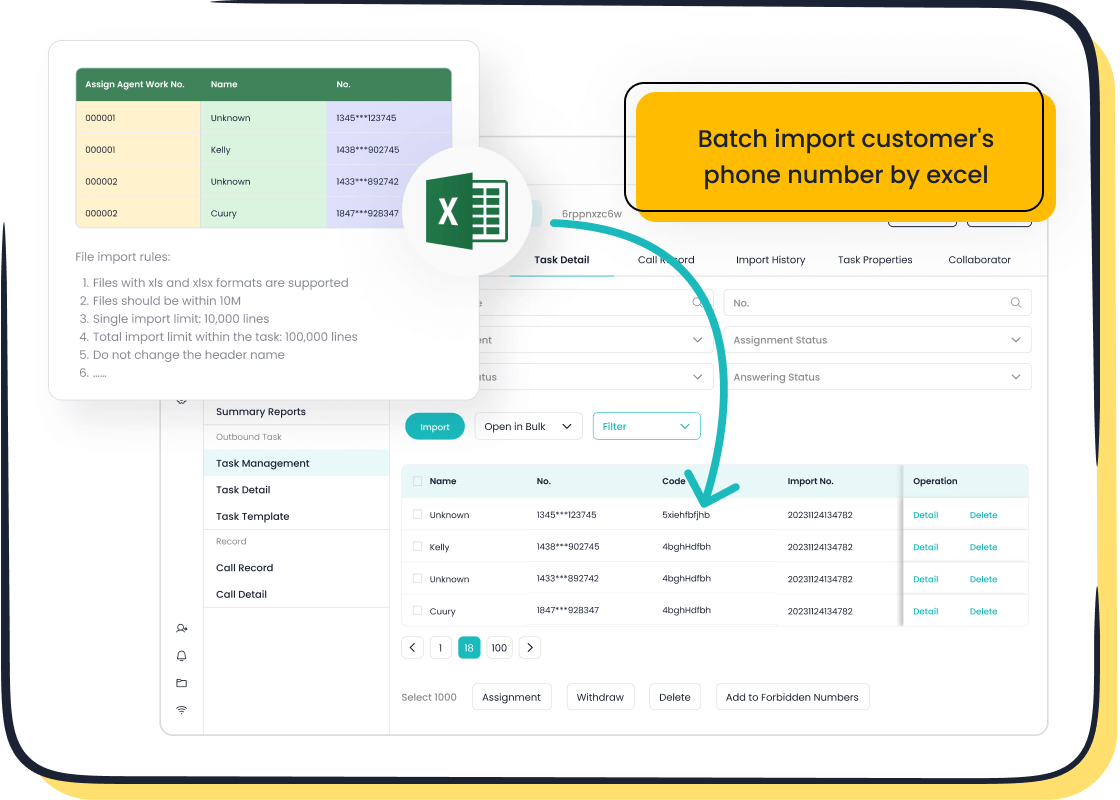
Integrating your templates with Sobot’s CRM tools enhances efficiency and accuracy. This integration allows you to sync data automatically, eliminating manual entry and ensuring consistency across reports. For example, Sobot’s Voice/Call Center provides real-time insights into metrics like agent activity and customer satisfaction, enabling you to generate detailed reports effortlessly. This seamless connection between templates and CRM tools ensures your outbound call center operates at peak efficiency.
Automating data entry and reporting processes.
Automation transforms how you manage call tracking. Sobot’s Voice/Call Center automates data entry, reducing the workload on your team and minimizing errors. For example, automated transcription tools capture call details accurately, while real-time monitoring ensures your reports reflect current performance. These features free up your agents to focus on delivering exceptional service, ultimately improving customer satisfaction.
Leveraging Automation for Efficiency
Using AI-powered tools to streamline tracking.
AI-powered tools revolutionize call tracking by automating routine tasks. For example, intelligent call routing directs customers to the most suitable agent, optimizing workload distribution. Additionally, AI chatbots handle routine inquiries, allowing your team to focus on complex issues. These tools not only enhance efficiency but also improve customer satisfaction by ensuring faster resolution times.
| Improvement Type | Description |
|---|---|
| Routine Inquiry Handling | AI chatbots handle routine inquiries, reducing the burden on agents. |
| Intelligent Call Routing | Directs customers to the most suitable representative, optimizing agent workload. |
Reducing manual workload for team members.
Automation reduces the manual workload for your team, allowing them to focus on critical tasks. For instance, automated self-service interactions cost significantly less—$0.10 compared to over $8 for live agent calls. This cost-saving measure also improves agent efficiency by freeing them to handle high-priority support tickets. Tools like Sobot’s Voice/Call Center ensure consistent data management and enhance reporting accuracy, further streamlining your outbound call center operations.
| Improvement Type | Description |
|---|---|
| Cost Savings | Automated self-service interactions cost $0.10 compared to over $8 for live agent calls. |
| Agent Efficiency | Frees up agents to focus on critical support tickets, optimizing their workload. |
Training and Adoption Across Teams
Educating team members on template usage
Training your team is essential for maximizing the benefits of call tracking templates. Start by introducing the purpose of the templates and how they align with your business goals. For example, explain how tracking metrics like the conversion rate can improve sales strategies. Use hands-on workshops or interactive sessions to demonstrate how to input data accurately and interpret key metrics.
Provide clear instructions and visual aids, such as step-by-step guides or video tutorials. These resources help agents understand the process and reduce errors. For instance, Sobot’s Voice/Call Center offers pre-designed templates that simplify data entry and reporting. Highlighting these tools during training ensures your team feels confident using them. Regularly assess their understanding through quizzes or practical exercises to reinforce learning.
Encouraging consistent adoption for better results
Consistency is key to achieving accurate and actionable insights. Encourage your team to update templates daily to maintain data accuracy. Set clear expectations for each agent, such as tracking metrics like call duration or total calls made. Recognize and reward agents who consistently follow the process, as this motivates others to adopt the practice.
Leverage automation tools to make adoption easier. For example, Sobot’s Voice/Call Center integrates with CRM systems, automating data collection and reducing manual workload. This allows agents to focus on customer interactions while ensuring templates remain up-to-date. Share success stories within your team to demonstrate the value of consistent usage. For instance, a team that tracks answer rates effectively can identify peak calling hours and improve performance.
Tip: Regular feedback sessions help address challenges and refine the process, ensuring long-term adoption across your team.
Overcoming Challenges in Call Center Reporting
Addressing Inconsistent Data Entry
Implementing validation rules in templates
Inconsistent data entry can lead to unreliable call center reporting, affecting decision-making and operational efficiency. You can address this issue by implementing validation rules in your templates. These rules ensure that data entered meets predefined criteria, such as correct formats for phone numbers or mandatory fields for call outcomes. For example, a template might require agents to select call results from a dropdown menu, reducing errors caused by manual input.
Reliable data improves customer service quality by minimizing mistakes during interactions. It also enhances agent performance by providing managers with accurate records for coaching and feedback. Clean data builds trust in reporting, enabling better forecasting and scheduling decisions. Tools like Sobot’s Voice/Call Center simplify this process by automating data validation, ensuring your metrics remain consistent and actionable.
Training teams on proper data entry practices
Training your team on proper data entry practices is essential for maintaining high-quality call center reporting. Start by educating agents on the importance of accurate data collection and how it impacts key performance indicators (KPIs) like conversion rate and customer satisfaction. Use interactive workshops to demonstrate best practices, such as verifying call details before submission.
Standardized forms and automated tools can further reduce errors. For instance, Sobot’s Voice/Call Center offers pre-designed templates that guide agents through the data entry process, ensuring consistency. Regular training sessions reinforce these practices, helping your team maintain reliable records and improve reporting accuracy.
Managing Resistance to Change
Communicating the benefits of using templates
Resistance to change is common when introducing new processes, such as call tracking templates. You can overcome this by clearly communicating the benefits. Explain how templates simplify data collection, reduce errors, and improve call center reporting. Highlight their role in tracking KPIs like answer rates and call duration, which provide actionable insights for enhancing performance.
Share success stories to illustrate the impact of templates. For example, a financial services company using Sobot’s solutions improved customer satisfaction by 30% through better data management. When your team understands the value of templates, they are more likely to embrace the change.
Providing ongoing support and resources
Ongoing support ensures successful adoption of call tracking templates. Provide resources like step-by-step guides, video tutorials, and access to technical assistance. Regular feedback sessions allow agents to share challenges and suggest improvements.
Sobot’s Voice/Call Center offers user-friendly templates and automated tools that simplify reporting. By integrating these solutions, you can reduce the learning curve and help your team adapt quickly. Continuous support fosters confidence and encourages consistent use of templates, leading to better reporting outcomes.
Ensuring Seamless Integration
Choosing templates compatible with existing systems
Compatibility is crucial for seamless integration of call tracking templates with your existing systems. Select templates that align with your CRM or contact center software to avoid disruptions. For example, templates designed for Sobot’s Voice/Call Center integrate effortlessly with CRM tools, automating data collection and reporting.
This compatibility ensures that your call center reporting remains accurate and efficient. It also reduces the need for manual adjustments, saving time and resources. By choosing the right templates, you can streamline operations and focus on analyzing trends to improve performance.
Exploring Sobot's solutions for unified call center reporting
Sobot’s Voice/Call Center provides advanced tools for unified call center reporting. Features like real-time monitoring and automated data entry eliminate inconsistencies and enhance accuracy. For example, the platform tracks metrics like agent utilization and customer satisfaction, offering valuable insights for strategic planning.
With Sobot’s solutions, you can centralize your reporting processes and gain a comprehensive view of your KPIs. This unified approach simplifies forecasting and scheduling, helping you optimize resource allocation and improve overall efficiency. Learn more about Sobot’s offerings here.
Tracking daily outbound call volume is vital for improving operational efficiency and achieving sales success. It provides visibility into agent performance, conversation quality, and conversion rates, enabling you to make data-driven decisions. Templates simplify this process by organizing metrics like call time and deal closures, ensuring accuracy and accessibility.
Sobot’s Voice/Call Center solutions enhance these benefits with automated tracking, real-time insights, and seamless CRM integration. These tools streamline operations, boost productivity, and improve customer satisfaction. By adopting these strategies, you can optimize your call center’s performance and drive better outcomes for your business.
Tip: Start implementing these tools today to unlock the full potential of your outbound call center.
FAQ
What is the best way to track daily outbound call volume?
Using templates is the most effective way to track daily outbound call volume. They help you organize metrics like total calls made, call duration, and answer rates. Tools like Sobot’s Voice/Call Center automate this process, providing real-time data and reducing manual effort.
How can templates improve my team’s performance?
Templates simplify data collection and highlight key metrics like agent productivity and conversion rate. By analyzing these metrics, you can identify areas for improvement and implement targeted strategies. Sobot’s solutions offer customizable templates that align with your business goals, ensuring better performance tracking.
Why is call duration an important metric?
Call duration reflects how efficiently your agents handle customer interactions. Shorter calls often indicate efficiency, but overly brief calls may compromise service quality. Monitoring this metric helps you balance speed and customer satisfaction. Sobot’s Voice/Call Center provides real-time insights into call durations for better decision-making.
Can I customize templates for my business needs?
Yes, you can customize templates to include industry-specific metrics. For example, a retail business might track lead sources, while a financial service provider could monitor compliance rates. Sobot’s Voice/Call Center offers flexible templates that adapt to your unique requirements.
How does automation enhance call tracking?
Automation reduces manual workload and improves data accuracy. Tools like Sobot’s Voice/Call Center automate data entry, track metrics in real time, and generate detailed reports. This allows your team to focus on customer interactions while ensuring reliable call tracking.
See Also
Understanding The Efficiency Of Call Center Automation
Strategies For Effective Management Of Live Chat Agents
Essential Principles Of QMS In Call Center Operations
Enhancing Call Center Performance Through Effective Monitoring

