Key Steps to Success with Top Contact Center Providers


A structured approach to contact center implementation helps you unlock the full potential of your customer service contact center. When you partner with top contact center providers, you gain access to advanced tools that simplify virtual contact center setup and drive results. Sobot AI uses omnichannel integration, industry-specific automation, and secure data handling to improve customer experience and boost your customer service team’s productivity. Industry studies show that top contact center providers deliver a 13.8% increase in inquiries handled, 87% faster resolution times, and a 12% rise in satisfaction scores.
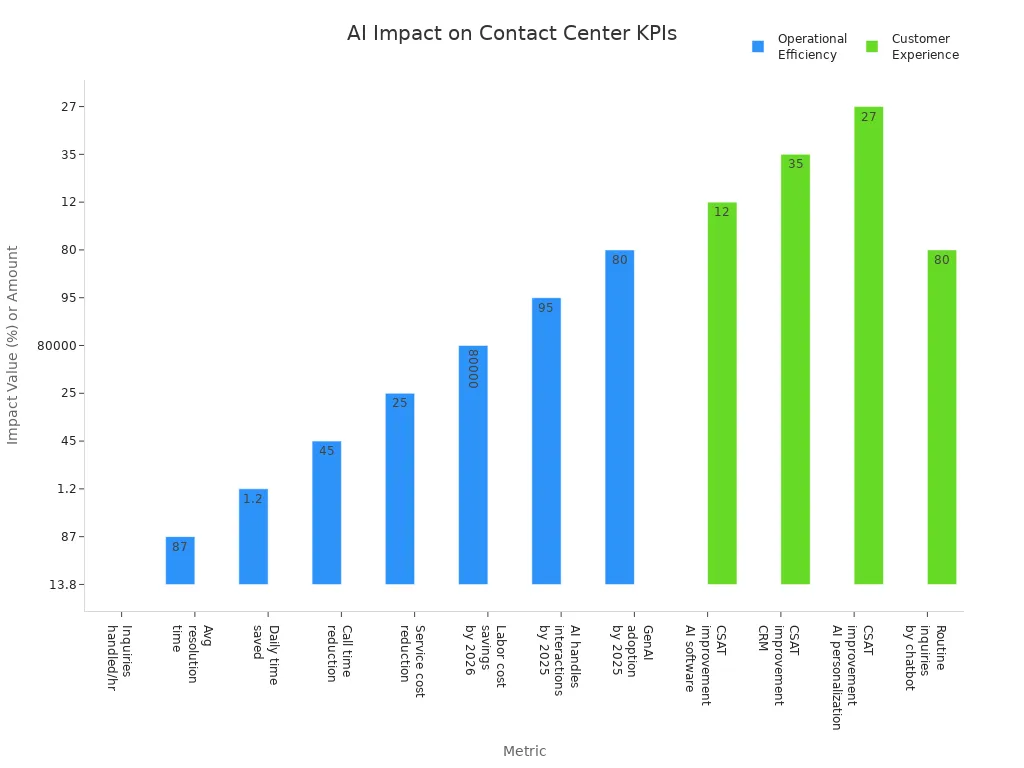
When you focus on clear goals, the right technology fit, and ongoing improvement, your virtual contact center and customer service contact center can reach new levels of efficiency. Sobot call center solutions help you achieve measurable outcomes with every step of your contact center implementation.
Define Contact Center Goals
Setting clear contact center goals gives your team direction and helps you measure success. You need to define your objectives before launching any new initiative. When you align contact center goals with your business strategy, you create a foundation for consistent service and growth.
Set Objectives
You should define your objectives by focusing on what matters most to your customers and your business. Common objectives include:
- Make a good first impression by improving first-call resolution and agent communication.
- Personalize every interaction using CRM data and AI tools.
- Improve employee experience through regular engagement surveys and training.
- Use data and feedback to guide decisions and share insights with leadership.
- Balance human interaction and automation with omnichannel workflows and chatbots.
Tip: Involve your agents in the goal-setting process. When you engage your team, you boost motivation and ownership.
You may face challenges such as technology migrations, employee adoption, and securing stakeholder buy-in. Address these by breaking down silos and sharing customer service insights across departments. Implement customer-centric policies to enhance satisfaction and empower agents.
Identify KPIs
Once you define your objectives, you must set and monitor KPIs to track progress. The most effective KPIs for contact center goals include:
| KPI Name | What It Measures |
|---|---|
| Average Handling Time | Agent efficiency and scheduling |
| First Call Resolution | Issue resolution on first contact |
| Customer Satisfaction | Customer feelings after each interaction |
| Net Promoter Score | Customer loyalty and likelihood to recommend |
| Customer Effort Score | Ease of resolving issues for customers |
Set and monitor KPIs regularly to ensure alignment with your objectives. When you track these metrics, you can identify areas for improvement and celebrate successes. This approach helps you maintain a high level of customer service and supports long-term business growth.
Plan Budget & Resources

Careful planning of your budget and resources sets the foundation for a successful new call center. You need to estimate costs accurately and build a strong team to support your goals. This approach helps you avoid common pitfalls and ensures your new call center operates efficiently from day one.
Estimate Costs
Start by listing all expenses for your new call center. Include technology, software licenses, hardware, staffing, training, and ongoing support. If you choose an on-premise contact center, remember to add costs for physical space, equipment, and maintenance. Many organizations underestimate costs by not including employee time off or by using overly optimistic assumptions. Overcomplicated payment structures and incorrect time tracking can also lead to budget overruns.
Tip: Use historical data and real-time metrics like call volume and average handle time to forecast expenses. Predictive analytics can help you adjust your budget as your new call center grows.
Common budgeting pitfalls include:
- Ignoring employee availability and time off, which can cause up to a 25% margin loss.
- Failing to assess risks in fixed-price projects, leading to unexpected costs.
- Not using accurate data, resulting in underestimated expenses.
Allocate Team
Building the right team for your new call center is essential. Assign clear roles and responsibilities to ensure smooth operations. Here is a table of key roles and their main tasks:
| Role | Key Responsibilities |
|---|---|
| Project Sponsor | Provides oversight, creates vision, secures buy-in, approves budget |
| Project Manager | Manages daily operations, plans schedule, recruits staff, manages budget |
| Resource Manager | Allocates resources, matches skills, monitors utilization |
| Business Analyst | Gathers requirements, ensures tools support project goals |
| Project Team Member | Completes tasks, collaborates, communicates progress |
You should also focus on recruiting staff with strong communication and problem-solving skills. Structured onboarding and ongoing training help new hires adapt quickly. HR operations play a key role in recruitment, onboarding, and employee engagement. Use operational metrics like Average Handle Time and First Contact Resolution to monitor team performance and adjust staffing as needed. AI-powered tools can help you optimize resource allocation and improve efficiency in both cloud and on-premise contact center environments.
Choose Top Contact Center Providers

Selecting top contact center providers shapes the success of your virtual contact center. You need to use the right technology to deliver seamless customer engagement and efficient operations. The best providers offer robust contact center software, advanced automation, and global support. Sobot stands out with its omnichannel capabilities, AI-driven features, and a cloud-based platform that supports businesses worldwide.
Evaluate Sobot Solutions
When you evaluate Sobot, you see a provider that prioritizes innovation and customer-centricity. Sobot’s virtual contact center solutions unify voice, chat, email, and messaging into one workspace. The Voice/Call Center product offers intelligent IVR, smart call routing, and AI-powered voicebots. These features help you identify automation opportunities and improve first-contact resolution. Sobot’s global network ensures 99.99% uptime, supporting your customer service contact center across time zones and regions. You can rely on Sobot for secure data handling and multilingual support, which is essential for global businesses.
Sobot’s customer story with Weee! shows a 20% increase in agent efficiency and a 50% reduction in resolution time after call center implementation. Customer satisfaction reached 96%, demonstrating the impact of using the right technology.
Compare Features
You should compare contact center software features to find the best fit for your virtual contact center. Use this table to review key features and their value:
| Feature | Description & Value |
|---|---|
| Pre-Call Agent Assist | Real-time recommendations and CRM data for personalized conversations |
| Voice Bots | 24/7 AI-driven support for FAQs and routine tasks |
| Call Monitoring | Supervisor tools for quality control and agent coaching |
| Skill-based Routing | Directs customers to agents with the right expertise or language skills |
| CRM Integrations | Connects customer data for efficient, personalized service |
| Real-Time Call Reporting | Live metrics for operational decisions and performance improvement |
Sobot’s contact center software includes all these features, helping you identify automation opportunities and optimize your customer service contact center.
Assess Integrations
Integration capabilities set top contact center providers apart. Sobot’s contact center software integrates with CRM, ticketing, and workforce management systems. You can connect live chat, voice, chatbot, and WhatsApp Business API in a single virtual contact center. This flexibility lets you use the right technology for your business needs. Sobot’s cloud contact center supports scalable operations and adapts to seasonal demand. Seamless integrations improve customer engagement, reduce service costs, and enhance operational efficiency for your customer service contact center.
Tip: Always check if your provider’s cloud-based platform supports the integrations and automation your business requires.
Implementation Guide: Set Up a Contact Center
Setting up a virtual contact center requires a clear plan and the right tools. This implementation guide will help you set up a contact center that fits your business needs, using Sobot’s advanced contact center software. You will learn how to develop workflows, choose your communication channels, and integrate Sobot Voice/Call Center with your existing systems.
Customize Workflows
You need to develop workflows that match your business goals. Start by mapping out each step your agents take when handling customer inquiries. Sobot’s unified workspace lets you automate quality assurance and coaching with AI-powered tools. This approach gives agents instant feedback and helps them improve skills quickly. Real-time dashboards show key metrics like average handle time and customer satisfaction, motivating your team to reach targets.
- Personalize workflows by connecting your CRM to your virtual contact center. Agents can see customer history and context, which leads to more meaningful conversations.
- Use automation to handle routine questions. This reduces agent workload and lets them focus on complex issues.
- Keep workflows simple to avoid errors and burnout. Sobot’s drag-and-drop IVR builder allows you to create custom call menus and smart routing rules in minutes.
- Always include a clear option for customers to speak with a human agent for sensitive or complex problems.
Regularly review and refine your workflows. Collect feedback from both agents and customers to make improvements. For example, e-commerce companies often automate holiday-related queries, which can cut wait times by 40% and boost satisfaction during busy seasons.
Configure Channels
To set up a contact center that delivers seamless service, you must choose your communication channels wisely. Begin with the most-used channels, such as phone and email, then expand to chat, SMS, or social media as your needs grow. Sobot’s contact center software supports omnichannel integration, so you can manage all interactions in one place.
- Choose your communication channels based on customer preferences and business goals.
- Train agents to handle multiple channels, ensuring smooth transitions between chat, voice, and email.
- Standardize performance metrics like First Contact Resolution and Customer Satisfaction across all channels.
- Use AI-powered automation to provide 24/7 support and handle routine tasks.
- Ensure seamless handoff from chatbots to human agents, with full context transfer.
Integrating all channels into your virtual contact center helps you deliver consistent service. Sobot’s platform makes it easy to add new channels as your business grows, keeping your setup guide simple and scalable.
Integrate Sobot Voice/Call Center
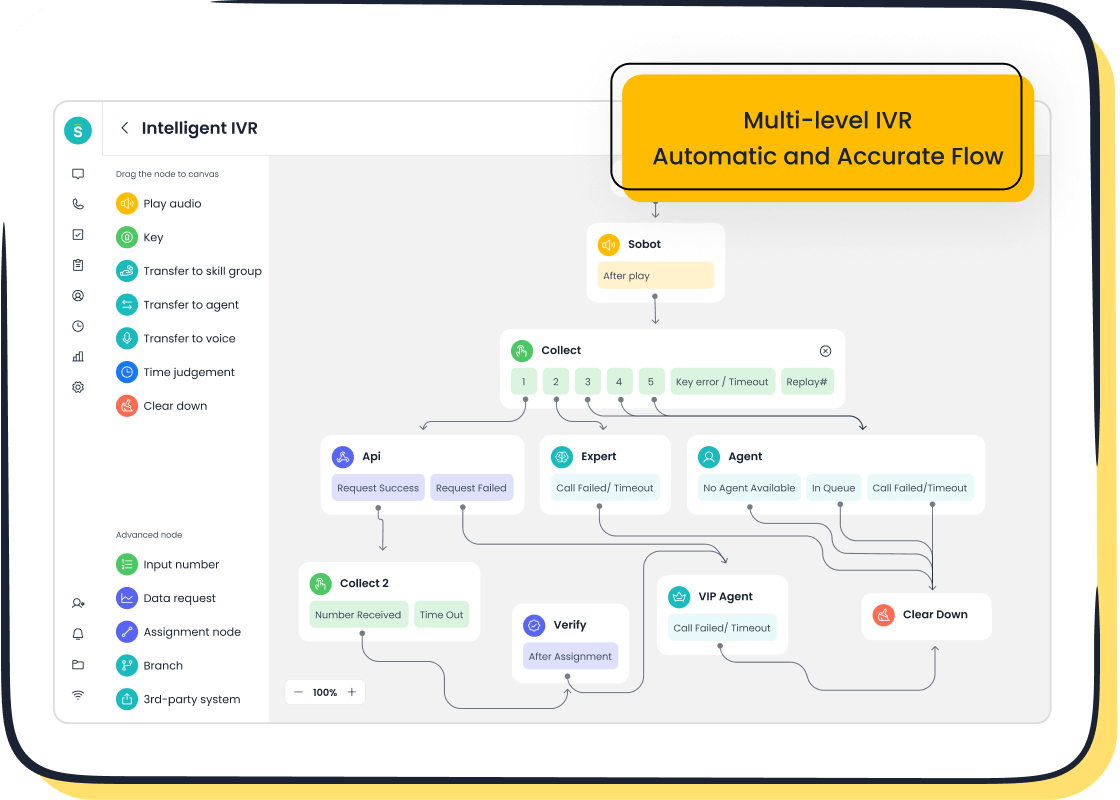
Integrating Sobot Voice/Call Center with your existing CRM and systems unlocks the full power of your virtual contact center. Sobot’s APIs allow instant connection with popular CRM platforms, ensuring agents have real-time access to customer data. This integration supports automated workflows, reduces manual tasks, and improves response times.
| Benefit | Description |
|---|---|
| Personalized Service | Agents see full customer history, enabling tailored interactions. |
| Automated Workflows | Routine tasks are automated, reducing missed appointments and errors. |
| AI Copilot Efficiency | AI tools reduce agent workload by up to 60%, boosting productivity. |
| Fast Resolution | Combining AI and human support achieves resolution times under one minute. |
| Data Analytics | Rich reports help you track KPIs and manage teams effectively. |
Sobot’s IVR system lets you build custom call flows that route customers to the right agent or department. You can set up global numbers and support multilingual interactions, making your virtual contact center ready for international business. Companies like OPPO and J&T Express have seen customer satisfaction scores rise above 90% after integrating Sobot’s solutions.
To ensure success, define your service level agreements, clarify reporting needs, and review security protocols. Monitor key metrics like CSAT, NPS, and average handle time through Sobot’s real-time dashboards. This approach helps you spot trends, control costs, and keep your virtual contact center running smoothly.
Tip: Regularly communicate with your provider, document any contract changes, and plan for future growth. This proactive management keeps your contact center agile and effective.
Train & Onboard Team
A strong agent training and onboarding process sets the foundation for excellent customer service. When you hire qualified staff, you must equip them with the right skills and knowledge to succeed. Effective training programs and a thoughtful onboarding process help your call center staff deliver consistent, high-quality support.
Training Programs
You need to train your agents using proven methods that boost performance and morale. Recent research shows that the best agent training and onboarding programs go beyond initial instruction. You should provide continuous learning opportunities, such as weekly skill-building sessions and daily huddles. One-on-one coaching and regular feedback help agents grow and stay motivated. Role-playing real customer scenarios builds empathy and sharpens soft skills in a safe environment.
Track progress with clear, metric-based goals. Give agents access to on-demand training materials so they can learn at their own pace. Real-time coaching, like whisper coaching and immediate post-call feedback, reinforces best practices. Use real-time dashboards to show performance metrics and encourage personal goal-setting. These steps help you implement customer-centric policies and drive measurable improvements in customer service.
Tip: Update your training plan regularly. Focus on what works best for your team and adjust as needed to keep training relevant and effective.
Onboarding Process
A successful agent training and onboarding process starts with a warm welcome. You should introduce new hires to your company’s history, values, and customer service standards. Follow these steps to ensure a smooth transition:
- Set clear goals and expectations with a structured training program. Combine classroom learning with one-on-one sessions tailored to each agent.
- Use a centralized knowledge base with visual guides and best practices. This reduces stress and helps agents move quickly to live calls.
- Leverage automation and AI tools to guide conversations and integrate essential software. This approach shortens the learning curve and builds confidence.
- Engage agents with scenario-based learning. Simulate real customer situations to boost preparedness and retention.
- Provide ongoing support through refresher sessions, coaching, and regular feedback. Recognize achievements and address areas for improvement.
Assign mentors or supervisors to support new agents. Let them listen to calls, receive feedback, and debrief after each session. Gradually increase responsibilities as agents gain confidence and meet performance goals. Continue to implement customer-centric policies throughout the onboarding journey to reinforce your commitment to quality customer service.
When you hire qualified staff and train your agents with these best practices, you create a team ready to deliver outstanding customer service from day one.
Test Contact Center Implementation
Testing your contact center implementation ensures you deliver reliable service from day one. You need to validate workflows, measure performance, and refine processes before a full-scale launch. A structured pilot run and a robust feedback system help you catch issues early and build a strong foundation for long-term success.
Pilot Run
Start your contact center implementation with a focused pilot run. Select a group of up to 250 agents and run the pilot for about 60 days. This phase lets you test real customer interactions, validate workflows, and identify any issues before a full rollout. You collect performance data daily for the first 15 days, then weekly, so you can spot trends and make quick adjustments.
| Aspect | Details |
|---|---|
| Pilot Scope | Selected group of up to 250 agents using the solution |
| Duration | Approximately 60 days after going live |
| Purpose | Low-risk, low-cost demonstration phase to validate workflows and identify issues early |
| Data Collection | Performance data gathered continuously; results shared daily for first 15 days, then weekly |
| Typical Outcomes | Workflow validation, early issue resolution, process refinement, ROI demonstration |
| Key Benefits | Automation reduces manual tasks, lowers employee attrition, improves job satisfaction |
| Measurement Metrics (KPIs) | Call handle time, employee attrition rates, customer satisfaction (CSAT), first response time (FRT), average handle time (AHT) |
| Operational Readiness | Ensures smooth integration with existing systems and alignment with business goals |
| Business Case Support | Uses real customer data to demonstrate savings and ROI |
"The automation capabilities of Intradiem minimized the time contact center agents, supervisors, WFM analysts, and trainers needed to spend on manual, low-level tasks, and helped them feel more supported and valued by their companies. These benefits helped improve job satisfaction and contributed to significantly lower employee attrition." — VP, Contact Center
A pilot run in contact center implementation gives you a low-risk way to demonstrate ROI and operational readiness. You use real customer data to support your business case and ensure your solution aligns with your goals.
Gather Feedback
After the pilot, you need to gather feedback to refine your contact center implementation. Use key metrics like First Call Resolution (FCR), Average Handle Time (AHT), and Customer Satisfaction Score (CSAT) to evaluate performance. Real-time dashboards and speech analytics help you monitor every customer interaction, giving you a complete view of agent effectiveness.
You should create feedback loops that connect quality assurance results with customer feedback. This approach helps you find the root causes of issues and target coaching where it matters most. Regular analysis and adjustment of these metrics allow you to improve agent performance and customer experience.
Encourage agents to share their experiences and suggest improvements. Tailor training programs to address knowledge gaps and different learning styles. When you foster transparency and empower your team, you build a culture of continuous improvement. This step is essential for implementing a contact center that delivers consistent, high-quality service.
Monitor & Optimize
Track Performance
You need to monitor your virtual contact center closely to maintain high standards and deliver a great customer experience. When you set up monitoring and analytics, you gain real-time insights into agent performance and operational efficiency. Tracking the right metrics helps you spot trends, address issues, and make informed decisions.
Use the following table to review essential performance metrics for your virtual contact center:
| Performance Metric | Description | Importance for Contact Center Success |
|---|---|---|
| Customer Satisfaction (CSAT) | Measures customer happiness with products, services, and support via surveys. | Guides understanding of what works in customer experience; critical for loyalty and ROI. |
| First Contact Resolution (FCR) | Rate of issues resolved in a single interaction. | Indicates efficiency and satisfaction; directly correlates with CSAT improvements. |
| Average Handle Time (AHT) | Time spent from interaction start to resolution. | Tracks resource allocation and agent performance; impacts customer satisfaction if too high. |
| Average Hold Time | Duration customers are on hold during interactions. | Reflects staffing and agent readiness; long hold times lower CSAT. |
| Abandonment Rate | Percentage of customers who hang up before reaching an agent. | Signals staffing or process issues; high rates reduce satisfaction and increase repeat calls. |
| Service Level | Percentage of calls answered within a target time frame. | Measures accessibility and resource allocation; essential for meeting customer demand. |
| Average Speed of Answer (ASA) | Average wait time before a call is answered by an agent. | Indicates responsiveness and efficiency; impacts customer experience. |
| Transfer Rate | Percentage of calls transferred to another agent or department. | Reflects agent empowerment and knowledge; high rates may indicate training needs. |
| Net Promoter Score (NPS) | Measures customer loyalty via likelihood to recommend the company. | Gold standard for customer experience; helps understand customer advocacy. |
| Call Volume | Total number of calls handled over a period. | Helps in staffing and resource planning; indicates demand fluctuations. |
You should review these metrics daily and share results with your team. Real-time dashboards and automated reporting tools help you visualize trends and identify areas for improvement. When you monitor these indicators, you ensure your virtual contact center delivers consistent service and meets business goals.
Tip: Regular assessment cycles, such as quarterly reviews, help you track progress and make timely adjustments.
Continuous Improvement
Continuous improvement keeps your virtual contact center agile and competitive. You must create a culture where agents and managers work together to enhance customer experience and operational results. Start by setting clear objectives using SMART criteria. Focus on measurable goals like reducing average handle time or increasing first contact resolution.
Follow these steps to drive ongoing optimization:
- Provide structured training programs tailored to agent needs. Use role-playing and real call evaluations to build skills.
- Establish feedback loops that encourage agents to share insights and refine their approach.
- Leverage AI-powered analytics and CRM systems to monitor performance and identify trends.
- Adjust training and operational strategies based on data-driven insights.
- Use advanced tools for quality management, sentiment analysis, and topic detection to evaluate every customer interaction.
You should measure ROI by tracking cost per interaction, automation rates, and agent productivity. Benchmark your virtual contact center against industry standards to identify gaps and opportunities. Regular optimization over 12-18 months helps you realize full benefits and improve customer experience.
Note: Starting with high-volume, routine inquiries accelerates ROI and demonstrates the value of your virtual contact center investment.
You achieve success in your customer service contact center by following proven steps: set clear goals, train your team, and use advanced technology. Top providers like Sobot help you improve customer experience, reduce costs, and boost agent performance. You see faster resolution times and higher satisfaction in your customer service contact center. Regularly review your customer service processes and monitor KPIs to keep your customer experience strong. Take action today—explore how Sobot can transform your customer service contact center. For a personalized demo, reach out to Sobot’s team.
FAQ
What is a virtual contact center, and how does it benefit your business?
A virtual contact center lets your team handle customer service from anywhere. You use cloud-based contact center software to manage calls, chats, and emails. This setup increases flexibility, reduces costs, and helps you scale your customer service contact center quickly.
How does Sobot contact center software support omnichannel communication?
You can manage voice, chat, email, and social media in one unified workspace. Sobot’s contact center software gives you seamless integration, so your agents switch between channels easily. This approach improves customer experience and boosts agent productivity in your virtual contact center.
What KPIs should you track in your call center?
You should track metrics like First Contact Resolution, Average Handle Time, Customer Satisfaction Score (CSAT), and Net Promoter Score (NPS). These KPIs help you measure the success of your contact center and identify areas for improvement.
Can you integrate Sobot with your existing CRM or ticketing system?
Yes, you can connect Sobot’s contact center software with your CRM or ticketing system using simple APIs. This integration gives your agents real-time customer data, streamlines workflows, and improves service quality in your customer service contact center.
How do you ensure data security in a virtual contact center?
Sobot uses encrypted data transfer and secure cloud infrastructure. You get 99.99% uptime and global support. These features protect your customer information and ensure your virtual contact center meets industry standards for security and reliability.
See Also
How To Successfully Deploy Omnichannel Contact Center Systems
Best Contact Center Platforms Evaluated For The Year 2024
Key Capabilities To Look For In CRM Call Center Tools
Effective Strategies For Managing Call Center Quality Standards

