A Practical Guide to Collaborative CRM in Customer Communication


You want clear steps to boost customer communication. Collaborative customer relationship management gives you a way to connect teams and improve every conversation. Sobot stands out with its expertise in omnichannel contact center solutions. When you use the right tools like Sobot’s Voice/Call Center, you see results.
Here is how Sobot impacts customer satisfaction:
| Metric | Result |
|---|---|
| Resolution Rate | 45% increase with Sobot’s solution |
| Inquiry Resolution | 70% of inquiries resolved |
| Conversion Rate | Increased by 3x |
| NPS Improvement | Significant improvement for over 10,000 brands |
This crm implementation guide helps you choose tools that drive real results.
Collaborative Customer Relationship Management Overview

What Is Collaborative CRM
You use collaborative CRM to connect your teams and improve every customer interaction. This type of customer relationship management brings together sales, marketing, and support. You can manage all customer interactions in one place. The main components of collaborative CRM include:
- Customer interaction channels for phone, email, chat, and social media.
- Communication channels that let you reach customers where they prefer.
- Customer data management to collect and analyze information.
- Workflow automation to make your processes faster and reduce errors.
- Analytics and reporting for real-time insights.
You see the difference between traditional CRM and collaborative CRM in how you communicate with customers. Here is a simple comparison:
| Aspect | Traditional CRM | Collaborative CRM |
|---|---|---|
| Communication Method | Phone calls, emails, in-person meetings | Real-time engagement via social media |
| Response Time | Periodic outreach | Instant responses to customer interactions |
| Customer Engagement | Structured and scheduled | Dynamic and public interactions |
Benefits For Customer Communication
Collaborative CRM gives you many benefits for customer communication:
- You automate information sharing across teams. This helps sales and marketing work with the same data.
- You ensure consistent and efficient communication with customers on every channel.
- You build stronger relationships by sharing information inside and outside your company. This leads to a unified service experience.
You improve service quality and make your engagement with customers more effective. You also see better results from your CRM implementation.
Sobot’s Omnichannel Solution
Sobot’s mission is to help you enhance customer interactions and improve operational efficiency. Sobot offers a full suite of collaborative CRM tools, including chatbot, AI Agent, live chat, call center/voice, voicebot, ticketing system, and a unified customer contact center. You can manage all your customer conversations in one workspace.
Sobot’s omnichannel solution boosts customer satisfaction. You get a 30-40% increase in agent efficiency and a 70% reduction in routine inquiries. Conversion rates rise by up to 20%. Customer satisfaction scores improve as you deliver fast, personalized service. Sobot’s collaborative CRM makes your implementation smooth and your engagement strong.
Defining Objectives For CRM Implementation
Setting Communication Goals
You need clear goals before you start your crm implementation. These goals guide your crm implementation process and help you measure progress. Many businesses set objectives to improve communication and teamwork with crm. You might want to increase marketing leads, boost sales efficiency, or refine how you track results. When you set these goals, you give your crm implementation guide a strong foundation.
Some common communication goals include:
- Responding to customer questions faster
- Sharing information between teams more easily
- Reducing mistakes in customer data
- Making sure every customer gets the same message
You should write down your goals and share them with your team. This step helps everyone understand the purpose of your crm implementation.
Aligning With Business Outcomes
You want your crm implementation to support your business outcomes. Start by connecting your communication goals to your company’s main targets. This approach makes your crm implementation process more effective.
Here are steps you can follow:
- Improve data accuracy by keeping all customer information in one place.
- Gain better insights by tracking the customer journey.
- Automate tasks to save time and reduce errors.
- Encourage teamwork and break down silos.
- Use data to make smart decisions and grow revenue.
- Find ways to make customers happier.
- Plan and budget better with accurate forecasts.
- Make it easy to grow your business as you add more customers.
When you align your crm strategy with business outcomes, you set the stage for a successful crm implementation.
Success Metrics
You need to measure the results of your crm implementation. Success metrics show if your crm implementation process works. Choose metrics that match your goals and business outcomes. Some examples include:
- Response time to customer requests
- Number of leads generated
- Sales conversion rates
- Customer satisfaction scores
- Data accuracy rates
Track these metrics often. Use the results to adjust your crm strategy. This approach is one of the keys to successful crm implementation. Good planning and strategy help you reach your goals and see real value from your crm.
Building Your CRM Implementation Team
Cross-Functional Roles
You need a strong team to make your CRM project successful. A cross-functional team brings together people from different departments. This approach increases team productivity because everyone shares their expertise. Here are the key roles you should include:
- Project manager leads the team and keeps everyone on track.
- System administrator handles configuration and maintenance.
- Data analyst manages data migration and checks data quality.
- Quality assurance engineer tests the system to find issues early.
- Champions represent each department and share feedback.
When you build a team with these roles, you boost team productivity. Each member understands their part and works toward a common goal.
Stakeholder Engagement
You want everyone involved in your CRM project to stay engaged. Stakeholder engagement helps you gather feedback and improve your CRM strategy. You can measure engagement using these metrics:
| Metric | Description |
|---|---|
| Email response rates | Shows how well stakeholders reply to emails. |
| Meeting attendance | Tracks who joins meetings and stays involved. |
| Portal logins | Counts how often stakeholders use the CRM system. |
| Resource downloads | Measures interest in guides and resources. |
| Social media interactions | Captures feedback and comments online. |
| Support ticket resolution times | Checks how quickly you solve stakeholder issues. |
You can improve engagement by involving key people from sales, marketing, and customer service. This approach gives you diverse insights and helps you address the needs of different groups. When you focus on existing relationships, you often save money and increase trust. Segmenting satisfied customers and offering rewards can also reduce churn.
Customer-Facing Departments
Customer-facing departments play a big role in CRM success. You should encourage collaboration between these teams. Sharing data creates a single view of each customer. Training helps your staff use the CRM system well. These steps raise team productivity and make sure everyone delivers a great customer experience. When all customer-facing teams work together, you see better results and stronger relationships.
Selecting Collaborative CRM Tools
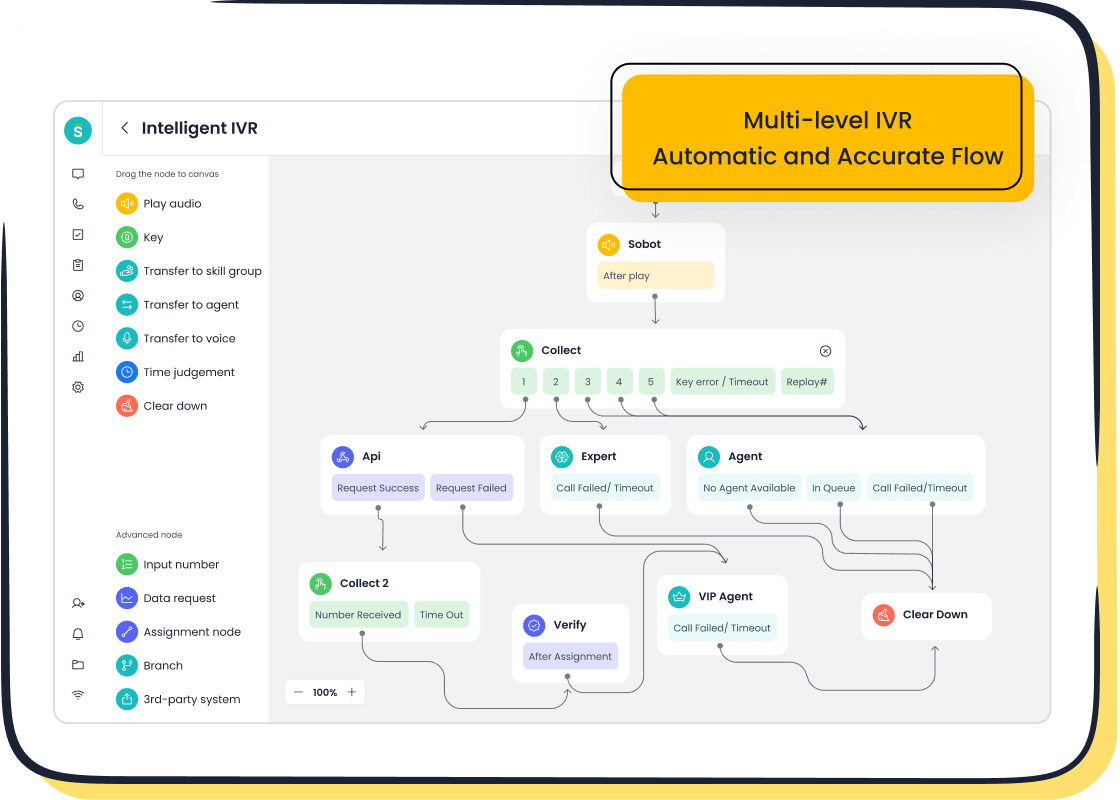
Choosing the right tools is a key step in your crm implementation. You want a collaborative crm that helps you manage every customer interaction with ease. The right crm software will support your team, improve customer satisfaction, and make streamlining communication simple. Let’s look at what you need to consider when you select the right crm for your business.
Key Features For Communication
You need a crm system that brings all your customer conversations together. Collaborative crm platforms do this by centralizing customer data and making it easy for your team to access information. This approach helps you respond faster and keeps your messages consistent. When you use crm software with strong communication features, you see better results from your crm implementation.
Here are the main features you should look for:
- Centralized customer data: Store all customer information in one place.
- Streamlined communication: Log every interaction, so nothing gets lost.
- Multi-channel support: Manage calls, emails, chats, and social media from one crm system.
- Personalized communication: Reach customers on their favorite channels.
- Workflow automation: Automate routine tasks to save time.
- Real-time analytics: Track performance and adjust your strategy.
These features help you with streamlining communication and make your crm implementation more effective. You want a crm system that supports your team and gives you the tools to build strong customer relationships.
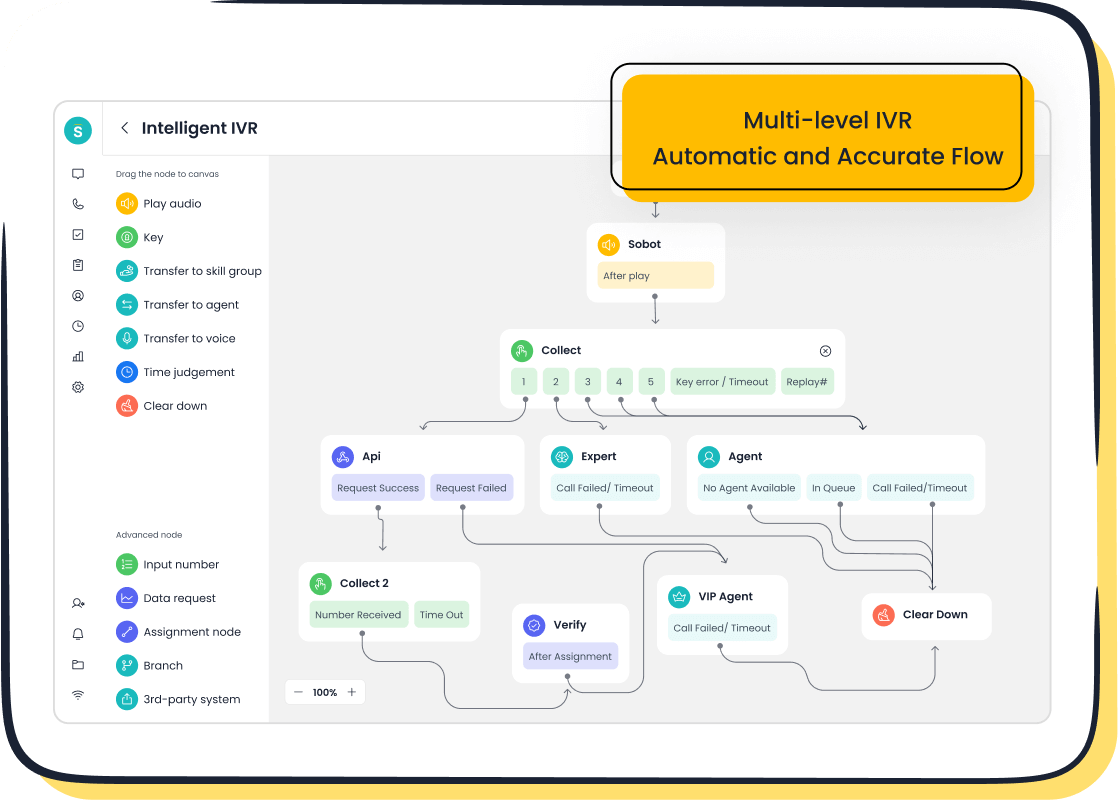
Sobot Voice/Call Center Integration
Sobot’s Voice/Call Center stands out as a recommended solution for unified customer contact. You get a collaborative crm platform that centralizes all support channels and customer conversations. The system uses AI to handle complex inquiries and supports your team with smart workflows. You can set up and manage customer interactions quickly, which makes your crm implementation smoother.
Here is how Sobot Voice/Call Center enhances unified customer contact and communication:
| Feature | Description |
|---|---|
| Unified Platform | Sobot brings all customer channels and communication methods into one place. |
| Trust | Over 10,000 brands use Sobot, showing its reliability and effectiveness. |
You can also see these benefits:
- Centralizes all support channels and conversations for easy access.
- Operates as an AI-powered contact center platform right out of the box.
- Handles complex inquiries instantly across all customer touchpoints.
- Builds AI workflows to support customers at scale.
- Frees up your team for more complicated tasks.
Sobot Voice/Call Center offers advanced integration capabilities. You can connect the crm system with Salesforce, HubSpot, Microsoft Dynamics, and Zoho CRM. For e-commerce, you can link with Shopify, WooCommerce, Magento, and Amazon Seller Central. The platform also works with Microsoft Teams, Slack, and email systems. You get global telephony support, with local numbers in over 50 countries. Intelligent IVR and smart call routing direct customers to the right agent. Supervisors can monitor calls in real time, record conversations, and use analytics for quality assurance. Learn more about Sobot’s Voice/Call Center at Sobot Voice/Call Center.
Tip: When you select the right crm, make sure it offers seamless integration and global support. This will help your crm implementation succeed.
Platform Comparison
You want to compare collaborative crm platforms before you make a decision. Look at how each crm software handles streamlining communication and supports your team. Here is a simple table to help you see the main differences:
| Feature | Description |
|---|---|
| Centralized Customer Data | Collaborative crm platforms store all customer data for easy access and management. |
| Streamlined Communication | They log and organize every interaction, so your team stays informed. |
| Multi-Channel Interaction | You can manage calls, emails, chats, and social media in one crm system. |
| Personalized Communication | These platforms let you reach customers on their preferred channels. |
Sobot’s collaborative crm solution gives you all these features and more. You get a unified workspace, AI-powered chatbots, and advanced analytics. The platform supports your crm implementation by making every step easier. You can automate workflows, personalize communication, and track results in real time. Sobot’s crm software helps you with streamlining communication and building strong customer relationships.
When you select the right crm, focus on tools that fit your business needs. Look for a crm system that offers easy integration, global telephony, and strong support for your team. Sobot’s collaborative crm platform checks all these boxes. You can trust it to help you succeed with your crm implementation.
If you want to see how Sobot’s collaborative crm can transform your customer communication, visit Sobot Omnichannel Solution.
Customizing CRM For Seamless Communication
Mapping Customer Touchpoints
You start by mapping customer touchpoints to visualize the journey each customer takes. This step helps you understand how customers interact with your business. You see where they connect through customer interaction channels like phone, email, chat, and social media. Mapping touchpoints improves your collaborative crm strategy because you tailor messages for each stage. You boost satisfaction and engagement by targeting marketing automation programs to the right moments.
- Visualizing the customer journey helps you understand customer behavior.
- Tailoring messages based on insights from each touchpoint enhances your crm-driven communication.
- Targeted automation increases satisfaction and engagement.
You use collaborative crm to track these touchpoints and adjust your approach for better results.
Workflow Configuration
You configure workflows in your crm to make communication seamless. Automating customer interaction workflows lets you focus on building relationships instead of handling administrative tasks. You organize customer details and set up follow-ups so you never miss an important interaction. A robust collaborative crm manages customer data and nurtures leads with personalized content and timely communications. You track engagement and automate follow-ups, which strengthens relationships and increases loyalty.
Effective workflow configurations require strategic planning. You assess your current operations and audit customer data to remove inefficiencies. Mapping key business processes and customizing the crm to fit these steps streamlines operations. Customization and integration of unique workflow steps and specialized reports turn your crm into a powerful tool for engagement. When your crm works with other business systems, you minimize redundant data entry and improve the customer experience.
Personalization & Automation
Personalization and automation drive engagement and satisfaction in collaborative crm. You unify contact management, sales tracking, and analytics to support sustainable growth. Data-driven decisions and personalized engagement at scale make customers happier. Personalization means you deliver tailored content based on preferences and behaviors, which builds loyalty. Automation ensures timely follow-ups with trigger-based messaging, so leads stay engaged.
- Trigger-based messaging keeps customers engaged without constant human effort.
- Automation shows attentiveness and improves satisfaction.
- Workflow automation helps you manage interactions efficiently.
You use collaborative crm to personalize every interaction and automate customer interaction workflows. Customization lets you adapt your crm to fit your business needs and deliver seamless communication.
Data Migration And Centralization
Preparing Customer Data
You need to prepare your customer data before moving it into a new CRM. This step helps you avoid problems and makes centralizing customer data easier. Start by looking at all your current data. Check for errors and remove duplicates. Clean data gives you better results. Map each data field to the right place in the new system. Try a small test migration to spot any issues early. Watch the process closely when you move all your data. After the migration, help your team learn the new system. These steps make centralizing customer data smooth and reliable.
- Review and assess all customer data.
- Clean and deduplicate records.
- Map data fields to the new CRM.
- Run trial migrations.
- Monitor the full migration.
- Train users after migration.
Importing Into CRM
When you import data, you want to keep it safe and organized. Centralizing customer data means you must follow secure methods. Track user consent to meet privacy rules. Use tools that help you find and report on stored data. Give access only to people who need it. Add multi-factor authentication for extra security. Encrypt your data and back it up often. These actions protect your information and make centralizing customer data effective.
- Track and manage user consents.
- Use data discovery and reporting tools.
- Set role-based access controls.
- Enable multi-factor authentication.
- Encrypt data and schedule regular backups.
Security & Compliance
You must protect customer information at every layer. The latest standards for security and compliance cover network, application, data, and user layers. Each layer has its own controls.
| Layer | Description |
|---|---|
| Network Layer | Controls traffic flow and connection attempts. |
| Application Layer | Secures the CRM software through coding practices and configuration. |
| Data Layer | Protects information via encryption and access restrictions. |
| User Layer | Manages user interactions through authentication and authorization controls. |
You also need to get clear consent before collecting data. Show privacy notices to explain how you use information. Let customers see and correct their data. Allow them to ask for deletion. Keep records of all data processing activities. These steps help you stay compliant and build trust.
Training And Adoption Steps
Training Methods
You need effective user training to help your team use the CRM system confidently. Start with role-based training. Tailor each session to the responsibilities of your staff. Focus on workflows that show how the CRM improves daily tasks. Offer multiple formats, such as videos, guides, and hands-on practice sessions. This approach helps you train and onboard team members with different learning styles. Plan for ongoing education. Schedule regular training sessions to keep everyone updated on new features. Use real-world examples during user training. Teach data entry standards and troubleshooting steps. Consistent user training builds strong skills and reduces mistakes.
Tip: Personalized and continuous user training ensures both new and experienced staff stay engaged and knowledgeable.
| Training Method | Description |
|---|---|
| Role-Based Training | Tailor training to specific roles, focusing on relevant features for each team. |
| Focus on Workflows | Emphasize how the CRM simplifies actual business processes. |
| Offer Multiple Formats | Provide various training formats to cater to different learning styles. |
| Ongoing Education | Schedule regular refresher sessions and training for new features. |
Best Practices For Teams
You maximize CRM benefits by following best practices. Evaluate system performance regularly. Gather feedback from your team to find areas for improvement. Customize the CRM as your business needs change. Encourage your staff to share ideas and report issues. When you train and onboard team members, set clear standards for data entry and communication. Use role-specific workflows to help everyone understand their tasks. These steps help your team work together and get the most from the CRM.
Continuous Support
Ongoing support keeps your CRM adoption rates high. Set up a help desk or appoint CRM champions in each department. These experts answer questions and solve problems quickly. Provide continuous support beyond initial training. Make sure someone monitors the health of your CRM system. Offer refresher user training sessions to reinforce skills. When your team feels supported, they use the CRM more effectively and stay motivated.
Note: Continuous support and regular user training help your team adapt to changes and maintain high performance.
Testing, Launch, And Monitoring
Pilot Workflow Testing
You need to test your crm implementation before you launch it. Start with a pilot workflow. Choose a small group of users from different teams. Let them use the new system for real tasks. This step helps you find problems early. You can see if the crm implementation supports your business needs. Watch how users move through each process. Check if the system handles customer data, tracks conversations, and automates tasks as planned. Make notes on what works well and what needs fixing. Adjust your crm implementation based on these results. This approach reduces risk and builds confidence for a full launch.
User Feedback Collection
You must collect feedback during your crm implementation. A strong feedback loop helps you improve the system and build trust with your team. Follow these steps to get the best results:
- Collect feedback from users often and analyze it for trends.
- Use survey tools that connect with your crm implementation.
- Keep surveys short and easy to access.
- Offer small rewards to encourage honest answers.
- Tag and group feedback to spot common issues.
- Make changes based on feedback and measure the results.
- Follow up with users to show you value their input.
Tip: When you act on feedback, you show your team that their opinions matter. This step increases adoption and success for your crm implementation.
Launch & Performance Tracking
You are ready to launch your crm implementation. Track key metrics to measure success and spot areas for improvement. Use the table below to guide your monitoring:
| Metric Type | Purpose |
|---|---|
| Lead Response Time | Measures how quickly leads are followed up on, indicating efficiency in the sales process. |
| Opportunity Win Rates | Tracks the success rate of converting opportunities into sales, highlighting team performance. |
| Net Promoter Score (NPS) | Assesses customer satisfaction and loyalty, crucial for optimizing customer experience. |
| Customer Satisfaction Score (CSAT) | Evaluates customer satisfaction levels, helping to identify areas for improvement. |
| Churn Rate | Indicates the rate at which customers stop doing business, signaling potential issues. |
| Customer Acquisition Cost (CAC) | Measures the cost-effectiveness of acquiring new customers, aiding in budget allocation. |
| Customer Lifetime Value (CLV) | Estimates the total revenue expected from a customer over their relationship with the business, guiding investment decisions. |
You should review these metrics often. Use the data to adjust your crm implementation and keep improving your customer communication.
Continuous Optimization Of Collaborative CRM
Process Review
You need to review your processes often to keep your collaborative crm running smoothly. Start by checking how your crm supports your team’s daily work. Look at each step in your customer communication. Find places where you can save time or reduce errors. Use Sobot’s analytics to see which workflows help you reach your goals. Real-time decision-making becomes easier when you have clear data. For example, a retail company used Sobot’s predictive analytics to increase customer lifetime value by 25%. You can use these insights to improve your crm and make your implementation more effective.
Feedback Loops
You should set up feedback loops to keep your collaborative crm strong. Ask your team and customers for their opinions. Use surveys, interviews, or quick polls. Sobot’s platform lets you collect feedback and see trends right away. Real-time decision-making helps you fix problems before they grow. When you listen to feedback, you support a successful crm implementation. You can also spot new needs and update your crm to match. Opay’s story shows how feedback and analytics led to a 90% customer satisfaction rate and a 20% cost reduction. You can read more about Opay’s journey here.
Scaling CRM Capabilities
As your business grows, you need to scale your collaborative crm. Sobot’s platform gives you tools to add new channels and users without slowing down. You can use real-time decision-making to adjust your crm quickly. Add features like AI chatbots or voice support as your needs change. Review your implementation often to make sure it fits your goals. A successful crm implementation means you can handle more customers and keep service quality high. Use Sobot’s performance insights to guide your next steps and keep your collaborative crm strong.
Tip: Continuous optimization helps you get the most from your crm investment and keeps your business ready for change.
You can improve customer communication by following the steps of crm implementation. Collaborative crm connects your teams and makes every conversation better. You see real results when you use collaborative crm for your business. Sobot shows how collaborative crm increases satisfaction and efficiency. You can start your journey with collaborative crm today. Explore Sobot’s solutions or contact Sobot for more information. Collaborative crm gives you the tools to grow and succeed.
FAQ
What is collaborative CRM implementation?
You use collaborative CRM implementation to connect your teams and manage customer communication in one place. This process helps you share information, automate tasks, and improve service quality. Sobot’s platform makes crm implementation simple and effective for your business.
How does Sobot support crm implementation?
Sobot supports crm implementation with omnichannel tools, AI-powered automation, and seamless integration. You can manage calls, chats, and emails in one workspace. Sobot’s analytics help you track performance and improve customer satisfaction. Learn more at Sobot Omnichannel Solution.
Why is crm implementation important for customer communication?
Crm implementation gives you a single view of each customer. You respond faster, reduce errors, and keep messages consistent. Sobot’s crm tools help you deliver better service and build stronger relationships with your customers.
How long does crm implementation take?
The time for crm implementation depends on your business size and data complexity. Many companies complete basic setup in a few weeks. Sobot’s team helps you plan, migrate data, and train users for a smooth crm implementation.
Can I customize workflows during crm implementation?
Yes, you can customize workflows during crm implementation. Sobot lets you map customer touchpoints, automate tasks, and personalize communication. You adjust the system to fit your business needs and improve every customer interaction.
See Also
Comprehensive Overview of Omnichannel Call Center Solutions
Effective Strategies for Managing Live Chat Support Teams
Ten Essential Steps for Deploying Omnichannel Contact Centers
Understanding Quality Management Systems in Call Centers
Ten Key Considerations for Selecting Social Media Support Tools

