Your Guide to Configure AI Customer Service in 2026

You want to build an effective AI chatbot for your business. The entire process breaks down into six clear stages. This step-by-step guide walks you through defining your chatbot's purpose, choosing a platform, designing the conversation, integrating data, testing the AI, and deploying the final chatbot. Following these steps provides the practical knowledge needed to configure ai customer service. You can build a powerful AI chatbot with a platform like Sobot that enhances the customer experience and boosts your support efficiency.
Step 1: A Step-by-Step Guide to Defining Your Chatbot's Scope
Before you build anything, you need a blueprint. A successful AI chatbot starts with a clear purpose. This initial step-by-step guide helps you define what your chatbot will do and how you will measure its success. A well-defined scope prevents your project from becoming too complex too quickly.
Identify Key Customer Use Cases
First, decide what tasks your chatbot will handle. You should focus on high-volume, repetitive questions that your customer service team answers daily. This frees up your human agents for more complex problems. Common use cases for an AI chatbot include:
- Answering frequently asked questions (FAQs) about your products or policies.
- Tracking order status and providing shipping updates.
- Scheduling appointments or managing bookings.
- Guiding customers through basic technical troubleshooting.
- Helping customers with account management tasks like password resets.
Analyze Customer Interaction Data
Next, look at your existing customer data. Your support tickets, live chat transcripts, and call logs are full of valuable information. This data shows you exactly what your customers ask about most often. Analyze this information to find patterns. You can identify the most common questions and problems your customers face. This analysis ensures your chatbot solves real issues for your customers, making it a truly helpful tool.
Tip: Start with the top 3-5 most frequent questions. You can always expand your chatbot's capabilities later. This focused approach helps you launch your AI project faster.
Set Clear, Measurable Chatbot Goals
Finally, you must set clear goals for your chatbot. How will you know if your new AI tool is successful? You need to define key performance indicators (KPIs) to track its performance. These goals should be specific and measurable. Good examples of metrics to track include:
- Human takeover rate: How often does the chatbot need to transfer a conversation to a human agent? A lower rate means the chatbot is more effective.
- Daily conversation volume: How many interactions does the chatbot handle each day? This shows customer engagement.
- Average chat rating: What feedback do customers give after interacting with the chatbot? This directly measures customer satisfaction.
Step 2: Choose the Right Platform to Configure AI Customer Service
After defining your goals, you need to select the right foundation for your AI chatbot. The platform you choose will impact development speed, cost, and future scalability. Your main choice is between a no-code platform and a developer framework.
Compare No-Code vs. Developer Frameworks
No-code platforms allow you to build a chatbot using visual tools, like dragging and dropping elements. Developer frameworks require you to write code to build your chatbot from the ground up.
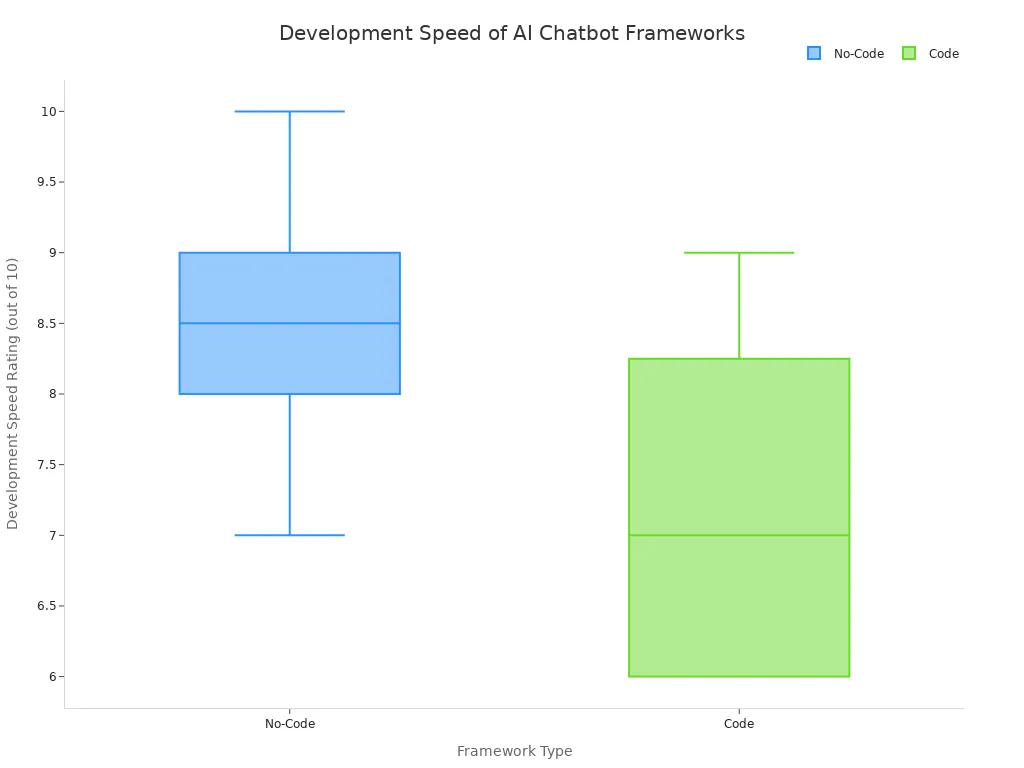
For most businesses, a no-code platform is the faster and more affordable option. You can launch a no-code AI chatbot in just a few days or weeks. A custom-coded chatbot can take several months to build. This speed difference is significant. No-code solutions can also reduce development costs by 40-60% because you do not need a dedicated team of programmers.
Key Factors for Platform Selection
When you evaluate a chatbot platform, look for these essential features:
- Seamless Integration: The platform should connect easily with your existing business systems, like your CRM or e-commerce software.
- Omnichannel Support: Your chatbot should work across all the channels your customers use, including your website, mobile apps, and messaging platforms like WhatsApp.
- Scalability: A good platform grows with your business. It should handle thousands of conversations at once without slowing down, especially during peak times.
- Security: The platform must protect sensitive customer data and comply with regulations like GDPR.
Top No-Code Platforms like Sobot
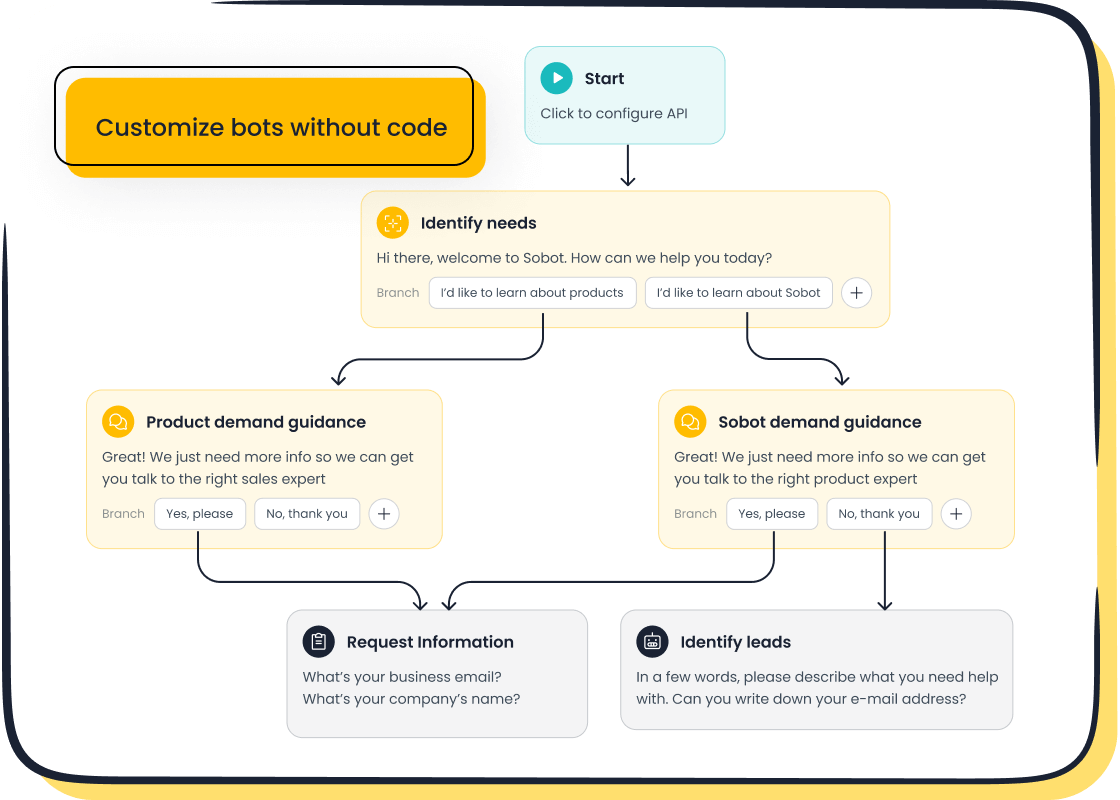
A user-friendly solution makes it easy to configure ai customer service without technical expertise. No-code platforms like Sobot are ideal for businesses that want to launch a powerful chatbot quickly. Sobot offers a point-and-click interface that lets you design and deploy your AI chatbot without writing a single line of code. This approach empowers your team to build and manage the chatbot, helping improve service productivity by up to 70%. Choosing the right platform simplifies the entire process and sets you up for long-term success.
Step 3: Design the AI Chatbot's Conversational Flow
A great chatbot feels like a natural conversation. You must design a smooth chatbot conversation flow. This design process involves mapping out how the AI will interact with users from start to finish. A well-planned conversation flow makes your AI chatbot helpful, not frustrating.
Map Key Customer Journey Paths
First, you need to understand the customer journey. Think about the different paths a customer might take when interacting with your brand. Your goal is to create a conversation that guides them to a solution. Mapping these paths helps you anticipate what your customers need at each step. Different industries use AI to support their unique customer journeys.
| Industry | Primary AI Outcome |
|---|---|
| Retail | More personalized product recommendations |
| Healthcare | Streamlined patient scheduling and support |
| Financial Services | Automated customer support for smoother processes |
| E-commerce | Tailored, dynamic content recommendations |
Plan Welcome, Error, and Escalation Messages
Your chatbot's first and last impressions are critical. You should plan key messages for every stage of the conversation.
- Welcome Message: Your welcome message sets the tone. Keep it short and clear. You should state what the chatbot can do to set expectations early. This avoids customer frustration.
- Error Message: Sometimes, the AI chatbot will not understand a request. Create a simple error message that politely asks the customer to rephrase their question.
- Escalation Path: Define clear rules for when the chatbot should transfer the conversation to a human agent. This ensures customers with complex problems get the help they need. Set rules to escalate a conversation after a few failed attempts or when a customer uses words like "complaint."
Follow Conversation Design Best Practices
Good conversation design makes your chatbot effective. Your AI should reflect your brand's voice and personality in every interaction. You can train your AI by providing it with examples of your existing content.
Pro Tip: Use interactive elements to improve the user experience. Quick-reply buttons and carousels guide customers through the conversation flow. These tools make it easier for users to get answers without typing, creating a faster and more efficient interaction for your customers. A good chatbot conversation flow is the key to a successful AI chatbot.
Step 4: Integrate Your Knowledge Base and Business Systems
Your chatbot is only as smart as the information you give it. A powerful AI chatbot needs access to your company’s knowledge and business systems. This integration allows the chatbot to provide accurate, real-time answers and perform helpful tasks for your customers.
Connect to Your Help Center and Documents
You can start by connecting your chatbot to your existing knowledge sources. An effective AI chatbot learns directly from your content. Modern platforms like Sobot make this process simple. You can build a comprehensive knowledge base by uploading various file types.
- Documents: Upload your existing help articles, PDFs, and text snippets.
- Websites: Scan your website or help center to index information automatically.
- Cloud Services: Connect to platforms like Google Drive or SharePoint.
This process trains your AI to answer questions accurately using information you already have. It ensures your chatbot provides consistent and reliable support from day one.
Integrate with CRM and E-commerce APIs
To make your chatbot truly functional, you must integrate it with your core business systems. Connecting to your CRM and e-commerce APIs unlocks powerful capabilities. This allows your chatbot to handle personalized requests. For example, it can track an order by pulling data from your Shopify store or update a customer's contact information in Salesforce.
A key advantage is creating an omnichannel experience. Platforms like Sobot are official WhatsApp Business Solution Providers (BSPs). This means you can deploy a single chatbot that seamlessly assists customers on your website, in your app, and through messaging channels like WhatsApp.
Leverage an Intelligent Knowledge Base for Accuracy
An intelligent knowledge base helps your AI chatbot understand what users mean, not just what they type. This is possible through semantic AI, which recognizes user intent even with different phrasings. This technology allows the chatbot to find the most relevant answer quickly. The AI also learns from past conversations, continuously improving its responses over time. By connecting your chatbot to live business data, you ensure it provides personalized and up-to-the-minute information, boosting both accuracy and customer trust.
Step 5: The Chatbot Development, Testing, and Refinement Cycle
Building your AI chatbot is not a one-time project. It is a continuous cycle of development, testing, and improvement. This iterative process ensures your chatbot stays effective and meets evolving customer needs. You will build, test, and refine your chatbot to create a truly helpful tool.
The Chatbot Development and Assembly Process
With a no-code platform, the chatbot development process is more like assembling building blocks than writing code. You will bring your conversation flows to life using a visual editor. The process generally follows these steps:
- Assemble Your Flows: Use the platform's tools to build the conversation paths you designed in Step 3.
- Define the Personality: Craft the chatbot's tone and voice to match your brand.
- Start Small: Prototype one or two key use cases first. This allows you to test and refine a single function before expanding the chatbot development to more complex tasks.
Test with Simulated User Scenarios
Before you launch your chatbot to the public, you must test it thoroughly. You should act like a customer and try to break it. This helps you find and fix problems early. Test a variety of real-world questions and scenarios, such as:
- Checking an order status with "where’s my package?"
- Asking for prices with "how much is it?"
- Using common misspellings like "traking info"
Testing every conversation path ensures your AI chatbot provides a smooth and reliable experience for your users from day one.
Gather User Feedback to Train the AI
After you launch, the real training begins. Collecting customer feedback is essential for improving your AI. You can use short in-chat surveys to ask users if their issue was resolved. This data shows you where the chatbot is succeeding and where it needs more training.
A great example of refinement is how OPPO used Sobot to optimize its knowledge base. By analyzing interactions and streamlining content, OPPO reduced its knowledge base maintenance efforts by 90%. This continuous cycle of testing and training is how OPPO achieved an impressive 83% chatbot resolution rate. This shows that effective training turns a good chatbot into a great one.
Step 6: Deploy and Monitor Your AI Chatbot's Performance

Your final step is deploying your chatbot and watching it perform. The launch is not the end of your journey. It is the beginning of a new phase of monitoring and improvement. This ensures your AI chatbot delivers long-term value to your business and your customers.
Integrate the Chatbot into Your Website and Apps
Putting your chatbot live is a straightforward process. The deployment is often as simple as adding a small piece of code to your website. You can typically copy a JavaScript snippet from your platform and paste it into your site’s backend before the closing </body> tag. Many platforms also offer simple integrations or apps for systems like Shopify or WordPress. This makes the technical part of deploying your chatbot quick and easy. After installation, you should test the chatbot one last time on both desktop and mobile devices to ensure it works perfectly for every customer.
Promote the Chatbot to Your Customers
You need to let your customers know about your new support tool. Make the chatbot widget clearly visible on your website pages. You can also announce the launch of your new AI assistant through your email newsletter or on social media. Encouraging customers to use the chatbot helps you gather valuable interaction data from day one. This promotion drives adoption and helps your AI learn faster.
Track Key Metrics for Success
You must track your AI chatbot's performance to understand its impact. This data shows you what is working and where you can improve. Key metrics to watch include:
- Resolution Rate: The percentage of queries the chatbot solves without human help.
- Escalation Rate: How often conversations are transferred to a human agent.
- Customer Satisfaction (CSAT): Direct feedback from users about their experience.
Platforms like Sobot offer built-in reporting and analytics dashboards. These tools make it easy to track these metrics in real time. For example, after implementing Sobot, OPPO saw a 94% positive feedback rate and a 57% increase in repurchase rate. These results show the powerful impact of a well-monitored chatbot on customer satisfaction and business growth. Analyzing this data helps you continuously refine your AI for better performance.
You have learned the six steps to success: Define, Choose, Design, Integrate, Test, and Deploy. This process makes implementing chatbots simple. A powerful platform like Sobot helps you configure AI customer service. This AI chatbot improves your customer service and support. Now, Embark on Your Contact Journey. Explore the Sobot AI chatbot and take your first step to configure AI customer service for a better customer experience. This AI makes implementing chatbots for your service easy.
FAQ
How do modern chatbots understand what customers are asking?
Modern chatbots use large language models (LLMs). These LLMs analyze customer questions. This technology helps the chatbot understand the intent behind what your customers write. Advanced LLMs power this entire process, making the chatbot smarter and more responsive for all customers.
What makes a chatbot sound natural and human-like?
Chatbots use natural language processing to create human-like conversations. This technology, powered by LLMs, allows the bot to understand and generate text. It helps create context-aware interactions, so the chatbot remembers previous parts of the conversation with your customers, providing better support.
Can a chatbot do more than just answer questions?
Yes. A chatbot can perform many automated tasks to support your team. Beyond providing information, it can:
- Schedule appointments for customers.
- Update customer information in your CRM.
- Process returns or exchanges.
How do LLMs improve chatbot support over time?
LLMs enable chatbots to learn from every interaction. The system analyzes conversations to see what worked and what did not. This feedback helps refine the LLMs. Your chatbot gets better at providing helpful support and understanding your customers with each conversation.
See Also
Elevating Customer Service Efficiency Through AI Software Solutions
A Comprehensive Review of Enterprise AI Call Center Solutions
Your Essential Guide to Call Center Artificial Intelligence Software
Discovering the Top 10 AI Tools for Enterprise Contact Centers
How AI Customer Service Agents Are Revolutionizing Support Experiences

