How to Ensure Smooth CRM Integration with Phone System


You want every customer call to feel effortless. The most critical factor for smooth CRM integration with phone system is choosing a solution that connects your tools without friction. When you align your customer relationship management platform with your phone system, you unlock better support and faster responses.
| Statistic | Percentage |
|---|---|
| Improved Customer Experience | 85% |
| Faster Decision-Making | 58% |
| Streamlined Operations | 54% |
| Better Collaboration | 53% |
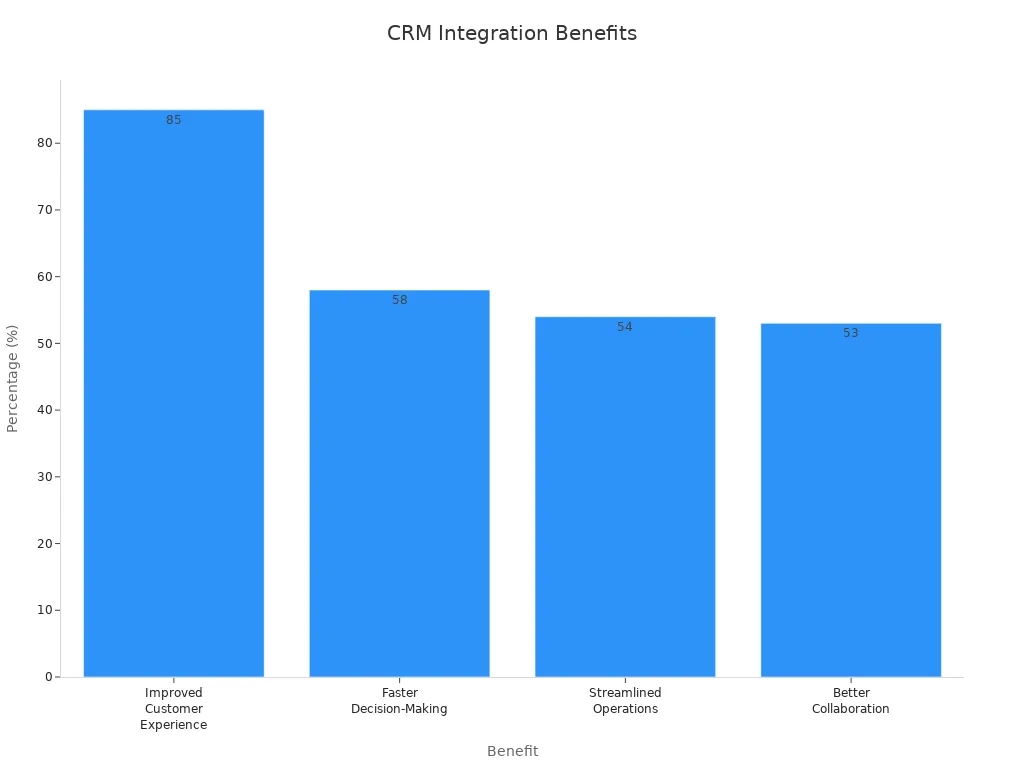
Most companies see a real difference. Sobot gives you the tools to make crm integration with phone system simple and effective.
Set Clear Goals and Involve Stakeholders
Define Integration Objectives
You need to start your crm integration project with clear goals. When you set specific objectives, you make sure the crm integration with phone system matches your business needs. Begin by asking what you want to achieve. Do you want to reduce lead response time or improve sales conversion rates? Maybe you want to decrease duplicate contact records or increase marketing campaign returns.
Tip: Write down your pain points and what success looks like for your team. This helps everyone stay focused.
Here is a table showing why setting clear goals matters:
| Key Benefit | Description |
|---|---|
| Alignment with Business Goals | Objectives keep crm integration on track with your company’s strategy. |
| Improved User Adoption | Clear goals encourage your team to use the new crm system effectively. |
| Effective Data Management | Goals guide better data handling and organization during crm integration. |
When you define your crm integration objectives, you help your team understand the purpose and expected results. This step leads to better outcomes and smoother transitions.
Engage Key Users and Leaders
Involving key users and leaders early in the crm integration process increases your chance of success. Stakeholders, such as managers and team leads, play a big role. They help align the crm project with business goals and support change management. Their input can improve the quality of your final solution.
- Ask leaders to share their vision for crm integration.
- Invite end-users to give feedback on what features they need.
- Encourage cross-department collaboration for a unified approach.
Sobot’s customer-centric approach shows that when you involve both decision-makers and end-users, you get better adoption and long-term results. Management buy-in ensures resources and support for your crm integration, making your project more likely to succeed.
Choose the Right CRM Integration with Phone System
Evaluate Compatibility and APIs
You want your crm integration with phone system to work smoothly from day one. Start by checking if your crm and phone system can connect easily. Look for open APIs and strong compatibility. APIs let your crm and phone system share data in real time. This means your team always sees the latest customer information and can make quick decisions.
APIs also help you automate tasks and reduce errors. When your systems talk to each other, you save time and avoid manual data entry. Here are some benefits of strong API capabilities:
- Seamless data flow between crm and phone systems boosts efficiency.
- Real-time updates help your team stay informed.
- Automated workflows cut down on mistakes and free up time.
- Teams work better together with shared data.
- Users enjoy a smoother experience with less manual work.
- You get better insights into customer interactions for planning.
If you use a voip phone system, make sure it supports integration with your crm. This step is key for successful crm integration.
Select Sobot Voice/Call Center for Seamless Integration

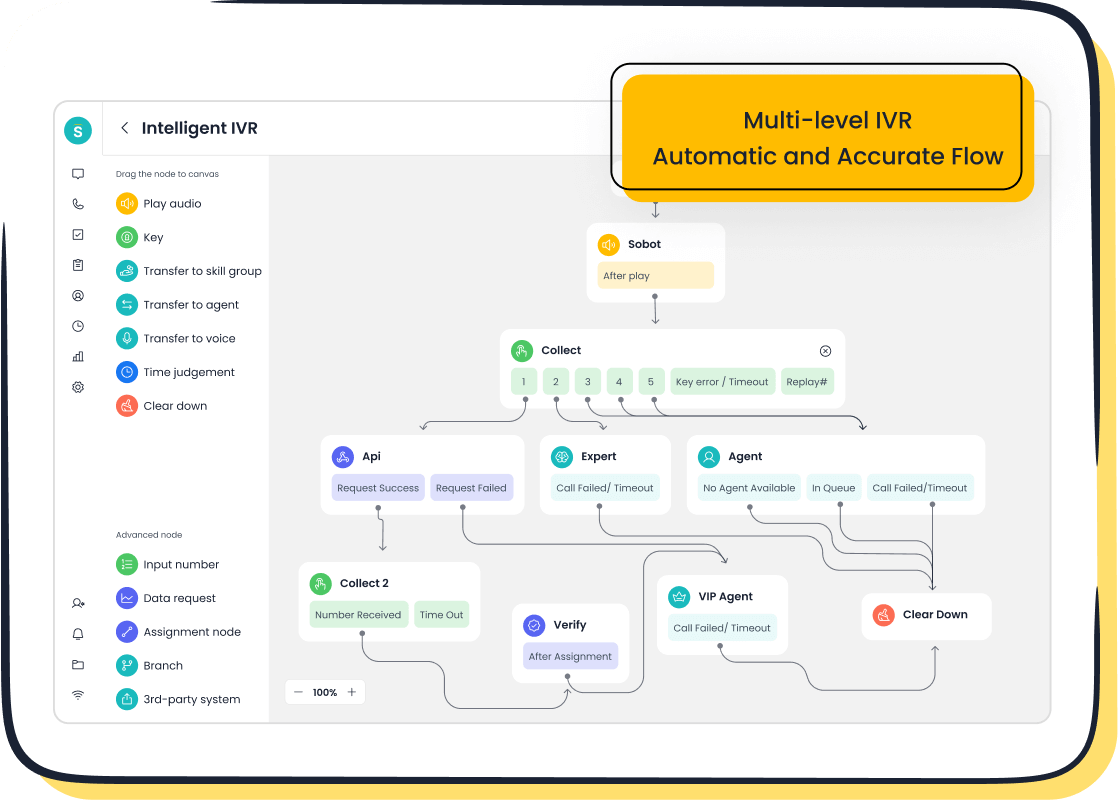
Choosing the right platform makes crm integration easy. Sobot Voice/Call Center stands out because it offers flexible integration options and supports popular systems like Salesforce, Shopify, and more. You can connect Sobot’s call center, live chat, chatbot, AI Agent, and ticketing system to your crm for a unified workspace.
| Feature | Description |
|---|---|
| Omnichannel capabilities | Connects all customer touchpoints for a seamless experience. |
| AI-driven features | Handles complex questions and builds smart workflows. |
| Flexible integration | Offers APIs for easy connection with leading platforms. |
| Centralized support | Brings all conversations and tools into one AI-powered platform. |
Sobot’s low-code integration tools help you deploy solutions up to 10 times faster than traditional methods. Many companies finish projects in under three months. This speed means your team can start using the new crm integration quickly and see results sooner.
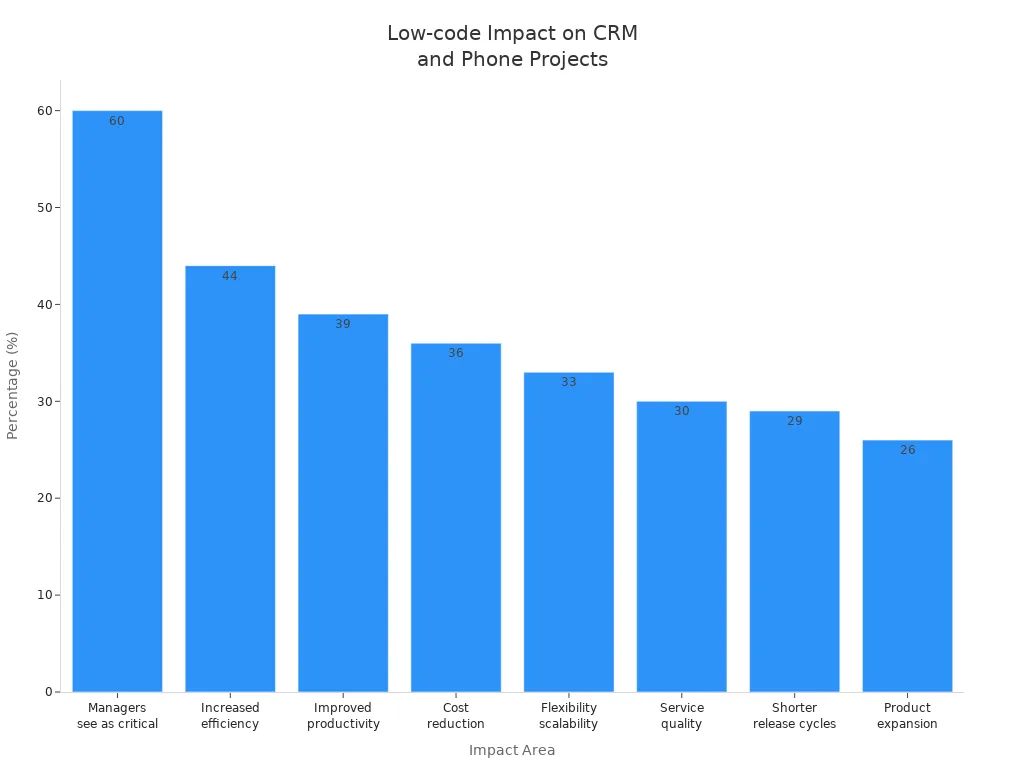
Low-code tools also improve process efficiency and employee productivity. With Sobot, you get a stable, secure, and scalable solution that supports your business as it grows. This approach leads to successful crm integration and better customer experiences.
Ensure Data Quality and Security
Clean and Standardize Data
You want your crm integration to work smoothly. Start by focusing on data quality. Good data quality means your team can trust the information in your crm and phone system. Before you connect the two systems, clean and standardize your data. This step helps you avoid problems later.
Here are some best practices for preparing your data:
- Remove duplicate records to prevent confusion.
- Update outdated contacts so your crm stays relevant.
- Standardize formats for names, phone numbers, and emails.
- Fill in missing information using mandatory fields.
- Set up strict data entry rules to stop future errors.
You can also use a table to guide your process:
| Method | Description |
|---|---|
| Consolidation | Merge duplicate records and keep all important details. |
| Correct and Standardize Formatting | Make sure all data follows the same format. |
| Update Outdated Information | Use reminders and tools to keep contacts current. |
| Deal with Incomplete Records | Fill in missing data with enrichment tools. |
| Ongoing Maintenance | Automate cleaning and check data quality often. |
Secure Data Transfer with Sobot
Protecting your data is just as important as cleaning it. When you integrate your crm with your phone system, you must keep customer information safe. Sobot uses AES-256 encryption to secure data during transfer and at rest. This keeps sensitive details private. Sobot also maintains audit logs and follows industry standards like HIPAA and PCI DSS.
You should:
- Use strong access controls to limit who can see data.
- Back up your data often.
- Test your integration before going live to catch any issues.
- Monitor for data breaches or unusual activity.
Sobot’s system uptime of 99.99% means your crm integration stays reliable and secure. By following these steps, you protect your business and build trust with your customers.
Plan, Test, and Launch Successful CRM Integration

Create a Step-by-Step Plan
You need a clear plan for successful crm integration. Start by assessing your business needs and goals. Identify what you want to achieve with crm integration. Choose the right crm and phone system that fit your requirements. Map out how your team interacts with customers. Document your current and future workflows. Set up the technical side, including API configuration. Customize settings so the integration matches your business processes. Train your team so everyone knows how to use the new system. Test everything before you launch. Roll out the integration with strong support.
A well-structured plan helps you avoid confusion and keeps your crm integration project on track.
Pilot Testing and Feedback
Pilot testing is key for successful crm integration. Define the scope and set clear goals for your pilot. Select a small group of users from different teams. Prepare a test environment that looks like your real system. Run the pilot and watch how users interact with the crm integration. Collect feedback using surveys and analytics. Analyze the results and compare them to your goals. Decide if you are ready to launch or need more changes.
Sobot’s customer Weee! used this approach. They started with a flexible IVR pilot, gathered feedback, and improved their workflows. This led to a 20% increase in agent efficiency and a 50% reduction in resolution time.
Troubleshoot and Optimize
You may face issues during crm integration with phone system. Train your team to handle basic troubleshooting. Teach them how to spot and fix data mismatches. Make sure they know how to update systems without breaking the integration. Set up error logs and alerts to catch problems early. If you need help, contact technical support. Keep optimizing your integration based on user feedback and system performance. This process ensures your crm delivers the best results for your business.
Train Teams and Drive Adoption
Role-Based Training and Documentation
You need to prepare your team for success with the new system. Role-based training helps each person learn what matters most for their job. When you match training to job roles, you make learning more relevant and boost confidence. Your team will know how to use the integrated system in their daily work.
- Create a training program with both basic and advanced lessons.
- Teach best practices for entering data and talking to customers.
- Show your team how to solve common problems and where to get help.
- Use guides and quick reference sheets for easy learning.
Role-based training makes sure everyone learns skills they can use right away. This approach increases engagement and helps your team adopt the new system faster.
Encourage User Feedback
Engaging with your team early in the project builds ownership and helps you spot challenges before they grow.
You should explain why you are making changes and give everyone a chance to share their thoughts. Let your team adjust at their own pace. Keep the conversation open after launch. This shows you value their feedback and want the crm system to work for everyone.
- Ask staff to share ideas and concerns.
- Give regular updates on progress.
- Use surveys or meetings to collect feedback.
- Involve employees in decisions during setup and after launch.
Launch and Support Adoption
You want your team to see the new system as a helpful tool. Build a culture where using the system is part of daily work. Offer support and answer questions quickly. Make the experience simple and listen to what users need. Use change management techniques to guide your team through the transition. Keep checking how things are going and make improvements based on feedback.
- Foster a positive attitude toward the new system.
- Provide ongoing training and support.
- Simplify tasks to make work easier.
- Monitor results and adjust as needed.
With these steps, you help your team feel confident and ready to use the integrated system every day.
Monitor, Maintain, and Optimize CRM and VoIP Integration
Track Performance Metrics
You need to measure how well your crm and voip integration works. Tracking the right metrics helps you see what is going well and what needs to improve. Here is a table to help you understand important metrics:
| Metric | Description |
|---|---|
| Average Handle Time (AHT) | Shows how long it takes to solve a customer issue. |
| First-Call Resolution (FCR) | Tells you how many problems get fixed on the first voip call. |
| Call Connection Rate | Measures how many voip calls reach the customer. |
| Time Spent on Manual Data Entry | Shows how much time agents spend logging voip calls and notes. |
You can also look for these signs of success:
- Shorter call handling time because agents get information fast.
- Better lead prioritization using voip call history.
- Automatic follow-up tasks after each voip call.
- Real-time voip call monitoring and coaching.
- Detailed analytics and reports from Sobot.
Schedule Updates and Maintenance
You should keep your crm and voip integration running smoothly with regular updates. Update your voip system often to protect against malware. Stay current with software updates to get the latest security patches. Monitor your voip system and train users to spot problems. Regular updates help you avoid security risks and keep your voip network strong.
Adapt to Business Changes
Your business will grow and change. You need to make sure your crm and voip integration can adapt. Use automated voip call logging so you never lose important details. Support remote work with mobile voip apps. Add new features like auto-dialing, call recording, and SMS to reach more customers. Sobot’s analytics and support services help you adjust your voip setup as your needs change. You get instant feedback and better lead qualification, which helps your team work smarter.
You can achieve smooth crm integration with phone system by following these steps:
| Step | Description |
|---|---|
| Data consistency | Validate and sync data regularly. |
| Team training | Prepare users with clear, role-based guidance. |
| Testing and launch | Test, gather feedback, and roll out in phases. |
| Ongoing maintenance | Update and monitor for best results. |
Sobot Voice/Call Center supports smart crm integrations with intelligent IVR, global numbers, and real-time monitoring. You can boost productivity and improve customer communication. Explore Sobot’s solutions or contact the team for expert support.
FAQ
What is the biggest benefit of CRM integration with phone system?
You get faster customer support and better data accuracy. Your team sees all call and customer details in one place.
How long does CRM integration with phone system take?
You can finish most integrations in under three months with Sobot’s low-code tools. Many teams see results in weeks.
Is CRM integration with phone system secure?
| Security Feature | Description |
|---|---|
| AES-256 Encryption | Protects your data during transfer |
| 99.99% Uptime | Keeps your system reliable |
You stay safe with Sobot’s advanced security.
See Also
Essential Aspects of CRM Call Center Solutions
A Complete Guide to Omnichannel Contact Center Setup
Understanding the Efficiency of Call Center Automation

