Your Guide to a Seamless AI to Human Handoff


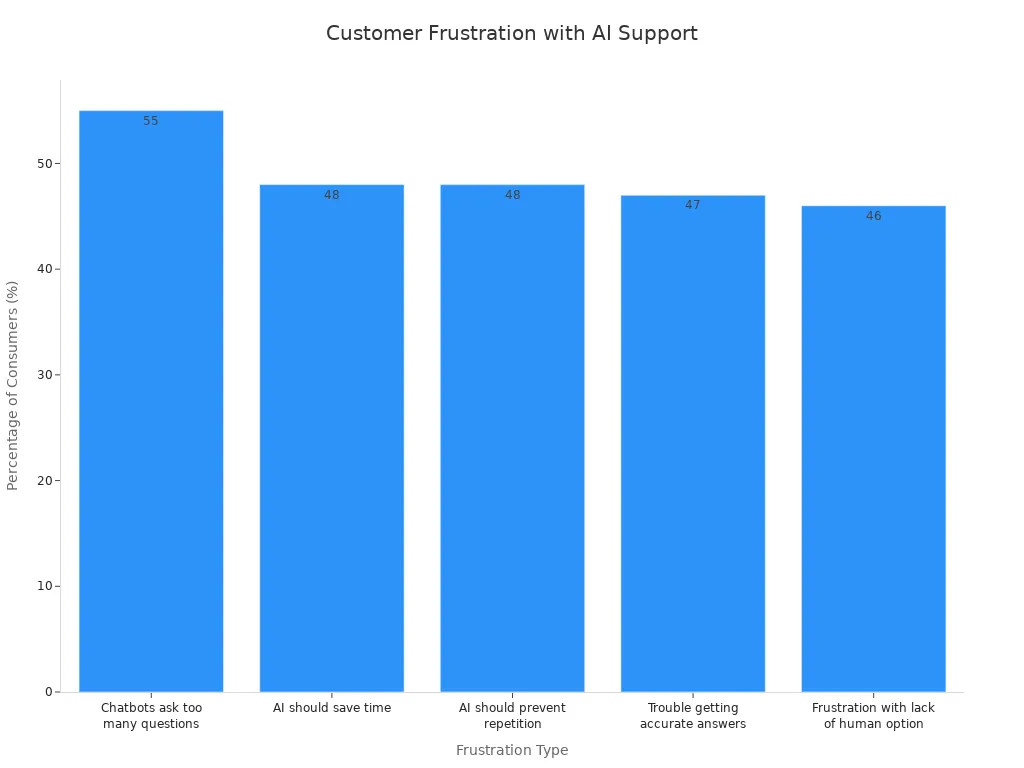
You know the frustration of talking to a customer support AI chatbot. Recent data shows 55% of consumers feel negative emotions when dealing with an AI. A poor chatbot to human handoff makes a bad customer support experience worse. This guide helps you perfect the ai to human handoff. We see the human handoff not as a failure, but a key step. With Sobot, you can embark on your contact journey and create a seamless experience from ai and human agents. This improves customer satisfaction and your entire customer service experience.
A successful handoff process ensures a seamless transition. It transforms the chatbot to human handoff from a point of friction into a moment of excellent customer support. Mastering this human handoff is vital for a great customer experience.
Identifying Triggers for a Seamless Handoff
A truly intelligent handoff happens when your system knows exactly when to escalate an interaction. You should not leave this to chance. A well-configured system, like Sobot's AI platform, automatically detects these triggers for a smooth chatbot to human handoff. This human-machine cooperation was key for OPPO. Their customer support AI chatbot handled repetitive queries. This freed human agents to solve complex issues, which is the core of a trigger-based handoff strategy.
Here are the key moments when your customer support AI chatbot should initiate a human handoff.
Explicit Customer Requests
The clearest trigger is when a customer directly asks for help. Your AI must recognize phrases that signal a desire for live human agent interactions. Customers often use specific words to bypass the AI.
Pro-Tip: Your AI agent should immediately trigger a handoff when it detects phrases like:
- "Talk to an agent"
- "I need a person"
- "Connect me to a human"
- "Supervisor"
Sentiment and Emotional Cues
Sometimes a customer doesn't ask for help directly, but their words show they are upset. Your AI can use sentiment analysis to detect frustration or anger in a customer interaction. An AI agent should monitor the interaction for emotional cues that require a human touch. An immediate handoff is necessary when the AI detects:
- Anxious or angry tones
- Phrases like "this is so frustrating"
- Signs of urgency or restlessness
Query Complexity Thresholds
Your customer support AI chatbot has limits. You can set rules so the AI knows when a problem is too difficult for it to solve. For example, a handoff can occur when the AI's confidence score for an answer drops below a certain point. This ensures the customer gets the right help without delay and prevents a frustrating experience. This is a key part of an intelligent handoff.
Repetition and AI Loop Detection
Nothing frustrates a customer more than getting stuck in an AI loop. This happens when the customer support AI chatbot fails to understand the query and gives the same unhelpful answer repeatedly. Your system should recognize this repetitive pattern. After two or three failed attempts, the human handoff functionality should automatically initiate a chatbot to human handoff to a live agent.
High-Value Customer Scenarios
You can provide a premium experience by identifying high-value customers. Your system can use data like purchase history or account status to flag these individuals. When a high-value customer starts a chat, you can configure the AI to offer an immediate ai to human handoff. This proactive support shows you value their business and builds loyalty.
Ensuring a Warm, Seamless Chatbot to Human Handoff

Once a handoff is triggered, the quality of the transfer determines the customer's experience. The single most important goal is to prevent the customer from repeating themselves. A successful chatbot to human handoff feels like a continuation of the same conversation, not the start of a new one. This is known as a warm transfer. It requires your customer support AI chatbot to package and send all relevant information to the human agent. Sobot's unified platform makes this easy. It ensures all context, from the chatbot interaction to customer data in your CRM, appears in a single workspace for your agent.
The Essential Context Package
You must equip your agent with a complete context package for every human handoff. This package gives the agent a full picture of the customer's issue before they even say hello. An effective package for a seamless chatbot to human handoff includes:
- Full conversation context (the complete chat history)
- Collected customer data (like name, email, or account ID)
- A summary of the issue from the AI
Full Chat and Action Transcript
Providing the full chat transcript is crucial for a successful chatbot human handoff. Your agent needs to see every step the customer took with the customer support AI chatbot. This eliminates guesswork and helps the agent understand the customer's frustration. An omnichannel system tracks the entire customer interaction across platforms. This gives your agent a complete view of the customer's journey.
With all interactions recorded, your agents can provide a seamless experience and resolve issues more efficiently. The AI can extract key details like order IDs or account numbers. When an agent receives the transfer, they have full context and can start solving the problem immediately.
Customer Data and Identifiers
Your customer support AI chatbot should identify the customer early in the interaction. The AI agent can collect key identifiers and pass them to the human agent during the handoff. This allows for a personalized and efficient transfer. Important data points include:
- Order number
- Account ID
- Reason for contact
- Complete conversation history
This human handoff functionality ensures the agent greets the customer by name and already understands their history.
AI's Pre-Handoff Actions Summary
Agents are busy. They do not always have time to read a long transcript. A great customer support AI chatbot can create a quick summary for the agent. This summary highlights the main problem, the steps the AI already took, and any unresolved issues. This allows the agent to understand the situation in seconds and decide on the next action for a quick resolution. This is a key part of a seamless chatbot to human handoff.
The Specific Handoff Reason
Finally, the AI agent should tell the human agent why the chatbot to human handoff happened. Was it a direct request from the customer? Did the AI detect frustration? Or was the query too complex? Knowing the reason for the transfer helps the agent tailor their approach. For example, an agent can use a more empathetic tone if the handoff was triggered by customer frustration. This small detail makes the chatbot human handoff feel much smoother.
Configuring Your Handoff Process Step-by-Step
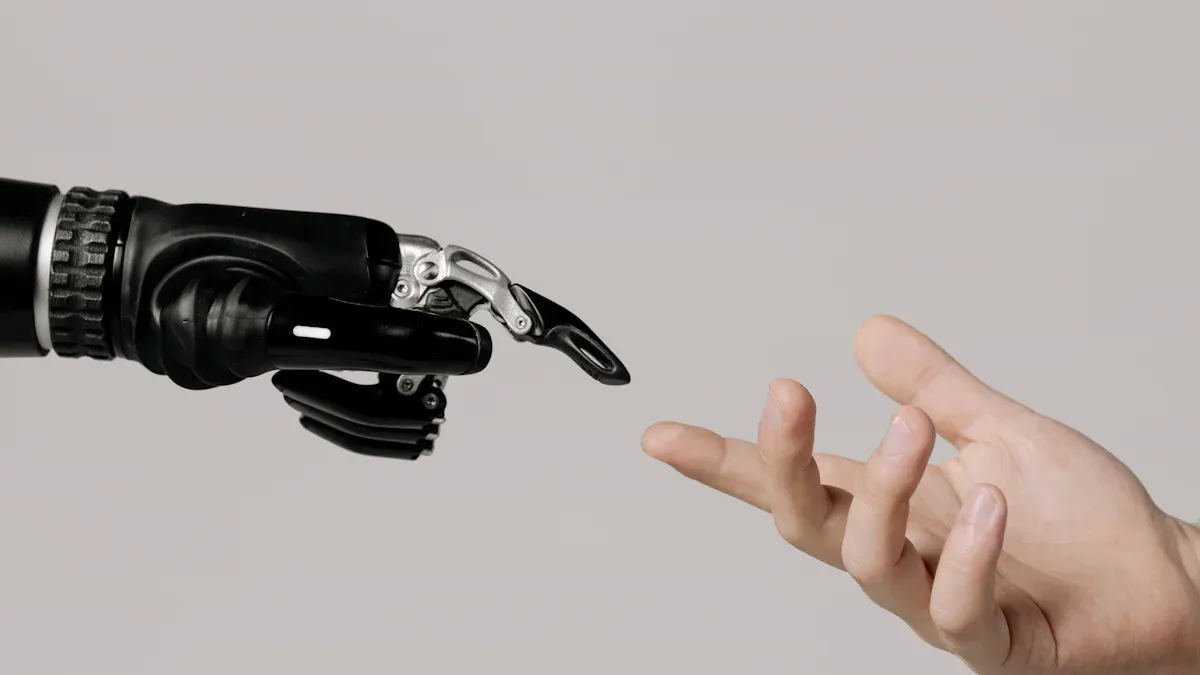
Creating a great handoff process does not happen by accident. You need a clear plan. This five-step guide will walk you through configuring an intelligent handoff system. You can build a flow that boosts customer satisfaction and makes your team more effective.
Step 1: Define Handoff Triggers in Your System
First, you must decide exactly when a handoff should occur. These rules, or triggers, tell your customer support AI chatbot when to transfer a customer to a person. A well-defined handoff process ensures the AI handles what it can and escalates when a human touch is needed.
Common and effective triggers for a human handoff include:
- Explicit User Request: The customer directly asks for a person using phrases like "talk to an agent" or "representative."
- Negative Sentiment: The AI detects frustration or anger in the customer's messages.
- Query Complexity: The issue is too complex for the AI, such as a sensitive billing dispute or a technical problem.
- Repeated Failures: The AI fails to understand the customer's query after two or three attempts.
- High-Value Keywords: The customer uses words that signal urgency or high importance, like "cancel," "refund," or "fraud."
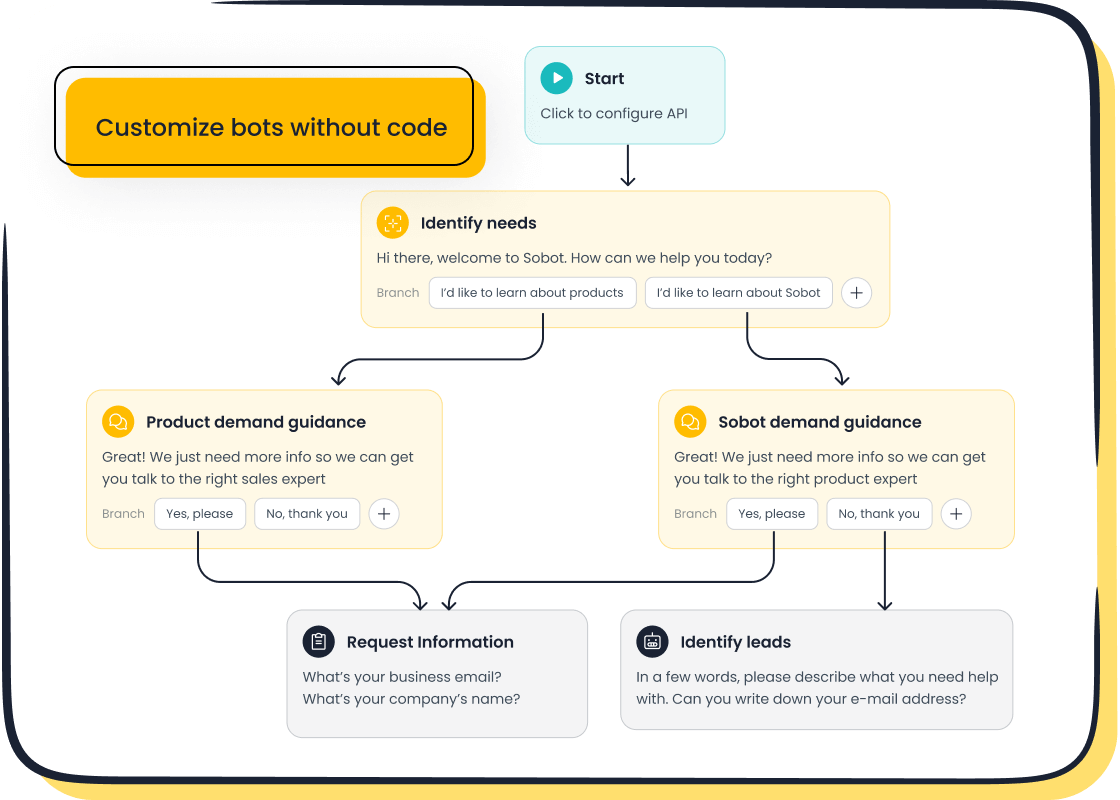
With Sobot's no-code Chatbot builder, you can easily set up these triggers. You do not need help from your IT department. You can create rules based on keywords, customer sentiment, or the number of failed attempts. This gives you full control over your handoff process.
Step 2: Integrate Your AI with CRM and Help Desk
Your AI chatbot needs to talk to your other business systems. An integration between your AI and your Customer Relationship Management (CRM) or help desk is essential for a warm transfer. This connection allows the AI agent to pass the entire conversation context to the human agent. The goal is to give your team a complete picture of the customer's issue.
For a successful integration, you must sync key data, including:
- Customer contact information (name, email, account ID)
- Full chat transcripts and interaction history
- Purchase history and previous support issues
- Notes created by the AI agent during the conversation
This data transfer is a core part of the human handoff functionality. It ensures your agent has all the information needed for a smooth handoff.
Sobot makes this step simple. Our platform offers native integration with our own Ticketing System and Voice Call Center. This creates a powerful, all-in-one solution. When a chatbot to human handoff happens, all the data automatically appears in the agent's workspace. There are no data silos or clunky transitions.
Step 3: Configure Smart, Skill-Based Routing
Once a handoff is triggered, where does the customer go? Sending them to a random agent can lead to more delays and frustration. Smart, skill-based routing sends the customer to the agent best equipped to solve their problem. This makes the entire customer support experience more efficient.
You can create routing rules based on different agent skills.
| Skill Category | Example Skills | Use Case |
|---|---|---|
| Language | Spanish, French, Mandarin | Route a customer to an agent who speaks their native language. |
| Product Knowledge | Product A, Product B, Billing | Send a technical question to a product specialist. |
| Issue Type | Refunds, Technical Support, Sales | Match the customer's need to the right department. |
This intelligent handoff ensures the customer connects with an expert on the first try. It reduces transfer times and improves first-contact resolution rates. This is a critical part of a modern handoff process.
Step 4: Customize Handoff Messaging with Sobot Chatbot
The moments while a customer waits for an agent are critical. You must manage their expectations and reassure them that help is on the way. Clear and empathetic messaging can turn a moment of friction into a positive experience. Your customer support AI chatbot should provide updates during the transfer.
Here are some examples of effective handoff messages:
- "I understand this is frustrating. Let me connect you with a specialist who can resolve this for you right away."
- "You're in good hands. I am transferring you to our support team now. They have your full conversation history and will be able to help."
- "Thank you for your patience. I am finding the best agent for your issue. You should be connected in about one minute."
You can customize these messages easily using Sobot's no-code Chatbot builder. You can write messages that match your brand's voice and tone. This allows you to create a reassuring and professional ai to human handoff experience without writing a single line of code.
Step 5: Test, Monitor, and Refine the Flow
Your handoff process is not a one-time setup. You must continuously test, monitor, and improve it. By tracking the right metrics, you can identify bottlenecks and find opportunities to make your human handoff even smoother. This data-driven approach helps you refine your AI and improve the customer journey.
Key metrics to monitor for your handoff process include:
- Escalation Rate: The percentage of conversations the AI transfers to a human agent. A high rate may mean your AI needs more training.
- Customer Satisfaction (CSAT): Ask customers to rate their experience after the handoff. Low scores can point to problems in the transfer.
- Customer Effort Score (CES): Measure how easy it was for the customer to get their issue resolved. A high-effort experience is a sign of friction.
- Agent Handle Time: If agents spend a lot of time gathering information after a handoff, your context package may be incomplete.
Regularly reviewing these numbers will help you perfect your chatbot to human handoff. It ensures your AI and human agents work together seamlessly to deliver excellent customer support.
Avoiding Pitfalls for a Seamless Experience from AI and Human Agents
Even a well-planned handoff strategy can fail if you overlook common pitfalls. Avoiding these mistakes is crucial for creating a seamless experience from AI and human agents. A poor handoff can erase any goodwill your AI has built and leave your customer feeling frustrated. Let's look at the top mistakes to avoid.
Forcing a Cold Chatbot to Human Handoff
A cold handoff happens when your AI transfers a customer to an agent without any context. The customer must start over, explaining their issue from the beginning. This abrupt transfer creates a disjointed and frustrating experience. A warm transfer, where context is passed along, is essential for a positive chatbot human handoff.
Customers are 25% more likely to report a positive experience with a warm transfer because they don't have to repeat themselves. This simple step builds trust and makes the customer feel valued, directly improving your customer experience. A cold human handoff does the opposite, damaging customer confidence.
Hiding the "Talk to an Agent" Option
Some companies make it difficult for a customer to request a human handoff. They hide the option deep within menus, hoping the AI can solve every problem. This strategy almost always backfires. When a customer wants to speak to a person, making it hard for them only increases their frustration. Your AI should always offer a clear and easy path to a human agent. This transparency is key to a seamless experience from AI and human agents.
A Mismatched Tone Between AI and Agent
Your brand should have a consistent voice. If your AI is cheerful and informal, but the human agent is strictly formal, the change feels jarring. This tonal shift can disrupt the chatbot human handoff and make the interaction feel disconnected. You should train your AI and human agents to use a similar tone. This alignment ensures a smooth and cohesive handoff experience for the customer.
Routing to the Wrong Department
A successful handoff gets the customer to the right person on the first try. Routing a customer with a billing question to the technical support team is a waste of everyone's time. This mistake forces another transfer and makes your company look disorganized. An intelligent human handoff uses skill-based routing to connect the customer with the agent best equipped to handle their specific issue. This ensures a quick resolution and a seamless experience from AI and human agents.
You build a successful handoff process on three pillars: intelligent triggers, complete context transfer, and smart routing. A platform like Sobot simplifies this complex handoff, merging AI efficiency with an essential human touch. Mastering the ai to human handoff is critical for a superior customer experience. This intelligent handoff improves customer satisfaction and key metrics. As seen with OPPO, a seamless handoff boosts repurchase rates and creates a better customer service experience. This seamless transition ensures every customer feels valued during the transfer. Your intelligent handoff process makes for a seamless experience from ai and human agents.
FAQ
Why is a chatbot to human handoff important?
A chatbot to human handoff is a key part of great customer service. It ensures customers get help for complex or emotional issues that an AI cannot solve. A smooth transfer improves customer satisfaction and shows you value their time.
What is a "warm transfer" in a handoff?
A warm transfer happens when the AI passes all conversation context to the human agent. This includes the chat history and customer data. The agent has all the information they need, so you do not have to repeat yourself.
How can I set up handoff triggers without coding?
You can use a no-code platform to define your handoff triggers.
Sobot's Chatbot builder lets you create rules based on keywords, customer frustration, or failed AI attempts. You can manage your handoff process easily without needing IT help.
What is the biggest mistake to avoid in a handoff?
The biggest mistake is a "cold handoff." This forces the customer to explain their problem all over again to the human agent. It creates a frustrating and disconnected experience. Always ensure context is transferred for a seamless chatbot to human handoff.
See Also
Essential Guide to AI Software for Modern Call Center Operations
In-Depth Review of AI Solutions for Enterprise Call Centers
Discovering the Top 10 AI Tools for Contact Center Success
Effective Management Strategies for Live Chat Agents: A Comprehensive Guide
Understanding Omnichannel Call Center Software: A Complete Implementation Guide

