How to Cut Support Tickets with AI in 2025

High support ticket volume is a major challenge. You can solve it with the right AI strategy for 2025. This involves using AI-powered customer support for automated resolution, enhanced self-service to deflect tickets, and smart automation. If you are asking, "how do I reduce the workload of my support agents?", AI is the answer. The AI customer service market is set to grow from $12.06 billion in 2024 to $47.82 billion by 2030, showing its rising importance.
AI automation can handle a high volume of your customer support tasks.
| Source | Percentage of Repetitive Queries Resolved by AI |
|---|---|
| IBM | Up to 80% of routine tasks and customer inquiries |
| Chatbase | Up to 86% of customer questions without human intervention |
A tool like the Sobot AI Chatbot provides a practical path to AI-powered customer support, delivering measurable results.
How Do I Reduce the Workload of My Support Agents?
You can significantly lighten your team's burden by implementing AI as your first line of defense. An AI-powered customer support strategy filters and resolves common issues before they ever become tickets for your agents. This approach directly answers the question, "how do I reduce the workload of my support agents?" by shifting from a reactive model to a proactive one. The goal is to use automation to handle volume, freeing your human experts for tasks that require their unique skills.
Deflect Tickets with an AI Chatbot
Your first step to reduce the workload of my support agents is to deflect tickets with an intelligent chatbot. A tool like the Sobot AI Chatbot provides 24/7 automated query resolution. It autonomously handles repetitive questions about order status, product features, or return policies. This immediately lowers your ticket volume.
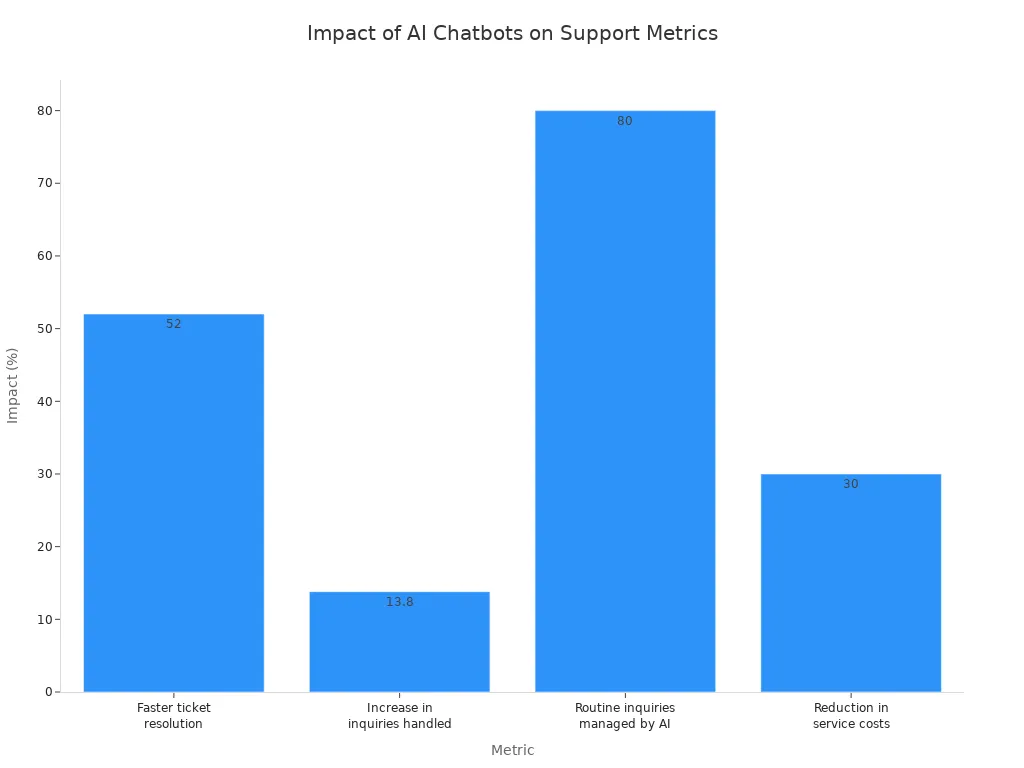
With AI, companies can close tickets 52% faster. This is because AI can manage up to 80% of routine customer inquiries without human help, giving agents more time for complex problem-solving.
This enhanced support efficiency allows your team to focus on high-value customer interactions that build loyalty and drive revenue. When agents are less overwhelmed, job satisfaction improves.
Leverage AI for Instant Self-Service Answers
Many customers prefer to find answers themselves. An AI-powered knowledge base makes this possible. Unlike traditional search bars, AI uses Natural Language Processing to understand what your customer is asking, even if they use conversational language. This provides a better self-service experience and is another effective way to answer, "how do I reduce the workload of my support agents?". Your AI-powered customer support system can instantly suggest relevant articles or guides, resolving issues without creating a ticket.
Use Automation to Intelligently Route Tickets
For issues that do require a human touch, AI-driven ticket triage ensures they get to the right person quickly. Instead of manual ticket triage, AI automation analyzes incoming requests and routes them based on specific rules.
- Skill-based routing: Sends technical questions to expert agents.
- Priority-based routing: Moves urgent tickets from VIP customers to the front of the line.
This intelligent ticket triage boosts support efficiency and improves resolution times. This level of automation can save each agent around 1.2 hours daily, providing a clear answer to "how do I reduce the workload of my support agents?". Your AI-powered customer support becomes smarter, faster, and more organized. This is how you reduce the workload of my support agents and improve overall efficiency.
Your 4-Step Plan for Customer Support Automation

Implementing customer support automation is a clear path to efficiency. You can transform your support operations with a structured approach. This plan breaks down the process into four manageable steps. It guides you from initial analysis to ongoing optimization for your help desk automation strategy. Following this guide will help you build a powerful AI support automation system.
Step 1: Audit Your Current Support Tickets
Your first step in support automation is to understand your current situation. You need to analyze your existing support tickets. This audit reveals the most common questions your customers ask. Identifying these repetitive queries shows you where automation can have the biggest impact. For example, a retail business might find that 30% of its tickets are about "order status" or "return policy." This is a perfect starting point for AI.
You can use powerful AI automation tools to analyze your ticket data. These platforms help you find patterns and themes in customer conversations.
- IBM Watson: Uses natural language processing to categorize customer feedback and identify trends.
- Zendesk AI: Employs machine learning to spot recurring problems.
- MonkeyLearn: Offers text analysis to extract common themes from your support data.
This analysis provides a clear roadmap for your help desk automation. It tells you exactly which issues to target first for the quickest ROI. This data-driven approach is the foundation of successful ticket management and support automation.
Step 2: Prepare Your Knowledge and Tools
After your audit, you must prepare your resources. This involves creating a high-quality knowledge base. Your AI will use this information to answer customer questions. A strong knowledge base needs to be well-organized and comprehensive. It should include more than just text. You can add images, videos, and guides to make answers more helpful. The AI needs access to the right data sources, like your CRM and product catalogs, to provide accurate, real-time answers.
Tip: Structure your knowledge base with a clear purpose. Break long documents into smaller, topic-focused chunks. This makes it easier for the AI to find the right information quickly.
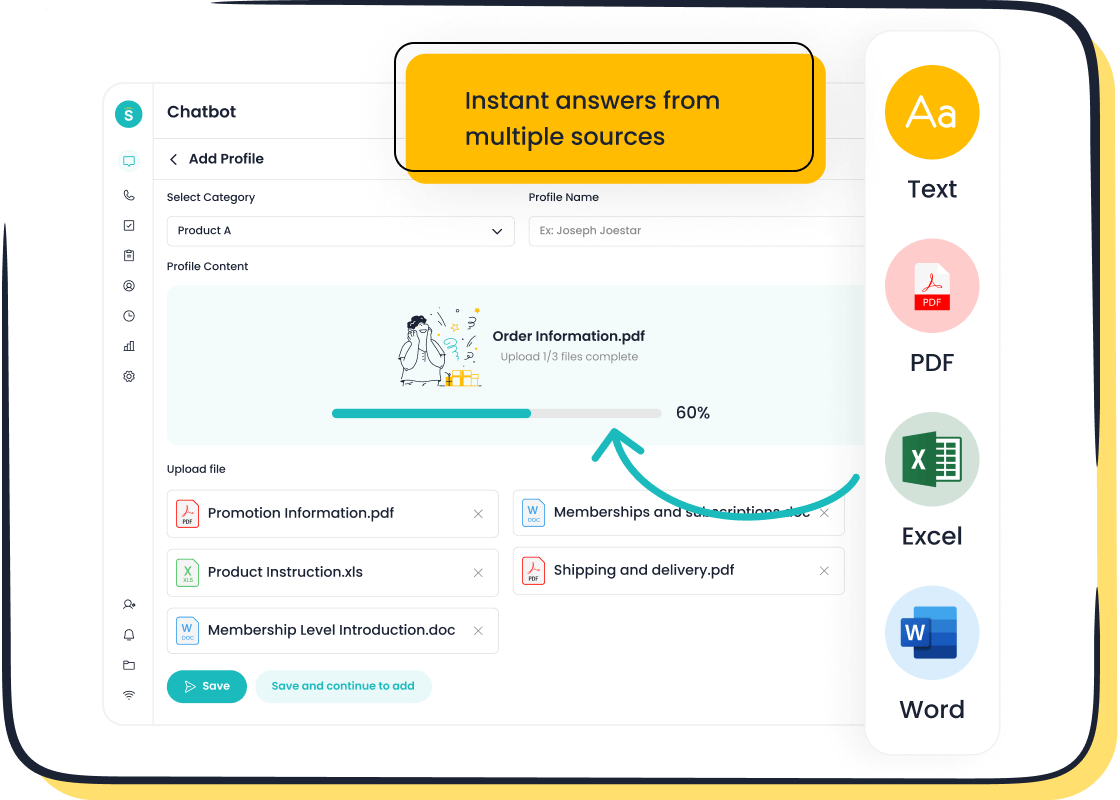
Building this knowledge base does not have to be difficult. With a solution like the Sobot AI Chatbot, you can create a powerful knowledge source without any coding. You simply upload your existing documents.
- PDFs
- Help articles
- Text files
The AI processes this information and learns from it. This ease of use makes setting up your help desk automation simple. This step is crucial for effective ticket management and support automation.
Step 3: Deploy Your AI and Automation Workflows
Now you are ready to bring your AI to life. This is where you build and launch your automated workflows. These workflows define how the AI interacts with your customers. You can create different workflows for different tasks. For example, you can design a workflow to handle password resets or another to answer questions about shipping. The goal is to automate high-volume, low-complexity tasks to free up your agents.
Successful AI support automation includes several types of workflows:
- AI Agents: Act as your frontline support, greeting customers and handling common FAQs.
- Intelligent Routing: The AI analyzes incoming messages to classify their intent and sends the tickets to the right team.
- Self-Service: An AI-powered help center provides instant answers, allowing customers to resolve issues on their own.
With a platform like Sobot, you can automate workflows using a simple point-and-click interface. You do not need any technical expertise to design these automated workflows. This makes deploying your help desk automation fast and straightforward. You can have a functional AI chatbot running in hours, not months. This is a key part of effective support automation.
Step 4: Monitor, Measure, and Optimize
Your work is not done after you launch your AI. The final step is to continuously monitor, measure, and optimize its performance. This ensures your customer support automation remains effective and improves over time. You should track key metrics to understand how well your AI is performing. This data helps you identify areas for improvement.
One powerful optimization method is A/B testing. You can test different chatbot responses to see which ones work best. For example, you can A/B test:
- Conversational Flow: Try different question orders or response lengths.
- Language and Tone: Experiment with formal versus casual language to see what your customer base prefers.
- User Interface: Test different button placements or the use of images.
Continuously monitoring metrics leads to better customer outcomes. Tracking the escalation rate, for instance, shows how well the AI contains issues. A lower rate means your help desk automation is working well. This ongoing optimization is vital for long-term success in help desk automation and is the final piece of your support automation strategy.
Key Metrics for AI Support Success
You need to measure your success to prove your return on investment. Tracking the right metrics shows you how AI automation is transforming your customer support. These numbers reveal improvements in efficiency and reductions in customer support costs.
Ticket Deflection Rate
This metric shows how many customer issues your AI resolves without creating support tickets. A higher rate means your AI is successfully handling more queries. While the industry average is around 23%, you can achieve a ticket deflection rate of 40% to 60% with a strong AI strategy. This directly reduces your team's workload.
AI Resolution Rate
The AI resolution rate measures how many conversations your chatbot successfully closes on its own. This is a key indicator of your AI's effectiveness. A high AI resolution rate proves your chatbot understands customer needs and provides correct answers. For example, by using Sobot, the smart device brand OPPO achieved an 83% chatbot resolution rate and a 94% positive feedback rate. This level of AI resolution rate is a great benchmark. High automated resolution rates lead to a better customer experience. You should aim for a high AI resolution rate to maximize efficiency. Your AI resolution rate is a direct measure of success. The AI resolution rate also impacts your customer satisfaction score. Improving your AI resolution rate is a primary goal.
First Contact Resolution (FCR)
First contact resolution means solving a customer's problem in a single interaction. A high FCR improves customer satisfaction and lowers support costs. AI boosts your FCR and improves your first response time. It helps you achieve a better first response time.
- Intelligent Routing: AI sends customers to the agent best equipped to solve their problem, improving first response time.
- Agent Assistance: AI provides real-time information to agents, helping them find answers faster and improve first response time.
- Interaction Analytics: AI analyzes past conversations to suggest effective solutions.
Cost Per Resolved Ticket
This metric calculates how much you spend to solve each customer issue. AI significantly lowers your customer support costs. Organizations report an average cost reduction of 85% per ticket when AI handles the resolution.
Success with Sobot: You can improve agent productivity by 70% and save up to 50% on customer support costs. This shows the powerful impact of AI on your budget.
By tracking these metrics, you can clearly see how AI automation cuts your customer support costs and empowers your support team.
Common Pitfalls in 2025 and How to Avoid Them

You can build a powerful AI support system. However, you must avoid common mistakes to achieve success. Implementing AI automation requires careful planning. Avoiding these pitfalls will ensure your AI enhances the customer experience instead of creating new problems.
Pitfall: Using an Outdated Knowledge Base
Your AI is only as smart as the information you give it. An outdated knowledge base leads to incorrect answers and frustrated customers. This increases support tickets instead of reducing them. You must keep your knowledge base fresh and accurate.
Tip: Use AI to help manage your content. An AI can identify and archive outdated articles. It can also process customer feedback to find gaps in your knowledge.
You can automate this process to ensure your information is always current.
- Use API calls to automatically sync new product information from your CRM.
- Set up scheduled tasks to pull data from other systems, like inventory levels.
- Use webhooks to let other tools push updates directly to your knowledge base.
Pitfall: Failing to Integrate with Backend Systems
A standalone AI has limited power. It cannot answer specific customer questions without access to your business systems. Failing to integrate your AI creates a disconnected experience. The customer will still need to contact a human agent for simple, account-specific issues.
You should connect your AI to critical backend systems. This allows your automation workflows to handle more complex queries. Key integrations include:
- CRM: Lets the AI look up customer subscription details.
- Logistics Database: Allows the AI to check order shipping status.
- E-commerce Tools: Enables the AI to assist with sales during a support interaction.
These integrations transform your AI from a simple FAQ bot into a capable support assistant.
Pitfall: Lacking a Human Escalation Path
Not every problem can be solved by AI. Trapping a frustrated customer in a chatbot loop is a quick way to lose them forever. Your support workflows must include a clear and easy path to a human agent. The best systems make this handoff seamless.
Your AI can proactively identify when a person needs help. Smart escalation workflows can trigger a transfer based on:
- Keywords like "refund" or "complaint"
- Negative customer sentiment or signs of frustration
- Three or more unsuccessful AI responses
When escalating, your AI should set clear expectations. For example, it can tell the customer, "An agent will be with you in about 2 minutes." This simple step improves the customer support experience.
You can achieve greater support efficiency by using AI. Your strategy should include deflecting tickets with AI-powered customer support, following a clear 4-step automation plan, and tracking metrics for resolution. The goal of AI is not to replace your team but to empower them. This AI-powered customer support approach allows agents to focus on high-value work.
- Complex problem-solving
- Building customer trust and relationships
- Strategic advising
Ready to cut your support tickets and empower your team? Explore how the Sobot AI Chatbot can transform your customer journey today.
FAQ
How quickly can I see results from AI?
You can see initial results very quickly. A well-prepared AI chatbot can start deflecting simple support queries within hours of deployment. You will notice a drop in ticket volume for common questions almost immediately. This allows your support team to focus on more complex issues right away.
Does AI replace my human support agents?
No, AI does not replace your team. The goal of AI is to empower your agents. It handles repetitive tasks so your human experts can focus on high-value interactions. This improves both efficiency and job satisfaction for your support staff.
What if the AI cannot answer a question?
A good AI system knows its limits. When the AI cannot find an answer, it should seamlessly transfer the conversation to a human agent. This ensures the customer always gets the help they need without getting stuck in a frustrating loop.
Tip: Your AI should pass the full conversation history to the agent. This provides context and creates a smooth handoff, improving the overall support experience.
Is setting up an AI chatbot difficult?
Modern AI platforms make setup simple. You can build a powerful knowledge base by uploading existing documents like PDFs and help articles. Many tools offer no-code interfaces, so you can design and launch your AI without needing technical expertise.
See Also
Optimizing Customer Support: AI Software Enhances Service Efficiency Dramatically
An In-Depth Look at AI Solutions for Enterprise Call Centers
Transforming Customer Support: The AI Agent's Revolutionary Impact
Your Essential Guide to Artificial Intelligence Software for Call Centers
Discover the Top 10 AI Tools for Enterprise Contact Center Solutions

