Reduce Customer Service Workload With These 5 Tips


Your customer service team faces immense pressure. High ticket volumes can quickly overwhelm agents, and studies show 74% are at risk of burnout. This challenge impacts team motivation and focus. The monthly team workload varies by industry, creating unique pressures.
- Equipment Manufacturing: Sees about 0.54 tickets per agent.
- High Tech: Experiences around 1.38 tickets per agent.
This post offers five proven workload management strategies. You will learn how to reduce customer service workload and boost team engagement. Proper tools and effective workload management are key. An all-in-one platform like Sobot helps you implement these workload management strategies, improving both agent engagement and customer satisfaction.
Tip 1: Reduce Customer Service Workload With a Self-Service Knowledge Base
Empowering customers to find their own answers is one of the most effective workload management strategies. A well-maintained knowledge base deflects common, repetitive questions before they become support tickets. This frees up your agents to handle more complex issues. Data shows that 91% of customers would use an online knowledge base if it were available and tailored to their needs. An optimized knowledge base can deflect 40-60% of routine questions, a significant step to reduce customer service workload.
For example, leading smart device innovator OPPO partnered with Sobot to optimize its knowledge base. By using AI to automate the input of Q&A pairs, OPPO reduced its knowledge base maintenance efforts by a staggering 90%.
How to Identify Key Content
You can build relevant and helpful content by analyzing your existing support tickets. Start by tagging and categorizing tickets to spot recurring themes. While manual review offers deep insights, technology provides a more efficient path. AI-powered tools, like those within the Sobot Ticketing System, can automatically sort tickets and use Natural Language Processing (NLP) to group inquiries by topic. This process quickly reveals the most frequently asked questions, giving you a clear roadmap for your first set of articles.
Best Practices for Article Organization
A great knowledge base is easy to navigate. Your goal is to help users find information with lightning-fast speed. Follow these best practices to create a user-friendly experience:
- Use a Logical Structure: Organize content into clear categories like "Getting Started" or "Billing." Use simple, direct titles such as "How to Reset Your Password."
- Incorporate Visuals: Use screenshots, GIFs, and short videos to break up text and explain complex steps. Visuals make articles more engaging and easier to understand.
- Keep It Simple: Write short, scannable articles. Use bullet points and bold text to highlight key information. If a topic is too long, break it into smaller, linked articles.
- Implement Powerful Search: A robust search function is essential. It allows customers to find answers instantly without browsing through categories, which is a core part of effective workload management strategies to reduce customer service workload.
Tip 2: Use Canned Responses for Common Inquiries
Your team likely answers the same questions every day. Canned responses are pre-written templates that address these common inquiries. Using them saves significant time and ensures every customer receives a consistent, on-brand answer. This standardization is one of the most direct workload management strategies you can implement, boosting both efficiency and customer engagement.
Creating Effective and Personalized Templates
A canned response should never sound robotic. The best templates feel personal and empathetic. You can achieve this by focusing on your language and using smart tools.
- Write with Empathy: Acknowledge the customer's feelings directly. Instead of a generic "Sorry for the trouble," try "That sounds incredibly frustrating. I can see why you're concerned, and I'm here to help."
- Validate Their Concerns: Use phrases that show you understand their perspective, such as, "It makes total sense that you would ask about that."
- Use Placeholders for Personalization: The key to making templates feel unique is to use placeholders. These automatically insert specific customer or ticket details into your message.
Pro Tip: Use placeholders to add a personal touch without extra effort. A simple
Hi {{customer_name}}is much warmer than a generic greeting. You can also include details like{{ticket.id}}to confirm you are addressing their specific issue.
Organizing Templates for Quick Team Access
Creating great templates is only half the battle. Your team needs to find them quickly. Disorganized responses defeat the purpose of saving time and can hurt agent engagement. Group your templates into logical categories so your team can find the right answer in seconds.
A powerful platform makes this process seamless. The Sobot Ticketing System includes built-in features like Canned Responses and Categorized Templates. You can organize your responses by topic, such as:
- Booking and order inquiries
- Product feature questions
- Account and billing issues
- Steps for closing an inquiry
Organizing your templates is one of the most important workload management strategies for a support team. It empowers agents with the information they need, right when they need it.
Tip 3: Automate Workload Distribution and Prioritization

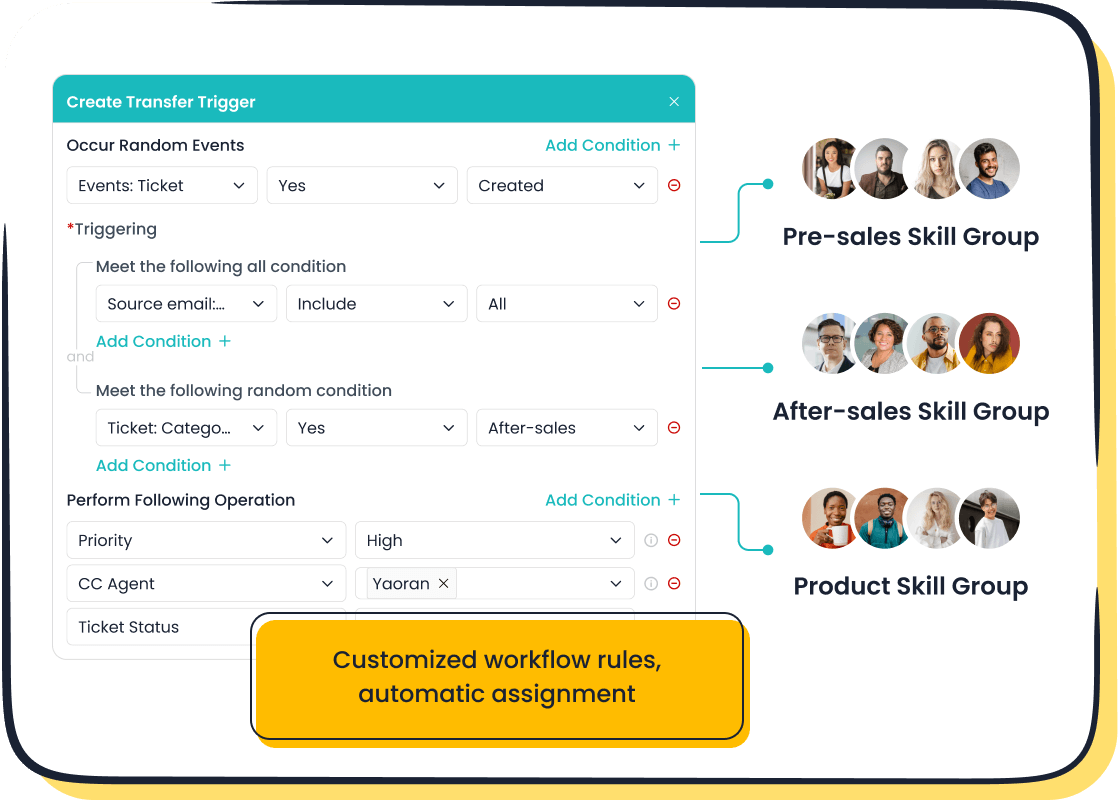
Manually assigning tickets is a major bottleneck. It creates delays and often leads to an uneven workload distribution, where some agents are overwhelmed while others are underutilized. Automating this process is one of the most impactful workload management strategies you can adopt. It ensures tickets reach the right person quickly, which can reduce first response times by 35-45%.
Setting Up Rules-Based Automation
You can set up rules-based automation to manage your team’s workflow. This process uses triggers and actions to sort and assign tickets without manual intervention. A trigger is an event, like a new ticket arriving from a specific email address. An action is what the system does next, such as assigning it to a particular agent.
The Sobot Ticketing System simplifies this with its Automatic Assignment feature. You can create custom rules to improve your workload distribution. For example:
- Keyword Routing: Assign tickets containing the word "refund" directly to the billing team.
- Channel-Based Assignment: Route all tickets from voicemail to agents skilled in voice support.
- Skill-Based Routing: Send technical questions to your product experts.
You also need to prioritize tickets. The Set Priority feature in Sobot lets you classify tickets based on urgency. You can define priority levels using your Service Level Agreements (SLAs) or customer value. For instance, you can automatically label tickets from enterprise customers as "High Priority." This ensures your team addresses critical issues first and is a core part of smart capacity planning.
Implementing Workload Balancing Strategies
Effective workload distribution is about more than just speed; it's about fairness. Implementing workload balancing strategies prevents agent burnout and boosts team morale. When your team sees that tasks are distributed evenly, it builds trust and creates a more supportive environment. This requires good capacity planning to understand what your team can handle.
Did You Know? A balanced workload makes team members feel understood and supported. This leads to better collaboration, higher retention, and a significant reduction in stress-related absenteeism.
There are several workload balancing strategies you can automate:
- Round-Robin Assignment: Distribute tickets evenly among available agents in a cyclical order.
- Least-Busy Agent: Assign new tickets to the agent with the fewest open tickets.
- Workload Caps: Set a maximum number of tickets an agent can have at one time to prevent overload.
These workload management strategies ensure no single team member is buried in tickets. Proper capacity planning and automated workload distribution create a system where everyone contributes fairly, leading to a happier and more productive team.
Tip 4: Leverage AI Chatbots for Instant Support

You can significantly reduce your team's workload by offering instant, automated support. AI chatbots provide 24/7 availability, serving customers across different time zones without delay. Modern AI tools can manage up to 80% of routine customer inquiries without any human help. This automation frees your agents to focus on issues that require a human touch, boosting overall team efficiency and customer engagement.
Identifying Ideal Use Cases for a Chatbot
To get the most from a chatbot, you should identify the right tasks for it to handle. Start with high-volume, repetitive questions that have clear, straightforward answers. This ensures the chatbot provides immediate value to both your customers and your team.
Sobot’s AI-powered Chatbot excels at resolving these common queries. Ideal use cases include:
- Order Tracking: Answering "Where is my order?" with real-time status updates.
- Policy Questions: Providing instant information on returns, shipping, and warranties.
- Billing Inquiries: Handling questions about invoices and payment methods.
- Basic Troubleshooting: Guiding users through simple, established solutions.
Ensuring a Smooth Chatbot-to-Agent Handoff
Sometimes, a customer needs to speak with a person. The transition from a chatbot to a live agent must be seamless to avoid frustration. A poor handoff can damage the customer experience and lower their engagement with your brand.
The single most important factor is to never make the customer repeat information that they already gave to the bot.
A well-designed system preserves the conversation's context. When a handoff occurs, the agent should receive the full chat transcript. This allows them to understand the issue immediately and pick up the conversation right where the bot left off. Sobot’s omnichannel platform ensures this smooth transition by providing agents with a unified workspace. The agent sees the entire chat history, creating a helpful and efficient experience for everyone involved.
Tip 5: Implement Batch Processing as One of Your Workload Management Strategies
Batch processing means grouping similar tasks together and doing them all at once. This method fights context switching. Your brain loses focus every time it jumps between different types of work. Research from the American Psychological Association shows this mental lag can slash productivity by up to 40%. By batching tasks, you help your team stay focused, reduce errors, and get more done.
How to Identify and Group Batchable Tasks
First, you need to find tasks that are suitable for batching. Look for repetitive work that requires the same mental mode. Your team can use technology to automatically identify and group these tasks. For example, Natural Language Processing (NLP) can scan incoming tickets and tag them by topic.
Common customer service tasks you can batch include:
- Ticket Management: Responding to a group of tickets all related to order tracking.
- Data Management: Processing new customer data or archiving old records in one session.
- Feedback Management: Analyzing all new survey responses from the past week at the same time.
Grouping these tasks allows your agents to develop a rhythm, leading to faster and more consistent work.
Scheduling 'Batching Blocks' for Your Team
Once you identify batchable tasks, you need to schedule time for them. Set aside specific "batching blocks" in your team's calendar. This creates dedicated, interruption-free time for deep focus. This is one of the most effective workload management strategies for reducing mental fatigue.
🧠 Did You Know? Cognitive neuroscientists call the cost of distractions a "switching tax." After an interruption, it can take an average of 23 minutes for your brain to fully regain focus on the original task.
By scheduling these blocks, you protect your team's attention. An agent handling all refund requests on Tuesday morning will be far more efficient than one who tackles them sporadically throughout the week. This approach keeps your team "in the zone," which boosts productivity, improves work quality, and lowers stress.
You can reduce customer service workload by implementing five key strategies. Build a knowledge base, use templates, automate routing, leverage chatbots, and batch similar tasks. These methods create effective workload management. When you support these strategies with an all-in-one platform like Sobot's Omnichannel Solution, you improve team motivation and focus. Digitizing your service this way can boost customer satisfaction by 33% and cut costs. This approach helps you reduce customer service workload and increase customer engagement, leading to better overall engagement.
Ready to transform your support team? Embark on Your Contact Journey.
FAQ
How can a small team start with these strategies?
You can start small. Begin by creating canned responses for your top 3-5 most common questions. This simple step immediately saves time. Next, you can identify content for a few essential knowledge base articles. These are effective workload management strategies for support teams of any size.
How does a ticketing system help balance workloads?
A ticketing system automates ticket assignment. You can use rules to distribute tasks evenly. For example, the Sobot Ticketing System uses features like Automatic Assignment to send tickets to the least-busy agent. This prevents agent burnout and ensures fairness.
Will using a chatbot make my service feel impersonal?
Not with the right setup. A chatbot handles simple, repetitive questions instantly. This frees up your human agents for complex issues. Sobot’s platform also ensures a smooth handoff from bot to agent, so customers never have to repeat themselves.
What is the first step to building a knowledge base?
You should analyze your support tickets first. Identify the questions your team answers most often. These topics are the perfect foundation for your first articles. Tools within the Sobot Ticketing System can help you categorize tickets to find these recurring themes quickly.
See Also
Achieve Superior Customer Satisfaction: Ten Live Chat Optimization Strategies
Selecting the Ideal Social Media Customer Service Software: Ten Essential Tips
Unlocking Peak Efficiency: The Power of AI in Customer Service Software
Implementing Top-Tier Quality Management Practices for Your Call Center
Elevating Call Center Performance Through Effective Monitoring Strategies

