Your Guide to Faster Customer Inquiry Responses


Slow response times directly threaten your customer retention. A fast response to inquiries, however, builds loyalty and revenue.
This guide provides actionable tips to transform your customer support. You can achieve fast customer responses by using automation for customer inquiries. Empower your agents with better support tools. Solutions from Sobot, like Sobot AI and the Sobot call center, help you deliver a superior response.
The Business Impact of Customer Service Response Time
A fast customer service response time is more than a nice-to-have; it is a critical driver of business success. When you improve your response speed, you directly impact your bottom line. This affects everything from customer loyalty to your team's well-being. Let's explore how a better customer service response time transforms your business.
Boost Customer Satisfaction and Loyalty
Quick responses show customers you value their time. This simple act builds trust and boosts customer satisfaction. In fact, 88% of customers say good service makes them more likely to buy again. Your speed in handling inquiries directly meets customer expectations for immediate support. A slow response can make customers feel ignored, damaging their perception of your brand.
A fast, helpful response turns a simple query into a positive customer experience. This builds the foundation for long-term loyalty.
Real-World Impact: The Michael Kors Story Luxury brand Michael Kors transformed its customer experience by focusing on speed. Using Sobot's all-in-one platform, they achieved an 83% reduction in response time. This led directly to a 95% customer satisfaction rate, proving that a faster response builds stronger customer relationships.
Increase Sales and Conversions
The speed of your response has a direct effect on sales. When a potential buyer has a question, a quick answer can be the final push they need to make a purchase.
- Responding to a lead within one hour makes them 7 times more likely to convert.
- A delay of just 10 minutes can decrease conversion chances significantly.
By providing instant support, you remove friction from the buying process. This improves the customer experience and captures sales you might otherwise lose. Michael Kors saw this firsthand, achieving a 20% increase in conversion rates after improving their response strategy with Sobot. A swift response turns interest into revenue.
Improve Team Efficiency and Reduce Burnout
Long customer service response times don't just frustrate customers; they also strain your support team. When agents face a constant backlog of inquiries, stress and burnout are inevitable. Automating simple tasks and streamlining workflows allows your team to focus on complex issues where their skills are most needed. This improves productivity and job satisfaction. An efficient system reduces the cognitive load on your agents, creating a more positive work environment. This helps you retain skilled support staff and deliver a consistently high-quality response.
7 Tips for Reducing Customer Service Response Time
Improving your customer service response time is achievable with the right strategies. These seven tips will help you streamline customer service, reduce wait times, and boost satisfaction. By focusing on automation, workflow optimization, and team empowerment, you can transform your customer support.
Tip 1: Automate Responses to Customer Inquiries
Automation is your first line of defense in reducing customer service response time. Many customer inquiries are repetitive and process-oriented. You can use technology to provide instant answers to these common questions. This frees up your agents to handle more complex issues.
Common customer inquiries perfect for automation include:
- Checking order status
- Updating account information
- Shipping and delivery information
- Return or refund policies
You can set up autoresponders to immediately acknowledge receipt of a customer's message. These autoresponders assure customers that their message was received and set expectations for the next response time. For even faster support, you can use an AI-powered chatbot.
How Sobot Helps: Sobot's AI-powered Chatbot provides 24/7 self-service, giving customers instant answers to their questions anytime. This tool handles a high volume of similar tickets, which helps you reduce response time and improve efficiency. You can set up autoresponders to manage customer expectations effectively.
Tip 2: Create a Library of Response Templates
Response templates, or canned responses, are pre-written answers to frequently asked questions. They allow your agents to provide quick, consistent, and accurate information. However, it's crucial to balance speed with a human touch. A robotic response can make customers feel unheard.
Follow these best practices to create effective templates:
- Personalize Each Response: Use the customer's name and reference specific details from their inquiry.
- Keep the Tone Human: Write in a conversational style and show empathy. Avoid jargon.
- State the Next Steps: Clearly explain what will happen next to reduce customer anxiety.
- Update Templates Regularly: Review and improve your templates based on customer feedback and performance data.
Templates should serve as a framework, not a rigid script. Encourage your agents to adapt them to fit the context of each conversation. This approach ensures you deliver quick email responses without sacrificing personalization.
Tip 3: Build a Self-Service Knowledge Base
Many customers prefer to find answers on their own. Research shows that 81% of customers try to resolve issues themselves before contacting a live representative. A comprehensive, easy-to-navigate knowledge base empowers them to do just that. This reduces the number of incoming inquiries and allows your team to focus on more complex problems.
A successful knowledge base should have these essential components:
| Component | Why It Matters |
|---|---|
| Powerful Search | Users need to find answers quickly with simple search terms. |
| Clear Structure | Information should be organized into logical categories. |
| Consistent Articles | Use standard formats like FAQs and step-by-step guides. |
| Feedback Loop | Allow users to rate articles so you can identify knowledge gaps. |
| Analytics | Track search queries and article views to understand what users need. |
Building a self-service portal is a proactive step toward improving customer response time. It provides immediate support and reduces the strain on your team.
Tip 4: Prioritize and Route Customer Service Response Times
Not all customer inquiries carry the same weight. To improve response times effectively, you need a system to sort and prioritize emails and other messages. This ensures your team addresses the most critical issues first. You can prioritize tickets based on:
- Urgency: Issues preventing a purchase, like a payment failure, should be at the top of the list.
- Customer Value: High-value or repeat customers may warrant a faster response to ensure retention.
- Sentiment: A customer expressing negative sentiment needs quick attention to de-escalate the situation.
Automated routing systems direct tickets to the right agent or department based on predefined rules. This eliminates manual sorting, reduces errors, and ensures compliance with your Service Level Agreement (SLA). An SLA defines the expected customer support response time, and automation helps you meet it.
How Sobot Helps: Sobot's Ticketing System automates workflows to sort and prioritize emails and other customer inquiries. You can set rules to manage your Service Level Agreement (SLA) and ensure that urgent tickets get the fastest first response time. This system helps you meet your SLA targets and improve your average first response time.
Tip 5: Streamline Workflows with a Unified Workspace
Agents waste valuable time switching between different applications to gather customer information. A unified workspace, or omnichannel solution, brings all communication channels into a single interface. This gives your agents a complete view of the customer's history, regardless of whether they reached out via email, chat, or phone.
The benefits of a unified workspace include:
- Boosted Productivity: Agents can manage all customer inquiries from one screen, leading to a better next response time.
- Enhanced Efficiency: A centralized view eliminates duplicate work and simplifies collaboration.
- Personalized Experiences: Full context allows agents to provide more tailored and effective support.
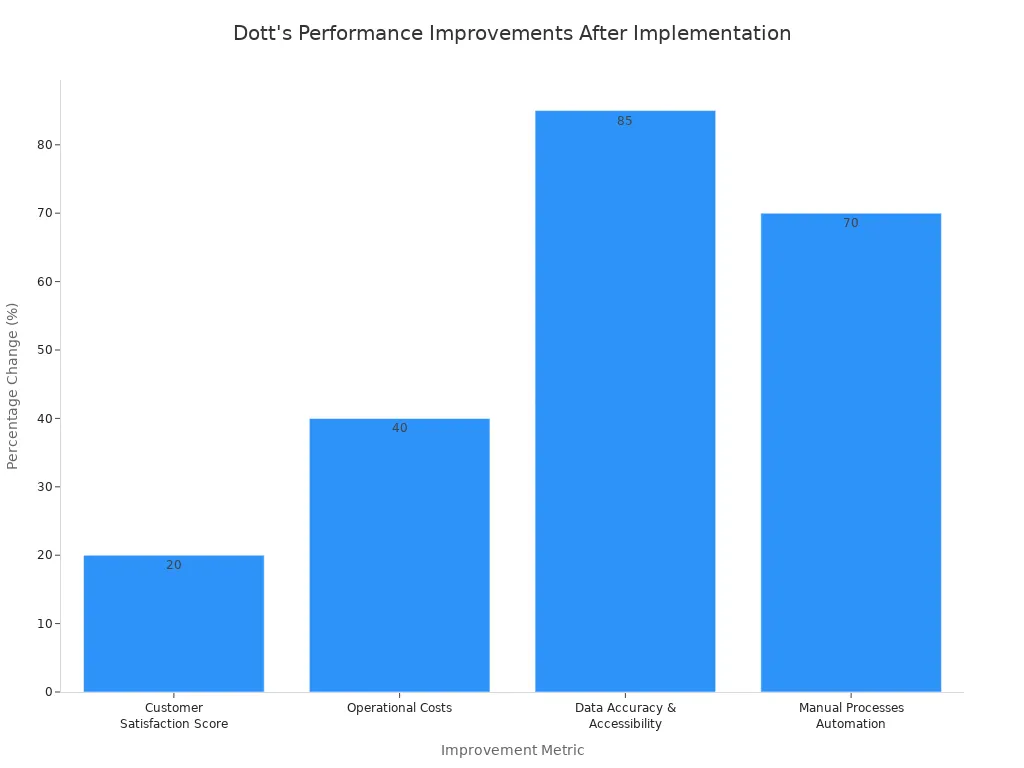
For example, a company that adopted a unified workspace saw a 20% increase in customer satisfaction and a 40% decrease in operational costs.
How Sobot Helps: Sobot's Omnichannel Solution creates a unified workspace for your team. It integrates channels like voice, chat, and email, giving agents full context without switching apps. The Sobot Voice/Call Center uses smart call routing to direct customers to the right agent, further improving the customer support response time. This integration is key to providing quick responses and a seamless experience.

Tip 6: Invest in Continuous Team Training
Your tools are only as good as the people using them. Continuous training is essential for keeping your team's skills sharp and their product knowledge up-to-date. Well-trained agents are more confident and efficient, which directly impacts first response time and first-contact resolution.
Your training program should cover:
- Soft Skills: Focus on empathy, active listening, and problem-solving.
- Product Knowledge: Keep your team informed about new products, features, and updates.
- Tool Proficiency: Ensure agents know how to use your support software effectively.
- Conflict Resolution: Use role-playing scenarios to practice handling difficult situations, like dealing with an angry customer or addressing a billing discrepancy.
Ongoing training empowers your agents to handle inquiries with confidence, leading to a better customer support response time and higher customer satisfaction.
Tip 7: Track Metrics for Improving Customer Response Time
You cannot improve what you do not measure. Tracking key performance indicators (KPIs) is one of the most important tips for improving customer response time. Data gives you clear insights into your team's performance and highlights areas for improvement.
Key metrics to track include:
- Average First Response Time (ART): This measures the average time it takes for an agent to send the first response to a customer. A low average first response time is a strong indicator of an efficient team.
- Average Handle Time (AHT): This is the average duration of a single customer interaction, from start to finish. The industry standard is around six minutes.
- First Contact Resolution (FCR): This metric tracks the percentage of inquiries resolved in a single interaction.
Regularly analyze these metrics to identify patterns. For example, a high average first response time on a specific channel may indicate a need for more resources. Use this data to refine your workflows, adjust staffing, and make informed decisions that lead to a better customer support response time.
You can achieve a faster response by focusing on three key areas. Use automation to handle simple inquiries. Optimize processes with unified workspaces and smart routing. Empower your team with training and self-service support tools. The ultimate goal is to blend a quick response with quality, empathetic support. This balance builds lasting customer relationships. An all-in-one platform provides the customer support tools for a better response. Explore how Sobot can help you deliver a superior response and Embark on Your Contact Journey.
FAQ
What is a good customer service response time?
A good customer service response time varies by channel. For live chat, aim for under one minute. For email, you should respond within one hour to stay competitive. The key is to meet or exceed customer expectations for a quick and helpful answer.
How can I improve my team's response time?
You can improve response times by using a few key strategies.
- Automate answers to common questions.
- Create a self-service knowledge base.
- Use templates for frequent inquiries.
- Prioritize tickets based on urgency.
These steps help your team work more efficiently.
What tools help reduce customer response time?
Tools like AI chatbots provide instant, 24/7 support. A unified omnichannel platform also helps. It brings all customer conversations into one place. This gives your agents the context they need to resolve issues quickly without switching between different apps.
See Also
Achieve Peak Customer Happiness: Ten Live Chat Satisfaction Strategies
Optimize Your Always-On Live Chat for Maximum Operational Efficiency
Become a Live Chat Expert: Elevating Your Customer Support Game
Effective Management: A Guide for Live Chat Agent Performance
Unlock Salesforce Live Chat Power: Mastering Pre-Chat Form Utilization

