Comparing Cloud Based Service Desk Solutions for Customer Communication

You see cloud based service desk solutions leading the way in customer communication, especially as adoption rates in North America reach 70% in 2024. Sobot stands out as a cloud service provider with advanced cloud services that unify channels, automate tasks, and boost efficiency. Omnichannel support, automation, and integration drive modern cloud computing. The table below shows rapid growth in cloud based helpdesk adoption worldwide.
| Region | Adoption Rate (%) | Year |
|---|---|---|
| North America | 70 | 2024 |
| Asia-Pacific | 67 | 2024 |
| Global Install Base | 35 (NA), 29 (EU), 25 (APAC), 11 (MEA) | 2024 |
| New Installations | 57 (Cloud), 43 (On-premise) | 2023 |
| AI Implementation | 44 | 2023 |
| Annual Growth Rate | 15 | 2023 |
Leading Cloud Based Service Desk Solutions
Top Platforms Overview
You have many choices when you look for a cloud based service desk. Some well-known platforms include Zendesk, Freshdesk, and Sobot. Each platform helps you manage customer communication in the cloud. These cloud services let you handle support tickets, live chat, and phone calls from one place. You can use these services to help your team respond faster and keep customers happy.
Here is a quick look at some top platforms:
| Platform | Omnichannel Support | Automation | Integration | AI Features |
|---|---|---|---|---|
| Sobot | Yes | Yes | Yes | Yes |
| Zendesk | Yes | Yes | Yes | Yes |
| Freshdesk | Yes | Yes | Yes | Yes |
You can see that most cloud based service desk platforms offer similar features. The real difference comes from how easy they are to use and how well they fit your business.
Key Differentiators for Customer Communication
You want a platform that makes customer communication simple and smooth. Sobot stands out because it brings all your channels together in one place. You can talk to customers by email, chat, or phone without switching between tools. Sobot’s cloud services use automation to assign tickets, send reminders, and give quick answers. This saves your team time and helps you meet your service goals.
Sobot also gives you smart tools like AI chatbots and detailed reports. These services help you understand what your customers need and how your team performs. With Sobot, you get a cloud based service desk that grows with your business and keeps your customers satisfied.
What Is a Cloud Based Helpdesk?
Core Features and Benefits
A cloud based helpdesk is a customer service tool that you access through the internet. You do not need to install special hardware or manage servers. You can log in from any device, anywhere. This makes it easy for your team to help customers, even if they work from different locations.
You get many benefits when you use a cloud based helpdesk. The table below shows the main features and why they matter:
| Feature/Benefit | Description |
|---|---|
| Cost-effectiveness | You avoid hardware and IT service fees. This is great for small teams. |
| Ease of maintenance | The provider handles updates and fixes. Your team saves time and effort. |
| Flexibility | You can work from anywhere with internet. Remote and mobile teams benefit. |
You do not need to worry about software updates. The provider takes care of everything. You can focus on helping your customers.
Why Cloud Based Solutions Matter for Customer Contact
You want your customers to reach you easily. A cloud based solution gives you the tools to do this. You can scale your service up or down as your business changes. You only pay for what you use. You do not need to spend a lot of money at the start.
Tip: Cloud based solutions let you add or remove users quickly. This helps you adjust to busy seasons or slow periods.
You also get better accessibility. Your team can log in from any device with internet. This is perfect if you have remote workers or offices in different places. Customers get faster answers because your team can respond from anywhere.
You can see the difference in the table below:
| Aspect | Cloud-based Solutions | On-Premises Solutions |
|---|---|---|
| Scalability | Easy to scale up or down | Needs more time and money to scale |
| Cost-Effectiveness | Pay-as-you-go, no big upfront costs | High upfront and ongoing costs |
| Accessibility | Use from anywhere with internet | Usually only at the office |
A cloud based helpdesk helps you serve your customers better. You save money, work faster, and give your team more freedom.
Sobot Ticketing System in Cloud Based Service Desk

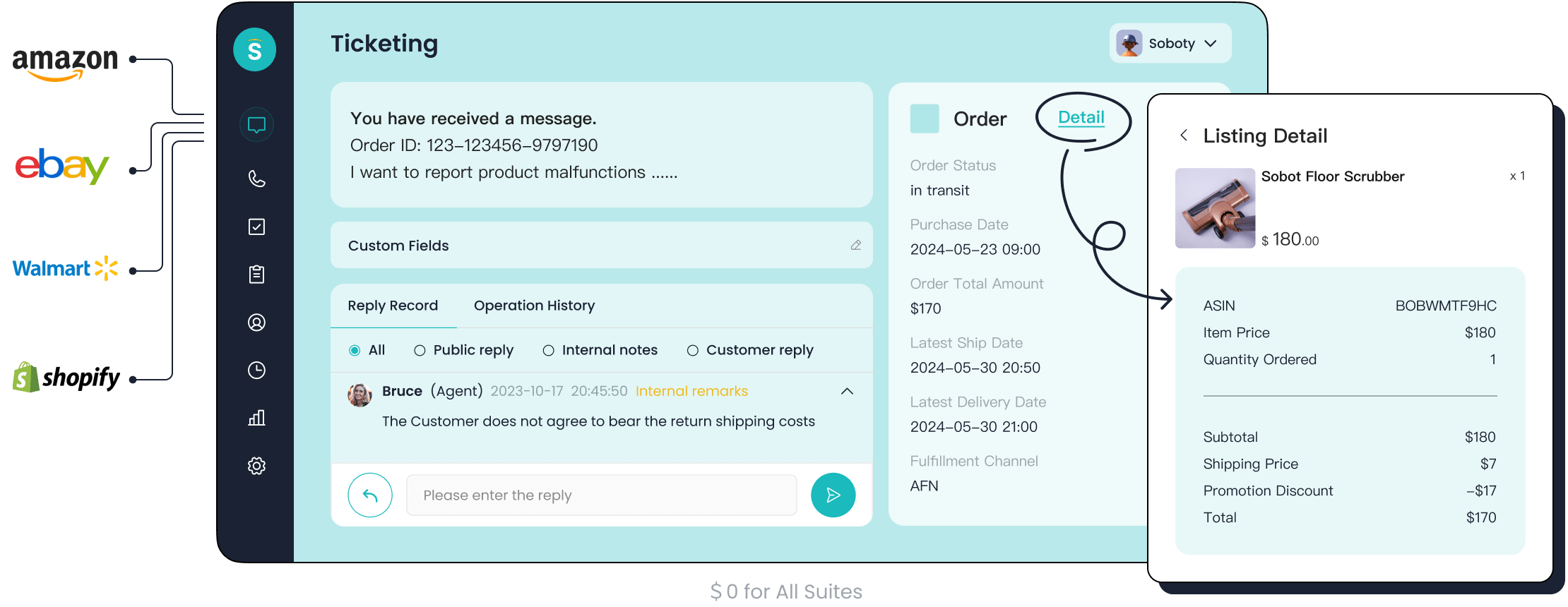
Unified Omnichannel Management
You want your customer communication to be simple and effective. Sobot’s ticketing system gives you a unified platform that brings all your channels together. You can manage conversations from email, live chat, voice calls, WhatsApp, and social media in one place. This means you do not need to switch between different tools or screens. Your team can see every customer message, no matter where it comes from.
Sobot’s cloud-based servers power this unified experience. You get:
- AI chatbots that handle common questions and give instant answers.
- Live chat for real-time support when customers need a human touch.
- A cloud call center with voice and voicebot capabilities for phone support.
- A ticketing system that organizes every case and keeps track of progress.
- WhatsApp Business API and other messaging integrations for global reach.
- Omnichannel support across social media, email, SMS, and more.
This approach helps you deliver a seamless experience. Customers can start a conversation on one channel and continue on another without repeating themselves. Your agents see the full history in one view. Sobot’s cloud-based servers ensure high accessibility, so your team can work from anywhere. You do not need to worry about hardware or maintenance. The system stays up and running, with 99.99% stability.
Automation and SLA Management
You want your team to work smarter, not harder. Sobot’s ticketing system uses automation to handle routine tasks. AI assigns tickets to the right agent, sends reminders, and even suggests answers. This lets your agents focus on complex issues that need a human touch.
Sobot’s cloud-based servers make automation possible at scale. You can set custom rules for ticket routing and escalation. The system tracks response and resolution times, helping you meet your service goals. SLA management keeps your team on track and ensures customers get timely help.
AI-driven automation boosts productivity. Businesses using multichannel platforms like Sobot report a 94% increase in agent productivity. Issue resolution speeds improve by 92%. When you use AI-powered chatbots, you can see a 95% reduction in response times. Customer satisfaction rises by 25%, and operational costs drop by 30%. These numbers show how cloud-based service management transforms your support operations.
Sobot’s cloud-based servers keep your data secure and your services reliable. You get trusted analytics and smart notifications. Managers can monitor performance and make quick decisions. The system supports multilingual tickets, so you can serve customers in their preferred language. You also get features like canned responses, ticket merging, and time-triggered actions. These tools help you deliver consistent, high-quality service.
Real-World Success: OPPO Case Study
You might wonder how these features work in real life. OPPO, a global leader in smart devices, chose Sobot’s cloud based service desk to improve customer communication. During busy shopping seasons, OPPO faced a surge in customer inquiries. They needed a solution that could handle high volumes without sacrificing quality.
OPPO used Sobot’s chatbot and ticketing system to manage repetitive questions. The chatbot resolved 83% of queries automatically. Human agents focused on complex cases. Sobot’s cloud-based servers allowed OPPO to integrate all customer channels and business systems. Agents accessed customer data quickly and gave faster answers.
The results speak for themselves:
- OPPO achieved a 93% Customer Satisfaction Score (CSAT) in conversational support.
- The company saw a 94% positive feedback rate from customers.
- Repurchase rates increased by 57% after using Sobot’s cloud-based service management.
- Maintenance efforts for the knowledge base dropped by 90%.
Sobot’s cloud-based servers provided the reliability and security OPPO needed. The system handled millions of interactions daily without downtime. OPPO’s team worked from different locations, but everyone accessed the same up-to-date information. This level of accessibility made a big difference in customer satisfaction.
You can see how Sobot’s cloud based helpdesk and cloud-based service management help companies like OPPO deliver better service, save time, and build stronger customer relationships. Sobot’s services give you the tools to grow your business and keep your customers happy.
Comparing Cloud Based Solution Features
Omnichannel Support
You want your customers to reach you on their favorite channels. Omnichannel support lets you connect with them through WhatsApp, email, live chat, and social media. Sobot’s cloud-based servers bring all these channels together. Your team sees every conversation in one place. Customers switch between channels without repeating information. This seamless experience boosts satisfaction and loyalty. Personalized interactions based on customer data improve engagement. Real-time support and proactive engagement help you deliver better services.
Here is a comparison of omnichannel features:
| Feature | Sobot | ControlHippo |
|---|---|---|
| Supported Channels | WhatsApp, email, live chat | WhatsApp, email, live chat |
| Integration Depth | Focuses on automation | Smooth integration with CRM |
| Customer Engagement | Basic automation | Predictive insights, chat summarization |
Tip: Omnichannel support on cloud-based servers helps your team respond quickly and keeps customers happy.
Integration and Automation
You need your tools to work together. Integration connects your cloud services with CRM, e-commerce, and other platforms. Automation saves time by handling routine tasks. Sobot’s cloud-based servers automate ticket assignment, responses, and categorization. AI enhancements optimize support and improve service experiences. Self-service features let customers solve common issues on their own.
| Capability | Description |
|---|---|
| Self-service features | Users resolve issues independently, reducing IT workload. |
| Automation capabilities | Automate ticket categorization and responses, streamlining workflows. |
| AI enhancements | Optimize support functions and improve service quality. |
| Analytics and reporting | Data analysis enables proactive decisions and performance tracking. |
Many businesses face integration challenges. Fragmented systems and legacy platforms can cause delays. High implementation costs and API management needs may require investment in integration platforms. Sobot’s cloud-based servers help you overcome these challenges by providing smooth integration and reliable automation.
Analytics and Reporting
You want to know how your team performs. Analytics and reporting tools on cloud-based servers give you real-time insights. You monitor performance and spot trends. Built-in reporting tools reveal pain points and opportunities for improvement. Proactive identification of issues helps you resolve them before they escalate.
- Built-in reporting tools provide insights into key metrics for service quality improvement.
- Analytics reveal pain points and opportunities for process enhancement.
- Proactive identification of issues helps in resolving them before escalation.
Advanced analytics tools like Yellowfin, ThoughtSpot, and Oracle Analytics Cloud offer interactive dashboards, collaborative analytics, and AI-powered suggestions. These tools integrate data from multiple sources, helping you make better decisions and improve communication strategies. Sobot’s cloud-based servers ensure your analytics are reliable and accessible.
Pros and Cons of Cloud Based Service Desk
Advantages for Customer Experience
You gain many benefits when you use cloud-based servers for your service desk. These servers help you save costs because you do not need to hire a full-time IT team or buy expensive hardware. You can access your data from anywhere, which supports a remote workforce and helps your team stay flexible. Cloud-based servers also give you improved customer profiles, so you can see notes and photos that help you serve customers better.
You can use performance dashboards to review your team’s work and coach them for better results. Scheduling and dispatch tools help you manage field teams and improve efficiency. Automatic security updates keep your software safe with little effort. Cloud-based servers also make it easy for your team to collaborate and share information in real time.
Here is a table that shows the main advantages:
| Advantage | Description |
|---|---|
| Cost Savings | Businesses can save significantly by reducing the need for full-time IT staff and associated costs. |
| Accessibility | Employees can access data from anywhere, enhancing flexibility and remote work capabilities. |
| Improved Customer Profiles | Robust profiles with notes and photos facilitate better service and customer interaction. |
| Performance Dashboards | Dashboards help in reviewing and coaching customer service teams effectively. |
| Scheduling and Dispatch Tools | Tools that optimize field team operations, improving efficiency. |
| Automatic Security Updates | Ensures software remains secure with minimal effort required from users. |
| Collaboration and Communication | Greater collaboration between teams with simultaneous access to data. |
Cloud-based servers support business continuity by reducing unplanned downtime. You can keep your services running even if your office faces problems.
Common Challenges and Risks
You may face some challenges when you use cloud-based servers for your service desk. Integration complexities can slow down your setup. Some team members may resist change, which can make training harder. Costs can still be a barrier for some businesses, especially if you need advanced features.
Security and data privacy are important concerns. Cloud-based servers must protect your information from threats. Regulatory compliance can also be a challenge, especially if you work in a field with strict rules. Unplanned downtime can happen if your internet connection fails, which can stop your services until you fix the problem.
The chart below shows the most common challenges and risks:
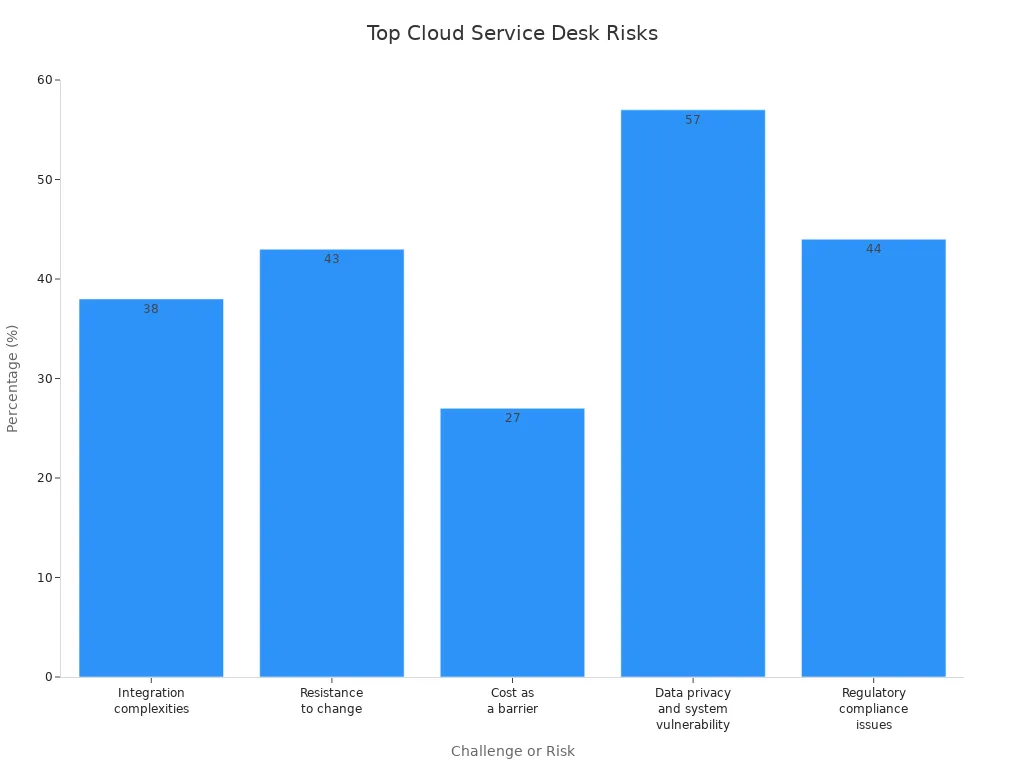
Here is a table with more details:
| Challenge/Risk | Percentage (%) |
|---|---|
| Integration complexities | 38 |
| Resistance to change | 43 |
| Cost as a barrier | 27 |
| Data privacy and system vulnerability | 57 |
| Regulatory compliance issues | 44 |
| Systems and data security risks | 63.1 |
| Legal and regulatory compliance issues | 25.2 |
You should always check your cloud services provider’s security and compliance standards. This helps you avoid risks and keep your services reliable.
Security and Reliability in Cloud-Based Service Management
Data Privacy and Compliance
You need to protect customer information when you use cloud-based service management. Data security is a top priority. Many countries have strict rules for how you handle data. For example, GDPR in Europe, CCPA in California, HIPAA for healthcare, and PCI-DSS for payment data all set high standards. These laws help prevent data breaches and keep customer trust. If you do not follow these rules, you can face large fines and damage your reputation.
Leading vendors use strong cybersecurity protections. They record interactions, monitor risks, and use privacy tools to meet regulations. Some companies, like Cisco and IBM, use end-to-end encryption and data loss prevention. Others, such as PCI Pal and Smarsh, focus on secure transactions and archiving. You should look for platforms that offer these features.
Here are some key measures for security and recovery in cloud-based service management:
| Key Measures | Description |
|---|---|
| Quality of Service (QoS) Guarantee | Ensures that the service meets certain performance standards, which is critical for reliability. |
| Data Protection and Metadata Ownership | Protects sensitive information and clarifies ownership, essential for compliance and security. |
| Contract Termination | Provides clarity on how contracts can be ended, which is important for risk management. |
| Data Export Functionality | Allows for the transfer of data between providers, reducing vendor lock-in risks. |
You should always check if your provider supports these standards. This helps you avoid data breach risks and unplanned downtime.
Vendor Lock-In and Internet Dependency
You may face challenges when you depend on one cloud infrastructure provider. Vendor lock-in happens when you cannot move your data or services easily. This can make it hard to switch providers if you are not happy. Many people do not know about proprietary standards that limit portability. Moving databases between vendors can be difficult, especially during migration.
Here are some risks you should know:
- Vendor lock-in can stop you from changing providers.
- Proprietary systems can make it hard to share data.
- If your provider changes their product or goes out of business, you may lose support.
- Prices can rise if you cannot switch easily.
- Internet dependency can cause unplanned downtime if your connection fails.
You can reduce these risks by taking smart steps:
- Evaluate cloud services before you choose one.
- Make sure you can move your data if needed.
- Keep backups so you can host data elsewhere.
- Use a hybrid cloud infrastructure or multicloud strategy to avoid full dependence on one vendor.
- Read contracts carefully and plan for entry and exit.
By following these steps, you can keep your cloud-based service management reliable and secure. You will be ready for any changes and can avoid long periods of unplanned downtime.
Choosing the Right Cloud Services for Your Business
Assessing Needs and Priorities
You need to start by understanding what your business wants from cloud-based service management. Every company has different needs. You should look at the main features that matter most for your team and your customers. The table below shows important criteria you should consider:
| Criteria | Description |
|---|---|
| Multi-Channel Ticketing | Handles requests from email, chat, phone, web forms, and social media. |
| Automation and Workflow | Reduces manual work with auto-ticket assignment and smart routing. |
| Self-Service Portal | Lets users solve common issues on their own, lowering ticket volume. |
| Reporting and Analytics | Gives dashboards to track key numbers and improve over time. |
| AI-Powered Capabilities | Uses AI to spot problems and suggest answers, making responses faster. |
| Integration Capabilities | Works with your current tools for a complete view of operations. |
| Scalability | Grows with your business without slowing down. |
| Security and Compliance | Meets rules like GDPR and keeps data safe with encryption and logs. |
| ITIL Alignment | Follows best practices for smooth workflows and steady service. |
| User Experience (UX) | Easy to use with a clear interface and mobile access. |
To choose the right solution, follow these steps:
- Write down the features you need and rank them by importance.
- Talk to your team and other stakeholders to gather all needs.
- Make a list of must-have features to guide your search.
- Share this list with leaders to set clear goals and expectations.
- Pick a vendor that updates its services often to keep up with changes.
Tip: Involve your remote workforce in these talks to make sure the solution fits everyone.
Cost, Scalability, and Support
You want to get the most value from your cloud-based service management. Look at how different providers handle costs, growth, and support. Many cloud services use a pay-as-you-go service model. This means you only pay for what you use, which helps you manage costs and avoid big upfront payments. You can start small and add more users or features as your business grows. This flexibility gives you real cost savings.
Cloud-based service management lets you scale up or down quickly. You do not need to buy new hardware or worry about long setup times. You can support a growing team or handle busy seasons with ease. Fast deployment means you get started without delays.
Support matters too. Choose a provider that offers strong customer support and regular updates. Good support helps you solve problems fast and keeps your services running smoothly.
Note: Always check if the provider offers training and resources for your team. This helps everyone use the system well and boosts success.
You have seen how a cloud based helpdesk can transform your customer communication. Sobot stands out with unified omnichannel support, upgraded AI chatbots, and strong integration of voice and digital channels. The table below shows Sobot’s performance:
| Metric | Sobot Performance |
|---|---|
| Resolution Rate | 45% increase |
| Chatbot Direct Answering Rate | 35% boost |
| Customer Satisfaction (CSAT) | 95% achieved |
| Escalation Rate | Reduced to ~30% |
To choose the right solution, focus on seamless support, essential features, and a pay-as-you-go service. Always check for cybersecurity protections to prevent data breaches. Analyze your needs, test integration, and remember that strong security helps avoid a data breach.
FAQ
What is a cloud based service desk?
A cloud based service desk is a tool you access online. You use it to manage customer support, track tickets, and communicate with customers from anywhere. You do not need to install software or buy special hardware.
How does a cloud based service desk improve customer communication?
You get all your customer messages in one place. You can answer emails, chats, and calls without switching tools. Automation helps you reply faster. This makes your customer communication smoother and more efficient.
Can I integrate a cloud based service desk with other business tools?
Yes! You can connect your cloud based service desk with CRM, e-commerce, and other platforms. This helps you see all customer data in one view and work more efficiently.
Is my data safe with a cloud based service desk?
Most cloud based service desk providers use strong security. You get data encryption, regular backups, and access controls. Always check your provider’s security certifications and privacy policies for extra peace of mind.
What are the main benefits of using a cloud based service desk like Sobot?
You save money, work from anywhere, and scale your support as your business grows. Sobot gives you omnichannel support, automation, and analytics. You improve customer satisfaction and make your team more productive.
See Also
Best Reviews of Cloud Contact Center Services for 2024
Comparative Analysis of Leading Voice of Customer Tools
Evaluating AI Solutions for Enterprise Call Centers

