Top 5 Outbound Calling Tools for Small Business


Small businesses often struggle with sales outreach. Your business needs the right tools to grow. The right call center software provides powerful solutions for your business. Understanding the outbound call meaning helps your business choose the best software. We reviewed the best outbound call tracking platforms for your business.
Here are the top software choices for your business:
- Sobot: A great solution from the Sobot call center with many features.
- RingCentral: This software offers unique features for your business.
- Aircall: This small business call center software has key features.
- Dialpad: Sobot AI powers similar features in this call center software.
- Comparison: We compare software features to help your business. Every business has unique needs, and these features help businesses succeed.
Understanding the Outbound Call Meaning
You need to understand the outbound call meaning to grow your business. An outbound call is any phone call your business makes to a customer or lead. Your team initiates the contact. This proactive approach is different from inbound calls, where customers call your business. The right software makes this process simple and effective for your business. Many businesses use this strategy to find new customers and increase sales.
Why Outbound Calling Matters
Outbound calling is a powerful tool for your business. It directly generates a large portion of sales opportunities. Many successful businesses build their sales pipeline with outbound strategies. Good software helps your business track these efforts. The data below shows how outbound efforts compare to inbound ones for creating a sales pipeline.
| Strategy | Pipeline Contribution |
|---|---|
| Inbound | ~44% |
| Outbound | ~53% |
This shows that outbound calling is a key driver of growth. Your business can reach more people and create more chances to sell. An effective outbound call center uses specialized software to manage these calls efficiently. Understanding the outbound call meaning helps you see its value.
Types of Outbound Calls
The outbound call meaning covers several types of calls. They are mainly grouped into cold calls and warm calls. Your business strategy will determine which type you use. The right software can help your team manage both types.
Cold Calls: You make these calls to new prospects who have not shown prior interest. The goal is to introduce your business and generate new leads. Examples include calls for market research or to invite people to an event.
Warm Calls: You make these calls to people who already know your business. They may have signed up for a newsletter or requested information. Examples include appointment reminders, feedback requests, and follow-up calls to interested leads.
Choosing the right call type helps your business connect with customers effectively.
Sobot Voice for Sales: Integrated Call Center Software

Your business can use Sobot Voice for Sales to boost telesales conversions. This comprehensive call center software is a platform designed for outbound sales success. The software provides powerful solutions for your business. This solution helps your team connect with customers anywhere. It is a reliable and easy-to-use call center software.
Key Features
You need to know the key features of this call center software. The software has many features that improve rep productivity. These key features help your business grow. Sobot's call center features are built on a stable cloud platform.
- Global Calling: You can reach customers worldwide with global phone numbers. This feature helps your business build trust with local caller IDs.
- AI-Powered Monitoring: The software uses AI for real-time call monitoring. This helps you check call quality and gives your team support. These features reduce customer complaints.
- Bulk Dialing: Your team can increase its outbound productivity. This feature automates dialing tasks and boosts call volume. The software provides powerful analytics.
Outbound Call Tracking Software
This platform is an effective outbound call tracking software. Your business gets clear data on every call. The software provides real-time analytics to track performance. You can monitor your lead-to-opportunity conversions easily. This call center software integrates with major CRMs like Salesforce and HubSpot in under 30 minutes. This makes the software a great choice for your business.
Best For
This call center software is best for any business that wants to scale its sales outreach. The software acts as one of the best sales enablement platforms available. If your business needs to see a quick return on investment, this is one of the best call center software solutions. Almost 90% of sales teams see ROI within six months. This solution offers many features to help your business succeed.
RingCentral: All-in-One Communication
Your business can explore RingCentral as a unified communication software. This platform combines phone, message, and video features into one application. It is a popular call center software for businesses that need a comprehensive solution. This cloud software offers many features to help your business communicate effectively. The software provides your business with a single hub for all interactions. This call center software is designed to support a growing business.
Key Features
You should understand the key features of this call center software. RingCentral offers many features in its different plans. The software has a popular middle-tier option for an established business. This plan includes advanced call handling features. You get automatic call recording and call monitoring features. The key features also include integrations with apps like Salesforce. This software allows video meetings for up to 100 people. These features help your business improve team productivity. However, some features like device-specific analytics are not included in all plans. This call center software provides many useful tools for your business.
Pricing
You need to review the pricing for this call center software. The cost depends on the plan and the number of users. For a small business, understanding the pricing structure is important.
- The Ultra plan for this software costs $45 per user each month. You can pay annually to reduce the cost to $35 per user each month.
- The call center software has public pricing for up to 100 users. Your business needs a custom quote for larger teams.
- AI-powered entry-level solutions start at $65.
This pricing information helps your business choose the right solution.
Best For
This software is best for a business seeking an all-in-one communication solution. If your business needs phone, video, and messaging features in one platform, this is a good choice. The software offers scalable solutions for a growing business. The key features and cloud platform make this a flexible call center software. It provides a strong set of features for a business that wants to unify its communication tools.
Aircall: Cloud-Based Calling for Sales Teams
Your business can use Aircall as a dedicated cloud-based solution for voice communication. This popular call center software is designed specifically for sales and support teams. The software helps your business improve customer conversations. As a focused cloud-based solution, it aims to be both powerful and easy to use. This call center software integrates smoothly into your existing workflows.
Key Features
You should understand the key features of this software. The software provides many features to improve team productivity. These key features help your business manage calls effectively. Aircall's features are built on a flexible cloud platform.
- Core Calling Features: You get essential features like IVR (Interactive Voice Response), call queuing, and call recording. These features help you manage inbound and outbound calls.
- Collaboration Tools: The software includes features like a shared inbox for team visibility. This helps your business handle customer inquiries together.
- Integrations: This call center software connects with over 50 popular business tools, including major CRMs. These features ensure the software works with your other systems.
The platform offers many useful features. The key features of this software make it a strong choice for your business.
Pricing
You need to review the pricing for this call center software. The software offers several solutions for your business, allowing you to choose the features you need. The cost depends on your selected plan and the number of licenses for your business.
| Plan | Monthly (Per License) | Annual (Per License) | Key Features |
|---|---|---|---|
| Essential | $30 | $20 | Unlimited US/Canada calls, IVR, call queuing, basic analytics. |
| Professional | $50 | $30 | All Essential features, plus call monitoring and Salesforce integration. |
| Custom | Contact Sales | Contact Sales | All Professional features, plus custom onboarding and priority support. |
These different solutions help your business find the right fit.
Best For
This software is an excellent solution for a business that needs a straightforward, user-friendly calling platform. If your business prioritizes ease of use and strong CRM integrations, this call center software is a great fit. The cloud software provides essential features without being overly complex, making it a valuable solution for teams focused on voice communication.
Dialpad: AI-Powered Sales Intelligence
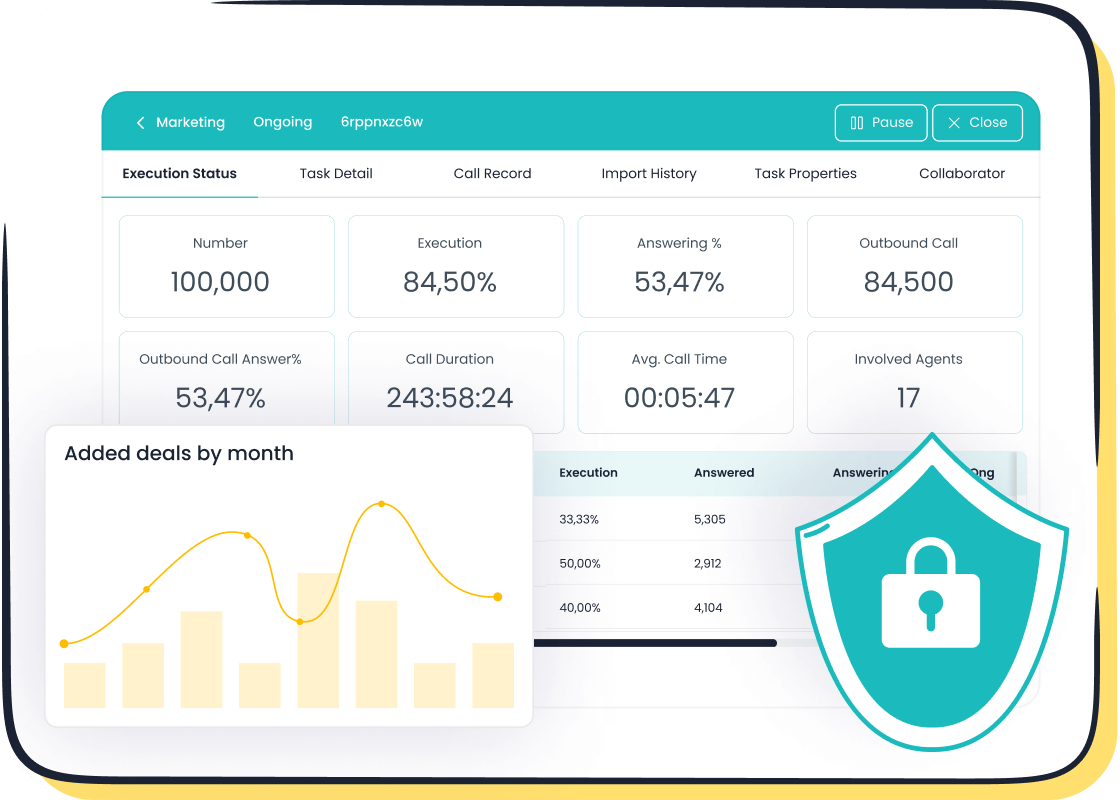
Your business can leverage Dialpad for its powerful AI-driven sales intelligence features. This call center software is a modern cloud communications platform. It combines voice, messaging, and video into a single application. The software uses conversational AI to help your business unlock insights from every conversation. This call center software offers many features to improve how your business operates. The software is a strong solution for any business looking to enhance its sales process with data.
Key Features
You should explore the key features of this advanced call center software. The software provides many unique features powered by artificial intelligence. These key features help your business automate tasks and guide your sales team.
- Real-Time Transcription and Coaching: The software transcribes calls in real-time. Its AI Sales Coach offers live suggestions to agents during calls. This feature helps your business train new hires and guide seasoned reps.
- Automated Post-Call Work: This call center software automates call logging and reporting. This reduces manual work for your team. The software also completes QA scorecards automatically.
- Sentiment Analysis: You can monitor customer sentiment live during calls. This allows managers to step in if a conversation turns negative. This feature helps your business protect its brand reputation.
- Opportunity Identification: The software's AI analyzes conversations to spot upsell and cross-sell opportunities. These features help your business maximize revenue from every interaction.
These key features make this software a powerful tool for your business.
Pricing
You need to understand the pricing for this call center software. The software offers different plans with various features. The cost of the software depends on the solutions you choose for your business.
The Sales Intelligence features are part of the AI Sales plan. This plan starts at $95 per user per month. For a business that needs more advanced analytics and features, custom enterprise solutions are available. This pricing structure allows your business to select the right set of features.
Best For
This call center software is an ideal solution for a data-driven business that wants to use AI to improve sales performance. If your business needs real-time analytics and coaching features, this software is a great choice. The cloud platform provides powerful AI features that offer deep insights into customer interactions. It is one of the best software solutions for a business focused on sales enablement and intelligence.
Comparing Small Business Call Center Software
You must choose the right call center software for your business. Comparing the top options helps you find the best fit. Each software offers different features and pricing. A good comparison looks at cost, key features, and integrations. This helps your business make a smart investment in a small business call center software. The best call center software solutions align with your specific goals.
Pricing Model Comparison
You need to understand the pricing of each call center software. Most platforms charge a monthly fee per user. The price often changes based on the features you select. For example, basic plans are cheaper but have fewer features. Advanced plans include more powerful tools but cost more. Your business should evaluate what key features it truly needs. This prevents you from overpaying for a software your team will not use. Many businesses find that annual billing reduces the overall cost of their small business call center software.
Standout Features
Each call center software has unique features. These standout features can make one software a better choice for your business. For example, some platforms focus on internal collaboration while others prioritize sales analytics. Good call center features automate tasks and help your team focus on selling.
| Tool | Standout Feature |
|---|---|
| Sobot | Integrated AI call monitoring and bulk dialing to double sales conversion rates. |
| RingCentral | Enhanced team collaboration with AI-powered video calls and chat features. |
| Dialpad | Strong real-time conversational analytics and AI-powered call summaries. |
Beyond these, you should look for other key features in a small business call center software.
- Predictive dialing increases the number of calls your agents can make.
- Local caller ID improves call answer rates for your business.
- CRM integration gives your team instant access to customer data.
These features make any call center software more powerful.
Key CRM Integrations
A critical feature for any small business call center software is CRM integration. The ability to connect your calling platform to your Customer Relationship Management (CRM) system is essential. This integration provides your agents with important customer history during calls. It allows for more personal and effective conversations. All the reviewed contact center solutions, including Sobot, RingCentral, Aircall, and Dialpad, offer strong integrations with major CRMs like Salesforce and HubSpot. This connectivity ensures that your call center software works seamlessly with the other tools your business uses. This makes the software a central part of your sales process.
Beyond Tools: Integrated Marketing Solutions
Your business needs more than just a calling tool to succeed. You need integrated marketing solutions that connect every customer touchpoint. The right solution helps you build stronger relationships and drive growth. Many businesses find that a unified approach improves their entire sales and marketing process.
Unifying Customer Data
You can build customer trust by unifying your data. When your messaging is consistent across all channels, it shows reliability and professionalism. Customers feel more secure when they see the same brand voice on your website, in emails, and during phone calls. This consistency makes them more likely to engage with your business repeatedly. A single customer view is the foundation for this strategy. It allows your teams to deliver a seamless experience.
Multichannel Engagement
You should engage customers across multiple channels. A strong outreach plan combines calling with email and social media. This approach helps you connect with leads at different stages of their journey. You can optimize outreach strategies by using each channel's strengths.
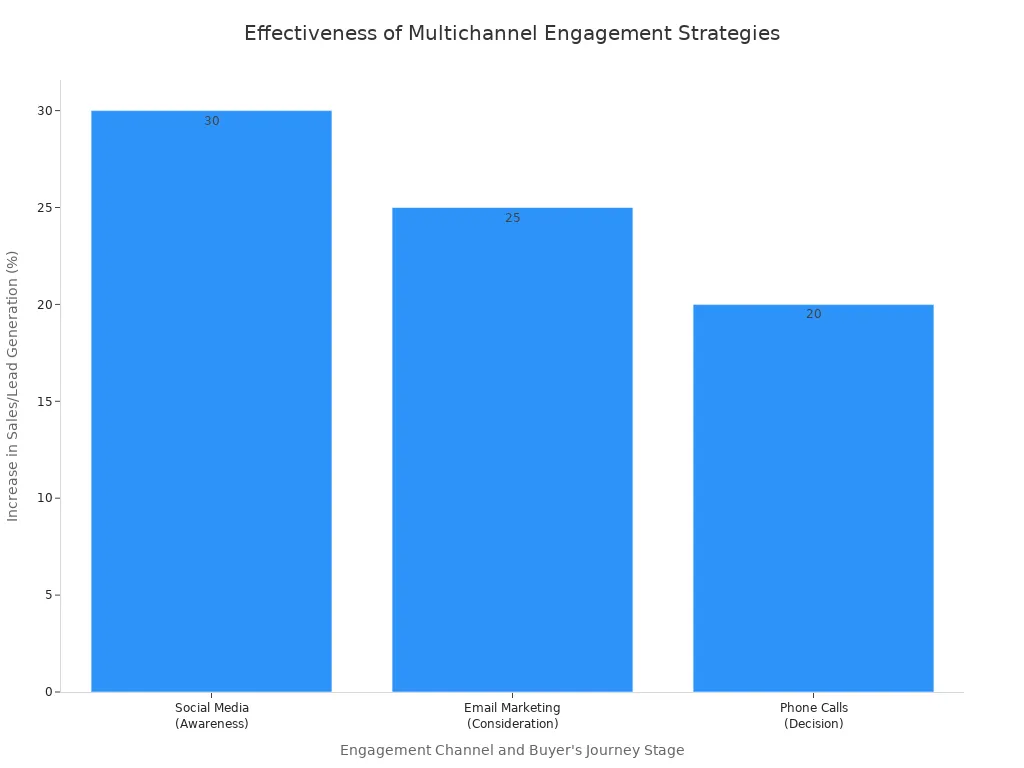
For example, you can use social media to build awareness and then use email to nurture leads with personalized content. A phone call can then close the deal with a personal touch. This integrated method gives your business a powerful advantage.
Measuring Campaign ROI
You must measure the return on investment (ROI) of your campaigns. Good analytics help you understand what works and what does not. Tracking key metrics is essential for making smart decisions. The best call center software solutions provide the data you need.
- Cost per Acquisition (CPA): This shows you how much it costs to gain one new customer.
- Conversion Rate: This measures how many calls result in a successful outcome, like a sale or appointment.
- Cost per Call (CPC): This tells you the total cost for each call your team makes.
These metrics help you see the real value of your marketing solutions and make adjustments for better results.
Choosing the right call center software depends on your specific needs. Your budget, team size, and integration requirements guide your decision. The best small business call center software provides valuable analytics to improve your sales strategies. Understanding the outbound call meaning helps businesses find the perfect solution. These solutions empower businesses to grow.
Now, you can evaluate your unique needs. Compare them against the call center software options we presented. Your business can find the right tool to start its contact journey. Let's get started!
FAQ
What is the main benefit of outbound call tracking software?
You can measure your sales team's performance with outbound call tracking software. It provides key data like call volume and conversion rates. This information helps you see what strategies work best for your business and improve your results.
How does a local caller ID help my business?
A local caller ID displays a familiar area code to your prospects. People are more likely to answer calls from local numbers. This simple feature can significantly increase your call connection rates and generate more conversations for your sales team.
Can I integrate call center software with my existing CRM?
Yes, you can connect most modern call center software with your CRM. Top platforms like Sobot, RingCentral, and Aircall offer seamless integrations with systems like Salesforce and HubSpot. This gives your team instant access to customer data during calls.
How long does it take to set up a call center software?
You can deploy most cloud-based platforms very quickly. For example, you can integrate Sobot Voice for Sales with your CRM in under 30 minutes. Your team can often start making calls in less than a week. Let's get started!
See Also
Leading VoIP Solutions for Small Businesses: A Comprehensive Top 10
Best Automated Voice Calling Software of 2024: An In-Depth Review
Revolutionary AI Tools for Enterprise Contact Centers: Our Top 10 Picks
Discover the Best Free Call Center CRM Software for 2024
Unveiling the Top 10 Speech Analytics Tools for Call Centers 2024