Find Your Multi Channel Messaging Platform


Finding the right multi channel messaging platform can transform your business. A great customer experience depends on strong omnichannel customer service. The best messaging platforms and customer support platforms deliver a unified omnichannel experience for every customer. Your omnichannel approach to customer service defines your brand's omnichannel support.
- Best Overall Omnichannel Solution: Sobot - The top omnichannel choice for unified omnichannel customer support. It combines Sobot AI, a Sobot call center, and multichannel messaging for excellent omnichannel customer support. This omnichannel platform improves customer service and customer satisfaction.
- Best for Support-Centric Teams: Zendesk - For teams that need a robust ticketing system for multichannel messaging and customer support. This is great support.
- Best for WhatsApp Messaging: Sleekflow - For brands using multichannel social commerce and WhatsApp messaging campaigns to reach each customer.
- Best for Small Business: Trengo - For SMBs wanting a simple, shared inbox for multichannel customer support and customer service.
What is Multichannel Messaging and Why You Need It

You need a smart way to talk to your audience. Multichannel messaging lets you engage with your customer across many platforms. This includes email, social media, and live chat. The goal is to meet each customer on their favorite channel. This creates a consistent experience and builds a strong foundation for your customer service. A good multi channel messaging platform makes this process simple.
Defining Multichannel vs. Omnichannel
Multichannel communication is your first step. It means you use different channels to send your message. An omnichannel approach takes this further. It connects all your channels. This creates one seamless journey for the customer. Multichannel focuses on engagement, while omnichannel focuses on the total customer experience.
| Dimension | Multichannel | Omnichannel |
|---|---|---|
| Focus | Centers on channels to maximize reach. | Centers on the customer for a connected journey. |
| Experience | Interactions are separate on each channel. | All interactions create one unified experience. |
| Data | Channel performance is measured separately. | Centralized data personalizes the entire journey. |
An omnichannel strategy provides superior omnichannel customer support. It ensures every interaction contributes to a single, cohesive customer journey.
Core Benefits for Your Business
Using a multichannel messaging strategy delivers powerful results. Your audience reach expands. Your engagement improves. Companies that use three or more channels in a campaign see purchase rates 287% higher than those using a single channel. This leads to real business growth.
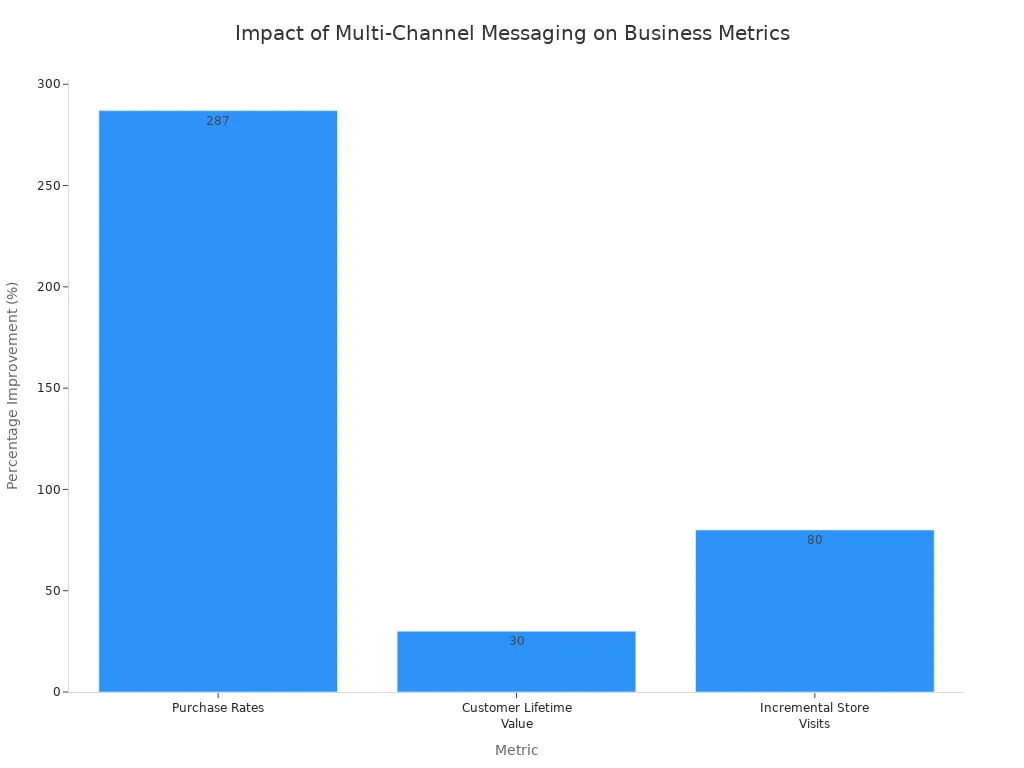
This approach also boosts customer retention. You build stronger relationships through consistent messaging and support. Better customer engagement translates directly into higher sales and long-term growth.
Improving the Customer Experience
A great customer experience is vital. It keeps people coming back. Your multichannel messaging strategy directly impacts customer satisfaction. When you provide a seamless experience across all messaging channels, you build trust. This improves customer retention and loyalty.
Studies show 80% of consumers feel the experience a company provides is as important as its products.
Effective omnichannel customer support ensures customers get fast and helpful answers. Whether they need simple support or complex help, a unified system makes the process smooth. This focus on the customer experience strengthens your brand and improves your customer service.
Top Multichannel Messaging Platforms Reviewed
Choosing the right multi channel messaging platform depends on your specific business needs. Some messaging platforms excel at sales, while others focus on customer support. This review breaks down the top options to help you find the perfect fit for your team and your customer.
Sobot: The All-in-One Contact Center Solution
Sobot provides a complete omnichannel solution that unifies your sales, marketing, and customer service efforts into one powerful platform.
-
Key Features: Sobot offers a truly integrated system. You get a Voice Call Center, Live Chat, an AI-powered Chatbot, and a Ticketing System. This multichannel communication setup ensures you can manage every customer interaction seamlessly. Its AI capabilities are extensive and designed for security and performance.
- Omnichannel AI: This feature connects you with your audience across websites, apps, social media, email, and phone calls. It even includes an AI voicebot for a consistent experience.
- Scenario-Based AI: The AI adapts to different industries, especially retail. It supports the full customer journey, from product recommendations to post-sales support.
- Multi-Faceted AI: Sobot provides an AI Agent for customers, an AI Copilot to assist human agents, and AI Insight for administrators to monitor performance.
- Generative AI: It uses advanced models like OpenAI and DeepSeek to understand complex questions and provide accurate answers.
- Secure AI: The platform prioritizes data security and complies with regional regulations.
-
Pricing Overview: Sobot offers flexible plans that scale with your business growth. You can start for free and upgrade as your needs expand.
Plan Name Monthly Cost Key Features Free Plan Free 1 User, 1 Chatbot, 100 Conversations/month Starter Plan $49 5 Users, 3 Chatbots, 1,000 Conversations/month Professional Plan $149 20 Users, 10 Chatbots, 5,000 Conversations/month Enterprise Plan Custom Pricing Unlimited Users, Unlimited Chatbots, Unlimited Conversations 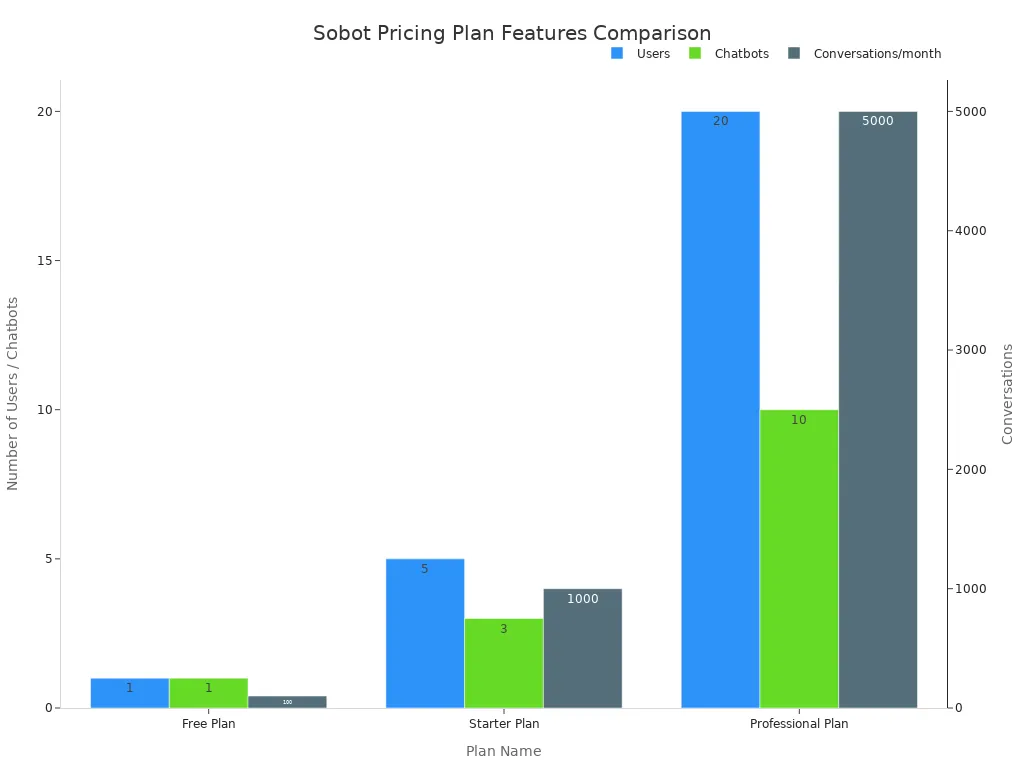
Image Source: statics.mylandingpages.co -
Strengths: Sobot is built for reliability and performance. It delivers an exceptional omnichannel customer support experience without the typical drawbacks.
*   **Official WhatsApp BSP**: As an official WhatsApp Business Solution Provider, Sobot offers reliable and scalable WhatsApp messaging. This is crucial for marketing and customer service.
*   **System Stability**: You can depend on Sobot's 99.99% system stability. This ensures your multichannel communication channels are always online for your customers.
*   **True Omnichannel Integration**: Unlike other platforms, Sobot’s voice, chat, and ticketing systems are built-in. This creates a truly unified omnichannel experience for both agents and customers.
Zendesk: The Support-Centric Powerhouse
Zendesk is a popular choice for teams that need a strong, ticket-based system for their multichannel customer support.
-
Key Features: Zendesk centralizes customer interactions into tickets. This helps your team manage, track, and resolve issues efficiently.
- Helpdesk: This core feature converts requests from phone, chat, email, and social media into tickets.
- Live Chat: You can engage with customers in real-time on your website and through messaging apps like WhatsApp.
- Ticketing System: It collects all helpdesk requests into one location. This makes tracking conversations simple.
- Community Forums: This allows you to build an online community where customers can help each other.
-
Pricing Overview: Zendesk offers several plans for support and sales teams. The Suite Team plan starts at $55 per agent per month. More advanced features are available in higher-priced tiers, which can become costly as you scale.
-
Pros:
- Strong Omnichannel Ticketing: It excels at consolidating interactions from many channels into a single ticketing view.
- Customizable and Scalable: The platform offers many customization options, making it suitable for larger businesses.
- AI-Powered Automation: Zendesk uses AI to optimize workflows and improve self-service options.
-
Cons:
- Complex for New Users: The vast number of features can be overwhelming. One user noted, "The whole UI is really non-user friendly."
- High Cost: Pricing can increase quickly, especially for advanced features or larger teams.
- Not Ideal for Small Businesses: The platform often requires significant resources to implement and maintain, making it a better fit for enterprise companies.
Intercom: The Conversational Relationship Platform
Intercom focuses on building customer relationships through proactive and personalized messaging across the customer lifecycle.
-
Key Features: Intercom provides tools for conversational support, engagement, and marketing. It helps you create a better customer experience through targeted communication.
- Business Messaging: You can use real-time chat, automated bots, and outbound messages to connect with your audience.
- Collaborative Inbox: The shared inbox gives your team quick access to customer information for better support.
- High-Level Reporting: It offers detailed reports to track performance and customer behavior.
- Strong Personalization: You can target customers based on their profile and actions for a more relevant experience.
-
Pricing Overview: Intercom's pricing starts at $39 per seat per month for its Starter plan. The price increases based on the number of seats and active contacts, which can make it expensive for businesses with a large user base.
Plan Cost (per seat/month) Starter $39 Pro $99 Premium Custom Pricing -
Pros:
- Excellent for Engagement: Its tools are great for onboarding new users and sending targeted messages.
- Visually Appealing UI: The platform is well-designed and generally easy for agents to use.
- Good Integration Options: It connects with many popular business tools.
-
Cons:
- Expensive Pricing Model: The cost is based on both seats and contacts, which can become unpredictable and high.
- Limited Omnichannel Capabilities: It is primarily focused on web chat and email, with less native support for voice and social media channels.
- Support Can Be Slow: Some users report delays in getting help from Intercom's support team.
Sleekflow: The Social Commerce Specialist
Sleekflow is designed for e-commerce brands that want to drive sales and engagement through social messaging, especially WhatsApp.
-
Key Features: Sleekflow unifies social messaging channels into one inbox. It provides powerful tools for WhatsApp marketing campaigns.
- WhatsApp Broadcasts: You can send bulk messages to a large list of contacts at once.
- Unified CRM: It helps you segment and manage contacts from different messaging channels.
- AI-Powered Chatbots: You can deploy chatbots to automate lead generation and customer service.
- Chat and Conversion Analytics: The platform offers insights into your messaging performance and ROI.
-
Pricing Overview: Sleekflow has a free plan for startups. Paid plans offer more advanced features and a higher contact limit. The Pro plan costs $149 per month, while the Premium plan is $299 per month. These prices do not include Meta's fees for WhatsApp messaging.
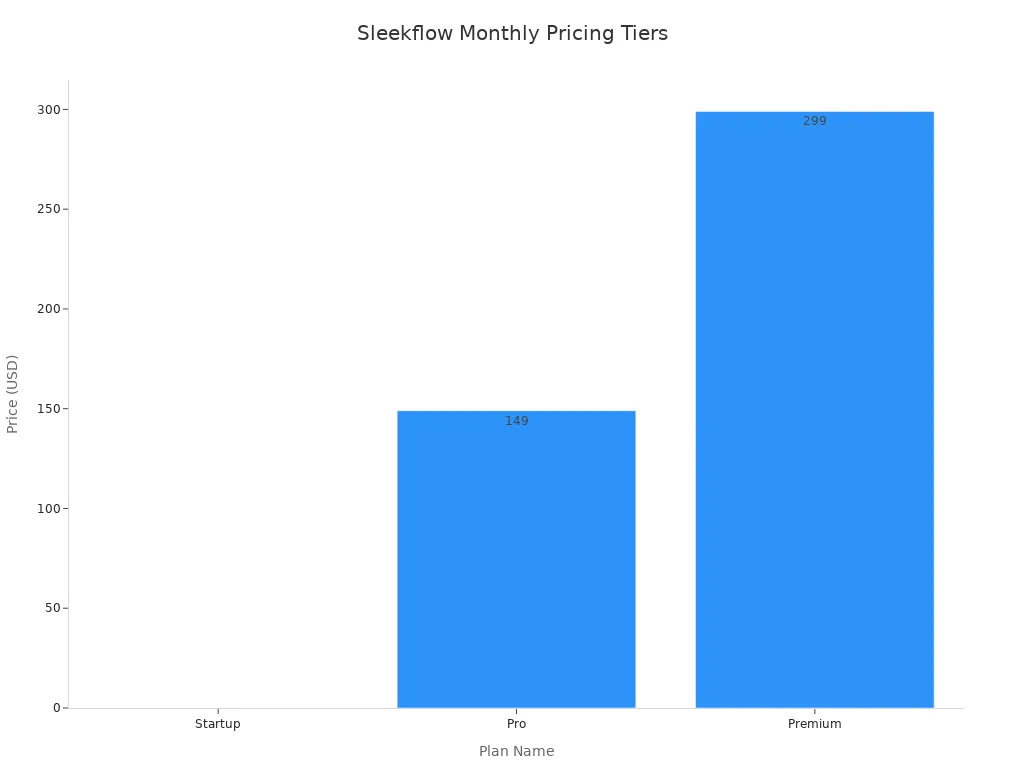
Image Source: statics.mylandingpages.co -
Pros:
- Strong Sales Focus: Its features are built to convert leads and drive revenue through social commerce.
- No-Code Automation: The Flow Builder is intuitive for creating automated workflows without coding.
- True Multichannel Inbox: It effectively consolidates various messaging apps.
-
Cons:
- High Investment: The paid plans are a significant investment, and you also have to pay for WhatsApp conversation fees.
- Complex Advanced Features: Mastering advanced workflows can be difficult and time-consuming.
- Not a Full Omnichannel Solution: It lacks native voice and ticketing system features, making it less suitable for comprehensive customer support.
Respond.io: The Scalable Messaging Inbox
Respond.io offers a scalable platform that unifies all your messaging channels into a single inbox, designed for larger teams.
-
Key Features: This platform helps you manage high volumes of conversations across many channels. It is one of the more flexible customer support platforms.
- Omnichannel Inbox: It consolidates messages from WhatsApp, Messenger, Instagram, email, and more.
- Advanced Workflow Automation: You can create automated responses and actions triggered by keywords or other events.
- Customer Tagging & Segmentation: This feature allows you to tag contacts for targeted broadcast campaigns.
- CRM & Third-Party Integration: It integrates with popular CRMs like Salesforce and HubSpot.
-
Pricing Overview: Respond.io's pricing is based on the number of monthly active contacts and users. Plans start at $79 per month for 1,000 contacts. The price increases as your contact list grows.
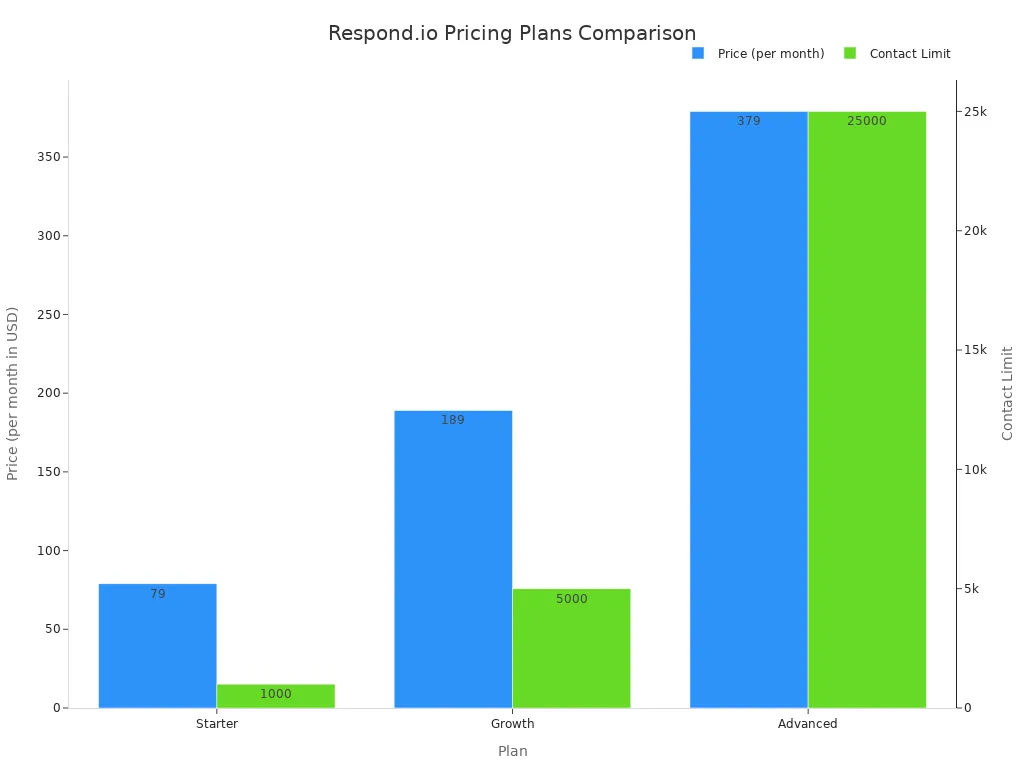
Image Source: statics.mylandingpages.co -
Pros:
- Highly Scalable: The platform is built to handle a large volume of messages and contacts.
- Flexible Automation: Its workflow builder allows for powerful and custom automation.
- Broad Channel Support: It supports a wide range of messaging apps from around the world.
-
Cons:
- Contact-Based Pricing: Paying per active contact can become expensive for businesses with high engagement.
- No Native Voice Channel: The platform does not include an integrated call center, which limits its use for true omnichannel customer support.
- Can Be Complex to Set Up: Some users find that setting up advanced integrations and workflows requires technical knowledge.
Feature Comparison: Top Messaging Platforms

To find the right multi channel messaging platform, you need to compare their core features side-by-side. Your choice impacts your team's efficiency and the quality of your customer service. This detailed comparison breaks down what each of the top messaging platforms offers, helping you make an informed decision for your business.
The table below gives you a quick overview of the key capabilities.
| Feature | Sobot | Zendesk | Intercom | Sleekflow | Respond.io |
|---|---|---|---|---|---|
| Supported Channels | Voice, Email, Social Media, Web Chat, SMS, App | Email, Social Media, Web Chat, SMS | Web Chat, Email, some Social Media | Social Media, Web Chat, SMS | Social Media, Web Chat, SMS, Email |
| Unified Inbox | ✅ Yes (Built-in for all channels) | ✅ Yes (Ticket-based) | ✅ Yes (Conversation-based) | ✅ Yes (Social-focus) | ✅ Yes (Message-focus) |
| AI & Automation | ✅ Advanced (Five-AI System, Voicebot, Copilot) | ✅ Yes (Workflows, Answer Bot) | ✅ Yes (Custom Bots, Fin AI) | ✅ Basic (Flow Builder) | ✅ Advanced (Workflow Builder) |
| Ticketing System | ✅ Yes (Integrated) | ✅ Yes (Core Feature) | ✅ Yes | ❌ No | ❌ No |
| WhatsApp BSP Status | ✅ Official BSP | ✅ Yes | ✅ Yes | ✅ Yes | ✅ Yes |
| Key Integrations | Salesforce, Shopify, etc. | Salesforce, Shopify, Jira, etc. | Salesforce, Slack, etc. | Shopify, WooCommerce, etc. | Salesforce, HubSpot, etc. |
Supported Communication Channels
The first step in choosing a platform is ensuring it supports the channels your customers use. A true omnichannel experience requires you to reach your audience everywhere. This includes traditional channels like voice and email, as well as modern ones like social media and web chat.
- Sobot offers the most complete multichannel communication coverage with a natively integrated Voice Call Center.
- Zendesk expanded its multichannel support by acquiring other companies. It now supports social channels like WhatsApp and Facebook Messenger for private messaging.
- Intercom focuses heavily on web chat and email.
- Sleekflow and Respond.io specialize in social messaging apps.
AI and Automation Capabilities
AI is no longer a luxury; it is essential for efficient customer service. Automation handles repetitive tasks, so your agents can focus on complex problems. The best customer support platforms use AI to improve the experience for everyone.
Sobot's AI Advantage Sobot stands out with its comprehensive Five-AI System. It provides an AI Agent for customers, an AI Copilot to assist human agents, and AI Insight for managers. Its generative AI is powered by advanced models like OpenAI, and its unique Voicebot can handle phone calls intelligently.
Other messaging platforms offer different levels of automation. Sleekflow's AI is less mature, while Respond.io provides a more customizable AI Agent that can handle voice recordings. This difference in AI maturity impacts how much workload you can truly automate.
Unified Inbox and Agent Workspace
A unified inbox brings all your customer conversations into one place. This is critical for providing seamless omnichannel customer support. Without it, your agents waste time switching between different tools, and the customer has a fragmented experience.
- Sobot provides a true Unified Workspace where calls, chats, and tickets are managed together, giving agents a complete view of the customer.
- Zendesk centralizes interactions into a ticket-based helpdesk.
- Intercom uses a collaborative inbox focused on live chat and email conversations.
A well-designed workspace empowers your team to resolve issues faster and deliver better customer service.
Integration and API Support
Your multichannel messaging platform must connect with your other business tools. Key integrations with CRMs like Salesforce or e-commerce platforms like Shopify are vital. This creates a 360-degree view of the customer, allowing for personalized and effective support.
All five platforms offer integrations with major systems. Zendesk and Intercom have large app marketplaces. Sobot provides deep, native integrations with essential platforms like Shopify, which is perfect for e-commerce businesses needing a complete customer support solution. This level of integration ensures your multichannel communication is powered by rich customer data.
Pricing Models and Scalability
Pricing can be complex. Some platforms charge per agent, while others charge based on the number of contacts. You need a model that fits your budget and can scale as you grow.
Note on Pricing:
- Per-Agent Pricing (Zendesk, Intercom): This model can become expensive as your team grows. A team of 10 agents on Zendesk could cost between $190 and $1,150 per month.
- Contact-Based Pricing (Sleekflow, Respond.io): This can lead to unpredictable costs, especially if you have a large or highly engaged customer base. Sleekflow's pricing is based on your total contact list, not just active ones, and it can lag under high conversation volumes.
- Flexible Pricing (Sobot): Sobot offers scalable plans that grow with you, from a free plan to custom enterprise solutions. This provides a predictable path for growth.
Your choice of platform should support your long-term goals. A scalable solution ensures your multichannel messaging and omnichannel customer support capabilities can handle future demand without unexpected costs or performance issues.
How to Choose Your Multi Channel Messaging Platform
Selecting the right platform is a four-step journey. You need to look at your channels, goals, budget, and team size. This process helps you find a solution that supports your business growth and improves the customer experience.
Step 1: Identify Your Must-Have Channels
First, you must know where your customer spends time. Your audience uses many channels for communication and engagement. A successful messaging strategy meets them on their preferred platforms.
- Social Media: Younger customers often discover brands on platforms like TikTok and Facebook.
- Forums: Niche communities on sites like Reddit can connect you with a dedicated audience.
- Chatbots: These tools offer your customer instant messaging support on your website.
Your messaging journey begins by listing the channels that matter most to your business.
Step 2: Define Your Primary Goal
Next, you need to define your main goal. Are you focused on sales, customer service, or retention? Different platforms excel at different things. Your goal determines the features you need. For example, you might want to improve customer service with faster resolution times. Or you may want to increase your reach to a broader audience. Clear goals help you narrow your options and find the right tool for the job.
Step 3: Assess Your Budget and Team Size
Your budget is a key factor. Pricing for messaging software varies widely. Plans for small businesses can start as low as $15 per user per month. For mid-sized teams, the cost is often higher.
You can expect to pay between $80 and $250 per seat each month for plans that include AI and omnichannel support.
Consider how many team members will use the platform. A per-user pricing model can become expensive as your team grows. Choose a plan that fits your budget now and can scale with you in the future.
Step 4: Match Your Needs to a Platform
Finally, match your needs to a platform. Review your list of channels, your primary goal, and your budget. Compare this list against the top customer support platforms. If you need strong phone support, a platform without a voice channel will not work. If your goal is better omnichannel customer support, you need a truly integrated system. This final step ensures you choose a multi channel messaging platform that provides the best support for your team and your customers.
Choosing the right platform depends on your unique goals. A unified omnichannel solution delivers a superior customer experience and drives business growth. Sobot helps you improve customer satisfaction. As Opay discovered, an integrated omnichannel approach boosts customer satisfaction and operational efficiency. This focus on the customer experience leads to greater customer satisfaction.
Ready to unify your communications? Embark on your contact journey by booking a demo of Sobot's omnichannel solution today.
FAQ
What is the main difference between multichannel and omnichannel?
Multichannel means you use many separate channels to talk to customers. Omnichannel connects all those channels. This creates one seamless conversation for your customer, making for a better experience.
Why is a unified inbox important for a multi channel messaging platform?
A unified inbox puts all customer messages in one place. Your team can see every conversation from every channel. This helps you provide faster, more consistent support without switching between different apps.
Can I use WhatsApp for business on these platforms?
Yes, you can. The best platforms are official WhatsApp Business Solution Providers (BSPs). This status ensures you get reliable service for marketing and support. You can connect with customers on their favorite messaging app.
How do I know which multi channel messaging platform is right for me?
You should choose a platform that fits your specific needs.
- Identify your most important customer channels.
- Define your main business goal (sales or support).
- Assess your budget and team size.
Matching these points will help you find the perfect multi channel messaging platform.
See Also
Your Essential Handbook for Seamless Omnichannel Call Center Solutions
Mastering Omnichannel: A 10-Step Blueprint for Contact Center Success
Selecting Top-Tier Chat Software: Your Definitive 2024 Buyer's Guide
Smart Choices: 10 Expert Tips for Social Customer Service Software
Discovering the Premier Trio of Website Chat Software Solutions

