Migrating from Gorgias Competitors Made Easy in 2026

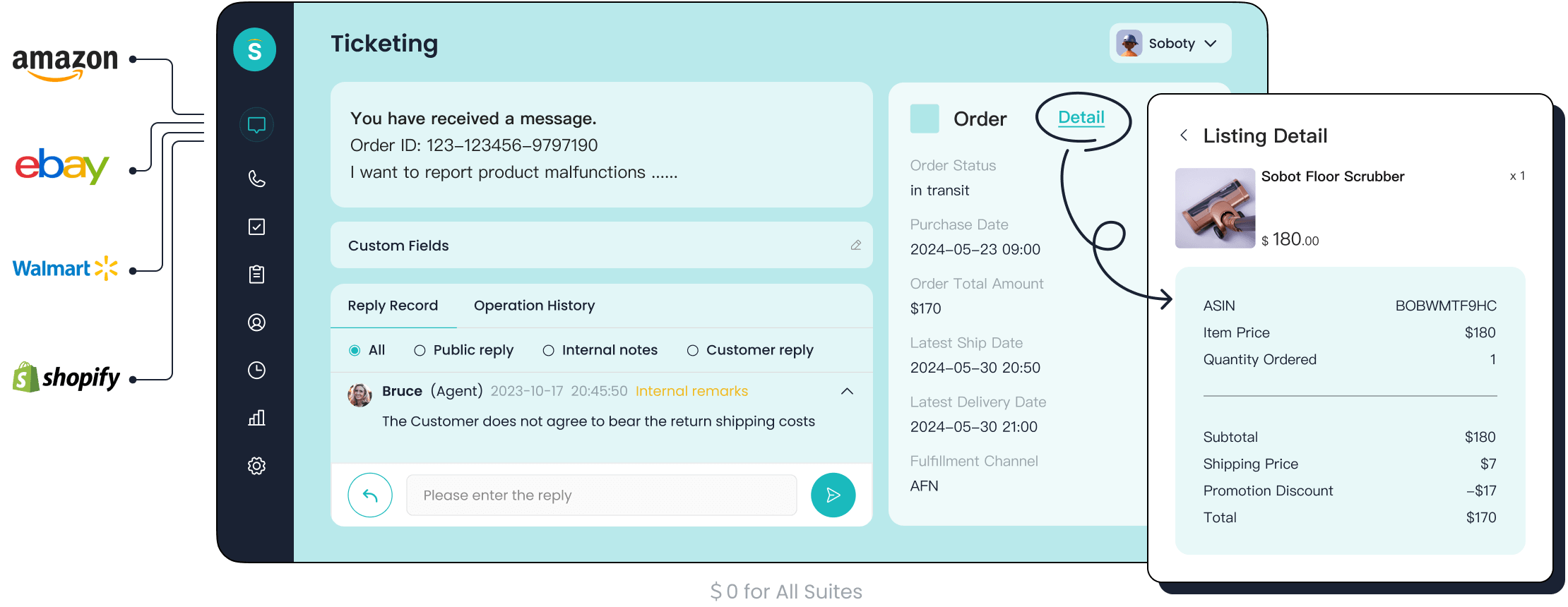
Migrating from Gorgias competitors in 2026 feels simple and stress-free. You protect your customer communication and experience by planning carefully. Some challenges you may face include rising costs with ticket-based pricing, limited automation for complex requests, and trouble managing support across many brands or regions. Sobot helps you overcome these hurdles with a modern approach to customer support.
Why Switch from Gorgias Competitors
Common Reasons for Moving
You may find that switching from gorgias competitors brings clear advantages for your business. Many companies decide to move because they want better pricing, improved analytics, and more reliable scalability. Take a look at the table below to see the top reasons businesses choose to switch:
| Reason | Description |
|---|---|
| Pricing | Gorgias charges based on ticket volume rather than just user seats. |
| Reporting and analytics | These have gaps compared to gorgias competitors. |
| Scalability issues | You could face scalability issues as ticket volumes grow across multiple stores or channels. |
You might notice that pricing models can become unpredictable as your ticket volume increases. For example, a growing DTC brand switched to Zendesk for more predictable per-agent costs. A multi-brand retailer found the multi-store setup with gorgias competitors cumbersome and chose Zendesk instead. Some hybrid businesses need features for B2B operations, so they keep Salesforce for those needs.
Tip: Review your current support platform’s pricing and features. If you manage multiple brands or stores, consider how gorgias competitors handle scalability and reporting.
Customer Experience Impact
Switching from gorgias competitors can improve your customer experience. You may see faster response times and higher satisfaction scores. The table below shows how some platforms compare:
| Competitor | Response Time Improvement | Customer Satisfaction Improvement |
|---|---|---|
| Yuma AI | 87% | Yes |
| HappyFox | Faster | Better Quality |
Users often report longer wait times and less personalized support with gorgias competitors. HappyFox offers a responsive support team and dedicated account management. Yuma AI boosts automation and support efficiency. When you choose a platform that fits your needs, you help your team deliver better service and keep customers happy.
Preparing to Migrate Helpdesks
Assessing Support Needs
You start your helpdesk migration by looking at your current workflows and customer support tickets. Think about how your team handles increased ticket volumes and whether your helpdesk can scale as your business grows. You check if your helpdesk platform connects with your tools, like e-commerce or CRM systems. You also look for automation and AI features that help your agents answer routine questions faster. Reliable support and a strong customer success team make your migration smoother. Make a list of what you need so you can switch from gorgias with confidence.
- Scalability for more tickets and agents
- Quality of support and customer success
- Integration with your tools
- Automation and AI for routine queries
Choosing a New Platform
When you switch platforms, you compare features that matter most for your business. You want deep e-commerce integration to access real-time customer data and manage customer support tickets easily. True omnichannel support helps you centralize conversations from email, chat, and social media. Automation and AI speed up responses and reduce manual work. Team collaboration tools improve ticket management. Self-service options let customers find answers on their own, lowering ticket volume. Actionable analytics help you track performance. Enterprise security keeps your data safe. Transparent pricing ensures you avoid sudden cost increases.
| Feature | Importance |
|---|---|
| Deep e-commerce integration | Access real-time customer data |
| Omnichannel support | Centralize communication |
| Automation and AI | Improve efficiency |
| Team collaboration | Enhance ticket management |
| Self-service | Reduce ticket volume |
| Analytics | Data-driven decisions |
| Security | Compliance and reliability |
| Scalable pricing | Predictable costs |
Planning Your Migration
You prepare to migrate helpdesks by reviewing your current setup and confirming the scope and timeline. You create a migration checklist to track each step. Back up all data, including customer support tickets, before moving from gorgias. You plan for importing contacts and importing conversations to ensure nothing gets lost. The migration runs while your team keeps supporting customers. You verify key workflows so your helpdesk queue behaves as expected. You choose the best time to switch, and you can run both platforms in parallel for extra confidence. Careful planning helps you migrate helpdesks smoothly and keeps your customer experience strong.
Tip: Always back up your helpdesk data before migration. This protects your customer support tickets and ensures a safe transition.
Moving from Gorgias: Step-by-Step
Migrating your helpdesk from Gorgias competitors can feel overwhelming at first. You can break the process into clear steps. You protect your customer experience and keep your data safe when you follow a proven migration plan. You can use this guide to migrate your support operations with confidence.
Data Review and Cleanup
You start your migration by reviewing your existing data. You check your tickets, contacts, and help center articles. You look for duplicate tickets and outdated information. You clean up your ticket history so you only import what matters. You remove old contacts that no longer need support. You organize your help center articles and decide which ones to import all your help center articles into your new platform.
- Review your ticket history for duplicates and closed cases.
- Clean up your contact list and remove inactive users.
- Organize your help center articles for easy import.
- Check for sensitive data and make sure you comply with privacy rules.
Tip: You can use filters and export tools to sort your tickets and contacts. You save time when you import only the data you need.
You protect your customers’ privacy when you delete unnecessary information. You make your migration easier when you prepare your data in advance.
Platform Setup and Integration
You set up your new helpdesk platform before you migrate any data. You create agent accounts and set permissions. You configure your support channels, such as email, chat, and phone. You connect your e-commerce platform, CRM, and other tools. You test each integration to make sure your data flows smoothly.
- Create agent profiles and assign roles.
- Set up your support channels for email, chat, and phone.
- Integrate your e-commerce platform and CRM.
- Test each integration for accuracy.
You check your workflow rules and automation settings. You set up triggers for ticket assignment and SLA reminders. You make sure your new platform supports all the features you need. You can use Sobot’s unified workspace to centralize your support channels and automate ticket routing.
Note: You can ask your new platform’s support team for help with integrations. You avoid delays when you test each connection before you import your data.
You prepare your platform so you can migrate your tickets and contacts without errors.
Importing Tickets and Contacts
You import your tickets and contacts into your new helpdesk platform. You use built-in import tools or APIs to transfer your data. You follow your migration checklist to make sure you import all your help center articles, tickets, and customer profiles. You map your fields so your data appears correctly in your new system.
- Export your tickets and contacts from your old platform.
- Use the import tool or API to upload your data.
- Map ticket fields, contact details, and article categories.
- Import all your help center articles for a seamless transition.
- Check for errors and verify your imported data.
You can import tickets in batches to avoid downtime. You monitor the import process and check for missing or duplicate records. You keep your support team updated so they know when to expect new tickets and contacts.
Alert: You should always back up your data before you import it. You protect your business from accidental data loss.
You can migrate your helpdesk data in stages. You start with tickets and contacts, then import all your help center articles. You keep your migration organized and avoid confusion.
Testing and Go-Live
You test your new helpdesk platform before you go live. You check your ticket workflows and make sure your agents can access all imported data. You run test tickets and verify that automation rules work as expected. You check your integrations and confirm that customer conversations appear in the right channels.
- Run test tickets and check ticket assignment.
- Verify imported contacts and help center articles.
- Test automation rules and SLA reminders.
- Check integrations with e-commerce and CRM platforms.
You train your agents on the new platform. You provide guides and resources so your team can answer customer questions quickly. You monitor your helpdesk for errors or missing data. You fix any issues before you migrate fully.
Tip: You can run your old and new platforms in parallel for a short time. You make sure your customers get support during the migration.
You announce your go-live date to your team and customers. You monitor your helpdesk performance and collect feedback. You celebrate your successful migration and enjoy improved support operations.
You can migrate your helpdesk step by step. You review your data, set up your platform, import your tickets and contacts, and test your workflows. You keep your customer experience strong and your support team ready for new challenges.
Sobot Ticketing System as an Alternative
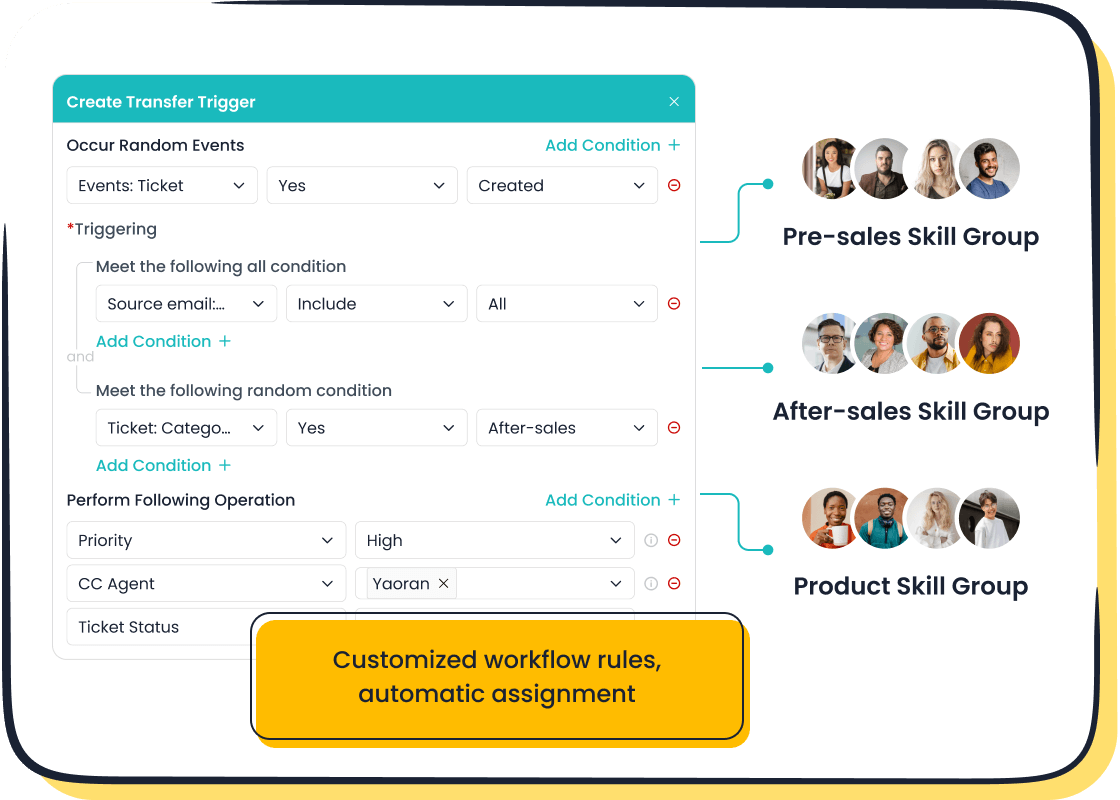
Migrating from Gorgias competitors gives you a chance to upgrade your customer support. Sobot stands out as a modern solution for businesses that want to unify their support channels, automate workflows, and boost efficiency. You can use Sobot’s all-in-one contact center to manage email, chat, voice, and social media conversations in one place. Sobot’s platform includes advanced tools like chatbot, AI Agent, live chat, call center, voicebot, ticketing system, and customer contact center. You get a seamless experience for both your agents and your customers.
Key Features for Customer Support
You need a helpdesk that adapts to your business. Sobot’s ticketing system offers features that help you deliver fast, reliable support. You can see all your conversations in one interface. You can automate routine tasks and get smart suggestions from AI. You can track performance with real-time analytics. Sobot’s mobile-first design lets your agents work anywhere.
| Feature | Description |
|---|---|
| True Omnichannel Integration | Consolidates conversations from various platforms into a single interface for better visibility. |
| Five-AI System | A comprehensive AI ecosystem that automates interactions and assists agents with smart suggestions. |
| Cloud Call Center Capabilities | Offers intelligent call routing, global number availability, and real-time monitoring features. |
| Mobile-First Design | User-friendly mobile app for managing interactions on-the-go, enhancing flexibility for agents. |
| Advanced Analytics and Reporting | Provides real-time dashboards and performance tracking for data-driven decision-making. |
You can use Sobot’s chatbot to answer common questions 24/7. You can deploy AI Agents to handle complex requests. You can use live chat to connect with customers instantly. You can manage calls with the cloud call center and voicebot. You can track every ticket and customer interaction in the ticketing system. Sobot’s customer contact center gives you a unified workspace, so you never miss a conversation.
Note: Sobot’s omnichannel platform helps you reduce resolution times by up to 50%. You can improve operational efficiency and deliver a better customer experience than Gorgias competitors.
Migration Benefits with Sobot
Switching from Gorgias competitors to Sobot brings clear benefits. You save money with cost-effective pricing. You get a powerful AI contact center that automates workflows and improves service quality. You connect with customers across all channels, so you respond faster and more accurately.
| Benefit | Description |
|---|---|
| Cost-effectiveness | Sobot's pricing can be significantly lower than competitors, often half or less without hidden charges. |
| Comprehensive AI integration | Sobot offers a powerful AI contact center solution across multiple dimensions, enhancing customer service efficiency. |
| All-in-one contact center | Sobot provides an integrated platform that connects customers across various channels, ensuring timely and efficient service. |
You can migrate your helpdesk data easily. Sobot’s migration tools help you import tickets, contacts, and help center articles without errors. You can set up automation rules and triggers to route tickets to the right agents. You can use Sobot’s analytics to monitor your migration and track performance. You get support from Sobot’s team during every step.
- Sobot’s automation reduces resolution times, so your agents handle more tickets with less effort.
- You get a unified workspace that centralizes all customer interactions.
- You avoid hidden charges and unpredictable costs that Gorgias competitors often bring.
- You improve customer satisfaction by responding quickly and accurately.
Tip: You can use Sobot’s migration checklist to plan your switch from Gorgias competitors. You protect your data and keep your customer experience strong.
OPPO Success Story
You can see how Sobot helps real businesses by looking at OPPO’s experience. OPPO, a global leader in smart devices, faced high volumes of customer inquiries during shopping festivals. The company needed a solution that could handle repetitive questions and complex requests. OPPO migrated from Gorgias competitors to Sobot’s chatbot and ticketing system.
| Metric | Value |
|---|---|
| Chatbot Resolution Rate | 83% |
| Boost in Repurchase Rates | 57% |
OPPO used Sobot’s chatbot to resolve 83% of customer inquiries automatically. The company saw a 57% increase in repurchase rates after migration. OPPO’s agents focused on complex issues, while Sobot’s AI handled routine questions. The integration of global channels and business systems improved data accessibility and customer satisfaction. OPPO reduced maintenance efforts by 90% and achieved a 94% positive feedback rate.
Success: OPPO’s migration to Sobot shows how you can improve efficiency and customer satisfaction when you switch from Gorgias competitors. You can read more about OPPO’s story on Sobot’s official blog.
Sobot’s industry recognition includes becoming an official WhatsApp Business Solution Provider. You can trust Sobot to deliver reliable, scalable, and secure customer support. You join over 10,000 brands that use Sobot to enhance their customer contact journey.
Sobot helps you migrate from Gorgias competitors with ease. You get a unified platform, powerful automation, and proven results. You can learn more about Sobot’s ticketing system at Sobot Ticketing System and explore omnichannel solutions at Sobot Omnichannel Solution.
Troubleshooting Migration Issues
Migrating from Gorgias competitors can bring new opportunities, but you may face some challenges along the way. You need to protect your data, keep your support running, and ensure your integrations work smoothly. This section helps you troubleshoot common migration issues so you can switch platforms with confidence.
Data Loss Prevention
You want to avoid losing important customer information when moving from Gorgias competitors. You can use several strategies to keep your data safe:
- Use Help Desk Migration tools to transfer tickets, contacts, and knowledge base articles securely.
- Back up all your data before starting the migration process.
- Test your imports with sample data to check for errors.
- Review your migration checklist to make sure you include every critical item.
- Monitor the transfer for missing or duplicate records.
Tip: Help Desk Migration ensures zero downtime and prevents data loss during migration from Gorgias competitors. You can trust these tools to keep your customer support history intact.
Minimizing Downtime
You need your helpdesk to stay online while switching from Gorgias competitors. Autonoly completes most migrations within 1-3 days, depending on workflow complexity. Their AI agents analyze your workflows and recreate them with improved functionality. You can run your old and new systems in parallel, so your team keeps supporting customers without interruption. Dedicated migration support and workflow analysis tools help you avoid delays. You protect your business from downtime by planning your migration carefully and using proven methods.
Note: Running parallel systems during migration from Gorgias competitors ensures critical processes experience zero downtime.
Integration Challenges
You may face integration challenges when moving from Gorgias competitors. Common issues include complex configuration requirements, insufficient multichannel support, and difficulties connecting with CRM, billing, or project management systems. You can solve these problems by:
- Selecting tools built for your specific business goals instead of generic solutions.
- Using an omnichannel helpdesk to unify customer interactions across platforms.
- Customizing your setup to match your workflows and support needs.
| Challenge | Solution |
|---|---|
| Complex configuration | Customize setup for your workflows |
| Insufficient multichannel support | Choose an omnichannel helpdesk |
| Integration difficulties | Select tools that fit your business goals |
You improve your migration from Gorgias competitors by focusing on seamless integration and unified support. You create a better customer experience and avoid repeated information requests.
Alert: Address integration challenges early to ensure your migration from Gorgias competitors goes smoothly.
You improve your customer experience when you move from Gorgias competitors to Sobot. You choose a customer service platform that unifies all channels and automates workflows. You see faster response times and higher satisfaction scores. You protect your customer experience with careful planning. You trust Sobot’s customer service platform to deliver reliable support. You join thousands of brands that value customer experience. You make your migration smooth and risk-free. You explore Sobot’s solutions and take the next step to upgrade your customer experience with a leading customer service platform.
FAQ
How long does it take to migrate from Gorgias competitors to Sobot?
Most migrations from Gorgias competitors to Sobot finish in 1–3 days. The exact time depends on your ticket volume and workflow complexity. You can run both systems in parallel to avoid downtime.
Will I lose any data when switching from Gorgias competitors?
You protect your data by backing up everything before migration. Sobot’s migration tools help you transfer tickets, contacts, and help center articles from Gorgias competitors without loss.
Can Sobot integrate with my existing e-commerce and CRM tools?
Yes. Sobot connects with popular e-commerce platforms like Shopify and major CRMs. You unify your support channels after moving from Gorgias competitors.
What support does Sobot offer during migration from Gorgias competitors?
Sobot provides step-by-step migration guides, live chat, and dedicated support. You get help with setup, data import, and workflow configuration when moving from Gorgias competitors.
Why should I choose Sobot over other Gorgias competitors?
You get a unified platform, advanced automation, and cost-effective pricing. Sobot helps you improve customer satisfaction and manage all channels in one place after leaving Gorgias competitors.
See Also
Best Live Chat Tools Analyzed for 2024 Businesses
Best 10 Chat Applications for Businesses in 2024
Comparing Genesis Call Center and Genesys: The Superior Choice?

