Boost Efficiency with Free Online Ticketing Systems

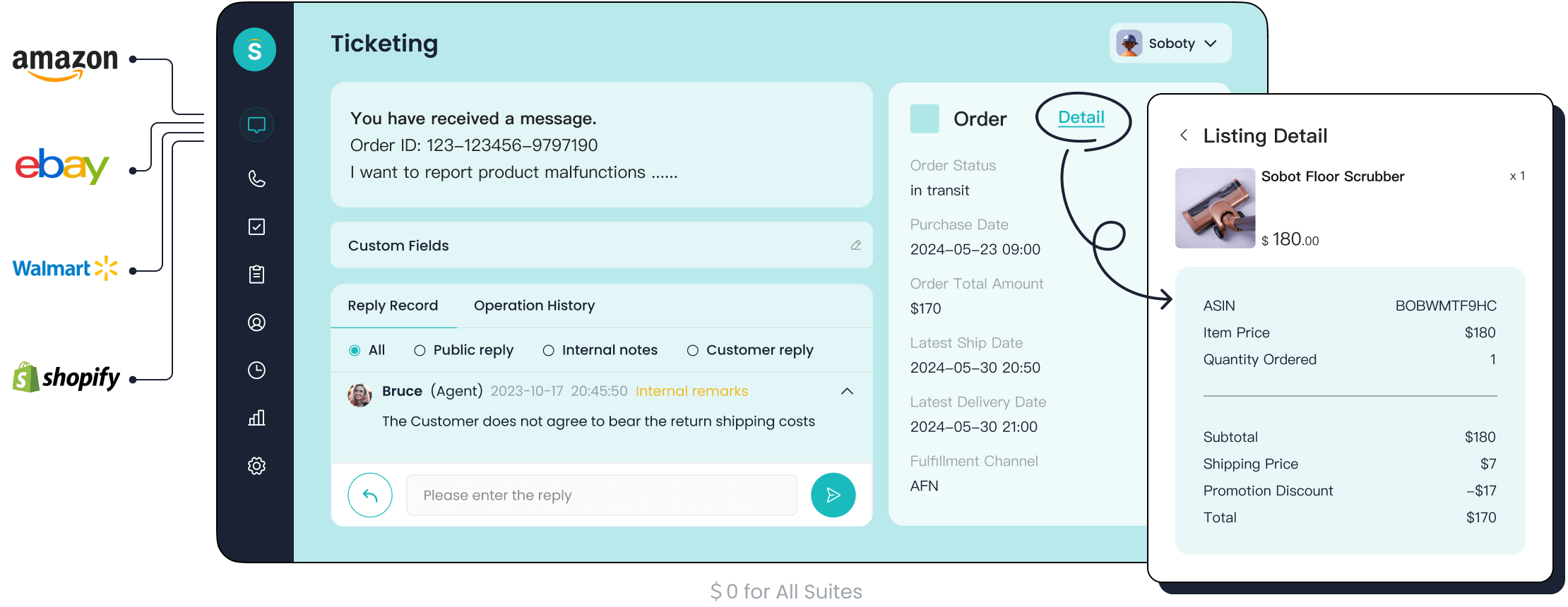
Imagine managing customer inquiries without the chaos of scattered emails or missed messages. A free online customer service ticketing system can transform your workflow. It organizes every query into a single platform, making it easier to track and resolve issues. Whether you're running an IT help desk or handling general customer service, this tool boosts efficiency without adding to your expenses.
Take Sobot, for example. Its ticketing system automates repetitive tasks and integrates seamlessly with your existing tools. This means less manual work and more time to focus on improving the customer experience. By adopting best practices, you can unlock the full potential of these systems and deliver faster, more reliable IT support.
Setting Up Your Free Online Customer Service Ticketing System
Define Service Level Agreements (SLAs)
Importance of SLAs in customer service
Service Level Agreements (SLAs) are the backbone of effective customer service. They set clear expectations for response and resolution times, ensuring your team stays accountable. When you define SLAs, you create a transparent framework that helps your customers know when to expect solutions. This builds trust and improves satisfaction. For example, an IT help desk can use SLAs to prioritize critical outages, ensuring they’re addressed within minutes. SLAs also help measure performance, making it easier to identify areas for improvement.
Steps to set realistic response and resolution times
Setting realistic SLAs starts with understanding your operational capacity. Use industry benchmarks to guide your decisions. For instance:
| Channel Type | Expected Response Time | Resolution Time |
|---|---|---|
| Voice | Immediate | N/A |
| Live Chat | Within 1 minute | N/A |
| High-Priority Tickets | Within 1 hour | Under 4 hours |
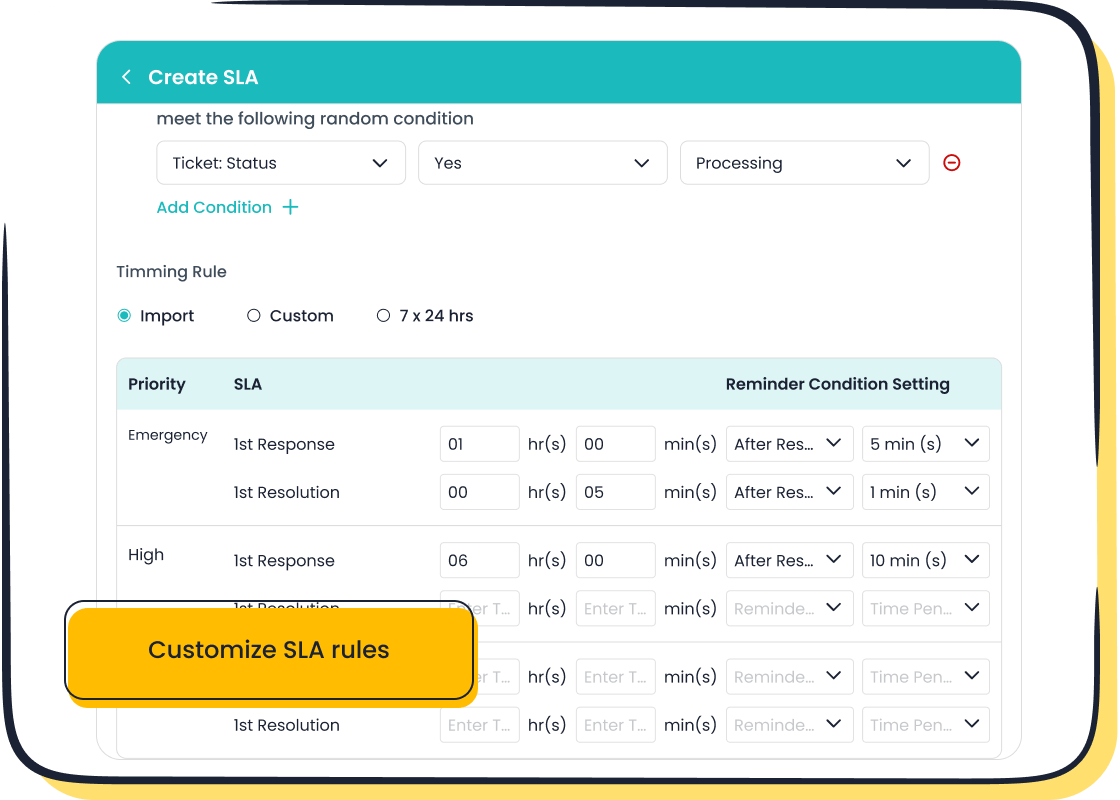
Tailor these benchmarks to your business needs. Define SLAs for each ticket priority level, ensuring clarity for your team. Tools like Sobot’s ticketing system make this process seamless by allowing you to set custom SLA rules based on ticket type or urgency.
Configure the Ticketing System for Your Needs
Customizing ticket categories and fields
Every business has unique needs, and your ticketing system should reflect that. Start by customizing ticket categories and fields to match your operations. For example, an e-commerce business might create categories like "Order Issues" or "Returns." This organization streamlines ticket management, helping your team resolve issues faster. Sobot’s ticketing system excels here, offering categorized templates and filters that simplify the process.
Setting up user roles and permissions
Assigning user roles and permissions ensures your team works efficiently. Define who can access, edit, or close tickets. For instance, managers might oversee all tickets, while agents focus on specific categories. This structure prevents confusion and enhances accountability. Sobot’s system supports this by allowing you to configure roles with ease, ensuring smooth operations.
Integrate with Existing Tools
Connecting with email, CRM, or chat platforms
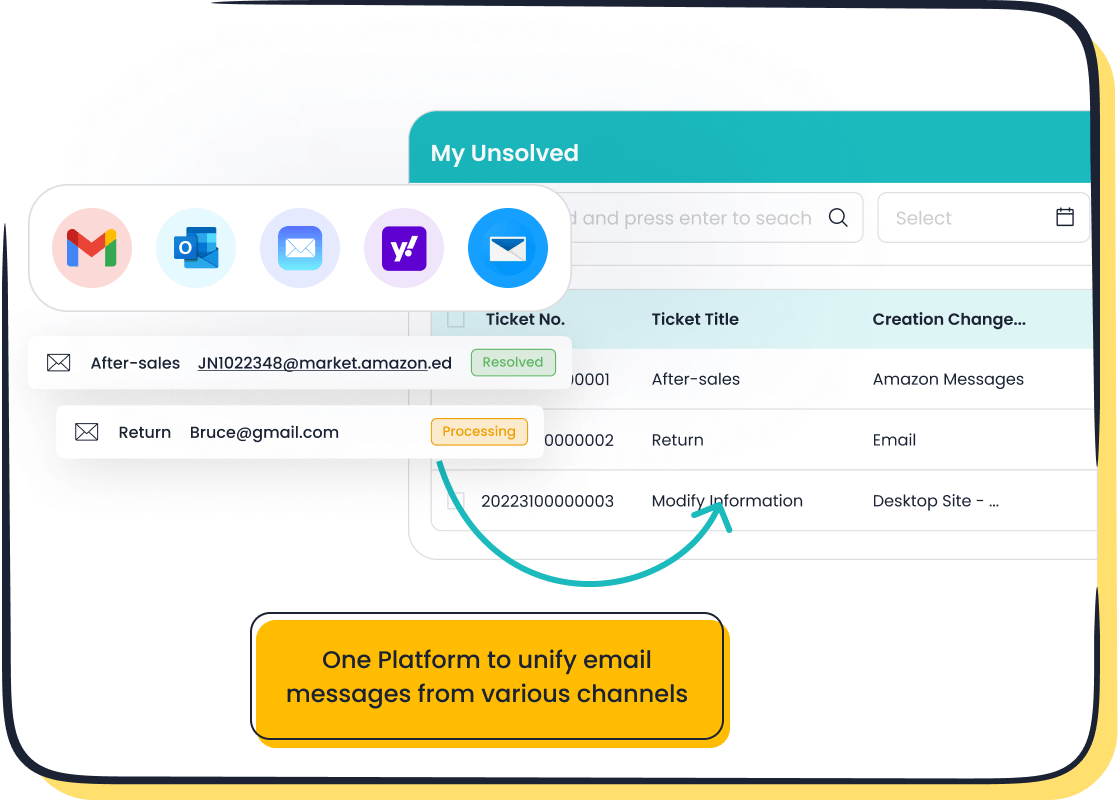
Integration is key to maximizing the potential of ticket management systems. By connecting your ticketing system with tools like email, CRM, or chat platforms, you centralize all customer interactions. This eliminates the need to switch between platforms, saving time and reducing errors. Sobot’s ticketing system integrates seamlessly with popular tools, including Shopify and email, ensuring a unified workflow.
Benefits of seamless integration for efficiency
A well-integrated system offers numerous benefits. It speeds up response times, improves collaboration, and enhances the customer experience. For example, when a ticket is linked to your CRM, agents can access customer history instantly. This leads to faster resolutions and happier customers. Additionally, advanced analytics from integrated systems provide insights to refine your support strategies.
Leveraging Advanced Features of a Ticketing System
Automate Repetitive Tasks
Setting up automated ticket assignments
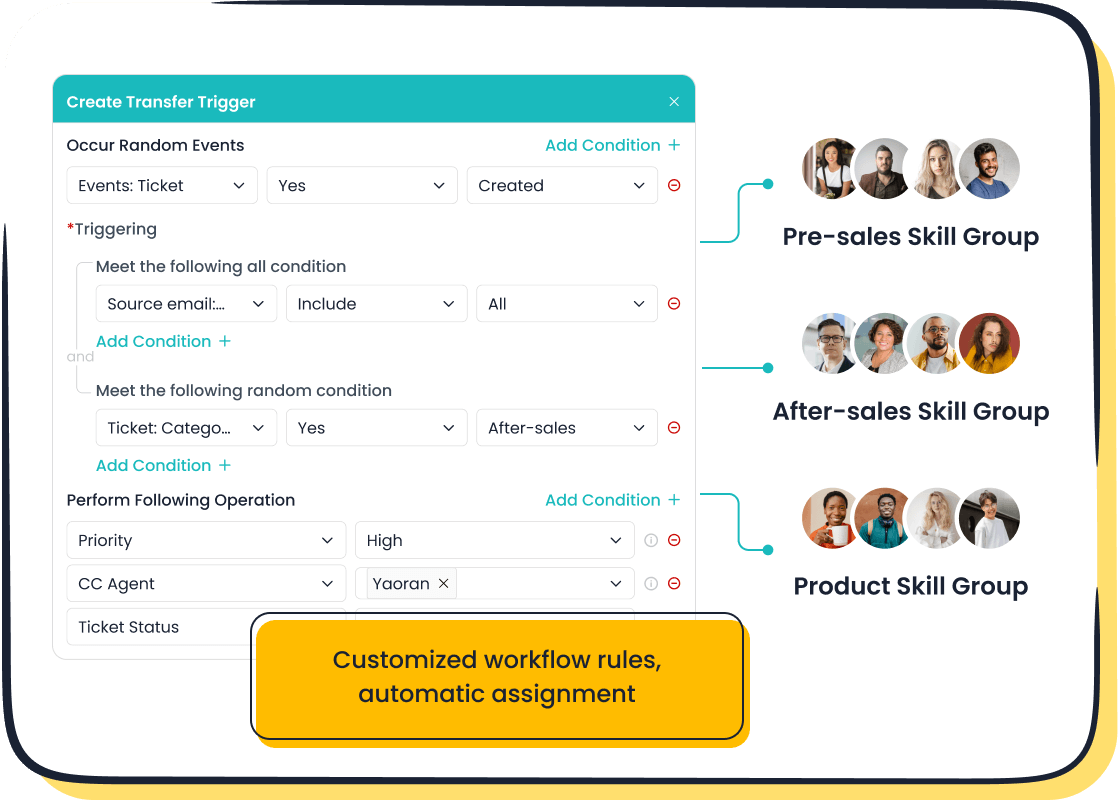
Automating ticket assignments can save your team hours of manual work. Instead of manually routing tickets, you can configure your ticketing system to assign them based on predefined rules. For example, tickets related to billing can go directly to the finance team, while technical issues are routed to the IT help desk. This ensures the right person handles each query, reducing delays and improving efficiency. Sobot’s ticketing system excels in this area with its custom trigger rules, ensuring tickets are routed accurately every time.
Using canned responses for common queries
Canned responses are a game-changer for handling repetitive questions. These pre-written replies allow your team to respond quickly to common issues like password resets or shipping inquiries. Not only does this save time, but it also ensures consistency in your communication. With Sobot’s categorized templates, you can create and organize canned responses effortlessly, making them accessible to your team when needed.
Enable Self-Service Options
Creating a knowledge base or FAQ section
A well-organized knowledge base is one of the most effective self-service tools you can offer. It provides customers with instant access to answers, reducing the need for direct support. For instance, an FAQ section can address common concerns like return policies or troubleshooting steps. Sobot’s ticketing system integrates seamlessly with self-service portals, allowing you to build a robust knowledge base that’s easy to update and maintain.
Benefits of empowering customers to resolve issues independently
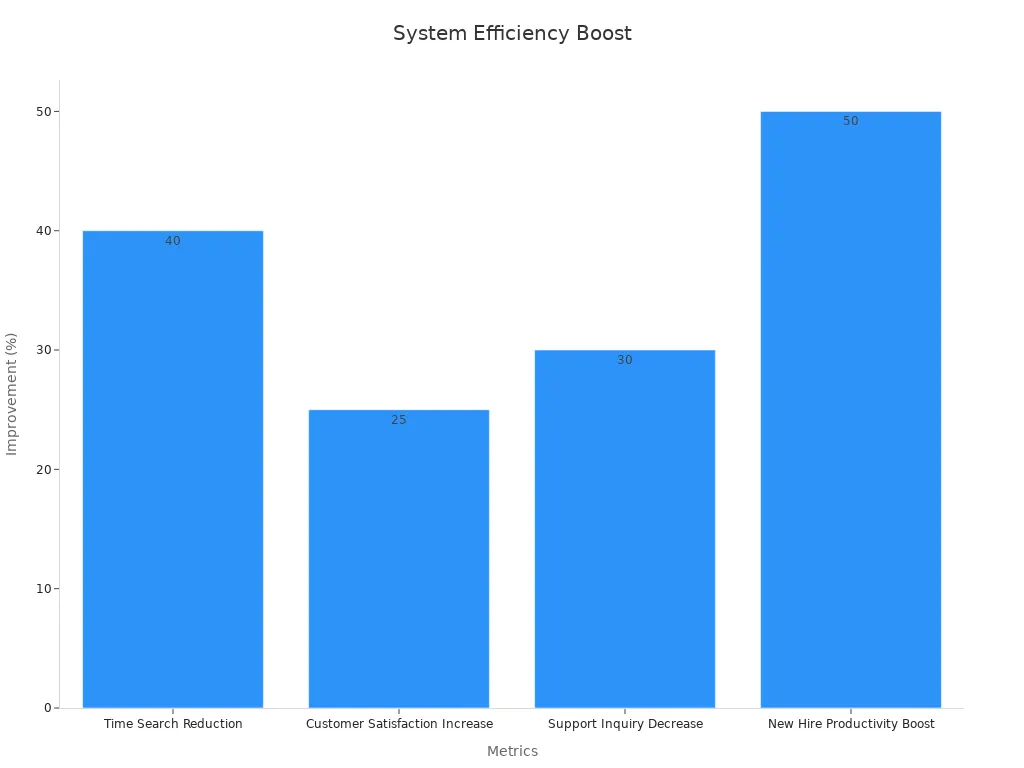
Empowering customers with self-service tools improves their experience and reduces your team’s workload. Customers can find solutions on their own, which speeds up problem resolution. This is especially helpful for industries with complex products, like electronics or software. According to studies, self-service options can reduce support inquiries by 30% and increase customer satisfaction by 25%.
Use Ticket Tagging and Prioritization
Organizing tickets by urgency or category
Tagging tickets helps your team stay organized. By assigning labels like "urgent," "billing," or "technical," you can categorize tickets for faster processing. Each tag provides context, making it easier for agents to prioritize their tasks. Sobot’s ticketing system simplifies this process with customizable tags and filters, ensuring no ticket gets overlooked.
Ensuring high-priority issues are addressed promptly
Prioritization ensures critical issues are resolved first. For example, an IT help desk can focus on system outages before addressing minor bugs. This approach prevents backlogs and keeps your operations running smoothly. With Sobot’s SLA reminders, you can set response times for high-priority tickets, ensuring your team meets customer expectations.
Training Your Team to Maximize the Ticketing System
Provide Comprehensive Onboarding
Familiarizing team members with the ticketing system

A smooth onboarding process ensures your team feels confident using the ticketing system from day one. Start by introducing the system’s core features, like automated workflows and ticket categorization. Walk your team through how to manage tickets, use the knowledge base, and access the self-service portal. For example, Sobot’s ticketing system simplifies onboarding with its intuitive interface and multilingual support, making it easy for agents to adapt quickly.
| Statistic | Source |
|---|---|
| An effective onboarding process boosts retention of new hires by 82%. | Brandon Hall Group (Glassdoor study) |
| Organizations with standard onboarding processes experience a 50% increase in productivity. | Society for Human Resources Management (SHRM) |
| 69% of employees are more likely to remain with a company if they receive a great onboarding experience. | Vlerick-Talmundo survey |
Training on best practices for ticket management
Effective ticket management is key to delivering excellent customer service. Train your team on prioritizing tickets, using canned responses, and leveraging self-service tools. Encourage them to explore features like SLA reminders and ticket tagging. For instance, Sobot’s system allows agents to merge duplicate tickets, saving time and reducing confusion. These practices ensure your team handles tickets efficiently and meets customer expectations.
Encourage Continuous Learning
Regular workshops or refresher courses
Continuous learning keeps your team sharp and adaptable. Organize workshops to address common challenges or introduce new features. For example, companies like IBM saw a 20% productivity boost after investing in comprehensive training programs. Similarly, British Airways reduced delays by 20% through targeted workshops. These sessions can focus on improving ticket resolution times or enhancing the use of self-service tools.
Sharing updates on new system features
Keep your team informed about updates to the ticketing system. Share release notes or host quick training sessions to explain new functionalities. For example, if your system introduces advanced analytics or AI-driven ticket routing, ensure your team knows how to use these tools effectively. This proactive approach helps maintain efficiency and keeps your team engaged.
Collect and Act on Feedback
Gathering input from team members on system usability
Your team’s feedback is invaluable for improving workflows. Regularly ask them about the system’s usability and any challenges they face. Use surveys or one-on-one meetings to gather insights. For example, one company used AI to analyze ticket data and identified a recurring payment issue. Acting on this feedback improved customer satisfaction and reduced churn.
“Feedback is the breakfast of champions.” By listening to your team, you can identify bottlenecks and implement changes that enhance efficiency.
Implementing changes to improve workflows
Once you’ve collected feedback, take actionable steps to address concerns. Categorize and prioritize the feedback to focus on high-impact areas first. For instance, if agents struggle with ticket tagging, provide additional training or simplify the process. Tracking metrics like resolution time and ticket backlog can help measure the impact of these changes, ensuring continuous improvement.
Monitoring and Analyzing Performance with Sobot's Ticketing System

Track Key Metrics
Monitoring ticket resolution times
Tracking ticket resolution times is essential for understanding how efficiently your team handles support tickets. Metrics like average resolution time and first response time provide valuable insights into your team's performance. For instance, Sobot's ticketing system offers detailed analytics to help you monitor these metrics. Here's a quick overview of key performance indicators (KPIs) you should track:
| KPI | Description |
|---|---|
| Average Resolution Time | Measures the average time taken to resolve a support ticket. |
| First Response Time | Indicates the time taken for the first response to a support ticket. |
| First Contact Resolution | Percentage of tickets resolved on the first interaction without follow-up. |
| Customer Satisfaction Score | Measures how well customer expectations are met, reflecting overall customer experience. |
By analyzing these KPIs, you can identify areas for improvement and ensure your team meets customer expectations.
Measuring customer satisfaction scores
Customer satisfaction scores (CSAT) are a direct reflection of how well your team resolves issues. Sobot's ticketing system makes it easy to collect feedback after ticket resolution. For example, you can send automated surveys asking customers to rate their experience. High CSAT scores indicate that your team is meeting or exceeding expectations, while low scores highlight areas needing attention. Regularly reviewing these scores helps you maintain a customer-centric approach.
Manage Backlogs Effectively
Identifying bottlenecks in the ticketing process
Backlogs can disrupt your workflow and frustrate customers. Identifying bottlenecks is the first step to managing them effectively. Use Sobot's analytics to pinpoint where delays occur, whether it's in ticket assignment or resolution. Industry benchmarks suggest maintaining a backlog as a percentage of monthly ticket volumes between 0.1% and 7.6%, depending on ticket priority. This helps you assess your backlog management strategies and make necessary adjustments.
Strategies for clearing overdue tickets
Clearing overdue tickets requires a structured approach. Start by prioritizing critical issues to prevent SLA breaches. For example:
- Assign high-priority tickets to senior agents for faster resolution.
- Use Sobot's automated workflows to route tickets to the right team.
- Regularly review predicted backlogs to allocate resources effectively.
These strategies not only reduce backlogs but also improve SLA compliance and customer trust.
Use Reports for Continuous Improvement
Analyzing trends in ticket volume and types
Reports are a goldmine for identifying trends in ticket volume and types. For example, seasonal trends might reveal a spike in support tickets during holidays. Sobot's ticketing system allows you to analyze these patterns, helping you plan resources better. Additionally, identifying frequently opened ticket types can highlight opportunities for automation, such as creating a knowledge base article for recurring issues.
Adjusting processes based on data insights
Data-driven decisions lead to continuous improvement. Use Sobot's reports to evaluate the effectiveness of new initiatives. For instance, if a new self-service option reduces ticket volume, you can expand it further. Regularly adjusting your processes based on these insights ensures your team stays efficient and your customers remain satisfied.
Ensuring Long-Term Success with Free Online Ticketing Systems
Regularly Update the System
Keeping software up to date for security and functionality
Keeping your ticketing system updated is crucial for maintaining security and functionality. Regular updates ensure compliance with industry standards and protect sensitive customer data. For example:
| Compliance Measure | Benefit |
|---|---|
| ISO 27001 | Commitment to security best practices |
| Data encryption | Protects customer information from breaches |
| Role-based access | Limits access to authorized personnel only |
Updates also bring new features like AI-powered automation, which can streamline ticket routing and improve response times. By staying current, you not only safeguard your system but also enhance the overall customer experience.
Adding new features as your business grows
As your business expands, your ticketing system should grow with it. Adding features like multilingual support or advanced analytics can help you serve a broader audience. For instance, integrating chatbots for 24/7 self-service can reduce wait times and improve ticket resolution accuracy. Sobot’s ticketing system excels in this area, offering scalable solutions that adapt to your evolving needs.
Scale the System as Needed
Expanding user access or storage capacity
Growth often means more users and data. A scalable ticketing system lets you add agents or increase storage without disrupting operations. For example, Sobot’s system supports seamless expansion, ensuring your team can handle higher ticket volumes efficiently. This flexibility is essential for businesses like IT help desks, where demand can spike unexpectedly.
Transitioning to paid plans if necessary
Free systems are a great starting point, but paid plans often unlock advanced features. These include enhanced analytics, priority support, and custom integrations. For example, Japan’s JR East scaled its digital ticketing platform to include NFC technology, enabling multifunctional uses like hotel check-ins. This kind of scalability ensures your system remains effective as your business grows.
"Scaling your ticketing system is not just about adding capacity; it’s about future-proofing your operations."
Foster a Customer-Centric Culture
Prioritizing customer satisfaction in all processes
A customer-centric approach transforms your service quality. Multi-channel support, like phone, email, and chat, gives customers the flexibility to connect how they prefer. Performance tracking tools help you monitor satisfaction and identify areas for improvement. Sobot’s ticketing system integrates these features, making it easier to prioritize customer needs.
Using the ticketing system to enhance customer relationships
Your ticketing system can do more than resolve issues—it can build relationships. Features like a unified customer ID provide agents with complete interaction histories, enabling personalized support. A well-maintained knowledge base also empowers customers to find answers independently, boosting satisfaction and loyalty. These tools not only improve efficiency but also strengthen your customer experience.
Free online ticketing systems are game-changers for businesses looking to streamline operations and improve the customer experience. By setting up the system thoughtfully, leveraging advanced features, and training your team effectively, you can handle customer inquiries with ease. Performance monitoring ensures you stay on track and continuously improve.
These systems offer undeniable benefits:
- Cost savings by eliminating expensive software licenses.
- Automation that reduces manual tasks, allowing teams to focus on critical issues.
- Enhanced customer interactions that build trust and satisfaction.
Sobot’s Ticketing System takes this a step further. It’s perfect for businesses like an IT help desk or customer service team, offering automation, SLA management, and seamless integration. Start implementing these strategies today and see how Sobot can transform your workflow.
FAQ
What is a ticketing system, and how does it work?
A ticketing system organizes customer inquiries into "tickets" for easy tracking and resolution. It collects requests from channels like email or chat and assigns them to the right team. For example, an IT help desk can use it to manage technical issues efficiently.
Can a free ticketing system handle high volumes of tickets?
Yes, many free systems, like Sobot’s ticketing system, are designed to scale. They include features like automated ticket routing and SLA management, ensuring smooth operations even during peak times. This makes them ideal for businesses like IT help desks or e-commerce platforms.
How do ticketing systems improve customer satisfaction?
They streamline communication, reduce response times, and provide consistent support. Features like self-service portals and canned responses empower customers to resolve issues quickly. For instance, Sobot’s system integrates with knowledge bases, helping customers find answers without waiting.
Are free ticketing systems secure?
Most free systems prioritize security with features like data encryption and role-based access. Sobot’s ticketing system, for example, complies with industry standards like ISO 27001, ensuring your customer data stays safe.
Can I integrate a ticketing system with my existing tools?
Absolutely! Integration is a key feature of modern ticketing systems. Sobot’s system connects seamlessly with tools like email, CRM, and e-commerce platforms, creating a unified workflow that boosts efficiency.
See Also
Enhance Your Around-The-Clock Live Chat Performance
Elevate SaaS Customer Service Using Live Chat Techniques
Tips for Effectively Overseeing Live Chat Representatives

