Manage Customer Inquiries 10 Best Software Picks 2026


Are you drowning in your inbox? You may be losing track of customer inquiries. This guide helps your small business find the best customer service software. You can manage customer inquiries and improve the customer experience. This list is your clear guide to the top customer communication management software. The right business management software, like Sobot, transforms your customer interactions. A good client management software helps every customer feel heard. This software is perfect for a growing small business that handles many customer inquiries and wants to organize its customer support.
Quick Verdict: Top 10 Inquiry Tools
Finding the best customer service software can feel overwhelming. This quick guide simplifies your choice. You can find the right tool to manage customer inquiries effectively. Each option below serves a different business need. Your goal is to find the software that best supports your customer and your team.
Here is a quick look at our top 10 picks for 2026:
- Zendesk: The complete, all-in-one platform for established teams.
- Sobot: This software uses powerful AI to unify every customer conversation.
- Freshdesk: A great choice for AI-powered support and intuitive design.
- Help Scout: Perfect for teams that want to make each customer feel valued.
- Zoho Desk: Offers the best value for growing teams needing scalable features.
- Intercom: Leads the way in proactive customer engagement through live chat.
- Front: A collaborative inbox that turns your email into a team workspace.
- Gorgias: The top helpdesk built specifically for e-commerce stores.
- Tidio: Combines live chat and easy-to-build chatbots for instant support.
- HubSpot Service Hub: The best free option to get started with professional tools.
Key Takeaway 📝 The right customer service software transforms how you handle inquiries. These customer support tools are more than just inboxes. They are customer service automation tools designed to organize conversations, save time, and improve the customer experience.
Read on for a detailed breakdown of each platform to see which one is the perfect fit for your business.
Comparing the Best Customer Service Software

Choosing the right customer service software is a big decision for your small business. You need a tool that helps you manage customer inquiries without confusion. The right software organizes every customer conversation in one place. This comparison table gives you a quick overview of our top picks. You can see the key details side-by-side. This makes your choice much easier.
A good client management software helps your team work better. It saves time and improves how you talk to each customer. This table acts as your guide to the best customer service software available. Use it to find a help desk software that fits your budget and goals. The right customer communication management software will support your growth. This client management software comparison will help you find the perfect match for your needs.
Quick Tip 💡 Focus on the "Best For" column to quickly find tools that match your industry or business size. This helps you narrow down your options before diving into the details.
| Software | Pricing Model | Standout Feature | Best For |
|---|---|---|---|
| Zendesk | Starts at $19/mo | All-in-One Suite | Established Teams |
| Sobot | Custom Pricing | AI-Powered Omnichannel Platform | All-in-One Contact Centers |
| Freshdesk | Free Plan Available | Intuitive AI Features | Growing Support Teams |
| Help Scout | Starts at $20/mo | Human-Centric Shared Inbox | Personalized Customer Support |
| Zoho Desk | Free Plan Available | Context-Aware AI (Zia) | Teams on a Budget |
| Intercom | Starts at $39/mo | Proactive Chat & Bots | Customer Engagement |
| Front | Starts at $19/mo | Collaborative Email Inbox | Internal Team Collaboration |
| Gorgias | Starts at $50/mo | Deep Shopify Integration | E-commerce Stores |
| Tidio | Free Plan Available | Lyro AI & Chatbot Builder | Startups & Micro-Businesses |
| HubSpot Service Hub | Free Tools Available | CRM Integration | Businesses Using HubSpot |
1. Zendesk: All-in-One Customer Service
Zendesk stands out as a comprehensive customer service software. You can use this platform to manage all customer interactions in one place. It acts as a powerful client management software and CRM, giving your team a complete view of every customer. This software is built for teams that need a robust, all-in-one solution to scale their customer support operations.
Key Features
Zendesk offers a deep set of tools designed to improve your ticket management workflow. The platform functions as a complete CRM, centralizing all data for a unified customer view. Its features help you organize and respond to every customer inquiry efficiently.
- Intelligent Routing: The software uses AI to analyze incoming tickets. It automatically sends each customer ticket to the right team based on language, intent, and sentiment. This saves significant time.
- AI-Powered Assistance: Zendesk's Answer Bot provides instant answers to common questions, enabling customer self-service. It also suggests macros to agents, which helps standardize responses and improve your workflow automation.
- Multichannel Support: You can manage conversations from email, chat, voice, and social media within a single ticketing system. This creates a seamless experience for every customer.
- Advanced Reporting: The platform provides detailed analytics. You can track team performance, monitor customer satisfaction, and gain valuable customer insights to improve your service. This makes it more than just a help desk software; it's a full CRM.
Pros and Cons
You should weigh the benefits and drawbacks before choosing this client management software. Zendesk is a market leader for a reason, but it may not be the perfect fit for every small business. Its CRM capabilities are extensive.
User Satisfaction Ratings 🌟 Zendesk consistently receives positive customer feedback, reflecting its reliability and powerful features.
- G2: 4.3 / 5
- Capterra: 4.4 / 5
Pros:
- Scalability: The software grows with your business, from basic ticketing to advanced enterprise needs.
- Powerful Integrations: It connects with hundreds of other apps, including sales and lead management tools, creating a unified CRM.
- Comprehensive Features: Offers everything you need to manage the entire customer experience, from the first contact to long-term support.
Cons:
- Steep Learning Curve: The vast number of features can be overwhelming for new users.
- Higher Cost: Pricing can be a significant investment, especially for a small business with a limited budget.
Pricing
Zendesk offers several pricing tiers for its Suite plans. Each plan provides more advanced features, allowing you to choose the right level of support for your team. The pricing structure is designed to scale as your customer support needs and CRM requirements grow. This customer communication management software has options for different stages of business growth.
- Suite Team: Starts at $55 per agent/month. Includes the core ticketing system, messaging, voice, and basic reporting.
- Suite Growth: Starts at $89 per agent/month. Adds multilingual support, SLAs, and custom ticket forms.
- Suite Professional: Starts at $115 per agent/month. Unlocks advanced reporting, HIPAA compliance, and collaboration via Slack.
2. Sobot: AI-Powered Software to Manage Customer Inquiries
Sobot offers a powerful, AI-driven platform to manage customer inquiries. This software acts as an all-in-one contact center solution. You can unify all your customer interactions into a single, intelligent workspace. This client management software is designed for businesses that want to improve efficiency and provide a superior customer experience. It helps you handle customer inquiries from awareness to advocacy.
Key Features
Sobot's features are built to create a seamless workflow for your customer support team. The software uses AI to automate tasks and provide valuable customer insights. This approach helps you manage a high volume of inquiries without sacrificing quality.
- Omnichannel Solution: Sobot’s platform unifies every channel into one view. Your team can manage conversations from many sources. This creates a consistent experience for every customer. Supported channels include:
- AI chatbots and live chat
- Email and phone calls
- Social media like Facebook and Instagram
- Messaging apps like WhatsApp and Telegram
- E-commerce platforms including Shopify and Amazon
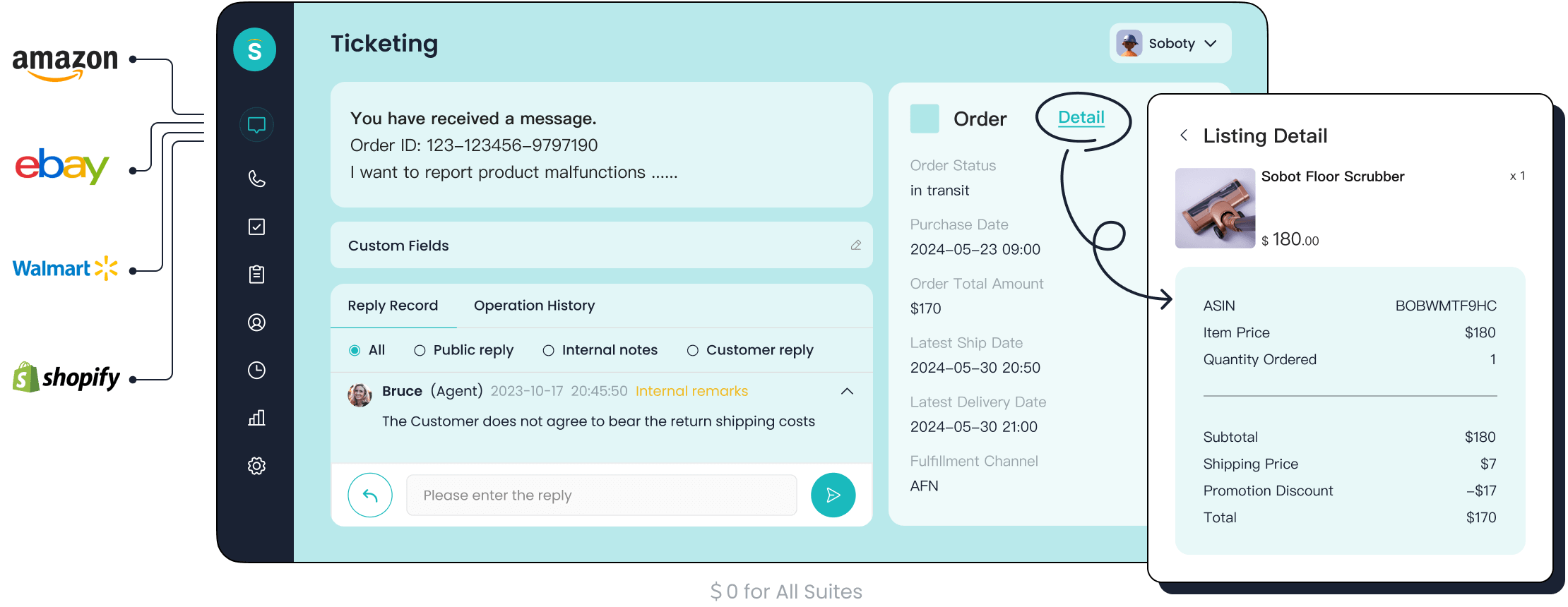
- AI-Powered Ticketing System: The ticketing system automates your ticket management. It uses AI for smart routing, SLA reminders, and workflow automation. This feature merges tickets about the same issue and provides canned responses. It turns your help desk software into an efficient powerhouse.
- Advanced Self-Service: The software provides AI-powered chatbots that offer 24/7 self-service options. This reduces agent workload and empowers your customer base to find answers quickly.
Pros and Cons
This customer communication management software provides significant advantages for a growing small business. The platform is built to enhance productivity and customer satisfaction.
Pro Tip 💡 Use Sobot's unified CRM to see a complete history of all customer interactions. This helps your team provide personalized support and strengthens your lead management process. A single customer view in the CRM is a game-changer.
Pros:
- Unified Workspace: The platform combines every customer conversation, ticket, and CRM data point in one place.
- Increased Efficiency: AI and automation handle repetitive tasks, which frees up your team to focus on complex inquiries.
- Deep Customer Insights: The CRM provides analytics on customer feedback and behavior, helping you make smarter business decisions.
- Scalable Solution: This client management software grows with you, supporting your needs from basic ticketing to a full multichannel contact center.
Pricing
Sobot uses a Custom Pricing model. You will need to contact their sales team for a quote. This approach ensures you get a plan tailored specifically to your business size, industry, and feature requirements. It allows you to build a package that includes the exact tools you need, from the CRM to the voice call center.
3. Freshdesk: AI-Powered Support
Freshdesk is a popular customer service software known for its user-friendly design. You can use this platform to streamline your customer support with powerful AI features. It is an excellent choice for a growing small business. This software helps you manage every customer inquiry effectively. The platform consolidates all customer interactions into one place. This improves your overall customer experience.
Key Features
Freshdesk offers a robust ticketing system designed for efficiency. Its features help you automate your workflow and improve ticket management. The software provides a complete CRM to track every customer journey.
- Multichannel Support: You can bring all your customer conversations from email, phone, chat, and social media into a single help desk software. This unified view ensures no customer message is lost.
- AI-Powered Automation: The software uses AI to handle repetitive tasks. It offers workflow automation for ticket routing and canned responses. This frees up your team to focus on more complex customer issues. The platform's CRM capabilities give you valuable customer insights.
- Self-Service Options: You can build a comprehensive knowledge base and AI-powered bots. This allows each customer to find answers on their own. This self-service feature reduces your team's workload. The CRM helps personalize these interactions.
Pros and Cons
This client management software offers great value. It balances powerful features with an affordable price. The platform's CRM is a strong tool for lead management.
User Review Highlight ⭐ Users often praise Freshdesk for its intuitive interface and powerful customization. The platform makes it easy for teams to adapt the ticketing and CRM workflow to their specific needs.
Pros:
- Ease of Use: The software has a simple, intuitive interface. Your team can start managing tickets with minimal training.
- Cost-Effective: It provides significant value, with a free plan available for startups. This makes it an affordable client management software.
- High Customization: You can customize your ticketing workflow, automations, and reporting. The CRM can be tailored to your business.
Cons:
- Limited Advanced Features on Lower Tiers: Some advanced features and customer feedback tools are only available in higher-priced plans.
Pricing
Freshdesk offers a flexible customer communication management software with several pricing plans. This includes a free option perfect for new businesses. The CRM is included in all plans.
- Free: $0 for up to 10 agents. Includes basic ticketing and a knowledge base.
- Growth: Starts at $15 per agent/month. Adds automation and collision detection.
- Pro: Starts at $49 per agent/month. Includes custom roles, advanced reporting, and a full CRM.
- Enterprise: Starts at $79 per agent/month. Provides skill-based routing and AI-powered tools.
4. Help Scout: Human-Touch Communication
Help Scout is a customer service software designed for a personal touch. You can manage all your customer interactions in a simple, shared inbox. This platform avoids the cold feel of a traditional ticketing system. It helps your small business build strong relationships with every customer. The software focuses on making each conversation feel human and personal.
Key Features
This client management software provides essential tools without complexity. Your team can master the workflow quickly. The features support excellent customer support.
- Shared Inbox: You can collaborate on emails and messages as a team. The software organizes every conversation without confusing ticket numbers. This creates a seamless workflow.
- Docs Knowledge Base: You can build a self-service help center. This lets each customer find answers to common questions 24/7.
- Customer Profiles: The software displays helpful customer data next to every message. This simple crm gives you context from past conversations. The crm helps you understand your customer better. You can use this crm to gain valuable customer insights and assist with lead management.
Pros and Cons
This platform is great for teams that prioritize the customer experience. It is a powerful customer communication management software. However, its simplicity has some trade-offs.
User Highlight ⭐ Users love that Help Scout feels just like sending a regular email. It helps them connect with each customer on a personal level, which improves satisfaction and loyalty.
Pros:
- Personalized Feel: The software removes ticket numbers and automated headers. This makes every reply feel like a one-on-one conversation.
- Easy to Use: Your team can learn this client management software in minutes. The interface is clean and intuitive.
- Excellent Reporting: The crm provides reports on team performance, conversation volume, and customer feedback.
Cons:
- Limited Automation: The workflow automation is less advanced than other tools. It may not be ideal for complex ticket management.
- Basic CRM: The built-in crm is great for context but is not a full-featured crm for advanced sales processes.
Pricing
Help Scout offers straightforward pricing plans. Each tier adds more features to support your growing team. This help desk software has options for different needs.
- Standard: Starts at $20 per user/month. Includes the core ticketing and multichannel features.
- Plus: Starts at $40 per user/month. Adds advanced permissions and more integrations.
- Pro: Starts at $65 per user/month. Provides enterprise security and premium support.
5. Zoho Desk: Best Value for Growing Teams
Zoho Desk is an excellent customer service software for a growing small business. You can get powerful features without a high price tag. This software helps you manage all customer interactions from one central place. Its broad connectivity across web, iOS, and Android platforms gives your team flexibility. This makes it a top choice for teams that need a scalable and affordable solution to improve the customer experience.
Key Features
This client management software offers a rich feature set designed for growth. The platform's powerful CRM gives you a complete view of every customer. You can use its tools to create an efficient workflow for your customer support team.
- Context-Aware AI: The software uses an AI named Zia. Zia helps your team with ticket management by providing solutions and spotting customer feedback trends. This gives you valuable customer insights.
- Scalable Ticketing System: The platform is built to grow with you. You can easily add new agents and support channels. Its workflow automation handles tasks like tagging and routing tickets.
- Advanced Reporting: The help desk software includes real-time dashboards and scheduled reports. You can connect it to Zoho Analytics for a deeper look at team performance.
- Team Collaboration: The software has shared inboxes and internal comments. These features improve team alignment and help you manage customer inquiries securely.
Pros and Cons
Zoho Desk provides a strong balance of features and affordability. The integrated CRM is a major benefit for managing the entire customer journey, including lead management.
Did You Know? 🧐 Zoho Desk's deep integration with other Zoho apps (like its CRM) and third-party tools creates a mission control center for your operations. This unified approach is a key advantage.
Pros:
- Excellent Value: This customer communication management software offers comparable or better features than competitors at a lower cost.
- Deep CRM Integration: The seamless connection with Zoho CRM provides unmatched context for every customer conversation.
- Powerful Automation: The software automates many repetitive tasks, which frees up your team for more complex issues.
Cons:
- Interface Can Be Cluttered: With so many features, the user interface can feel busy for new users.
- Best Within Zoho Ecosystem: You get the most value when you use it with other Zoho products, like the CRM.
Pricing
Zoho Desk offers a very competitive pricing structure, including a free plan. This makes the multichannel ticketing software accessible to businesses of all sizes.
- Free: $0 for up to 3 agents. Includes email ticketing and a private knowledge base.
- Standard: Starts at $14 per agent/month. Adds social channels, SLAs, and a public knowledge base.
- Professional: Starts at $23 per agent/month. Includes time tracking, ticket sharing, and the Zia AI assistant.
- Enterprise: Starts at $40 per agent/month. Unlocks live chat, a self-service portal, and advanced CRM features.
6. Intercom: Proactive Live Chat
Intercom is a customer service software that excels at proactive engagement. You can use this platform to turn website visitors into loyal customers. This software is ideal for a small business focused on sales and real-time customer support. It moves beyond traditional ticket management by starting conversations. This approach improves your overall customer experience and boosts conversions. The platform combines a help desk software, a powerful CRM, and marketing automation into one tool.
Key Features
This client management software offers a unique set of tools for engaging every customer. The platform's CRM gives you deep customer insights. You can use its features to create a smooth workflow for your customer support team. The integrated CRM helps you track all customer interactions.
- Proactive Live Chat: This software actively engages visitors on your site. It does not wait for a customer to ask for help. You can use it to:
- Welcome new visitors with an automated message.
- Send targeted messages to high-value visitors.
- Reach out to people who spend time on specific pages, like your pricing page.
- Encourage visitors to complete an order, which can increase sales.
- Integrated Ticketing System: The platform includes a multichannel ticketing system for email and in-app messages. This helps your team manage conversations that require more time. The CRM provides full context for every ticket.
- Self-Service Bots: You can build AI-powered bots to answer common questions. This provides instant self-service options for your customer base and collects valuable customer feedback. The CRM uses this data for better lead management.
Pros and Cons
This customer communication management software is a leader in conversational marketing. Its powerful CRM and workflow automation tools make it a strong choice. However, you should consider its focus and cost.
Success Story 🚀 Christian Parker at TrueCommerce noted that by proactively messaging customers about issues, they saw "a reduction of almost 80% in the contact rate for temporary issues." This shows the power of proactive customer communication.
Pros:
- Excellent for Engagement: The software is unmatched for starting conversations and converting leads.
- Powerful CRM: The built-in CRM provides a complete view of each customer journey.
- Highly Customizable: You can tailor bots, messages, and your entire workflow to fit your needs.
Cons:
- Higher Price Point: The cost can be high, especially for teams needing advanced features.
- Complex for Simple Ticketing: It might be too powerful if you only need a basic ticketing tool.
Pricing
Intercom’s pricing is based on features and the number of people you reach. This client management software offers plans designed to scale with your business.
- Essential: Starts at $39 per seat/month. Includes the core live chat and inbox features.
- Advanced: Starts at $99 per seat/month. Adds more advanced workflow automation and customization.
- Expert: Starts at $139 per seat/month. Unlocks the full feature set, including advanced reporting.
7. Front: Collaborative Inbox Management
Front transforms your email inbox into a collaborative hub for your team. You can use this customer service software to manage all customer interactions from a shared space. This approach is perfect for a small business that wants to improve teamwork without a complex ticketing system. This software helps every customer feel like they are getting personal attention. It is a powerful client management software for organizing your customer support.
Key Features
This client management software gives your team a unified view of every customer conversation. The platform's features are designed to boost transparency and efficiency. You can connect the software to your CRM for a complete picture of all customer interactions. This helps with lead management and provides valuable customer insights.
- Collaborative Inboxes: You can bring emails, chats, and social media messages into one place. This allows your team to work together on replies. The shared workflow helps you:
- Make faster decisions with instantly searchable information.
- Divide the workload and track conversations easily.
- Ensure no customer message is ever missed.
- Internal Comments: Your team can discuss a customer email privately within the thread. This avoids messy email forwards and improves your workflow. The CRM integration provides context for these discussions.
- Workflow Automation: You can set up rules to automatically route messages to the right person or team. This simple workflow automation saves time on manual ticket management. The built-in CRM helps you personalize these automated actions.
Pros and Cons
This customer communication management software excels at team collaboration. The platform's CRM features provide a solid foundation for improving the customer experience. However, you should consider its unique approach.
Team Tip 🤝 Use Front's internal comments to train new team members. They can see how experienced agents handle a customer inquiry, which helps them learn faster. The CRM provides the history they need.
Pros:
- Enhanced Teamwork: The software makes it easy for your team to collaborate on every customer message.
- Unified Communications: It brings multichannel messages into one familiar inbox interface.
- Powerful CRM Integrations: The platform connects with your existing CRM to give you full context on every customer.
Cons:
- Less Structured Than a Help Desk: It may lack the rigid structure of a traditional ticketing tool, which some teams prefer.
- Can Become Expensive: Pricing can increase as you add more users and advanced features.
Pricing
Front offers several plans designed to scale with your team's needs. This help desk software provides options for different stages of growth.
- Starter: Starts at $19 per person/month. Includes up to 10 team members and core collaboration features.
- Growth: Starts at $59 per person/month. Adds workflow automation, analytics, and more integrations.
- Scale: Starts at $99 per person/month. Provides advanced routing, permissions, and a self-service portal for customer feedback.
8. Gorgias: Top E-commerce Helpdesk
Gorgias is the customer service software built specifically for e-commerce stores. You can use this platform to turn your customer support into a profit center. This software connects directly to your online store. It gives your team the data they need to solve problems and increase sales. This client management software is perfect for a small business that wants to improve the customer experience and drive revenue through excellent customer support.
Key Features
This help desk software provides tools designed to manage customer interactions in an e-commerce setting. The platform’s powerful CRM pulls data directly from your store. This gives you deep customer insights for every conversation. The software helps you create an efficient workflow.
- Deep E-commerce Integration: The software connects directly with major platforms. This allows you to see and edit order information right next to a customer ticket. Supported platforms include:
- Shopify
- WooCommerce
- BigCommerce
- Magento
- PrestaShop
- Revenue-Driving Tools: You can track sales generated from customer conversations. The platform’s CRM helps you identify opportunities to upsell. This turns your customer support team into a sales driver.
- Powerful Workflow Automation: The software uses rules to automate ticket management. You can automatically tag, assign, or respond to a customer ticket based on its content. This CRM-driven workflow automation saves your team valuable time.
Pros and Cons
This customer communication management software offers unique advantages for online stores. The platform’s CRM is focused on sales and order data. However, its specialization is something to consider.
E-commerce Tip 🛒 Use Gorgias to create a self-service portal. This allows a customer to track their own orders and process returns without contacting your team. This improves the customer experience and frees up your agents.
Pros:
- Increases Sales: The software makes it easy to see which customer interactions lead to purchases.
- Rich Customer Context: The deep CRM integration provides complete order history for every customer.
- Excellent Automation: Its workflow automation is tailored for e-commerce needs, like shipping questions.
Cons:
- Niche Focus: This client management software is less ideal for businesses outside of e-commerce.
- Usage-Based Pricing: The cost is tied to your ticketing volume, which can be unpredictable.
Pricing
Gorgias offers several plans based on your monthly ticket volume. This multichannel ticketing system is designed to scale with your store's growth. The CRM and lead management tools are included.
- Starter: Starts at $10/month. Includes 50 tickets per month and core features.
- Basic: Starts at $60/month. Includes 300 tickets per month and live chat.
- Pro: Starts at $360/month. Includes 2,000 tickets per month and more integrations.
- Advanced: Starts at $900/month. Includes 5,000 tickets per month and dedicated support.
9. Tidio: Live Chat and Chatbot Automation
Tidio is a customer service software that makes live chat and automation simple. You can use this platform to engage visitors on your website in real time. It is an excellent choice for a small business that wants to provide instant customer support. This software combines a live chat tool, chatbots, and a multichannel inbox into one easy-to-use dashboard. It helps you improve the customer experience from the very first interaction.
Key Features
This client management software gives you powerful tools to manage customer interactions. The platform’s built-in CRM stores contact information and conversation history for every customer. This simple CRM gives you context for better lead management.
- Lyro AI Chatbot: You can build powerful chatbots without any coding. This feature helps you provide 24/7 self-service. The chatbot uses advanced technology to understand each customer. Its capabilities include:
- Natural Language Processing (NLP) to understand questions.
- The ability to self-train using your company's information.
- Understanding message context and intent.
- Ready-to-use conversational bot templates.
- Various chat triggers to activate the bot automatically.
- Unified Inbox: The software gathers messages from live chat, email, and social media. This multichannel approach keeps your customer support organized. The simple ticketing system helps you track issues.
- Workflow Automation: You can create an automated workflow to handle common questions. This workflow automation saves your team time and provides valuable customer insights. The CRM helps personalize these automated responses.
Pros and Cons
This customer communication management software is known for its simplicity and powerful free plan. The platform's CRM is a great tool for tracking a customer.
Quick Start Tip 🚀 Use Tidio's pre-built chatbot templates to get started in minutes. You can set up a bot to greet visitors, answer FAQs, or capture leads without any technical skills.
Pros:
- Very Easy to Use: The interface is clean and intuitive, making setup quick.
- Generous Free Plan: The free plan offers core features, making it perfect for startups.
- Powerful Chatbot Builder: You can create custom bots to automate your ticket management and customer support.
Cons:
- Limited for Large Teams: The help desk software may lack the advanced features needed for complex ticket management in large enterprises.
Pricing
Tidio offers several plans, including a robust free option. This makes the client management software accessible for any budget. The CRM is included in all plans.
- Free: $0 for up to 2 operators. Includes live chat and basic chatbot features.
- Communicator: Starts at $29 per seat/month. Adds more conversation features and analytics.
- Chatbots: Starts at $29/month. Unlocks the full power of the Lyro AI chatbot.
- Tidio+: Starts at $394/month. Offers custom features and dedicated support.
10. HubSpot Service Hub: Best Free Option
HubSpot Service Hub is the best customer service software if you need a powerful free option. You can manage all your customer interactions within one of the most robust CRM platforms available. This client management software is perfect for a small business that wants to build a foundation for growth. The software connects your customer support directly to your sales and marketing data. This creates a unified view of every customer.
Key Features
This software provides a generous set of free tools to organize your customer support. The platform is built around its world-class CRM, giving you deep customer insights from day one. You can use its features to build a solid workflow.
- Free Ticketing System: You can turn emails and form submissions into trackable tickets. This free help desk software helps you organize and prioritize every customer inquiry. The system works seamlessly with the HubSpot CRM.
- Shared Inbox: The platform includes a universal inbox. Your team can manage conversations from email and live chat in one place. This improves your ticket management process.
- Knowledge Base: You can create a self-service library of help articles. This empowers each customer to find answers independently, which improves the overall customer experience.
- CRM Integration: Every interaction is automatically logged in the CRM. This gives your team full context on a customer, from their first website visit to their latest purchase, which is great for lead management.
Pros and Cons
This customer communication management software offers incredible value, especially with its free tools. The powerful CRM is a major advantage. However, you should consider its limitations.
User Insight 💡 The true power of HubSpot is its all-in-one nature. When you use the Service Hub with the Marketing and Sales Hubs, you get an unmatched, 360-degree view of every customer.
Pros:
- Powerful Free Tools: The free plan offers more than enough to get a professional customer support system running.
- Best-in-Class CRM: The integrated CRM is the core of the platform, providing rich context for every conversation.
- Scalable Platform: You can start for free and add more advanced features as your business grows.
Cons:
- Expensive Paid Plans: Advanced workflow automation and customer feedback tools are locked behind costly upper-tier plans.
- Complex for Simple Needs: The software can feel overwhelming if you do not plan to use the full CRM.
Pricing
HubSpot offers a free-forever plan with essential tools. For more advanced features, you can upgrade to a paid plan. The Service Hub Starter plan begins at a promotional rate of $9 per seat/month, adding basic workflow automation. The Professional plan starts at $90 per seat/month and introduces SLA tracking and customer feedback surveys. The Enterprise plan, at $150 per seat/month, unlocks the full Breeze AI suite for complex operations.
| Plan | Monthly Cost (per seat) | Users Included | AI Support Tools |
|---|---|---|---|
| Service Hub Starter | Starts at $9 | 1+ users | No |
| Service Hub Professional | Starts at $90 | 5+ users | No |
| Service Hub Enterprise | Starts at $150 | 10+ seats | Yes (Breeze Suite) |
How to Choose the Right Customer Service Software for Your Small Business

Choosing the best customer service software is a key decision for your small business. The right platform organizes your customer interactions and improves the overall customer experience. This guide helps you find a tool that fits your needs perfectly.
Assess Your Communication Channels
First, look at how your customers contact you. Do they prefer email, live chat, phone calls, or social media? A good customer communication management software unifies these channels. This ensures you never miss a message from a customer. List your most important channels to find a software that supports them all. This helps you provide consistent customer support.
Consider Your Budget and Scalability
Your budget is a major factor. Many tools offer free plans or affordable starting tiers. Think about your future needs. Will your team grow? You need a platform that can scale with you. Look for a software that allows you to add more agents and features as your business expands. A flexible CRM is essential for managing a growing customer base.
Evaluate Integrations with Your Client Management Software
Your new tool must work with your existing systems. A strong integration with your CRM is crucial. This connection gives your team a complete view of every customer. It combines sales data, support history, and customer feedback in one place. A well-integrated CRM provides deep customer insights. This helps you personalize every conversation and improve your workflow.
Pro Tip 💡 A powerful CRM integration is non-negotiable. It turns your customer service software from a simple inbox into a central hub for all customer data, empowering your team to provide exceptional service.
Prioritize Ease of Use for Your Team
A complex platform can slow your team down. Choose a tool with an intuitive interface. Your team should be able to learn it quickly. For most non-technical teams, it takes about two to three weeks of training to feel comfortable with a new system's basic functions. A user-friendly design means less time training and more time helping each customer.
You can now manage customer inquiries and improve your customer experience. Moving from a messy inbox to a streamlined workflow is vital for your small business. The best customer service software depends on your unique needs. You might need an all-in-one software like Sobot, an e-commerce tool like Gorgias, or a free option like HubSpot. This customer communication management software helps you gather customer feedback and customer insights.
Your Next Step 🚀 Choose one or two top contenders from this list. Sign up for a free trial to see how the right software transforms your customer support and customer interactions. See how it helps you handle customer inquiries and satisfy every customer.
FAQ
What is customer service software?
Customer service software helps you manage all customer conversations in one place. This software organizes emails, chats, and calls. It makes sure every customer gets a fast and helpful reply.
Why do I need this software for my business?
You need this software to handle customer inquiries efficiently. It saves you time and prevents missed messages. The best customer service software helps you provide a better experience for each customer.
How do I choose the best customer service software?
You should consider your business needs.
- Look at your main communication channels.
- Think about your budget and team size.
- Check for integrations with your other tools.
Can this software help me manage all types of inquiries?
Yes, these platforms are designed to handle a wide range of inquiries. You can track everything from simple questions to complex support tickets. This ensures every issue is resolved properly.
See Also
Leading Customer Service Platforms: A 2024 Review of Top Solutions
Unveiling the Premier Voice of Customer Software Tools for 2024
Discovering the Best Live Chat Support Software Options in 2024
Analyzing the Top Call Center Analytics Software Solutions for 2024
Exploring the Leading IVR Interactive Voice Response Software of 2024

