Lessons I learned from sending apology emails to clients


You learn a lot when you send an apology email to client after a mistake. I remember the first time I had to do this at Sobot. I felt nervous, but I realized that being honest and taking responsibility matters most. Sobot AI and Sobot call center taught me that humility builds trust.
Common Apology Email Mistakes
When you write an apology email to client, you want to get it right. Many people make the same mistakes, but you can avoid them if you know what to look for.
Over-Apologizing
You might think saying "sorry" a lot helps, but it can actually make your message feel less sincere. Studies show that customer service agents apologize about 1.75 times more than customers do. In call centers, agents say sorry even more when there is a service or product issue. Too much apologising can sound robotic or forced. Instead, focus on one clear, heartfelt apology. Sobot Live Chat helps you with this by offering templates that guide you to use sincere and direct language, so you don’t fall into the trap of repeating yourself.
Softening Language
Sometimes, you may want to soften your words to avoid sounding harsh. You might use phrases like "maybe" or "it seems." This can make your apology email to client sound vague or unsure. Clients want you to be straightforward and honest. Sobot Live Chat’s AI-assisted suggestions encourage you to use clear and empathetic language, which builds trust and shows you care.
Unclear Responsibility
If you do not clearly state what went wrong or who is responsible, clients may feel you are avoiding the issue. Here’s how unclear responsibility affects client trust:
| What Happens | Why It Matters |
|---|---|
| Unclear responsibility | Clients see the apology as insincere and lose trust in your company. |
| Blaming others (scapegoating) | Clients think you are being manipulative, which hurts your reputation. |
| Clear, direct apologies | Clients feel respected and are more likely to trust you again. |
Sobot Live Chat templates remind you to take ownership and outline steps to fix the problem, making your message stronger and more effective.
Impact on Client Trust

Relationship Damage
When you send a poor apology email to client, you risk damaging the relationship. In a busy contact center, one weak message can undo months of good service. Here’s what can happen:
- A sincere apology can actually help you keep customers and even make them more loyal.
- If you send an unclear or weak apology, customers may feel ignored or frustrated. This can lead to them leaving your business.
- Sometimes, a well-handled mistake can boost your reputation. Customers want to know you will treat them fairly, even when things go wrong.
- A good apology can even lower the chance of legal trouble or complaints.
- People are more likely to forgive a company that apologizes than one that just offers money.
Sobot always puts customers first. The platform gives you tools to send clear, honest messages, so you can repair trust quickly.
Communication Clarity
Clear communication matters a lot after a mistake. When you recognize what went wrong and talk openly, you show customers that you care. Honest information and open discussion help you rebuild trust. Sobot’s solutions help you stay transparent and accountable, making it easier to regain confidence after a service failure.
Loyalty Effects
The quality of your apology email to client can shape long-term loyalty. Did you know that 70% of email users say apology emails are very important for keeping business relationships strong? Saying “I’m sorry” can boost customer retention by 17%. Customers who get sincere apologies are four times more likely to recommend your brand. They are also twice as likely to forgive you compared to those who only get compensation. By apologising sincerely and using Sobot’s customer-centric tools, you can turn a mistake into a chance to build loyalty.
Turning Points in Communication
Learning from Feedback
You probably remember a time when a client replied to your apology email to client with honest feedback. I sure do. One customer told me my message felt too formal and didn’t really address their frustration. That moment changed how I approached apologising. I started asking myself, “How would I feel if I got this email?” Feedback like this helped me see that clients want you to listen, own up, and show you care. When you pay attention to what clients say, you learn how to make your messages more personal and effective.
Adopting Sobot Live Chat
Switching to Sobot Live Chat made a huge difference in how you handle client conversations. You get all your messages in one place, so you never miss a chance to respond quickly. The AI tools help you write clear, direct replies, and the templates keep your tone friendly and honest. Here’s what changed after using Sobot Live Chat:
| Metric | Before Automation | After Automation | Improvement (%) |
|---|---|---|---|
| First Response Time | 15 minutes | 2 minutes | 86.7% reduction |
| Resolution Time | 60 minutes | 30 minutes | 50% reduction |
| CSAT Score | 75% | 85% | 13.3% increase |
| Resolution Rate | 60% | 80% | 33.3% increase |
| Escalation Rate | 20% | 5% | 75% reduction |
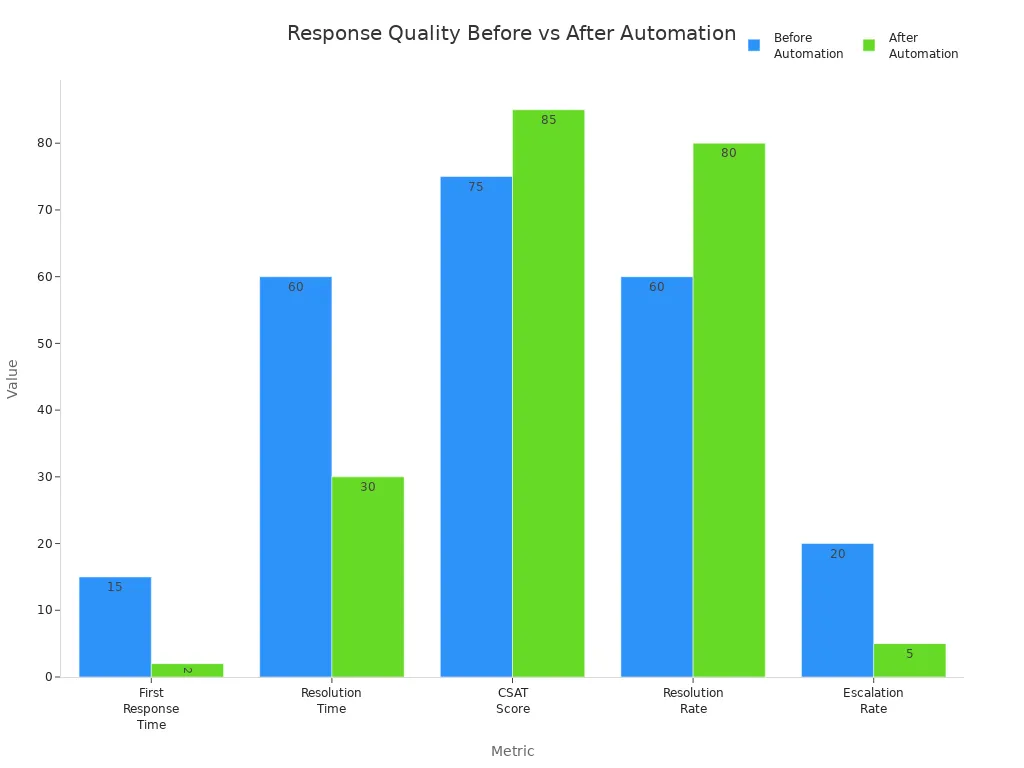
You can see how much faster and better your team can respond. Clients notice when you fix problems quickly and clearly.
Mindset Shift
After these changes, you start to see every apology as a chance to build trust. You stop seeing mistakes as failures and start seeing them as moments to connect. When you use the right tools and listen to feedback, you become more confident and your clients feel valued.
Effective Apology Email to Client
Writing an apology email to client can feel tricky, but you can make it much easier by following a few simple strategies. When you get it right, you show your clients that you care, you take responsibility, and you want to make things better. Let’s break down what works best.
Be Direct and Concise
You want your message to be clear and easy to understand. Clients do not like reading long, confusing emails. They want to know what happened, what you are doing about it, and what comes next. Communication experts suggest a simple structure for your message:
| Key Element | Description |
|---|---|
| Introduce yourself | Start with a friendly greeting and your name. |
| Acknowledge the mistake | Clearly state what went wrong and say you are sorry. |
| Explain corrective actions | Tell the client what you are doing to fix the issue. |
| Outline next steps | Let them know what will happen after your email. |
| Sign off | End with a polite closing and your contact info. |
Tip: Keep your sentences short. Use simple words. Avoid extra details that do not help the client understand the situation.
Sobot Live Chat helps you stay direct and concise. The platform gives you ready-to-use templates that follow this structure. You can pick a template, personalize it, and send it in seconds. The AI-powered suggestions also help you cut out extra words and keep your message focused.
Take Responsibility
Clients want to know that you are not passing the blame. When you take responsibility, you show respect and honesty. Studies show that customers are more than twice as likely to forgive a company that apologizes than one that just offers money. In fact, 45% of people will change a negative review to a positive one after getting a real apology, while only 23% do so if you offer them compensation.
When you say, “I’m sorry, this was our mistake,” you build trust. You show that you care about fixing the problem, not just saving face.
Sobot Live Chat’s AI tools remind you to use clear, direct language. The system can highlight when your message sounds vague or when you are not taking full responsibility. This helps you avoid phrases like “It seems there was an issue” and instead say, “We made a mistake, and here’s what we’re doing to fix it.”
Offer Solutions
Saying sorry is important, but clients also want to know what you will do next. The best apology emails do three things:
- Accept the mistake and apologize sincerely.
- Offer a clear solution to the issue.
- Provide compensation if needed to show goodwill.
Here’s a quick table to help you remember what works best:
| Strategy | Description |
|---|---|
| Taking Responsibility | Admit the mistake without blaming others. |
| Providing Compensation | Offer a refund, discount, or other compensation if it fits the situation. |
| Personalized Approach | Tailor your message and solution to the client’s specific problem. |
Always follow up after you send your apology. Ask if the client feels satisfied. Show that you care about their experience, not just closing the ticket.
Sobot Live Chat makes this step easier. The platform lets you track each conversation, so you can see if the client’s issue is resolved. You can set reminders to follow up, and the system will prompt you to check in with the client after a few days.
Use Sobot Live Chat Tools
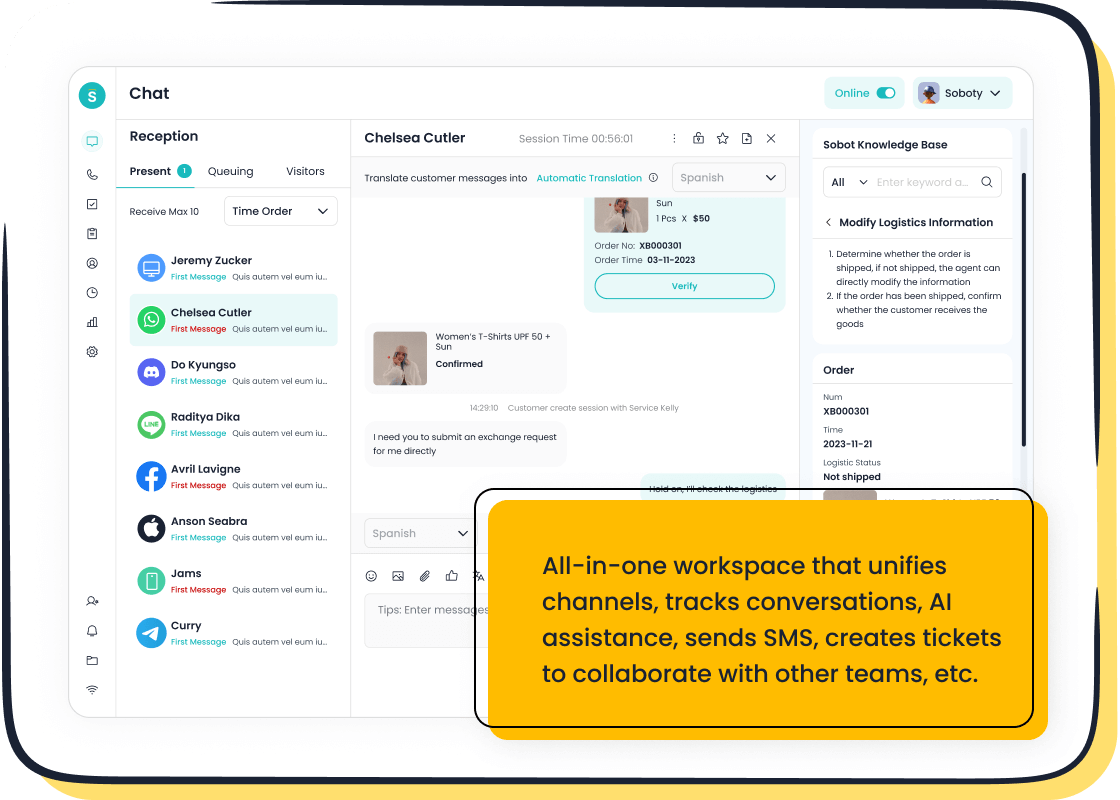
You do not have to write every apology from scratch. Sobot Live Chat gives you smart tools to help you craft the perfect message:
- AI-Powered Templates: Choose from templates designed for different situations. The AI suggests the best one based on the client’s message.
- Real-Time Suggestions: As you type, the system offers tips to make your message clearer and more empathetic.
- Unified Inbox: See all your client conversations in one place. Never lose track of a follow-up or a promise you made.
- Analytics and Feedback: Check how clients respond to your apology emails. Use built-in analytics to see which messages get the best results.
- Auto-Translation: If you work with clients in different countries, Sobot Live Chat can translate your apology email instantly, so nothing gets lost in translation.
Note: Sobot Live Chat helps you avoid common mistakes, like over-apologizing or using vague language. The platform keeps your team consistent and professional, even when things go wrong.
When you use these tools, you save time and reduce stress. You also make sure every apology email to client is clear, honest, and helpful. That’s how you turn a mistake into a chance to build trust and loyalty.
Benefits of Improved Communication
Stronger Relationships
When you send a clear apology email to client, you do more than fix a mistake. You build trust. Regular updates and honest messages help clients feel valued. Take a look at how communication shapes relationships:
| Key Insight | Evidence |
|---|---|
| Client Updates | Regular updates lead to higher client satisfaction and more referrals. |
| Trust and Commitment | Good communication increases satisfaction, trust, and client commitment. |
| Communication Frequency | 64% of clients want more frequent contact from their advisors. |
| Client Satisfaction | More communication means higher satisfaction and trust. |
If you keep clients in the loop, they are more likely to stay loyal and recommend your business.
Team Confidence
Improved communication helps your team, too. When everyone knows what to say in an apology email to client, your team feels more confident. Clear roles and open chats lead to better teamwork. People feel valued and ready to help. This confidence shows in every client interaction and makes your service stand out.
Customer Success
Better apology emails lead to long-term wins. Here’s what you can expect:
- Improved customer satisfaction
- Stronger relationships
- Increased loyalty
- Reduced churn
- More chances for upselling
Sobot’s omnichannel solutions make this possible. You get all your channels—chat, email, voice, and social media—in one place. Fast replies and smart tools help you meet client needs. Businesses using Sobot saw a 25% sales boost and a 30% drop in complaints. When you use Sobot, you turn every apology email to client into a chance for success.
You can write better apology emails to clients by following these key steps:
| Key Element | Description |
|---|---|
| Acknowledge the mistake | Show you understand what went wrong. |
| Express sincere regret | Let clients know you truly care. |
| Explain clearly | Share what happened in simple words. |
| Offer solutions | Tell clients how you will fix the issue. |
| Invite feedback | Ask if they have more concerns or questions. |
Take a moment to reflect on your habits. Try using Sobot Live Chat to make your messages clear and quick. Keep learning, check in with clients, and always show you care. Remember: “Your customer doesn’t care how much you know until they know how much you care.”
FAQ
What should you avoid when apologising to someone by email?
You should avoid blaming others, using vague language, or sending a long message. Stay honest and keep your apology short and clear.
How can Sobot Live Chat help you write better apology emails?
You get AI-powered templates, real-time suggestions, and a unified inbox. These tools help you respond quickly and keep your messages clear.
Why does a sincere apology matter to your clients?
A sincere apology builds trust. Clients feel respected and valued. You can turn a mistake into a chance to strengthen your relationship.
See Also
Top 10 Strategies to Enhance Live Chat Satisfaction
Essential Tips for Achieving Success in Depop Chats
How to Transfer Values to Pre-Chat Live Forms

