How to Launch a Self-Service Help Desk for Customer Communication

You want to launch a self service help desk for customer communication. Start with a smart platform like Sobot. Its Ticketing System helps you bring all your channels together and boost customer support. Customers get fast answers, while your team works smarter and saves time. Check out these real benefits:
| Benefit | Description |
|---|---|
| Faster resolutions | 71% of customers prefer bots for quicker issue resolution, with 72% expecting responses within 30 minutes. |
| Increased efficiency | Automation can handle up to 97% of interactions without human involvement, allowing teams to manage more. |
| Reduced operational costs | Automation can cut support costs by up to 40% and boost agent productivity by 70%. |
| Empowered agents | AI can answer 95% of customer questions, letting agents focus on complex issues. |
| 24/7 availability | AI chatbots provide multilingual support around the clock, ensuring help is available anytime. |
This guide will help you get started with confidence.
Why Choose a Self-Service Help Desk
Customer Experience Benefits
You want your customers to feel in control. A self-service portal gives them that power. Most people want answers right away. In fact, 81% of customers prefer to solve problems themselves. They do not want to wait in line or on hold. With a self-service portal, you can give them instant access to guides, FAQs, and troubleshooting steps. This means they get help when they need it, even if it is late at night or early in the morning. When you make it easy for customers to find solutions, they feel happier and more loyal to your brand.
| Evidence Type | Description |
|---|---|
| Faster Issue Resolution | Self-service tools eliminate customer wait times, with 81% of consumers wanting immediate answers. |
| Improved Customer Satisfaction | 81% of consumers prefer to fix issues themselves, leading to increased loyalty and satisfaction. |
| 24/7 Availability | Self-service provides access to solutions anytime, enhancing customer control and confidence. |
Support Team Efficiency
Your support team works smarter with a self-service help desk. The system handles simple questions, so your agents can focus on bigger problems. This boosts productivity and reduces stress. You do not need to hire more staff as your business grows. The self-service portal helps you manage more requests without extra cost. Traditional support can cost over $8 per contact, but self-service drops that to just $0.10. That is a huge saving. When you automate common tasks, your team saves time and energy for the cases that matter most.
| Benefit | Description |
|---|---|
| Enhanced Agent Productivity | Automates repetitive queries, allowing agents to focus on more complex issues. |
| Reduced Operational Costs | Self-service interactions are significantly cheaper than traditional support channels. |
| Improved Service Desk Adoption | Encourages more users to utilize the help desk, leading to better overall support efficiency. |
24/7 Service Availability
You never know when a customer will need help. A self-service portal stays open all day, every day. Customers can get answers at midnight or during a holiday. This keeps them from leaving for a competitor who offers faster support. Companies with strong 24/7 self-service options keep more customers—up to 89%—compared to those who do not. Fast replies make people feel valued. When you offer round-the-clock support, you build trust and keep customers coming back.
- Providing 24/7 support helps prevent customer churn and unlocks new revenue opportunities.
- 90% of customers say immediate response is key for brand loyalty.
A self service help desk is not just a tool. It is a way to show your customers you care about their time and needs.
Key Steps to Launch a Self-Service Help Desk

Launching a self service help desk is a big move for your business. You want to make sure you do it right. Let’s break down the steps so you can build a self-service portal that works for your customers and your team.
Define Self-Service Scope
Start by figuring out what your self-service help center should cover. Look at your support tickets. You’ll see patterns in the questions people ask. Many issues are simple and repeat often. These are perfect for self-service. You can create a self-service help center that answers these common questions. This saves your team time and gives customers quick solutions.
Ask yourself:
- What problems do customers face most often?
- Which issues can be solved without an agent?
- Are there guides or FAQs that can help?
When you define the scope, you make sure your self-service portal is useful. You focus on high-volume, low-complexity problems. This makes your self-service help desk more effective.
Tip: Review your ticket history every few months. Update your self-service help center to match new trends.
Select the Right Platform (Sobot Ticketing System)
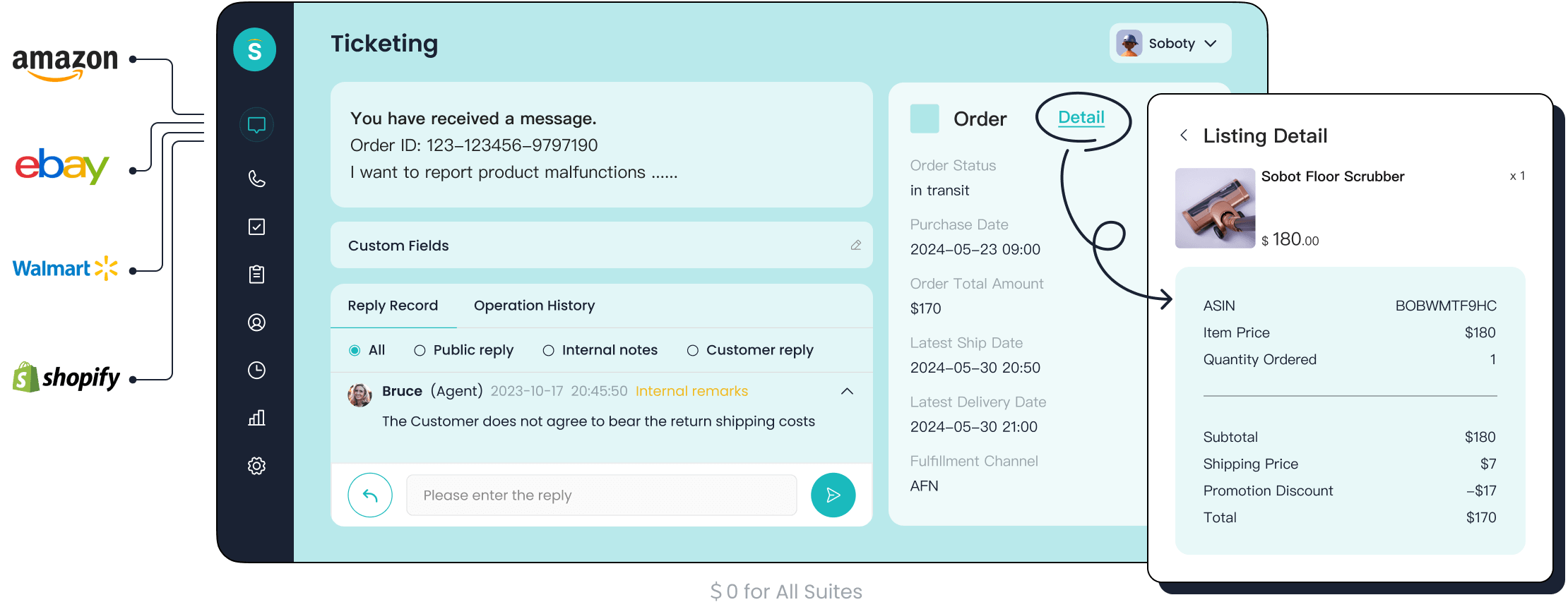
Choosing the right platform is key. Sobot offers a powerful ticketing system that brings all your channels together. You get email, chat, voice, and social media in one place. Sobot’s AI chatbot and live chat tools help customers find answers fast. The ticketing system automates workflows, routes tickets, and manages SLAs. You can set priorities and merge tickets about the same issue. This keeps everything organized.
Here’s how Sobot stands out:
| Feature | Description |
|---|---|
| Omnichannel Support | Integrated customer service across channels for a seamless experience. |
| AI Integration | AI enhances customer interactions and automates responses. |
| Automated Workflows | Streamlines processes to improve efficiency and reduce response times. |
| Self-Service Capabilities | Lets customers resolve common queries independently, available 24/7 through AI agents. |
You can compare Sobot to other platforms like ControlHippo. Sobot offers comprehensive AI features, lower pricing, and intelligent customer engagement. You get a unified workspace and smart notifications. Sobot’s ticketing system is easy to use and supports multilingual customers. You can integrate with e-commerce platforms like Shopify. This makes Sobot a great choice for your self-service help desk.
If you want to learn more, visit Sobot’s official website.
Build a Self-Service Help Center
Now it’s time to create a self-service help center. You want it to be easy to use. Customers should find answers quickly. A good self-service help center builds confidence and keeps people coming back.
Best practices for building your self-service help center:
| Best Practice | Description |
|---|---|
| Define Goals | Set clear objectives for your self-service help center. |
| Develop Content Strategy | Create guides and FAQs that address common questions. |
| Optimize Design | Make your self-service help center user-friendly and easy to navigate. |
| Invest in the Right Software | Use tools like Sobot that support your needs. |
| Continuously Improve | Update your self-service help center based on feedback. |
You can create a self-service help center that empowers customers. Make sure it provides instant answers and helps people learn about your products. Keep the design simple. Reduce frustration by making navigation easy.
- A well-structured self-service help center gives customers control.
- It should offer quick solutions and help them understand your services.
- Intuitive design is important, especially when customers feel stressed.
Sobot’s omnichannel AI capabilities unify all your channels. You can connect your website, app, social media, and phone support. The AI adapts to your business environment. This helps you engage customers throughout their journey. Sobot integrates with major e-commerce platforms. Customers find solutions fast and your team saves time.
Note: When you create a self-service help center, always listen to customer feedback. Update your content to stay relevant.
Integrate Automation and Search
Automation and search make your self-service portal powerful. You want tools that help customers find answers without waiting. Sobot’s AI chatbot gives instant support. It understands questions and provides tailored responses. You can automate repetitive tasks with self-service workflows. This reduces your team’s workload.
Key features to include:
- User-friendly tools for easy navigation.
- A knowledge base with guides and FAQs.
- AI chatbots that answer questions in real time.
- Automated workflows for common issues.
- Continuous monitoring to track performance.
When you integrate automation and search, you improve customer experience. Customers get personalized guidance. They find information fast. AI-powered chatbots engage in natural language. They suggest relevant content and guide customers to solutions. This makes your self-service help desk more efficient.
Callout: Automation and search reduce frustration. Customers don’t have to dig through menus or wait for help.
Educate Customers on Self-Service Portal
You need to teach customers how to use your self-service portal. Personalization is important. Most people expect personalized interactions. If they don’t get them, they feel frustrated. You can create learning paths based on user roles and preferences. Make sure training materials are relevant.
Focus on user-friendly design. Customers should navigate your self-service help center easily. You can use videos, guides, and step-by-step instructions. Show them how to find answers and use the portal.
- Personalize the experience for each customer.
- Offer clear instructions and easy navigation.
- Update training materials as your self-service help center grows.
Most customers want more self-service options. Only a few are satisfied with what’s available. You can change that by making your self-service portal easy to use and by educating your customers.
Tip: Send reminders and updates about new features in your self-service help center. Keep customers informed and engaged.
Change Management and Culture Shift
Transitioning to a self service help desk is not just about technology. You need to manage change within your team. Open communication helps build trust. When you invest in change management, you improve adoption rates. Employees understand the benefits and support the move.
| Benefit of Change Management | Description |
|---|---|
| Improved Communication | Keeps everyone informed and builds trust. |
| Increased Adoption Rates | Helps employees embrace the self-service help desk. |
| Enhanced User Experience | Makes the transition smoother for both customers and staff. |
| Higher Engagement | Encourages more people to use the self-service portal. |
Address concerns openly. Show your team how the self-service help center will help them. When everyone is on board, your self-service help desk will succeed.
Note: Change management is key. It helps your team and customers adjust to new ways of getting support.
You now have a clear roadmap for How to Launch a Self-Service Help Desk for Customer Communication. Define your scope, choose Sobot, create a self-service help center, integrate automation, educate your customers, and manage change. You can build a self-service portal that improves customer communication and makes your support team more efficient.
Optimizing Your Self-Service Help Desk
Monitor Analytics and Performance
You want your self-service help desk to run smoothly. Start by tracking important metrics. Sobot’s analytics and smart notifications make this easy. You can see how fast your team responds, how quickly they solve problems, and how happy your customers feel. Here are some key things to watch:
- Average response and resolution times
- Customer satisfaction scores
- Escalation rates
- Service level agreement (SLA) compliance
- Number of repeat tickets
When you keep an eye on these numbers, you spot trends and fix problems before they grow. Sobot’s dashboard gives you real-time updates, so you always know what’s happening.
Tip: Check your analytics every week. This helps you catch issues early and keep your self-service help desk running at its best.
Gather Feedback and Update Content
Your customers know what works and what doesn’t. Ask for their feedback using surveys. Review support tickets to find common questions. This helps you see where your self-service portal needs improvement. Automated tools can even flag old or outdated answers for you.
- Use surveys to measure customer satisfaction.
- Let AI spot content that needs updates.
- Review tickets and feedback to find common issues.
- Focus on the most frequent problems first.
Update your help center content every month or quarter. This keeps your self-service options fresh and useful. When you listen to your customers, you build trust and make your help desk better.
Maintain Knowledge Base Quality
A strong knowledge base is the heart of your self-service help desk. Keep all your information in one place. Assign someone to check and update each section. Use automation to spot old articles and fix them fast. Always look for ways to improve based on what your customers ask and what your analytics show.
| Factor | Why It Matters |
|---|---|
| Centralized knowledge | Easy access for everyone |
| Automated content updates | Keeps info fresh and accurate |
| Assigned content ownership | Makes sure updates happen on time |
| Continuous improvement | Adapts to customer needs and feedback |
Companies with strong knowledge management see higher customer satisfaction. When you keep your knowledge base up to date, you help customers solve problems faster and boost their confidence in your support.
Common Pitfalls and Success Tips
Launching a self-service help desk can transform your customer service, but you might hit a few bumps if you’re not careful. Let’s look at the most common mistakes and how you can avoid them.
Avoid Overcomplication
Keep things simple. Many companies make their help desk too complex. Customers don’t want to download extra apps or click through endless menus. In fact, 91% of people dislike being forced to install something just to get support. If your system feels confusing, people will give up. Stick to a clean design and clear steps.
| Pitfall | Why It Matters |
|---|---|
| Outdated or Missing Content | 88% of employees get frustrated by old info and may stop using your help desk. |
| Overcomplicating the Interface | Most customers want quick answers, not extra steps. |
| Ignoring Accessibility Needs | 29% of Americans have disabilities, so make sure everyone can use your portal. |
| Lack of Performance Tracking | You need more than surveys to know what’s working. |
Keep Content Accessible
You want everyone to find answers fast. Make sure your help center works for all users, including those with disabilities. Use simple language and clear headings. Update your articles often. Outdated info drives people away. Assign someone to check content every month. This keeps your customer service strong and reliable.
Promote Self-Service Options
Don’t hide your self-service tools. Show customers where to find them. Add links on your website, in emails, and inside your app. Companies like OPPO saw an 83% chatbot resolution rate and a 57% jump in repeat buyers after making self-service easy to find. Sobot lets you launch chat and voice flows on WhatsApp, SMS, email, and web chat—no coding needed. The more visible your options, the more people will use them.
Train Support Teams
Your team needs to know how the system works. Offer short, focused lessons that fit busy schedules. Try role-based learning paths and microlearning. These methods help agents learn what matters most for their jobs. When you train your team well, you see fewer basic tickets and happier customers. Clear communication and ongoing training keep your customer service running smoothly.
Tip: Review your help desk performance often. Adjust your training and content as your business grows.
You now know how to launch a self-service help desk for customer communication with Sobot. Most customers try self-service first, and many prefer solving problems on their own. You can boost satisfaction by using AI and keeping human support ready for tough issues. Start by checking your tools, reviewing common questions, and setting clear SLAs. Make your help desk simple and helpful. If you want better customer communication, take the next step and try Sobot’s Ticketing System. Your customers will thank you, and your team will work smarter every day.
FAQ
How do you set up a self-service help center?
You start by listing common questions. Build guides and FAQs for your self-service help center. Make the portal easy to use. Add search tools so customers find answers fast. Update your self-service help center often. Keep the portal simple and clear.
What makes a self-service portal successful?
A self-service portal works best when you keep the self-service help center organized. Use clear language. Make the portal easy to navigate. Add step-by-step guides. Listen to feedback. Update your self-service help center regularly. Customers should feel confident using the portal.
How can you improve your self-service help center?
You review feedback from customers. Check analytics in your portal. Update your self-service help center with new guides. Remove old info. Add videos or pictures. Make the self-service help center easy to understand. Test the portal with real users.
Why do customers prefer a self-service portal?
Customers like a self-service portal because they get answers fast. The self-service help center gives them control. They don’t wait for support. The portal is open all day. They can use the self-service help center anytime. The portal saves time and builds trust.
How does a self-service help center help your team?
Your team spends less time on simple questions. The self-service help center handles common issues. Agents focus on tough problems. The portal keeps everything organized. You see fewer tickets. The self-service help center makes your team more efficient.
See Also
Excelling in Live Chat for Effective Customer Assistance
Enhance SaaS Customer Service Using Live Chat Techniques
10 Guidelines for Selecting Social Media Support Tools

