Key Elements of Seamless Interaction in User Interfaces

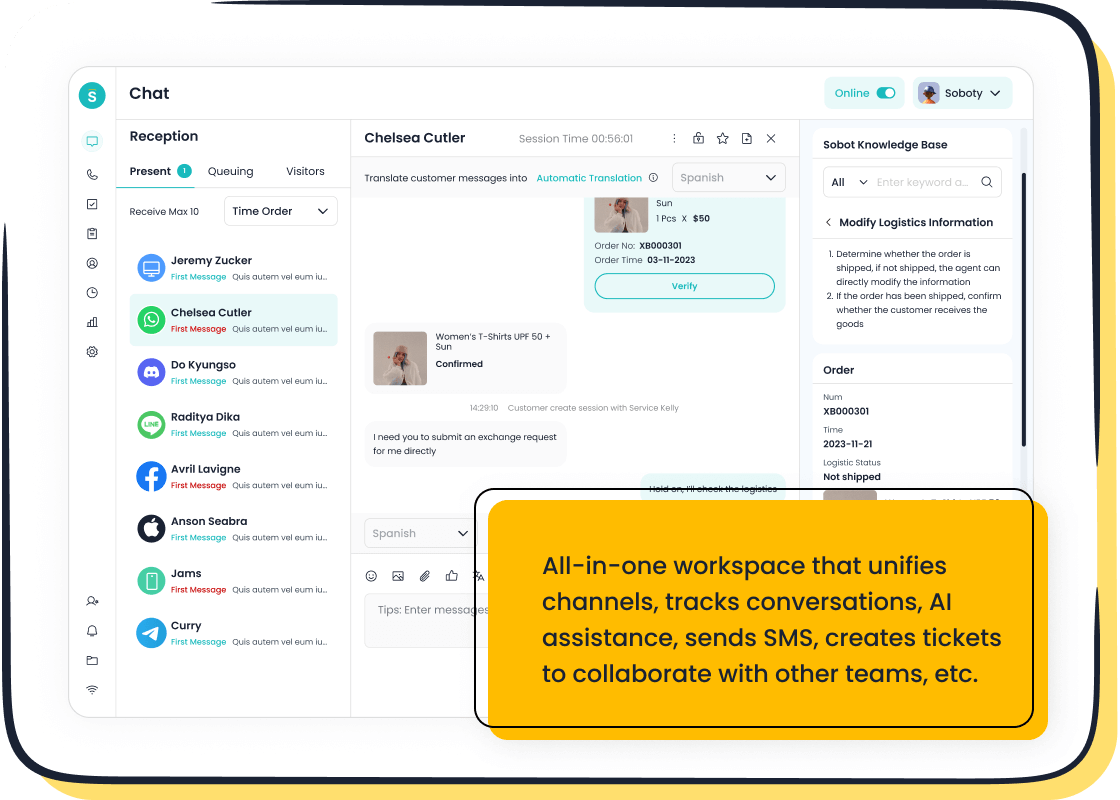
You experience seamless interaction when user interface design removes barriers between you and your goals. Seamless interaction makes customer service fast and stress-free. You notice key elements like simplicity, intuitiveness, consistency, clarity, and visual appeal in user interface design. These design principles help you enjoy seamless experiences and smooth human-computer interaction. Sobot uses advanced design features in Sobot AI, Sobot call center, and Live Chat to deliver seamless interaction for every user. You can reflect on your own user interface design and see how seamless experiences improve satisfaction.
Simplicity in User Interface Design
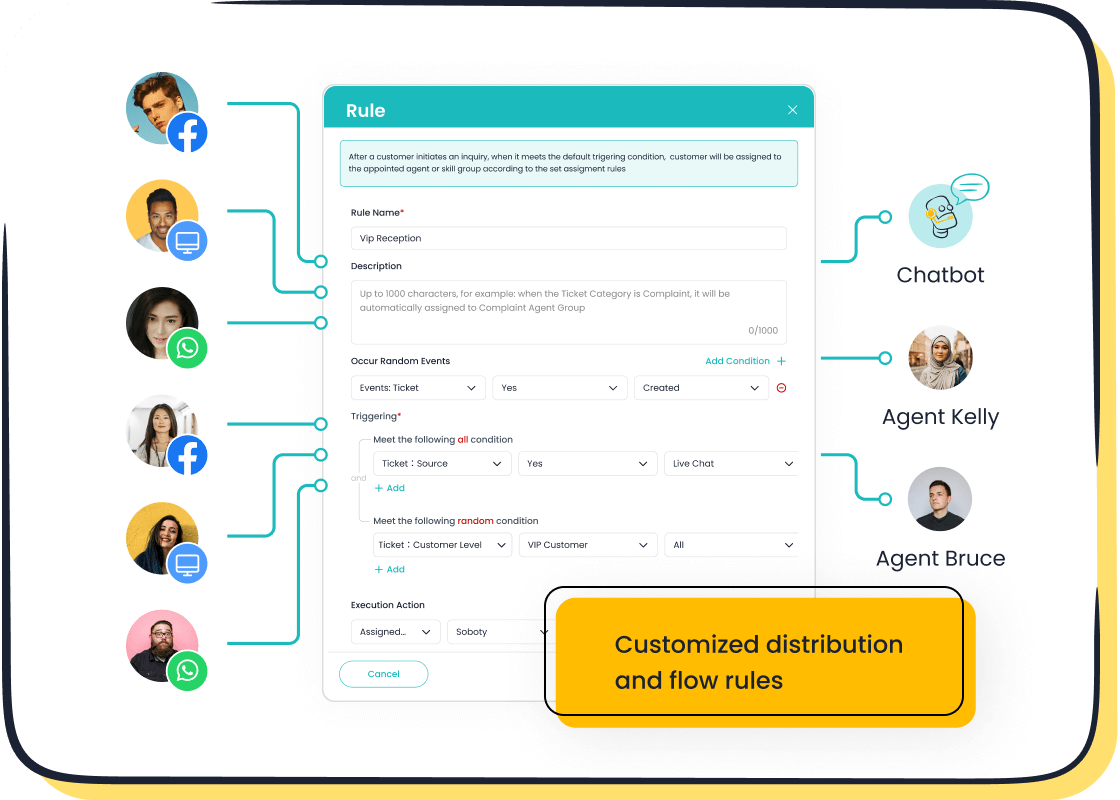
Simplicity stands at the core of effective interaction design. When you use a digital product, you want to reach your goal quickly. Simple user interfaces help you do this by following clear design guidelines. Sobot Live Chat uses minimalism to make every interaction smooth and easy. You see only the most important options, so you never feel overwhelmed. This approach follows usability guidelines that recommend reducing clutter and focusing on what matters most.
Minimal Choices
You benefit when a user interface offers minimal choices. Too many options can slow you down and make interaction confusing. Sobot Live Chat presents clear, direct paths for you to get help or find information. For example, when Samsung adopted Sobot’s solution, agents could handle customer requests faster. The design guidelines in Sobot’s platform helped Samsung’s team focus on each interaction without distractions. As a result, agent efficiency increased by 30%, and customer satisfaction reached 97%. These numbers show how good interaction design leads to better usability and happier users.
Reducing Cognitive Load
Reducing cognitive load is another key part of interaction design. When you interact with a system, you want to think less and act more. Sobot Live Chat uses design guidelines that limit the amount of information you see at once. This makes every interaction easier to follow. Research shows that digital environments can increase cognitive and perceptual load, which affects how deeply you process information. The table below summarizes these findings:
| Key Findings | Description |
|---|---|
| Cognitive Load Differences | The study highlights differences in cognitive load between real and digital environments. |
| Perceptual Load Impact | The digital environment influences both cognitive and perceptual load. |
| Depth of Information Processing | The findings indicate a relationship between the type of environment and the depth of information processing. |
By following strong design guidelines, Sobot ensures that you experience less cognitive strain. This leads to better usability and more efficient interaction every time you use the platform.
Intuitive Interaction and Navigation
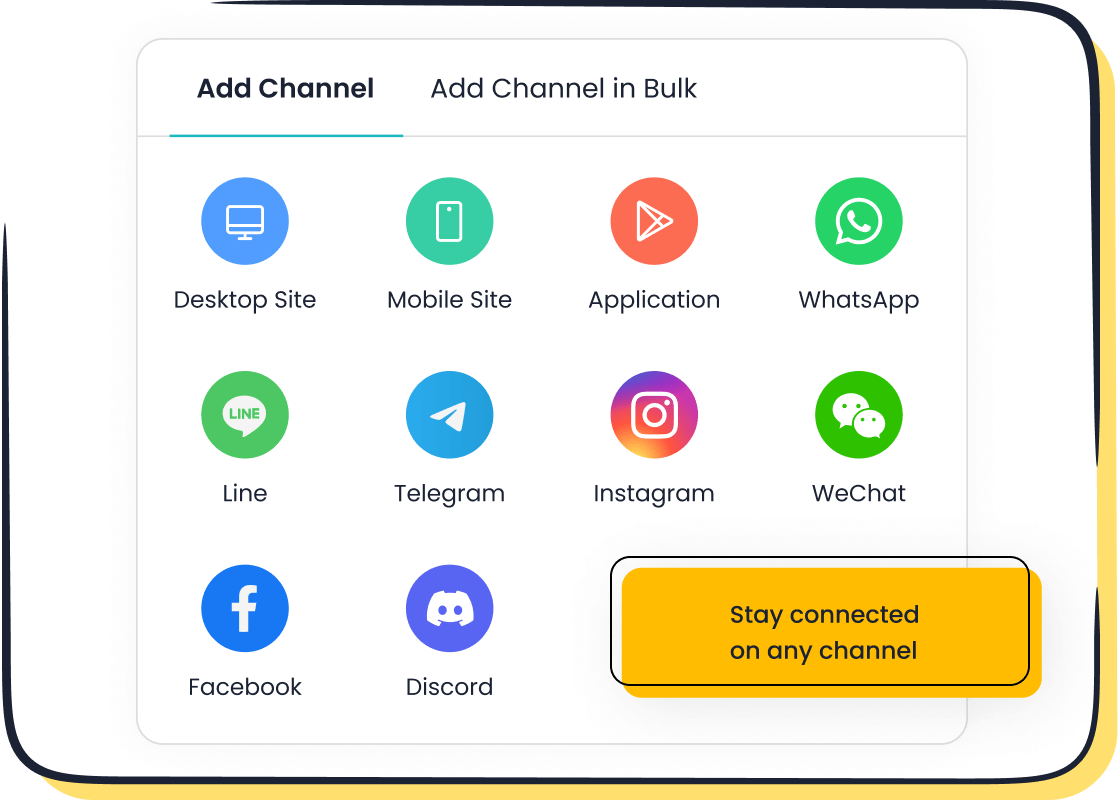
Intuitive interaction design helps you find what you need without confusion. You want to move through a user interface easily. Sobot’s omnichannel solution makes this possible. You can switch between channels like chat, email, or social media. The design keeps everything simple, so you never feel lost. You see clear paths to support, and you know where to go next. This approach follows strong guidelines for interaction design.
Discoverability
Discoverability means you can find features and information quickly. Sobot Live Chat uses a unified workspace. You see all your messages, tickets, and customer data in one place. AI-assisted tools help you spot important details. You do not waste time searching. The design uses guidelines that highlight key actions. You get help fast, which improves your interaction with the system.
Studies show that discoverability in user interfaces leads to higher engagement and satisfaction. Experts agree that good UI/UX features make users happier. The table below shows these findings:
| Key Findings | Description |
|---|---|
| Impact of UI/UX | Discoverability in user interfaces increases user satisfaction and engagement. |
| Expert Agreement | Experts confirm UI/UX features improve user experience. |
Sobot’s interaction design follows these guidelines. You get a better user experience design every time you use the platform.
Predictability
Predictability means you know what will happen when you take an action. Sobot Live Chat uses design guidelines to make every step clear. You see familiar buttons and patterns. The system uses component libraries to keep the design consistent. You trust the interaction because it feels the same across channels.
Best practices for predictability include:
- Use design systems and style guides for visual and functional standards.
- Apply component libraries for consistent design elements.
- Conduct user testing to check if the design meets user needs.
Sobot’s omnichannel solution uses these guidelines. You get predictable interaction design, which makes you feel confident. You know what to expect, and you get support without surprises.
Consistency and Familiarity
Consistency in interaction design helps you trust a user interface. When you see the same patterns across channels, you know what to expect. Sobot uses guidelines to keep design elements uniform, whether you chat on a website, use a mobile app, or connect through WhatsApp. This approach supports recognition and makes every interaction easier for you.
Consistent Patterns
You notice consistent patterns when buttons, icons, and menus look and work the same way. This reduces your learning time and lowers error rates. You rely on your past experiences to navigate new features. Sobot’s interaction design uses a cohesive visual appearance, so you do not need to relearn each channel. You see predictable actions, which means less mental effort. Inconsistency can slow you down and cause missed opportunities. Sobot’s guidelines make sure you get a smooth experience every time.
- Predictable actions help you use the system with confidence.
- Cohesive design lowers the mental effort needed to understand new elements.
- Consistent interaction design leads to faster task completion.
Familiar Elements
Familiar elements in interaction design build trust. You recognize icons, colors, and layouts from other platforms. Sobot integrates with major brands like Samsung, OPPO, and HP. These companies use Sobot’s solutions to keep their customer support interfaces familiar and flexible. You see the same design standards, which makes interaction simple. Sobot’s guidelines focus on recognition and flexibility, so you can switch between channels without confusion. You get the same quality of interaction whether you use live chat, voice, or ticketing systems.
Tip: Look for familiar elements in every user interface. They help you learn faster and avoid mistakes.
Sobot’s commitment to consistency and flexibility in interaction design supports your success. You feel comfortable and confident with every interaction.
Clarity and Feedback in Interaction
Clear information and strong feedback help you feel in control when you use any digital product. Good design gives you confidence. You know what is happening and what to do next. Sobot Live Chat uses these principles to make every interaction smooth and easy for you.
Clear Information
You need clear information to make good choices. Sobot Live Chat shows you important details in a simple way. You see messages, tickets, and customer data in one place. This design helps you find answers fast. You do not waste time searching for what you need. The system uses built-in analytics to show you how well things work. You can check reports and see what users like or dislike. This supports user control and freedom. You decide what to do next because you have the facts.
Sobot’s design also helps agents. They see all the information about each user. This makes it easy to give the right answer. The design supports flexibility and efficiency of use. Agents can switch between tasks without losing track. You get better service because the system keeps everything clear.
Effective Feedback
Feedback tells you if your actions work. Sobot Live Chat gives you feedback right away. You see if your message was sent or if an agent is typing. After a chat, you can fill out a satisfaction survey. This lets you share your thoughts. The system uses your feedback to improve the design.
Sobot’s solutions use error prevention and mapping strategies. If you make a mistake, the system helps you fix it. You see clear messages that guide you. This supports user control and freedom. You feel safe to try new things. The design also offers flexibility and efficiency of use. You can move between channels and still get helpful feedback.
Tip: Always look for feedback in any user interface. It helps you know what is happening and what to do next.
Sobot’s focus on clarity and feedback makes every user interaction better. You stay informed, feel confident, and enjoy a smooth experience.
Visual Appeal and Emotional Impact
Engaging Design
You notice the power of engaging design every time you interact with a digital platform. Sobot’s customizable widgets let you match the look and feel of your brand, making each user experience unique and memorable. Rich messaging options, such as images, emojis, and quick replies, add vibrancy to conversations. These features help you create a visually appealing environment that draws users in and keeps them engaged.
Research shows that visual appeal in user interfaces increases perceived usefulness and encourages positive emotions. When you see a well-designed interface, you feel more motivated to use it. Positive feelings boost your willingness to interact and explore new features. Sobot’s design team focuses on colors, layouts, and icons that make every user feel comfortable and excited to engage.
| Design Feature | Benefit for User |
|---|---|
| Customizable Widgets | Personalizes experience |
| Rich Messaging | Makes interaction lively |
| Clear Layouts | Improves navigation |
Emotional Connection
You build emotional connections through thoughtful design. Sobot’s platform uses feedback tools, such as satisfaction surveys and instant notifications, to help you feel heard and valued. When you receive quick responses and see friendly visuals, you trust the system and enjoy the interaction.
Sobot’s brand values—innovation and customer-centricity—shine through in every design choice.
- Visual design elements, like bold colors and clear fonts, show innovation and make the interface easy for users to understand.
- Emotional connections grow when you receive personalized feedback and support, highlighting customer-centricity.
- Personalized onboarding welcomes you and makes you feel important from the start.
Tip: Choose design elements that evoke positive emotions. You will see higher engagement and satisfaction among users.
Sobot’s commitment to engaging design and emotional connection helps you create lasting relationships with users. You see the difference in every interaction.
You see how seamless interaction depends on strong design principles. Simple navigation, clear feedback, and engaging visual design help every user feel confident. Sobot’s Live Chat and omnichannel solutions use these design features to improve customer service and boost operational efficiency. You can follow best practices to enhance your own user interface:
- Improve accessibility with keyboard navigation and screen reader compatibility.
- Simplify navigation and prioritize page load speed.
- Enhance visual design and offer helpful content.
| Challenge | Solution |
|---|---|
| Not optimizing across devices | Test design for mobile and desktop users. |
| Cluttered navigation | Limit menu items and clarify design. |
| Failing to address user needs | Align design with user experience metrics. |
| Not testing enough | Test design thoroughly before launch. |
| Designing for yourself | Focus on user needs, not personal preferences. |
You gain long-term benefits from seamless design, such as increased customer retention, higher conversion rates, and improved brand reputation. Voice user interfaces and AI-driven design trends will shape future customer service. You can create better engagement and business growth by applying these design principles.
FAQ
What makes a user interface design seamless for customer service?
You experience seamless design when you see clear options, fast responses, and familiar layouts. Sobot uses unified workspaces and AI tools to help you find answers quickly. This approach improves your satisfaction and makes every interaction smooth.
How does Sobot Live Chat improve user experience?
You get instant support through Sobot Live Chat. The design shows all your messages and tickets in one place. AI-assisted tools help you and agents respond faster. You see fewer errors and enjoy a more efficient user experience.
Why is consistency important in user interface design?
You trust a system when you see consistent design patterns. Sobot keeps buttons, icons, and menus uniform across channels. This helps you learn faster and reduces mistakes. Consistency in design supports better interaction and builds user confidence.
How does visual design impact user engagement?
You feel more engaged when you see appealing colors, clear layouts, and interactive elements. Sobot’s customizable widgets and rich messaging options make the design lively. Good visual design encourages you to interact more and stay connected.
Can Sobot’s solutions adapt to different user needs?
You benefit from flexible design in Sobot’s products. The platform supports multiple channels and integrates with other systems. You get personalized support whether you use live chat, voice, or ticketing. Sobot’s design adapts to your needs for better interaction.
See Also
Excelling in Live Chat for Effective Customer Assistance
Ten Essential Steps for Omnichannel Contact Center Setup
Effective Strategies for Managing Live Chat Representatives

