IT Ticketing System Comparison Guide for Features and Pricing

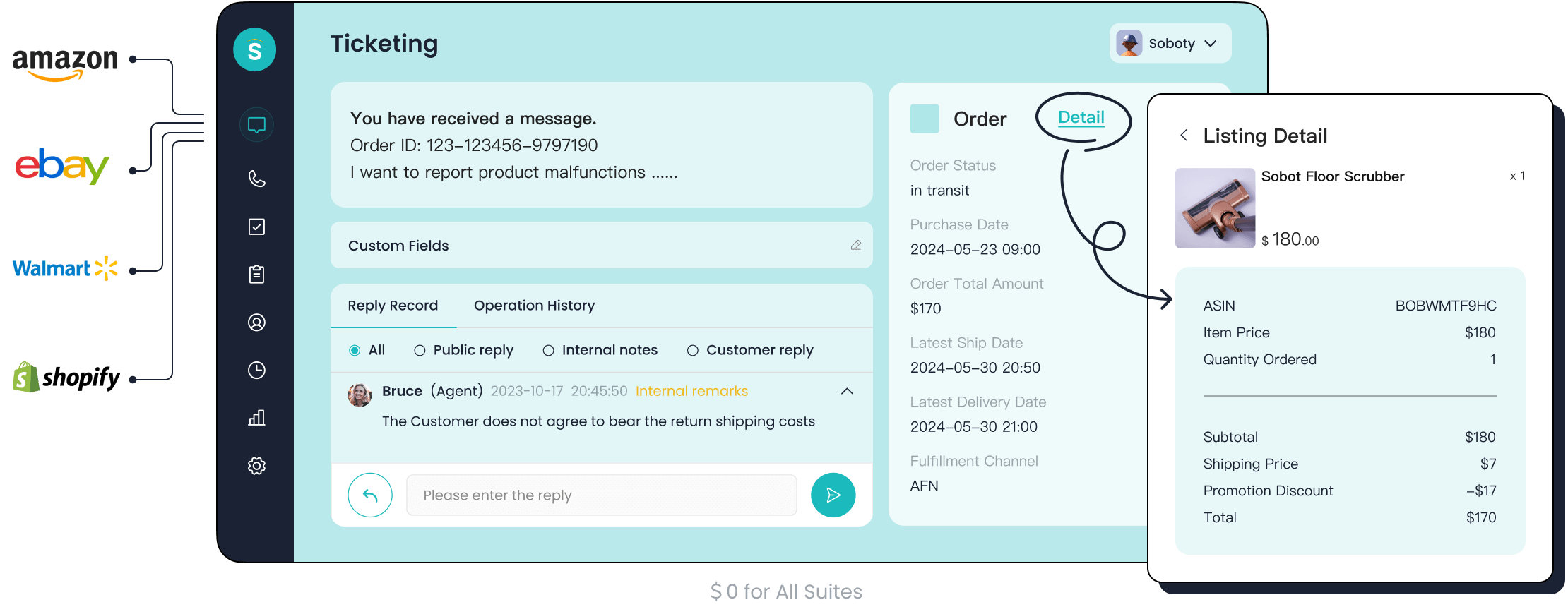
Choosing the right IT ticketing system is essential for efficient IT support. It helps you manage customer inquiries, streamline workflows, and improve team productivity. Comparing features and pricing ensures you make an informed decision. The table below highlights key factors to consider:
| Key Factors | Description |
|---|---|
| Key Features | User-friendliness, customer service, compliance, scalability are crucial for integration. |
| Pricing Considerations | Both free and paid options exist; paid solutions often provide comprehensive benefits. |
| Implementation Time | The time required for the system to go live is an important factor in decision-making. |
| Additional Factors | Considerations include automation, reporting, user roles, and vendor support. |
Sobot offers a unified platform that simplifies ticket management across channels like email and chat. Its automation features and SLA management enhance efficiency, making it a trusted choice for businesses.
What is an IT Ticketing System?
Definition and Purpose
An IT ticketing system is a tool that tracks IT service requests, events, incidents, and alerts requiring further action. It serves as the backbone of efficient IT service management, ensuring that every issue is documented, prioritized, and resolved systematically. By automating workflows and centralizing communication, it simplifies the process of managing IT support tasks.
Key purposes of a ticketing system include:
- Effective issue tracking to ensure no request is overlooked.
- Enhancing communication and collaboration among teams.
- Setting priorities and managing SLAs for timely resolutions.
- Allocating resources effectively to address critical issues.
- Keeping historical records for future reference and analysis.
- Monitoring accountability and performance metrics.
- Automating workflows to save time and reduce errors.
- Reducing operational costs while improving efficiency.
Common Use Cases
Ticketing systems are versatile tools used across industries to streamline operations. Some common use cases include:
- IT Support & Maintenance: Employees can report issues like software glitches or hardware malfunctions, which are routed to the appropriate technician.
- Facilities Management: Staff can submit requests for building repairs or maintenance, such as fixing a broken air conditioner.
- HR Inquiries: Employees can ask questions about benefits or policies, with the system tracking and prioritizing these queries.
These examples highlight how a help desk ticketing system can adapt to various business needs, making it an essential part of customer service software.
Benefits for Businesses
Streamlining IT Support
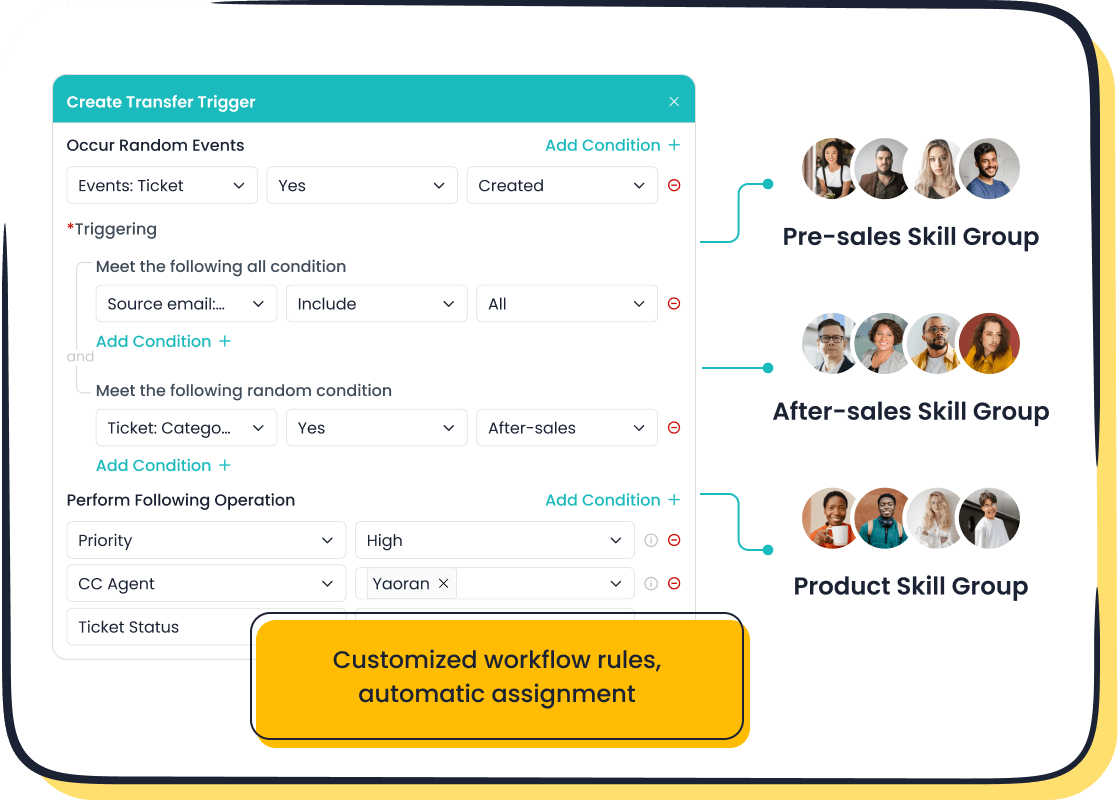
A ticketing system organizes and automates IT support tasks. It ensures faster response times by routing tickets to the right team or agent. For example, Sobot’s ticketing system uses custom triggers to assign tickets automatically, reducing delays and improving efficiency.
Enhancing Customer Satisfaction
Ticketing systems enhance customer experience by providing clear communication and faster resolutions. Features like SLA reminders and multilingual support ensure that customers receive timely and accurate assistance. Sobot’s system, for instance, integrates all communication channels into one platform, creating a seamless customer support experience.
Improving Team Productivity
With workflow automation and trusted analytics, ticketing systems help teams focus on resolving issues rather than managing tasks manually. Sobot’s AI-powered ticketing system boosts productivity by automating repetitive tasks and offering actionable insights through comprehensive reports.
Key Features to Look For in Help Desk Ticketing Systems
Automation and Workflow Management
Ticket Routing and Prioritization
Efficient ticket routing ensures that every issue reaches the right agent without delay. Automated processing categorizes and assigns tickets based on predefined rules or skill sets. For example, AI-powered systems like Sobot’s ticketing system use advanced algorithms to interpret ticket content and route it to the most suitable agent. This precision reduces response times and ensures urgent issues receive immediate attention. Additionally, automation minimizes human error, balances workloads, and handles high ticket volumes during peak periods. These capabilities enhance overall efficiency and customer satisfaction.
SLA Management
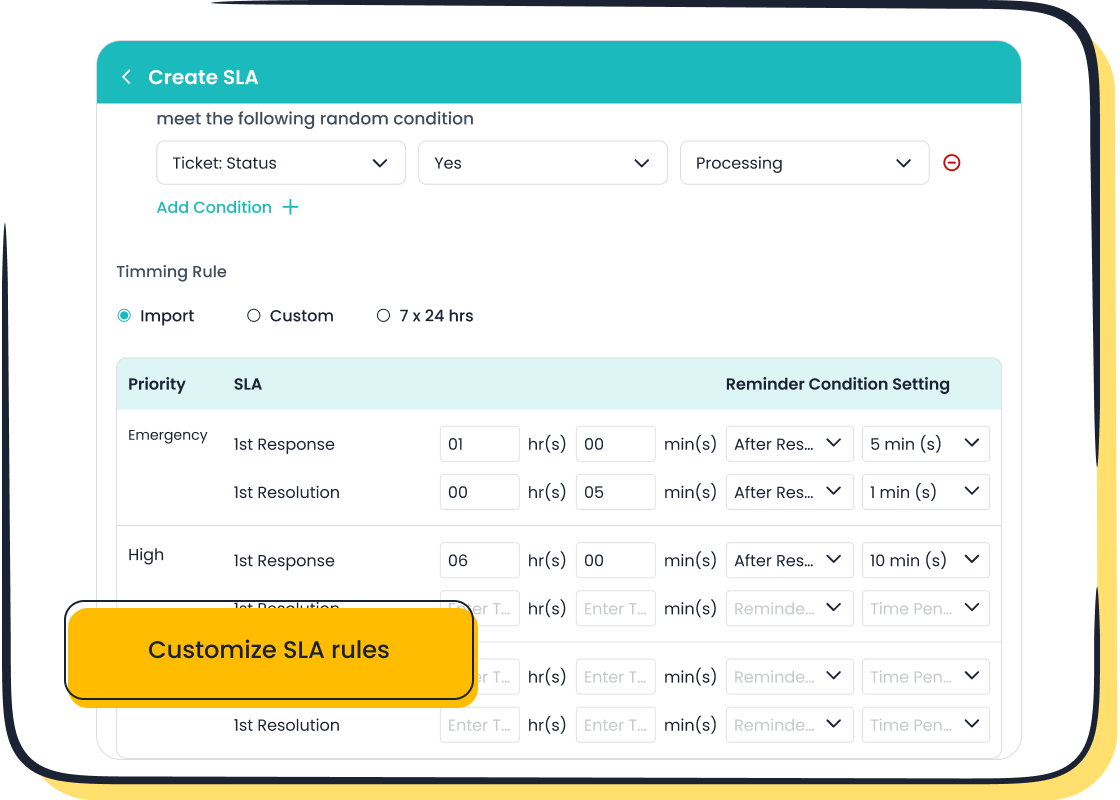
Service Level Agreement (SLA) management is critical for maintaining service quality. A robust ticketing system allows you to set response and resolution times based on ticket priority, customer type, or channel. Sobot’s SLA reminders ensure that deadlines are met, reducing the risk of customer dissatisfaction. By automating SLA tracking, you can monitor compliance and identify areas for improvement, ensuring consistent service delivery.
Multi-Channel Support
Email, Chat, and Phone Integration
Modern help desk software must support multiple communication channels. Integration with email, chat, and phone enables seamless communication between your team and customers. For instance, Sobot’s unified platform consolidates all interactions into a single shared inbox. This streamlines ticket management, allowing agents to focus on resolving issues without switching between platforms. Such integration also enhances collaboration through shared notes and histories, ensuring a smooth customer experience.
Social Media and Self-Service Portals
Social media and self-service portals expand accessibility for customers. A ticketing system with these features allows users to submit tickets directly through platforms like Facebook or Twitter. Self-service portals empower customers to find solutions independently, reducing the workload on your support team. Sobot’s ticketing system integrates these channels, ensuring a unified approach to customer support.
Integration Capabilities
CRM and Project Management Tools
Integration with CRM and project management tools enhances ticket management by providing a unified view of customer interactions. This connectivity improves communication, streamlines workflows, and enables better reporting. For example, integrating Sobot’s ticketing system with your CRM ensures that agents have access to complete customer histories, leading to more personalized support.
Third-Party App Support
Third-party app support is essential for businesses using diverse tools. Effective integration capabilities allow ticketing systems to synchronize data and automate processes across platforms. According to a ManageEngine poll, 72% of IT professionals believe that such integrations improve efficiency and reduce manual work. Sobot’s system supports seamless integration with e-commerce platforms like Shopify, ensuring smooth operations.
Scalability and Customization
Adapting to Business Growth
Scalability is a critical feature in IT ticketing systems, especially for businesses planning to expand. As your organization grows, the volume of support tickets will likely increase. A scalable system ensures that you can handle this growth without compromising efficiency. For instance, Freshservice reported a 22% rise in ticket volume from 2018 to 2019, highlighting the importance of scalability in managing growing demands.
A robust IT ticketing system like Sobot’s adapts seamlessly to your business needs. It efficiently manages high ticket volumes by automating processes such as ticket routing and prioritization. This automation reduces the workload on your team, allowing them to focus on resolving issues. Additionally, Sobot’s system integrates with various platforms, ensuring smooth operations as your business scales. By choosing a scalable solution, you future-proof your IT support infrastructure, ensuring consistent service quality even during periods of rapid growth.
Customizable Dashboards and Reports
Customizable dashboards and reports empower your IT team to make informed decisions quickly. These features allow you to tailor the display of key metrics, ensuring that you focus on the most relevant data.
| Benefit | Description |
|---|---|
| Faster access to insights | Custom dashboards provide a quick overview of key metrics, allowing IT teams to make timely decisions. |
| Automation | Automation saves time in data gathering and reporting, enabling teams to focus on analysis. |
| Visual reporting | Visual summaries help teams easily digest complex data, improving understanding and decision-making. |
| Always-on reporting | Continuous access to reports ensures that teams have the latest information at their fingertips. |
| Cross-organizational collaboration | Enhanced visibility fosters collaboration across departments, leading to more informed decisions. |
Sobot’s ticketing system offers customizable dashboards that present performance indicators in a visually appealing format. You can filter out unnecessary data, enabling your team to focus on essential metrics. Personalized views help track progress and optimize resources effectively. With these tools, your team can enhance collaboration, improve operational decisions, and gain stakeholder support through clear visualizations.
By leveraging scalability and customization, you ensure that your IT ticketing system evolves with your business, delivering consistent value and efficiency.
Comparison of Top Help Desk Ticketing Systems
Overview of Leading Solutions
Sobot Ticketing System
Sobot’s ticketing system stands out for its unified platform that integrates email, voicemail, and chat. It automates ticket creation and routing, ensuring faster resolutions. Features like SLA management, multilingual support, and trusted analytics make it a reliable choice for businesses of all sizes. Sobot also supports seamless integration with e-commerce platforms like Shopify, enhancing operational efficiency. Its AI-powered tools and customizable dashboards further streamline ticket management, making it one of the top help desk software options available.
Freshdesk
Freshdesk offers a user-friendly interface and built-in AI to automate workflows. It supports multi-channel communication, including email, chat, and phone. Freshdesk’s scalability makes it suitable for growing businesses. Its reporting tools provide insights into ticket volumes and resolution times, helping you optimize your customer support operations.
Zendesk
Zendesk is known for its extensive integrations and scalability. It provides a comprehensive suite of tools for ticketing, reporting, and analytics. Zendesk’s self-service options, such as knowledge bases, empower customers to resolve issues independently. These features make it a popular choice among large enterprises.
Feature Comparison Table
| Feature | Sobot Ticketing System | Freshdesk | Zendesk |
|---|---|---|---|
| Automation | AI-powered ticket routing and triggers | Workflow automation | Automated ticket management |
| Multi-Channel Support | Email, voicemail, chat, social media | Email, chat, phone | Email, chat, phone, social |
| SLA Management | Customizable SLA reminders | SLA tracking | SLA compliance monitoring |
| Integration Capabilities | CRM, e-commerce platforms | CRM, project management tools | Extensive third-party apps |
| Customization | Dashboards, templates | Custom workflows | Customizable reports |
Pricing Comparison
Free Plans and Trials
Many top help desk software providers offer free trials or basic plans. Sobot provides a trial period, allowing you to explore its features before committing. Freshdesk also offers a free plan with limited features, suitable for small teams. Zendesk provides a trial to test its capabilities.
Subscription Tiers and Costs
Pricing structures vary across ticketing systems. Sobot offers affordable pricing plans tailored to different business sizes. Freshdesk uses a per-agent pricing model, while Zendesk provides tiered subscriptions based on features and user capacity. When evaluating costs, prioritize performance and essential features over price alone. A well-performing system like Sobot justifies its cost by enhancing efficiency and customer satisfaction.
Suitability for Different Business Sizes
Small Businesses
Small businesses often require help desk ticketing systems that are simple, cost-effective, and scalable. These systems should streamline workflows without overwhelming your team. Features like intelligent automation, easy integrations, and user-friendly interfaces are essential. For example, Sobot’s ticketing system automates ticket routing and prioritization, saving time and reducing manual effort.
Several options cater specifically to small businesses:
| Ticketing System | Key Features | Pricing |
|---|---|---|
| LiveAgent | Free plan, chat button, basic reporting, customer portal | Free version available |
| Zoho Desk | Multi-channel support, sentiment analysis, reports | Starts at $15.55 per agent per month |
| Help Scout | Live chat, knowledge base, rule-based automation | Starts from $22 per user per month |
When choosing a system, consider ROI, scalability, and automation features. Sobot’s system offers excellent value for money by integrating email, voicemail, and chat into one platform. Its multilingual support and customizable dashboards make it a versatile choice for small teams aiming to grow.
Medium and Large Enterprises
Medium and large enterprises need robust help desk ticketing systems to handle high ticket volumes and complex workflows. Scalability, deep integrations, and advanced automation are critical. Sobot’s ticketing system excels in these areas, offering seamless integration with CRM tools and e-commerce platforms like Shopify.
| Feature | Description |
|---|---|
| Scalability | Handles large ticket volumes efficiently. |
| Deep integrations | Connects with third-party apps and internal tools. |
| Customization options | Adapts to specific workflows and business processes. |
| Cloud-Based deployment | Simplifies maintenance and reduces IT resource needs. |
| Reporting and analytics | Provides insights into performance metrics for continuous improvement. |
For example, Sobot’s SLA management ensures timely resolutions, while its AI-powered tools automate repetitive tasks. These features improve efficiency and reduce operational costs. By choosing a scalable system like Sobot, you future-proof your IT support infrastructure and maintain high service standards as your business grows.
Factors to Consider When Choosing an IT Ticketing System
Business Size and Needs
Your business size and specific needs play a crucial role in selecting the right ticketing system. Small businesses often prioritize affordability and ease of use due to limited resources. For instance, only 57% of companies allocate budgets for internal IT services, with smaller businesses spending significantly less. A simple, cost-effective solution like Sobot’s ticketing system can help streamline operations without straining your budget.
Larger enterprises, on the other hand, require scalability and advanced features to handle high ticket volumes and complex workflows. Systems like Sobot adapt to growing demands by automating ticket routing and integrating with tools like CRMs and e-commerce platforms. This ensures seamless ticket management as your organization expands.
When evaluating help desk ticketing systems, consider whether the system aligns with your business processes, supports your ticket volume, and offers efficient workflows. Tailoring your choice to your business size and scalability ensures long-term success.
Budget and ROI
Budget is a critical factor when choosing help desk software. You should evaluate the total cost, including initial purchase, installation, and ongoing maintenance. For example, Sobot offers affordable pricing plans that deliver excellent value by enhancing efficiency and customer support quality.
To calculate ROI, consider both costs and benefits. Use the formula:
ROI = (Benefits - Costs) / Costs x 100%
If your system costs $10,000 and generates $20,000 in benefits, your ROI is 100%. Benefits include reduced labor costs, faster resolutions, and improved customer satisfaction. A well-chosen ticketing system like Sobot justifies its cost by delivering measurable returns.
Integration and Compatibility
Integration capabilities are essential for seamless operations. Your ticketing system should connect with existing tools like CRMs, project management software, and email platforms. Poor integration can lead to siloed data and disrupt workflows. Sobot’s system excels in this area, offering compatibility with tools like Shopify and ensuring smooth ticket management.
Compatibility with your IT infrastructure is equally important. A system that integrates effortlessly minimizes disruptions and enhances productivity. By choosing a ticketing system with strong integration features, you ensure a unified approach to customer support and operational efficiency.
Customer Support and Training
When choosing help desk software, you should evaluate the quality of customer support and training offered by the vendor. A reliable vendor provides comprehensive resources to help you and your team maximize the system's potential. These resources often include user guides, video tutorials, and live training sessions. For example, Sobot offers detailed onboarding materials and multilingual support to ensure smooth adoption across global teams.
Effective customer support ensures that you can resolve technical issues quickly. Vendors with 24/7 availability or dedicated account managers can address your concerns without delay. Sobot excels in this area by providing round-the-clock assistance and smart notifications to keep you informed. This level of support minimizes downtime and ensures your operations run smoothly.
Training is equally important for empowering your team. A well-trained team can use the system efficiently, reducing errors and improving productivity. Sobot’s intuitive interface and customizable dashboards simplify the learning process, making it easier for your team to adapt. By prioritizing vendors that offer robust training and support, you can ensure long-term success with your help desk software.
Vendor Reputation and Reviews
Vendor reputation plays a crucial role in selecting the right help desk software. A vendor with a strong track record inspires confidence and ensures reliability. Sobot, for instance, has earned recognition as a trusted provider of IT solutions, serving over 10,000 brands globally. Its reputation for innovation and efficiency makes it a preferred choice for businesses across industries.
You should also consider third-party reviews when evaluating vendors. These reviews provide unbiased insights into the strengths and weaknesses of various systems. For example, many organizations rely on platforms like G2 or Capterra to compare user experiences. Positive reviews often highlight features like ease of use, scalability, and customer support quality.
By combining vendor reputation with customer feedback, you can make an informed decision. Look for vendors like Sobot that consistently receive high ratings for their performance and reliability. This approach ensures you invest in a solution that meets your needs and delivers value over time.
Choosing the right ticketing system is essential for improving IT support and operational efficiency. Comparing features and pricing helps you identify the top help desk ticketing systems that align with your business goals. To select the best system, follow these steps:
- Define your objectives and requirements.
- Research and gather feedback on ticketing systems.
- Plan and prepare for implementation.
- Customize the system to fit your processes.
- Migrate data accurately.
- Train users and provide documentation.
- Test the system thoroughly before launch.
- Communicate the launch effectively.
Sobot’s ticketing system offers a unified platform with automation, SLA management, and multi-channel support. Its scalability and customization make it suitable for businesses of all sizes. By choosing Sobot, you ensure a reliable and efficient solution for your IT needs.
FAQ
1. What is the primary purpose of an IT ticketing system?
An IT ticketing system helps you track, manage, and resolve customer or internal support requests. It organizes communication, automates workflows, and ensures timely resolutions. For example, Sobot’s ticketing system uses AI to route tickets efficiently, improving response times and customer satisfaction.
2. How does automation improve ticket management?
Automation reduces manual effort by routing tickets, setting priorities, and sending reminders. This ensures faster resolutions and fewer errors. Sobot’s system automates these processes with custom triggers, saving time and enhancing productivity for your support team.
3. Can Sobot’s ticketing system integrate with other tools?
Yes, Sobot integrates seamlessly with tools like Shopify, CRMs, and email platforms. This connectivity ensures smooth workflows and centralized data management, making it easier for you to provide consistent and efficient support.
4. Is Sobot’s ticketing system suitable for small businesses?
Absolutely! Sobot offers affordable plans with features like automation, SLA management, and multilingual support. These tools help small businesses streamline operations without overwhelming their teams, ensuring scalability as they grow.
5. What makes Sobot’s ticketing system unique?
Sobot stands out with its unified platform, AI-powered automation, and multilingual support. It integrates all communication channels, provides trusted analytics, and offers customizable dashboards. These features make it a versatile and efficient solution for businesses of all sizes.
💡 Tip: Explore Sobot’s ticketing system here to see how it can transform your IT support operations.
See Also
Comparative Guide to Live Chat Support Expenses
Comparison of Leading Interactive Voice Response Tools
2024 Comparison of Best Live Chat Platforms

