Implement an AI Chatbot for Ecommerce Service

You can implement an AI chatbot for your e-commerce service by choosing a platform like Sobot, training the AI with your product data, and integrating the chatbot into your website. This process is the key to ecommerce AI chatbot customer service automation. It helps you boost sales and streamline operations. An AI chatbot provides major benefits for your customer service. You get 24/7 customer support, which is important since 68% of consumers appreciate the speed of a chatbot. The AI also gives personalized recommendations and automated order tracking for each customer.
A Step-by-Step Guide to Implementation
Building an ai chatbot for your ecommerce store is a manageable project. This step-by-step guide breaks down the process into six clear actions. Following this beginner's guide will help you launch a tool that enhances customer service and drives sales.
Step 1: Define Your Chatbot Goals
Before you start any chatbot development, you must define your chatbot’s purpose. Clear goals will guide your decisions in every following step. What do you want your chatbot to achieve? Your objectives will shape its features, conversation flow, and integration needs.
Common goals for an ecommerce chatbot include:
- Reducing customer service costs: Automate answers to common questions. This frees up your human agents to handle more complex issues.
- Increasing sales and conversions: Guide users to products, offer recommendations, and help recover abandoned carts.
- Improving customer satisfaction: Provide instant, 24/7 support. This builds brand loyalty by giving customers friendly and accessible responses.
- Generating and qualifying leads: Collect contact information from potential customers and identify high-intent shoppers.
Tip: Start with one or two primary goals. For example, focus first on automating order tracking and answering frequently asked questions. You can add more complex functions later as you gather data and user feedback.
Step 2: Choose the Right Platform
The right platform is the foundation of your project. You have several types of platforms to consider for your ai chatbot development. Your choice depends on your technical skill, budget, and long-term goals.
- No-Code and Low-Code Platforms: These are perfect for beginners. Platforms like Tidio and Chatbot.com offer visual, drag-and-drop builders. You can design conversation flows without writing any code.
- Developer-Focused Frameworks: Tools like Kore.ai give developers full control. They are ideal for creating highly customized and complex bots but require coding expertise.
- All-in-One Platforms: A solution like Sobot combines ease of use with powerful features. It offers a no-code, point-and-click interface that makes it easy to build a chatbot. At the same time, it provides advanced capabilities that can improve productivity by 70% and cut costs by 50%. This makes it a comprehensive choice for businesses of any size.
Pricing models vary widely, which can impact your budget. Some platforms charge per agent, while others charge per AI-powered resolution.
| Platform | Pricing Model | Best For |
|---|---|---|
| Tidio | Tiered monthly plans | SMBs wanting affordable automation. |
| Intercom | Per seat + per AI resolution | Growth companies needing sophisticated sales automation. |
| ManyChat | Low-cost monthly plans | Small businesses focused on social media marketing. |
| Zendesk | Per agent + per AI resolution | Large support teams needing enterprise-level features. |
Choose a platform that aligns with your goals and offers transparent pricing.
Step 3: Train and Build Your Bot
Once you select a platform, the next step is chatbot development. You need to train your bot with your business data. The quality of this data directly impacts your chatbot’s performance. An ai trained on good data gives accurate and helpful answers.
Follow these best practices for training:
- Collect and Prepare Data: Gather information from relevant sources. This includes your product catalogs, FAQ pages, and internal support documents. Clean the data to remove errors and ensure consistency. Using structured data like a CSV file for products is better than unstructured text from a webpage.
- Focus on Quality Over Quantity: A hundred high-quality examples of customer questions are more valuable than a thousand poor ones. Ensure your data includes diverse ways customers might ask the same question.
- Use a Feedback Loop: Training is not a one-time task. You must continuously update your bot's knowledge. Monitor user questions, refine unclear answers, and add new information as your products or policies change.
Common Mistakes to Avoid:
- Do not just copy and paste marketing text into your bot. Customers want clear, conversational answers.
- Do not forget to update your bot. An outdated chatbot provides wrong information and erodes trust.
- Ensure your bot's responses match your brand's tone of voice.
Step 4: Design the Conversation Flow
A good conversation flow feels natural and helpful. You need to map out the user's journey from the first greeting to the final resolution. Think of this as creating a decision tree for the conversation.
Start by creating a skeleton of the dialogue.
- Create a Welcoming Greeting: Your chatbot's first message should be friendly and clearly state what it can do.
- Develop Paths for Key Goals: Design specific conversation paths for your main goals, like tracking an order or finding a product. Use quick reply buttons to make navigation easy for users.
- Plan for Human Handoff: No ai chatbot can answer every question. Create a clear and seamless path to transfer the conversation to a human agent when the bot gets stuck.
- Keep it Simple: Use short sentences and everyday language. Avoid technical jargon. A few well-placed emojis can make the interaction feel more human, but do not overdo it.
The goal is to create a non-linear flow where users can change topics or go back without hitting a dead end. This makes the conversation feel more flexible and natural.
Step 5: Integrate and Deploy
Integration connects your chatbot to your other business systems. This step turns your bot into a truly powerful tool. Without integration, your chatbot can only answer questions from its pre-loaded knowledge. With integration, it can perform actions.
There are two main types of integration:
- Front-End Integration: This involves adding the chatbot widget to your website. Most platforms provide a simple JavaScript snippet you can paste into your site's code. For platforms like Shopify or WooCommerce, you can often use a dedicated app or plugin. Solutions like Sobot offer simple integrations for these major ecommerce platforms.
- Back-End Integration: This connects your chatbot to systems like your CRM, inventory management, and order database using APIs. This allows the bot to perform real-time actions.
| System to Integrate | Purpose of Integration | Example Chatbot Functionality |
|---|---|---|
| CRM (e.g., HubSpot) | Access customer history and details. | "What is my loyalty point balance?" |
| Order Management System | Get real-time order status and inventory. | "Where is my order?" or "Is this shirt in stock?" |
| Payment Gateway | Process transactions or refunds. | "I would like to request a refund for my last order." |
Modern platforms like Sobot also offer omnichannel capabilities. This lets you deploy the same chatbot not just on your website but also on WhatsApp, SMS, and social media, meeting customers where they are.
Step 6: Test, Monitor, and Improve
Launching your chatbot is just the beginning. You must continuously test, monitor, and improve its performance to ensure it meets your goals. This final part of the step-by-step guide is crucial for long-term success.
Start by testing common customer scenarios.
- Ask for an order status.
- Inquire about your return policy.
- Search for a specific product.
- Type a confusing or misspelled question to see how the bot responds.
After launch, monitor key performance metrics to understand how users interact with your bot. Important metrics include:
- Goal Completion Rate (GCR): Does the chatbot successfully help users achieve their goals?
- Self-Service Rate: What percentage of conversations are resolved without needing a human agent?
- Satisfaction Rate: Are users happy with the answers they receive? You can measure this with a simple thumbs-up/thumbs-down survey at the end of a chat.
- Confusion Rate: How often does the bot say "I don't understand"? A high rate means your ai needs more training.
Real-world success shows what is possible. For example, the smart device brand OPPO used Sobot to handle customer inquiries. They achieved an 83% chatbot resolution rate and a 94% positive feedback rate. This demonstrates the powerful impact a well-monitored and optimized chatbot can have on customer satisfaction.
Understanding Ecommerce AI Chatbot Customer Service Automation

Ecommerce AI chatbot customer service automation transforms how you interact with shoppers. An AI chatbot does more than just answer questions. It becomes a core part of your sales and support strategy. This technology helps you automate tasks, increase revenue, and find new leads. Understanding these functions shows you the true power of an AI chatbot for your e-commerce business.
Automating Customer Support
You can automate a large part of your customer service with an AI chatbot. Research from IBM shows that AI can handle up to 80% of repetitive customer support tasks. This automation brings great efficiency to your team. Your chatbot can manage many common inquiries on its own.
This frees up your human agents to focus on complex problems. The chatbot provides instant support for your customer. This leads to an improved customer experience. Common automated tasks include:
- Order Processing: The chatbot can take orders and send confirmations.
- Information Retrieval: It helps shoppers find product details quickly.
- Feedback Collection: The chatbot can ask for customer feedback through automated surveys.
Increasing Sales and Conversions
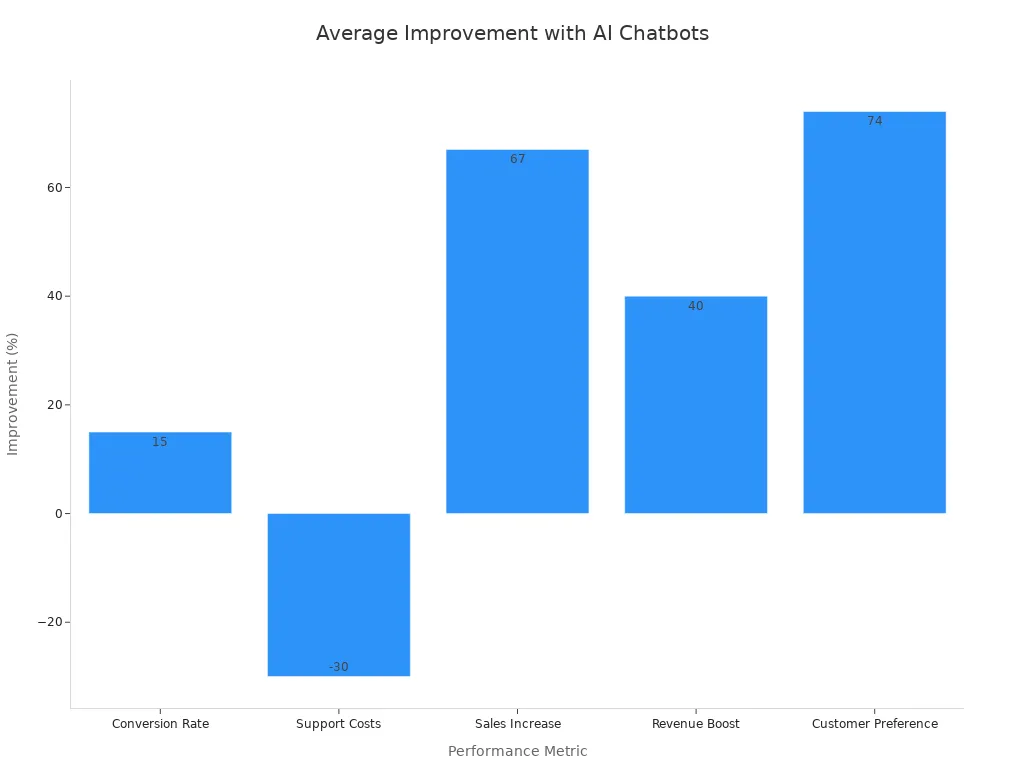
An AI chatbot is a powerful tool for boosting sales. Websites with a chatbot see much higher conversion rates. This is because the AI engages shoppers at the right moment. For example, a chatbot can help a customer who seems stuck, reducing cart abandonment. The right AI can increase your sales by up to 67%.
| Shopper Engagement | Conversion Rate |
|---|---|
| With AI Chatbots | ≈12.3% |
| Without AI Chatbots | ~3.1% |
Personalization is key to this success. The AI uses customer data to offer smart product recommendations, much like Sephora and H&M do. This makes the shopping experience more helpful and can boost revenue by up to 40%. This level of ecommerce AI chatbot customer service automation drives both sales and customer satisfaction.
Generating and Qualifying Leads
Your chatbot can also find and qualify new leads for you. It turns website visitors into potential buyers. The AI starts personalized conversations to understand a visitor's needs. This is a key part of ecommerce AI chatbot customer service automation. The chatbot asks smart questions to see if a visitor is a serious lead. This process increases efficiency. It scores leads based on their answers and engagement. This helps your sales team focus on the most promising prospects. This targeted approach improves your overall sales efficiency and ensures you never miss an opportunity.
Choosing the Right AI Chatbot Platform
Selecting the right platform is a critical step in your ai chatbot development journey. Your choice will depend on your technical skills, budget, and the specific goals you set for your chatbot. You have several options, from simple tools for a beginner to advanced frameworks for developers. Understanding each type helps you make an informed decision for your ecommerce business.
No-Code and Low-Code Platforms
You will find no-code platforms perfect if you have limited technical experience. These tools offer visual, drag-and-drop interfaces for your chatbot development. You can design conversation flows without writing a single line of code. This makes them an excellent starting point.
Examples of No-Code Platforms:
- Tidio: A great budget-friendly option that blends live chat with AI automation.
- ManyChat: Focuses on lead generation for social media channels like Instagram and WhatsApp.
These platforms help you launch a functional chatbot quickly.
All-in-One Platforms like Sobot
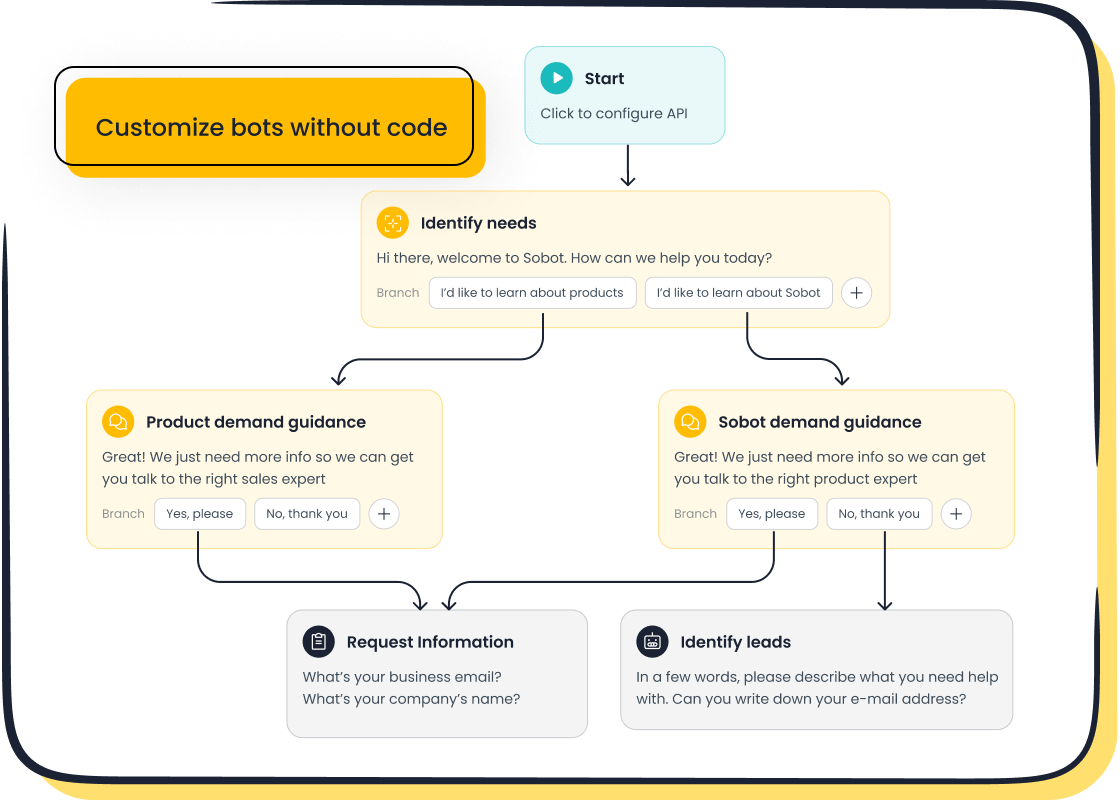
All-in-one platforms give you the best of both worlds. They combine ease of use with powerful, advanced features. A solution like Sobot offers a no-code, point-and-click interface that simplifies chatbot development. This approach allows you to build a sophisticated ai chatbot without needing to code. At the same time, the platform's powerful AI can improve your team's productivity by 70% and cut service costs by 50%. This makes it a comprehensive choice that grows with your business. The AI is designed to handle complex ecommerce tasks, from order tracking to product recommendations.
Developer-Focused Frameworks
If you have a development team, you might consider a developer-focused framework. These tools provide maximum control and customization for your chatbot. Frameworks like Botpress give your developers the flexibility to build a highly tailored AI solution from the ground up. This path requires coding expertise and more resources. It is ideal for large enterprises with unique and complex requirements for their AI.
Training Your AI Chatbot with Ecommerce Data
You must train your ai chatbot with the right information. This step is the core of your chatbot development process. A well-trained chatbot gives customers accurate and helpful answers. The quality of your data directly shapes how smart your ai becomes. Good training uses natural language processing (nlp) to help the chatbot understand user questions.
Uploading Product Catalogs and FAQs
You can start by uploading your existing business documents. This is a simple way to build the chatbot's knowledge base. The ai learns your company's tone and terminology directly from these files.
You can upload:
- Files like PDFs: Drag and drop your product catalogs, shipping policies, and sizing charts.
- Specific Q&As: You can add individual question-and-answer pairs. For example, you can input a question like, "What is your return policy?" and provide the exact answer you want the chatbot to use. The ai uses nlp to recognize different ways a user might ask that same question.
Using Website URLs for Knowledge Scraping
Another powerful training method is using your website's content. You can simply provide the URLs of important pages, like your homepage or product pages. The platform's ai will then "scrape" or read the information from those links. This process, powered by nlp, helps the chatbot learn from your existing online content. This is a fast and efficient part of ai chatbot development. The ai processes this data to provide context-aware responses based on your real information.
Defining Intents and Entities
To make your chatbot truly intelligent, you need to define intents and entities. This is a key function of nlp.
- An intent is the user's goal (e.g., tracking an order).
- An entity is the specific piece of information related to that goal (e.g., the order number).
For example, if a user asks, "Where is my order #12345?", the intent is "track order" and the entity is "12345". The chatbot uses nlp to identify both. This structure allows the ai to understand requests and manage conversations effectively. This advanced nlp capability is crucial for successful chatbot development.
Designing the Conversation Flow for Shoppers

You must design your chatbot’s conversations to feel natural and helpful. A good flow guides shoppers from their first greeting to a final solution. This part of your chatbot development is crucial for creating a positive user experience. A well-designed ai chatbot makes your brand feel more accessible and supportive.
Creating a Welcoming Greeting
Your chatbot's first message is very important. It should be friendly and clearly state what the chatbot can do. This sets the right expectations for the customer. You can use quick reply buttons in the chat interface to help users start the conversation.
For example, if a customer is on a specific product page, your chatbot could say: "Looking for [product category]? I can show you our top picks or help you find something specific. What's your preference?"
Other effective greetings include:
- "Welcome to our store! I can help you find products, track orders, or answer questions about returns."
- "Hi! Looking for new arrivals or today’s hottest picks?"
Developing Paths for Key Goals
You need to create clear paths for your main goals. This is a key step in chatbot development. Think about what your shoppers will ask for most often. Then, build a conversation flow for each task. The ai can use a user-friendly chat interface to guide users with simple questions and buttons.
- For Order Tracking: The ai chatbot can ask, "Can you share your order ID?" It then provides the status or escalates the issue.
- For Product Questions: The chatbot can ask, "What’s your price range?" or "Preferred color?" The ai then offers personalized recommendations in the chat interface.
This approach uses ai to automate support for both pre-purchase and post-purchase needs.
Planning for a Seamless Human Handoff
No ai chatbot can answer every question. You must plan for a smooth transfer to a human agent. A seamless handoff is essential for good service. The chatbot should transfer the full conversation history. This means the customer does not have to repeat information.
The process should be clear.
- The chatbot informs the user they are being transferred.
- The ai passes all chat data to the human agent.
- The agent reviews the information and continues the conversation.
This creates a better experience and makes your support team more efficient. The chat interface should make this transfer invisible to the user.
Integrating and Deploying Your Ecommerce Chatbot
After designing the conversation, you need to connect your chatbot to your business systems. This integration step makes your ai a powerful part of your operations. You will deploy and monitor your ai chatbot to ensure it works perfectly for your customers. This process is a key part of ecommerce ai chatbot customer service automation.
Connecting to Ecommerce Platforms
You can easily connect your chatbot to major ecommerce platforms. This integration allows your ai to access product data and order information directly. Many chatbot providers offer simple plugins or one-click integrations for platforms like Shopify and WooCommerce.
Solutions like Sobot provide seamless integration with these platforms. More importantly, Sobot offers true omnichannel support. This means you can deploy the same chatbot not just on your website, but also on:
- SMS
- Social Media
This allows you to meet customers on their favorite channels. This integration extends across a full contact center solution, including live chat, voice calls, and a ticketing system, creating a unified customer experience.
Integrating with CRM and Inventory Systems
You should connect your chatbot to your back-end systems. This integration gives your ai real-time information. A chatbot connected to your inventory system can tell a customer if a product is in stock. An ai linked to your CRM can see a customer's purchase history and offer personalized help.
A chatbot that is not connected to your central systems can give wrong information. This can cause you to lose customer trust and sales.
This deep integration allows the chatbot to perform real actions. It can help issue refunds, apply discounts, or update a customer profile right in the chat interface.
Adding the Chatbot Widget to Your Website
The final step is to add the chatbot widget to your website. This makes your ai chatbot visible and accessible to shoppers. Most platforms make this very easy. You usually just need to copy a small piece of code and paste it into your website's settings. This code adds the user-friendly chat interface to your pages. Once the chat interface is live, customers can start interacting with your chatbot immediately.
Testing, Monitoring, and Improving Performance
You must test and improve your chatbot after its launch. This final step is essential for long-term success. You need to deploy and monitor your ai chatbot to ensure it provides excellent customer service. This process helps your AI learn and get better over time.
Testing Common Customer Scenarios
You should test your chatbot with common customer questions before it goes live. This helps you find and fix problems early. Your goal is to make sure the AI provides a smooth experience for every customer.
You can test these key areas:
- Language Understanding: Check if the chatbot understands misspellings, slang, or unclear questions.
- Conversation Flow: See if the AI can handle a user changing topics.
- Unexpected Inputs: Test what the chatbot does with strange or partial information.
- High Traffic: Make sure your chatbot stays fast during busy times like holiday sales.
- Human Handoff: Verify that the transfer to a human agent is seamless and includes the chat history.
Monitoring Key Performance Metrics
You need to track key metrics after you launch your AI chatbot. These numbers show you how well the chatbot is performing. They help you understand user interactions and find areas for improvement. Important metrics include the percentage of issues the AI resolves on its own and the customer satisfaction rate.
Real-world success shows what is possible. The smart device brand OPPO used Sobot's AI to improve its customer service. They achieved an 83% chatbot resolution rate. They also earned a 94% positive feedback rate. This shows how a well-monitored chatbot can boost customer satisfaction and deliver great results. Consistent monitoring helps you refine your AI and reach similar goals.
Gathering User Feedback to Refine Responses
You should actively collect user feedback to improve your chatbot. This feedback is the best way to understand what your customers need. It gives you direct insight into your AI chatbot's performance. You can gather feedback with simple tools.
A common method is a quick survey at the end of a chat. You can ask the customer for a thumbs-up or thumbs-down. This simple feedback tells you if the answer was helpful. You can use this user feedback to train your AI. Over time, this process makes your chatbot smarter and more accurate. It ensures your chatbot continues to provide valuable support and positive experiences.
You can successfully implement an ecommerce chatbot by following the six steps. The process is manageable with the right tools. Your new ai chatbot will improve customer service and boost sales.
Ready to start? Begin with one simple goal, like automating your FAQs. You can explore a solution like Sobot to help you build and scale your efforts.
Embark on Your Contact Journey.
FAQ
How much does an AI chatbot cost?
Your cost for an AI chatbot for ecommerce service will vary.
- Some platforms charge a monthly fee.
- Others charge per agent or per AI resolution.
- You should choose a platform with transparent pricing that fits your budget and goals.
How long does it take to set up an AI chatbot?
You can set up a basic chatbot in just a few hours.
- No-code platforms like Sobot use a point-and-click interface.
- This simple process lets you build and deploy your chatbot quickly.
- More complex integrations may take longer.
Can a chatbot handle multiple languages?
Yes, many modern chatbots are multilingual.
- A platform like Sobot can interact with your customers in their preferred language.
- This feature helps you provide better support to a global audience.
- It creates a more personalized customer experience.
What is the main benefit of an all-in-one platform?
An all-in-one platform offers you both simplicity and power.
- You get an easy-to-use interface for building your chatbot.
- You also get advanced features to improve productivity and cut costs.
- This makes it a great choice for growing businesses.
See Also
Elevating E-commerce Customer Happiness Through Smart Chatbot Interactions
Driving E-commerce Revenue Growth with Dynamic Live Chat Solutions
Effortlessly Deploying Effective Chatbot Examples for Your Website
Best Live Chat Platforms for E-commerce Success This Year
Crafting Intelligent Chatbots to Achieve Outstanding Website Performance

