How to Start a Contact Center with the Best Software


To answer how to start a contact center with the best contact center software, organizations must address real challenges like high call volume, agent burnout, and customer satisfaction. They should define goals, identify the best contact center software features, compare top call center software solutions, evaluate call center software providers, and plan implementation. The right contact center solutions, including Sobot AI and Sobot call center, improve operational efficiency and customer experience. Using advanced technology, such as AI-driven call center software, ensures that every solution fits business needs. The best contact center software and call center solutions drive success.
Define Contact Center Goals
Set Customer Service Objectives
Every successful call center starts with clear customer service objectives. These goals guide the team and shape every customer interaction. Industry research highlights several key objectives for new contact centers:
- Expand communication channels to meet diverse customer preferences, including live chat, chatbots, messaging apps, social media, and video chat.
- Implement an omnichannel strategy to provide seamless, consistent customer experiences across all touchpoints.
- Reduce cost per contact by optimizing self-service, automating workflows, improving first contact resolution, and investing in agent training.
- Innovate with technology trends, such as AI-powered tools and workforce management solutions, to stay competitive and efficient.
- Prioritize mobile support by optimizing websites, knowledge bases, and communication channels for mobile devices.
- Automate strategically to complement human agents, using AI chatbots and automated notifications to enhance service and reduce costs.
- Set SMART (Specific, Measurable, Achievable, Relevant, Time-bound) goals to ensure clarity, alignment, and measurable progress in customer service objectives.
Tip: Setting measurable goals helps teams track progress and improve customer support over time.
Assess Team and Channels
A call center must understand its team’s strengths and the channels customers prefer. Leading contact centers analyze business needs, call volume, and service complexity before choosing communication channels. Customer preferences play a big role. Many customers want digital options like live chat, text, and social media, while others still prefer voice calls for direct support. Omnichannel communication helps personalize experiences and reduce agent workload. Sobot’s omnichannel solution allows teams to manage customer interactions from voice, email, chat, and social media in one unified workspace. This approach improves efficiency and ensures every customer receives consistent support.
Modern call centers use AI, analytics, and automation to handle routine tasks and provide predictive insights. Features like natural language processing and AI-powered virtual assistants help agents deliver faster, more accurate service. By balancing automation with human support, call centers can improve first contact resolution and customer satisfaction.
Plan for Growth
Growth planning ensures a call center can scale as customer demand increases. Teams should evaluate current resources, forecast future needs, and invest in scalable technology. Cloud-based call center solutions, like Sobot’s, offer flexibility and global reach. These platforms support remote work, making it easier to expand teams and serve customers in different regions.
Note: Regularly review performance data and customer feedback to identify areas for improvement and adjust strategies as the business grows.
A strong growth plan includes ongoing agent training, quality assurance, and technology upgrades. By planning ahead, call centers can maintain high service standards and adapt to changing customer needs.
Must-Have Contact Center Features
Omnichannel Support
Omnichannel support stands as a core feature for any modern call center. Companies that use omnichannel support see higher customer retention rates—up to 95%—compared to those with weak engagement, who retain only 33% of customers. This approach allows customers to move between channels like voice, chat, email, and social media without repeating their issues. Agents gain full visibility into customer interactions, which leads to faster resolutions and better customer experience. Sobot’s omnichannel solution unifies all customer support channels in one workspace, making it easier for teams to deliver consistent service and manage call routing efficiently. This seamless integration reduces churn and builds long-term loyalty.
Note: Omnichannel support helps agents provide personalized service and ensures every customer receives the same high-quality support, no matter which channel they use.
CRM Integration
CRM integrations play a vital role in boosting agent productivity and improving customer support. When a call center connects its CRM with the contact center platform, agents see customer information instantly through screen pops. This reduces manual lookups and speeds up service. CRM integrations automate data entry, so agents spend less time on paperwork and more time helping customers. Features like click-to-call and unified access to customer history make call routing smarter and more effective. Sobot offers seamless CRM integrations, allowing agents to view all customer data and past interactions in one place. This unified view helps agents personalize service and resolve issues faster.
- CRM integrations reduce agent stress by providing instant access to customer information.
- Automation of workflows and data entry saves time and lowers error rates.
- Smart call routing connects customers to the best agent based on CRM data.
AI and Automation
AI and automation have transformed the call center industry. Nearly 50% of client support units now use AI, and 52% of contact centers have invested in conversational AI. AI-powered automation handles up to 80% of routine customer inquiries, freeing agents to focus on complex issues. Sobot’s AI-powered automation includes chatbots, voicebots, and smart call routing, which improve efficiency and reduce wait times. Automation also supports real-time analytics, helping managers monitor performance and make quick decisions. By using AI and automation, call centers can scale their operations, reduce costs, and deliver faster customer support.
| Statistic Description | Percentage/Value |
|---|---|
| Client support units that have implemented AI | Nearly 50% |
| Contact centers invested in Conversational AI | 52% |
| AI tools resolving customer inquiries without humans | 75% (predicted) |
Analytics and Security
Analytics and security are essential for every cloud-based contact center. Real-time analytics help managers track key performance indicators, monitor agent behavior, and identify areas for improvement. Quality management platforms analyze 100% of interactions, providing insights for coaching and compliance. Security features like multi-factor authentication, encryption, and role-based access control protect sensitive customer data. Sobot’s cloud platform offers robust analytics, secure data transfer, and compliance with global standards. Automated tools pause recordings during sensitive data sharing, helping call centers meet regulations like HIPAA and PCI-DSS. Regular security audits and real-time monitoring ensure the highest level of protection for both customers and agents.
Tip: Strong analytics and security features not only protect your business but also build customer trust and support long-term success.
Best Contact Center Software Comparison
Sobot Voice/Call Center Overview
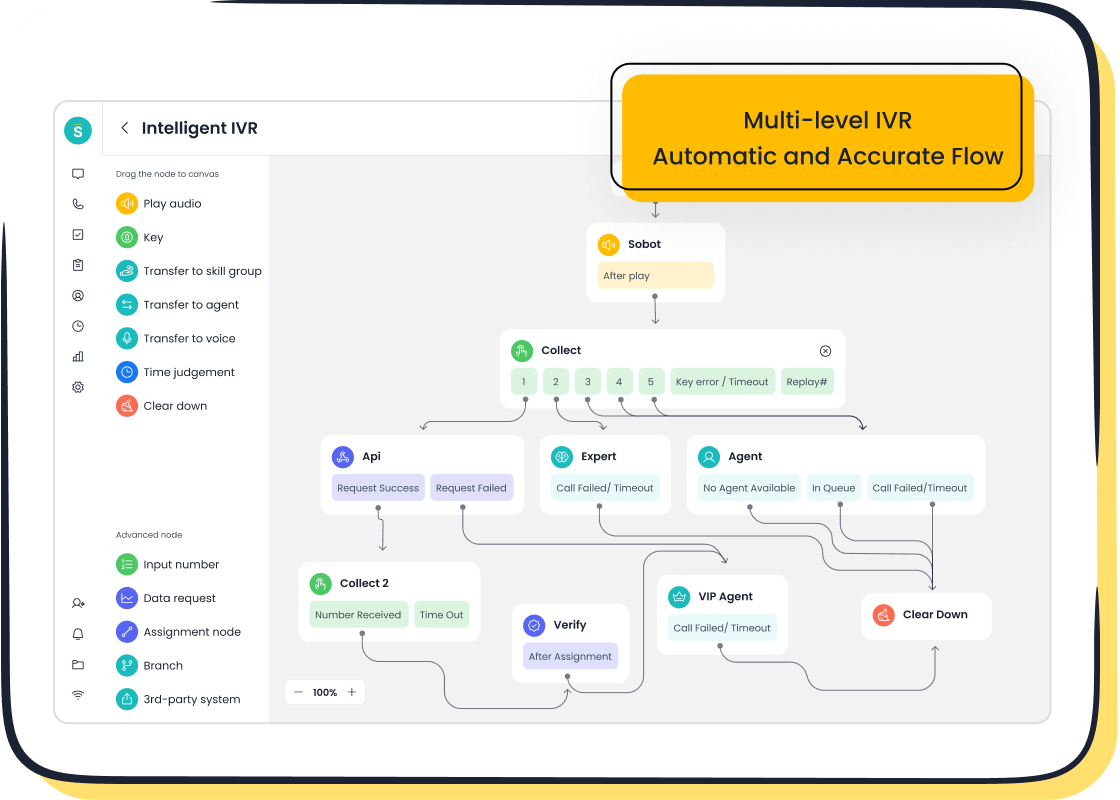
Sobot Voice/Call Center stands out as one of the best contact center software options for businesses seeking a unified, cloud-based platform. Sobot integrates multiple customer channels, including e-commerce sites, social media, apps, email, SMS, and voice, into a single solution. This all-in-one approach simplifies call routing and ensures agents can manage every interaction from one workspace. Sobot’s Five-AI system, launched in 2024, powers advanced ai-powered automation, omnichannel support, and real-time analytics. The platform supports flexible crm integrations, allowing seamless connection with tools like Salesforce and Shopify. Sobot’s solution delivers high uptime (99.99%), global number availability, and secure data handling. Companies benefit from fast deployment, stable performance, and cost-effective pricing—often half the cost of other call center software.
Sobot’s customer service team remains available at every stage, from pre-sales to ongoing support, ensuring businesses always have expert help.
Leading Alternatives
Other leading call center solutions include Five9, Talkdesk, and NICE CXone. These platforms offer strong call routing, automation, and analytics features. Five9 provides predictive dialing and workforce management. Talkdesk focuses on cloud-based call center software with robust routing and omnichannel support. NICE CXone delivers advanced analytics, ai-powered automation, and flexible routing for large enterprises. Each solution supports cloud deployment, making it easy for businesses to scale operations and add new channels. However, most competitors focus on a single core product or channel, while Sobot’s solution integrates all channels and advanced AI into one platform.
Pros, Cons, and Pricing
| Vendor / Solution | Pros | Cons | Price Range (per user/month) |
|---|---|---|---|
| Sobot Voice/Call Center | All-in-one platform, omnichannel support, advanced AI, flexible crm integrations, strong analytics, cost-effective, global reach, high uptime | Customization for large projects may require consultation | $20 to $100+ |
| Five9 | Predictive dialing, workforce management, strong routing, cloud-based | Higher starting price, contract required | Starting at $119 |
| Talkdesk | Omnichannel support, automation, analytics, scalable cloud platform | Some advanced features cost extra | $75 to $125 |
| NICE CXone | Advanced analytics, ai-powered automation, flexible routing, enterprise-grade | Premium pricing, complex setup | $71 to $249 |
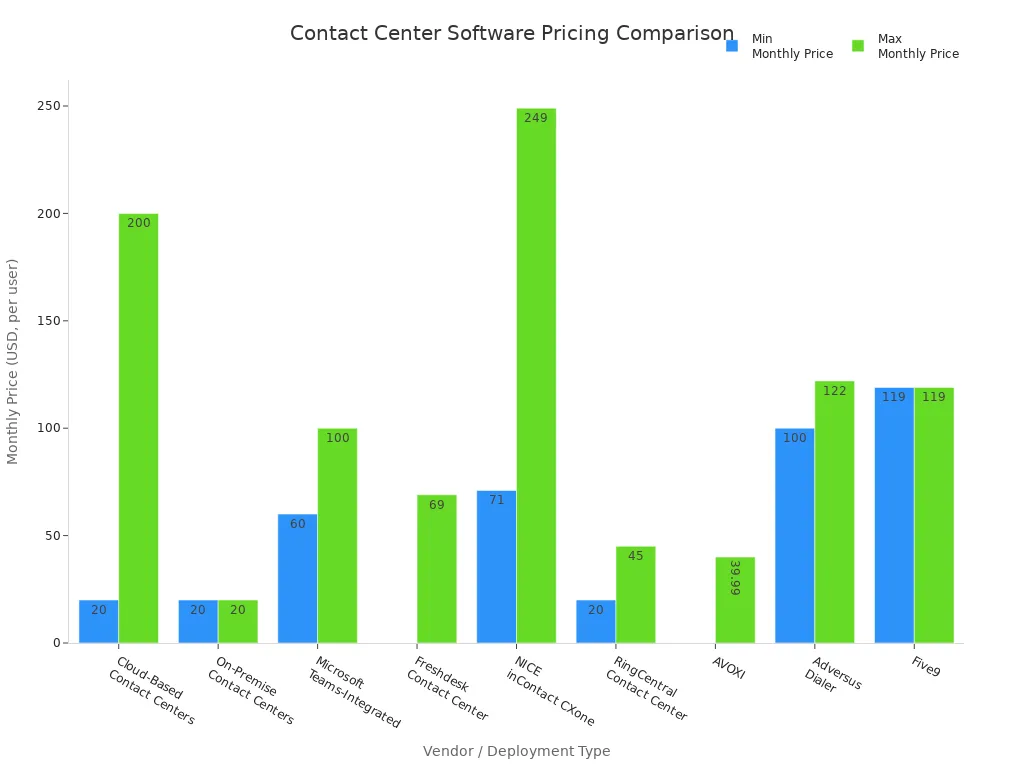
Note: Most cloud-based contact center software uses a subscription model, with prices ranging from $20 for basic plans to over $200 for advanced suites. Sobot’s solution remains highly competitive, offering premium features at a lower cost.
How to Start a Contact Center: Step-by-Step

Starting a contact center with the best call center software requires a clear plan and careful execution. This step-by-step guide explains how to start a contact center, from choosing the right solution to launching your new platform. Each step helps businesses avoid common mistakes and ensures a smooth transition to a modern, efficient call center.
Choose the Right Solution
Selecting the right call center software forms the foundation of a successful contact center. Industry analysts recommend that organizations align features and capabilities with business goals, budget, and customer preferences. The best solution supports omnichannel communication, including voice, SMS, chat, email, and social messaging. User-friendly dashboards and analytics portals help managers track performance and make informed decisions.
Key criteria for choosing a solution include:
- Support for omnichannel communication (voice, chat, email, SMS, video, social messaging)
- User-friendly dashboards and analytics
- Drag-and-drop IVR and call routing systems
- Customer self-service options like IVR, chatbots, and knowledge bases
- Call monitoring features such as whisper, barge, and live queue reports
- Workforce management tools and outbound dialers
- Automation and AI capabilities, including real-time sentiment analysis
- Integration with CRM, unified communications, and billing systems
- Security and compliance with standards like HIPAA
Sobot’s all-in-one call center software checks all these boxes. The platform offers omnichannel support, advanced AI, and seamless CRM integration. Sobot’s drag-and-drop IVR builder and unified workspace make it easy for agents to manage calls and customer data. The solution also provides global number availability and a 99.99% uptime guarantee, ensuring reliable service for businesses of all sizes.
Tip: Always match the solution’s features to your business needs and customer expectations. This approach helps maximize return on investment and customer satisfaction.
Setup and Integration
Once you select the right call center software, the next step involves setup and integration. This process connects the new platform with your existing business systems, such as CRM, helpdesk, and billing tools. A smooth integration ensures agents have access to all customer information in one place, improving efficiency and service quality.
Typical steps for setup and integration include:
- Assess current systems to understand workflows and identify limitations.
- Define clear objectives for integration, such as improving data flow or user experience.
- Prioritize data consistency and security by validating and encrypting data.
- Choose the best integration method, such as API or data integration.
- Use a phased approach to minimize disruption and allow troubleshooting.
- Test all components thoroughly, including unit and end-to-end tests.
- Monitor system performance after integration and use analytics to optimize processes.
Sobot’s call center software stands out for its ease of integration. The platform offers open APIs and pre-built connectors for popular CRM and business tools. Sobot’s onboarding team provides step-by-step guidance, helping businesses migrate data securely and configure workflows quickly. The solution supports global operations, with mobile compatibility and encrypted data transfer for maximum security.
Note: A well-planned integration reduces downtime and ensures agents can start using the new platform without delays.
Agent Training
Agent training plays a critical role in the success of any contact center. Effective training ensures agents can use the new call center software confidently and deliver excellent customer service. The most effective training programs combine hands-on practice, structured courses, and ongoing support.
Best practices for agent training include:
- Build a training stack with sandbox environments for hands-on learning, a learning management system for structured courses, and digital adoption platforms for in-app guidance.
- Set clear, measurable training objectives using SMART goals.
- Use multimedia content such as videos, infographics, and interactive simulations to engage agents.
- Incorporate gamification elements like points, badges, and leaderboards to motivate participation.
- Establish feedback mechanisms, including real-time tools and regular sessions, to support continuous development.
- Foster a positive work culture that encourages teamwork and knowledge sharing.
- Pair new hires with mentors for onboarding support and company culture integration.
- Leverage AI-powered analytics and agent dashboards for data-driven coaching and performance improvement.
- Combine virtual and in-person training to accommodate different learning styles and remote work needs.
Sobot’s call center software includes built-in training resources and an intuitive interface, making it easy for agents to learn new features. The platform’s analytics tools help managers identify training gaps and tailor coaching sessions. Sobot’s onboarding support ensures agents receive the guidance they need from day one.
Callout: Avoid one-size-fits-all training. Customize learning materials to reflect your contact center’s environment and customer scenarios.
Testing and Launch
Testing and launching the new contact center platform marks the final step in the process. Proper testing ensures the software works as expected and agents are ready to handle customer interactions. A successful launch minimizes disruptions and sets the stage for long-term success.
Best practices for testing and launch include:
- Establish continuity plans to handle risks like internet outages.
- Maintain clear communication with employees and encourage feedback.
- Conduct A/B testing for call scripts and processes to find the best options.
- Develop comprehensive onboarding plans with engaging training materials, including call recordings and transcripts.
- Select agents with different experience levels for pilot testing to gather diverse feedback.
- Launch during low-traffic periods to minimize downtime.
- Continuously optimize the contact center by reviewing agent performance and customer feedback.
- Plan for scalability by choosing cloud-based call center software that can grow with your business.
- Ensure compliance and security by following data protection regulations and training agents on security protocols.
Sobot’s call center software supports a smooth launch with real-time monitoring, analytics, and ongoing support. The platform’s high uptime and global network ensure reliable service from day one. Sobot’s team assists with pilot testing, rollout planning, and post-launch optimization, helping businesses achieve their goals quickly.
Tip: Use customer feedback and operational data to refine processes and improve service quality after launch.
How to Start a Contact Center: Key Takeaways
- Start by aligning the solution’s features with your business goals and customer needs.
- Integrate the new call center software with existing systems for a unified workspace.
- Invest in comprehensive agent training using a mix of hands-on practice, multimedia content, and ongoing support.
- Test the platform thoroughly and launch during low-traffic periods to minimize disruptions.
- Use analytics and feedback to drive continuous improvement and maximize return on investment.
Sobot’s all-in-one call center software and onboarding support make it easy for businesses to follow these steps. The platform’s robust features, seamless integration, and dedicated support team help organizations launch and scale their contact centers with confidence.
For more information on how to start a contact center with Sobot, visit Sobot’s official website.
Contact Center Solutions for Customer Success
Sobot Omnichannel Solution
Sobot’s omnichannel solution transforms how organizations deliver customer support. The platform brings together all communication channels—voice, chat, email, and social media—into a single workspace. Agents see every customer interaction in one place, which helps them solve problems faster and more accurately. This approach improves first contact resolution rates and reduces the need for customers to repeat their issues. Sobot’s AI-driven features suggest responses, automate simple tasks, and surface helpful knowledge base articles in real time. Intelligent routing connects customers with the right agent, making each service interaction smoother.
- Sobot’s solution tracks and unifies customer interactions across all platforms.
- Agents gain a complete view of the customer journey, which leads to seamless experiences.
- AI tools reduce delays and guesswork, helping agents resolve issues on the first contact.
- High first contact resolution rates lower operational costs and increase customer loyalty.
- The platform’s design supports agents, improves job satisfaction, and builds a strong company reputation.
Sobot’s contact center solutions help businesses deliver consistent, high-quality customer support while reducing costs and boosting customer satisfaction.
Real-World Example: Weee! Case Study
Weee!, America’s largest online Asian supermarket, chose Sobot’s voice product to improve its contact center. The company faced challenges with inflexible IVR systems and language barriers. After implementing Sobot’s solution, Weee! saw a 20% increase in agent efficiency and a 50% reduction in resolution time. The customer satisfaction score reached 96%. Sobot’s flexible IVR, integrated workbench, and multilingual support allowed Weee! to serve a diverse customer base and manage high volumes of customer support requests. This real-world example shows how Sobot’s contact center solutions drive measurable improvements in service quality and customer experience.
Measuring Customer Satisfaction
Contact centers use several key metrics to measure customer satisfaction and service effectiveness:
- Customer Satisfaction Score (CSAT): Surveys measure how well the service meets customer expectations.
- Net Promoter Score (NPS): This metric tracks how likely customers are to recommend the company.
- First Call Resolution (FCR): The percentage of issues solved on the first contact.
- Customer Effort Score (CES): This score shows how easy it is for customers to resolve their issues.
- Service Level: The percentage of contacts answered within a set time.
These metrics help organizations understand the impact of their contact center solutions and guide improvements in customer support and service delivery.
Practical Tips for Scaling
Free Trials and Demos
Free trials and demos help businesses evaluate call center software before making a commitment. Many vendors offer these options so teams can test features, user interfaces, and integration capabilities. A hands-on trial allows managers to see how the call center software fits daily workflows. Teams can check if the solution supports omnichannel communication, AI automation, and analytics. During a demo, decision-makers should ask about setup time, training resources, and support. Sobot provides guided demos and free trials for its cloud-based contact center solution, making it easy for organizations to explore the platform’s capabilities. This approach reduces risk and ensures the chosen call center software meets business needs.
Tip: Use a checklist during trials to compare call center software features, ease of use, and integration with existing systems.
Data Migration
Switching to new call center software often involves data migration. This process can present several challenges:
- Data loss may occur if information is not backed up or if transfers are incomplete.
- Data corruption can result from incompatible formats or errors during transmission.
- Extended downtime disrupts operations if migration takes longer than planned.
- Complex data transformations make it hard to convert information from old systems.
- Semantics errors happen when data fields are mapped incorrectly.
- Integration problems arise if the new solution does not work with current software.
- Security risks increase during migration, especially if data is not encrypted.
- Lack of user training leads to mistakes and inefficiency.
- Poor change management causes confusion among staff.
To avoid these issues, teams should back up all data, audit information before migration, and use secure transfer protocols. Sobot’s onboarding team supports businesses through each step, offering tools and guidance to ensure a smooth transition to its call center software.
Scaling with Sobot
Sobot’s call center software helps businesses scale their contact center operations with ease. The solution integrates AI-powered chatbots and the WhatsApp Business API, which handle high volumes of customer inquiries efficiently. Automation reduces the workload on support teams, allowing agents to focus on complex tasks. The user-friendly interface and seamless multi-channel integration help organizations manage peak periods without losing speed or quality. WhatsApp integration boosts customer engagement and response times. Sobot’s cloud-based contact center solution enables companies to expand quickly, maintain high service standards, and adapt to changing business needs. These features make Sobot a strong choice for growing call centers.
Note: Sobot’s scalable solution supports businesses as they grow, ensuring reliable performance and customer satisfaction.
Starting a contact center with the best software means aligning technology with business goals and customer needs. Companies should define clear service objectives, select features that support omnichannel communication, and focus on automation to improve customer satisfaction. Sobot’s solutions help teams deliver consistent service and streamline customer interactions. Businesses can explore free trials to see how Sobot supports customer engagement and service quality. Next steps include training agents, monitoring performance, and using analytics to refine customer service for long-term success.
FAQ
What is the first step in how to start a contact center?
The first step in how to start a contact center involves setting clear goals. Companies should define customer service objectives and choose the right technology. Sobot provides a free consultation to help businesses outline their needs and select the best solution for their industry.
How does Sobot support omnichannel communication?
Sobot unifies voice, chat, email, and social media in one workspace. Agents can view all customer interactions in real time. This approach improves first contact resolution and helps teams deliver consistent service. Sobot’s omnichannel solution increases agent productivity by up to 30%.
What security features should a contact center have?
A secure contact center uses encryption, role-based access, and regular audits. Sobot’s platform meets global standards and offers 99.99% uptime. The system protects sensitive data and supports compliance with regulations like HIPAA and PCI-DSS.
How can businesses measure contact center success?
Businesses track metrics such as Customer Satisfaction Score (CSAT), Net Promoter Score (NPS), and First Call Resolution (FCR). Sobot’s analytics dashboard provides real-time insights. Companies use these metrics to improve service and meet customer expectations.
Can Sobot help with data migration when starting a new contact center?
Yes. Sobot’s onboarding team guides businesses through secure data migration. The process includes data backup, validation, and encrypted transfer. This support ensures a smooth transition and reduces downtime when learning how to start a contact center.
See Also
Comprehensive Overview Of Omnichannel Call Center Platforms
Best No-Cost CRM Solutions For Call Centers In 2024
Step-By-Step Process To Deploy Omnichannel Contact Centers

