How to Reduce Support Team Workload with AI


Your support agents face immense pressure. They handle 50 to 60 tickets daily, leading to high stress and burnout. With industry turnover rates often between 30-45%, you need a way to reduce support team workload. AI for customer service offers a practical solution. Tools like AI chatbots and voice bots help you reduce support volume and scale without hiring more agents. You can empower your team with solutions from providers like Sobot to manage tasks more effectively and focus on what truly matters: your customers.
Use AI Chatbots and Voice Bots for Instant Support

Implementing ai chatbots and voice bots is one of the most effective ways to immediately reduce your team's workload. These tools act as the first line of defense, handling common questions and freeing your agents to tackle more complex customer issues.
Provide 24/7 Answers to FAQs
Customers expect immediate assistance, regardless of your business hours. Globalization and e-commerce have made 24/7 availability a key differentiator. You can use ai chatbots and voice bots to provide instant, automated responses to frequently asked questions around the clock. This ensures customers in different time zones or those shopping late at night receive the support they need without having to wait for a human agent.
Empower Customer Self-Service
Many customers want to find answers on their own. Studies show that a significant majority—as high as 67%—prefer self-service over speaking to a company representative. By offering effective self-service support, you cater directly to this preference. As one expert notes:
“We often think that high-touch, involved answers are what customers want when in reality, they want answers.”
Empowering customers to resolve issues quickly on their own boosts satisfaction and builds confidence in your brand. This approach gives them the convenient options they appreciate.
Integrate Bots with Your Knowledge Base
The effectiveness of ai chatbots and voice bots depends on the information they can access. Integrating them with a well-organized knowledge base is critical. This allows the bot to pull from articles, PDFs, and other documents to deliver accurate, context-aware answers. A strong integration helps improve response times and ensures customers receive consistent information.
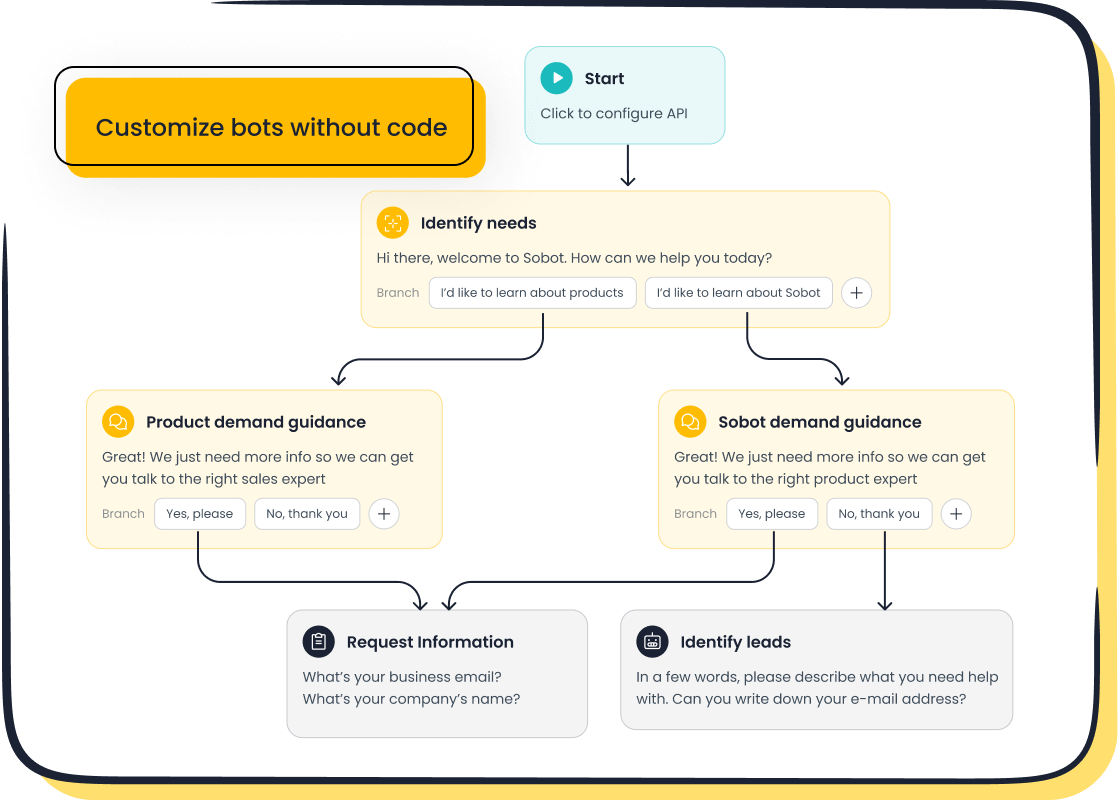
For example, the Sobot AI Chatbot is a powerful tool for providing this level of self-service support. It helps businesses:
- Improve productivity by up to 70% by handling routine queries.
- Cut operational costs by as much as 50%.
- Deploy quickly with a user-friendly, no-code interface.
By connecting a tool like this to your knowledge base, you create a seamless support system that benefits both your customers and your team.
Reduce Support Team Workload with Smart Automation
Beyond answering questions, AI can organize your entire support operation. Smart automation helps you manage incoming requests, prioritize tasks, and streamline your customer service processes. This lets your team work smarter, not harder.
Implement an Automated Ticketing System
Your team likely spends too much time manually sorting emails and messages. An automated ticketing system solves this problem. Using technologies like Natural Language Processing (NLP), these systems can:
- Read incoming emails, chats, and forms.
- Automatically create and categorize tickets.
- Route tickets to the right agent or department.
This eliminates manual data entry and ensures urgent issues get seen first. A platform like Sobot’s customer contact center includes a powerful ticketing system that unifies requests from all channels, which is a key step to reduce support team workload.
Achieve Efficient Customer Service Automation
True customer service automation combines tools to create a seamless workflow. This "human-machine cooperation" model empowers agents by letting bots handle repetitive work.
Case Study: How OPPO Achieved 94% Positive Feedback Smart device leader OPPO faced huge ticket volumes during peak seasons. By combining Sobot's chatbot and automated ticketing system, they transformed their customer service processes. The chatbot handled common questions, while the ticketing system organized complex issues for human agents. This approach to customer service automation resulted in an 83% chatbot resolution rate and a 94% positive feedback rate.
This shows how customer service automation doesn't replace your team; it makes them more effective.
Use Sentiment Analysis to Prioritize Issues
Not all tickets are equal. Some customers are simply asking a question, while others are deeply frustrated. Sentiment analysis technology uses AI to read the emotional tone of a message. It detects negative words and phrases to flag urgent issues in real time. This allows your automated ticketing system to push frustrated customers to the front of the queue. By addressing critical problems first, you can improve customer satisfaction and efficiently reduce support team workload. This proactive approach is a core part of modern customer service automation.
Empower Agents with Real-Time AI Assistance

AI can also work alongside your agents, acting as a helpful partner. This ai-powered support gives your team the tools they need to resolve issues faster and more accurately. You can empower them with real-time assistance that reduces stress and improves performance.
Deploy AI Copilots for Response Suggestions
Your agents spend a lot of time crafting the perfect response. AI copilots can do this work for them. These tools analyze customer questions and suggest the best answers in real time. This helps your team in several ways:
- Ensures consistent quality: All agents use clear, pre-approved messages.
- Reduces training time: New hires can get up to speed faster with AI guiding their conversations.
- Frees up agent time: Agents can focus on solving the problem instead of typing out replies.
Solutions like Sobot's AI Agent act as a copilot, providing instant suggestions from your knowledge base. This helps agents guide conversations efficiently and improves first-contact resolution.
Provide Instant Access to Customer Data
Customers hate repeating themselves. When your agents have instant access to customer history, they can provide a much better experience. AI tools can unify data from all your channels into a single view. This means your agents see past purchases, previous support tickets, and chat transcripts without switching screens.
Security is Key 🔐 Providing access to data requires strong security. Modern AI tools use encryption and strict access controls to protect customer information. This ensures agents only see what they need to perform their tasks, keeping data safe.
Centralizing information allows your team to skip unnecessary questions and get straight to solving the problem. This personalizes the experience and significantly reduces average handling time.
Automate Post-Interaction Summaries
After a call or chat ends, your agents must log notes and summarize the conversation. This after-call work is repetitive and time-consuming. AI can automate this entire process. It listens to the interaction and generates a concise, accurate summary automatically.
This simple change can save a significant amount of time. Some teams report saving 5-6 minutes per interaction. This allows your agents to move to the next customer more quickly, increasing overall team productivity and reducing their administrative burden.
A Practical Guide to Implementing AI for Customer Service
Adopting AI doesn't have to be complicated. You can start reducing your team's workload by following a clear, step-by-step plan. This guide will walk you through the practical stages of implementing AI, from identifying opportunities to measuring success.
Step 1: Identify High-Volume, Repetitive Tasks
Before you choose any tool, you must first understand where your team spends most of its time. The best candidates for customer service automation are tasks that are predictable and frequent. Look for patterns in your daily operations.
Start by mapping your existing customer service processes. Talk to your agents and managers to find bottlenecks and pain points. You should focus on identifying tasks that are:
- High-volume: These are tasks that happen over and over again. Automating them saves a significant amount of time.
- Rule-based: These processes follow clear, simple rules with few exceptions. An AI can handle them consistently every time.
- Error-prone: Manual data entry or copying and pasting information often leads to mistakes. Automation improves accuracy.
- Bottlenecks: These are repetitive steps that slow down your entire workflow. Fixing them makes your whole team more efficient.
Once you have a list of potential tasks, you can prioritize them based on impact and feasibility. This gives you a clear starting point for your AI implementation.
Step 2: Choose the Right AI Tools
With a clear goal in mind, you can now find the right tools for the job. When evaluating ai for customer service solutions, you need to look beyond just the features. Consider how the tool will fit into your existing workflow and grow with your business.
Here are key criteria to use when comparing options:
- Performance and Accuracy: Does the AI understand customer questions and provide relevant answers?
- Integrations: Can the tool connect seamlessly with your CRM, ticketing system, and other software?
- Ease of Use: Is the platform user-friendly? A no-code interface, like the one offered by Sobot, allows your team to build and manage bots without needing developers.
- Data Security: Does the provider use strong encryption and follow data privacy regulations like GDPR?
- Scalability: Can the solution handle more requests as your company grows?
Understanding the cost is also crucial. AI tools often use different pricing models, and you need to choose one that aligns with your budget and usage patterns.
| Pricing Model | What You Pay For | Best For |
|---|---|---|
| Per-User Pricing | Each agent using the tool. | AI copilots that assist human agents. |
| Usage-Based Pricing | The number of interactions the AI handles. | Fully automated chatbots and voice bots. |
| Tiered Pricing | Predefined plans with set features and limits. | Businesses that want a predictable monthly cost. |
Choosing the right tool is a balance of capability, cost, and usability. A good choice will support your customer service processes without creating new complications.
Step 3: Train Your AI and Launch a Pilot
An AI is only as smart as the data you give it. The quality of your training data directly impacts your AI's performance. This is often called the "Garbage In, Garbage Out" principle. To avoid this, you need to create a reliable source of information for your AI.
Tip: Create a Single Source of Truth (SSOT) 💡 Unify your knowledge base articles, product information, and past customer conversations into one central, verified repository. This ensures your AI provides consistent and accurate answers across all channels.
Once your data is ready, you can launch a pilot program. A pilot is a small-scale test that lets you see how the AI performs in a real-world setting before you roll it out to all customers.
Follow these steps for a successful pilot:
- Select a Use Case: Start with one of the high-volume tasks you identified in Step 1. Set a clear, measurable goal, like reducing response time for that specific issue.
- Assemble Your Team: Choose a few enthusiastic agents to participate. Their feedback will be essential for making improvements.
- Configure and Test: Set up the AI bot or workflow. Test it internally to catch any obvious issues.
- Launch and Monitor: Release the AI to a small segment of your customers. Watch its performance closely and gather feedback.
- Iterate and Refine: Use the data and feedback from the pilot to make adjustments. This iterative process helps you perfect the solution before a full launch.
Step 4: Monitor Metrics and Refine Performance
Implementing ai for customer service is not a "set it and forget it" project. To get the most value, you must continuously monitor performance and make data-driven improvements. A/B testing is a powerful method for refining your customer service automation.
In an A/B test, you create two versions of a chatbot script or workflow (Version A and Version B) and show them to different users. You then measure which version performs better based on key metrics.
You can test different elements, such as:
- The wording of a welcome message
- The order of questions in a flow
- The design or placement of the chat widget
Track metrics like chat completion rate, user engagement, and customer satisfaction scores to see what works best. The goal is to find the most effective way to interact with your customers.
One fintech company used this approach to refine its AI chatbot's onboarding flow. Through weekly testing, they achieved a 27% increase in qualified leads over three months.
This process of continuous optimization ensures your customer service automation evolves with your customers' needs. It turns a good tool into a great one, delivering better results for both your team and your business.
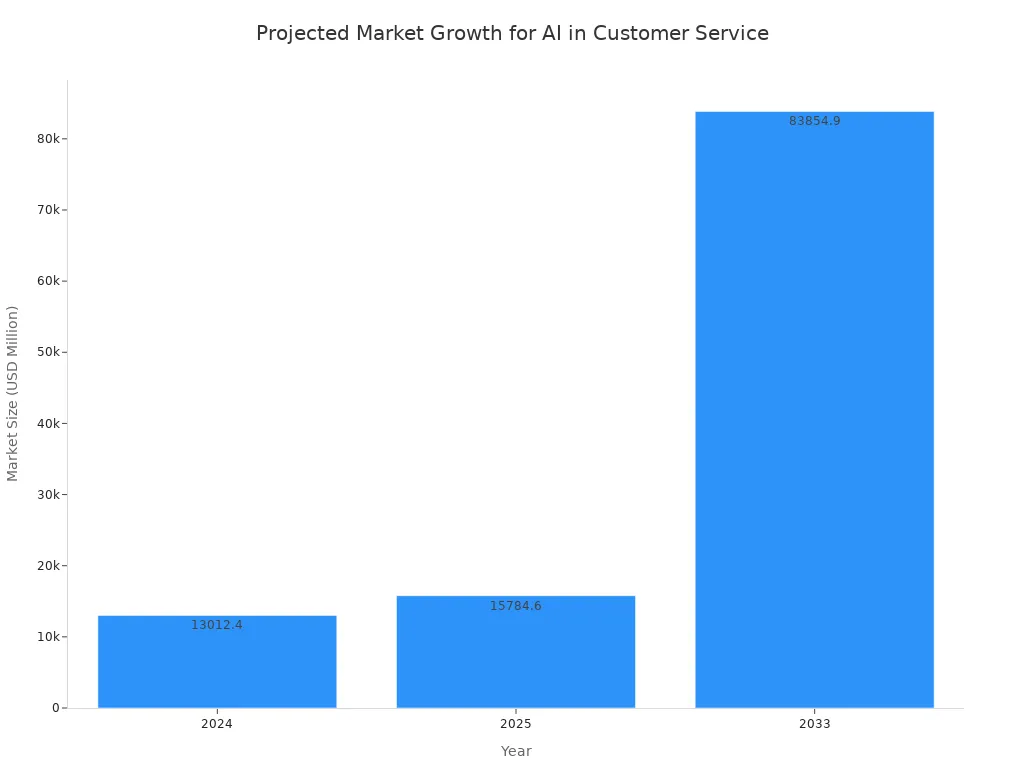
You can reduce support team workload with AI. Tools like ai chatbots and voice bots handle routine questions. This frees your team for complex issues, much like how Lufthansa uses AI to help agents with nuanced interactions. This customer service automation boosts customer satisfaction. The future of customer service automation is growing rapidly. Start your journey with customer service automation today. Identify one repetitive task to automate. Explore how a solution like Sobot can help you implement effective customer service automation and reduce support team workload. This is the first step in using ai for customer service.
FAQ
How quickly can you see results from AI?
You can see immediate results. An AI chatbot starts answering common questions right away. This frees up your agents from day one. You will notice a drop in simple, repetitive tickets almost instantly, helping you reduce support team workload with AI.
Will AI replace my human support agents?
No, AI empowers your agents. It handles routine tasks so your team can focus on complex problems that require a human touch. This "human-machine cooperation" model makes your team more efficient and valuable, not obsolete.
Do you need a developer to set up an AI chatbot?
You do not need a developer for many modern tools. For example, the Sobot AI Chatbot uses a no-code, point-and-click interface. This allows your team to design and launch automated workflows without any coding experience.
How does AI help reduce costs?
AI reduces costs by automating tasks that normally require human agents. A chatbot can operate 24/7 to answer questions and create tickets. This saves you up to 50% on costs associated with hiring additional staff for off-hours support.
See Also
Elevating Customer Service Efficiency Through Advanced AI Software Solutions
Discovering the Top 10 AI Tools for Enterprise Contact Centers
A Comprehensive Guide to Artificial Intelligence Software for Call Centers
An In-Depth Review of AI-Powered Enterprise Call Center Solutions
How AI Customer Service Agents Are Revolutionizing Modern Support Operations

