API vs Plugin for Support What's the Difference


Choosing between an api vs plugin can be confusing. A plugin is a simple add-on for one feature. An API, or Application Programming Interface, is a toolkit for custom connections. The right choice in the plugin vs api debate depends on your needs. This guide helps you understand how to connect my website with a support platform. A powerful api integration, like those offered by Sobot, provides flexibility for your support team. A simple plugin offers a quick integration solution. This article will help you decide which path is best.
Understanding Plugins for Your Support System

A plugin is a piece of software that adds a specific feature to an existing program. Think of it as a pre-built block you can snap into place. For a support system, a plugin might add a simple contact form or a basic chat window to a website. It offers a quick way to expand your system's capabilities without needing to write code.
How Plugins Work
A plugin works by hooking into the host application's existing code. Most support platforms design their systems to allow these add-ons. A business can typically install a plugin from a marketplace with just a few clicks. Once activated, the plugin adds its specific feature. This process is simple and does not require technical expertise. The core benefit is the immediate enhancement of plugin functionality.
Key Advantages of Plugins
Plugins offer several clear benefits, especially for teams with limited resources.
- Ease of Use: Installing a plugin is usually a straightforward process. It requires no coding knowledge.
- Speed: You can add new plugin functionality to your support system in minutes.
- Cost-Effectiveness: Many plugins are free or have a low one-time cost, making them an affordable choice.
Potential Downsides of Plugins
While convenient, plugins come with significant risks. The debate of plugin vs api often centers on security and flexibility. A plugin can create security vulnerabilities. In 2023, over 60% of data breaches started from weaknesses in third-party tools. Attackers often exploit outdated plugins or use supply chain attacks to inject malicious code. This can lead to data theft or business disruption.
A support agent often has access to sensitive customer information. A simple plugin for email notifications might request far more data access than it needs. This oversight can expose private customer data unnecessarily.
Limited customization is another major issue. A plugin provides a fixed set of plugin functionality. You cannot easily change it to fit unique workflows. This lack of flexibility can hinder growth as your support needs become more complex and require a more powerful solution, like an api.
Exploring the Power of API Integration

An API acts like a secure messenger between different software programs. It allows them to talk to each other and share information. This is a key difference in the plugin vs api discussion. While a plugin adds a feature, an API builds a bridge. This creates powerful, custom integration solutions for your support system.
How APIs Connect Systems
An API connects systems by defining a set of rules for communication. One program makes a request, or an API call, to another program's API. The second program then sends back the requested data. This process enables seamless integration between tools that were not originally designed to work together.
For example, Sobot's Omnichannel Solution uses API integration to create a unified integration platform. It pulls data from various channels like voice, email, and social media. It also connects with external systems like Salesforce and Shopify. This allows a support agent to see all customer information in one workspace, eliminating the need to switch between different applications. The API makes specific API calls to fetch order history from Shopify and customer details from Salesforce, presenting it all in real-time.
The Power of Custom API Integration
Custom API integration offers unmatched flexibility. Businesses can build workflows tailored to their exact needs. This is one of the biggest pros of api integrations. Sobot, for instance, is an official WhatsApp Business Solution Provider (BSP). This status shows a high level of expertise in providing advanced API solutions. It means Sobot offers direct and reliable access to the WhatsApp Business API, managing the technical complexity for its clients.
The luxury brand Michael Kors used Sobot's API integration to connect its CRM and order systems. This gave agents a complete view of each customer's history. The result was a 95% customer satisfaction rate, showing the power of a connected support experience.
This level of custom integration is impossible with a simple plugin. A business can use a real-time API to create unique customer journeys and automate complex tasks.
Key Considerations for APIs
While powerful, APIs require more resources than plugins. This is one of the main cons of api integrations. Implementing a custom API integration strategy requires technical expertise. You need developers who can write code, manage authentication, and handle data mapping between systems.
Choosing a standalone api integration platform or building an in-house solution involves planning.
- Skills: Your team needs to understand how to work with a restful api.
- Time: Development and testing take time to ensure the integration is secure and stable.
- Maintenance: An API requires ongoing maintenance to handle updates and changes from either software.
These factors make the initial investment for an API higher than for a plugin. However, the long-term benefits of scalability and custom functionality often justify the cost.
Plugin vs API Integration: A Direct Comparison
Deciding between a plugin vs api integration requires a clear look at their core differences. The choice impacts everything from your support team's daily workflow to your business's ability to grow. This comparison breaks down the key factors to help you make an informed decision.
Customization and Flexibility
The primary distinction in the plugin vs api debate is the level of control you have. A plugin offers limited plugin functionality, while an API provides a foundation for building whatever you need. The functional differences are significant.
A plugin is a pre-packaged solution. You get the features the developer decided to include, with some minor configuration options. An API, on the other hand, is a toolkit. It gives your developers the building blocks to create custom workflows and a unique integration.
This table highlights the key functional differences:
| Feature | Plugins | APIs |
|---|---|---|
| Customization | Limited to the functionalities and options provided by the plugin developer. | Highly customizable, allowing developers to build specific functionalities and integrate with various systems. |
| Integration | Designed to integrate with a specific platform or application. | Can be integrated across different platforms, applications, and systems. |
| Development | Easier to develop, often requiring less coding knowledge. | Requires more technical expertise and coding knowledge. |
| Control | Less control over the underlying system. | More control over the underlying system and data. |
| Flexibility | Less flexible, as they are pre-built solutions. | More flexible, as they can be tailored to specific needs. |
| Maintenance | Updates and maintenance are handled by the plugin developer. | Developers are responsible for maintaining their API integrations. |
| Security | Security depends on the plugin developer's practices. | Security is a shared responsibility between the API provider and the developer. |
| Performance | Can sometimes impact the performance of the host application. | Can be optimized for performance, but poorly designed APIs can also cause issues. |
| Use Case | Adding specific features to an existing application (e.g., a contact form plugin for a website). | Building new applications, connecting different software systems, or enabling data exchange between services. |
| Examples | WordPress plugins, browser extensions. | Google Maps API, Stripe API, Twitter API. |
An API integration gives you granular control over your support processes. This flexibility is crucial for unique business needs.
- You can precisely manage what data moves between systems.
- You can easily modify the integration as your business evolves.
- An API covers a wider range of integration use cases beyond a plugin's scope.
- It is less likely to break when other software is updated.
Security and Stability
Security is a major factor in the plugin vs api integration choice. A plugin introduces third-party code directly into your system. This can create vulnerabilities if the plugin is poorly coded or not updated regularly. These security concerns are significant because a support plugin often handles sensitive customer data.
An API provides a more secure method for integration. It acts as a controlled gateway between systems.
Communication happens through authenticated API calls, which means only authorized programs can request or send data. This reduces the attack surface compared to a plugin that has broad access to your website's backend.
Stability is another win for the API. A plugin can become unstable or break when the host platform (like your website's CMS) updates. An API integration is more resilient. Since it connects systems externally, it is less dependent on the internal workings of a single platform, leading to fewer conflicts and greater reliability. These security concerns make a strong case for a well-managed API.
Scalability for Growth
Performance and scalability are critical for a growing business. Here, the api vs plugin comparison shows a clear winner for long-term growth. While a plugin is fine for a small site, it can create serious problems as you scale.
Too many plugins cause "plugin bloat." Each plugin adds extra code and database queries to your site. This accumulation slows down website performance.
- Increased HTTP Requests: Every plugin can add its own scripts and styles, making pages load slower.
- Database Overload: Plugins often create their own tables in your database, leading to slower queries.
This slowdown has real consequences. Studies show that around 40% of users will abandon a website if it takes more than three seconds to load. A mere one-second delay can reduce sales conversions by 7%. Google also penalizes slow sites with lower search rankings.
An API, especially a well-designed restful api, is built for performance. It handles a high volume of API calls efficiently without bloating your website. This robust architecture ensures your support systems can grow with your business, handling more customers and more complex requests without sacrificing speed.
Cost and Required Resources
Cost is one of the most debated api integrations pros and cons. A plugin often appears cheaper upfront, but the total cost of ownership can tell a different story.
Many support plugins operate on a subscription model. The price often depends on the number of agents or the level of plugin functionality.
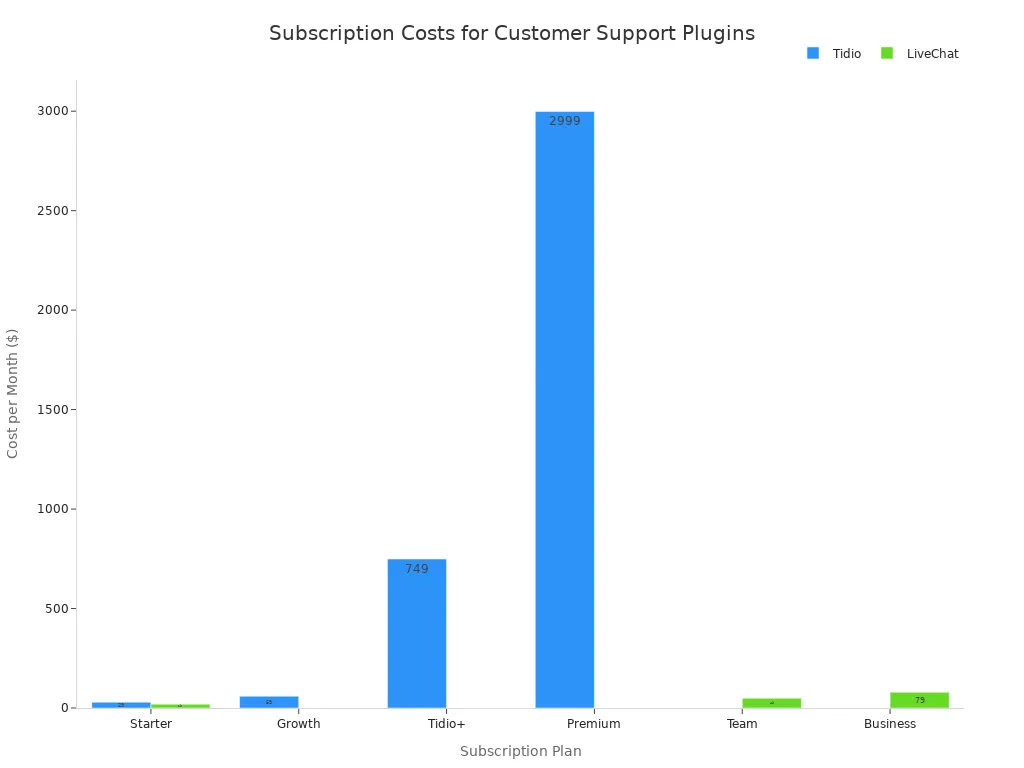
A custom API integration has a higher initial development cost. This requires hiring developers or dedicating your in-house team to the project.
| Complexity Tier | Initial Cost Range |
|---|---|
| Moderate | $15,000 – $40,000 |
| Advanced or Custom | $50,000 – $150,000+ |
Furthermore, the total cost of an API includes ongoing maintenance. For example, a complex system costing $80,000 to build might require an additional $15,000 annually for support. This brings the 3-year total cost to around $125,000. While the initial investment is higher, the return on investment from a scalable and custom-fit solution can be substantial.
Ease of Use and Maintenance
The final point in the plugin vs api integration comparison is ongoing management. A plugin is designed for simplicity. You can typically install and activate it in a few clicks without writing any code. Maintenance is also simple because the plugin developer handles all updates and bug fixes. You just need to click the "update" button.
A custom API requires a completely different approach.
- Initial Setup: Implementation is complex and requires a dedicated technical team.
- Ongoing Maintenance: Your team is responsible for monitoring the integration, applying updates, and fixing any issues that arise. This requires continuous attention and resources.
While a plugin offers ease, it comes at the cost of control. With an API, your team has full ownership. They can quickly address problems and adapt the integration to new business requirements without waiting for a third-party developer. This control is invaluable for businesses that rely on their support systems for mission-critical operations.
How to Connect My Website With a Support Platform
The question of how to connect my website with a support platform is a critical one for any business. The answer depends on your current needs and future goals. Making the right choice between a plugin and an API will define your customer service capabilities. This section provides a clear guide to help you decide.
When to Choose a Plugin
A plugin is an excellent starting point for many businesses. It offers a simple and direct way to add support features to your website. You should consider a plugin in the following scenarios:
- You Need a Small, Specific Solution: A plugin is perfect for adding a single function. If you just need a basic contact form or a simple live chat window, a plugin provides that without unnecessary complexity.
- Your Budget is Limited: Many plugins are free or low-cost. This makes them a great choice for startups and small businesses that need to manage expenses carefully.
- Your Team Lacks Coding Skills: Website builders like WordPress have a vast ecosystem of plugins. These tools allow anyone to add features without writing a single line of code, making them highly accessible.
A plugin is a practical first step for businesses figuring out how to connect my website with a support platform. It allows you to implement essential support features quickly.
Tip for Startups 💡 A startup can use a plugin to automate responses to common questions or categorize support tickets. This helps a small team manage customer inquiries efficiently without needing a large support staff or a complex integration.
Basic support features are well-suited for a plugin-based solution. These include:
- Simple email functionality
- Basic user authentication
- Session management for website visitors
- Logging customer interactions
These features provide a solid foundation for customer support without requiring a significant technical investment. A plugin offers a straightforward path for businesses that are just beginning their customer service journey.
When to Choose an API
A business eventually outgrows the limitations of a simple plugin. As your customer base expands and your support needs become more complex, an API becomes necessary. An API provides the power and flexibility for a truly scalable support operation. The final decision in the plugin vs api debate often comes down to growth.
You know it's time to switch to an API when you see these signs:
- Performance Issues: Your website slows down as you add more plugins or as user traffic increases.
- Feature Roadblocks: You need a specific function, like advanced ticket filtering or B2B logic, that your current plugin does not support.
- Cost Inefficiencies: The subscription fees for multiple plugins become more expensive than investing in a custom solution.
- Need for Backend Control: You want to implement advanced AI models or real-time analytics, which requires direct access to your system's backend.
For businesses facing these challenges, the answer to "how to connect my website with a support platform" is a robust API integration. This is where a powerful integration platform like Sobot's Ticketing System becomes essential. It is designed for businesses that require strong, scalable connections between their support tools and other critical systems.
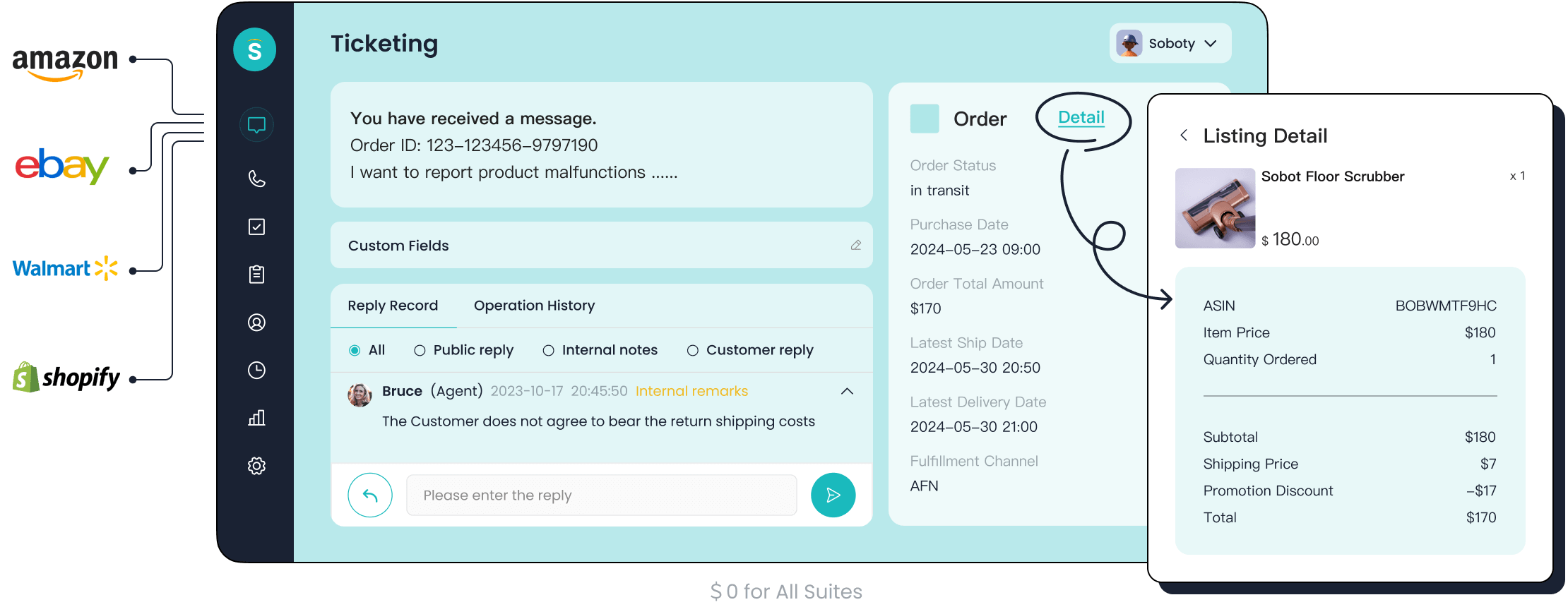
A custom API integration allows you to build a support ecosystem tailored to your exact needs. For example, Sobot's Ticketing System uses an API to connect with various channels and platforms. This integration creates a unified workspace for support agents.
- It pulls in customer requests from email and voicemail.
- It connects with e-commerce platforms like Shopify to display order history alongside a ticket.
- It uses an advanced API to power AI-driven ticket routing.
This level of deep integration is impossible with a standard plugin. The API acts as the central hub, ensuring data flows seamlessly between all your tools. This is how to connect my website with a support platform for long-term success.
The AI-powered routing enabled by Sobot's API is particularly powerful. It automates the process of assigning tickets, which delivers significant benefits. This is a key advantage of a dedicated integration platform.
| Mechanism | How it Works | Advantage |
|---|---|---|
| Intelligent Categorization | The API allows AI to analyze ticket text to identify issue types and sentiment, then automatically assigns categories. | This leads to more accurate classification than manual methods and saves agent time. |
| Smart Assignment | The API enables the system to consider agent skills, workload, and availability to route tickets to the best person. | This minimizes ticket transfers and ensures faster problem resolution from the start. |
| Context-Aware Prioritization | The API helps the AI determine a ticket's priority by analyzing urgency, customer value, and issue type. | This ensures critical problems are addressed immediately, helping teams meet their service goals. |
Ultimately, choosing an API is about investing in a future-proof solution. It provides the control and scalability needed to deliver exceptional customer service as your business grows. For any company serious about its support operations, learning how to connect my website with a support platform through an API is a crucial step. A flexible integration platform provides the foundation for building a world-class customer experience.
The choice between a plugin and an API is not about finding a winner. It is about matching the tool to the task. A plugin offers speed and simplicity for basic features. An API provides the power and flexibility for complex, scalable operations. The right decision depends on your business's unique needs for functionality, security, and future growth. Evaluate your current pain points and long-term goals. See how a powerful API solution like Sobot can build a strategic foundation for your customer service success.
FAQ
What is the main difference in the plugin vs api debate?
A plugin is a simple, pre-made add-on that adds one specific feature to a system. An API is a powerful toolkit. It allows developers to build custom connections between different software, creating a more flexible and integrated support platform.
Is an API more secure than a plugin?
Yes, an API is generally more secure. It uses controlled, authenticated requests to share specific data between systems. A plugin adds third-party code directly to your site. This can create security risks if the plugin is not well-maintained or properly coded.
When should a small business choose a plugin?
A small business should choose a plugin when it needs a simple, low-cost solution for a specific function. Plugins are ideal for teams without coding skills. They offer a quick way to add features like a basic chat window or contact form.
Why is an API better for a growing business?
💡 An API is better for growth because it is scalable and flexible. It can handle high volumes of requests without slowing down your website. It also allows you to build custom workflows that adapt to your changing business needs and complex support operations.
See Also
Discovering The Best Free WordPress Live Chat Plugins For 2024
A Comprehensive Guide To Comparing Live Chat Support Service Costs
Achieving Excellence In Customer Support Through Live Chat Mastery
Comparing The Leading Interactive Voice Response Software Solutions Available Today
Elevate Your SaaS Customer Support Using Effective Live Chat Strategies

