Find Your Zendesk Alternative Today


You know Zendesk is a big name in customer support. However, its platform can be complex for small businesses. You need a tool that fits your team and budget. This guide presents the best zendesk alternatives to help you choose wisely. Your search for better customer service software ends here.
For example, Zendesk's popular plan can cost a team of 10 agents over $1,150 per month. Many small businesses find this price too high for their customer support needs.
This article answers the question, "how can I compare different customer service platforms?" We will explore great Zendesk alternatives like Help Scout, Freshdesk, and Sobot.
Common Zendesk Pain Points for SMBs

You want your customer support to be excellent, but the tools you use shouldn't create more problems. While Zendesk is powerful, many small businesses find it presents significant challenges that get in the way of growth. Let's explore why you might be looking for a change.
Prohibitive Pricing Tiers
You need affordable pricing that scales with your business, not against it. Zendesk’s pricing structure can quickly become a major expense. As your team grows, the per-agent costs add up, and essential features often require expensive upgrades.
- Costs escalate with necessary add-ons. For example, AI features can cost an extra $50 per agent each month.
- Advanced tools are locked behind higher-tier plans, forcing you to pay for more than you need.
- Lower-tier plans lack customization, making it hard to adapt the software to your specific workflow.
This model makes it difficult for small businesses to access advanced customer support tools without breaking the bank. You deserve budget-friendly pricing that supports your success.
Steep Learning Curve
Your team needs to start helping customers right away. You don't have weeks to spend on complex software training. Zendesk's platform is powerful, but its complexity creates a steep learning curve.
Setting up the basics can take a minimum of four weeks. This timeline extends with every new user you add. This lengthy implementation process is a major roadblock for fast-moving teams that need to be agile.
Often, you might even need a developer just to get the help desk software configured correctly, which adds another layer of cost and delay.
Mismatched Feature Sets
Paying for features you never use is frustrating. Many companies report using less than 30% of Zendesk's functionality. This means you are paying a premium for a suite of tools that are "overkill" for your actual needs. This mismatch is a common issue for small businesses that require a focused, efficient solution. You need a platform that provides the right tools for your team without overwhelming them with unused options.
The Best Zendesk Alternatives for Small Businesses
Now that you understand the common challenges with Zendesk, it's time to explore better options. You need a platform that aligns with your budget, team size, and goals. The following are the best zendesk alternatives that empower small businesses to deliver outstanding customer support without the enterprise-level complexity or cost.
Help Scout: For Simple, Personalized Support
Best for: Teams that want to provide personalized customer support with a tool that feels like a simple email inbox.
Help Scout is designed for simplicity and human connection. If Zendesk’s interface feels overwhelming, you will appreciate Help Scout’s clean design. It removes clutter so your team can focus on what matters: the customer. This makes it one of the best zendesk alternatives for teams prioritizing ease of use.
Key Features:
- Shared Inbox: Manage all your customer conversations from email and live chat in one place.
- Knowledge Base: Build a self-service help center to empower customers to find their own answers.
- Customer Profiles: See past conversations and data next to every message for context.
- Reporting: Track team performance and customer satisfaction with straightforward reports.
Why It’s a Strong Alternative: Help Scout directly solves Zendesk’s steep learning curve. Your team can get started in hours, not weeks.
- It offers a fast, familiar agent experience with a UI resembling a shared email inbox, which eliminates a steep learning curve.
- You get instant setup, allowing you to be operational quickly without needing a dedicated onboarding team.
- The user-friendly, clean inbox-style layout helps your support team concentrate on tasks without distractions.
Pricing: Plans start at $20 per user/month (billed annually). This affordable pricing model includes key features without forcing you into expensive tiers, making it an excellent choice for small businesses.
Freshdesk: For a Robust Free Plan
Best for: Startups and small businesses that need a free, feature-rich help desk software to get started.
Freshdesk is a popular choice because it offers a free plan that is actually useful. While Zendesk has no free tier, Freshdesk gives you the essential customer support tools to build your operations from the ground up. This makes it a fantastic entry point into organized customer service.
Key Features (in the Free Plan):
- Integrated ticketing across email and social media
- Knowledge base creation
- Ticket trend reporting
- Team collaboration features
- 24x5 email support for your team
Why It’s a Strong Alternative: Freshdesk’s primary advantage over Zendesk is its accessible starting point. You can support up to 10 agents for free. However, you should be aware of its limitations. For features like live chat support, you need to purchase a separate product, Freshchat. Zendesk, in contrast, includes live chat in its entry-level paid plans.
For example, Freshdesk's free plan is great for email ticketing, but if you need live chat, you'll have to add Freshchat, which can cost up to $83 per month. Zendesk's paid plans bundle this from the start.
Here is a quick comparison to help you decide:
| Feature | Freshdesk Free Plan | Zendesk Support Team (Entry-Level Paid) |
|---|---|---|
| Free Version | Yes, for up to 10 agents | No free version available |
| Ticketing system | Basic ticket management and routing | Extensive features with automated ticket creation |
| Live chat | Requires separate Freshchat purchase | Included in the plan |
| AI and automation | Basic automation; advanced AI is an add-on | AI features like Answer Bot are included |
Pricing: Freshdesk offers a "Free Forever" plan. Paid plans with more advanced features start at $15 per agent/month (billed annually), offering affordable pricing as you scale.
Sobot: For an AI-Powered Omnichannel Solution
Best for: Businesses seeking to boost efficiency with powerful AI and unify all customer conversations into a single platform.
Sobot stands out as one of the best zendesk alternatives for teams that want to leverage cutting-edge technology. While Zendesk gates its AI features behind expensive add-ons, Sobot builds its platform around AI-powered customer support to automate workflows and enhance every interaction. It provides a true all-in-one contact center solution, unifying channels like email, voice, social media, and live chat.
Key Features:
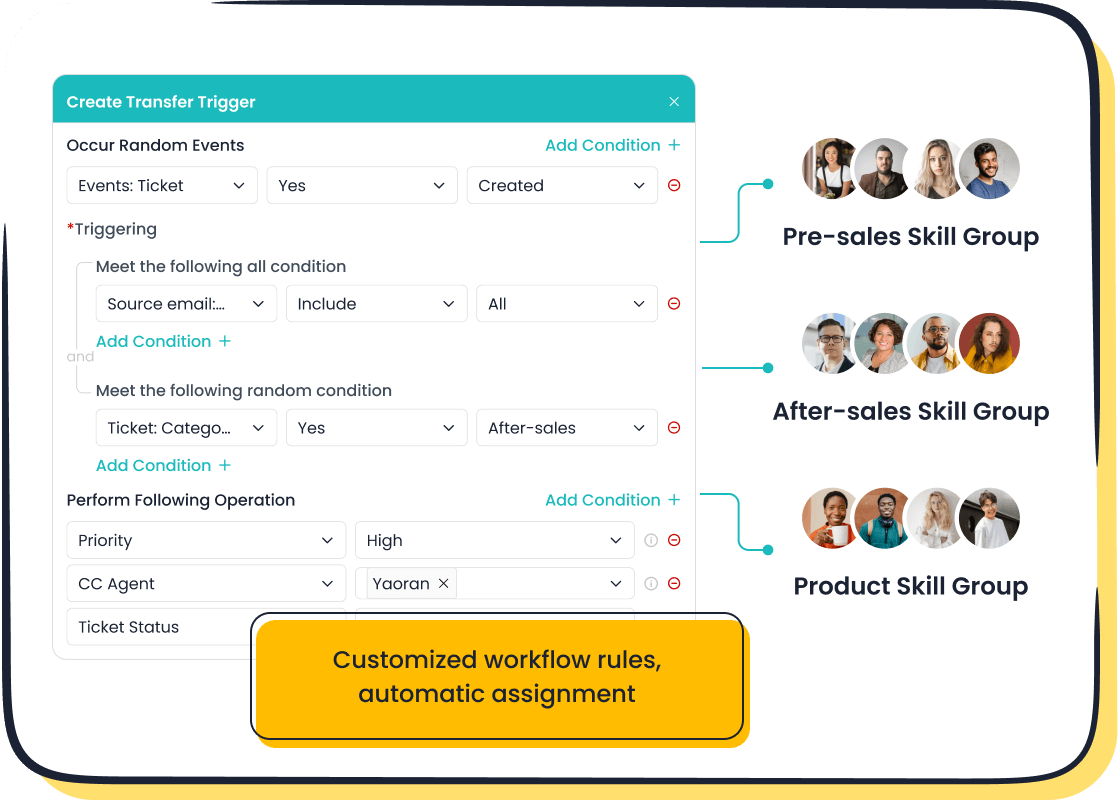
- AI-Powered Ticketing System: Sobot’s Ticketing System automates ticket creation, routing, and responses. It uses AI to merge tickets, set priorities, and provide agents with canned responses, dramatically improving efficiency.
- Omnichannel Solution: Unify your customer service by managing interactions from your website, mobile app, social media (Facebook, Instagram, WhatsApp), email, and phone in one workspace.
- Advanced AI Capabilities: Sobot uses generative AI to understand customer needs, provide accurate answers from your knowledge base, and even detect customer sentiment to escalate issues to a human agent when needed.
- AI Copilot for Agents: Your human agents get AI-powered suggestions for replies and automatic conversation summaries, helping them resolve issues faster and with greater accuracy.
Why It’s a Strong Alternative: Sobot directly addresses Zendesk's high cost for advanced features and its operational complexity. You get a powerful, integrated system designed for efficiency from day one. Imagine a customer contacts you on WhatsApp, follows up with an email, and then calls your support line. With Sobot’s Omnichannel Solution, your agent sees that entire history in one unified view, enabling a seamless and personalized customer experience. This level of integration is complex and costly to achieve with Zendesk. Sobot offers this as a core part of its value, making it a leader in customer service automation.
Pricing: Sobot offers customized pricing based on your specific needs. You can contact their team at marketing@sobot.io to get a quote that fits your business, ensuring you only pay for what you need.
HubSpot Service Hub: For an All-in-One CRM Platform
Best for: Businesses already using HubSpot's ecosystem or those wanting to unify sales, marketing, and service on a single platform.
If your business is built around the customer journey, HubSpot Service Hub is one of the best zendesk alternatives available. It is built on top of HubSpot’s powerful CRM, meaning every customer interaction is automatically connected to a rich customer profile. This eliminates the data silos that often occur when using separate tools for your CRM and help desk software.
Key Features:
- Native CRM Integration: All service data lives in the same place as your sales and marketing data.
- Conversational Tools: Includes live chat, chatbots, and a shared inbox connected to the CRM.
- Help Desk Automation: Automate ticket routing, escalations, and feedback surveys.
- Knowledge Base: Create a library of help articles to enable customer self-service.
Why It’s a Strong Alternative: HubSpot Service Hub’s main advantage over Zendesk is its seamless, native integration with a world-class CRM.
- With HubSpot, your agents see the full customer history—past purchases, marketing emails they’ve opened, and sales conversations—right next to the support ticket.
- To get a similar unified view in Zendesk, you often need to purchase Zendesk Sell or manage a complex, and sometimes clunky, integration with a third-party CRM.
- HubSpot offers a cleaner, more modern agent experience where all information is accessible from a single screen, avoiding the configuration-heavy setup Zendesk is known for.
Pricing: HubSpot offers a free plan with basic tools. Paid plans start at $45/month (billed annually), which includes two users, making it an affordable help desk software for growing teams.
Zoho Desk: For the Zoho Ecosystem
Best for: Companies that are already invested in the Zoho suite of business applications or are looking for a highly customizable and affordable help desk software.
Zoho Desk is a powerful contender among Zendesk alternatives, especially if you love having all your business tools under one roof. It integrates deeply with Zoho CRM and over 40 other Zoho apps, creating a connected ecosystem that streamlines workflows between your sales, marketing, and support teams.
Key Features:
- Multichannel Support: Manage conversations from email, phone, live chat, social media, and web forms in one place.
- AI-Powered Assistant (Zia): Zia can suggest answers to agents, analyze customer sentiment, and spot anomalies in ticket traffic.
- Process Automation: Set up workflows, assignment rules, and SLAs to automate your support processes.
- Deep Zoho CRM Integration: Give your support agents a complete view of the customer by syncing data seamlessly with Zoho CRM.
Why It’s a Strong Alternative: Zoho Desk’s strength lies in its ecosystem and affordability. While Zendesk is a standalone customer support software, Zoho Desk is part of a larger suite. This deep integration enhances collaboration between your support and sales teams effortlessly. Furthermore, its pricing is extremely competitive.
Here is a look at Zoho Desk's pricing plans:
| Plan Name | Cost (per agent per month) | Key Features |
|---|---|---|
| Free Plan | $0 | Email Ticketing, Customer Management, Help Center |
| Standard Plan | $14 (annually) | Social Channels, Product-Based Ticketing, Zoho CRM Integration |
| Professional Plan | $23 (annually) | Multi-Department Ticketing, Time Tracking, Process Automation |
| Enterprise Plan | $40 (annually) | Live Chat, AI-Powered Zia, Multi-Brand Help Center |
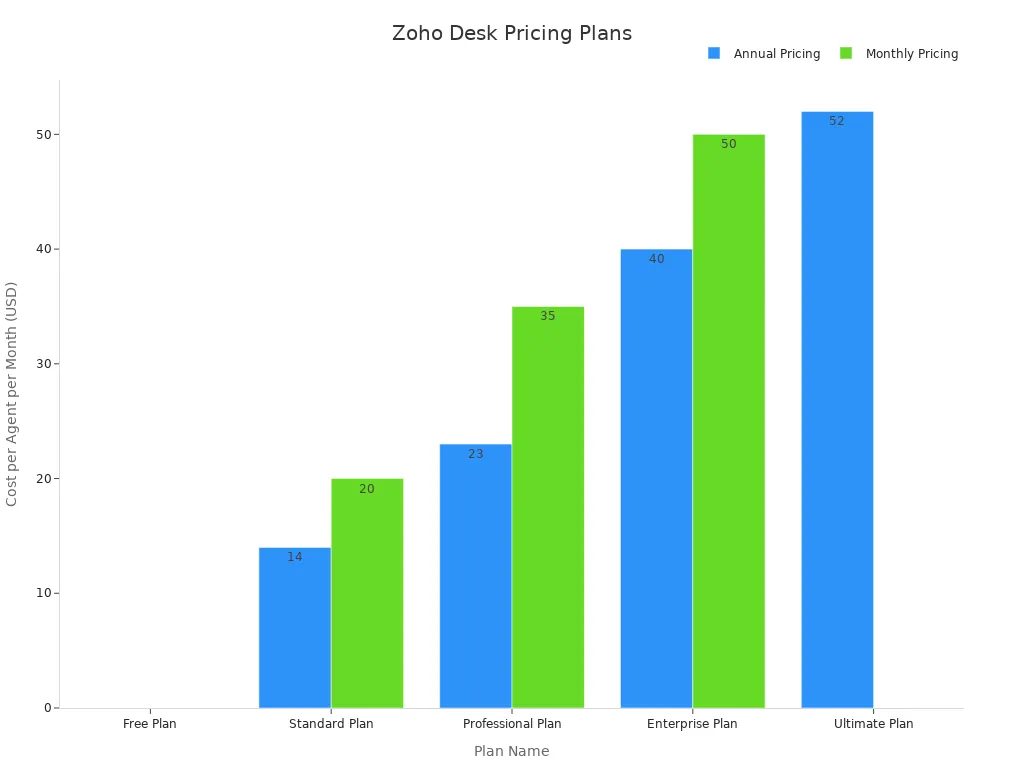
Pricing: Zoho Desk offers a free plan for up to three agents. Paid plans start at just $14 per agent/month (billed annually), making it a very affordable help desk software.
LiveAgent: For Real-Time Chat and Voice Support
Best for: Teams that focus heavily on real-time customer communication through live chat and phone calls.
LiveAgent excels at providing fast and efficient real-time support. If your customers prefer immediate assistance via live chat support or voice, this platform is built for you. It combines a universal inbox with robust chat and call center features, making it a strong choice for e-commerce and service-based businesses.
Key Features:
- Universal Inbox: Manages tickets from email, live chat, phone calls, and social media.
- Advanced Live Chat: Features proactive chat invitations, real-time typing view, and website visitor monitoring.
- Built-in Call Center: Handle inbound and outbound calls directly within the help desk.
- Gamification: Use rewards and badges to motivate agents and improve performance.
Why It’s a Strong Alternative: LiveAgent offers a more integrated and affordable solution for real-time support compared to Zendesk. While Zendesk often separates its Chat and Talk products, LiveAgent bundles them into its core offering. This provides a more seamless experience for agents who handle both chat and voice interactions.
Here’s how they compare for real-time support:
| Feature | Zendesk | LiveAgent |
|---|---|---|
| Omnichannel Conversations | Natively supports seamless conversations across channels. | Communicates with customers across channels using a universal inbox. |
| Live Chat & Messaging | Complete messaging solution with AI chatbots. | Offers proactive chat invitations in higher-tier plans. |
| Voice Support | Agents can respond to phone calls in the Agent Workspace. | Support agents can respond to calls in the same universal inbox. |
Pricing: LiveAgent offers a limited free plan. Paid plans start at $9 per agent/month for ticketing only, with the all-inclusive plan costing $49 per agent/month. This makes it a cost-effective choice for teams needing comprehensive customer service tools.
How Can I Compare Different Customer Service Platforms?
You have seen the options. Now, how can you compare different customer service platforms to find the perfect fit? Making the right choice requires a clear plan. This section gives you a simple framework for how can I compare different customer service platforms effectively. You will learn to evaluate each option based on your unique business needs. Answering the question "how can I compare different customer service platforms?" starts with looking at the right details.
At-a-Glance Comparison Table
You should start by creating a simple comparison chart. This visual tool helps you see how each help desk software stacks up. When you ask, "how can I compare different customer service platforms?", a table makes the answer clear.
Focus on the metrics that matter most for great customer support. Your table should track key performance indicators to see which platform helps you improve them.
Consider including these metrics:
This approach helps you move beyond just features and focus on results.
Assessing Your Budget and Team Size
Your budget is a critical factor. You need customer service software that provides value without straining your finances. Many small businesses find that premium plans from some providers are too expensive. For example, Freshdesk offers plans starting from $15 per agent per month. You must calculate the total monthly cost for your entire team. This simple step clarifies how can I compare different customer service platforms on price.
Identifying Your Must-Have Features
Next, you need to list your essential features. What tasks do you need your customer service tools to perform every day? For many small businesses, the core needs include:
- A unified inbox for all channels (email, chat, social media)
- Automated ticket routing to the right agent
- A self-service portal or knowledge base
AI-powered features like automated ticket summaries and suggested replies can also be a game-changer for small teams. These tools boost efficiency and improve your customer support. Your list of must-haves is central to your customer service strategies.
Evaluating Integration Capabilities
Your help desk software should work with the other tools you use. Seamless integration is key to an efficient workflow. You need to check if the platform connects to your e-commerce store (like Shopify), your CRM, and your marketing automation tools. Platforms like HubSpot and Zoho offer deep integration within their own ecosystems. This creates a single view of the customer, which is vital for providing excellent customer service.
How to Make Your Final Decision
You have narrowed down your options. Now it is time to make a confident choice. You can move from theory to practice with a clear, hands-on evaluation process. Follow these three steps to select the platform that will truly elevate your customer support.
Start with Free Trials
You can't know a tool until you use it. Free trials are your opportunity to look under the hood. To get the most value from this period, you need a plan.
Your goal during a trial is simple: confirm that the software can solve your most critical problems quickly and easily.
Before you sign up, prepare a focused approach:
- Define Your Goals: Know exactly what you need the platform to do. Are you trying to reduce response times or automate ticket sorting?
- Focus on Key Features: Immediately test the features that matter most to your team. Don't get distracted by tools you will never use.
- Use Their Support: Reach out to the trial's support team with a question. Their response time and quality tell you a lot about the company.
- Check the Upgrade Path: See how easy it is to move to a paid plan. A clear process shows the company has a smooth customer journey.
Test Key Workflows
A great platform must fit into your team's daily routine. Use your trial to simulate real-world scenarios and test your most common workflows from start to finish.
Imagine a customer emails you about a late shipment. Can you test this entire process?
- Does the ticket get assigned to the right agent automatically?
- Can the agent find the customer's order history in the same window?
- How does the AI assist? Test its ability to suggest replies or summarize the issue for the next agent.
- Can you create a canned response for this issue to use in the future?
Testing these core functions shows you how the platform performs under pressure. You can see if its automation truly saves time or just creates more work for your customer support team.
Gather Team Feedback
You are not making this decision alone. Your agents are the ones who will use this tool every day. Their buy-in is essential for success. 🤝
After your team has had a chance to test the platform, bring everyone together. Ask them direct questions:
- Was the interface easy to navigate?
- Did it help you solve customer problems faster?
- What did you like most? What was frustrating?
Their feedback is the final piece of the puzzle. A platform that your team loves is a platform that will help you deliver an outstanding customer experience.
Choosing the best zendesk alternatives depends on your unique business goals. You need a platform that empowers your team to deliver excellent customer service. To make your choice easier, here is a quick guide:
- For an all-in-one contact center: Choose Sobot.
- For simplicity: Look at Help Scout.
- For a free starting point: Try Freshdesk.
The best zendesk alternatives are the ones that solve your problems. Now, you can take the final step. Embark on Your Contact Journey by starting a free trial to find your perfect fit.
FAQ
How do I move my data from Zendesk?
You can easily migrate your data. Most platforms offer built-in import tools or dedicated support to help you transfer tickets, contacts, and knowledge base articles. You should check each provider's migration process during your free trial to ensure it is simple and straightforward for your team.
Why should I choose a platform with AI?
You should choose AI to make your team more efficient. AI-powered tools automate repetitive tasks like ticket sorting and provide agents with instant answer suggestions. 🤖 This frees up your team to focus on solving complex customer problems, improving your overall support quality.
Is a free plan good enough for my business?
A free plan is a great starting point for new businesses. You get essential ticketing features without any cost. However, you will need to upgrade to a paid plan as your team grows or if you need advanced features like deep analytics or robust automation.
Which Zendesk alternative is best for unifying channels?
You should look for a true omnichannel solution. Platforms like Sobot are designed to unify all your communication channels, including email, chat, voice, and social media. This gives your agents a single view of the customer, which helps them provide faster and more personalized support. 👍
See Also
Comparing The Best Live Chat Platforms And Solutions For 2024
The 10 Leading Customer Service Software Options Reviewed For 2024
Discover The Best Free Call Center CRM Software Available In 2024
Shopify Live Chat Tools Versus Competitors: A Top 10 Comparison
A Comprehensive Guide To Comparing Live Chat Support Service Costs

