How to Find the Right CRM for Call Center Operations


You need the right CRM to make your call center work better. Start by looking at your business needs. Think about what you want to achieve with customer contact. CRM helps you solve problems and make your team more efficient. Every business has pain points. A good customer relationship management system can fix them. CRM gives you tools to track calls, manage data, and improve service. Sobot can support your goals and help you grow. CRM also helps you compare salesforce pros and cons. Focus on your business needs and let CRM guide your next steps.
Assessing Call Center Needs

Customer Contact Workflows
You need to understand your customer contact workflows before you choose a CRM. Start by mapping out how your team interacts with customers. This includes every step, from the first call to follow-up support. When you use a CRM, agents can see customer history, past purchases, and support tickets right away. This helps your team solve problems faster and makes customers happier. You do not want customers to repeat information. A CRM with strong contact and lead management gives your agents the tools to track calls and manage customer data in one place. Sobot’s call center solution, for example, lets you connect voice, chat, and email in a single workspace. This unified approach supports the customer journey and improves relationships at every touchpoint.
Operational Pain Points
You must identify your biggest pain points before you select a CRM. Many call centers struggle with:
- Inefficiencies in managing leads
- Difficulties in tracking customer interactions
- Disorganized customer data
- Missed opportunities
- Lack of collaboration
- Poor visibility into the sales pipeline management
Look at where you store customer information and how much time your team spends on manual tasks. If your lead management process is slow or you cannot track critical data, you risk losing customers. Opay, a financial service platform, faced these challenges. By using Sobot’s integrated system, Opay improved relationships, reduced costs by 20%, and raised customer satisfaction from 60% to 90%. You can read more about their story here.
Communication Channels
You need to know which communication channels your customers use most. A CRM should support all key channels for contact and lead management. Here is a table showing common channels and features:
| Communication Channel | Description |
|---|---|
| Voice Communication | Deeply integrated for efficient service and better customer experience. |
| Omni-channel Communication | Connects phone, chat, email, and social media for a complete experience. |
A CRM with lead tracking capabilities and real-time analytics helps you manage relationships and customer support across every channel. Sobot’s omnichannel solution brings all these tools together, making it easier to meet customer needs and build strong relationships.
CRM Features for Call Centers
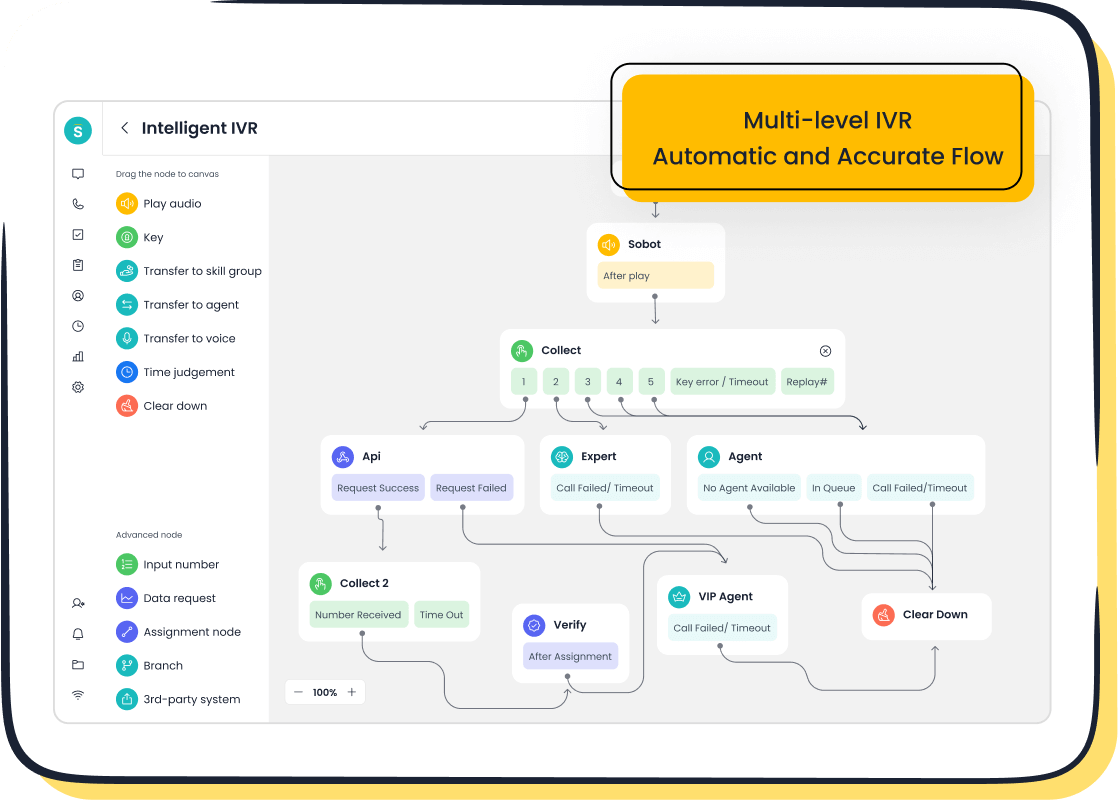
Choosing the right CRM for your call center means looking for the features that help your team work smarter and serve customers better. You want a CRM that brings together all your communication channels, gives you real-time insights, and uses automation to make every interaction count. Sobot’s Voice/Call Center and Omnichannel Solution show what a modern CRM can do for your business. Let’s look at the must-have features of an effective crm solution for call center operations.
Omnichannel Support
Omnichannel support lets you connect with customers on their favorite platforms. You can talk to them by phone, chat, email, or social media—all in one place. This makes it easy for your agents to see every conversation and respond quickly. Sobot’s Omnichannel Solution brings all these channels together in a unified workspace. Your team can switch between channels without losing track of the customer’s history.
Here is a table showing how omnichannel support improves customer experience:
| Evidence Description | Impact on Customer Experience |
|---|---|
| Enables agents to deliver personalized services to customers. | Enhances customer experience through tailored interactions. |
| Centralizes all support channels and customer conversations. | Improves efficiency by streamlining communication. |
| AI handles complex inquiries across all touchpoints and builds workflows. | Frees up team resources for more complicated tasks, improving service quality. |
You can use Sobot’s live chat, chatbot, and voicebot to help customers get answers fast. The AI Agent can handle simple questions, so your team can focus on more complex issues. This kind of omnichannel support is one of the key features you need in a CRM.
Real-Time Analytics
Real-time analytics give you the power to see what is happening in your call center right now. You can track important metrics like customer satisfaction, engagement, and retention. Sobot’s Voice/Call Center provides dashboards and reports that help you spot trends and make quick decisions. You can see which agents are performing well and where you need to improve.
Here is a chart that shows the impact of real-time analytics on call center performance:
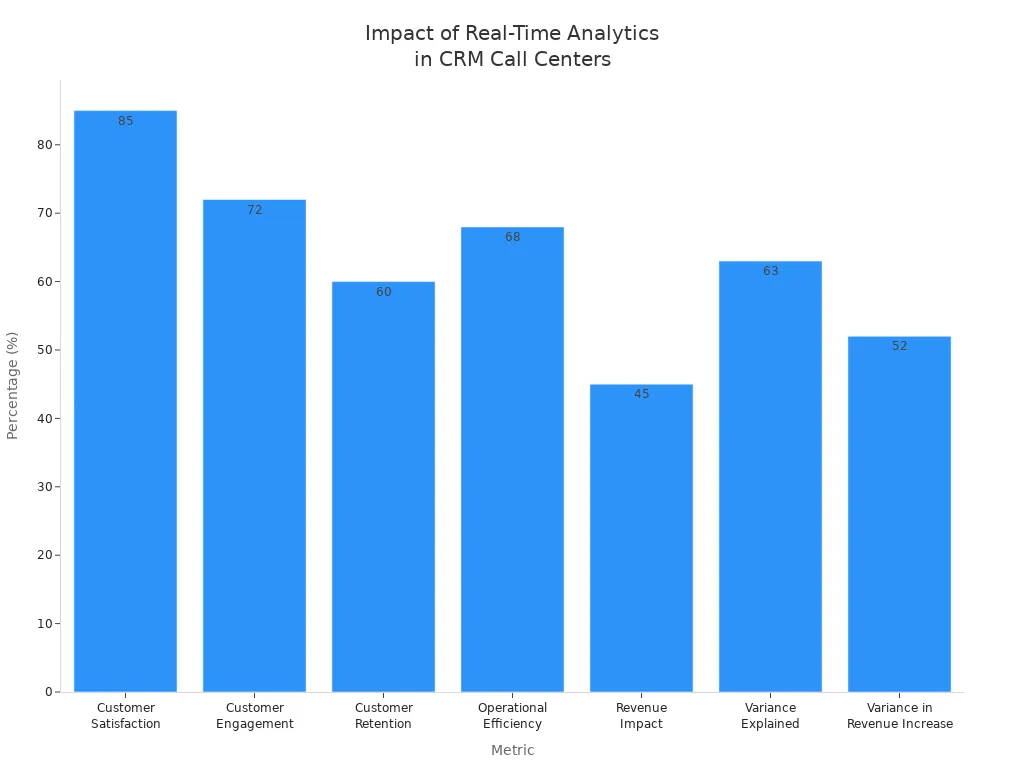
You can see that customer satisfaction rises to 85% when you use real-time analytics. Engagement goes up to 72%. Retention improves to 60%. Operational efficiency increases by 68%. Revenue grows by 45%. These numbers show why reporting and analytics are must-have features in any CRM. Sobot’s reporting tools help you understand your data and make better choices every day.
Automation & AI
Automation and AI make your call center more efficient. You can use sales automation to route calls to the right agent based on their skills and availability. Marketing automation helps you send the right message to the right customer at the right time. Sobot’s AI-powered Voicebot and Chatbot can answer common questions, collect information, and even analyze customer sentiment during calls.
Here are some ways automation and AI improve your call center:
- Real-time sentiment analysis spots problems during calls.
- High-risk calls get sent to senior agents for fast help.
- Actionable insights from call data help you improve future interactions.
- Personalized follow-ups are created based on past conversations.
- Calls are routed to the agent who helped the customer before, so customers do not have to repeat themselves.
With Sobot, you can reduce customer churn by 20% and increase satisfaction by 15%. Automation saves your team time and lets them focus on building strong customer relationships. Sales automation and marketing automation work together to boost your results.
Integration with Voice/Call Center
Integration with your voice and call center systems is essential. You want your CRM to track every call and store all customer information in one place. Sobot’s Voice/Call Center connects with your CRM so agents can see account history, past calls, and open tickets. This helps agents solve problems faster and gives customers a better experience.
Here are the features you should look for:
- CRM integration that connects your call center software and CRM, so you avoid manual data entry and errors.
- A centralized location for all customer information, including call history and account details.
- Access to the full customer journey, so agents know what happened before and can resolve issues quickly.
- No-code integrations and open APIs for easy setup and customization.
Sobot’s platform makes integration simple. You can connect your ticketing system, live chat, and customer contact center with just a few clicks. This seamless integration is one of the features of an effective crm solution. It helps your team work faster and keeps your data organized.
Here is a table that highlights the must-have features for CRM and call center integration:
| Feature | Description |
|---|---|
| CRM integration | Ensures that call center software connects with CRM to avoid manual data entry and errors. |
| Reporting and analytics | Provides automated metrics tracking for continuous improvement, including FCR, AHT, and CAR. |
| Quality assurance | Facilitates the identification and resolution of call quality issues, enhancing customer experience. |
You can see that reporting is important for tracking your progress. Quality assurance helps you deliver better service every time.
Tip: When you choose a CRM, make sure it supports integration with your existing systems. This will save you time and help your team deliver great service.
Sobot’s Voice/Call Center and Omnichannel Solution give you all these must-have features. You get a CRM that grows with your business and helps you deliver the best customer experience.
Choose the Right CRM Solution
Selecting the best crm solution for your call center can feel overwhelming. You want a system that fits your needs today and supports your business growth tomorrow. To choose the right crm, you need to look at several important factors. Let’s break down the steps so you can make a smart decision.
Vendor Research
Start your search by listing what your business needs most from a crm solution. Think about contact and lead management, sales pipeline management, and the ability to use AI and automation. Make a checklist of must-have features. Look for vendors that offer easy integration with your current systems. This helps you get a complete view of your customers and improves service delivery.
When you research vendors, pay attention to these points:
- Integration capabilities with your existing technology
- High system uptime and reliability
- Global support for your team and customers
- Customization options for your workflows
- Quality of customer support and training
Sobot stands out because it offers seamless integration, a 99.99% uptime, and support across the globe. You can connect Sobot’s voice, chatbot, live chat, and ticketing system with your other tools. This makes it easier to manage every customer interaction in one place. Sobot’s crm solution helps you unify your contact center and improve efficiency. You can read reviews, ask for recommendations, and check case studies to see how other companies use the platform.
Here is a quick checklist to help you compare vendors:
| Criteria | Why It Matters |
|---|---|
| Integration | Connects with your current systems |
| Uptime | Keeps your call center running smoothly |
| Global Support | Helps teams in different locations |
| Customization | Adapts to your unique workflows |
| Customer Support | Solves problems quickly |
Tip: Always check for hidden costs and review pricing models. A good crm solution should fit your budget and deliver strong ROI.
Demo Testing
After you narrow down your list, schedule demos with your top choices. A live demo lets you see the crm solution in action. Ask the vendor to show real data and real workflows. This helps you understand how the system will work for your team.
Set clear goals for each demo. Decide what you want to learn or test. For example, you might want to see how the crm handles call routing, ticketing, or reporting. If a vendor cannot show you a working demo, that could be a red flag.
Here are some best practices for demo testing:
- Prepare questions about features and integration
- Watch how easy it is to use the system
- Test the speed and reliability of the platform
- Ask about support and training options
- Plan your next steps after the demo
Sobot offers free trials and live demos. You can see how the voice/call center, AI Agent, and omnichannel workspace work together. This helps you choose the right crm for your business.
Support & Training
Support and training play a big role in crm adoption. If your team does not feel confident using the new crm solution, you may face slowdowns and mistakes. Look for vendors that offer strong onboarding, ongoing support, and easy-to-understand resources.
Here are some common training methods:
| Training Method | Description |
|---|---|
| In-Person Workshops | Hands-on sessions for immediate feedback |
| Online Tutorials | Flexible video guides and webinars for remote learning |
| User Manuals & Docs | Step-by-step instructions for quick help |
| Ongoing Support | Help desk, peer groups, and regular check-ins to keep users on track |
Sobot provides a full range of support options. You get access to online tutorials, detailed documentation, and a dedicated help desk. Regular check-ins and peer support groups help your team stay confident. Sobot’s global support team is ready to help you solve problems fast, no matter where you are.
Note: Leadership should use the crm solution and encourage everyone to do the same. This builds trust and helps your team adopt the new system faster.
Scalability & Growth
Your crm solution should grow with your business. You do not want to hit a ceiling when your team expands or when you enter new markets. A scalable system lets you add users, features, and integrations without slowing down.
“With the right crm solution, you can scale up during busy times and adjust when demand drops. This flexibility helps you move into new markets quickly and supports business growth.”
Look for these signs of scalability:
- The crm can handle more contacts and data as you grow
- You can add new channels, like voice or chat, without extra hassle
- The vendor provides regular updates to keep up with new technology
Sobot’s crm solution is SaaS-based, so it evolves with your needs. You can add features like AI-powered chatbots, voicebots, and advanced analytics as your business grows. Sobot’s platform supports over 550,000 users and handles millions of communications every day. This shows the power of a scalable system for supporting business growth.
To choose the right crm, focus on integration, uptime, support, and scalability. Sobot delivers on all these points, making it a strong choice for any call center looking for a reliable crm solution.
Budget & ROI Considerations
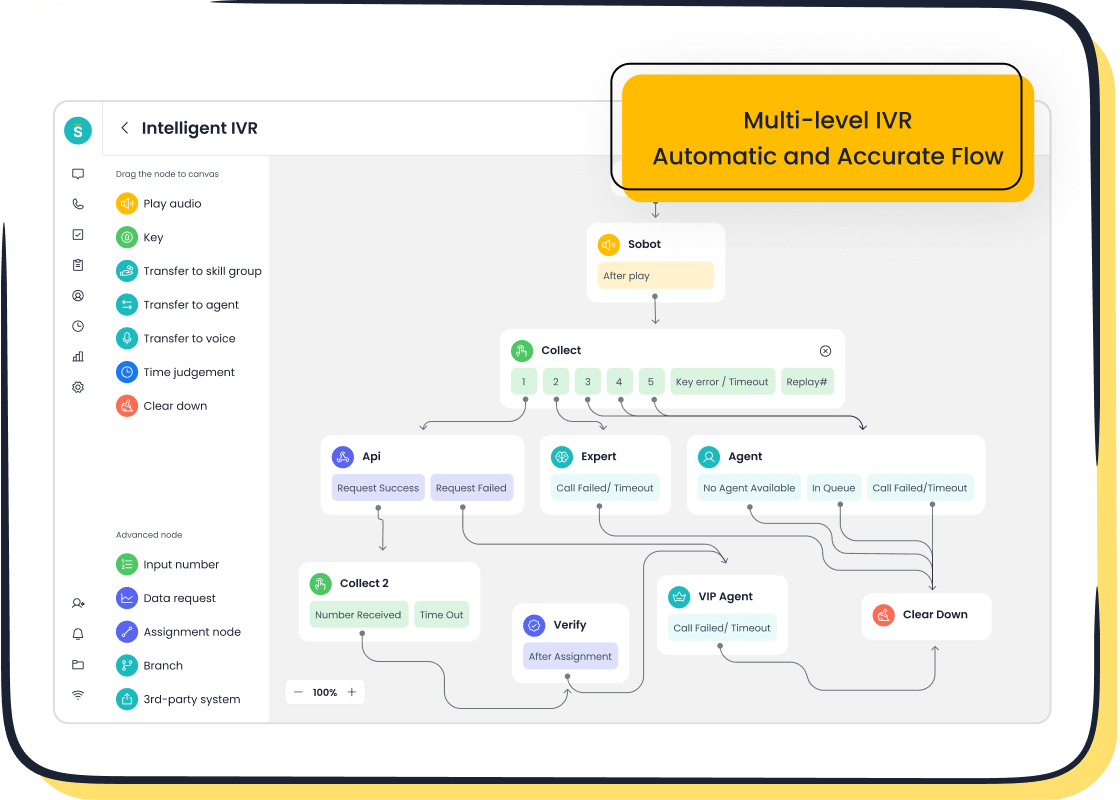
When you look for a crm for your call center, you need to think about both the budget and the return on investment. Making the right choice helps you save money and get more value from your crm.
Total Cost of Ownership
You should always look beyond the sticker price of a crm. The total cost of ownership includes setup fees, training, support, upgrades, and any extra features you might need. With cloud-based saas software like Sobot, you avoid big upfront costs. You pay a simple monthly or yearly fee. This model gives you access to updates, security, and support without extra charges. On-premise software often needs large investments in hardware, IT staff, and maintenance. Sobot’s crm keeps your costs predictable and helps you plan your budget better.
Pricing Models
Different crm pricing models can change how much you spend. Some vendors charge per user, while others offer flat-fee or tiered plans. If you have a small team, you might pick a basic plan with only the features you need. As your team grows, you can move to a higher tier for more advanced tools. Large call centers may need premium plans for more users and features. Sobot uses a SaaS rental model, so you only pay for what you use. This makes it easy to scale up or down as your needs change.
Tip: Always check what is included in each plan. Some crms charge extra for features like analytics or automation.
ROI Calculation
You want to know if your crm investment pays off. To calculate ROI, you compare the gains from your crm to the costs. Gains can include more sales from better follow-ups, hours saved by automation, and fewer mistakes. Use this formula:
| Method | Description |
|---|---|
| ROI Calculation | Subtract crm costs from gains, then divide by costs. |
| Formula | CRM ROI = (Gains – Costs) ÷ Costs |
For example, Sobot’s crm helps you save time with AI-powered chatbots, voicebots, and automated ticketing. These tools let your team handle more calls and solve problems faster. Many businesses see a 20% drop in costs and a big jump in customer satisfaction after switching to Sobot. When you use a crm that fits your needs, you get more value for every dollar spent.
Salesforce Pros and Cons vs. Sobot
When you compare CRM solutions for your call center, you want to know how Salesforce and Sobot stack up. Looking at the salesforce pros and cons helps you make a smart choice for your team. Both platforms offer tools for customer service, but they have different strengths and weaknesses.
Salesforce CRM Strengths
Salesforce gives you a wide range of features for call center operations. You can see some of the main strengths in the table below:
| Feature | Description |
|---|---|
| Built-in cloud calling | Make calls directly from the app, which helps remote teams work without extra tools. |
| Agent productivity tools | Use AI-driven tips to help agents work better and give supervisors more control. |
| Real-time metrics | Track key numbers so supervisors can see how agents perform and help them improve. |
| Live chat | Connect with customers on many platforms for better support. |
| Help center | Give agents a place to find answers during calls. |
| Omnichannel routing | Send calls to the best agent based on skills and who is available. |
| Conversational insights | Use AI to summarize calls and highlight important points. |
These features show why many businesses look at the salesforce pros and cons when choosing a CRM.
Salesforce CRM Weaknesses
You should also think about the challenges that come with Salesforce. Here are some common weaknesses:
- Steep learning curve makes it hard for new users to get started.
- High cost can be a problem, especially for large teams.
- Mobile app may not have all the features you need.
- Data storage limits can restrict how much information you keep.
- You need a strong internet connection to use all features.
- Customizing the platform often needs technical skills.
- Integration with other tools can take extra time and effort.
Knowing these salesforce pros and cons helps you decide if it fits your call center.
Sobot CRM Advantages
Sobot offers several advantages for call center operations, especially when you compare it to Salesforce. The table below highlights some key differences:
| Advantage | Sobot CRM | Salesforce |
|---|---|---|
| Integration | Omnichannel integration in one platform | Needs multiple subscriptions |
| AI Capabilities | Full AI for automation and assistance | Fewer AI features |
| Cost-Effectiveness | Saves money by combining services | Higher costs for extra features |
With Sobot, you get a unified workspace for voice, live chat, chatbot, ticketing, and AI Agent. You do not need to buy separate tools or subscriptions. Sobot’s platform helps you manage all customer contacts in one place, making your team more efficient. When you look at the salesforce pros and cons, you see that Sobot gives you more value and easier setup for your call center. You can learn more about Sobot’s solutions by visiting their official website.
Tip: Always review the salesforce pros and cons before making your final decision. Sobot’s all-in-one approach can help you save time and money while improving customer satisfaction.
Common CRM Selection Mistakes
Choosing the right crm for your call center can be tricky. Many teams make mistakes that slow down progress and hurt customer service. You can avoid these pitfalls by learning what to watch for and how Sobot’s seamless integration and scalability help you succeed.
Ignoring Integration Needs
You might overlook integration needs when picking a crm. This mistake leads to disconnected workflows, duplicated data, and unhappy users. Call centers need smooth communication and accurate data. Sobot’s platform offers seamless integration with other tools, so your agents can access customer history, tickets, and call logs in one workspace. This keeps your team efficient and your customers satisfied. Learn more about Sobot’s integration features here.
- Failing to involve end users in the selection process
- Not understanding user pain points
- Overlooking compliance requirements
Overlooking User Adoption
If you do not involve your team in the crm selection, you risk poor user adoption rate. When agents do not use the system, you lose the benefits. Sobot makes onboarding easy with training, tutorials, and a user-friendly interface. Teams that adopt their crm see big gains:
| Metric | Percentage |
|---|---|
| Increased sales revenue | 57% |
| Improved customer satisfaction | 53% |
| Enhanced customer service quality | 49% |
Timing matters. Try to launch your crm during slower periods, not busy seasons.
Focusing Only on Price
Some managers focus only on price when choosing a crm. This shortcut can lead to missing key features and analytics. You need a crm that fits your goals, not just your budget. Sobot’s platform gives you advanced analytics and automation, helping you maximize customer lifetime value.
| Key Findings | Description |
|---|---|
| Heuristic Decision-Making | Managers use rules of thumb instead of data analysis. |
| Impact on CRM Choices | Critical data gets overlooked, leading to poor crm solutions. |
| Importance of Analytics | Analytics drive profitability and customer value. |
Neglecting Scalability
Neglecting scalability causes problems as your business grows. You might face slow systems, trouble adding new tools, or repeated migrations. Sobot’s crm scales with your needs, supporting thousands of users and millions of calls daily.
| Risk Type | Implication |
|---|---|
| Inflexible business processes | Cannot adapt to change |
| Performance degradation | Slower response as data grows |
| Difficulty integrating new systems | Challenges with expansion |
| Repeated customizations or migrations | Disrupts daily operations |
Avoid these mistakes by choosing a crm with seamless integration and strong scalability. Sobot’s solutions help you build a reliable, efficient call center. You can read more about How to Find the Right CRM for Call Center Operations on Sobot’s official website.
You can find the right CRM for call center operations by following a clear process. Start with a checklist that covers integration, pricing, ease of use, support, training, and security.
| Checklist Item | Why It Matters |
|---|---|
| Integration | Fits with your workflows |
| Pricing | Matches your budget |
| Ease of Use | Drives adoption |
| Support & Training | Ensures success |
| Security | Protects customer data |
Align CRM features with your business needs. This helps you track the customer journey and improve service. Begin vendor research, request demos, and plan improvements. Sobot’s solutions make your contact center more efficient and customer-focused.
FAQ
What is the first step in How to Find the Right CRM for Call Center Operations?
You should start by listing your business needs. Think about your customer contact goals and pain points. This helps you choose a CRM, like Sobot, that fits your call center operations.
How does Sobot help improve call center efficiency?
Sobot gives you tools like AI Agent, live chat, and a unified workspace. You can manage calls, tickets, and chats in one place. This saves time and helps your team work better.
Can Sobot CRM handle multiple communication channels?
Yes! Sobot supports voice, chat, email, and social media. You can talk to customers on their favorite platforms without switching systems. This makes customer service faster and easier.
Why is integration important when choosing a CRM?
Integration lets you connect your CRM with other tools. You avoid manual data entry and errors. Sobot offers seamless integration, so you keep all customer information in one place.
How do I measure ROI after choosing a CRM for my call center?
Track your gains, like higher customer satisfaction and lower costs. Use this formula:
ROI = (Gains – Costs) ÷ Costs
Sobot’s analytics help you see these numbers clearly.
See Also
Best Free CRM Solutions for Call Centers This Year
Essential Features to Look for in Call Center CRM
Comprehensive Guide to Omnichannel Solutions for Call Centers
Understanding the Efficiency of Call Center Automation Tools

