How to Build a Custom AI Support Tool Fast

You want to build a better support experience, and you want it fast. Creating a custom AI support agent is no longer a project that takes months. In fact, AI and automation tools save teams over two hours daily. You can do this today.
In just five straightforward steps, you can launch a custom AI tool that handles key support tasks. We'll walk you through how to define your goal, pick a platform like Sobot, prepare data, build the flow, and deploy your AI agent instantly. Let's customize ai support tool to deliver exceptional customer support. Embark on your contact journey now.
Step 1: Define Goals to Customize AI Support Tool
The fastest way to get value from your AI is to start small. Instead of trying to solve every problem at once, focus on a single, high-impact task. To do this, you first need to know your audience and their most common pain points. Understanding your customer helps you decide what to build. This focused approach allows you to launch quickly and see immediate results.
Start with a Single, High-Impact Task
Choose one core problem that consumes a lot of your team's time. This could be answering the same questions repeatedly or guiding users through simple setup processes. By concentrating your efforts, you can build and deploy an effective AI solution in days, not months. This initial success provides a strong foundation for future expansions.
Automate Frequent Questions
Your support team likely spends hours on repetitive questions. In fact, an AI is capable of handling 70-80% of these common inquiries. When you customize ai support tool to automate these answers, you give your customers instant solutions 24/7. This efficiency boost also improves satisfaction; brands that use automation see a measurable increase in their CSAT scores. Your human agent can then focus on more complex issues.
Streamline Ticket Creation
An AI can do more than just answer questions. It can also streamline how you create and manage support tickets. For example, some companies use conversational AI to gather essential details from a user before creating a ticket. The AI refines the problem description and can even assign the ticket to the right department automatically. This process makes your entire support workflow more efficient.
Guide Users to Resources
You can customize ai support tool to act as a smart guide for your audience. An AI can direct users to the right help articles, tutorials, or product pages, reducing the need for live assistance. This has a direct impact on your team's workload.
AI-powered tools can summarize long conversation threads for an agent. This feature saves time and energy, allowing your team to work more efficiently, especially when onboarding new reps.
By automating intake and routing, the AI ensures every customer inquiry gets to the right place, faster.
Step 2: Choose a Platform for AI Customer Support

Your platform choice is the most critical decision for building fast. You do not need a team of developers to create powerful ai customer support. Modern no-code platforms give you the power to build and launch your tool with a simple point-and-click interface. These no-code tools are designed for speed and efficiency.
Evaluate Key Features for Speed
When you evaluate platforms, look for features that accelerate development. The right platform makes building an ai agent feel like assembling blocks. Your ideal solution should offer:
- User-friendly interfaces with drag-and-drop functionality.
- Pre-built templates for common support scenarios.
- Guided workflows to help you through the creation process.
- Powerful integration options to connect with your existing software.
These features are essential for a quick launch. They remove technical barriers and let you focus on the customer experience.
Compare Top No-Code Platforms
Many platforms offer ai customer support, including Zendesk and Intercom. However, for rapid, no-code deployment, you need a solution built for it. Sobot is a leading example of a no-code platform designed for this purpose. While other tools may add chatbots to a larger suite, Sobot provides an all-in-one contact center solution where ai is a core component. This focus makes building your first ai tool incredibly straightforward. You can design entire workflows without writing a single line of code.
Leverage Templates and Integrations
Templates are your fastest path to a working prototype. Instead of starting from scratch, you can use a pre-built flow for tasks like lead generation or customer support. These templates provide a solid foundation that you can customize for your specific needs.
Platforms like Sobot take this a step further. They offer omnichannel support, allowing your ai to interact with a customer on their preferred channels, like WhatsApp or SMS. This is a key feature of modern no-code tools.
By using templates and integrations, you can deploy effective ai customer support in minutes, not weeks. This approach saves time and resources, allowing your team to see the benefits of ai automation almost immediately.
Step 3: Prepare Your Knowledge Base
An ai tool is only as smart as the information you give it. The quality of your data directly impacts the quality of its answers. Preparing a strong knowledge base is the most important step to ensure your ai provides accurate and helpful support. This process involves gathering, structuring, and formatting your existing content.
Gather Existing Documentation
You likely already have a wealth of information. Start by collecting all your existing support materials. This includes help center articles, product manuals, internal wikis, and saved replies. Once you have everything, you need to organize it.
- Audit your content: Review your documents to find outdated information, duplicates, or gaps in knowledge.
- Establish clear guidelines: Create simple rules for tone and formatting to keep all your articles consistent.
- Tag and categorize: Use tags and categories to organize information. This helps the ai find the right answer quickly.
This initial cleanup ensures your ai learns from your best and most current information.
Structuring Data as Q&A Pairs
The most effective way to teach an ai is by using a simple question-and-answer format. This structure works well because it teaches the ai model to connect a specific question to the correct answer. It learns to imitate high-quality examples, making your data quality more important than its quantity. Think about the top 10-20 questions your customers ask and write them down with their corresponding answers. This simple exercise transforms your base model into an instruction-following ai.
Format Data for Easy Ingestion
After preparing your content, you need to upload it to your chosen platform. You do not need to be a technical expert to do this. Modern platforms make this step incredibly simple. They are designed to handle various data formats, so you can use the documents you already have.
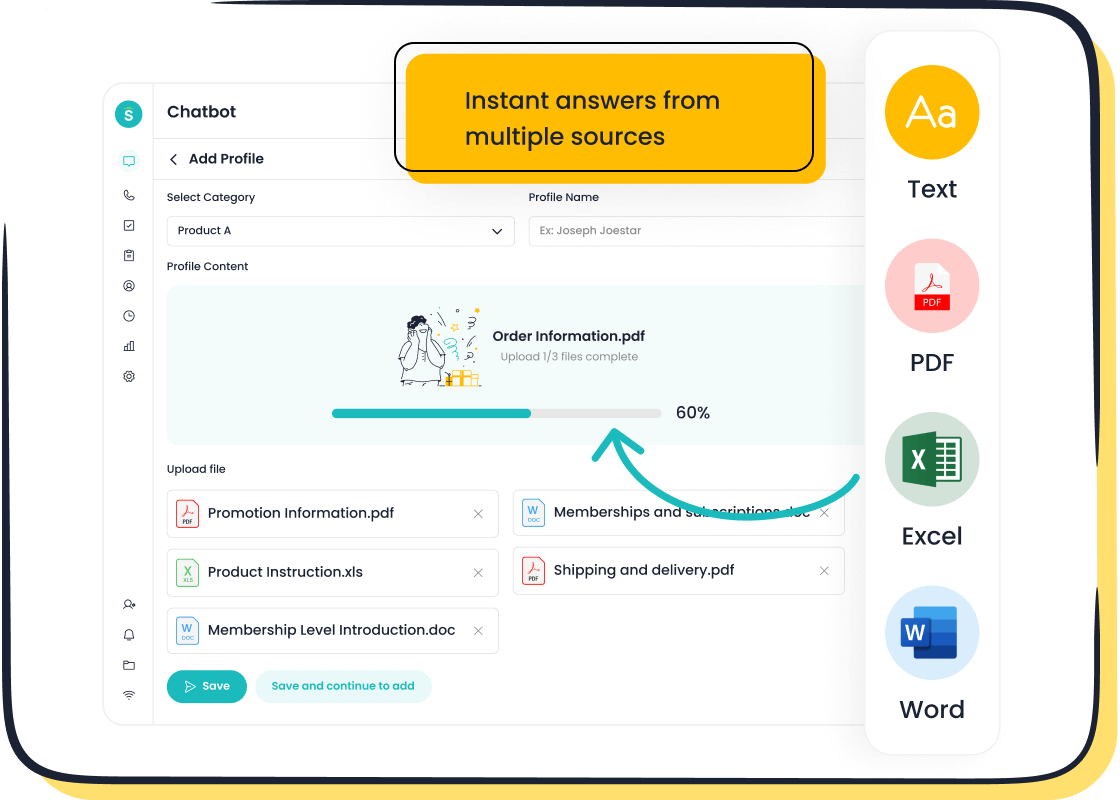
Platforms like the Sobot Chatbot streamline this process. You can easily upload your knowledge base from different sources, including articles, PDFs, and even Excel spreadsheets. The platform does the heavy lifting for you.
This flexibility allows you to build a powerful knowledge base for your ai without having to reformat all your content manually.
Step 4: Create AI Agents with a Simple Flow

You can now begin the process to create ai agents. This phase is not about complex coding. It is about assembling pre-made pieces. Platforms like Sobot offer straightforward building blocks and a point-and-click interface. This approach makes ai agent creation accessible to everyone. You can design, test, and launch your ai agent without technical help. The goal is to create ai agents that solve problems efficiently.
Start Fast with a Template
Templates give you a massive head start. You do not need to build a flow from scratch. Instead, you can select a pre-built template and customize it. This is the fastest way to create ai agents for common tasks. Common templates include:
- Customer Support Flow: Guides users through order tracking or payment issues.
- FAQ Flow: Provides instant answers to your most common questions.
- Internal Process Flow: Helps employees with HR or IT support tasks.
Using a template helps you create ai agents that deliver value from day one.
Design a Simple Welcome Message
Your welcome message is the first interaction a user has with your ai agent. It should be simple and clear. A good message sets expectations and guides the user. For example, you can use a greeting like, "Hello! I can help you track an order or answer product questions. What would you like to do?" This tells the user exactly what the ai can do. You should avoid giving too many examples at once. Introduce helpful examples when the user starts a specific task. This makes the guidance more relevant.
Plan the Human Agent Hand-off
No ai can solve every problem. You must plan for a smooth transfer to a human agent. A clear escalation path is essential for good customer support. Your ai should recognize when a person needs more help. Triggers for this include:
- A user directly asks to speak with a person.
- The ai detects frustration or negative sentiment.
- A user asks the same question multiple times.
When a hand-off occurs, context is key. An integrated platform like Sobot ensures the conversation history transfers seamlessly. The ai agent can pass the entire interaction to a live customer support agent or create a detailed ticket. This means your customer support agent has all the information needed, and the customer never has to repeat themselves. This is how you create ai agents that work with your team, not against it.
Step 5: Test and Deploy Your AI Tool
This is the final, exciting step. You are ready to launch your AI tool and see it in action. This is where your planning and building efforts pay off. You will test your creation, deploy it to your website, and start measuring its impact on your ai customer support.
Conduct Quick Internal Testing
Before your AI agent meets your customers, your team should test it first. This internal review helps you find and fix any issues. You can create a simple checklist for your team to follow.
- Check for accuracy: Does the AI provide correct answers from your knowledge base?
- Test the flow: Can you complete a task from start to finish without getting stuck?
- Look for errors: Test for common AI issues like hallucinations (made-up answers) or sensitive data exposure.
- Review the hand-off: Does the AI successfully transfer the conversation to a human agent when needed?
This quick testing phase ensures your customer has a smooth experience from day one.
Deploy with One-Click to Your Site
You do not need a developer to take your AI tool live. Most no-code platforms make deployment incredibly simple. You can often add the AI to your site by pasting a small piece of code into your website’s backend. This process takes just a few minutes. Once you add the code, your AI tool appears on your site, ready to help every visitor. This simple deployment means you can start providing better support almost instantly.
Monitoring Post-Launch Support Performance
After launch, you need to track how your AI is performing. This data shows you what is working and where you can improve. You should monitor key metrics to measure success.
A great example of success is OPPO's story with Sobot. By deploying an AI chatbot, OPPO achieved an incredible 83% chatbot resolution rate and a 94% positive feedback rate. This shows the powerful results of a well-deployed ai customer support tool.
To see similar results, track metrics like:
- Resolution Rate: The percentage of issues the AI solves without a human agent.
- Customer Satisfaction (CSAT): How happy customers are after interacting with the AI.
- Escalation Rate: How often the AI needs to pass a conversation to a person.
Watching these numbers helps you optimize your ai agent over time and improve your ai customer support.
You now have the five-step framework to build your AI tool: Define, Choose, Prepare, Build, and Deploy. You can customize ai support tool to handle key tasks and improve your support. Building a powerful AI agent is no longer a complex project. With a no-code platform like Sobot, you can create an effective AI customer support agent quickly. This approach makes advanced support accessible to any team. You can customize ai support tool to deliver better experiences and free up your human customer support agent.
Ready to cut costs and boost conversions? Embark on your contact journey and start building your AI support agent with Sobot today.
FAQ
Why should I use an AI for customer support?
You should use an ai for customer support to save time and money. An ai can answer common customer questions 24/7. This frees your human agent to handle more complex problems. The ai provides instant assistance, which improves the overall customer experience for your audience.
Do I need coding skills to build an AI agent?
No, you do not need coding skills. You can use a no-code platform to build your ai agent. These no-code tools offer simple interfaces. A no-code approach lets you create a powerful ai without writing any code. This makes ai accessible for any team.
What are some common AI agent examples?
Common ai agent examples include chatbots that answer frequently asked questions on a website. Other ai agent examples involve guiding a customer through order tracking. An ai can also create a support ticket for a customer, gathering all the needed information for a human agent.
How does an AI improve customer satisfaction?
An ai improves customer satisfaction by providing immediate, personalized assistance. A customer gets answers instantly, any time of day. This quick and helpful assistance makes your audience feel valued. This leads to a better customer service experience and higher satisfaction for every customer. A no-code ai makes this easy.
See Also
Leading AI Solutions for Enterprise Contact Centers: A Top 10 List
Boosting Efficiency: The Power of AI in Customer Service Software
A Comprehensive Guide to Artificial Intelligence Software for Call Centers
Effortless Implementation: Practical Examples of Website Chatbots for Your Site
An In-Depth Review of AI-Powered Solutions for Enterprise Call Centers

